Alibaba Cloud Full Stack (6): RAM, KMS, and Cloud Security
Lock down your cloud: RAM users, groups, roles, and policies. STS for temporary credentials. KMS for encryption. ActionTrail for audit logging. Build a secure multi-team access model with least privilege.
I once found a DashScope API key hardcoded in a public GitHub repo. It was mine. Someone had forked a demo I pushed months earlier, and the key was sitting in a config file I forgot to gitignore. By the time I noticed, the key had been used to generate 14,000 Qwen API calls in a single weekend. The bill was not catastrophic — DashScope per-token pricing is forgiving — but the lesson was. I had treated cloud security as something I would figure out later. “Later” arrived as a billing alert at 2 AM on a Sunday.
That day, I set up RAM users, rotated all access keys, enabled MFA, and started using STS for any frontend interactions. This article covers everything I learned, structured so you can do it in an afternoon rather than learn it from an incident.
Security groups — the network-layer firewall — are covered in Part 3 . This article is about the identity layer: who can do what, how to encrypt data, and how to audit everything. For Terraform-managed security, see Terraform Part 6: LLM Gateway and Secrets .
The Security Mental Model#
Cloud security isn’t a single feature; it’s a stack of independent layers, each covering a different failure mode. If you miss one layer, the others still protect you—that’s the principle of defense in depth.

I think about it as four pillars:
| Pillar | Question it answers | Alibaba Cloud service | AWS equivalent |
|---|---|---|---|
| Identity | Who is making this request? | RAM (users, groups) | IAM (users, groups) |
| Authorization | What are they allowed to do? | RAM (policies, roles) | IAM (policies, roles) |
| Encryption | Is the data protected at rest and in transit? | KMS, SSL certificates | KMS, ACM |
| Auditing | Who did what, and when? | ActionTrail | CloudTrail |
Every security decision you make fits into one of these four categories. When something goes wrong—and it will—the audit trail shows which of the other three failed. When designing access for a new team, you go through these four steps: create identities, assign permissions, encrypt data, and log actions.
The mental model aligns well with AWS IAM, intentionally. Alibaba Cloud designed RAM to be similar to AWS IAM, with the same conceptual hierarchy: root account at the top, RAM users below, policies granting permissions, and roles for cross-service and cross-account access. If you’ve used AWS IAM, you already know 80% of what RAM does. The remaining 20% involves naming differences and a few features that work slightly differently.
One critical difference: Alibaba Cloud’s root account is called the “Alibaba Cloud Account” or sometimes the “primary account.” It is not called “root” in the console, but functionally it is the same thing — an all-powerful identity that should never be used for daily work.
RAM: Resource Access Management#
RAM is the identity and access management system for Alibaba Cloud. Every API call, console click, and CLI command is authenticated and authorized through RAM. Understanding RAM is essential—it’s the foundation for everything else in this article.

The Alibaba Cloud Account (Root)#
When you sign up for Alibaba Cloud, you get an Alibaba Cloud Account, which is the root identity. It has unrestricted access to every service, resource, and billing setting. It can create and delete RAM users, change payment methods, and even close the account.
You should use this account for exactly three things:
- Initial setup (creating your first RAM admin user)
- Billing and payment method changes
- Emergency recovery when RAM is misconfigured
For everything else — development, deployment, operations, monitoring — use RAM users. I have seen teams where six engineers all share the root account credentials. One person accidentally deletes a production RDS instance, and nobody can figure out who did it because ActionTrail shows “root” for every action. Separate identities are not bureaucracy; they are how you debug incidents.
Creating RAM Users#
A RAM user is a permanent identity within your Alibaba Cloud Account. Each user gets their own login credentials (password for the console, AccessKey for API/CLI) and a unique set of permissions.
Create a RAM user via CLI:
| |
Enable console login with a password:
| |
The --PasswordResetRequired true flag forces Alice to change her password on first login. The --MFABindRequired true flag forces MFA setup before she can do anything. Both are non-negotiable for any account that has write access to production resources.
Create an AccessKey pair for programmatic access:
| |
This returns an AccessKeyId and AccessKeySecret. The secret is shown exactly once — if you lose it, you have to create a new key pair. Store it in a password manager, not in a config file, not in an environment variable on a shared server, and absolutely not in a Git repository.
Setting Up MFA#
Multi-factor authentication adds a second layer to the identity pillar. Even if someone steals a password, they can’t log in without the TOTP code from a phone app.
Enable virtual MFA for a RAM user:
| |
For the root account, go to the console: Account Management > Security Settings > MFA. Use a hardware key if you have one. The root MFA device should be stored in a safe, not on the CEO’s phone, which they replace every year.
RAM Groups#
Managing permissions per user doesn’t scale. With 3 developers, attaching policies to each user is manageable. With 30, it becomes a maintenance nightmare. If a developer changes teams, you might forget to remove their old permissions. If a new developer joins, you might copy-paste policies, accidentally granting production delete access to a junior hire.
Groups solve this. A RAM group is a container for users. You attach policies to the group, and every user in the group inherits those policies. When someone changes teams, you move them between groups. When a new hire starts, you add them to the right group and they get exactly the permissions they need.
Here is the group structure I use for most projects:
| Group | Purpose | Key policies |
|---|---|---|
Administrators | Full access to everything except billing | AdministratorAccess |
Developers | Read/write to compute, storage, database | Custom: ECS/OSS/RDS full, no RAM/billing |
ReadOnly | View everything, change nothing | ReadOnlyAccess |
Billing | Manage payments and cost analysis | Custom: BSS full access |
CICD | Deploy pipelines (not humans) | Custom: ECS/CR/ACK deploy-only |
Create groups and add users:
| |
List all users in a group:
| |
Remove a user when they change teams:
| |
The key discipline: never attach policies directly to users. Always go through groups. The one exception is deny policies for specific users who need restricted access within their group — but even that is better handled with a separate group.
RAM Policies Deep Dive#
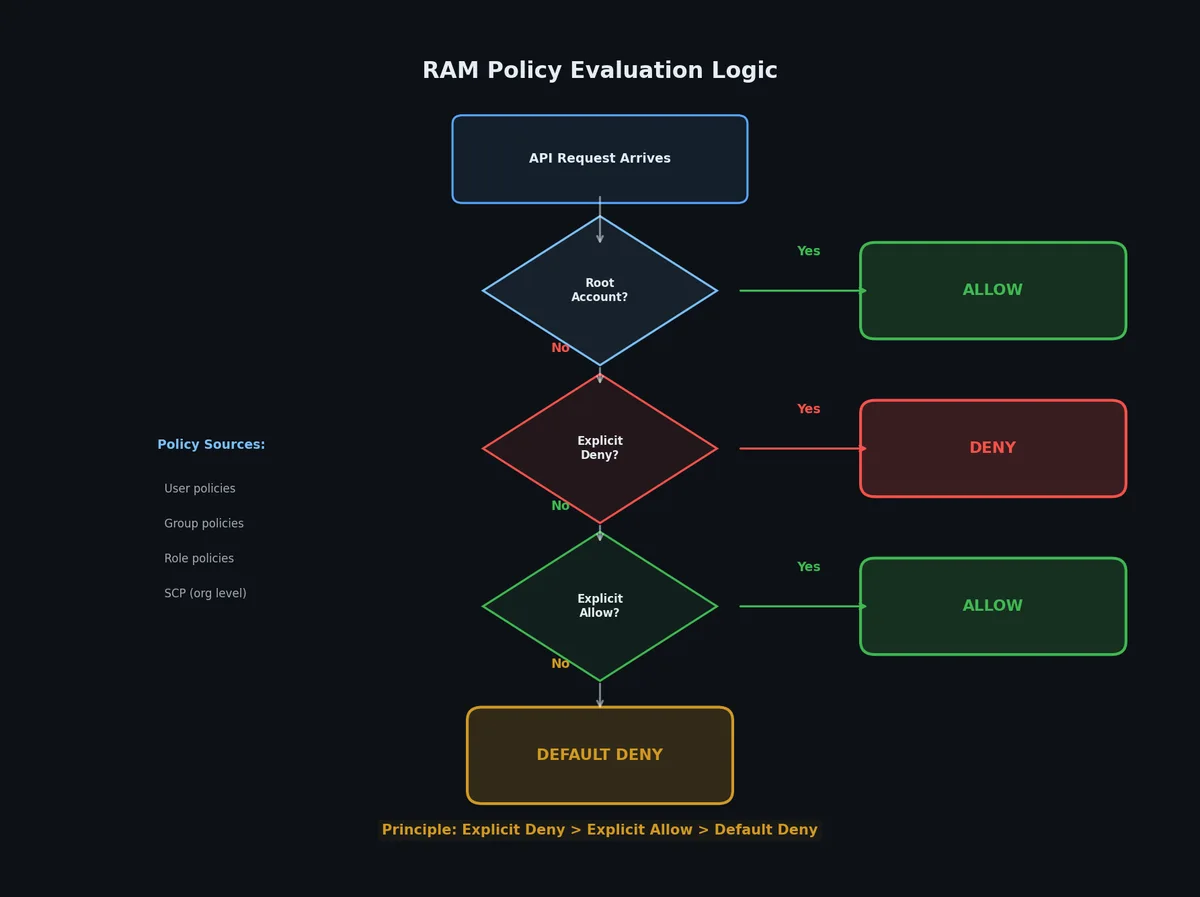
Policies are the authorization engine. Every API call in Alibaba Cloud is evaluated against the caller’s attached policies to decide: allow or deny. Understanding how policies work is the difference between “it works” and “it works securely.”
System Policies vs Custom Policies#
Alibaba Cloud provides over 800 system policies — pre-built permission sets maintained by Alibaba Cloud. You cannot modify them, but they cover the most common scenarios:
| System policy | What it grants |
|---|---|
AdministratorAccess | Full access to all services and resources |
ReadOnlyAccess | Read-only access to all services |
AliyunECSFullAccess | Full access to ECS |
AliyunOSSFullAccess | Full access to OSS |
AliyunRDSFullAccess | Full access to RDS |
AliyunVPCFullAccess | Full access to VPC |
AliyunRAMFullAccess | Full access to RAM (dangerous — this is the keys to the kingdom) |
AliyunKMSFullAccess | Full access to KMS |
AliyunActionTrailFullAccess | Full access to ActionTrail |
AliyunBSSFullAccess | Full access to billing |
For anything beyond these broad strokes, you need custom policies.
Policy Structure#
A RAM policy is a JSON document with a specific structure. Every policy has a Version and one or more Statements. Each Statement has an Effect (Allow or Deny), an Action (what API operations), a Resource (which specific resources), and optionally a Condition (when the rule applies).
Here is the anatomy:
| |
Breaking this down:
- Version: Always
"1". Alibaba Cloud RAM currently has only one policy version. - Effect:
"Allow"or"Deny". Deny always wins over Allow when both match. - Action: The API operations. Supports wildcards:
ecs:*means all ECS operations,ecs:Describe*means all ECS read operations. - Resource: The Alibaba Cloud Resource Name (ARN). Format:
acs:{service}:{region}:{account-id}:{resource-type}/{resource-id}. Use*for all resources. - Condition: Optional constraints. Common ones: source IP, MFA present, time of day, request tag values.
Real Policy Examples#
ECS administrator — full ECS access in one region only:
| |
The second statement grants VPC read access — necessary because ECS operations often need to query VPC/VSwitch information. Without it, creating instances fails with an authorization error that does not mention VPC at all, which is confusing.
OSS read-only for a specific bucket:
| |
Note the two Resource lines: the first grants access to the bucket itself (for ListObjects), the second grants access to objects within the bucket (for GetObject). Missing either one produces confusing 403 errors.
DashScope API access only (for AI developers):
| |
This grants full DashScope access but explicitly denies deletion operations. The Deny overrides the Allow, so even if someone has dashscope:*, they cannot delete models or deployments. This is a common pattern: broad Allow plus targeted Deny for destructive operations.
Require MFA for sensitive operations:
| |
The first statement says “allow everything, but only if MFA is active.” The second statement allows MFA-related actions without MFA (so the user can actually set up MFA in the first place). Without the second statement, a new user would be locked in a catch-22: cannot do anything without MFA, cannot set up MFA because that requires permissions.
RBAC vs ABAC#
RAM supports two permission models, and most setups use both:
RBAC (Role-Based Access Control): Permissions are assigned based on the user’s role (group membership). “All Developers can start/stop ECS instances.” This is what groups provide.
ABAC (Attribute-Based Access Control): Permissions are assigned based on resource attributes, typically tags. “Users can only manage instances tagged with team=alpha.”
ABAC example — users can only manage their own team’s instances:
| |
This policy says: allow ECS operations only when the resource’s team tag matches the user’s team tag. Tag user Alice with team=alpha, tag her instances with team=alpha, and she can manage them. She cannot touch instances tagged team=beta, even though the Action says ecs:*.
ABAC is powerful but harder to debug. I recommend starting with RBAC (groups + policies) and adding ABAC only when you need tag-based isolation — typically when multiple teams share the same account.
Create and attach a custom policy:
| |
RAM Roles#
RAM users are permanent identities for humans (and CI/CD pipelines). RAM roles are temporary identities designed for three scenarios:

- Service roles: An Alibaba Cloud service (ECS, Function Compute, etc.) needs to access another service (OSS, RDS, etc.)
- Cross-account access: A user in Account A needs to access resources in Account B
- Federated login (SSO): Users from an external identity provider (LDAP, SAML, OIDC) need Alibaba Cloud access
The key difference between a user and a role:
| Aspect | RAM User | RAM Role |
|---|---|---|
| Identity type | Permanent | Temporary (assumed) |
| Credentials | Password + AccessKey | STS token (auto-expires) |
| Who uses it | Humans, CI/CD bots | Services, cross-account, SSO |
| MFA support | Yes | No (trust policy handles it) |
| Direct login | Yes (console) | No (must be assumed) |
| Max session | Permanent | 1 hour (configurable to 12h) |
Trust Policy#
Every role has a trust policy that specifies who can assume it. This is separate from the permission policy (which specifies what the role can do once assumed). Think of it as: the trust policy is the door lock, the permission policy is the key ring inside.
Service Role Example: ECS Accessing OSS#
A common scenario: your ECS instance needs to read files from an OSS bucket. The wrong way to do this is to put an AccessKey in the instance’s environment variables. If the instance is compromised, the attacker has permanent credentials. The right way is an instance role — the ECS instance automatically gets temporary credentials that rotate every hour.
Step 1 — Create the role with a trust policy allowing ECS to assume it:
| |
Step 2 — Attach a permission policy to the role:
| |
Step 3 — Attach the role to an ECS instance:
| |
Step 4 — Inside the ECS instance, the SDK automatically picks up the role credentials:
| |
The SDK calls the instance metadata service at http://100.100.100.200/latest/meta-data/ram/security-credentials/ECS-OSS-Reader to get temporary credentials. These credentials rotate automatically. No AccessKey is stored on the instance. If the instance is compromised, the attacker gets credentials that expire within the hour, and you can revoke the role immediately.
Cross-Account Role#
When Account B (ID: 9876543210) needs to let users from Account A (ID: 1234567890) manage its ECS instances:
| |
In Account A, the user assumes the role:
| |
The Condition block requires MFA, adding a second verification layer for cross-account access.
STS: Temporary Credentials#
Security Token Service generates temporary AccessKey pairs with an attached security token. They work exactly like regular AccessKeys but expire automatically. This is the mechanism behind RAM roles, and you can also use it directly for scenarios like mobile uploads and frontend access.

Why Temporary Beats Permanent#
Permanent AccessKeys are a liability. They do not expire. If leaked, they remain valid until you manually rotate them. Rotation means updating every service that uses the key, which means downtime or a coordinated deployment. Most teams put off rotation because it is painful, which means leaked keys stay active for months.
STS tokens expire. The maximum lifetime is 12 hours (default 1 hour, minimum 15 minutes). If a token is leaked, the damage window is small. You do not need to rotate anything — just wait for it to expire, then investigate how it leaked.
The STS Workflow#
The flow is: trusted backend assumes a role, gets temporary credentials, passes them to the untrusted client (mobile app, browser, third-party service), client uses the credentials until they expire.
| |
Complete STS Example: Frontend Upload to OSS#
This is the most common STS use case. A mobile app or browser needs to upload files directly to OSS. You do not want the upload to go through your backend (bandwidth and latency), but you also do not want permanent OSS credentials in the frontend.
Step 1 — Create a role with a narrowly scoped OSS policy:
| |
Step 2 — Backend assumes the role and returns temporary credentials to the frontend:
| |
Step 3 — Frontend uses the temporary credentials to upload directly to OSS:
| |
The credentials expire after 15 minutes. If the user needs to upload more files, the frontend requests new credentials from your backend. The backend can add business logic (rate limiting, file type validation, quota checking) at the credential-issuance step, before any bytes reach OSS.
KMS: Key Management Service#
KMS handles the encryption pillar. It manages cryptographic keys and uses them to encrypt/decrypt data. You never see the raw key material — KMS keeps it in hardware security modules (HSMs) and performs cryptographic operations on your behalf.

Key Concepts#
| Concept | What it is |
|---|---|
| CMK (Customer Master Key) | The top-level key. Never leaves KMS. Used to encrypt data keys. |
| Data Key | A key generated by KMS, encrypted under a CMK. You use the plaintext version to encrypt your data, store the encrypted version alongside it. |
| Envelope Encryption | The pattern: KMS generates a data key → you encrypt data with the plaintext data key → you store the encrypted data key with the encrypted data → to decrypt, you send the encrypted data key to KMS, get the plaintext back, decrypt your data. |
| Symmetric Key | Same key for encrypt and decrypt. AES-256. Used for data encryption. |
| Asymmetric Key | Public/private pair. RSA or EC. Used for signatures and key exchange. |
Why Envelope Encryption?#
You might ask: why not just send my data to KMS and let it encrypt everything directly? Because KMS has a 6 KB limit on direct encryption. For anything larger (which is everything in practice — files, database fields, disk volumes), you use envelope encryption.
The flow:
- Call
GenerateDataKey— KMS returns a plaintext data key AND an encrypted copy of the same key - Use the plaintext data key to encrypt your data locally (AES-256-GCM)
- Store the encrypted data + the encrypted data key together
- Discard the plaintext data key from memory
- To decrypt: send the encrypted data key to KMS (
Decrypt), get the plaintext back, decrypt your data
This way, KMS handles one small decryption (the data key), and your application handles the bulk encryption locally. Fast, scalable, and the master key never leaves KMS.
Creating Keys and Encrypting Data#
Create a symmetric CMK:
| |
The ProtectionLevel HSM means the key is stored in a hardware security module. It costs more but provides FIPS 140-2 Level 3 compliance.
Generate a data key for envelope encryption:
| |
Encrypt a small piece of data directly (under 6 KB):
| |
Encrypting Alibaba Cloud Services#
Most Alibaba Cloud services support KMS encryption natively. You provide your CMK ID and the service handles envelope encryption internally.
| Service | What gets encrypted | How to enable |
|---|---|---|
| ECS | System disk, data disks | --Encrypted true --KMSKeyId <id> at disk creation |
| OSS | Objects at rest | Bucket SSE setting: x-oss-server-side-encryption: KMS |
| RDS | Transparent Data Encryption (TDE) | Console: Instance > Data Security > TDE > Enable |
| NAS | File system data | Encryption type at filesystem creation |
| ACK | Kubernetes Secrets | Enable Secret encryption in cluster settings |
Enable server-side encryption for an OSS bucket:
| |
Enable ECS disk encryption when creating an instance:
| |
Key Rotation#
KMS supports automatic key rotation. When you enable it, KMS creates a new key version on your schedule (e.g., every 90 days). New encryption operations use the latest version. Decryption automatically detects which version was used and decrypts correctly. You do not need to re-encrypt existing data.
| |
For manual rotation (useful for incident response — “we think this key might be compromised”):
| |
ActionTrail: Audit Everything#
ActionTrail is the auditing pillar. It records every API call made against your Alibaba Cloud account — who did it, when, from what IP, with what parameters, and whether it succeeded. Think of it as the black box flight recorder for your cloud.

What Gets Logged#
ActionTrail captures two categories of events:
- Management events: API calls that create, modify, or delete resources.
CreateInstance,DeleteBucket,AttachPolicyToUser. These are logged by default. - Data events: API calls that read or write data within resources.
GetObjecton OSS,SendMessageon MNS. These are opt-in because of volume.
Each event record includes:
| |
This tells you: Alice stopped instance i-bp1234567890abcdef at 03:24 UTC from IP 203.0.113.42, and it succeeded. If someone deletes a production RDS instance at 3 AM, you can find exactly who did it, from where, and what credentials they used.
Setting Up a Trail#
A trail delivers audit events to a storage destination. You should have at least one trail active at all times, delivering to an OSS bucket in a region you control.
| |
The logs arrive in the OSS bucket as gzipped JSON files, partitioned by date:
| |
For real-time analysis, also deliver to SLS (Simple Log Service):
| |
Querying Audit Events#
Look up recent events via CLI:
| |
For compliance use cases (SOC 2, ISO 27001, PCI DSS), ActionTrail provides the audit evidence trail. The key requirements are:
- Logs must be tamper-proof: deliver to an OSS bucket with versioning enabled and a lifecycle rule that prevents deletion for N years
- Logs must cover all accounts: use organization trails for multi-account setups
- Logs must be monitored: set up SLS alerts for high-risk events (root login, policy changes, security group modifications)
Security Best Practices Checklist#
After setting up RAM, KMS, and ActionTrail, here is the full checklist I run through for every Alibaba Cloud account. Print this and tape it to your wall.
Identity:
- Enable MFA on the root Alibaba Cloud Account. Use a hardware key if possible.
- Create RAM users for every human. Never share the root credentials.
- Use RAM groups. Never attach policies directly to users.
- Delete or deactivate unused RAM users within 24 hours of offboarding.
Authorization:
- Follow least privilege. Start with zero permissions and add only what is needed.
- Use system policies for common scenarios, custom policies for everything else.
- Never use
"Action": "*", "Resource": "*"except for the Administrators group. - Review permissions quarterly. Use RAM’s “last accessed” data to find unused permissions.
- Rotate AccessKeys every 90 days. Set calendar reminders.
Encryption:
- Enable server-side encryption (SSE-KMS) on all OSS buckets.
- Enable disk encryption on all ECS instances.
- Enable TDE on RDS instances containing sensitive data.
- Use KMS for application-level encryption of secrets, API keys, tokens.
- Enable automatic key rotation (annually at minimum).
Auditing:
- Enable ActionTrail in every region you use.
- Deliver logs to both OSS (long-term storage) and SLS (real-time analysis).
- Set up alerts for: root account login, AccessKey creation, policy changes, security group changes, cross-account role assumptions.
- Enable OSS versioning on the audit log bucket. Add a lifecycle rule preventing deletion.
Network (covered in Part 3 but critical for security):
- Never open port 22 (SSH) to
0.0.0.0/0. Use bastion hosts or VPN. - Use VPC private endpoints for services that support them (OSS, RDS, KMS).
- Restrict security groups to specific CIDR ranges, not
0.0.0.0/0.
Credentials:
- Never hardcode AccessKeys in source code. Use instance roles, STS, or environment variables.
- Use STS temporary credentials for any untrusted client (mobile, browser, third-party).
- Add
.env,credentials, and*.keyto your.gitignorebefore the first commit.
Solution: Secure Multi-Team Access#
Let me put it all together. Here is a complete walkthrough for a startup with three teams (admin, development, stakeholders) that need different levels of access, an ECS application that reads from OSS, a frontend that uploads to OSS, and an audit trail for compliance.
Step 1: Create the RAM Groups#
| |
Step 2: Create RAM Users and Assign to Groups#
| |
Step 3: Create Service Role for ECS#
| |
Step 4: Set Up STS Policy for Frontend Upload#
| |
Step 5: Enable ActionTrail#
| |
Step 6: Create KMS Key for Sensitive Data#
| |
After these six steps, you have: three groups with properly scoped permissions, MFA enforced on every user, a service role so ECS accesses OSS without stored credentials, STS for frontend uploads with 15-minute token expiry, encryption at rest for your data bucket, and a complete audit trail delivered to a versioned OSS bucket.
The total time to set this up is about 30 minutes via CLI. The total time to recover from not setting it up is measured in incident-response hours and compromised-data cleanup days.
Summary#
Never use the root account for daily work. Create RAM users, enforce MFA, use groups for permission management. The root account should be locked in a metaphorical safe.
Least privilege is a practice, not a one-time setup. Start with zero permissions, add what is needed, review quarterly. The
"Action": "*"policy is the security equivalent of leaving your front door open.Temporary credentials beat permanent credentials every time. Use STS for anything that touches an untrusted environment (frontend, mobile, third-party). Use instance roles for ECS and Function Compute. Reserve permanent AccessKeys for backend services that cannot use roles.
Encrypt everything at rest. KMS makes this trivial — enable SSE-KMS on OSS, disk encryption on ECS, TDE on RDS. The performance overhead is negligible. The cost of a data breach is not.
Audit everything, always. ActionTrail is free for management events. Enable it on day one, not after the first incident. When something goes wrong — and it will — the audit trail is the first thing you reach for.
Security is layers, not a single wall. Identity controls who gets in. Authorization controls what they can do. Encryption protects data even if someone gets through. Auditing tells you when someone tried. Each layer compensates for failures in the others.
The hardcoded API key that kicked off this article cost me a weekend and a modest bill. A production database leak or a compromised root account costs orders of magnitude more. The six steps in the solution section are 30 minutes of work. Do them now, not “later.”
What’s Next#
In Part 7 , we move to observability: SLS for centralized logging, CloudMonitor for infrastructure metrics and alerting, and the dashboards that tie them together. We will build on the security foundations from this article — every log project gets proper RAM policies, and alerting rules catch the suspicious access patterns we learned to prevent here.
Alibaba Cloud Full Stack 12 parts
- 01 Alibaba Cloud Full Stack (1): The Ecosystem Map — What Alibaba Cloud Actually Is
- 02 Alibaba Cloud Full Stack (2): ECS — Compute That Actually Makes Sense
- 03 Alibaba Cloud Full Stack (3): VPC, SLB, and the Network Layer
- 04 Alibaba Cloud Full Stack (4): OSS — Object Storage Done Right
- 05 Alibaba Cloud Full Stack (5): RDS and PolarDB — The Database Layer
- 06 Alibaba Cloud Full Stack (6): RAM, KMS, and Cloud Security you are here
- 07 Alibaba Cloud Full Stack (7): SLS, CloudMonitor, and Observability
- 08 Alibaba Cloud Full Stack (8): Serverless — Function Compute and EventBridge
- 09 Alibaba Cloud Full Stack (9): OpenSearch and AI Search
- 10 Alibaba Cloud Full Stack (10): Bailian and DashScope — The LLM Layer
- 11 Alibaba Cloud Full Stack (11): PAI — The ML Platform
- 12 Alibaba Cloud Full Stack (12): End-to-End — One Terraform Apply for Everything