Alibaba Cloud Full Stack (9): OpenSearch and AI Search
From keyword search to AI-powered retrieval: OpenSearch service, vector search for RAG, LLM-powered query rewriting, and hybrid search. Build a product search engine combining vectors and keywords.
I built my first search engine with Elasticsearch and a pile of synonyms. It took six months to get decent results. Every week, users complained about missing results, so I added more synonyms, broke something else, and added exception rules. The relevance tuning spreadsheet grew to 400 rows. I had custom analyzers for three languages, a boosting config that no one understood (including me), and a reindexing job that took four hours. Then I tried hybrid vector+keyword search on a side project and got better results on day one. Not marginally better — “users stopped complaining” better. That experience completely changed how I think about search, and it’s the reason this article exists.
Search is deceptively hard. Keyword search fails when users use different words than the document author. Vector search fails when users need exact matches like part numbers, error codes, or SKUs. The answer, as the industry has learned over the past three years, is to combine both—and increasingly, to add an LLM for query understanding and answer generation. Alibaba Cloud offers a managed service for this: OpenSearch. This article covers the full spectrum, from basic keyword search to LLM-powered AI Search, and ends with a complete product search engine you can deploy.
Before diving into OpenSearch, you should know there are multiple search options on Alibaba Cloud. Choosing the wrong one can cost you money or months of migration.
Service
What it is
Best for
Managed?
Vector support
OpenSearch
Alibaba’s proprietary managed search platform
Production search with advanced features
Fully managed
Yes (native)
Elasticsearch (managed)
Alibaba-managed Elasticsearch Service
Teams with existing ES expertise
Fully managed
Yes (via plugin)
Elasticsearch (self-hosted)
Elasticsearch on ECS
Full control, budget-constrained dev
Self-managed
Yes
Lindorm Search
Search engine integrated into Lindorm database
When Lindorm is already your primary store
Fully managed
Yes
AnalyticDB (ADB)
Data warehouse with vector index support
Analytics-first with search as a secondary need
Fully managed
Yes
The decision tree is straightforward:
You want a search engine and nothing else — use OpenSearch. It has the best relevance tuning, native vector support, and the AI Search add-on.
Your team already knows Elasticsearch — use the managed Elasticsearch Service. The API is standard ES, so your existing code works. You trade some of OpenSearch’s advanced features for familiarity.
Search is secondary to your database — if you already use Lindorm or AnalyticDB and only need basic search, use their built-in search capabilities rather than adding another service.
You need AWS compatibility — Note that Alibaba Cloud’s “OpenSearch” is not the same as AWS OpenSearch Service (which is a fork of Elasticsearch). They share a name but are completely different products with different APIs. If you are migrating from AWS OpenSearch, use Alibaba Cloud’s managed Elasticsearch Service, not OpenSearch.
That last point often trips people up. I’ll say it again: Alibaba Cloud OpenSearch is not AWS OpenSearch. They are entirely different systems with different query languages, APIs, and pricing models.
OpenSearch on Alibaba Cloud is a fully managed search platform. You don’t operate clusters, manage shards, or worry about garbage collection pauses. You define your data schema, push data in, and query it out. Alibaba handles indexing, replication, and scaling.
The core concepts:
Application — The top-level container. Think of it as a search “project.” Each application has its own schema, data source, and query configuration.
Table — The data schema within an application. Defines fields, types, and which fields are indexed.
Index — The searchable structure built from table data. OpenSearch supports inverted indexes (for keywords), vector indexes (for embeddings), and attribute indexes (for filtering/sorting).
Data Source — Where the data comes from. Can be RDS, MaxCompute, Object Table Service, or direct API push.
importrequestsimportjsonimporthashlibimporthmacimporttimefromurllib.parseimportquote# OpenSearch query exampleOPENSEARCH_HOST="http://opensearch-cn-hangzhou.aliyuncs.com"APP_NAME="product_search"# Basic keyword searchquery_params={"query":"query=title:'wireless headphones'","index_name":APP_NAME,"format":"json","start":0,"hit":10,"sort":"-price"# descending by price}# With filtersquery_with_filter={"query":"query=title:'wireless headphones'""&&filter=price>50 AND price<200""&&sort=-created_at","index_name":APP_NAME,"format":"json"}# With aggregationquery_with_agg={"query":"query=title:'wireless headphones'""&&aggregate=group_key:category,""agg_fun:count()","index_name":APP_NAME,"format":"json"}
The query string format differs significantly from Elasticsearch. Here is the translation table:
If you are coming from Elasticsearch, the query syntax will feel less flexible but more concise. You can do most things, but complex nested queries require a different approach.
Since the naming confusion is inevitable, here is a direct comparison:
Feature
Alibaba Cloud OpenSearch
AWS OpenSearch Service
Underlying technology
Alibaba proprietary (Havenask)
Elasticsearch/OpenSearch fork
Query language
OpenSearch Query Syntax (proprietary)
Elasticsearch Query DSL
Cluster management
Fully abstracted (no clusters)
You choose instance types, manage nodes
Vector search
Native, first-class
Via k-NN plugin
AI/LLM features
AI Search add-on (native)
Must integrate separately
Plugin ecosystem
Limited (closed system)
Rich (ES plugin ecosystem)
Pricing model
By QPS and storage
By instance hours
Migration path from ES
Requires rewrite
Near-seamless from self-hosted ES
The Alibaba product is more opinionated and less flexible, but operationally simpler. You trade the vast Elasticsearch ecosystem for zero-ops management and native AI features.
This is where search gets interesting. Traditional keyword search uses inverted indexes — it maps words to documents. If the user searches “wireless earbuds” but the product listing says “bluetooth headphones,” keyword search returns nothing. The words do not match.
Vector search solves this by converting text into high-dimensional numerical representations (embeddings) that capture semantic meaning. “Wireless earbuds” and “bluetooth headphones” end up as nearby points in vector space because they mean similar things, even though they share zero words.
An embedding model takes text and produces a fixed-length array of floating-point numbers. For Alibaba Cloud’s text-embedding-v3 model (available via DashScope), that array is 1024 dimensions by default.
importdashscopefromdashscopeimportTextEmbedding# Generate embedding for a single textdefget_embedding(text:str,dimension:int=1024)->list[float]:"""Generate embedding vector using DashScope text-embedding-v3."""response=TextEmbedding.call(model="text-embedding-v3",input=text,dimension=dimension)ifresponse.status_code==200:returnresponse.output["embeddings"][0]["embedding"]raiseException(f"Embedding failed: {response.code} - {response.message}")# Generate embeddings for a batchdefget_embeddings_batch(texts:list[str],dimension:int=1024)->list[list[float]]:"""Batch embedding generation. Max 25 texts per call."""response=TextEmbedding.call(model="text-embedding-v3",input=texts,dimension=dimension)ifresponse.status_code==200:return[item["embedding"]foriteminresponse.output["embeddings"]]raiseException(f"Batch embedding failed: {response.code} - {response.message}")# Example usageproduct_title="Sony WH-1000XM5 Wireless Noise Cancelling Headphones"embedding=get_embedding(product_title)print(f"Dimensions: {len(embedding)}")# 1024print(f"First 5 values: {embedding[:5]}")# [-0.0234, 0.0891, ...]
The text-embedding-v3 model costs 0.0007 RMB per 1,000 tokens. For a product catalog of 100,000 items with 50-token descriptions, that is about 3.5 RMB (roughly $0.50) to embed the entire catalog. Cheap enough to re-embed whenever you want.
When you query a vector index, the system calculates how “close” the query vector is to each document vector. Two common distance metrics:
Cosine Similarity — Measures the angle between two vectors. Returns a value between -1 and 1 (1 = identical direction, 0 = orthogonal, -1 = opposite). Ignores magnitude, so it only cares about direction. This is the default and the right choice for most text search use cases.
L2 Distance (Euclidean) — Measures the straight-line distance between two points in vector space. Returns 0 for identical vectors and increases with dissimilarity. Sensitive to magnitude. Better for cases where the absolute values in the embedding matter (rare for text).
For text search, use cosine similarity. The math:
1
2
3
4
cosine_similarity(A, B) = (A . B) / (|A| * |B|)

where A . B = sum(a_i * b_i)  (dot product)
      |A|   = sqrt(sum(a_i^2))  (magnitude)
In practice, most embedding models produce normalized vectors (magnitude = 1), so cosine similarity reduces to just the dot product.
Vector search would be unusably slow if it compared the query vector against every document vector. With 1 million documents and 1024 dimensions, that is 1 billion multiplications per query. HNSW (Hierarchical Navigable Small World) is the index structure that makes it fast.
Think of HNSW as a multi-level graph. The top level is a sparse graph connecting distant “landmark” vectors. Each lower level adds more connections. A query starts at the top level, quickly navigates to the right neighborhood, then drills down through increasingly detailed levels to find the nearest neighbors. The result is approximate (it might miss the absolute nearest neighbor) but it is fast — typically sub-millisecond for millions of vectors.
Key HNSW parameters:
Parameter
What it controls
Default
Trade-off
ef_construction
Graph quality during build
200
Higher = better recall, slower indexing
M
Max connections per node
16
Higher = better recall, more memory
ef_search
Search quality at query time
200
Higher = better recall, slower query
For most applications, the defaults are fine. If you need to tune: increase ef_search first (it is cheap), then M (costs memory), then ef_construction (costs indexing time).
importjsonfromdashscopeimportTextEmbeddingdefembed_and_push(products:list[dict],opensearch_client)->None:"""Generate embeddings for products and push to OpenSearch."""# Prepare texts for embedding (combine title + description)texts=[f"{p['title']}{p['description']}"forpinproducts]# Batch embed (max 25 per call)all_embeddings=[]foriinrange(0,len(texts),25):batch=texts[i:i+25]response=TextEmbedding.call(model="text-embedding-v3",input=batch,dimension=1024)all_embeddings.extend([item["embedding"]foriteminresponse.output["embeddings"]])# Prepare documents for OpenSearchdocs=[]forproduct,embeddinginzip(products,all_embeddings):doc={"cmd":"ADD","fields":{"id":product["id"],"title":product["title"],"description":product["description"],"category":product["category"],"price":product["price"],"vector_embedding":json.dumps(embedding)}}docs.append(doc)# Push to OpenSearch (batch API)opensearch_client.push(app_name="product_search",table_name="main",docs=docs)print(f"Pushed {len(docs)} documents with embeddings")# Example usageproducts=[{"id":1,"title":"Sony WH-1000XM5 Wireless Headphones","description":"Industry-leading noise cancelling with Auto NC Optimizer","category":"electronics","price":349.99},{"id":2,"title":"Apple AirPods Pro 2nd Generation","description":"Active noise cancellation with adaptive transparency","category":"electronics","price":249.99}]# embed_and_push(products, opensearch_client)
defvector_search(query_text:str,top_k:int=10)->list[dict]:"""Perform vector similarity search in OpenSearch."""# Step 1: Embed the queryquery_embedding=get_embedding(query_text)# Step 2: Build the vector queryvector_query={"vector_query":{"vector_embedding":{"vector":query_embedding,"top_k":top_k,"ef_search":200}},"index_name":"product_search","format":"json"}# Step 3: Execute and parse resultsresponse=opensearch_client.search(vector_query)results=json.loads(response)return[{"id":hit["fields"]["id"],"title":hit["fields"]["title"],"score":hit["score"],"price":hit["fields"]["price"]}forhitinresults["result"]["items"]]# This will find "bluetooth headphones" even if the query is "wireless earbuds"results=vector_search("wireless earbuds under 300 dollars")forrinresults:print(f" {r['title']} (score: {r['score']:.4f}, ${r['price']})")
Vector search is great for semantic understanding. Keyword search is great for exact matches. A user searching for “WH-1000XM5” wants the exact product — vector search might return semantically similar headphones instead of the exact model. A user searching for “comfortable headphones for long flights” wants semantic understanding — keyword search will fail because no product listing uses exactly those words.
Hybrid search combines both. The question is: how do you merge two different scoring systems into one ranked list?
I have run this comparison on three production datasets. The pattern is always the same:
Method
Precision@10
Recall@10
NDCG@10
Keyword only (BM25)
0.42
0.38
0.45
Vector only (cosine)
0.51
0.47
0.54
Hybrid (RRF)
0.61
0.58
0.65
Hybrid (weighted, tuned)
0.63
0.59
0.67
Hybrid consistently wins by 15-25% on NDCG. The reason is straightforward: the failure modes of keyword and vector search are different and largely non-overlapping. Keyword search fails on paraphrases; vector search fails on exact terms. Combining them covers both failure modes.
OpenSearch AI Search is the next layer up. It wraps the search pipeline with LLM capabilities at three stages: query understanding, re-ranking, and answer generation. This is the RAG (Retrieval-Augmented Generation) pattern built directly into the search platform.
User Query
    |
    v
[LLM Query Understanding]  --> intent detection, query expansion, entity extraction
    |
    v
[Hybrid Search]             --> keyword + vector retrieval
    |
    v
[LLM Re-ranking]           --> re-score results based on semantic relevance
    |
    v
[LLM Answer Generation]    --> generate a natural language answer from top results
    |
    v
Final Response (ranked results + generated answer)
Each stage is optional. You can use query understanding without answer generation, or re-ranking without query expansion. Mix and match based on your needs.
The query understanding stage takes the raw user query and transforms it into a better search query. Three capabilities:
Intent detection — Classifies what the user wants. “How do I return my order?” is a support query. “AirPods Pro price” is a product search. This lets you route queries to different search configurations.
Query expansion — Adds related terms. “laptop” might expand to “laptop OR notebook OR computer.” This is what synonyms do manually, but the LLM does it automatically and contextually.
Entity extraction — Pulls out structured attributes. “Red Nike running shoes under $100” becomes brand=Nike, color=red, category=running shoes, price<100. These map directly to filters.
# AI Search with query understanding enableddefai_search(query_text:str)->dict:"""Use OpenSearch AI Search with LLM-powered query understanding."""search_params={"query":query_text,"index_name":"product_search","ai_search":{"query_understanding":{"enabled":True,"intent_detection":True,"query_expansion":True,"entity_extraction":True},"reranking":{"enabled":True,"model":"ops-rerank-v1","top_k":20},"answer_generation":{"enabled":True,"model":"qwen-plus","max_tokens":500,"system_prompt":("You are a helpful product search assistant. ""Answer the user's question based on the search results provided. ""If no results match, say so clearly.")}},"format":"json","hit":10}response=opensearch_client.ai_search(search_params)result=json.loads(response)return{"answer":result.get("ai_answer",""),"expanded_query":result.get("expanded_query",""),"detected_intent":result.get("intent",""),"results":[{"title":hit["fields"]["title"],"score":hit["score"],"rerank_score":hit.get("rerank_score",None)}forhitinresult["result"]["items"]]}
The re-ranker takes the top N results from hybrid search and re-scores them using a cross-encoder model. Unlike the embedding model (which encodes query and document independently), the re-ranker encodes them together, allowing it to capture fine-grained interactions between query terms and document content.
This is computationally expensive — you cannot run a cross-encoder on a million documents. But running it on the top 20-50 candidates from hybrid search is fast and dramatically improves precision.
The improvement is most visible on ambiguous queries. “Apple” could mean the fruit or the company. The initial retrieval might return both. The re-ranker, seeing the full query context (“Apple with good battery life”), pushes the electronics results to the top.
The answer generation stage feeds the top search results into an LLM and produces a natural language answer. This is the RAG pattern: retrieval provides the context, the LLM generates the response.
# Example response from AI Searchresponse={"ai_answer":("Based on the available products, I recommend the Sony WH-1000XM5 ""($349.99) for the best noise cancellation, or the AirPods Pro 2 ""($249.99) for a more portable option. Both feature active noise ""cancellation and are highly rated for long flights."),"expanded_query":"comfortable headphones long flights noise cancelling","intent":"product_recommendation","result":{"items":[{"fields":{"title":"Sony WH-1000XM5","price":349.99},"score":0.95,"rerank_score":0.98},{"fields":{"title":"AirPods Pro 2nd Gen","price":249.99},"score":0.87,"rerank_score":0.91}]}}
The key architectural decision is whether to use OpenSearch’s built-in answer generation or to handle it in your application layer. Built-in is simpler but less customizable. Application-layer RAG gives you full control over the prompt, the model, the citation format, and the fallback behavior.
My recommendation: start with OpenSearch’s built-in answer generation. Move to application-layer RAG only when you hit a limitation (custom citation format, multi-turn conversation, tool use within the answer).
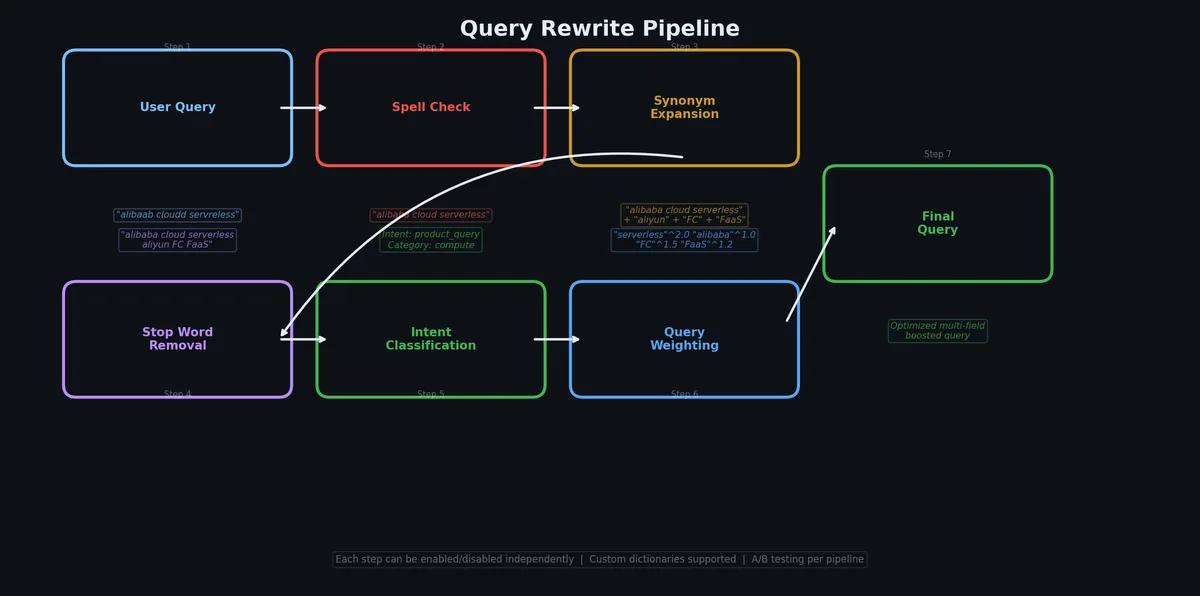
Even with hybrid search and LLM capabilities, you still need to tune relevance. The LLM handles the hard cases, but the easy cases — synonyms, stop words, field boosting — are better handled by traditional configuration. It is faster, cheaper, and more predictable.
For more complex rewriting than synonyms can handle, you can use an LLM as a query rewriter before the search stage. This is cheaper than full AI Search because you only call the LLM once for the query, not for re-ranking or answer generation.
fromopenaiimportOpenAI# Using DashScope-compatible APIclient=OpenAI(api_key="your-dashscope-api-key",base_url="https://dashscope.aliyuncs.com/compatible-mode/v1")defrewrite_query(user_query:str)->dict:"""Use LLM to rewrite and expand the search query."""response=client.chat.completions.create(model="qwen-plus",messages=[{"role":"system","content":("You are a search query optimizer. Given a user query, output JSON with:\n""- rewritten_query: improved search query\n""- keywords: list of important keywords to match\n""- filters: extracted filters (category, price_min, price_max, brand)\n""Output ONLY valid JSON, no explanation.")},{"role":"user","content":user_query}],response_format={"type":"json_object"},temperature=0.1)returnjson.loads(response.choices[0].message.content)# Exampleresult=rewrite_query("cheap sony headphones for running")# {# "rewritten_query": "Sony sports headphones water resistant",# "keywords": ["Sony", "headphones", "sports", "running", "workout"],# "filters": {# "brand": "Sony",# "category": "sports_audio",# "price_max": 150# }# }
Not all fields are equally important. A match in the title is usually more relevant than a match in the description. Field boosting lets you weight this:
1
2
3
4
5
6
# Boosted keyword queryboosted_query=("query=title:'headphones'^3 "# title matches worth 3x"OR description:'headphones'^1 "# description at normal weight"OR category:'headphones'^2"# category worth 2x)
The boosting values are relative. Start with title at 3x, category at 2x, and description at 1x, then adjust based on your relevance testing.
importrandomimporttimedefsearch_with_ab_test(query:str,user_id:str)->dict:"""Execute search with A/B test tracking."""# Deterministic variant assignment based on user_idvariant="A"ifhash(user_id)%2==0else"B"ifvariant=="A":# Control: keyword onlyresults=keyword_search(query)else:# Treatment: hybrid searchresults=hybrid_search(query,alpha=0.4)# Log for analysislog_entry={"timestamp":time.time(),"user_id":user_id,"query":query,"variant":variant,"result_ids":[r["id"]forrinresults],"result_count":len(results)}search_logger.info(json.dumps(log_entry))return{"results":results,"variant":variant}
A search index is only useful if it reflects current data. If a user updates a product price in RDS and the search index shows the old price for the next hour, that is a bad experience (and potentially a legal problem for pricing compliance).
The DTS job monitors the MySQL binlog and translates INSERT/UPDATE/DELETE operations into OpenSearch document operations. When you update a row in RDS, the change appears in OpenSearch within 1-3 seconds.
Important considerations:
Schema mapping — DTS maps RDS columns to OpenSearch fields. You need to configure this explicitly for non-trivial schemas.
Embedding generation — DTS syncs raw data. It does NOT generate embeddings. You need a separate pipeline (a Function Compute trigger, for example) that watches for new/updated documents in OpenSearch and adds embeddings.
Delete handling — When you delete a row in RDS, DTS sends a delete command to OpenSearch. This works out of the box.
When DTS pushes a new or updated document, it does not include the vector embedding (because the embedding does not exist in RDS). You need a pipeline to generate and attach embeddings:
# Function Compute trigger: runs when OpenSearch receives a new document# This is deployed as an Alibaba Cloud Function Compute functionimportjsonimportloggingfromdashscopeimportTextEmbeddinglogger=logging.getLogger()defhandler(event,context):"""
Triggered by OpenSearch document update.
Generates embedding and updates the document.
"""payload=json.loads(event)doc_id=payload["id"]title=payload.get("title","")description=payload.get("description","")# Generate embeddingtext=f"{title}{description}"response=TextEmbedding.call(model="text-embedding-v3",input=text,dimension=1024)ifresponse.status_code!=200:logger.error(f"Embedding failed for doc {doc_id}: {response.message}")return{"status":"error"}embedding=response.output["embeddings"][0]["embedding"]# Update document in OpenSearch with the new embeddingupdate_doc={"cmd":"UPDATE","fields":{"id":doc_id,"vector_embedding":json.dumps(embedding)}}opensearch_client.push(app_name="product_search",table_name="main",docs=[update_doc])logger.info(f"Updated embedding for doc {doc_id}")return{"status":"ok","doc_id":doc_id}
Let us build a complete product search API. This ties together everything from the article: schema design, data import with embeddings, hybrid search, LLM query understanding, and a Flask API that serves it all.
Client (browser/app)
    |
    v
Flask API  ---------> DashScope (embeddings + LLM)
    |
    v
OpenSearch (hybrid keyword + vector search)
    ^
    |
DTS (real-time sync from RDS)
    ^
    |
RDS MySQL (source of truth for product data)
"""
app.py
Product search API with hybrid retrieval and LLM query understanding.
"""importjsonimporttimeimportloggingfromflaskimportFlask,request,jsonifyfromdashscopeimportTextEmbeddingfromopenaiimportOpenAIapp=Flask(__name__)logging.basicConfig(level=logging.INFO)logger=logging.getLogger(__name__)# DashScope client for LLM featuresllm_client=OpenAI(api_key="your-dashscope-api-key",base_url="https://dashscope.aliyuncs.com/compatible-mode/v1")defget_embedding(text:str)->list[float]:"""Generate embedding for search query."""response=TextEmbedding.call(model="text-embedding-v3",input=text,dimension=1024)returnresponse.output["embeddings"][0]["embedding"]defunderstand_query(user_query:str)->dict:"""LLM-powered query understanding."""response=llm_client.chat.completions.create(model="qwen-plus",messages=[{"role":"system","content":("You are a product search query analyzer. ""Given a user query, output JSON with:\n""- search_query: optimized search terms\n""- filters: {category, brand, price_min, price_max} (omit if not specified)\n""- intent: 'product_search' | 'comparison' | 'recommendation'\n""Output ONLY valid JSON.")},{"role":"user","content":user_query}],response_format={"type":"json_object"},temperature=0.1)returnjson.loads(response.choices[0].message.content)defbuild_filter_string(filters:dict)->str:"""Convert extracted filters to OpenSearch filter syntax."""parts=[]if"category"infilters:parts.append(f"category=\"{filters['category']}\"")if"brand"infilters:parts.append(f"brand=\"{filters['brand']}\"")if"price_min"infilters:parts.append(f"price>={filters['price_min']}")if"price_max"infilters:parts.append(f"price<={filters['price_max']}")return" AND ".join(parts)ifpartselse""defhybrid_search(search_query:str,filters:str="",top_k:int=10)->list[dict]:"""Execute hybrid keyword + vector search."""query_embedding=get_embedding(search_query)# Build querykeyword_part=f"query=title:'{search_query}'^3 OR description:'{search_query}'"iffilters:keyword_part+=f"&&filter={filters}"keyword_part+="&&sort=-rating"search_params={"query":keyword_part,"vector_query":{"vector_embedding":{"vector":query_embedding,"top_k":top_k*2}},"rank_model":{"type":"rrf","parameters":{"k":60}},"index_name":"product_search","format":"json","hit":top_k}response=opensearch_client.search(search_params)returnjson.loads(response)["result"]["items"]defgenerate_answer(query:str,results:list[dict])->str:"""Generate natural language answer from search results."""ifnotresults:return"No products found matching your query."context="\n".join([f"- {r['fields']['title']}: {r['fields']['description']} "f"(${r['fields']['price']}, rating: {r['fields']['rating']})"forrinresults[:5]])response=llm_client.chat.completions.create(model="qwen-plus",messages=[{"role":"system","content":("You are a product search assistant. ""Based on the search results, give a brief, helpful answer. ""Mention specific products with prices. ""Keep it under 100 words.")},{"role":"user","content":f"Query: {query}\n\nSearch results:\n{context}"}],temperature=0.3,max_tokens=200)returnresponse.choices[0].message.content@app.route("/api/search",methods=["GET"])defsearch():"""Main search endpoint."""query=request.args.get("q","").strip()ifnotquery:returnjsonify({"error":"Missing query parameter 'q'"}),400page=int(request.args.get("page",1))page_size=min(int(request.args.get("size",10)),50)use_ai=request.args.get("ai","false").lower()=="true"start_time=time.time()try:# Step 1: Query understanding (if AI enabled)filters_str=""search_query=queryintent="product_search"ifuse_ai:understood=understand_query(query)search_query=understood.get("search_query",query)intent=understood.get("intent","product_search")filters_str=build_filter_string(understood.get("filters",{}))# Step 2: Hybrid searchraw_results=hybrid_search(search_query=search_query,filters=filters_str,top_k=page_size)# Step 3: Format resultsproducts=[{"id":hit["fields"]["id"],"title":hit["fields"]["title"],"description":hit["fields"]["description"],"category":hit["fields"]["category"],"brand":hit["fields"]["brand"],"price":hit["fields"]["price"],"rating":hit["fields"]["rating"],"stock_status":hit["fields"]["stock_status"],"image_url":hit["fields"]["image_url"],"score":hit["score"]}forhitinraw_results]# Step 4: Generate answer (if AI enabled)answer=Noneifuse_ai:answer=generate_answer(query,raw_results)elapsed=time.time()-start_timereturnjsonify({"query":query,"search_query":search_query,"intent":intent,"total":len(products),"products":products,"ai_answer":answer,"elapsed_ms":round(elapsed*1000,2)})exceptExceptionase:logger.error(f"Search error: {e}",exc_info=True)returnjsonify({"error":"Search failed","detail":str(e)}),500@app.route("/api/health",methods=["GET"])defhealth():"""Health check endpoint."""returnjsonify({"status":"ok"})if__name__=="__main__":app.run(host="0.0.0.0",port=5000,debug=False)
# Basic keyword searchcurl "http://localhost:5000/api/search?q=wireless+headphones"# Search with AI understandingcurl "http://localhost:5000/api/search?q=cheap+sony+headphones+for+running&ai=true"# Example response with AI enabled# {# "query": "cheap sony headphones for running",# "search_query": "Sony sports headphones water resistant",# "intent": "product_search",# "total": 5,# "products": [# {# "id": 42,# "title": "Sony WF-SP800N Wireless Sports Earbuds",# "description": "IP55 water resistant, noise cancelling...",# "category": "electronics",# "brand": "Sony",# "price": 128.00,# "rating": 4.3,# "score": 0.89# }# ],# "ai_answer": "For Sony running headphones on a budget, I recommend# the Sony WF-SP800N ($128) — they are IP55 water resistant with# active noise cancellation. If you want an even cheaper option,# the Sony WI-SP510 ($58) offers 15-hour battery life with an# IPX5 rating for sweat resistance.",# "elapsed_ms": 342.7# }# Filter by categorycurl "http://localhost:5000/api/search?q=laptop+stand&size=5"# Health checkcurl "http://localhost:5000/api/health"
This is for a moderately trafficked search service. The LLM costs scale linearly with query volume — if you do not need AI features on every query, add them only for complex queries and cut the LLM cost by 80%.
Hybrid search is not optional. If you are building search in 2026 and using only keywords or only vectors, you are leaving 15-25% of relevance on the table. The implementation cost of hybrid is minimal once you have either one working.
Alibaba Cloud OpenSearch is not AWS OpenSearch. They share a name and nothing else. Do not expect Elasticsearch APIs to work. If you need ES compatibility, use Alibaba Cloud’s managed Elasticsearch Service.
Embeddings are cheap, LLM calls are not. Embedding your entire catalog costs pennies. Running LLM query understanding on every search query costs real money at scale. Be strategic: use LLM features for complex queries and fall back to pure hybrid search for simple ones.
DTS solves the sync problem. Do not build your own CDC pipeline when DTS exists. It handles the binlog parsing, the schema mapping, and the retry logic. The only gap is embedding generation, which you solve with a single Function Compute trigger.
Start without AI Search, add it later. Get keyword search working. Add vector search. Measure the improvement. Then add LLM query understanding. Then add answer generation. Each layer is incremental and independently valuable. Do not try to build the full AI Search pipeline from day one.
Measure everything. Log every query, every result set, every click. Without this data, you are tuning search by intuition, which is how you end up with a 400-row synonym spreadsheet and no idea if it is helping.
Search gets data to users. But the intelligence behind the search results — and behind chatbots, content generation, and smart summaries — comes from large language models. In the next article, we cover Bailian and DashScope: the Qwen model family, the OpenAI-compatible API, text generation, embeddings, and how to wire LLM capabilities into your Alibaba Cloud stack.