
Alibaba Cloud Full Stack (10): Bailian and DashScope — The LLM Layer
The complete LLM toolkit on Alibaba Cloud: Qwen model family, DashScope API (OpenAI-compatible), Wanxiang image/video generation, Qwen TTS, async task patterns, and fine-tuning. Build a multi-modal AI pipeline.
When I first needed an LLM API for a production app in China, my options were limited and expensive. Most international providers had no mainland endpoint, billing required a foreign credit card, and latency from calling US-based APIs was 800ms+ before a single token came back. Then Qwen showed up on DashScope with an OpenAI-compatible endpoint, and suddenly building AI products in China became as straightforward as anywhere else. Same SDK, same request shape, same streaming protocol — just a different base_url and a key from the Bailian console. I have been running production workloads against it for over a year now, and this article is the comprehensive walkthrough I wish I had on day one.
This is not a shallow overview. By the end you will understand the full model catalog, know how to call every modality (text, image, video, audio, embeddings), handle the async task pattern that trips up every team at least once, and have a working multi-modal pipeline that generates an article, illustrates it, and narrates it — all from Python.
Bailian vs DashScope: what is what#
The naming confuses everyone, even Alibaba’s own documentation sometimes. Here’s the truth:
Bailian (百炼) is the product platform. It lives at bailian.console.aliyun.com. This is where you manage API keys, browse the model catalog, launch fine-tuning jobs, build RAG applications, create prompt templates, evaluate model performance, and check billing. Think of it as the control plane.
DashScope is the API service. Every HTTP call hits dashscope.aliyuncs.com. The Python SDK is pip install dashscope. When your code calls a model, it is talking to DashScope. When you look at your bill or deploy a fine-tuned model, you are using Bailian.
In practice, you open Bailian to get your API key and configure things, then write code against DashScope to use the models.
How this maps to AWS#
| Concept | Alibaba Cloud | AWS equivalent |
|---|---|---|
| Model marketplace + management console | Bailian | Bedrock console + SageMaker Studio |
| Model inference API | DashScope | Bedrock Runtime API |
| Fine-tuning platform | Bailian fine-tuning | Bedrock Custom Models / SageMaker Training |
| Agent builder | Bailian Agent | Bedrock Agents |
| Prompt engineering studio | Bailian Prompt Lab | Bedrock Playground |
| RAG service | Bailian Knowledge Base | Bedrock Knowledge Bases |
The key difference from AWS: on Alibaba Cloud, Qwen is a first-party model family built by the same company. On AWS, every model (Claude, Llama, Mistral) is third-party. This means Qwen models get features faster on DashScope than anywhere else, pricing is aggressive because there is no middleman margin, and the Chinese-language quality is unmatched because Qwen was trained with Chinese as a first-class language, not an afterthought.
For a deep dive into the Bailian platform itself, see our dedicated Bailian series .
The Qwen model family#
Qwen is not a single model; it’s a family of models covering text, vision, audio, code, math, and multimodal understanding. Here’s what matters for production:

Text generation models#
| model_id | Context | Best for | Input / Output (CNY per 1M tokens) |
|---|---|---|---|
qwen-turbo | 128K | High-throughput classification, simple extraction, cheap batch jobs | 0.3 / 0.6 |
qwen-plus | 128K | The default — chat, summarization, translation, light reasoning | 0.8 / 2.0 |
qwen-max | 128K | Hardest reasoning, legal/medical accuracy, when you cannot afford errors | 2.4 / 9.6 |
qwen3-max | 128K | New default for hard reasoning; cheaper than qwen-max with thinking mode | 2.0 / 6.0 |
qwen3-coder-plus | 128K | Code generation, diff/patch, AST manipulation | 1.0 / 4.0 |
qwen-turbo-longcontext | 1M | Massive documents where 128K is not enough | 0.6 / 2.0 |
My rule: Default to qwen-plus. Move up to qwen3-max only when you have an eval proving Plus is not accurate enough. Move down to qwen-turbo only when cost actually matters at your volume. The qwen3-max model with enable_thinking=True can match qwen-max accuracy at lower price, but requires streaming — more on that later.
Multimodal and specialized models#
| model_id | Modality | What it does | Pricing |
|---|---|---|---|
qwen3-omni-flash | Video + Audio + Image + Text | Fast multimodal understanding (my default) | Per-token, varies by input type |
qwen3.5-omni-plus | Video + Audio + Image + Text | Higher quality, longer reasoning, audio output | Per-token |
text-embedding-v3 | Text → Vector | 1024-dim embeddings for RAG and search | 0.7 / 1M tokens |
text-embedding-v4 | Text → Vector | Newer, marginally better on benchmarks | 0.7 / 1M tokens |
wan2.5-t2v-plus | Text → Video | 5-second video generation from prompt | Per-second of video |
wan2.5-i2v-plus | Image → Video | 5-second video from starting frame | Per-second of video |
qwen3-tts-flash | Text → Audio | Speech synthesis, 40+ voices, dialect support | 0.8 CNY / 10K characters |
Each of these modalities has its own API pattern and set of gotchas. The rest of this article covers them one by one.
DashScope API: OpenAI-compatible#
This is the single most important thing to understand about DashScope: it provides an OpenAI-compatible endpoint. You can use the official OpenAI Python SDK with a two-line configuration change:

| |
That is it. Every client.chat.completions.create() call, every streaming pattern, every function-calling schema you already know from OpenAI works here. The SDK is thread-safe and pools connections — construct it once and hold it for the lifetime of the process. Constructing a new client per call adds 50-100ms of TLS handshake overhead.
What works through the OpenAI-compatible endpoint#
| Feature | Supported? | Notes |
|---|---|---|
| Chat completions | Yes | All Qwen text models |
| Streaming | Yes | Standard SSE protocol |
| Function calling / tools | Yes | Same schema as OpenAI |
| JSON mode | Yes | response_format={"type": "json_object"} |
| Vision (image input) | Yes | Via content blocks with image_url |
| Embeddings | Yes | client.embeddings.create() |
| Qwen-Omni (multimodal) | Yes | Video/audio/image content blocks |
| TTS | No | DashScope native API only |
| Image generation (Wanxiang) | No | DashScope native API only |
| Video generation (Wanxiang) | No | DashScope native API only |
The pattern is: anything that fits the OpenAI request/response shape goes through the compat endpoint. Anything async (video, image generation) or with a non-standard response format (TTS audio streams) uses the DashScope native API.
The two endpoints side by side#
| Endpoint | URL | SDK | Use for |
|---|---|---|---|
| OpenAI-compatible | https://dashscope.aliyuncs.com/compatible-mode/v1 | openai Python SDK | Text, embeddings, vision, Omni |
| DashScope native | https://dashscope.aliyuncs.com/api/v1/services/aigc/... | dashscope Python SDK or raw HTTP | TTS, image gen, video gen |
I default to the OpenAI-compatible endpoint for everything it supports. The request shapes are familiar, the error handling is documented to death on the OpenAI side, and switching to another provider later is a one-line base_url change.
The Qwen LLM API is covered extensively in Bailian Part 2: Qwen LLM API .
Text generation deep dive#
Let me walk through the patterns you will use daily.
Basic chat completion#
| |
Streaming#
For anything user-facing, stream. Time-to-first-token is what users perceive as “fast.” Total latency is what your dashboards measure. They are different problems.
| |
Two things bite people: the last chunk has delta.content == None with a finish_reason, so always check if delta:. And if you want token counts in streaming mode, you must pass stream_options={"include_usage": True} — without it the final chunk has no usage field and you will not know what you spent.
The enable_thinking trap (Qwen3 family)#
This is the bug I cost myself half a day on. Qwen3 models (qwen3-max, qwen3-coder-plus) have an enable_thinking parameter that activates chain-of-thought reasoning. It is powerful — qwen3-max with thinking can match qwen-max accuracy at lower price — but there is a hard rule:
enable_thinking=Truerequiresstream=True. Non-streaming calls will fail.
| |
| |
Structured output (JSON mode)#
When you need the model to return structured data — product attributes, extracted entities, classification results — use JSON mode:
| |
JSON mode is more reliable than just asking for JSON in the prompt. Without it, models occasionally add markdown fences or explanatory text around the JSON. With it, the output is always parseable. But it is not a schema validator — if you need strict schema conformance, validate after parsing.
Function calling#
DashScope supports OpenAI-style function calling, which is how you build tool-using agents:
| |
You then execute the function yourself, feed the result back as a tool message, and let the model generate the final response. The pattern is identical to OpenAI’s function calling — same JSON schema, same message flow.
Multi-turn conversation#
Maintaining conversation history is just appending messages to the array:
| |
Watch your token count. Every turn sends the full history as input tokens. For long conversations, implement a sliding window or summarization strategy. I typically cap at 20 turns and summarize the first 15 into a single system message when the limit is hit.
The key parameters worth tuning:
| Parameter | Default | Range | What it controls |
|---|---|---|---|
temperature | 1.0 | 0.0 - 2.0 | Randomness. 0.0 for deterministic, 0.7-0.9 for creative |
top_p | 1.0 | 0.0 - 1.0 | Nucleus sampling. Lower = more focused |
max_tokens | Model-dependent | 1 - 8192 | Maximum output length |
stop | None | List of strings | Stop generation at these sequences |
presence_penalty | 0.0 | -2.0 - 2.0 | Penalize repeating topics |
frequency_penalty | 0.0 | -2.0 - 2.0 | Penalize repeating exact tokens |
My defaults for production:
temperature=0.3for extraction and classification (you want consistency),temperature=0.7for creative writing and chat (you want variety),max_tokensalways set explicitly (never rely on the default — it varies by model and you do not want a surprise 8K-token response eating your budget).
Embeddings#
Embeddings turn text into vectors, which is the foundation of RAG (retrieval-augmented generation), semantic search, clustering, and deduplication. DashScope offers text-embedding-v3 and the newer text-embedding-v4.

| |
Batch embedding#
For efficiency, embed multiple texts in a single call (up to 25 texts per batch, each up to 2048 tokens):
| |
Using embeddings for semantic search#
The typical pattern: embed your knowledge base offline, store vectors in a vector database (or OpenSearch, which we covered in Part 9: OpenSearch ), then at query time embed the user’s question and find the nearest neighbors.
| |
In production, do not compute cosine similarity in Python loops. Use OpenSearch’s vector search or a dedicated vector database like Milvus. The code above is for understanding the concept.
Wanxiang: image and video generation#
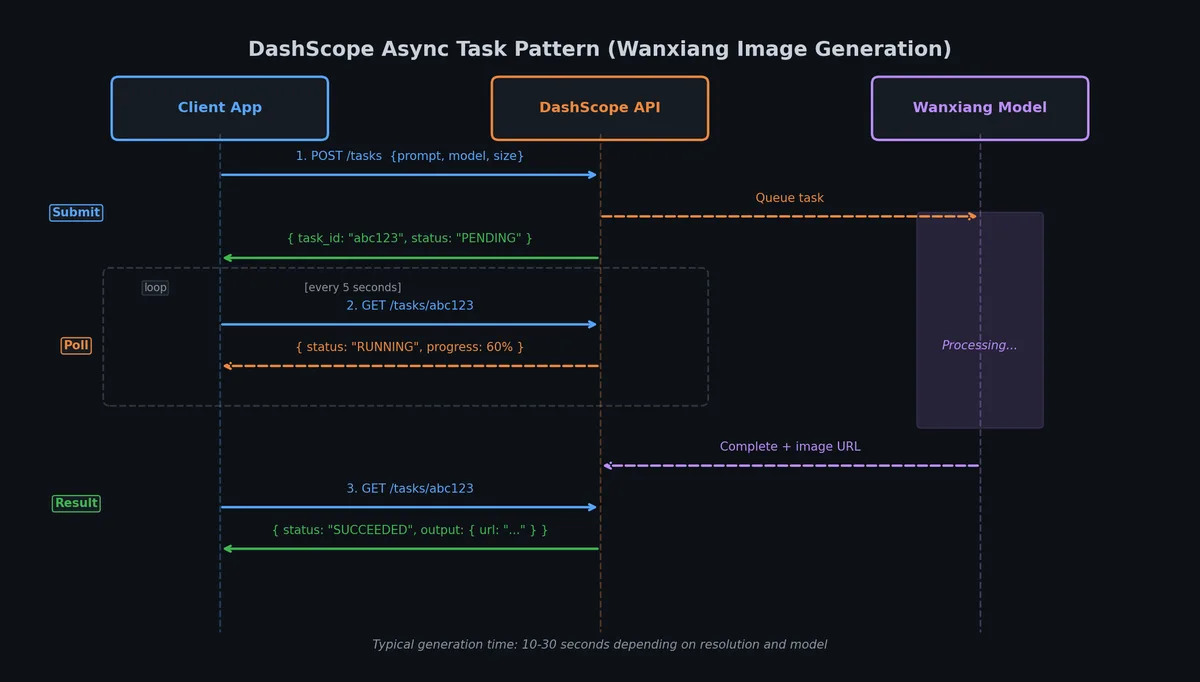
Wanxiang is DashScope’s generative media family. It covers text-to-image, image-to-video, and text-to-video. All media generation uses the DashScope native API (not the OpenAI-compatible endpoint) and follows an async task pattern.

The async task pattern#
Every Wanxiang call follows the same three-step dance:
- Create the task. POST with header
X-DashScope-Async: enable. You get atask_idimmediately. - Poll. GET
/api/v1/tasks/{task_id}untiltask_statusisSUCCEEDEDorFAILED. - Download. The success response includes a URL. Download within 24 hours — after that the URL returns 404 and your media is gone forever.
The 24-hour expiry is the single biggest operational footgun. I have seen multiple teams — mine included — lose work because they polled, logged the URL, then failed to download because of an unrelated bug, then noticed the next day. Treat the URL the way you would treat a one-time download link: download immediately, store to your own OSS, never assume it will be there tomorrow.
Text-to-video example#
| |
Image-to-video#
Same pattern, different model and input:
| |
Both models cap at 5 seconds. If you need 10 seconds, make two clips and stitch them — use the last frame of the first clip as the img_url input for the second.
For the full Wanxiang video deep dive, see Bailian Part 4: Wanxiang Video Generation .
Text-to-image#
Image generation uses a slightly different endpoint but the same async pattern:
| |
Poll with the same poll_task() function. The success response contains output.results[0].url instead of output.video_url — small inconsistency, just adapt.
Qwen TTS: text-to-speech#
Qwen TTS is the part that trips up everyone who assumes “if Qwen LLM works through the OpenAI client, TTS must too.”
Qwen-TTS does NOT work via the OpenAI-compatible endpoint. It is DashScope-native only.
You cannot point the openai SDK’s audio.speech.create at the compat URL and have it work. There is no compat shim for TTS. Use the dashscope SDK or raw HTTP.
The simplest call#
| |
Voice selection#
The model supports 40+ voices. Here are the ones I actually use:
| Voice | Gender | Character | Best for |
|---|---|---|---|
| Cherry | Female | Warm, natural, positive | Product demos, tutorials |
| Serena | Female | Gentle, calm | Meditation, soft narration |
| Ethan | Male | Warm, energetic | Marketing videos |
| Andre | Male | Deep, steady, magnetic | Professional narration |
| Neil | Male | News anchor style | Reports, announcements |
| Maia | Female | Intellectual, gentle | Educational content |
| Stella | Female | Sweet, youthful | Social media content |
| Bellona | Female | Loud, powerful | Calls to action |
Voice names are case-sensitive. Cherry works, cherry does not.
Streaming TTS for real-time playback#
For long text or real-time applications, stream the audio:
| |
Language and dialect coverage#
This is where Qwen TTS genuinely has no competition. Beyond Mandarin and English, it supports Cantonese, Sichuanese, Shanghainese, Northeast dialect, Japanese, and Korean — with voices that sound native, not like a tourist reading a phrasebook. I have not found another TTS API that handles Cantonese this well at this price.
For the full TTS deep dive including voice cloning and instruct mode, see Bailian Part 5: Qwen TTS .
Fine-tuning on Bailian#
Fine-tuning is the nuclear option. Before you reach for it, ask whether prompt engineering, few-shot examples, or RAG can solve your problem. In my experience, 80% of “we need to fine-tune” conversations end with “actually, a better system prompt fixed it.”

When fine-tuning actually makes sense#
| Scenario | Why fine-tuning helps | Alternative to try first |
|---|---|---|
| Domain-specific jargon the model consistently gets wrong | Training data teaches the correct terminology | Few-shot examples in the prompt |
| Consistent output format (e.g., always return XML with specific tags) | Fine-tuning bakes the format into the model weights | JSON mode + structured prompt |
| Cost reduction at high volume | Fine-tuned qwen-turbo can match qwen-plus quality for your specific task | Measure whether the cost difference actually matters |
| Latency reduction | Smaller fine-tuned model runs faster | Prompt compression, shorter system prompt |
| Tone/style consistency | The model learns your brand voice | Detailed style guide in system prompt |
Preparing training data#
Bailian expects JSONL format with the standard chat completion structure:
{"messages": [{"role": "system", "content": "You are a product description writer for electronics."}, {"role": "user", "content": "Write a description for: Sony WH-1000XM5 headphones"}, {"role": "assistant", "content": "Premium wireless noise-cancelling headphones with 30-hour battery life..."}]}
{"messages": [{"role": "system", "content": "You are a product description writer for electronics."}, {"role": "user", "content": "Write a description for: Apple AirPods Pro 2"}, {"role": "assistant", "content": "True wireless earbuds with adaptive noise cancellation..."}]}
Rules for good training data:
- Minimum 50 examples, 200-500 is the sweet spot. More than 1000 rarely helps unless your domain is very diverse.
- Consistent system prompt across all examples — the model learns the system prompt as part of the task definition.
- High-quality outputs only — every assistant response should be exactly what you want the model to produce. One bad example can teach one bad habit.
- Diverse inputs — do not repeat the same question with minor variations. Cover the full range of inputs you expect in production.
- Validate JSONL before uploading. One malformed line and the whole job fails silently.
| |
Launching a fine-tuning job#
Fine-tuning is done through the Bailian console or the API:
- Upload training data to the Bailian console under Data Management
- Create a fine-tuning job: select base model (e.g.,
qwen-turbo), point to your dataset, configure hyperparameters - Monitor training: the console shows loss curves and training progress
- Deploy: once training completes, deploy the model to get a custom
model_id
Via the API (using the dashscope SDK):
| |
Cost comparison: fine-tuned small vs large with prompting#
This is the math that decides whether fine-tuning is worth it:
| Approach | Model | Input cost/1M | Output cost/1M | Typical prompt tokens | Monthly cost at 1M requests |
|---|---|---|---|---|---|
| Prompt engineering | qwen-plus | 0.8 | 2.0 | 800 (long system prompt + few-shot) | ~2,240 CNY |
| Prompt engineering | qwen-max | 2.4 | 9.6 | 800 | ~7,680 CNY |
| Fine-tuned | qwen-turbo (custom) | ~0.6 | ~1.2 | 200 (short prompt, no few-shot needed) | ~360 CNY |
The fine-tuned turbo model costs roughly 6x less than prompt-engineered plus and 21x less than max — because the prompt is shorter (no few-shot examples needed, the behavior is baked in) and the per-token price of turbo is lower. But fine-tuning itself costs money (training compute) and time (preparing data, validating quality, monitoring for drift). It is worth it only above roughly 100K requests/month for a specific, well-defined task.
Solution: multi-modal AI pipeline#
Let me put it all together. Here is a complete pipeline that takes a topic, generates an article draft, creates an illustration, and produces a voice narration — all orchestrated in Python.

| |
This is about 120 lines of Python. It calls three different DashScope capabilities (text generation via OpenAI-compat, image generation via native async, TTS via native sync) and produces three output files. In production, you would add error handling, retry logic, and parallel execution (image and TTS can run concurrently since they are independent). But the bones are here.
Multimodal capabilities including video understanding are covered in Bailian Part 3: Qwen-Omni .
API rate limits and error handling#
Before you go to production, know the rate limits:
| Model family | Default RPM (requests/min) | Default TPM (tokens/min) | Can be raised? |
|---|---|---|---|
qwen-turbo | 500 | 500K | Yes, via ticket |
qwen-plus | 300 | 300K | Yes |
qwen-max | 120 | 120K | Yes |
qwen3-max | 120 | 120K | Yes |
text-embedding-v3 | 500 | 500K | Yes |
wan2.5-t2v-plus | 20 | N/A | Yes |
qwen3-tts-flash | 180 | N/A | Yes |
When you hit a limit, DashScope returns HTTP 429 with a Retry-After header. Handle it:
| |
Common error codes#
| HTTP status | DashScope code | Meaning | Fix |
|---|---|---|---|
| 400 | InvalidParameter | Bad request body | Check your request against the docs |
| 401 | InvalidApiKey | Wrong or expired API key | Regenerate key in Bailian console |
| 404 | ModelNotFound | Model ID typo or model not available | Check exact model_id string |
| 429 | Throttling | Rate limit exceeded | Backoff and retry, or request quota increase |
| 500 | InternalError | Server-side issue | Retry after 5-10 seconds |
Budget alerts#
Set a budget alert in the Bailian console. I have eaten a four-figure bill exactly once because someone left a debug loop running overnight. The alert would have caught it in 30 minutes instead of 8 hours.
| |
Putting it in context: the full-stack picture#
Here is where DashScope sits in a typical Alibaba Cloud architecture:
| Layer | Service | Article |
|---|---|---|
| Compute | ECS, Function Compute | Part 2 , Part 8 |
| Networking | VPC, SLB | Part 3 |
| Search & Retrieval | OpenSearch + embeddings | Part 9 |
| AI / LLM | DashScope (this article) | Part 10 |
| Storage | OSS (for media assets) | Part 1 |
A typical AI application flow:
- User sends a request to your API (running on ECS or Function Compute)
- Your app embeds the query using
text-embedding-v3via DashScope - You search OpenSearch for relevant context using those embeddings
- You call
qwen-pluswith the retrieved context + user query via DashScope - The response streams back to the user
- If media is needed, you call Wanxiang (async) and store results on OSS
Every piece of this stack is covered in this series. DashScope is the brain; the other services are the body.
Summary#
Bailian is the console, DashScope is the API. You configure on Bailian, you code against DashScope. Do not confuse them.
Use the OpenAI-compatible endpoint as your default.
base_url="https://dashscope.aliyuncs.com/compatible-mode/v1"with theopenaiSDK covers text, embeddings, vision, and multimodal. Only drop to native API for TTS, image gen, and video gen.Default to
qwen-plus. Move up toqwen3-max(with thinking) only when evals prove Plus is not enough. Move down toqwen-turboonly when cost matters at your volume.Qwen3 thinking requires streaming.
enable_thinking=Truewithoutstream=Trueis a hard error. This catches everyone once.TTS is DashScope-native only. Do not try the OpenAI-compat endpoint for
qwen3-tts-flash. It will 404.All media generation is async. Submit task, poll, download within 24 hours. The 24-hour URL expiry is the most common production incident.
Fine-tuning is the last resort. Try prompt engineering, few-shot examples, and RAG first. Fine-tune only when you have 100K+ monthly requests for a specific, well-defined task where a smaller model with training data can match a larger model with a long prompt.
Set budget alerts. Do it now, before someone leaves a debug loop running overnight.
What’s Next#
Part 11 covers the ML platform layer: PAI-DSW for interactive notebooks, PAI-DLC for distributed training, and PAI-EAS for model serving. Every model we fine-tuned or deployed via DashScope in this article can be trained at scale and served with autoscaling on PAI — and that is where we are headed next.
Alibaba Cloud Full Stack 12 parts
- 01 Alibaba Cloud Full Stack (1): The Ecosystem Map — What Alibaba Cloud Actually Is
- 02 Alibaba Cloud Full Stack (2): ECS — Compute That Actually Makes Sense
- 03 Alibaba Cloud Full Stack (3): VPC, SLB, and the Network Layer
- 04 Alibaba Cloud Full Stack (4): OSS — Object Storage Done Right
- 05 Alibaba Cloud Full Stack (5): RDS and PolarDB — The Database Layer
- 06 Alibaba Cloud Full Stack (6): RAM, KMS, and Cloud Security
- 07 Alibaba Cloud Full Stack (7): SLS, CloudMonitor, and Observability
- 08 Alibaba Cloud Full Stack (8): Serverless — Function Compute and EventBridge
- 09 Alibaba Cloud Full Stack (9): OpenSearch and AI Search
- 10 Alibaba Cloud Full Stack (10): Bailian and DashScope — The LLM Layer you are here
- 11 Alibaba Cloud Full Stack (11): PAI — The ML Platform
- 12 Alibaba Cloud Full Stack (12): End-to-End — One Terraform Apply for Everything