
Claude Code Hands-On (1): Install, the Three-Layer Config, and the # @ /init Trio
Install Claude Code, understand the three-layer settings.json system, and learn the three quietly powerful primitives: # to write into context, @ to reference files, /init to generate the project memory file.
This is the first in a ten-part field guide to Claude Code. The order is deliberate: each piece unlocks the next. By the end, you’ll be using features that 90% of users never touch.

Install#
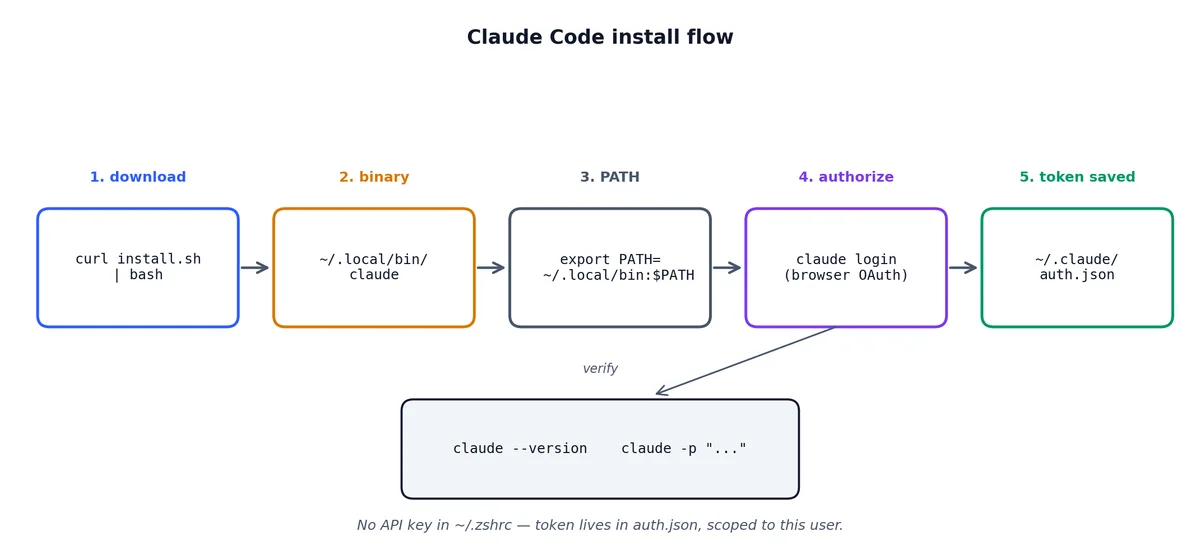
There is one supported install path, and it’s the right one.
| |
That sets up the claude binary in ~/.local/bin/ (Linux/Mac). Add it to your PATH, then:
| |
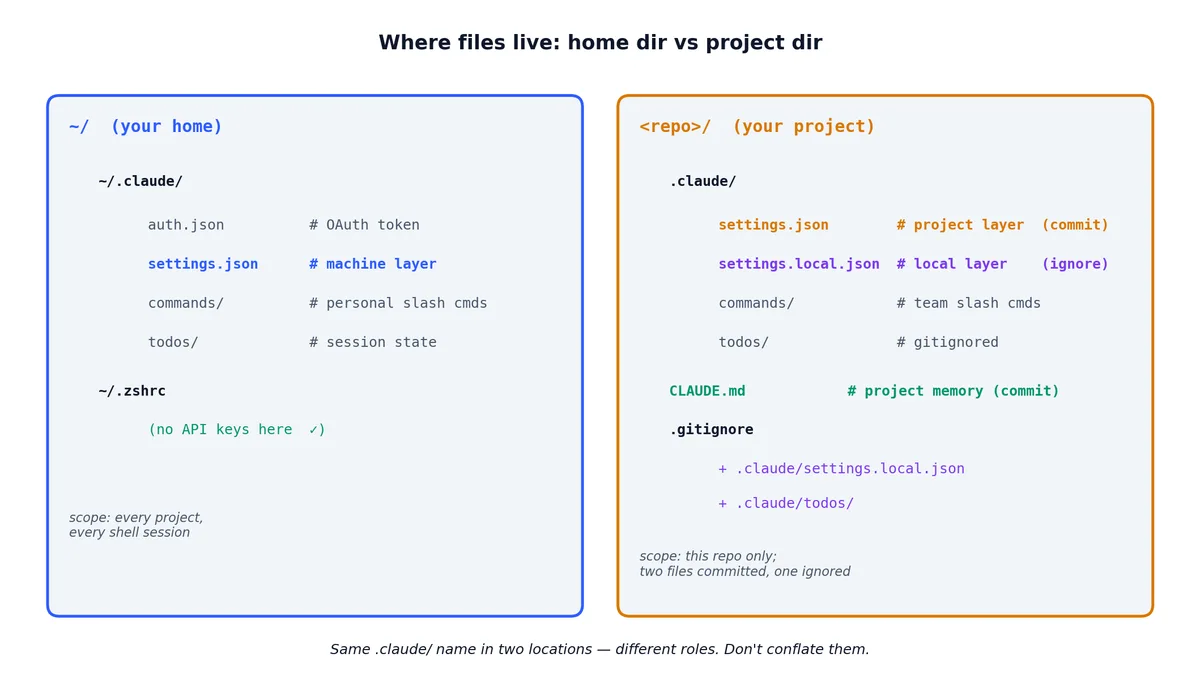
The login flow opens a browser, you authorize the CLI, and you’re done. Your auth token lives in ~/.claude/auth.json. There is no API key in ~/.zshrc to leak — that’s worth noting because most “AI CLI” tools get this wrong.
Troubleshooting the install#
The install script is clean, but real machines are messy. Here are the problems I’ve run into and seen others face.
“command not found: claude” after install. The script puts the binary in ~/.local/bin/. If that’s not in your PATH, you have two options.
| |
On a fresh Mac, ~/.local/bin/ almost certainly doesn’t exist in your PATH. Check with echo $PATH | tr ':' '\n' | grep local.
Node.js version mismatch. Claude Code requires Node.js 18+. If you’re on an older version (common on Ubuntu LTS), the binary will either fail silently or throw a cryptic error. Check with:
| |
If you need to upgrade, nvm is the least painful path:
| |
Corporate proxy issues. If you’re behind a corporate proxy, the curl install might fail silently. Set the proxy environment variables first:
| |
WSL-specific note. On Windows Subsystem for Linux, the browser-based login flow can’t open a browser automatically. The CLI will print a URL. Copy it, open it in your Windows browser, authorize, and the CLI will pick up the token. It works, but not smoothly.
Multiple installations. If you installed Claude Code via npm globally (npm install -g @anthropic/claude-code) and also via the install script, you’ll have two competing binaries. Check which one is active:
| |
If it shows an npm path, uninstall the npm one: npm uninstall -g @anthropic/claude-code.
Run it#
cd into a real project and run:
| |
You get an interactive prompt. Try a round-trip to confirm the install.
| |
Claude will use its own tooling to ls, summarize, and reply. If that worked, the install is done.
You can also run Claude Code non-interactively from scripts.
| |
The -p flag (print mode) skips the interactive loop. This is useful for scripts, CI pipelines, and quick one-off questions where you don’t want a full session.
The three-layer config#

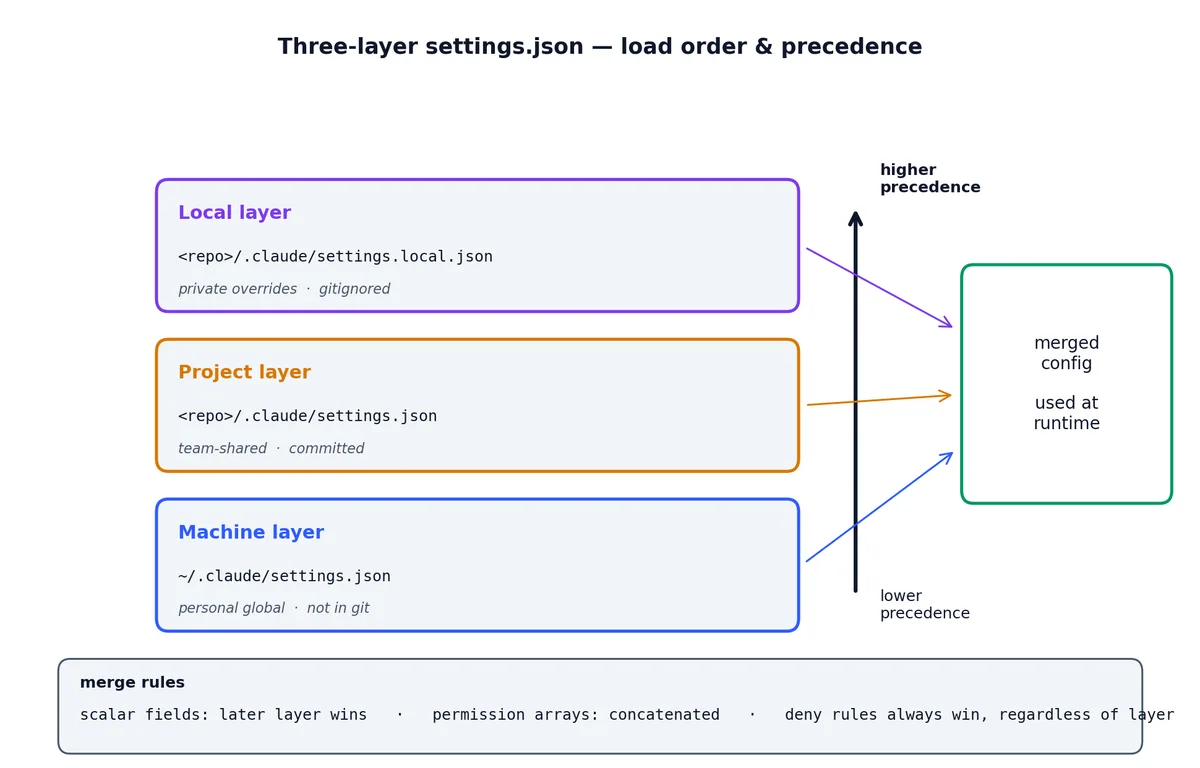
This is the part most users never read. Claude Code merges configuration from three locations, in order of increasing precedence.
| Layer | Path | Tracked in git? | Used for |
|---|---|---|---|
| Machine | ~/.claude/settings.json | No | Your personal global preferences |
| Project | <repo>/.claude/settings.json | Yes | Team-shared project conventions |
| Local | <repo>/.claude/settings.local.json | No (gitignored) | Your private overrides for this repo |
Why three layers and not two? Some settings are personal and global (like your default model and editor command), some are team and shared (like the linter and test command), and some are personal but project-scoped (like your API key for the staging server).
How the merge works#
The merge is a deep merge with later layers winning. If your machine config sets "model": "claude-opus-4-7" and the project config doesn’t mention model at all, you get Opus. If the project config sets "model": "claude-sonnet-4-7", the project wins — unless your local config overrides it again.
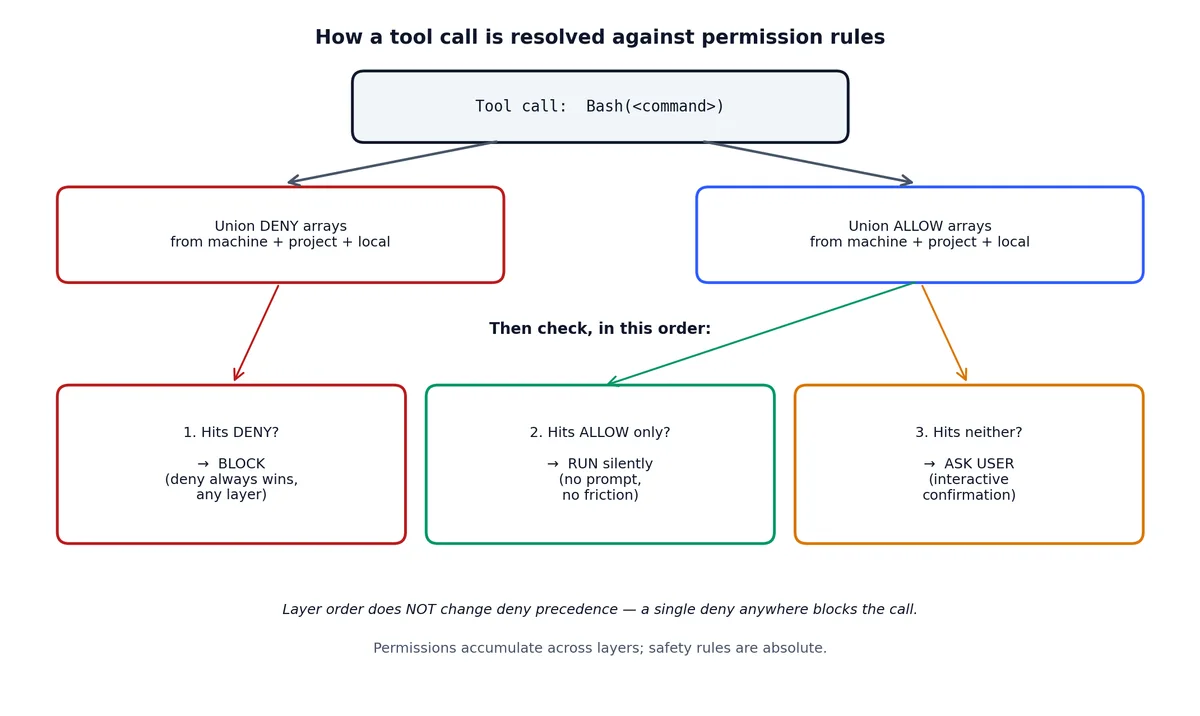
For the permissions object, arrays are concatenated. If the project allows Bash(npm test) and your machine config allows Bash(docker compose up), you get both. Deny rules always take precedence over allow rules regardless of layer.
Machine-level settings — your global defaults#
This is ~/.claude/settings.json. It applies to every project you open. Keep it minimal — only things you truly want everywhere:
| |
Those are read-only commands I never want to be prompted for. Every time Claude asks “can I run git status?” it interrupts my flow for zero safety benefit. Put read-only operations here and forget about them.
I don’t put anything that writes files, runs tests, or executes project-specific commands here. Those belong in the project layer.
Project-level settings — team conventions#
This is <repo>/.claude/settings.json. It gets committed to git. Everyone on the team inherits it.
A real-world example from a Next.js project:
| |
The deny list is as important as the allow list. npm publish in a Claude session would be catastrophic. prisma migrate deploy against production is not something you want an AI to do autonomously. Be explicit about what’s off-limits.
A more advanced project config with environment and hooks:
| |
Hooks let you run shell commands before or after Claude uses specific tools. The PreToolUse hook fires before a tool runs, PostToolUse after. You can use them for logging, notifications, or validation.
Local settings — your private overrides#
This is <repo>/.claude/settings.local.json. It’s gitignored (add it to .gitignore if it’s not already there). Use it for anything private to you:
| |
Environment variables set here are available to Claude’s shell commands in that project. This is the right place for API keys, database URLs, and other sensitive, project-specific data.
A common mistake is putting sensitive values in the project-level config and committing them. The three-layer system prevents this.
Quick reference: what goes where#
| Setting | Machine | Project | Local |
|---|---|---|---|
| Read-only command permissions | Yes | — | — |
| Write/execute command permissions | — | Yes | — |
| Deny rules for dangerous commands | — | Yes | — |
| API keys and secrets | — | — | Yes |
| Environment variables | — | — | Yes |
| Project test/lint commands | — | Yes | — |
| Hooks and automation | — | Yes | Overrides |
| Model preferences | Yes | Optional | Overrides |
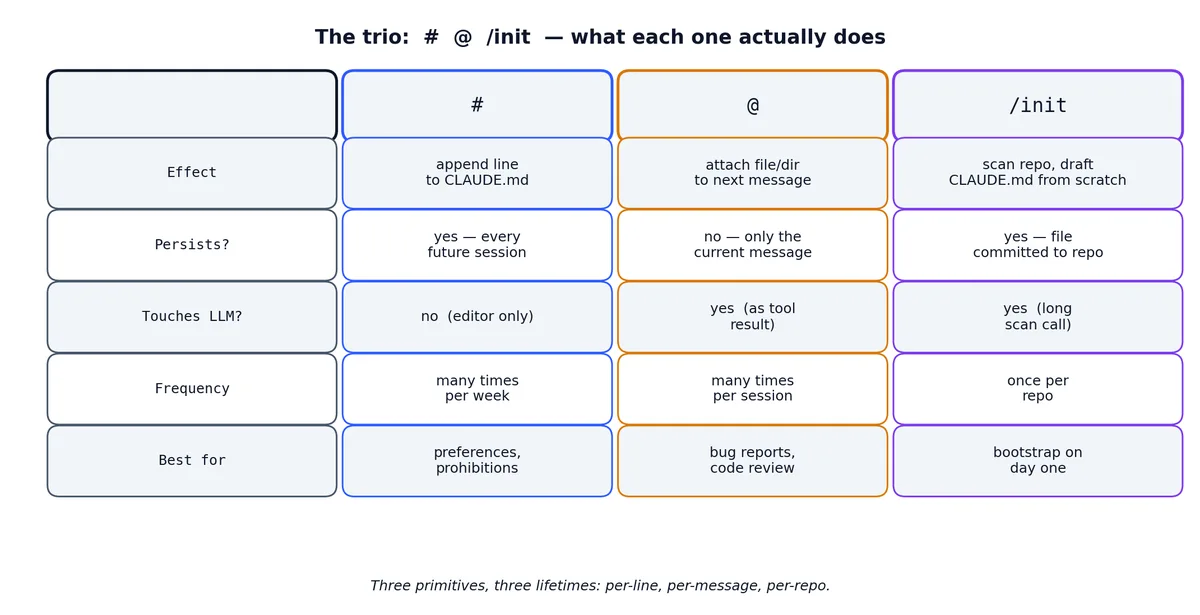
# — write into context#
Type # at the start of a line and the rest of the line is appended to the project’s memory file (CLAUDE.md) instead of being sent as a prompt. Example:
| |
Claude doesn’t reply. It opens an editor on CLAUDE.md, drops the line in, and saves. The next conversation starts with that line in context.
This is how I avoid re-explaining preferences. “When you write Python, use type hints.” “Don’t add emoji to commit messages.” “The CI is GitHub Actions, not GitLab.” Each one is a # line and stays for life.
Advanced # patterns#
The # command is more flexible than it looks. Here are patterns I’ve found useful over time.
Multi-line additions. You can add multi-line content by typing # and then a longer instruction. Claude opens the CLAUDE.md file in an editor view where you can write or refine the content before saving:
| |
Structured sections. Over time your CLAUDE.md accumulates entries. Organize them with headers:
| |
The key insight about #: it’s not just a note-taking tool. Every line in CLAUDE.md is injected into the system prompt of every future conversation. That means Claude follows those instructions as if you typed them. A line like “Never modify files in the migrations/ directory without asking first” genuinely changes Claude’s behavior. It’s configuration, not documentation.
What not to put in CLAUDE.md. Don’t put things that change frequently (current sprint goals, today’s task list). Don’t put long documents or entire API specs — that burns context window for every message. Keep it to instructions, conventions, and structural knowledge. If something is longer than 5 lines, consider whether it belongs in a referenced file instead.
@ — reference a file#
Type @ and you get a fuzzy file picker. Pick a file, it gets attached to the next message:
| |
The file is sent as a tool result, not pasted into your prompt. That means it counts against tool-budget, not against your typing. Practically: you can attach a 2000-line file without making your prompt unreadable.
@ with glob patterns and directories#
You’re not limited to single files. @ supports several patterns:
| |
When you reference a directory, Claude reads the file listing and may selectively read files within it. It doesn’t blindly dump every file into context — it picks the relevant ones based on your prompt. This is smarter than it sounds; it means you can say @src/ where is the rate limiting logic? and Claude will hunt through the directory rather than you having to know the exact file.
Practical @ patterns#
Bug investigation. When a bug report comes in, I attach the relevant files and the error:
| |
Claude has both files in context and can trace the data flow between them without needing to search.
Code review. For reviewing a specific module:
| |
Understanding unfamiliar code. When I join a new project or look at code I didn’t write:
| |
The @ symbol saves you from the “go read this file” round-trip. Without it, you’d type “read src/core/scheduler.ts”, wait for Claude to use the Read tool, then ask your question. With @, the file is already in context when your question arrives. That’s one fewer round-trip per file, which adds up fast in a complex investigation.
/init — bootstrap the project memory#
Run /init once per repo. Claude reads the codebase, writes a CLAUDE.md summarizing:
- What the project does
- Languages and frameworks used
- Build, test, lint commands
- Major directories and their purposes
- Any conventions Claude can detect (commit message style, test naming, etc.)
You then edit it. The point isn’t that Claude’s draft is perfect — it isn’t. The point is that you have a starting structure that takes 30 seconds instead of 30 minutes.
The generated CLAUDE.md is committed to the repo. Every teammate’s Claude Code session starts with it. This is how a project shares mental model.
What /init generates — and what you should edit#
Here’s a typical /init output for a medium-sized Node.js project:
| |
This is a solid starting point, but it’s generic. Here’s what I always add manually:
Things Claude can’t detect:
| |
Explicit prohibitions:
| |
These prohibitions are the highest-value lines in CLAUDE.md. They encode institutional knowledge that would otherwise live only in senior engineers’ heads.
/init best practices#
Run /init on an empty context. Start a fresh Claude session, run /init, let it finish. Don’t run it in the middle of a long conversation — the existing context can bias the output.
Edit immediately, don’t defer. The first edit pass takes 5 minutes. The quality difference between a raw /init output and one you’ve spent 5 minutes on is enormous. The raw version is accurate but bland. Your edits add the things that actually matter — the gotchas, the tribal knowledge, the “don’t touch this” warnings.
Re-run /init periodically. As your project evolves, the CLAUDE.md can drift. Every few months (or after a major refactor), run /init again. It will generate a new version. Diff it against your existing CLAUDE.md and merge the new structural information while keeping your hand-written conventions.
Keep it under 100 lines. CLAUDE.md is injected into every conversation. If it’s 500 lines, you’re burning context tokens on every message. Be concise. Link to external docs rather than pasting them in.
Team onboarding workflow#
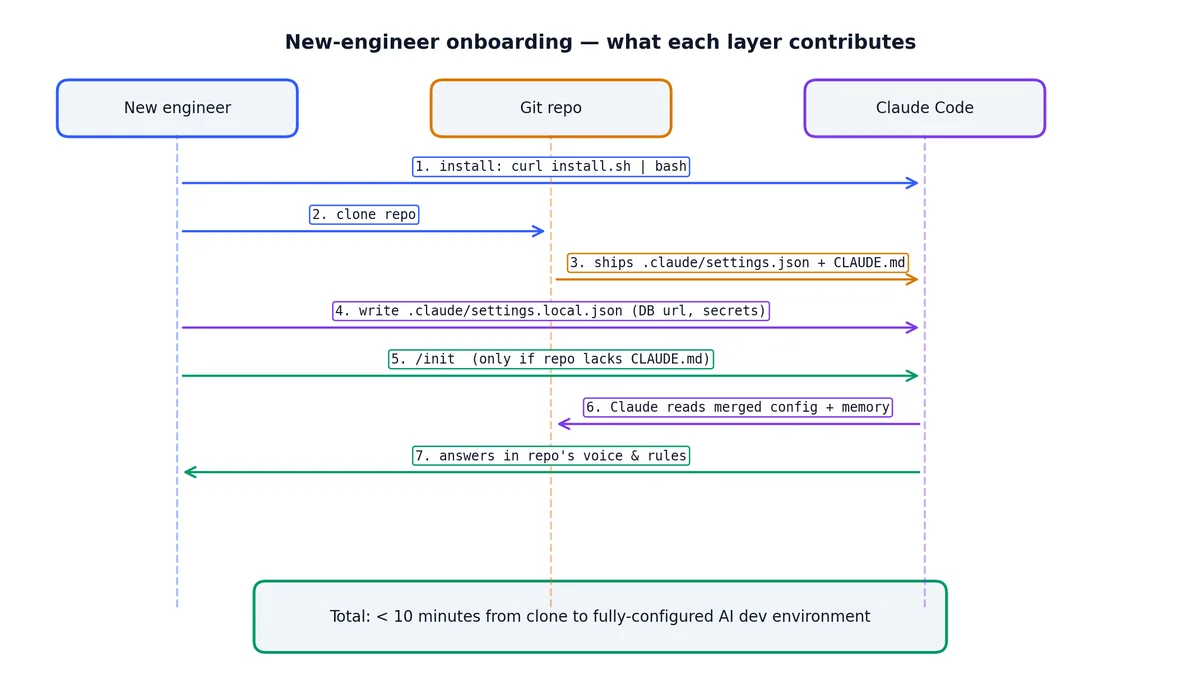
Here’s the workflow I use when bringing a new engineer onto a project that already uses Claude Code.
Step 1: They install Claude Code. The curl command from the top of this article. Takes 60 seconds.
Step 2: They clone the repo. The repo already has .claude/settings.json and CLAUDE.md committed. They get both automatically.
Step 3: They create their local config. I share a template:
| |
Step 4: They run /onboard (a custom command — covered in piece 3). This slash command reads CLAUDE.md and produces a one-page orientation tailored to the current state of the code.
Step 5: They start working. Within 10 minutes of cloning, they have a fully configured Claude Code environment with team conventions, proper permissions, and project context. No wiki page to read, no Notion doc to find, no Slack thread to search.
The key insight: the three-layer config system means onboarding is “clone and go.” Everything team-shared is in the repo. Everything personal is created once on their machine. There’s nothing to synchronize.
What I do on every new repo#
claudeto open/initto generate the memory file- Edit
CLAUDE.mdto add 3-5 specific conventions and prohibitions - Add
.claude/settings.jsonwith permissions for the test/lint commands - Add
.claude/settings.local.jsonto.gitignore - Commit and move on
Five minutes. Pays back the first time anyone — me or a teammate — opens the repo with Claude Code.
The .gitignore entries you need#
Make sure your .gitignore includes:
| |
The settings.local.json contains personal and potentially sensitive configuration. The todos/ directory contains session-specific task tracking that shouldn’t be shared.
Don’t gitignore .claude/settings.json or .claude/commands/ — those are team resources.
Common mistakes and how to avoid them#
Mistake: putting everything in machine config. I’ve seen people put project-specific test commands in ~/.claude/settings.json. This breaks when they switch projects. Project-specific commands go in the project config.
Mistake: not using deny rules. Allow rules are the ones people set up. Deny rules are the ones that save you. Think about what would be catastrophic if Claude ran it: rm -rf, npm publish, git push --force, database migrations against production. Deny those explicitly.
Mistake: writing a novel in CLAUDE.md. I’ve seen CLAUDE.md files that are 400 lines of detailed API documentation. That’s 400 lines of context burned on every single message. Keep CLAUDE.md to instructions and structure. Put reference material in separate files and use @ to reference them when needed.
Mistake: never re-running /init. Projects change. CLAUDE.md should change with them. If you added three new services and a GraphQL layer since the last /init, the memory file is lying to Claude about your project’s structure.
Mistake: forgetting to gitignore settings.local.json. One leaked API key is all it takes. Add the gitignore entry before creating the local config file, not after.
Next piece: shortcuts and the four-state mode toggle that everyone misses.
Claude Code Hands-On 10 parts
- 01 Claude Code Hands-On (1): Install, the Three-Layer Config, and the # @ /init Trio you are here
- 02 Claude Code Hands-On (2): Shortcuts, the Four-State Toggle, and Thinking Modes
- 03 Claude Code Hands-On (3): Custom Slash Commands and Conversation Control
- 04 Claude Code Hands-On (4): MCP Servers, or How Claude Talks to Anything
- 05 Claude Code Hands-On (5): Hooks, or How to Stop Worrying About Yolo Mode
- 06 Claude Code Hands-On (6): The SDK, GitHub Integration, and Claude in CI
- 07 Claude Code Hands-On (7): Ten Hooks I Actually Use, with the Code
- 08 Claude Code Hands-On (8): Sub-Agents, Worktrees, and Plan Mode
- 09 Claude Code Hands-On (9): settings.json, the Three-Layer Permission Model, and Env
- 10 Claude Code Hands-On (10): Skills, and When to Reach for Each Extension Mechanism