
Claude Code Hands-On (3): Custom Slash Commands and Conversation Control
Slash commands turn repeated workflows into one-line invocations. $ARGUMENTS makes them parameterized. The right ones become your team's shared vocabulary.
Built-in slash commands like /clear and /init are the visible part of the iceberg. The main point of the system is for you to write your own commands, which live in your repo.

What a slash command is#
A file at .claude/commands/<name>.md. Contents are a Markdown prompt. Filename becomes the command. After creating the command, you need to restart Claude Code (one of the few places it isn’t hot-reloaded).
The simplest possible example. Create .claude/commands/audit.md:
| |
Restart, then in any session:
| |
The whole prompt runs. You get a structured audit report without having to remember the three commands and their order.
Two things to notice:
- The command is just a prompt. There’s no DSL or special syntax, which keeps the surface area small.
- You don’t have to repeat yourself. The next time anyone on the team needs an audit, they type
/audit.
How the command system works internally#
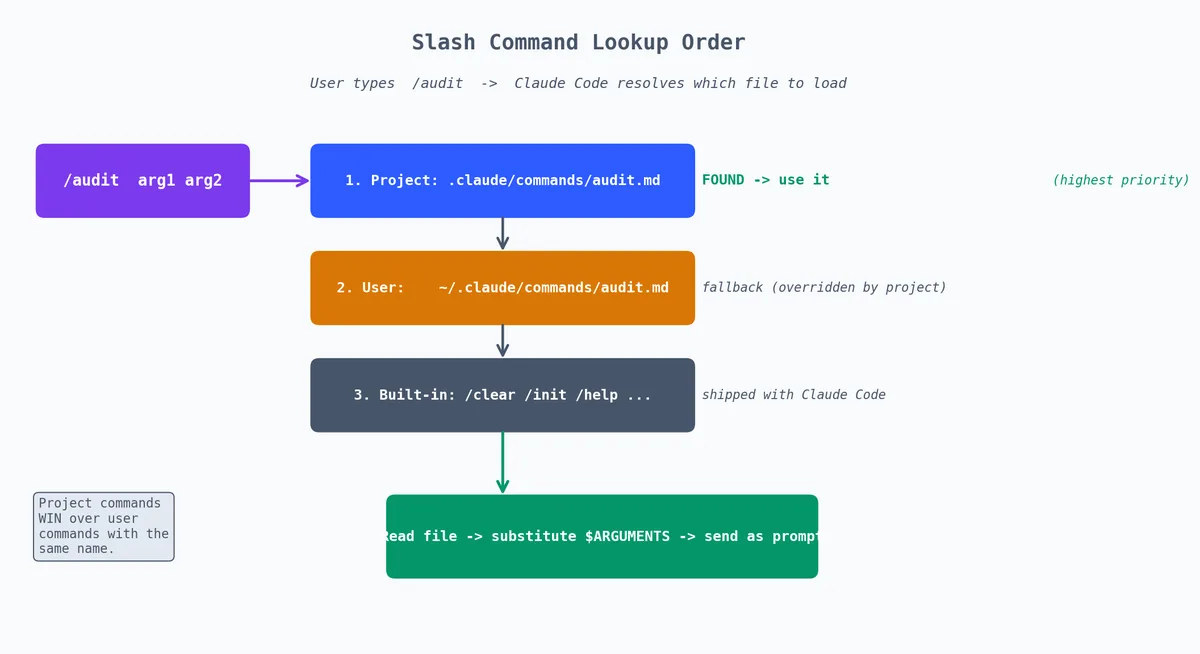
When you type /audit, Claude Code does the following:
- Looks for
.claude/commands/audit.mdin the current project - Also checks
~/.claude/commands/audit.mdfor personal global commands - Reads the file contents
- Sends the contents as a prompt, as if you had typed them
Project commands take precedence over global commands with the same name. This means a team can override your personal /audit with a project-specific version.
The command content is treated as a regular prompt. This means:
- It can reference files with
@ - It can include thinking level triggers (“think a lot”)
- It can use
$ARGUMENTSfor parameterization - It can contain multi-step instructions
- Markdown formatting is preserved
The directory structure#
Here’s the full layout for a mature project:
| |
And for personal global commands:
| |
The split matters. Team commands go in the project’s .claude/commands/. Personal workflow commands go in ~/.claude/commands/. Personal commands are available in every project, while team commands are specific to one repo.
Naming conventions#
Names become the slash command, so keep them short and clear:
| Good | Bad | Why |
|---|---|---|
/review | /code-review-for-pr | Too long to type |
/test | /run-all-tests-and-report | Verbose |
/deploy | /deploy-to-staging-env | Include the environment in $ARGUMENTS instead |
/explain | /e | Too cryptic for teammates |
/debug | /dbg | Abbreviation unclear to new members |
The sweet spot is one word, 4-8 characters, that any team member would guess on their first try. If someone can’t guess that /review reviews code, the naming is wrong.
Avoid versioning in names (/review-v2, /test-new). If you need a better version, replace the old file. Git history preserves the old version if you need it later.
$ARGUMENTS — parameterization#

Slash commands get a magic $ARGUMENTS token that’s replaced with whatever you typed after the command name. Example — .claude/commands/explain.md:
| |
Then:
| |
$ARGUMENTS becomes rate limiter, the prompt fires, you get a three-level explanation grounded in the actual repo.
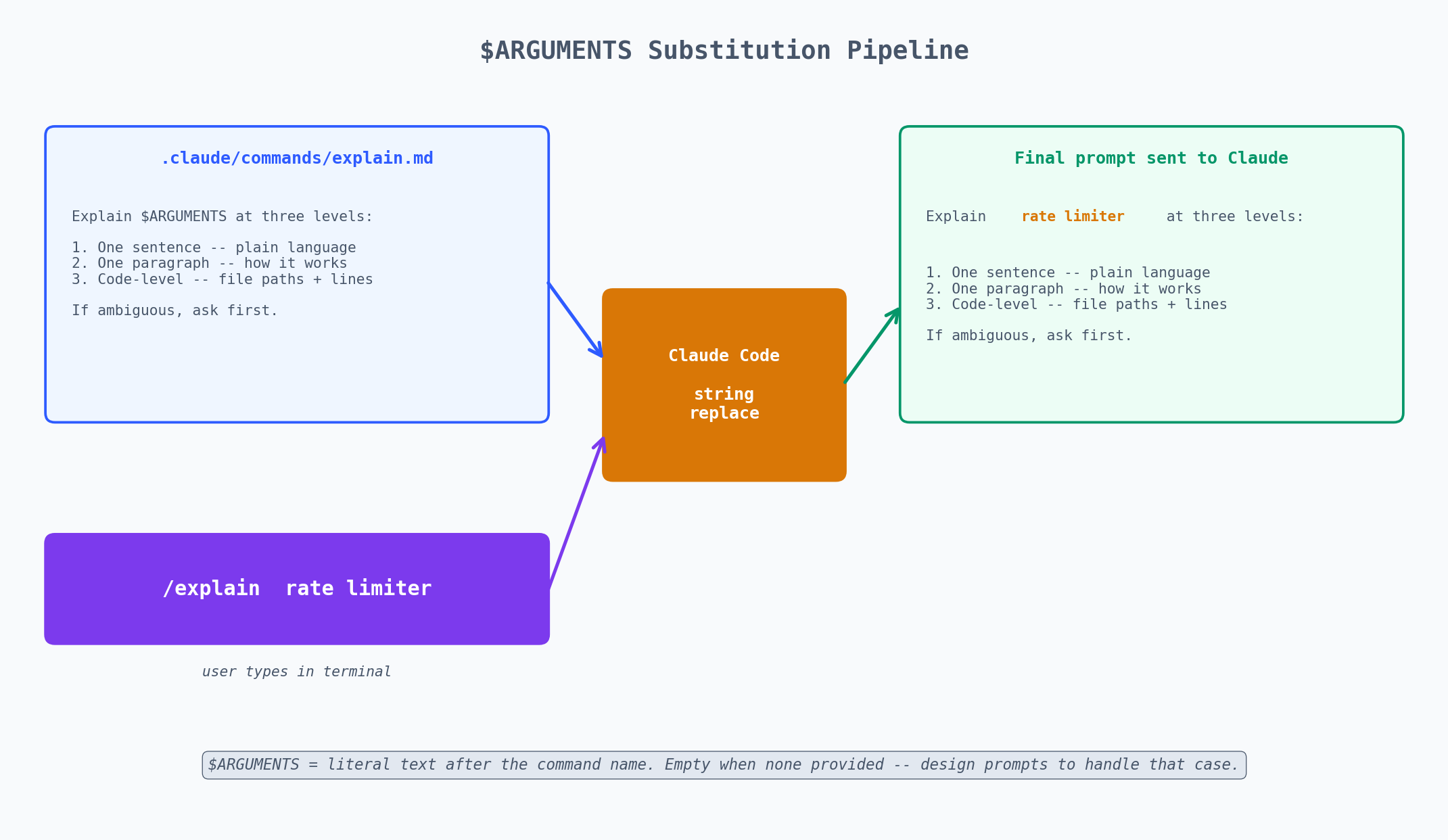 *Figure: $ ARGUMENTS is pure string replacement — everything after the command name lands verbatim inside the prompt.*
$ARGUMENTS patterns#
The $ARGUMENTS token is just string substitution — everything after the command name becomes the value. This simplicity is a feature. Here are patterns that exploit it:
Single argument — a name or identifier:
| |
| |
Multiple arguments as a natural sentence:
| |
| |
Everything after /compare becomes $ARGUMENTS, so Claude gets “axios vs fetch vs ky for HTTP requests” as a natural language string.
File path as argument:
| |
| |
No arguments — default behavior:
If $ARGUMENTS is empty (the user just typed /coverage with nothing after), the substitution produces an empty string. Design your prompts to handle this gracefully:
| |
| |
This pattern — “if arguments exist, scope to them; otherwise, do everything” — makes commands more flexible without needing separate commands for general and specific cases.
The commands I have on every project#
After two years of using Claude Code, I have settled on a core set. Here they are with the full prompt contents.
/audit — security audit#
| |
/test — run and analyze tests#
| |
/review — code review#
| |
/explain — three-level explanation#
| |
/onboard — new engineer orientation#
| |
/deploy — deployment checklist#
| |
/debug — structured debugging#
| |
/document — generate documentation#
| |
Building a team command library#
Slash commands are the easiest way to spread a convention across a team. The process is dead simple:
- Write a useful command
- Put it in
.claude/commands/ - Commit it to main
- Tell nobody
Step 4 is not a joke. The next time anyone runs claude in that repo and types /, they see the command in the autocomplete list. They try it. It works. They use it again. No training deck, no Confluence page, no onboarding session.
How command libraries evolve#
I’ve watched command libraries grow across three teams. The pattern is consistent:
Week 1-2: One person adds 2-3 commands. Usually /test, /review, and one project-specific one.
Week 3-4: Other team members discover the commands. They start using them. Somebody adds a /deploy command.
Month 2: The commands start getting refined. The /review prompt gets better criteria. Somebody adds /explain because they keep asking Claude to explain parts of the codebase.
Month 3+: The command library stabilizes at 5-10 commands. New ones get added rarely. The existing ones get tweaked for precision. At this point, the commands are the team’s shared vocabulary for interacting with AI.
Commands as documentation#
Here’s a non-obvious benefit: your command library documents your team’s workflows. A new engineer can read .claude/commands/ and learn:
- What the deployment process looks like (
/deploy) - What the team values in code review (
/review) - What the testing strategy is (
/test) - What the common debugging approach is (
/debug)
Each command file is a runnable specification of a workflow, which is more useful than a wiki page because it’s always up to date (if it weren’t, people would fix it because they use it every day). day).
Personal vs. team commands#
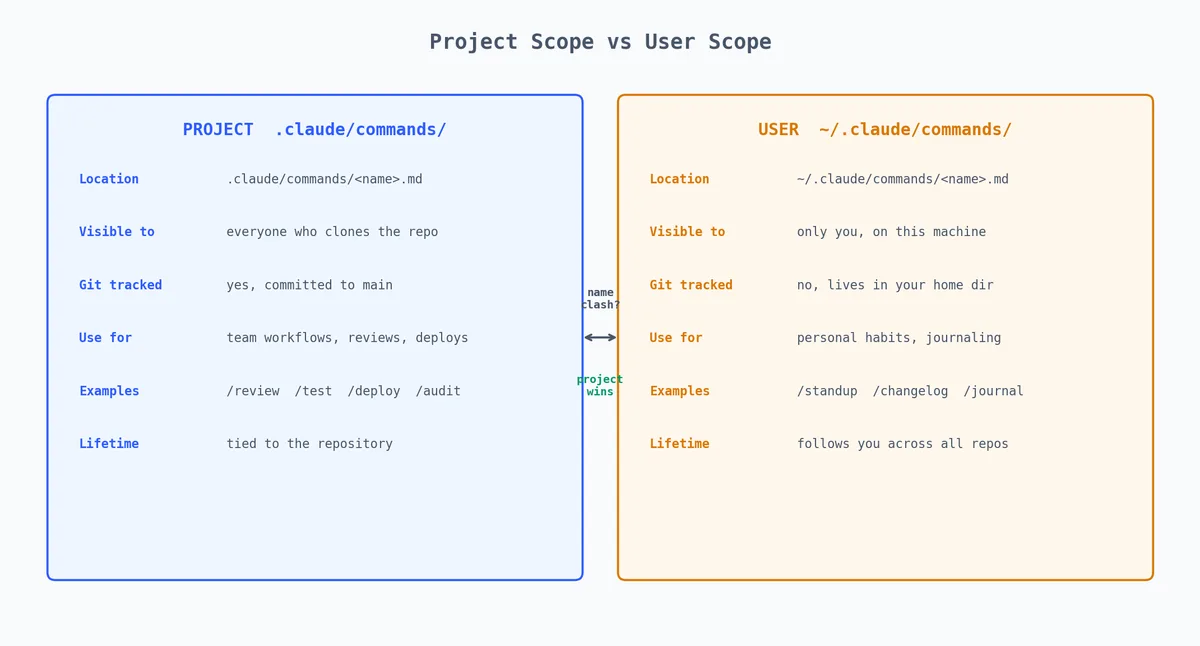
Keep the distinction clear:
| Type | Location | Git-tracked | Example |
|---|---|---|---|
| Team | .claude/commands/ | Yes | /review, /test, /deploy |
| Personal | ~/.claude/commands/ | No | /standup, /journal, /quickfix |
Personal commands are for your individual workflow. Some of mine:
~/.claude/commands/standup.md:
| |
~/.claude/commands/changelog.md:
| |
These are personal because they’re about my workflow, not the team’s. A teammate might have a completely different standup format.
Advanced command patterns#
Commands that chain other commands#
A command can reference other commands by name in its prompt:
| |
This isn’t literally invoking /test as a subcommand — it’s asking Claude to do what /test does. Since Claude has read the /test command file (it’s in the project), it knows the format. The effect is the same.
Commands with structured output#
| |
Commands for specific workflows#
Pre-PR checklist:
| |
Database migration review:
| |
Debugging commands#
When a command doesn’t work as expected, here’s how to diagnose:
Command not showing up. Check the file location. It must be exactly .claude/commands/<name>.md — not .claude/command/ (singular), not .claude/commands/<name>.txt. Restart Claude Code after creating the file.
Command runs but produces bad output. The most common issue is an ambiguous prompt. Test your command prompt by pasting its contents directly into Claude Code as a regular message. If it doesn’t work well as a direct prompt, it won’t work well as a command.
$ARGUMENTS not substituting. Make sure you typed something after the command name. /explain with nothing after it sends an empty string for $ARGUMENTS. If your command requires arguments, add a note at the top:
| |
The HTML comment won’t affect the prompt but serves as documentation when someone reads the file.
Command too long. There’s no hard limit on command file length, but very long commands can push out context space for the actual work. Keep commands under 50 lines. If you need more, you’re probably trying to do too much in one command — split it into two.
Command works in one project but not another. Check whether the command references project-specific details (specific file paths, specific test commands). If it does, either make it generic (use “see CLAUDE.md for the test command” instead of hardcoding npm test) or accept that it’s a project-specific command.
Conversation control — the three you should know#
Built-in commands worth muscle-memorizing:
/compact — summarizes the conversation so far. Use when the model starts to feel slow. Keeps the gist, drops the verbose bits. Covered in depth in piece 2.
/clear — wipes conversation. Keeps memory and settings. Use when switching tasks.
/init — covered in piece 1. Run once per repo to bootstrap CLAUDE.md.
There are more — /help lists everything — but those three are the daily set.
Other built-in commands worth knowing#
| Command | What it does | When to use |
|---|---|---|
/help | Shows all available commands | When you forget a command name |
/compact | Summarize and shrink context | Long sessions getting slow |
/clear | Fresh conversation | Switching tasks |
/init | Generate CLAUDE.md | New repo setup |
/config | Open settings | Changing preferences |
/cost | Show token usage | Monitoring spend |
/doctor | Diagnose Claude Code issues | When something feels broken |
/login | Re-authenticate | Token expired |
/logout | Clear authentication | Switching accounts |
/permissions | View active permissions | Debugging “why did it ask me?” |
What stops being good for slash commands#
Slash commands are bad at:
Anything that needs runtime arguments more complex than a single string.
$ARGUMENTSis just one token. You can’t have named parameters like/deploy --env staging --skip-tests. If you need that, write a shell script and call it from Claude.Anything that needs to maintain state between invocations. Each
/commandruns in a fresh prompt context. There’s no way to have/step1pass data to/step2. For multi-step stateful workflows, use a single long prompt or the SDK.Anything you’d want to test. You can’t write a unit test for a slash command. If your workflow needs validation, it should be a script that Claude calls, not a command that Claude executes.
Anything that needs to be different per environment. The command file is the same for everyone. If staging and production need different steps, use
$ARGUMENTSto pass the environment name and handle the branching in the prompt.
For those cases you want the SDK (piece 6). Slash commands are for the workflow shortcuts that don’t justify the complexity of code.
The hierarchy of automation in Claude Code#
| |
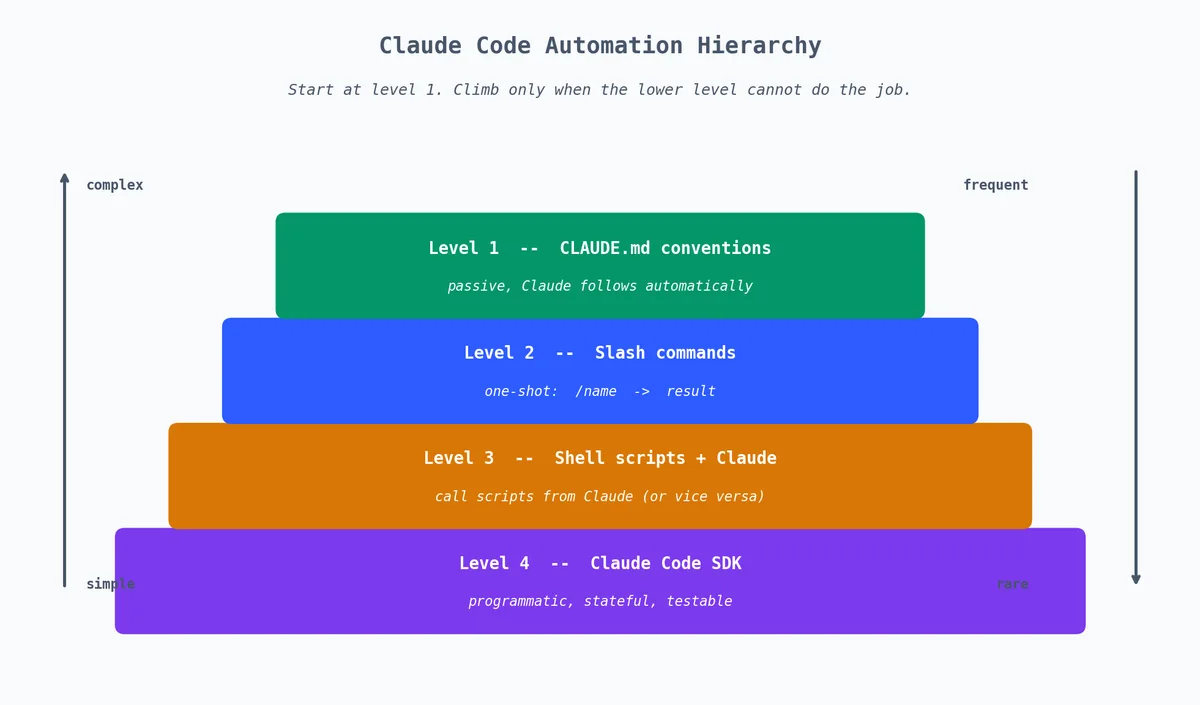
Start at level 1. Move up only when the lower level can’t handle your use case. Most teams never need level 4. Almost every team benefits from levels 1-2.
A real command library walkthrough#
Let me show what a mature .claude/commands/ directory looks like for a production API project:
| |
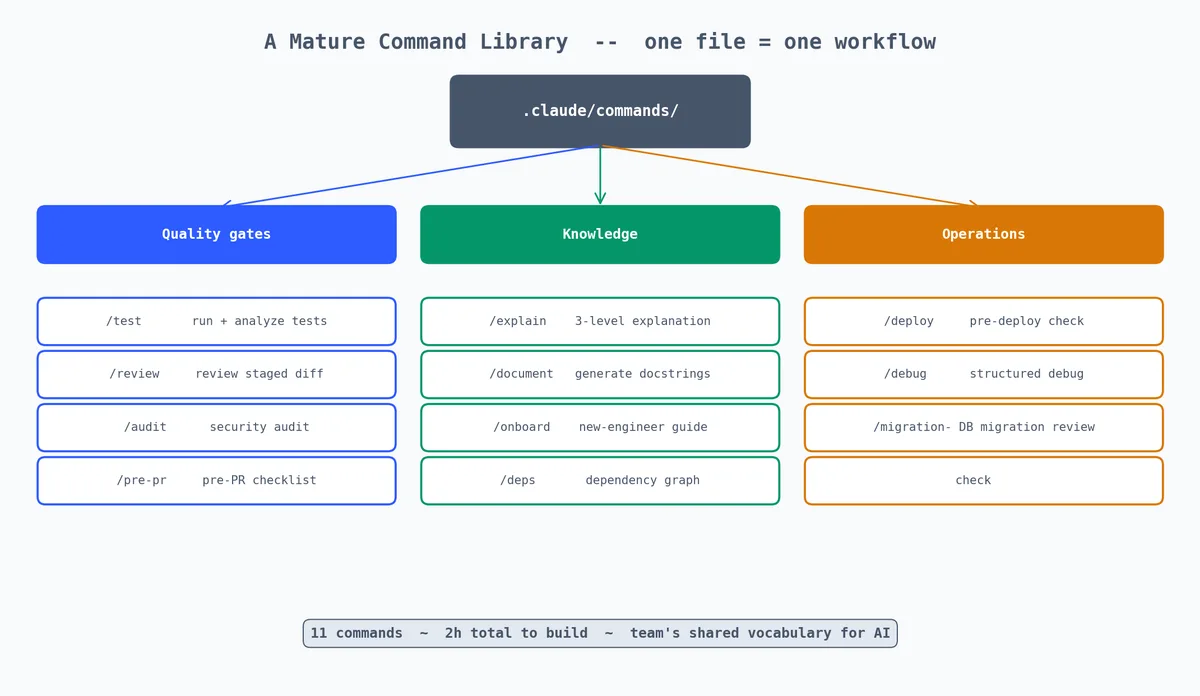
11 commands. Each one is a workflow that used to be either (a) done manually with multiple steps, or (b) not done at all because it was too tedious.
The total investment to create these: maybe 2 hours spread over two months. The time saved per week: hard to measure, but conservatively 30 minutes per developer. With a team of 5, that’s 2.5 hours per week. The commands paid for themselves in the first week.
The real value isn’t the time savings — it’s the consistency. Every code review covers the same criteria. Every debug session follows the same structure. Every deploy goes through the same checklist. The commands encode the team’s best practices into repeatable workflows.
Next piece: MCP — the protocol that lets Claude Code talk to anything.
Claude Code Hands-On 10 parts
- 01 Claude Code Hands-On (1): Install, the Three-Layer Config, and the # @ /init Trio
- 02 Claude Code Hands-On (2): Shortcuts, the Four-State Toggle, and Thinking Modes
- 03 Claude Code Hands-On (3): Custom Slash Commands and Conversation Control you are here
- 04 Claude Code Hands-On (4): MCP Servers, or How Claude Talks to Anything
- 05 Claude Code Hands-On (5): Hooks, or How to Stop Worrying About Yolo Mode
- 06 Claude Code Hands-On (6): The SDK, GitHub Integration, and Claude in CI
- 07 Claude Code Hands-On (7): Ten Hooks I Actually Use, with the Code
- 08 Claude Code Hands-On (8): Sub-Agents, Worktrees, and Plan Mode
- 09 Claude Code Hands-On (9): settings.json, the Three-Layer Permission Model, and Env
- 10 Claude Code Hands-On (10): Skills, and When to Reach for Each Extension Mechanism


