Claude Code Hands-On (4): MCP Servers, or How Claude Talks to Anything
MCP is the plug-in protocol that lets Claude Code reach beyond your filesystem. Install one (Playwright), see it work end-to-end, and learn the permission model that keeps it from going feral.
If you only learn one extension mechanism in Claude Code, learn MCP. It is the difference between an autocomplete and a platform.

The 60-second pitch#
MCP is Model Context Protocol — a small open spec that lets Claude Code call tools and read resources from external servers. The “server” is any process that speaks MCP over stdio or HTTP. Claude treats MCP tools the same as its built-in tools: the model decides when to call them, you confirm or auto-approve, results come back as text.
This means Claude can:
- Drive a browser (Playwright MCP)
- Query a Postgres database (Postgres MCP)
- Read your Notion or Obsidian vault
- Talk to your internal API
- Anything you wrap in a 200-line Node script
MCP servers are mostly community-built. There’s a catalog at mcp.so and a growing one inside Anthropic’s docs. The good ones are short, focused, and honest about what they do.
Understanding the MCP protocol#
Before installing anything, it helps to understand what’s actually happening under the hood. MCP is a JSON-RPC 2.0 protocol with a specific lifecycle:
1. Initialization. Claude Code spawns the MCP server process (or connects to a remote one). The two sides exchange capabilities in an initialize handshake. The server declares what it supports — tools, resources, prompts — and the client confirms what it wants to use.
2. Discovery. Claude Code calls tools/list to get the full catalog of available tools. Each tool comes with a name, description, and a JSON Schema for its input. This is how the model knows what it can call and what arguments to pass.
3. Invocation. During a conversation, when the model decides to use an MCP tool, Claude Code sends a tools/call request with the tool name and arguments. The server executes the logic and returns a result — text, images, or structured data.
4. Shutdown. When Claude Code exits or you remove the server, it sends a shutdown notification and terminates the process.
The entire protocol spec is surprisingly short. You can read it at spec.modelcontextprotocol.io in about 30 minutes. The key insight is that MCP is stateless between calls — each tools/call is independent. The server doesn’t need to track conversation context; Claude Code handles that.

Four phases of an MCP session. Init and Discover happen once at startup; Invoke is the only loop the model exercises during a conversation; Shutdown fires when Claude Code exits or you remove the server.
Stdio vs SSE transport#
MCP supports two transport mechanisms, and understanding the difference matters for how you configure and debug servers:
Stdio transport is the default and most common. Claude Code spawns the MCP server as a child process and communicates over stdin/stdout. Each JSON-RPC message is written as a line to stdout; Claude Code writes requests to the process’s stdin.
Advantages of stdio:
- Zero network configuration
- No port conflicts
- Process lifecycle managed automatically
- Works behind firewalls and VPNs
- Simplest to debug — you can just read the pipe
SSE (Server-Sent Events) transport is for remote servers. The MCP server runs as an HTTP service, and Claude Code connects to it via Server-Sent Events for server-to-client messages and HTTP POST for client-to-server messages.
Advantages of SSE:
- Server can run on a different machine
- Multiple clients can share one server instance
- Server persists across Claude Code sessions
- Can be deployed behind a reverse proxy with auth
In practice, 90% of the MCP servers you’ll use are stdio. SSE is for when you need a shared service — a company-wide database proxy, a centralized tool server, etc.
| |

Stdio is the local default — single client, single child process, zero network. SSE inverts the topology: one long-running server, many clients, but you now own the deployment.
Install your first MCP server#
Playwright is the canonical “first MCP” because it makes the value obvious. From your shell — not inside Claude Code:

The MCP server is its own process. Claude Code talks to it over stdio (or HTTP, for remote servers). Tools are discovered at handshake — Claude asks “what can you do?” and the server replies with a list of tool schemas. From then on, the model can call those tools as if they were built-in.
Step-by-step: Playwright MCP#
Playwright MCP gives Claude a real browser. Not a headless scraper — a full Chromium instance it can navigate, click, screenshot, and inspect.
| |
After adding, restart Claude Code (or start a new session). You should see the Playwright tools in the tool list. Try a simple prompt:
| |
Claude will call browser_navigate, then browser_snapshot to read the page content, and summarize the results. The first time each tool is called, you’ll get a permission prompt.
Here’s what the actual tool calls look like in a session:
| |
Step-by-step: Filesystem MCP#
The filesystem MCP server gives Claude controlled access to directories outside your project root. By default, Claude Code can only read and write files within the current working directory. The filesystem MCP extends that — with guardrails.
| |
Now you can ask Claude things like:
| |
| |
The filesystem server enforces a strict allowlist. Even if the model tries to read /etc/passwd, the server returns an error. This is sandbox-by-design.
Step-by-step: GitHub MCP#
The GitHub MCP server gives Claude direct access to the GitHub API — issues, PRs, repos, and more. It’s richer than shelling out to gh because the model gets structured data back.
| |
Now Claude can:
| |
| |
| |
The GitHub MCP exposes tools for repositories, issues, pull requests, branches, files, and search. It’s one of the most tool-rich MCP servers — around 30+ tools.
Step-by-step: Postgres MCP#
The Postgres MCP server connects Claude to a PostgreSQL database. It’s designed for read-only exploration — analyzing schemas, running queries, explaining table structures.
| |
Now you can have conversations like:
| |
| |
| |
The server runs queries against your database and returns results as formatted text. A few safety notes:
- Use a read-only database user. The server doesn’t enforce read-only mode itself.
- Don’t point it at production with a write-capable user. Use a replica.
- Connection strings with passwords end up in your settings file. Use environment variables instead:
| |
Step-by-step: Slack MCP#
The Slack MCP server lets Claude search your Slack workspace, read channels, and post messages.
| |
Useful prompts:
| |
| |
| |
This one is powerful but I keep it on per-call confirmation. A tool that can post messages to your entire company’s Slack deserves careful supervision.
Configuration in settings.json#
When you run claude mcp add, the server gets registered in .claude/settings.json. Here’s what that looks like for a multi-server setup:
| |
A few things to notice:
- Environment variables are referenced with
${VAR}syntax. Claude Code resolves them at startup. Never hardcode secrets in settings files. - The
argsarray is passed directly to the command. No shell interpolation happens here. - Server names (like
playwright,github) are how you’ll reference them in permissions and in conversation.
Configuration scopes#
MCP servers can be registered at three levels:
| Scope | File | Applies to |
|---|---|---|
| Project | .claude/settings.json | Everyone who clones this repo |
| User-project | .claude/settings.local.json | Only you, in this repo |
| Global | ~/.claude/settings.json | All your projects |
Project-level is for servers the whole team should use (Playwright for testing, database for exploration). User-project is for personal productivity servers (your Obsidian vault, your private APIs). Global is for servers you want everywhere (filesystem access to your dotfiles).

Scopes resolve from most-specific to broadest. Use project-scope for servers you want committed to the repo, user-project for your personal tokens, global for cross-project utilities.
Permissions — the part you must not skip#

Every MCP tool has a permission level. The first time the model calls one, you get a confirmation dialog. You have three options:
- Allow once — for this call only
- Allow for this session — until you
/clearor quit - Always allow — written into
.claude/settings.json
I do not recommend “always allow” for any MCP that mutates state. Read-only tools (search, fetch, query) — sure. Anything that writes files, sends messages, or hits an API with side effects — confirm every time, or scope the permission narrowly.
The right pattern in .claude/settings.json:
| |
This auto-allows read-only operations and blocks anything that mutates external state. Per-tool granularity.
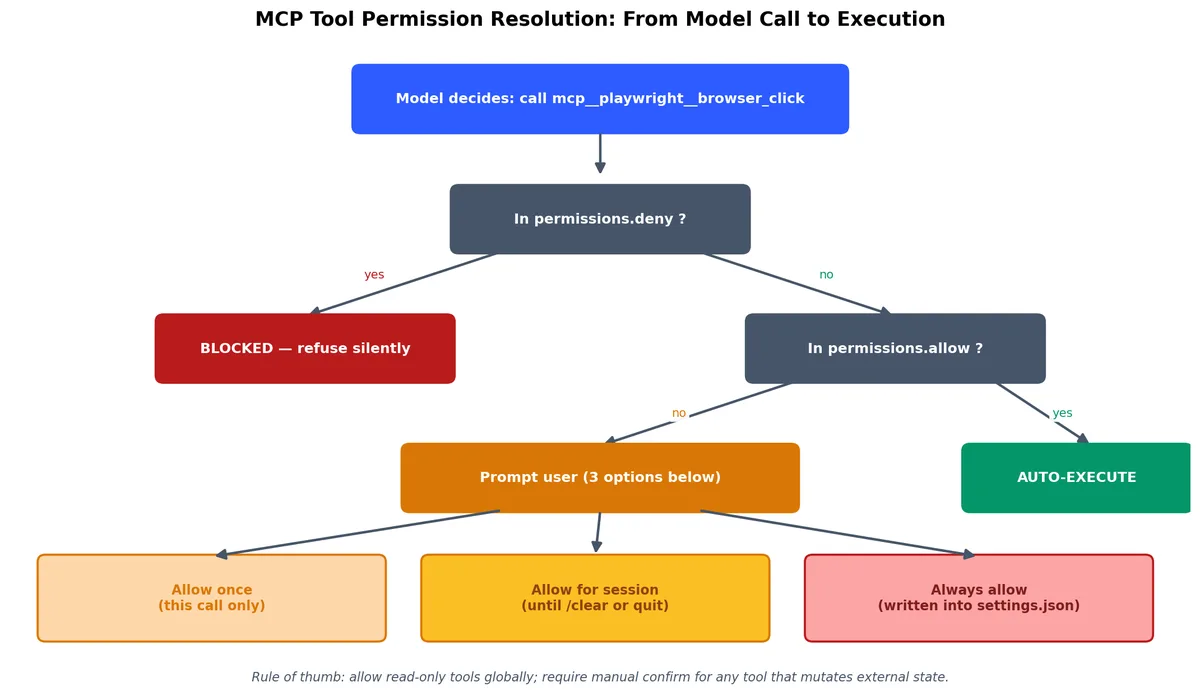
Every MCP tool call walks this tree. The deny list short-circuits before anything else; allow-listed tools auto-execute; everything in between hits the three-option prompt.
Permission naming convention#
MCP tool permissions follow the pattern mcp__SERVERNAME__TOOLNAME. The double underscore is intentional. You can also use regex patterns:
| |
If you want to allow all tools from a server (for read-only servers), you can be more permissive. But I prefer explicit allowlists.
Common permissions gotchas#
Gotcha 1: npx downloads on first run. The first time an MCP server runs, npx may download the package. This takes a few seconds and looks like the server is hanging. It’s not broken — just wait.
Gotcha 2: Permission prompt fatigue. If you’re getting a permission prompt on every single MCP call, you’re doing it wrong. Add the safe, read-only tools to your allow list. Keep the write tools on manual confirmation.
Gotcha 3: Env vars not resolved. If your server needs environment variables and they’re not set in your shell, the server will fail silently or with a cryptic error. Always verify with echo $VAR_NAME before blaming the MCP server.
Gotcha 4: Server name collisions. If two settings files (e.g., project and global) define the same server name, the more specific one wins. This can be confusing if you expect the global config to apply.
Useful MCP servers I actually use#
After trying ~30, the ones that earned a permanent spot:
| Server | Package | What it does | Why it’s worth it |
|---|---|---|---|
| Playwright | @anthropic-ai/mcp-playwright | Browser automation | Replaces a dozen hand-rolled scrapers |
| Postgres | @modelcontextprotocol/server-postgres | Read-only Postgres queries | “Show me the rows” without leaving Claude |
| Filesystem | @modelcontextprotocol/server-filesystem | Sandboxed file access outside project root | Read configs in ~/.config/ etc. |
| Slack | @anthropic-ai/mcp-slack | Search Slack history, post to channels | Standup summaries write themselves |
| GitHub | @modelcontextprotocol/server-github | Issue and PR access via GitHub API | Cleaner than CLI for some queries |
| Fetch | @anthropic-ai/mcp-fetch | HTTP GET/POST to any URL | Quick API exploration, web fetching |
The pattern: each does one thing well, ships as a single npm or PyPI package, and exposes 3-10 tools.
Servers I evaluated and dropped#
Not every MCP server is worth keeping. Here are some I tried and why I removed them:
| Server | Why I dropped it |
|---|---|
| Memory server | Interesting concept but the model’s built-in context is usually enough |
| Brave Search | Rate limits hit fast; WebSearch built-in tool is often sufficient |
| SQLite | Postgres server covers my needs; didn’t need a second database tool |
| Docker | Too much power with too little guardrails; prefer scripting Docker commands directly |
Debugging MCP connection issues#
Things will go wrong. Here’s a systematic approach to debugging MCP servers.
Step 1: Check the server is registered#
| |
You should see your server in the list with its command and args. If it’s not there, re-add it.
Step 2: Test the server standalone#
Run the server command directly in your terminal:
| |
Step 3: Check for error output#
When a server fails inside Claude Code, the error often shows up in Claude Code’s own output. Look for lines like:
| |
Common causes:
| Error | Cause | Fix |
|---|---|---|
ENOENT | npx not found | Ensure Node.js is in your PATH |
ECONNREFUSED | SSE server not running | Start the remote server first |
timeout | Server took too long to initialize | Check if npx is downloading a package |
unexpected token | Version mismatch | Clear npx cache: npx clear-npx-cache |
Step 4: Enable verbose logging#
| |
This shows the raw JSON-RPC messages between Claude Code and the MCP server. You’ll see exactly where the communication breaks down.
Step 5: Check environment variables#
| |
MCP servers fail silently when required environment variables are missing. The server starts, the handshake succeeds, but the first tool call fails with an auth error.
What MCP isn’t#
A few things to be clear about:
- Not a sandbox. An MCP server runs with your user permissions. A malicious server can do whatever you can do. Vet what you install.
- Not a fast path. Each MCP tool call is a process roundtrip. Latency is real. Don’t use MCP for things you’d put in a hot loop.
- Not the only way. For one-off integrations, a slash command that runs a shell script is sometimes the right answer. MCP is for things you’ll call repeatedly across sessions.
- Not a streaming interface. MCP tools return complete results, not streams. If you need real-time data, you need a different approach.
Building a custom MCP server — complete example#
If you want to build your own, the SDK is @modelcontextprotocol/sdk for Node or mcp for Python. Let me walk through a real example: a server that queries a REST API and exposes it as tools.
The scenario#
You have an internal API at https://api.internal.company.com that manages deployments. You want Claude to be able to list deployments, check their status, and trigger rollbacks. Instead of teaching Claude to use curl, you build an MCP server.
Project setup#
| |
The full server#
| |
Register it with Claude Code#
| |
Or with environment variables:
| |
Set up permissions#
In .claude/settings.json:
| |
Notice I left rollback_deployment off the allow list. That one stays on manual confirmation because it mutates production state.

The whole point of building your own server: domain operations become first-class tools, and the permission boundary lives in settings.json instead of in the model’s judgment.
Using it in practice#
Now in Claude Code, you can have conversations like:
| |
This is the power of MCP: domain-specific operations feel like natural conversation, but with full control over what’s allowed.
Building in Python#
If TypeScript isn’t your thing, the Python SDK is equally capable:
| |
Register it:
| |
The Python SDK uses type hints and docstrings to auto-generate the tool schemas. Less boilerplate than the TypeScript version.
Real workflow examples#
Workflow 1: Testing a web app end-to-end#
With Playwright MCP installed, you can ask Claude to test your app like a real user:
| |
Claude will navigate, fill in the form, click submit, check the resulting URL, and report back. If something breaks, it can screenshot the error state and read the console logs.
Workflow 2: Database-driven debugging#
With Postgres MCP:
| |
Claude runs the queries, correlates the data, and gives you a diagnosis. No context-switching to a SQL client.
Workflow 3: Cross-referencing GitHub and Slack#
With both GitHub and Slack MCP:
| |
This kind of cross-system correlation is where MCP really shines. Each server does one thing; Claude orchestrates.
MCP server management commands#
Here’s the full reference for managing MCP servers via the CLI:
| |
What to build next#
If you’ve made it this far, you have MCP servers installed, configured, and you understand the protocol. The natural progression:
- Start with pre-built servers. Install 2-3 from the list above.
- Get comfortable with permissions. Build your allowlist over a week of use.
- Build a custom server for your team’s internal tools.
- Share it. Commit the server config to your repo’s
.claude/settings.jsonso the team gets it automatically.
The protocol is small enough that you can read the spec in 30 minutes. Building your own is a half-day project for a focused use case. The hard part is choosing what tools to expose; the protocol gets out of the way.
Next piece: hooks — code that runs before and after every tool call. The defensive layer.
Claude Code Hands-On 10 parts
- 01 Claude Code Hands-On (1): Install, the Three-Layer Config, and the # @ /init Trio
- 02 Claude Code Hands-On (2): Shortcuts, the Four-State Toggle, and Thinking Modes
- 03 Claude Code Hands-On (3): Custom Slash Commands and Conversation Control
- 04 Claude Code Hands-On (4): MCP Servers, or How Claude Talks to Anything you are here
- 05 Claude Code Hands-On (5): Hooks, or How to Stop Worrying About Yolo Mode
- 06 Claude Code Hands-On (6): The SDK, GitHub Integration, and Claude in CI
- 07 Claude Code Hands-On (7): Ten Hooks I Actually Use, with the Code
- 08 Claude Code Hands-On (8): Sub-Agents, Worktrees, and Plan Mode
- 09 Claude Code Hands-On (9): settings.json, the Three-Layer Permission Model, and Env
- 10 Claude Code Hands-On (10): Skills, and When to Reach for Each Extension Mechanism