
Claude Code Hands-On (5): Hooks, or How to Stop Worrying About Yolo Mode
Hooks are the shell scripts that run before and after every tool call. PreToolUse can block. PostToolUse can format, lint, log. Five hooks I use on every repo, and the one anti-pattern that bites everyone.
If MCP is how Claude reaches out, hooks are how you reach in. They enforce the rules you care about, not just what you hope for.

The model#
A hook is a shell command that Claude Code runs at specific moments. The two you’ll use most are:
PreToolUse— runs before a tool is invoked. Exit code 0 lets the tool proceed; non-zero blocks it.PostToolUse— runs after a tool returns. Exit code is informational; you can use it to format files, run linters, log.
There are others (UserPromptSubmit, Stop, Notification, SubagentStop). For day-to-day work, those two are 90% of the value.
The complete hook lifecycle#
Let’s walk through what happens when Claude calls a tool and hooks are configured. Understanding this lifecycle is key to writing effective hooks.
PreToolUse — the gatekeeper#
When Claude decides to call a tool, this sequence runs:
- Claude Code resolves the tool name and input arguments.
- It checks the
PreToolUsehooks in settings. Each hook with a matchingmatcheris selected. - Selected hooks run sequentially, in the order they appear in the config.
- Each hook receives the tool call details as JSON on stdin.
- If any hook exits with a non-zero code, the tool call is blocked. The hook’s stderr output is sent back to the model as an error message.
- If all hooks exit with code 0, the tool call proceeds.
The input JSON on stdin looks like this:
| |
And the environment variables available to your hook:
| Variable | Value |
|---|---|
CLAUDE_PROJECT_DIR | Absolute path to the project root |
CLAUDE_SESSION_ID | Current session identifier |
CLAUDE_TOOL_NAME | Name of the tool being called |
PostToolUse — the inspector#
After a tool completes:
- Claude Code collects the tool’s output.
- It checks
PostToolUsehooks with matching matchers. - Selected hooks run sequentially.
- Each hook receives the tool output as JSON on stdin.
- If a hook writes to stdout, that output replaces what the model sees. This is how you can filter, redact, or annotate tool output.
- Exit codes are informational — a non-zero exit doesn’t undo the tool call. But stderr output is logged and can be useful for debugging.
The input JSON for PostToolUse includes both the call and the result:
| |
UserPromptSubmit — the input validator#
Runs before the user’s prompt is sent to the model. Use it to:
- Warn about prompts that contain sensitive data
- Add standard context to every prompt
- Log prompts for audit
| |
Stop — the session closer#
Runs when Claude finishes its response and is about to yield control back to the user. Useful for:
- Generating summary reports
- Cleaning up temporary files
- Sending notifications (“Claude finished the task”)
Notification — the alert handler#
Runs when Claude Code sends a desktop notification (e.g., when a long task completes). Use it to route notifications to other channels like Slack, email, or webhooks.
SubagentStop — the delegation monitor#
Runs when a sub-agent (spawned by the main agent for parallel tasks) completes. Use it for logging or aggregating results from parallel work.
The hook execution model#
A few critical details about how hooks actually run:
Hooks are shell commands, not scripts. The command field is passed to the system shell (/bin/sh -c "..."). This means you can use shell features like pipes and redirects directly:
| |
But for anything beyond a one-liner, use a script file.
Hooks have a timeout. By default, hooks must complete within a few seconds. A hook that hangs will be killed, and the tool call proceeds (or is blocked, depending on the hook type). Don’t make HTTP calls in hooks unless you set a tight timeout.
Hooks run synchronously. Each hook must finish before the next one starts. Five hooks at 200ms each add up to a full second of delay per tool call. Keep hooks fast.
Hooks inherit the Claude Code process environment. They have access to your shell’s environment variables, PATH, and so on. But they don’t run in your interactive shell — no shell aliases, no .bashrc functions.
Stdin is consumed once. If you have multiple hooks for the same event and matcher, each gets its own copy of stdin. You don’t need to worry about one hook consuming the input.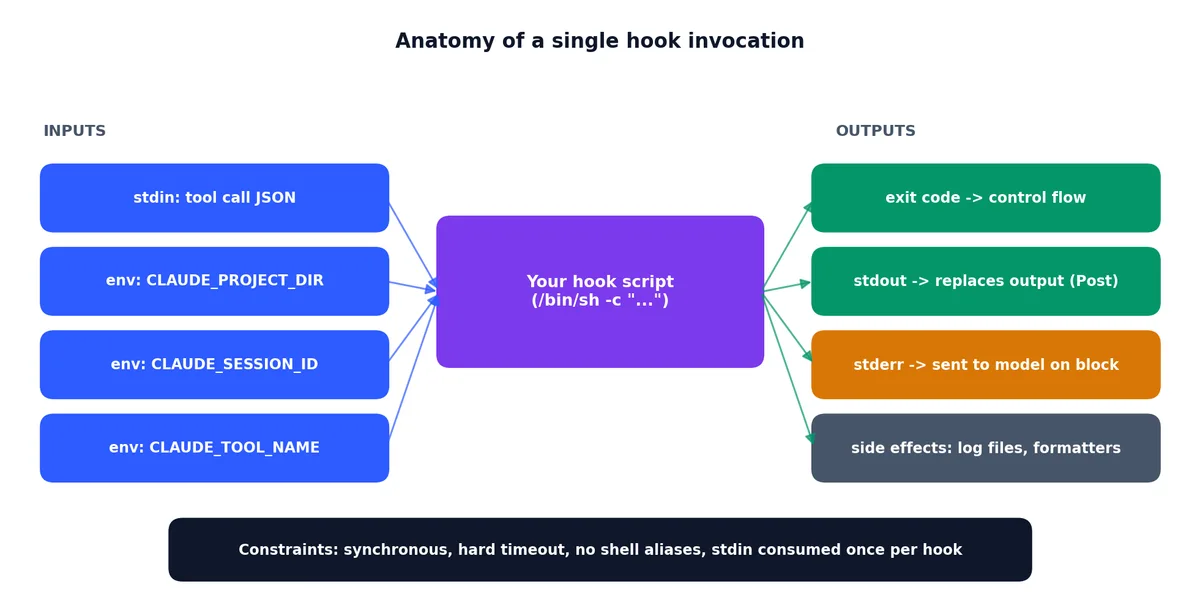
Where hooks live#
In .claude/settings.json (or its local variant). The minimal example:
| |
The matcher decides which tools the hook applies to. "Bash" matches the built-in Bash tool. "Write" matches file writes. "mcp__playwright__.*" matches all Playwright MCP tools. Regex is supported — wildcards are common.
The hook command receives the tool’s input as JSON on stdin and gets the conversation context as environment variables. The simplest possible hook reads stdin, decides, and exits with the appropriate code.
Matcher patterns#
The matcher field is a regex tested against the tool name. Here’s a reference:
| Matcher | Matches |
|---|---|
Bash | Built-in Bash tool only |
Write | File write tool |
Edit | File edit tool |
Read | File read tool |
Write|Edit | Either Write or Edit |
mcp__playwright__.* | All Playwright MCP tools |
mcp__.* | All MCP tools from all servers |
.* | Every tool call |
Use the most specific matcher possible. A .* hook runs on every single tool call — including reads, which happen dozens of times per session. That adds up.
Hook 1: ban dangerous commands#
.claude/hooks/check-bash.sh:
| |
Register it:
| |
PreToolUse matcher Bash. Block exits with code 1; the message on stderr goes back to the model so it knows why and can adapt. This is the difference between “agent crashes silently” and “agent learns to ask permission.”
How the model responds to blocks#
When a PreToolUse hook blocks a tool call, the model receives the stderr message as an error. A well-written error message helps the model recover:
| |
The model will typically acknowledge the block and try an alternative approach. If your message is descriptive enough, it often finds the right alternative on the first try.
Hook 2: auto-format on write#

.claude/hooks/format-on-write.sh:
| |
PostToolUse matcher Write|Edit. Every time Claude touches a file, it gets formatted before the agent sees the next turn. The agent never has to be told about formatting again — your house style is enforced by code.
A few details about this hook:
- It checks for the formatter’s existence with
command -vbefore calling it. The hook degrades gracefully on machines without the tools. - It uses
2>/dev/nullto suppress formatter warnings. These would otherwise pollute the model’s context. - It runs both
ruff formatandruff check --fixfor Python — one for style, one for lint autofixes.
Register it:
| |
Hook 3: log every tool call#
| |
PostToolUse matcher .*. Logs every tool call with timestamp to a JSONL file. One line per call. When something goes wrong — or right — you have a complete audit trail.
I have used this exactly three times. All three were post-mortems where I needed to know “what did Claude actually do during that 40-minute session.” Worth its disk space.
Analyzing the logs#
The JSONL format makes analysis straightforward:
| |
Hook 4: enforce test passing before commit#
| |
PreToolUse matcher Bash. Intercepts git commit calls and runs the test suite first. If tests fail, the commit is blocked and the model is told why. A pre-commit hook for the agent itself.
This sounds aggressive. It is. The point is that you can’t accidentally commit broken code anymore. The model has to actively work around the hook to do the wrong thing, and it doesn’t.
The improved version above auto-detects the test framework based on project files. It supports npm, Make, pytest, and Cargo out of the box.
Hook 5: redact secrets in tool output#
| |
PostToolUse matcher Read|Bash. Filters tool output through a stream redactor before the agent sees it. If you accidentally cat a file with secrets in it, the model never reads them — they get replaced inline with [REDACTED].
This is the single most important security hook for working with real codebases.
The expanded version above covers more secret patterns:
- GitHub tokens (ghp_, gho_, ghs_, ghr_)
- Slack tokens (xoxb-, xoxp-)
- AWS access keys (AKIA…)
- Private key blocks
- Connection strings with embedded passwords
- JWT tokens
- Generic password fields in config files
Testing the redaction hook#
You can test it standalone:
| |
Expected output:
| |
Hook 6: prevent writes to protected files#
A hook I add to every team project:
| |
PreToolUse matcher Write|Edit. Prevents Claude from modifying sensitive files or writing outside the project directory. This is a belt-and-suspenders approach on top of the built-in permissions.
Hook 7: notification on long operations#
| |
Register it on the Notification event:
| |
Error handling in hooks#
Hooks that crash are worse than hooks that don’t exist. Here’s how to make them robust.
Always use set -euo pipefail#
| |
This catches:
set -e: exit on any command failureset -u: error on undefined variablesset -o pipefail: catch failures in piped commands
Handle missing jq gracefully#
Not every machine has jq. If your hook depends on it, check first:
| |
Don’t let hooks fail silently#
If a hook crashes, Claude Code logs the error but proceeds with the tool call (for PostToolUse) or blocks it (for PreToolUse). A crashing PreToolUse hook means nothing gets through. Test your hooks.
Trap and cleanup#
If your hook creates temporary files:
| |
Testing hooks locally#
You don’t need to run Claude Code to test hooks. They’re just scripts that read stdin and exit with a code.
Manual testing#
| |
Automated test script#
I keep a test file alongside my hooks:
| |
Run it with bash .claude/hooks/test-hooks.sh. Add it to your CI if you want to make sure hooks stay valid.
Hook performance considerations#
Every hook adds latency. Here’s how to keep it manageable.
Measure your hooks#
| |
Target: under 50ms per hook. Anything over 200ms is noticeable.
Common performance traps#
| Trap | Cost | Fix |
|---|---|---|
npm test in PreToolUse | Seconds | Cache test results, only re-run on file change |
| HTTP calls to external APIs | 100ms-5s | Use timeouts, or move to async PostToolUse |
| Reading large files | Variable | Use head or tail instead of full reads |
Multiple jq invocations | 10ms each | Chain jq filters in a single call |
| Starting Python/Node interpreter | 100-300ms | Use bash for simple hooks |
Performance budget#
A reasonable budget:
| |
If you have 5 hooks at 100ms each, every tool call costs an extra 500ms. With 50 tool calls in a session, that’s 25 seconds of pure hook overhead. Keep it lean.
Composing multiple hooks#
You can have multiple hooks for the same event and matcher. They run in order:
| |
Order matters for PreToolUse: put the fastest checks first (string matching) and the slowest checks last (running tests). If an early hook blocks, the later ones never run.
You can also combine different matchers:
| |
The anti-pattern: relative paths#

The most common hook bug is using a relative command path:
| |
Claude Code runs the hook from a working directory you don’t control. Always use absolute paths or use the $CLAUDE_PROJECT_DIR environment variable:
| |
Same for the scripts themselves. Inside a hook, don’t cd and don’t use relative paths.
Other common anti-patterns#
Anti-pattern: hooks that modify tool input. PreToolUse hooks can block, but they cannot change the tool’s arguments. If you want to modify what the tool does, you need a different approach (like a slash command wrapper).
Anti-pattern: hooks that depend on network. A hook that calls a remote API will slow down every tool call and can fail intermittently. If you need remote logging, buffer locally and flush asynchronously.
Anti-pattern: hooks that shell out to heavy processes. Starting Python, Node, or Docker in a hook is expensive. Stick to bash, jq, grep, and sed for hot-path hooks.
Anti-pattern: overly broad matchers. A .* PostToolUse hook that does heavy processing will run on every Read, every Bash, every Edit. That’s hundreds of times per session. Be specific.
A complete production hook setup#
Here’s the full .claude/settings.json hooks section I use as a starting point for new projects:
| |
This gives you:
- Dangerous command blocking (PreToolUse on Bash)
- Protected file enforcement (PreToolUse on Write/Edit)
- Auto-formatting (PostToolUse on Write/Edit)
- Secret redaction (PostToolUse on Read/Bash)
- Completion notifications (Notification)
Five hooks. Each under 50 lines. Total overhead under 200ms per tool call. Covers 90% of what you need for safe, automated Claude Code usage.
Where hooks fit in the team workflow#
Hooks committed to .claude/settings.json apply to everyone. That’s the point. A new teammate clones the repo, runs claude, and inherits your safety rails and your formatting policy automatically. No setup, no opt-in.
For personal-only hooks (e.g. ones that depend on your specific tools), put them in .claude/settings.local.json instead. They stay on your disk.
What hooks are not#
- Not a substitute for permissions. A hook can supplement permissions but should not replace them. Permissions are declarative and explicit; hooks are executable and easy to misconfigure.
- Not a free check. Every hook adds latency to every tool call. Five hooks at 100ms each is half a second per tool call. Watch the budget.
- Not Turing-complete configuration. When the hook starts looking like a small program, you’re better off building an MCP server.
- Not a security boundary. Hooks run in the same process context as Claude Code. A sufficiently creative model could potentially work around them. They’re guardrails, not firewalls.
Next piece is the SDK and GitHub integration — programmatic Claude Code, in CI, against PRs. The end of the series and the most powerful piece.
Claude Code Hands-On 10 parts
- 01 Claude Code Hands-On (1): Install, the Three-Layer Config, and the # @ /init Trio
- 02 Claude Code Hands-On (2): Shortcuts, the Four-State Toggle, and Thinking Modes
- 03 Claude Code Hands-On (3): Custom Slash Commands and Conversation Control
- 04 Claude Code Hands-On (4): MCP Servers, or How Claude Talks to Anything
- 05 Claude Code Hands-On (5): Hooks, or How to Stop Worrying About Yolo Mode you are here
- 06 Claude Code Hands-On (6): The SDK, GitHub Integration, and Claude in CI
- 07 Claude Code Hands-On (7): Ten Hooks I Actually Use, with the Code
- 08 Claude Code Hands-On (8): Sub-Agents, Worktrees, and Plan Mode
- 09 Claude Code Hands-On (9): settings.json, the Three-Layer Permission Model, and Env
- 10 Claude Code Hands-On (10): Skills, and When to Reach for Each Extension Mechanism