Claude Code Hands-On (7): Ten Hooks I Actually Use, with the Code
Picking ten hooks out of the 100 in the reference repo and walking through each: what it does, the actual JS, the settings.json wire-up, and where it bites. PreToolUse for safety, PostToolUse for hygiene, the boring ones that earn their keep.
Chapter 5
provided a conceptual tour of hooks. This chapter is the field guide. From the 100-script reference repo, ten scripts earn their place in every serious project I run. I’ll walk through these ten with code.
All examples assume Node 18+, save scripts to ./hooks/, mark them chmod +x, and wire them in .claude/settings.json like:
Before we dive in, here’s the hook lifecycle to make the following code clear:
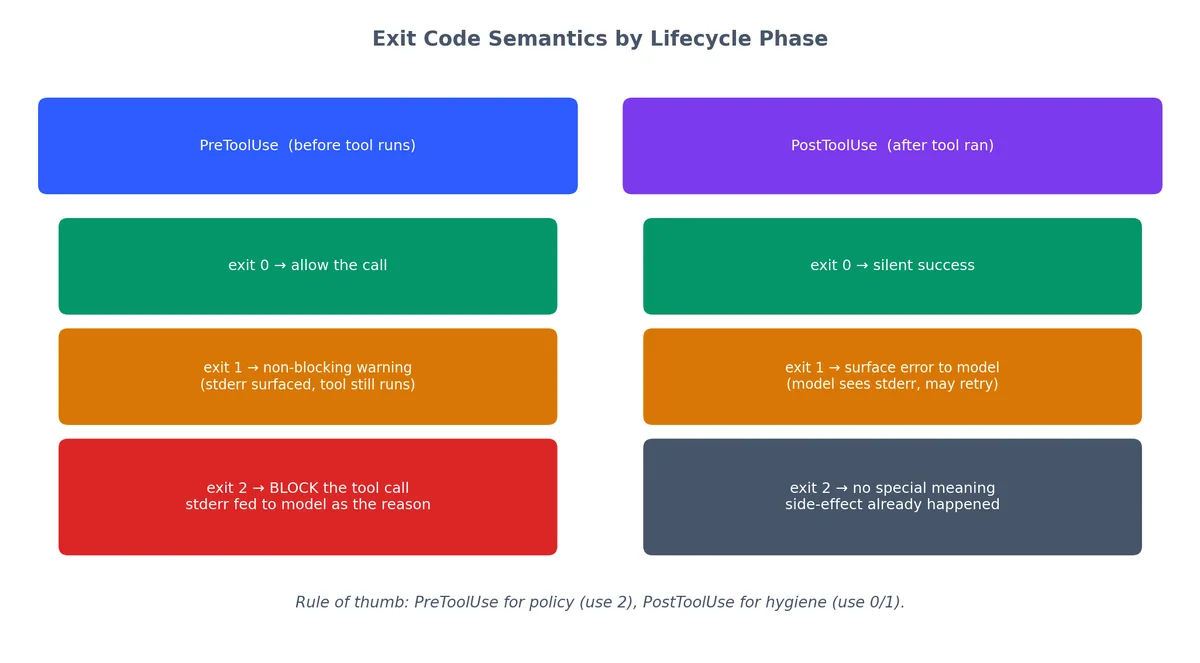
PreToolUse fires before Claude executes a tool. Exit code 0 means “allow.” Exit code 2 means “block this call.” Anything you write to stderr gets fed back to the model as an explanation.
PostToolUse fires after the tool returns. Exit code 1 surfaces errors to the model. Exit code 2 has no special meaning here — the action already happened.
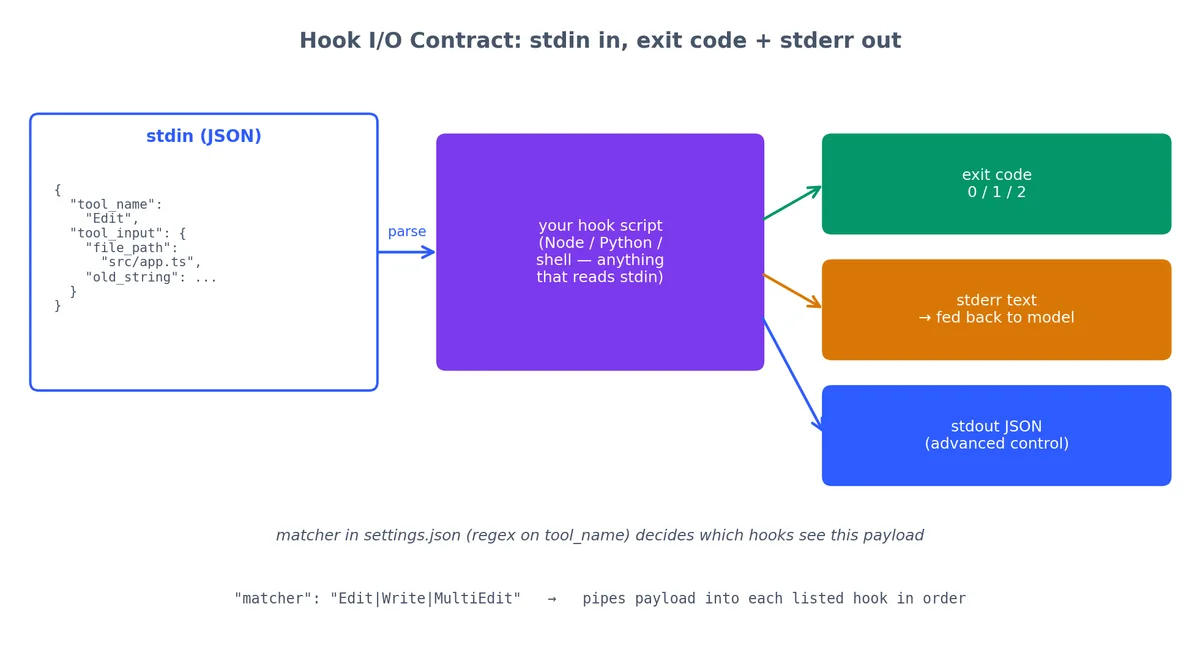
stdin carries a JSON payload with tool_name and tool_input. Every hook reads from stdin.
The common preamble for all hooks:
1
2
3
4
5
6
7
8
9
#!/usr/bin/env node
constchunks=[];process.stdin.on('data',c=>chunks.push(c));process.stdin.on('end',()=>{constt=JSON.parse(Buffer.concat(chunks).toString());// t.tool_name → "Read", "Bash", "Edit", etc.
// t.tool_input → the arguments Claude passed to the tool
main(t);});
I will skip that preamble in some listings below for brevity, but every real hook starts with it.
Each hook is a script that reads a JSON payload from stdin and signals back with an exit code (verdict) and stderr (explanation). The matcher in settings.json determines which hooks handle each tool call.
#!/usr/bin/env node
// hooks/block-env-read.js
// PreToolUse on Read|Grep|Edit|Write|MultiEdit
constchunks=[];process.stdin.on('data',c=>chunks.push(c));process.stdin.on('end',()=>{constt=JSON.parse(Buffer.concat(chunks).toString());constp=t.tool_input?.file_path||t.tool_input?.path||t.tool_input?.pattern||"";constsensitive=['.env','.env.local','.env.production','credentials.json','secrets.yaml','secrets.yml','id_rsa','id_ed25519','.aws/credentials','.gcloud/credentials.json','service-account.json','.npmrc',// can contain tokens
'.pypirc',// can contain tokens
];if(sensitive.some(s=>p.includes(s))){console.error(`Blocked: "${p}" matches sensitive pattern. If you need values from this file, ask the user to provide them directly.`);process.exit(2);}process.exit(0);});
When this hook blocks a call, Claude receives the stderr text as feedback. A real session looks like this:
1
2
3
4
5
Claude: I'll read the environment configuration...
[Hook blocked Read on .env.local]
Claude: I can't read .env.local directly as it contains sensitive data.
Could you share the specific variable names you'd like me to use?
For example: DATABASE_URL, API_KEY, etc.
The model recovers gracefully because the stderr message tells it what to do instead.
#!/usr/bin/env node
// hooks/bash-blacklist.js
// PreToolUse on Bash
constchunks=[];process.stdin.on('data',c=>chunks.push(c));process.stdin.on('end',()=>{constt=JSON.parse(Buffer.concat(chunks).toString());constcmd=t.tool_input?.command||"";constbanned=[{re:/rm\s+-rf\s+\/(\s|$)/,desc:"recursive delete from root"},{re:/rm\s+-rf\s+~(\s|$)/,desc:"recursive delete home directory"},{re:/:\(\)\s*\{.*:\|:.*\}\s*;:/,desc:"fork bomb"},{re:/mkfs\./,desc:"format filesystem"},{re:/dd\s+if=.*of=\/dev\//,desc:"raw disk write"},{re:/chmod\s+-R\s+777\s+\//,desc:"world-writable root"},{re:/>\s*\/dev\/sd[a-z]/,desc:"redirect to raw disk"},{re:/curl.*\|\s*(sudo\s+)?bash/,desc:"pipe-to-bash from internet"},{re:/wget.*\|\s*(sudo\s+)?bash/,desc:"pipe-to-bash from internet"},];constmatch=banned.find(b=>b.re.test(cmd));if(match){console.error(`Blocked: command matches dangerous pattern "${match.desc}". Command: ${cmd.substring(0,100)}`);process.exit(2);}process.exit(0);});
The regex list is short on purpose. Long blocklists get ignored when they cause false positives. A blocklist with 50 rules will inevitably block rm -rf ./node_modules and you will disable the whole hook in frustration.
#!/usr/bin/env node
// hooks/bash-whitelist.js
// PreToolUse on Bash
constchunks=[];process.stdin.on('data',c=>chunks.push(c));process.stdin.on('end',()=>{constt=JSON.parse(Buffer.concat(chunks).toString());constcmd=t.tool_input?.command||"";constallow=newSet([// filesystem reads
'ls','cat','head','tail','wc','find','file','stat',// search
'grep','rg','ag','awk','sed',// build tools
'npm','npx','node','python','python3','pip','pip3','cargo','rustc','go',// version control (read-only)
'git',// network (read-only)
'curl','wget',// data processing
'jq','yq','sort','uniq','cut','tr',// system info
'echo','printf','date','env','which','type',]);// Extract the first command in the pipeline
constsegments=cmd.trim().split(/[|;&]/);for(constsegofsegments){consttrimmed=seg.trim();if(!trimmed)continue;constfirst=(trimmed.split(/\s+/)[0]||"").split('/').pop();if(first==='sudo'){console.error(`Blocked: sudo is never allowed.`);process.exit(2);}if(!allow.has(first)){console.error(`Blocked: "${first}" is not on the allowlist. Allowed: ${[...allow].sort().join(', ')}`);process.exit(2);}}process.exit(0);});
Whitelists succeed where blocklists fail: you can’t accidentally allow something new. New binaries are blocked by default. The tradeoff is maintenance—you need to add every legitimate tool.
I use the blacklist on dev machines and the whitelist on anything production-adjacent.
#!/usr/bin/env node
// hooks/block-git-push.js
// PreToolUse on Bash
constchunks=[];process.stdin.on('data',c=>chunks.push(c));process.stdin.on('end',()=>{constt=JSON.parse(Buffer.concat(chunks).toString());constcmd=t.tool_input?.command||"";// Block any form of git push
constpushPatterns=[/\bgit\s+push\b/,/\bgit\s+.*--force\b/,/\bgit\s+push-all\b/,];if(pushPatterns.some(re=>re.test(cmd))){console.error("Blocked: git push must be human-initiated. "+"Please ask the user to run the push command themselves.");process.exit(2);}// Also block force-operations on protected branches
constprotectedBranchOps=[/\bgit\s+branch\s+-[dD]\s+(main|master|production|staging)\b/,/\bgit\s+reset\s+--hard\b/,/\bgit\s+checkout\s+--\s+\./,/\bgit\s+clean\s+-f/,];if(protectedBranchOps.some(re=>re.test(cmd))){console.error("Blocked: destructive git operation on protected branch. "+"Ask the user to confirm and run this manually.");process.exit(2);}process.exit(0);});
#!/usr/bin/env node
// hooks/format-on-write.js
// PostToolUse on Write|Edit|MultiEdit
const{execSync}=require('child_process');constpath=require('path');constchunks=[];process.stdin.on('data',c=>chunks.push(c));process.stdin.on('end',()=>{constt=JSON.parse(Buffer.concat(chunks).toString());constfilePath=t.tool_input?.file_path||t.tool_input?.path||"";if(!filePath)process.exit(0);// Only format files Prettier knows about
constformattable=/\.(ts|tsx|js|jsx|json|md|mdx|css|scss|less|html|yaml|yml|graphql)$/;if(!formattable.test(filePath)){process.exit(0);}try{// Use the project-local prettier if available, fall back to npx
constprettierBin=(()=>{try{execSync('npx prettier --version',{stdio:'pipe'});return'npx prettier';}catch{return'prettier';}})();execSync(`${prettierBin} --write "${filePath}"`,{stdio:'pipe',timeout:10000,// 10 second timeout
});console.error(`Formatted: ${path.basename(filePath)}`);}catch(e){// Don't fail the whole operation if Prettier chokes
console.error(`Warning: Prettier failed on ${filePath}: ${e.message}`);}process.exit(0);});
The same exit code means different things depending on the lifecycle phase. Exit 2 only blocks in PreToolUse. In PostToolUse, the side-effect has already occurred.
PostToolUse runs after the edit. Exit code 2 does not roll anything back — the side-effect already happened. Using exit 1 would surface the error to the model, which might then try to “fix” a formatting issue by re-editing the file, creating a loop. For formatting, just log the warning and move on.
Claude: I'll update the component...
[Edit applied to src/components/Header.tsx]
[PostToolUse hook] Formatted: Header.tsx
Claude: Done. The component now accepts a `subtitle` prop.
The format happens silently. Claude does not even mention it.
#!/usr/bin/env node
// hooks/test-on-edit.js
// PostToolUse on Edit|MultiEdit
const{execSync}=require('child_process');constpath=require('path');constfs=require('fs');constchunks=[];process.stdin.on('data',c=>chunks.push(c));process.stdin.on('end',()=>{constt=JSON.parse(Buffer.concat(chunks).toString());constfilePath=t.tool_input?.file_path||"";// Only trigger for source files, not tests or config
if(!/\/(src|lib|app|packages)\/.*\.(ts|tsx|js|jsx)$/.test(filePath)){process.exit(0);}// Skip if no test script exists
constpkgPath=path.resolve('package.json');if(!fs.existsSync(pkgPath))process.exit(0);constpkg=JSON.parse(fs.readFileSync(pkgPath,'utf8'));consthasRelated=pkg.scripts?.['test:related'];consthasTest=pkg.scripts?.test;try{if(hasRelated){// Run only tests related to the changed file
execSync(`npm run -s test:related -- "${filePath}"`,{stdio:'inherit',timeout:60000,});}elseif(hasTest){// Fall back to full test suite
execSync('npm run -s test',{stdio:'inherit',timeout:120000,});}}catch(e){console.error(`Tests failed after editing ${path.basename(filePath)}.`);console.error("Review the test output above and fix the issue.");process.exit(1);// 1 = surface error to the model
}process.exit(0);});
Claude: I'll update the validation logic...
[Edit applied to src/validators/email.ts]
[Running test:related for email.ts...]
FAIL tests/validators/email.test.ts
✕ rejects emails without @ symbol (3ms)
Expected: false
Received: true
Tests failed after editing email.ts.
Review the test output above and fix the issue.
Claude: The test shows my regex change broke the @ validation.
Let me fix the pattern...
[Edit applied to src/validators/email.ts]
[Running test:related for email.ts...]
PASS tests/validators/email.test.ts
✓ rejects emails without @ symbol (2ms)
✓ accepts valid emails (1ms)
Claude: Fixed. The regex now correctly requires an @ symbol.
Over time, across many sessions, this hook trains the model to write code that matches your test expectations on the first try. It is the most valuable hook in this entire list.
#!/usr/bin/env node
// hooks/backup-before-edit.js
// PreToolUse on Edit|Write|MultiEdit
constfs=require('fs');constpath=require('path');constchunks=[];process.stdin.on('data',c=>chunks.push(c));process.stdin.on('end',()=>{constt=JSON.parse(Buffer.concat(chunks).toString());constfilePath=t.tool_input?.file_path||t.tool_input?.path||"";if(!filePath)process.exit(0);if(fs.existsSync(filePath)){constbackupDir='/tmp/cc-backups';if(!fs.existsSync(backupDir)){fs.mkdirSync(backupDir,{recursive:true});}consttimestamp=Date.now();constsafeName=filePath.replace(/\//g,'_');constbackupPath=`${backupDir}/${timestamp}-${safeName}`;try{fs.copyFileSync(filePath,backupPath);// Keep a manifest for easy recovery
constmanifest=`${backupDir}/manifest.log`;constentry=`${newDate().toISOString()} | ${filePath} -> ${backupPath}\n`;fs.appendFileSync(manifest,entry);}catch(e){// If backup fails, still allow the edit — don't block work for insurance
console.error(`Warning: could not back up ${filePath}: ${e.message}`);}}process.exit(0);// Always allow — this is a safety net, not a gate
});
#!/usr/bin/env node
// hooks/log-tool-calls.js
// PostToolUse on * (all tools)
constfs=require('fs');constpath=require('path');constchunks=[];process.stdin.on('data',c=>chunks.push(c));process.stdin.on('end',()=>{constt=JSON.parse(Buffer.concat(chunks).toString());constlogDir='.claude';if(!fs.existsSync(logDir)){fs.mkdirSync(logDir,{recursive:true});}constlogFile=path.join(logDir,'tool-calls.jsonl');// Build a compact log entry
constentry={ts:newDate().toISOString(),tool:t.tool_name,input:t.tool_input,};// For Bash, also capture the command for easy grepping
if(t.tool_name==='Bash'){entry.cmd=(t.tool_input?.command||"").substring(0,500);}// For file operations, capture the path
if(t.tool_input?.file_path){entry.file=t.tool_input.file_path;}constline=JSON.stringify(entry)+"\n";fs.appendFileSync(logFile,line);process.exit(0);});
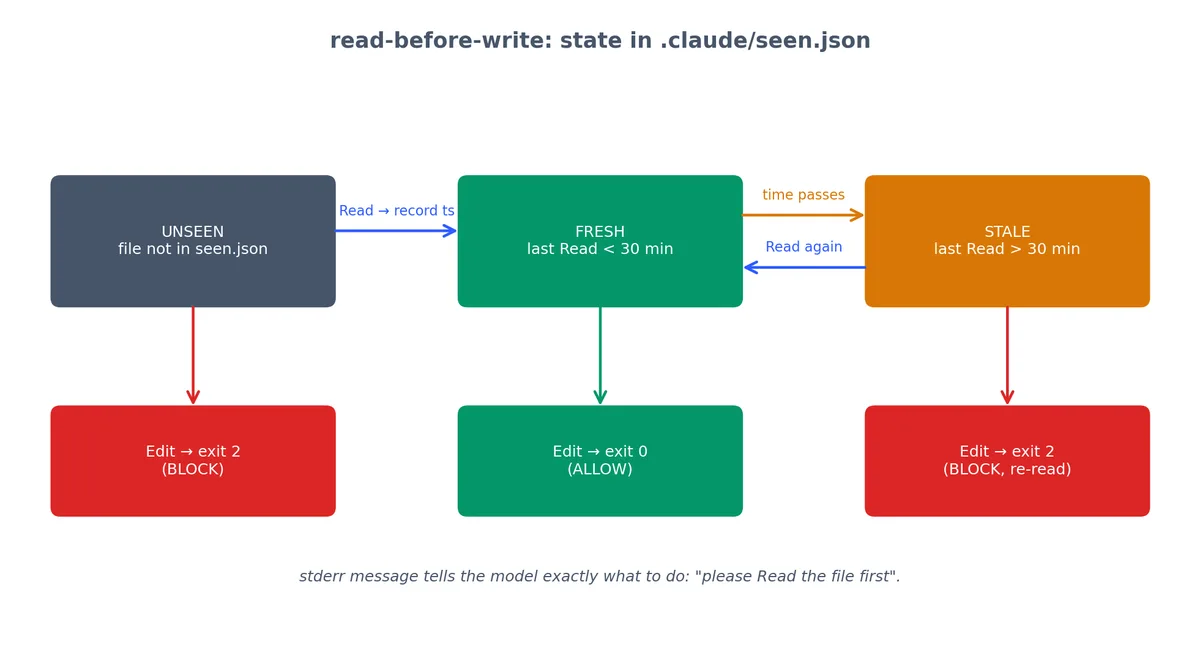
PreToolUse on Edit|MultiEdit. Forces the model to read a file before editing it.
The hook keeps a small seen.json map of when each file was last Read. Edits to UNSEEN or STALE files are blocked with a stderr message that tells Claude exactly how to recover.
#!/usr/bin/env node
// hooks/read-before-write.js
// PreToolUse on Edit|MultiEdit
// Also needs a companion entry on Read to track what has been seen.
constfs=require('fs');constpath=require('path');constchunks=[];process.stdin.on('data',c=>chunks.push(c));process.stdin.on('end',()=>{constt=JSON.parse(Buffer.concat(chunks).toString());constfilePath=t.tool_input?.file_path||t.tool_input?.path||"";constseenFile=path.join('.claude','seen.json');// Load the seen map
letseen={};try{if(fs.existsSync(seenFile)){seen=JSON.parse(fs.readFileSync(seenFile,'utf8'));}}catch{seen={};}// If this is a Read call, record it and allow
if(t.tool_name==='Read'){seen[filePath]=Date.now();constdir=path.dirname(seenFile);if(!fs.existsSync(dir))fs.mkdirSync(dir,{recursive:true});fs.writeFileSync(seenFile,JSON.stringify(seen,null,2));process.exit(0);}// For Edit/MultiEdit, check if the file was read recently (within 30 minutes)
constlastSeen=seen[filePath];constthirtyMinutes=30*60*1000;if(!lastSeen){console.error(`Blocked: "${filePath}" has not been Read in this session. `+`Please read the file first to understand its current state before editing.`);process.exit(2);}if(Date.now()-lastSeen>thirtyMinutes){console.error(`Blocked: "${filePath}" was last Read ${Math.round((Date.now()-lastSeen)/60000)} minutes ago. `+`Please re-read the file to verify its current state.`);process.exit(2);}process.exit(0);});
This hook catches the subtle bug where the model edits based on its training data prior, not the file’s current state. Without this hook, Claude might “fix” a function it remembers from training, not the function that actually exists in your repo right now.
I run this on the box that handles after-hours pings. If a bot tries to do something destructive at 2 AM, it’s almost certainly a misfire. The hook isn’t about enforcing work-life balance for Claude—it’s about catching runaway automation that shouldn’t be running at all.
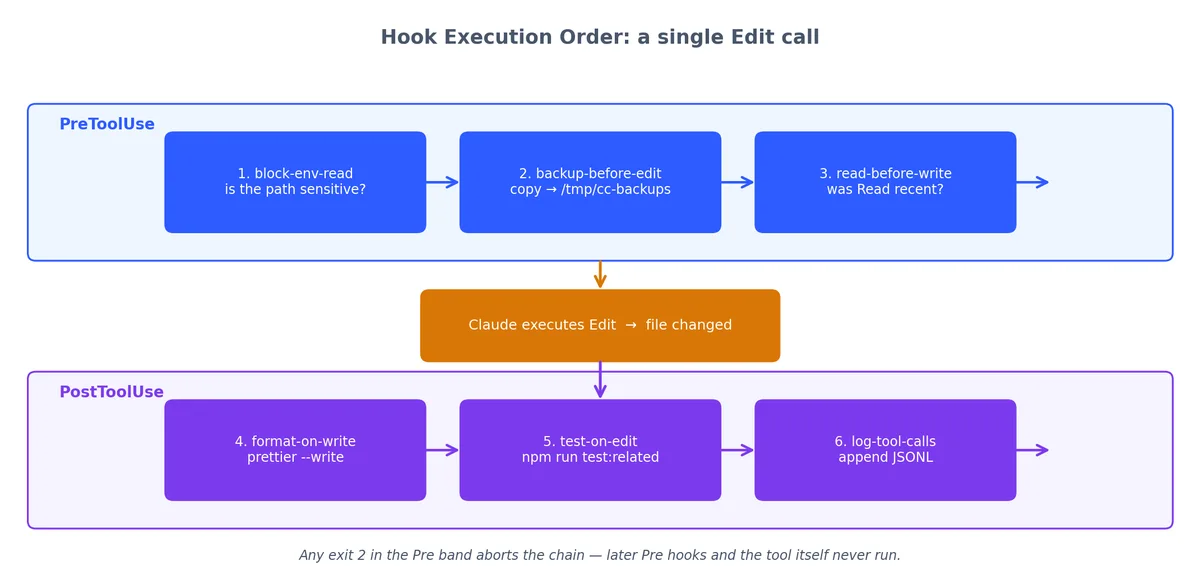
A single Edit call fans out across six hooks: three PreToolUse gatekeepers, the tool itself, then three PostToolUse hygiene jobs. Any exit 2 in the Pre band aborts the chain.
When Claude calls Edit on a source file, this is the sequence:
block-env-read — is the file sensitive? If yes, block.
backup-before-edit — copy the current version to /tmp/cc-backups/.
read-before-write — was the file Read recently? If not, block.
(Claude performs the edit)
format-on-write — run Prettier on the result.
test-on-edit — run related tests. If they fail, surface the error.
log-tool-calls — append to the JSONL log.
Steps 1-3 are PreToolUse (any exit 2 blocks the edit). Steps 5-7 are PostToolUse (the edit already happened). This order means: safety first, then hygiene, then observability.
Problem: hooks run in series, and a slow hook blocks everything.
If test-on-edit takes 60 seconds, every edit feels sluggish. Solution: set a timeout and fall back to async test runs for large suites.
Problem: one hook’s exit code kills the whole chain.
In PreToolUse, if block-env-read exits 2, the remaining hooks (backup-before-edit, read-before-write) do not run. This is correct — a blocked call should not be backed up or tracked.
Problem: hooks can conflict.
A format hook that changes a file can trigger the “file changed since last read” logic in read-before-write. Solution: the format hook runs in PostToolUse, which does not trigger PreToolUse hooks. The lifecycle prevents this conflict.
If you want to set up all ten hooks in a new project, here is the directory structure:
1
2
3
4
5
6
7
8
9
10
11
12
13
14
.claude/
settings.json # the wiring shown above
your-project/
hooks/
block-env-read.js
bash-blacklist.js
bash-whitelist.js # swap with blacklist for prod repos
block-git-push.js
format-on-write.js
test-on-edit.js
backup-before-edit.js
log-tool-calls.js
read-before-write.js
work-hours-only.js
Set them all executable:
1
chmod +x hooks/*.js
Test them all at once:
1
2
3
4
5
# Quick smoke test — should all exit 0 for a normal Readfor hook in hooks/*.js;doecho'{"tool_name":"Read","tool_input":{"file_path":"./src/index.ts"}}'| node "$hook"echo"$hook: exit $?"done
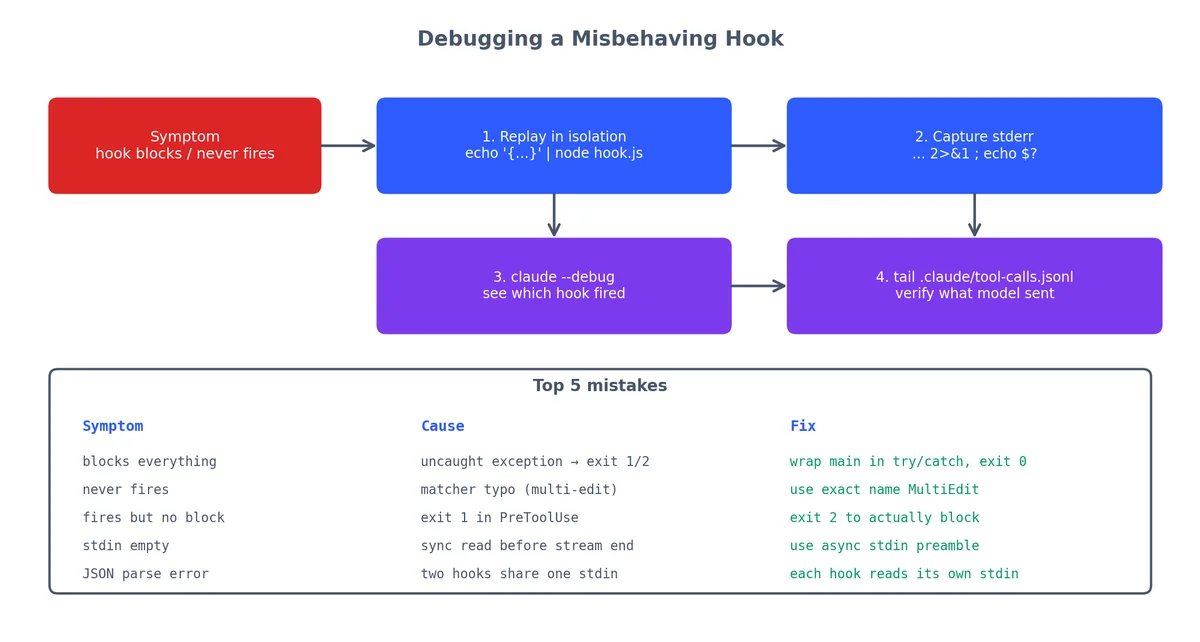
When a hook misbehaves, here is the debugging sequence:
Replay the failing call against the hook in isolation, capture stderr, then escalate to claude --debug and the JSONL log. The table below it covers the five mistakes that cause 90% of broken hooks.
PreToolUse for policy, PostToolUse for hygiene. Do not try to undo things in PostToolUse — the side-effect already happened.
Stderr is feedback, exit code is verdict. Exit 2 blocks (PreToolUse only). Anything in stderr gets fed back to Claude verbatim. Use both.
Hooks fail closed. A misbehaving hook will block all your tool calls. Test the script with echo '{"tool_name":"Read","tool_input":{"file_path":"/tmp/x"}}' | node hook.js before wiring it in.
Ten hooks do not sound like much. It is enough to make a YOLO-mode session feel responsible.