
Claude Code Hands-On (9): settings.json, the Three-Layer Permission Model, and Env
settings.json is the file that decides what Claude can do, where, and with whose credentials. The three layers (user, project, local), the permission grammar, env vars that change behavior, and the precedence order that catches everyone the first time.
Hooks let you interact with Claude Code, while settings.json specifies what it can access. This file also confuses many with its precedence rules.
This chapter is the missing reference.

The three layers#
There are three settings.json files Claude Code reads, in order:
- User settings —
~/.claude/settings.json. Applies to every project on your machine. - Project settings —
<repo>/.claude/settings.json. Committed to git. Applies to anyone working in this repo. - Local settings —
<repo>/.claude/settings.local.json. Gitignored. Your private overrides for this repo.
The merge rule: later layers override earlier ones, key by key. Permissions are additive for allow, subtractive for deny — once any layer denies something, no other layer can re-allow it. This asymmetry is what makes the system safe.
Where each file lives#
| |
Practical consequence: keep org policy in ~/.claude/settings.json, keep project rules in .claude/settings.json (committed), keep your “I trust this exact thing on my machine” overrides in .claude/settings.local.json.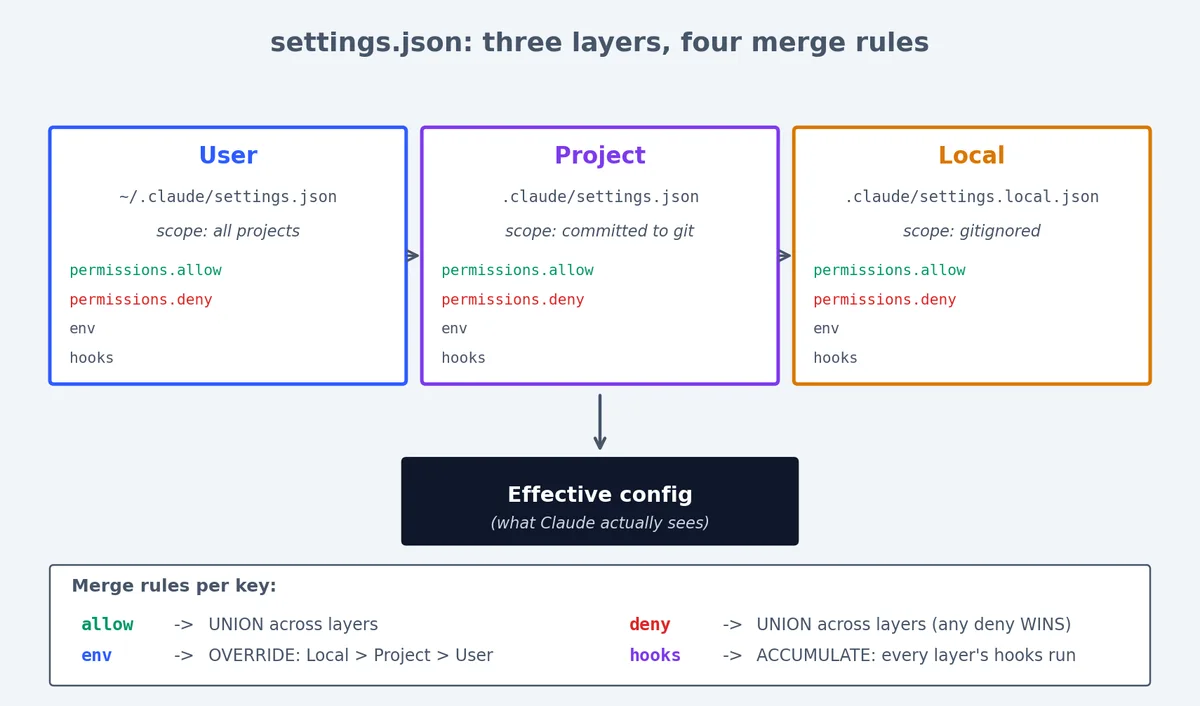
Figure 3: The three settings.json layers and how each key merges across them.
The complete settings.json reference#
Here is every top-level key you can set in settings.json, with descriptions:
| |
permissions#
Controls what tools Claude can use and on what targets.
env#
Sets environment variables for all tool calls (Bash, hooks, etc.).
hooks#
Defines scripts that run before or after tool calls. See Chapter 7 for the full treatment.
worktree#
Controls worktree behavior. baseRef can be "fresh" (branch from origin/main) or "head" (branch from current HEAD).
The permissions block — the grammar#
| |
Tool permission syntax#
Every permission entry follows the pattern: ToolName or ToolName(pattern).
What goes inside the parentheses is a glob-style matcher specific to the tool: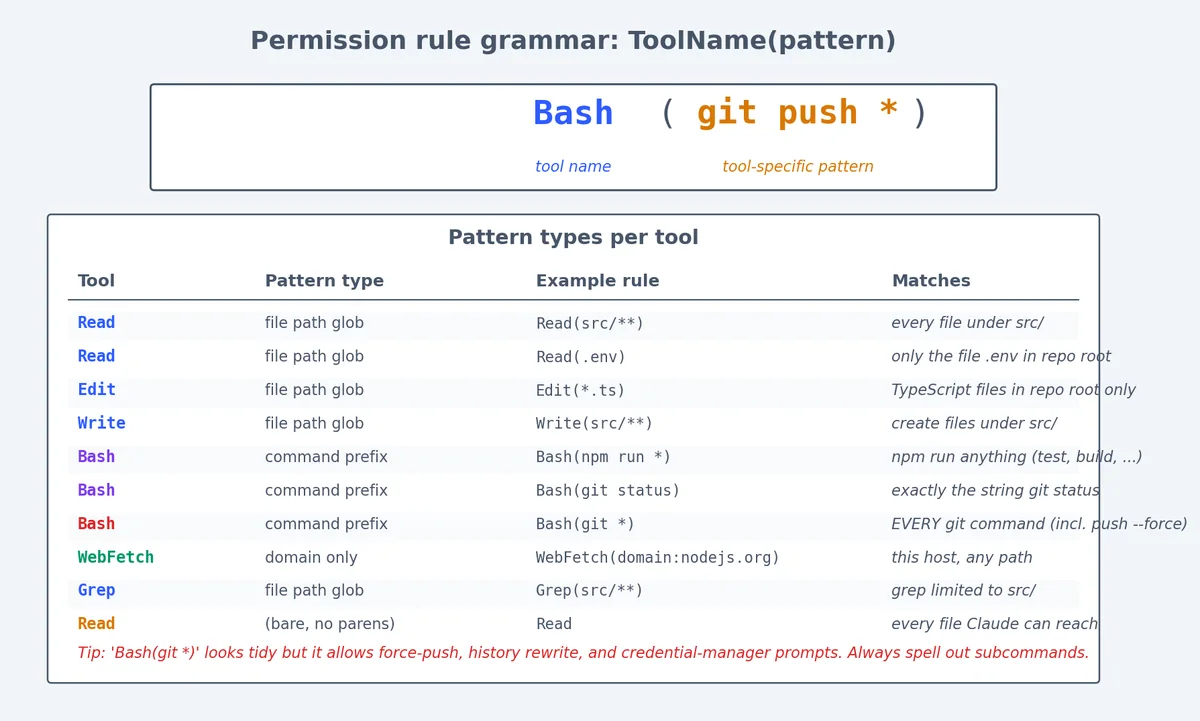
Figure 5: Permission rule grammar at a glance — every entry is ToolName(pattern) with tool-specific match semantics.
| Tool | Pattern type | Example | Matches |
|---|---|---|---|
Read | File path glob | Read(src/**) | Any file under src/ |
Read | File path glob | Read(.env) | Only .env in repo root |
Read | File path glob | Read(**/.env*) | Any .env file, any depth |
Edit | File path glob | Edit(src/**) | Edit files under src/ |
Edit | File path glob | Edit(*.ts) | Edit TypeScript files in root |
Write | File path glob | Write(src/**) | Write files under src/ |
MultiEdit | File path glob | MultiEdit(src/**) | Multi-edit files under src/ |
Bash | Command prefix | Bash(npm run *) | Any npm run command |
Bash | Command prefix | Bash(git status) | Exactly git status |
Bash | Command prefix | Bash(git *) | Any git command (careful!) |
WebFetch | Domain | WebFetch(domain:docs.anthropic.com) | Only this domain |
Grep | File path glob | Grep(src/**) | Grep in src/ only |
A bare tool name with no parentheses (e.g., just Read) allows everything for that tool. That is almost always too broad outside ~/.claude/settings.json for trusted personal use.
The additionalDirectories field#
By default, Claude can only access files within the current project directory. To grant access to files outside the project:
| |
Use cases:
- Monorepo where Claude needs to read sibling packages
- Shared design system in a separate directory
- Spec documents stored outside the repo
Every permission type with examples#
Here is the complete list of tool names you can use in permission rules:
| Tool name | What it does | Common allow pattern | Common deny pattern |
|---|---|---|---|
Read | Read file contents | Read(src/**) | Read(.env), Read(**/credentials*) |
Edit | Modify existing files | Edit(src/**) | Edit(.github/workflows/**) |
Write | Create new files | Write(src/**) | Write(.env*) |
MultiEdit | Multiple edits in one call | MultiEdit(src/**) | MultiEdit(.github/**) |
Bash | Run shell commands | Bash(npm run *) | Bash(rm -rf *), Bash(git push *) |
Grep | Search file contents | Grep (bare) | rarely denied |
Glob | List files by pattern | Glob (bare) | rarely denied |
WebFetch | Fetch web content | WebFetch(domain:docs.*) | WebFetch(domain:internal.corp) |
WebSearch | Search the web | WebSearch (bare) | rarely denied |
NotebookEdit | Edit Jupyter notebooks | NotebookEdit(notebooks/**) | project-specific |
Why deny wins#

Once the merged config denies an action, nothing can re-allow it. This is the control you need.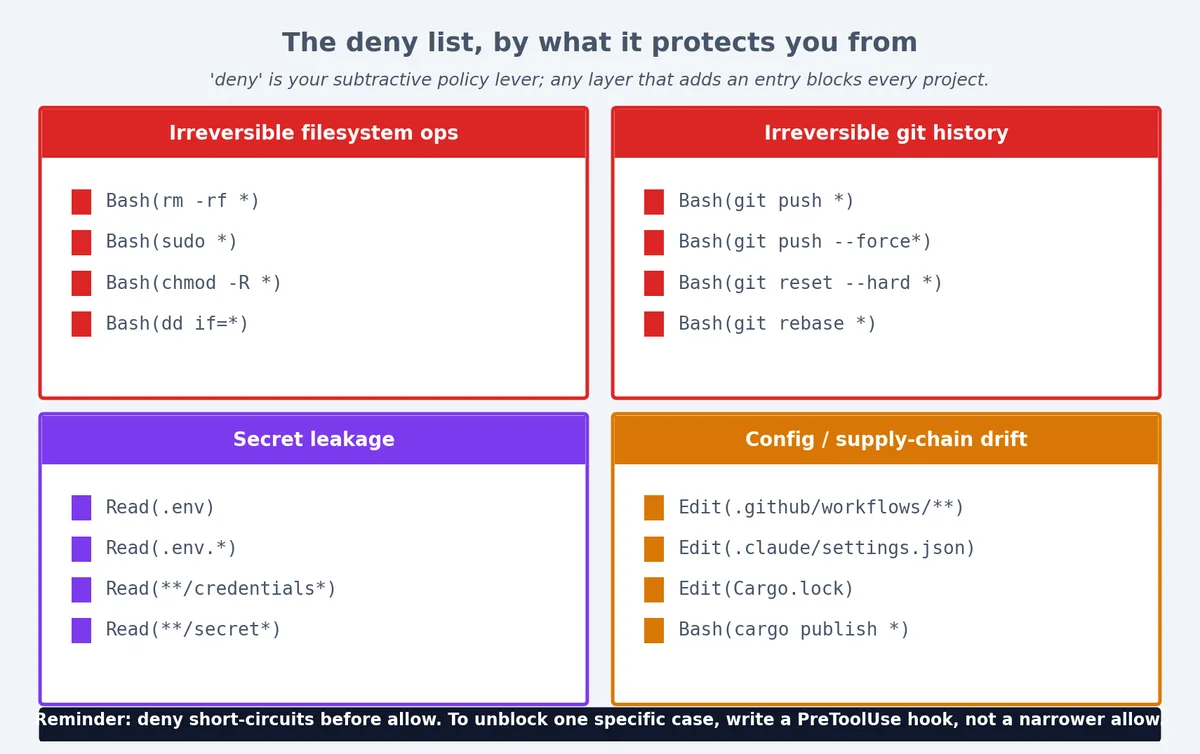
Figure 6: A deny list, organized by what category of damage it prevents.
Example: project deny overrides local allow#
A repo’s .claude/settings.json says:
| |
A teammate adds .claude/settings.local.json with:
| |
The push is still blocked. The deny from the project layer wins. This is correct and you should rely on it.
Example: user deny overrides everything#
Your ~/.claude/settings.json says:
| |
No project on your machine can read .env files or secrets, regardless of what their project settings say. This is your machine-wide policy.
The deny-wins rule in practice#
This asymmetry exists for security. Think of it this way:
allowis a convenience — it removes the “do you want to allow this?” prompt.denyis a policy — it blocks the action regardless of who says otherwise.
An org can commit a .claude/settings.json with deny rules. Individual developers cannot override those denies. This is the mechanism for shared safety policy.
env — the other half#
The env block sets environment variables for every tool call:
| |
What env vars affect#
- Bash commands. Every
Bashtool call inherits these vars.NODE_ENV=developmentwill be set when Claude runsnpm test. - Hook scripts. Hooks run as child processes and inherit the environment. A hook can read
process.env.LOG_LEVEL. - They do NOT leak into the model’s prompt. The model cannot see env var values. Safe place for configuration.
Layer precedence for env#
Local layer overrides project layer overrides user layer. So DEBUG=true in .claude/settings.local.json will turn on logging just for you, without committing the change.
| |
Practical env patterns#
Setting API keys for tools:
| |
Put these in settings.local.json (gitignored) so they never get committed.
Controlling test behavior:
| |
Python path configuration:
| |
hooks — referenced from the same file#
| |
Hook configuration details#
Matchers are pipe-separated tool names. The matcher Read|Grep fires on both Read and Grep tool calls.
Special matcher *: matches all tool calls. Use for logging or observability hooks.
Multiple hooks per matcher: hooks run in order. If any hook exits 2 (in PreToolUse), the call is blocked and remaining hooks do not run.
| |
Hook layer behavior#
Hooks across all three layers accumulate — they do not override. Adding a hook in a deeper layer adds to the hook chain; it never replaces hooks from higher layers.
| |
This is different from permissions (where deny overrides allow) and env (where deeper layers override). Hooks always add.
Real settings.json from different project types#
Node.js / TypeScript project#
| |
Three things to notice:
- The Bash allowlist includes the read-only and reversible Git commands but never
push,reset --hard, orrebase. Push is a deliberate human action. Edit(.github/workflows/**)is denied. CI config changes need review; I do not want them slipping into a normal commit.- The hooks belt-and-brace the deny list. If a deny rule has a typo, the hook still blocks the dangerous call.
Python / ML project#
| |
Python-specific choices:
NotebookEditis allowed for the notebooks directory — Claude can modify Jupyter notebooks.Read(**/weights/*)is denied — model weight files are huge and reading them is pointless.Write(data/**)is denied — data files should not be modified by Claude.CUDA_VISIBLE_DEVICESis set to prevent accidental multi-GPU usage during development.
Rust project#
| |
Rust-specific choices:
cargo publishis denied — accidental crate publishing is irreversible.Edit(Cargo.lock)is denied — lockfile changes should come fromcargo update, not direct edits.RUST_BACKTRACE=1is set so Claude sees full backtraces when tests fail.
Monorepo / multi-language project#
| |
Monorepo-specific choices:
Edit(packages/*/package.json)is denied — dependency changes should be deliberate.additionalDirectoriesincludes a sibling directory with shared configs.- Individual packages can have their own
.claude/settings.jsonwith more permissive rules.
Troubleshooting permission issues#
“Claude keeps asking for permission”#
The most common complaint. Claude asks because the action is neither in allow nor deny — it falls through to the interactive prompt.
Fix: Add the action to allow:
| |
“Claude is blocked but I don’t know why”#
Run Claude with --debug to see the permission resolution log:
| |
The debug output shows exactly which settings file provided each rule and which rule matched.
“I allowed something but it’s still blocked”#
Check for deny rules. Remember: deny wins over allow, always. A common pattern:
| |
The deny on git push * matches git push origin main, so it wins. To allow a specific push while blocking others, you need to restructure:
| |
“Local settings are not being picked up”#
Verify the file name and location:
- Must be
.claude/settings.local.json(notsettings-local.jsonorlocal.settings.json) - Must be in the repo root’s
.claude/directory - Must be valid JSON
| |
“Hooks from user settings don’t run”#
Check that the hook script path is absolute or relative to the right directory:
| |
The precedence order, as a checklist#
When something does not behave the way you expect:
- Is it in any
deny? Blocked, regardless of allows. - Is it in any
allow? Permitted without prompting. - Otherwise, Claude will ask before doing it (interactive prompt).
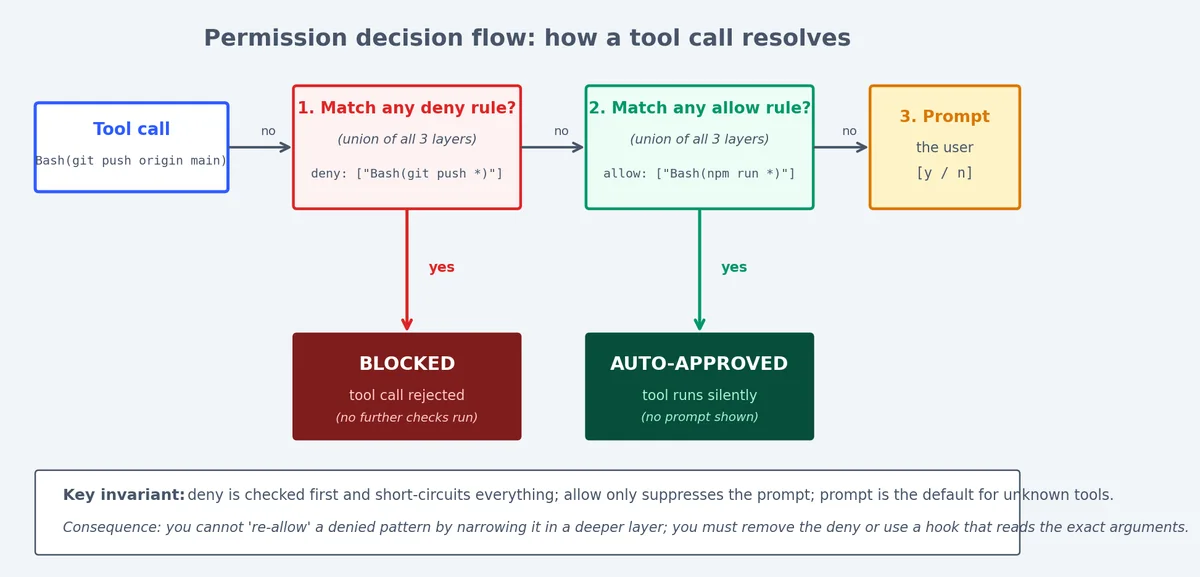
Figure 4: How a tool call resolves through deny -> allow -> prompt; deny short-circuits everything else.
Precedence for each config type#
| Config key | Precedence rule |
|---|---|
permissions.deny | Union of all layers. Any deny from any layer blocks. |
permissions.allow | Union of all layers. Any allow from any layer permits (unless denied). |
env | Later layers override earlier. Local > Project > User. |
hooks | Accumulate across all layers. All hooks run. |
worktree | Later layers override earlier. |
The merge visualized#
| |
Common patterns summarized#
| What you want | Where to put it |
|---|---|
| “Never allow X on any project” | ~/.claude/settings.json deny |
| “This project forbids X” | .claude/settings.json deny (committed) |
| “I personally want to skip the prompt for X” | .claude/settings.local.json allow |
| “Set DEBUG=true just for me” | .claude/settings.local.json env |
| “Everyone on this project should run Prettier on save” | .claude/settings.json hooks |
| “I want an extra logging hook” | .claude/settings.local.json hooks |
Building a settings.json from scratch#
When you start a new project, here is the process I follow:
Step 1: Start with deny#
What should never happen in this project?
| |
Step 2: Add allows for common operations#
What does Claude do repeatedly that I am tired of approving?
| |
Step 3: Add env vars#
What does the development environment need?
| |
Step 4: Add hooks#
What policies should be enforced automatically?
| |
Step 5: Test by using Claude#
Run a session and see what prompts you get. If Claude keeps asking for permission on something safe, add it to allow. If Claude does something you do not want, add it to deny. Iterate.
Summary#
settings.json is the constitution for what Claude can do in a project. Keep deny short and merciless, keep allow specific, keep hooks as the second line of defense. Once you have the layers and precedence in your head, configuring a new repo takes ninety seconds. Until then it will feel like the rules are arbitrary; they are not.
Claude Code Hands-On 10 parts
- 01 Claude Code Hands-On (1): Install, the Three-Layer Config, and the # @ /init Trio
- 02 Claude Code Hands-On (2): Shortcuts, the Four-State Toggle, and Thinking Modes
- 03 Claude Code Hands-On (3): Custom Slash Commands and Conversation Control
- 04 Claude Code Hands-On (4): MCP Servers, or How Claude Talks to Anything
- 05 Claude Code Hands-On (5): Hooks, or How to Stop Worrying About Yolo Mode
- 06 Claude Code Hands-On (6): The SDK, GitHub Integration, and Claude in CI
- 07 Claude Code Hands-On (7): Ten Hooks I Actually Use, with the Code
- 08 Claude Code Hands-On (8): Sub-Agents, Worktrees, and Plan Mode
- 09 Claude Code Hands-On (9): settings.json, the Three-Layer Permission Model, and Env you are here
- 10 Claude Code Hands-On (10): Skills, and When to Reach for Each Extension Mechanism