
Claude Code Hands-On (10): Skills, and When to Reach for Each Extension Mechanism
Skills are the newest extension mechanism in Claude Code: a folder, a SKILL.md, and a body of instructions the model loads on demand. How they differ from slash commands, MCP servers, and hooks — with a decision tree for which one to reach for.
Claude Code now has four extension mechanisms: slash commands, MCP servers, hooks, and Skills. They overlap. The first time you have a “Claude should know how to do X” thought, the question is which of the four to use.
This is the closing chapter of the series. Let me lay out the decision tree.

What a Skill actually is#
A Skill is a folder under ~/.claude/skills/<name>/ (user-level) or <repo>/.claude/skills/<name>/ (project-level), containing at minimum a SKILL.md.
The complete SKILL.md anatomy#
Every SKILL.md has two parts: the frontmatter and the body.
| |
Frontmatter fields#
| Field | Required | Description |
|---|---|---|
name | Yes | The skill’s identifier. Used in logs and debugging. Keep it lowercase-with-dashes. |
description | Yes | Load-bearing. This is how Claude decides whether to load the skill. If the description does not say when to use it, the skill will not get used. |
The description is the most important line in the entire file. Claude reads the descriptions of all available skills at the start of each session. When your prompt matches a description, Claude loads the full skill body. If the description is vague, the skill fires on everything or nothing — both are bad.
The body#
The body can be as long as it needs to be. It becomes part of the system prompt only when triggered, so verbosity is not taxed unless the skill fires. I have skills with 600+ line bodies. Worth every line.
The body is free-form Markdown. But there are patterns that work:
Voice/style section — how Claude should write when this skill is active:
| |
Schema/format section — exact formats Claude must follow:
| |
Workflow section — step-by-step procedure:
| |
Rules/constraints — what NOT to do:
| |
Skill directory structure#
User-level skills#
| |
User-level skills are available in every project on your machine.
Project-level skills#
| |
Project-level skills are available only in that project. They can be committed to git so the whole team shares them.
Which level to use#
| Situation | Level | Reason |
|---|---|---|
| Personal writing style | User | Applies everywhere you write |
| Project deploy procedure | Project | Specific to this codebase |
| Code review taste | User | Your taste, all projects |
| API integration workflow | Project | Specific APIs, specific patterns |
| General “simplify code” | User | Universal applicability |
Writing a real skill from scratch#
Let me walk through building a skill for a concrete use case: a team that deploys a Node.js app to a staging environment.
Step 1: Identify the skill-shaped use case#
The question to ask: “Is this domain knowledge that should kick in whenever the topic comes up, or is it a command I invoke by name?”
Deploying to staging is something the team does in multiple contexts — after merging a PR, when testing a feature, when debugging production. It is not a single command; it is a body of knowledge about how we deploy. That is skill-shaped.
Step 2: Write the description#
Start with the description, because it determines when the skill fires:
| |
Be specific. “Use for deployment” is too vague — it would fire on discussions about deployment theory. “Use when deploying to the staging environment” is specific to the action.
Step 3: Write the body#
| |
docker build -t acme-api:staging -f Dockerfile.staging .
docker tag acme-api:staging 123456789.dkr.ecr.us-east-1.amazonaws.com/acme-api:staging
docker push 123456789.dkr.ecr.us-east-1.amazonaws.com/acme-api:staging
aws ecs update-service
–cluster acme-staging-ecs
–service acme-api
–force-new-deployment
| |
curl -s https://staging.acme.dev/health | jq .
| |
aws ecs describe-services –cluster acme-staging-ecs –services acme-api
| jq ‘.services[0].deployments[] | select(.status == “PRIMARY”) | .taskDefinition’
aws ecs update-service
–cluster acme-staging-ecs
–service acme-api
–task-definition acme-api:
| |
Step 4: Test the skill#
Create the file and start a Claude session:
| |
Claude should load the skill and follow the procedure. If it does not, check the description — it might not match your phrasing.
Step 5: Iterate#
After a few uses, you will notice gaps. Add them to the body:
- “Oh, I need to mention the VPN requirement.”
- “The ECR login step should be more prominent.”
- “Add the Slack notification step.”
Each iteration makes the skill more complete. After a week of use, the skill becomes the authoritative documentation for the deploy process.
Skills vs commands vs hooks vs MCP — the complete comparison#
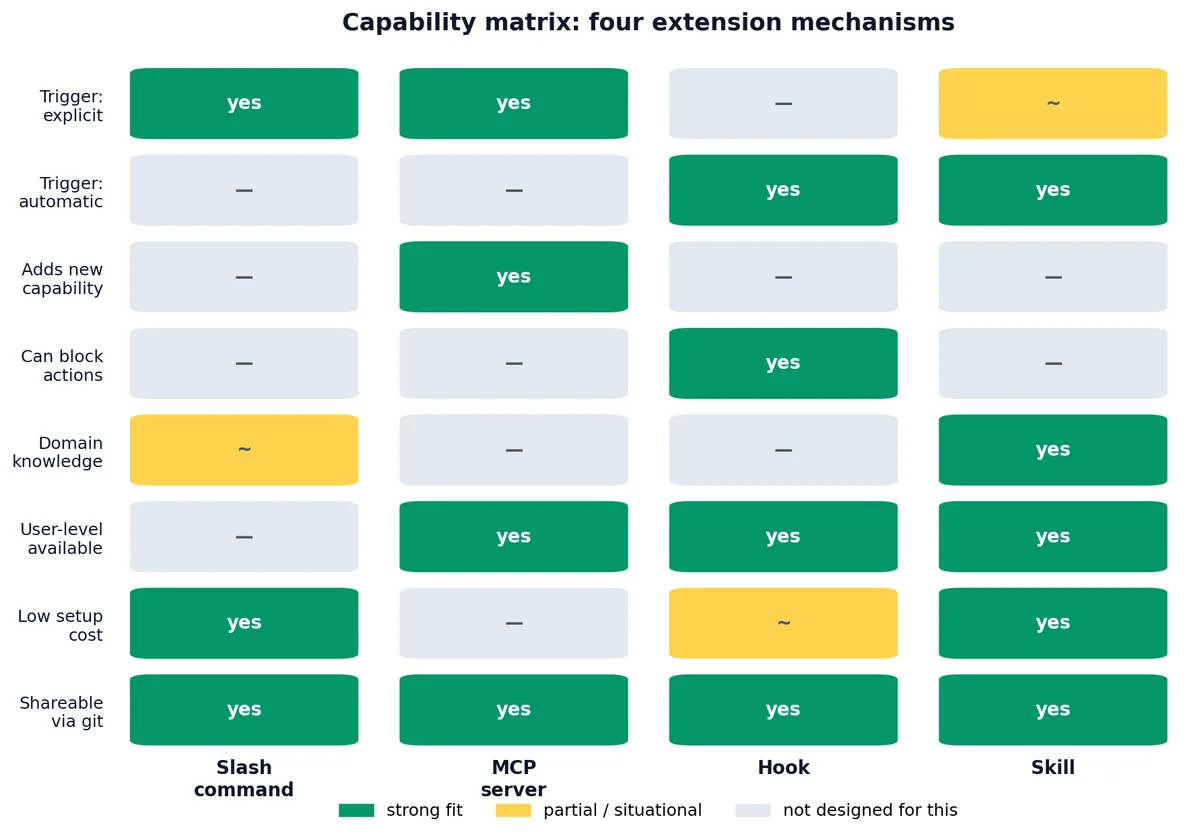
This is the table I wish I had when I started:
| Dimension | Slash command | MCP server | Hook | Skill |
|---|---|---|---|---|
| Lives in | .claude/commands/<name>.md | mcp.json config | settings.json | .claude/skills/<name>/SKILL.md |
| Loaded when | User types /<name> | Always available | Around tool calls | Description matches prompt |
| Trigger | Explicit (user types it) | Explicit (Claude calls tool) | Automatic (on tool call) | Implicit (topic match) |
| Best for | Repeatable workflows | External capabilities | Policy enforcement | Domain knowledge |
| Can edit files | Yes (via Claude) | Yes (via tools) | Yes (side-effects) | Yes (via Claude) |
| Can block actions | No | No | Yes (exit code 2) | No |
| Context cost | Loaded once when invoked | Tool descriptions always loaded | Minimal (scripts run externally) | Loaded when triggered |
| Shareable | Yes (commit to repo) | Yes (commit config) | Yes (commit settings + scripts) | Yes (commit to repo) |
| Complexity to write | Low (just Markdown) | High (server code) | Medium (Node.js scripts) | Low (just Markdown) |
| User-level available | No (project only) | Yes | Yes | Yes |
The clearest dividing lines#
Slash commands are commands; skills are knowledge. A slash command is “do this exact thing.” A skill is “here is how I think about this whole class of problem; use this whenever it applies.”
Hooks are automatic; everything else is opt-in. A hook runs whether or not Claude or the user wants it to. That makes hooks the right choice for safety policy, and the wrong choice for optional workflows.
MCP is for capabilities; the others are for instructions. Only MCP can give Claude a tool it does not have. If you need browser automation, database access, or a third-party API, MCP is the only option. The others shape how Claude uses its existing tools.
Skill discovery and loading#
How Claude discovers skills#
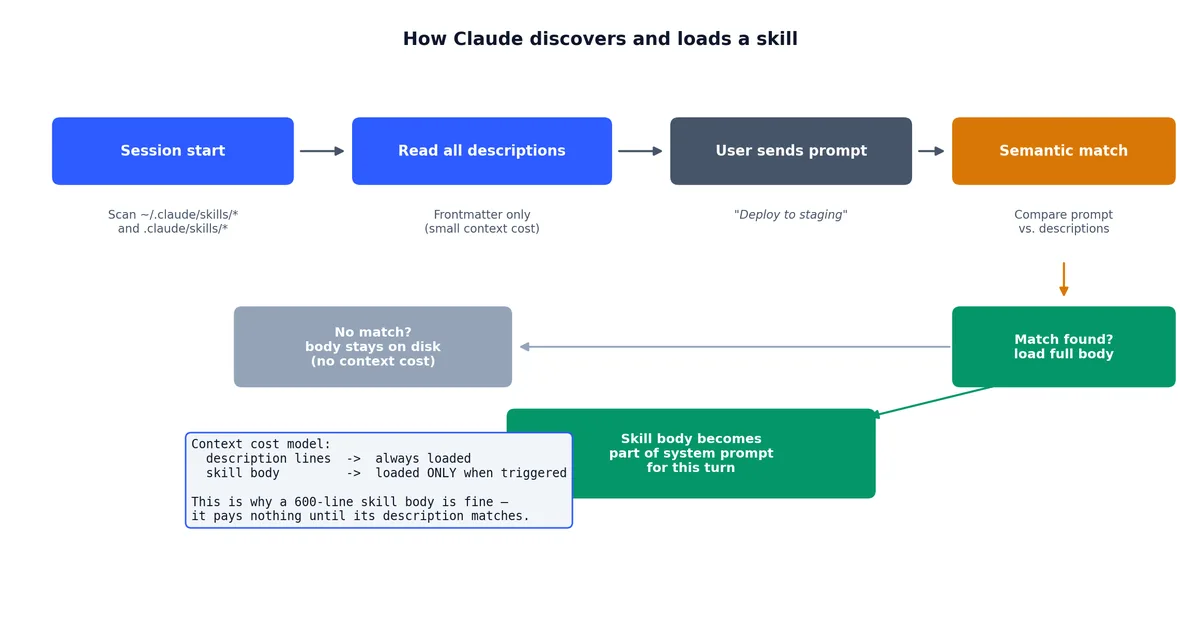
At session start, Claude scans for skill files:
~/.claude/skills/*/SKILL.md— user-level skills.claude/skills/*/SKILL.md— project-level skills
It reads the description from each SKILL.md frontmatter. The descriptions are always in context — they are part of the system prompt.
How loading works#
When you send a message, Claude compares your prompt against all skill descriptions. If there is a match, Claude loads the full body of the matching skill(s) into context for that turn.
This means:
- Descriptions are always loaded (small cost — just the description lines).
- Bodies are loaded on demand (potentially large, but only when relevant).
- Multiple skills can fire if multiple descriptions match. This can cause context bloat — see “When skills are the wrong answer” below.
Debugging skill loading#
If a skill is not firing when you expect it to:
- Check the description. Does it mention the keywords you are using? Claude matches on semantic similarity, not exact keywords, but specific descriptions work better than vague ones.
- Check the file location. Is the SKILL.md in the right directory?
~/.claude/skills/<name>/SKILL.mdor.claude/skills/<name>/SKILL.md. - Check the frontmatter. Is it valid YAML? Is the
---delimiter present? - Try explicit invocation. Some skills can be invoked by name if they are also registered as slash commands. But the point of skills is implicit loading — if you have to invoke it by name, it should probably be a slash command.
Conditional skills#
Sometimes a skill should only fire in specific contexts. You handle this in the description and body.
Context-aware descriptions#
| |
The “only relevant in Python projects” part is a hint to Claude. It will not load this skill when you are working on a JavaScript project, even if you mention “training.”
Body-level conditions#
| |
This is not enforcement — Claude can still deviate. But it gives Claude clear guidance on when to dial up the strictness.
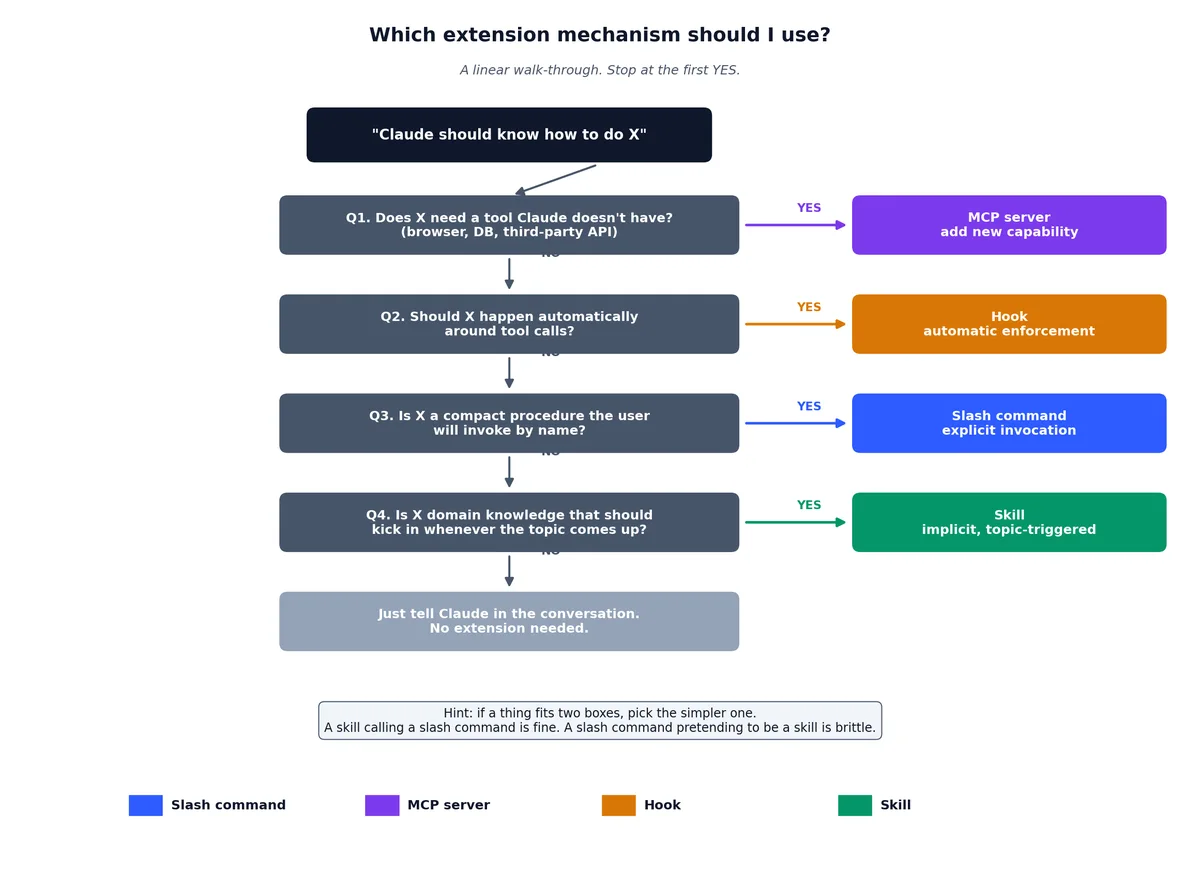
The decision tree as a flowchart#
When you have a “Claude should know how to do X” thought, walk through this:
| |
If a thing fits two boxes, prefer the simpler one. A skill that calls a slash command is fine. A slash command that pretends to be a skill is brittle.
Three skills I have actually written#
chenk-blog-write#
For writing on this site. Covers front matter schema, writing voice, EN/ZH parity requirements, cover generation with Wanxiang, deploy procedure, and common pitfalls.
Triggered by anything mentioning chenk.top, “write a post,” or “new article.” The body is ~600 lines. Worth every one.
Why it is a skill and not a command: I do not always invoke it by name. Sometimes I say “write about hooks” and Claude needs to know that means “write a blog post on chenk.top about hooks, in this voice, with this format.” The skill fires because the description matches.
update-config#
For changes to ~/.claude/settings.json and .claude/settings.json. Triggered by “allow X command,” “set env Y,” “add a hook,” “move permission to project settings.”
Encodes the permission precedence rules from Chapter 9 and the typical patterns. Saves me from re-deriving the merge order every time.
Why it is a skill and not a hook: it provides knowledge about how to edit settings, not enforcement of settings. A hook would block or allow; this skill teaches.
simplify#
For code review on my own changes. Triggered by “is there a simpler way to do this,” “review for quality,” “check for reuse.”
Encodes my taste: prefer composition over inheritance, kill dead code immediately, name things by what they are not how they are built, if a function is over 30 lines it is probably two functions.
Why it is a skill and not a command: it is not a procedure. It is a set of values and heuristics that should inform how Claude reads and reviews code. You cannot command taste; you can teach it.
When skills are the wrong answer#
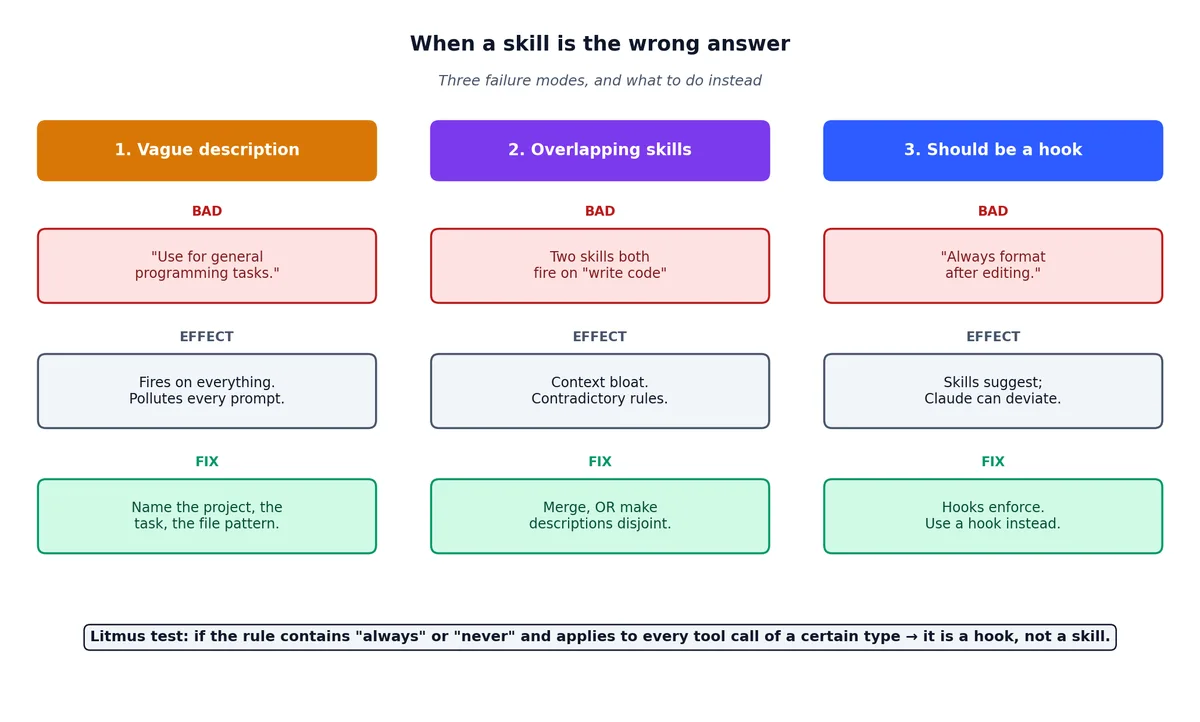
A skill that fires too often is worse than no skill — it pollutes context for tasks that do not need it. Three traps:
Vague descriptions#
| |
“Use for general programming” matches everything. It will fire when you are editing a README. It will fire when you are writing a commit message. Use for everything = use for nothing useful.
Overlapping skills#
Two skills that both fire on “write code” create context bloat. The model gets two sets of instructions, possibly contradictory, and has to figure out which one applies.
Fix: merge them into one skill, or make the descriptions more specific so they fire on different subtopics.
Skills that should have been hooks#
“Always format code after editing.” That is a hook, not a skill. Skills suggest; hooks enforce.
The litmus test: if the instruction contains “always” or “never” and applies to every tool call of a certain type, it is a hook. If it contains “when discussing X” or “for tasks involving Y,” it is a skill.
Building your own extension library#
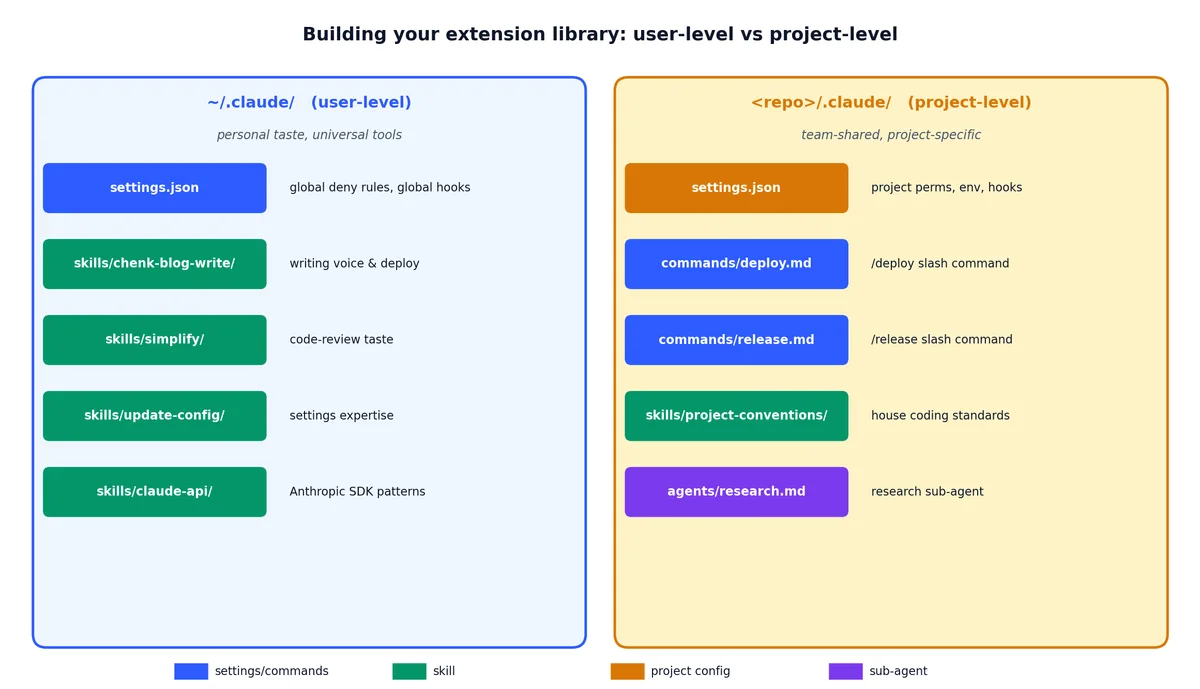
Over time, you will accumulate extensions across all four mechanisms. Here is how I organize mine:
| |
The pattern: user-level for personal taste and universal tools, project-level for team-shared knowledge and project-specific procedures.
The end of the series#

Ten chapters in, you have:
- A configured Claude Code with the three-layer settings model in your head (chapters 1, 9).
- Fluency with shortcuts, modes, and conversation control (chapter 2).
- The four extension mechanisms — slash commands, MCP, hooks, skills — and a decision tree for picking between them (chapters 3, 4, 5, 7, 10).
- The concurrency primitives — sub-agents, worktrees, plan mode — for scaling individual sessions to bigger work (chapter 8).
- A working SDK and GitHub integration story for putting Claude in CI (chapter 6).
That is the surface area. The extension points compose: a skill can reference a slash command, a hook can enforce what a skill recommends, an MCP server can provide data that a skill tells Claude how to interpret. The mechanism you pick first matters less than picking any mechanism at all — the gap between “Claude with no extensions” and “Claude with even one well-written skill” is larger than the gap between a skill and a command.
Past this point, the work is no longer about Claude Code itself — it is about what you build with it. Go build.
Claude Code Hands-On 10 parts
- 01 Claude Code Hands-On (1): Install, the Three-Layer Config, and the # @ /init Trio
- 02 Claude Code Hands-On (2): Shortcuts, the Four-State Toggle, and Thinking Modes
- 03 Claude Code Hands-On (3): Custom Slash Commands and Conversation Control
- 04 Claude Code Hands-On (4): MCP Servers, or How Claude Talks to Anything
- 05 Claude Code Hands-On (5): Hooks, or How to Stop Worrying About Yolo Mode
- 06 Claude Code Hands-On (6): The SDK, GitHub Integration, and Claude in CI
- 07 Claude Code Hands-On (7): Ten Hooks I Actually Use, with the Code
- 08 Claude Code Hands-On (8): Sub-Agents, Worktrees, and Plan Mode
- 09 Claude Code Hands-On (9): settings.json, the Three-Layer Permission Model, and Env
- 10 Claude Code Hands-On (10): Skills, and When to Reach for Each Extension Mechanism you are here