Series · Cloud Computing · Chapter 3

Cloud-Native and Container Technologies

Why cloud-native exists, what containers actually do at the kernel level, how Kubernetes really works, when service mesh is worth its weight, and how the whole stack fits together in production.

The shift from monolithic applications to cloud-native architectures is one of the most consequential changes in software engineering this decade. The headline – containers and Kubernetes – is well known. The interesting story is why this stack won, what each layer actually does, and where the seams are that determine whether your platform feels effortless or feels like a maze.

This article walks the cloud-native stack from first principles. We start with the architectural shift that motivates everything else, then dig into what a container really is at the Linux kernel level, climb up to Kubernetes orchestration, examine when a service mesh earns its complexity, and finish with packaging and delivery via Helm and GitOps. Examples are deliberately concrete: copy-pastable Dockerfiles, real manifests, and the trade-offs that matter when you run this in production.

What You Will Learn

  • The 12-Factor App methodology and why each factor exists
  • Containers from the inside: namespaces, cgroups, union filesystems, and image layering
  • Docker production essentials: multi-stage builds, security, Compose for local dev
  • Kubernetes architecture: how the control plane drives worker nodes via the reconciliation loop
  • Workload primitives: Pods, Services, Deployments, StatefulSets, DaemonSets, Jobs
  • Networking: CNI plugins, NetworkPolicy, Ingress, and when Istio service mesh pays for itself
  • Storage: PV/PVC dynamic provisioning and what ReadWriteMany actually costs
  • Helm packaging, release history, and how rollbacks really work
  • Microservices patterns: circuit breakers, sagas, API gateways
  • GitOps with ArgoCD and the operational discipline it forces

Prerequisites

  • Comfortable with the Linux command line and basic networking (routing, DNS, TCP)
  • Understanding of HTTP/REST and how web apps and databases talk to each other
  • Parts 1-6 of this series (especially Virtualization , Networking , and DevOps ) provide useful background

Cloud-Native: What Changed and Why

Cloud-native is not “running stuff in the cloud.” A lift-and-shifted VM is in the cloud but not cloud-native. The CNCF definition is precise:

Cloud-native technologies empower organizations to build and run scalable applications in modern, dynamic environments such as public, private, and hybrid clouds. Containers, service meshes, microservices, immutable infrastructure, and declarative APIs exemplify this approach.

Three ideas do most of the work behind that sentence:

  1. Immutable infrastructure. Servers are not pets you patch; they are cattle you replace. A new release is a new image, never an in-place edit. This eliminates configuration drift, the source of half of all production incidents.
  2. Declarative APIs. You describe the desired state (“I want 3 replicas of v1.4 with 500 MB memory each”) and the platform makes reality match. The opposite – imperative scripts that say “do step 1, then step 2” – breaks the moment reality differs from the script’s assumptions.
  3. Loose coupling at every layer. Services are independent. So are deploys. So are failures. So are scaling decisions. The cost is more moving parts; the benefit is that no single moving part can break everything.

Monolith vs Microservices: The Trade-off Made Visible

Monolith vs Microservices Architecture

The diagram above shows the structural difference, but the real story is in four numbers:

DimensionMonolithMicroservices
Deploy unit1 binaryN independent services
Scale unitWhole appEach service independently
Tech stackOne language/runtimePolyglot per service
Failure blast radius100%1 service (with circuit breakers)

Microservices are not strictly better. They trade simplicity for independence: you pay with distributed systems complexity (network failures, eventual consistency, distributed tracing, contract versioning) to gain the ability to deploy, scale, and fail independently. The decision rule: if your team is small enough to fit in two pizzas and your release cadence is monthly, a well-structured monolith is almost certainly the right answer. The threshold to introduce microservices is when coordination overhead between teams starts dominating engineering time.

The 12-Factor App: A Survival Guide

The 12-Factor methodology (Heroku, 2011) predates Kubernetes but has become the default operational contract a containerized service is expected to honor. Each factor exists to make a specific failure mode impossible:

#FactorWhy it matters
1Codebase – one repo, many deploysSame code, different config = reliable promotion path
2Dependencies – explicitly declared and isolated“Works on my machine” becomes impossible
3Config – in environment, not codeSame image runs in dev/staging/prod
4Backing services – attached resourcesSwap a DB by changing a URL, not refactoring
5Build, release, run – strictly separatedA release is immutable and rollback-able
6Processes – stateless and share-nothingAny replica can serve any request
7Port binding – self-containedNo assumed external server (Tomcat, IIS)
8Concurrency – scale via process modelHorizontal scaling is the default
9Disposability – fast startup, graceful shutdownAuto-scaling and rolling updates work
10Dev/prod parity – keep environments similarProduction surprises shrink
11Logs – as event streams to stdoutPlatform aggregates, you don’t write to files
12Admin processes – one-off in same envMigrations don’t have a separate stack

Violating a factor is sometimes the right call (factor 6 is genuinely hard for stateful systems), but each violation is a debt you should know you took on.

Containers: What They Actually Are

A common mental model is “containers are lightweight VMs.” That mental model is wrong in important ways. Containers are not virtualization; they are process isolation. A container is just a Linux process (or process tree) where the kernel has been instructed to lie to it about what the system looks like.

Three Linux kernel features do the work:

  1. Namespaces – give a process its own view of system resources (PID, network, mount, UTS, IPC, user, cgroup). Inside a PID namespace, your container sees itself as PID 1 and cannot see processes outside.
  2. cgroups (v2) – enforce resource limits (CPU, memory, IO, PIDs). When you set --memory=512m, the kernel kills the process if it exceeds that limit.
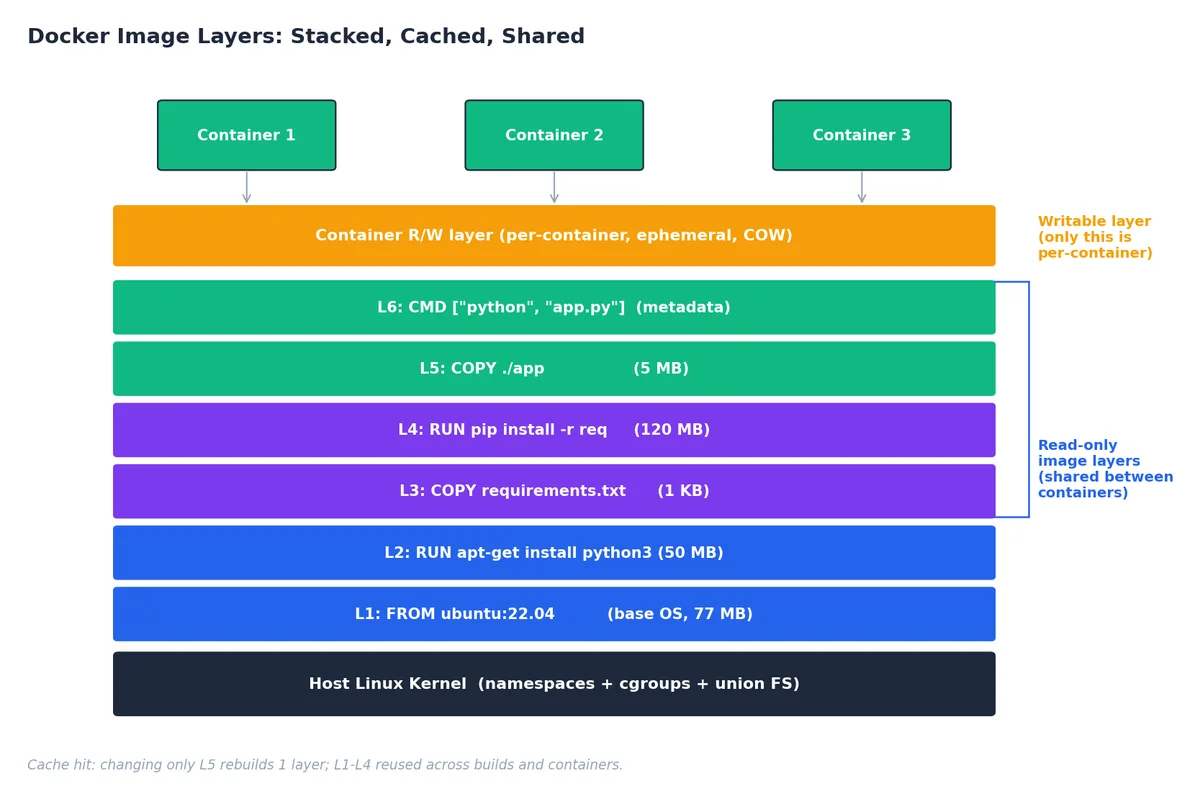
  3. Union filesystems (overlay2 today) – stack read-only image layers under a thin writable layer per container, enabling instant copy-on-write filesystem semantics.

That’s it. A container shares the host kernel. There is no hypervisor, no second OS. The cost: ~50 ms startup vs ~30 s for a VM, ~5 MB overhead vs ~500 MB, and density of hundreds per host vs tens.

Image Layers: The Cache That Makes Builds Fast

Docker Image Layers

Every Dockerfile instruction creates a new layer. Layers stack via the union filesystem; identical layers are deduplicated across images and across hosts. This is why two well-structured images that share a base can differ by megabytes even if the base is gigabytes.

Two practical consequences:

1. Order Dockerfile instructions for cache reuse. Put things that change rarely (system packages, language runtime) first; put things that change every commit (your app code) last. A cached build is seconds; a cold build is minutes.

 1
 2
 3
 4
 5
 6
 7
 8
 9
10
11
12
13
14
15
FROM python:3.12-slim

# Layer 1: system deps (changes ~monthly)
RUN apt-get update && apt-get install -y --no-install-recommends \
        libpq-dev gcc \
    && rm -rf /var/lib/apt/lists/*

# Layer 2: Python deps (changes ~weekly)
COPY requirements.txt .
RUN pip install --no-cache-dir -r requirements.txt

# Layer 3: app code (changes every commit)
COPY . /app
WORKDIR /app
CMD ["gunicorn", "-w", "4", "app:app"]

If you COPY . . first, every code change invalidates the dependency layer and you reinstall everything. The shipping difference is 10x build time.

2. Image size matters more than you think. Smaller images pull faster, start faster, attack-surface smaller, and (in tools like KEDA or Knative) cold-start faster. Multi-stage builds let you compile in a heavy image and ship from a tiny one:

 1
 2
 3
 4
 5
 6
 7
 8
 9
10
11
12
13
14
# Builder stage: full toolchain (~800 MB)
FROM golang:1.22-alpine AS builder
WORKDIR /src
COPY go.mod go.sum ./
RUN go mod download
COPY . .
RUN CGO_ENABLED=0 GOOS=linux go build -ldflags="-s -w" -o /out/server ./cmd/server

# Runtime stage: just the binary (~10 MB)
FROM gcr.io/distroless/static-debian12
COPY --from=builder /out/server /server
USER 65532:65532
EXPOSE 8080
ENTRYPOINT ["/server"]

The final image contains only the compiled binary – no shell, no package manager, no source code. That’s a security and operational win.

Production-grade Dockerfile Practices

PracticeWhy
Pin tags, never latestReproducible builds; latest is a moving target
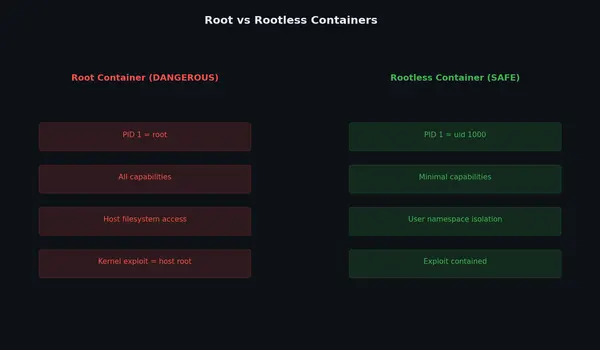
Run as non-root (USER 1000)Container escape is much harder without root
One process per containerInit systems (supervisord) hide failures from K8s
Use .dockerignorenode_modules/, .git/, .env should never enter the build context
Combine related RUNsEach RUN is a layer; cleanup in a separate RUN doesn’t shrink the image
Use HEALTHCHECKTells the runtime when the process is ready, not just running
Sign and scan imagescosign for signing, trivy/grype for CVE scanning in CI

Docker Compose: The Right Tool for Local Dev

Compose is for local development and small single-host deployments. It is not a production orchestrator – it has no auto-healing, no rolling updates, no horizontal scaling across hosts. But for “spin up the API, the database, and Redis on my laptop,” nothing is better:

 1
 2
 3
 4
 5
 6
 7
 8
 9
10
11
12
13
14
15
16
17
18
19
20
21
22
23
24
25
26
27
services:
  web:
    build: .
    ports: ["3000:3000"]
    environment:
      DATABASE_URL: postgresql://postgres:dev@db:5432/myapp
      REDIS_URL: redis://redis:6379
    depends_on:
      db: { condition: service_healthy }

  db:
    image: postgres:16-alpine
    environment:
      POSTGRES_PASSWORD: dev
      POSTGRES_DB: myapp
    healthcheck:
      test: ["CMD-SHELL", "pg_isready -U postgres"]
      interval: 5s
      timeout: 3s
      retries: 5
    volumes: [pgdata:/var/lib/postgresql/data]

  redis:
    image: redis:7-alpine

volumes:
  pgdata:

depends_on with condition: service_healthy is the underrated feature – it means web only starts once the DB actually accepts connections, not just when its container exists.

Kubernetes: The Orchestrator That Won

Kubernetes (K8s) emerged from Google’s internal Borg system and has won the orchestration race so completely that “container orchestration” and “Kubernetes” are now synonyms in most conversations. Understanding how it works – not just which YAML to write – is what separates copying examples from designing platforms.

Architecture: Control Plane and Worker Nodes

Kubernetes Architecture

The control plane is the brain. Four components matter:

ComponentRole
kube-apiserverThe only thing that talks to etcd. All other components talk to the API server. REST/gRPC over HTTPS.
etcdThe cluster’s source of truth. A consistent, distributed key-value store. Lose etcd, lose the cluster. Back it up.
kube-schedulerDecides which node a new pod should run on (based on resource requests, taints, affinity, etc.).
kube-controller-managerRuns the reconciliation loops – the deployment controller, replica set controller, node controller, etc.

Each worker node runs:

ComponentRole
kubeletThe node agent. Receives pod specs from the API server, asks the container runtime to run them, reports status back.
kube-proxyPrograms iptables/IPVS rules so that Service IPs route to the right pods.
container runtimeActually runs containers (containerd or CRI-O; Docker is no longer used directly).

The Reconciliation Loop: Kubernetes’ Core Idea

Every controller in Kubernetes runs the same loop:

while True:
    desired = read_desired_state_from_api_server()
    actual = observe_actual_state()
    if desired != actual:
        take_action_to_close_the_gap()

You declare you want 3 replicas. The replica set controller observes 2 are running. It creates 1 more. A node dies; 1 pod becomes unavailable. The controller observes 2 are running again. It creates another. You never told it what to do; you told it what you want.

This is why Kubernetes feels self-healing: there is no separate “self-healing” feature; the entire system is built as a self-healing loop. It is also why it can sometimes feel mysterious – if reality doesn’t match desired state, something somewhere is silently retrying.

Pods, Services, Deployments: The Daily Drivers

A Pod is the smallest deployable unit – one or more containers that share network and storage. In practice, “one container per pod” is the default; the exception is when a sidecar (logging agent, service mesh proxy) needs to share network/volumes with the main app.

 1
 2
 3
 4
 5
 6
 7
 8
 9
10
11
12
13
14
15
16
17
18
19
apiVersion: v1
kind: Pod
metadata:
  name: web
  labels: { app: web }
spec:
  containers:
    - name: web
      image: nginx:1.27-alpine
      ports: [{ containerPort: 80 }]
      resources:
        requests: { memory: "64Mi", cpu: "100m" }   # guaranteed
        limits:   { memory: "128Mi", cpu: "500m" }  # ceiling
      readinessProbe:
        httpGet: { path: /, port: 80 }
        periodSeconds: 5
      livenessProbe:
        httpGet: { path: /healthz, port: 80 }
        initialDelaySeconds: 30

Resource requests vs limits is a load-bearing distinction. Requests are what the scheduler uses to place the pod and what the kernel guarantees. Limits are the hard ceiling beyond which the kernel kills (memory) or throttles (CPU) the process. Setting requests too low causes nodes to over-commit and OOM; setting limits too low causes throttling that looks like a slow app.

Probes determine traffic and lifecycle. Readiness gates traffic (“am I ready to serve?”). Liveness gates restarts (“am I alive at all?”). Many production outages trace to a misconfigured liveness probe that restart-loops a pod that is actually fine but slow.

A Service gives you a stable virtual IP and DNS name in front of a set of pods. Pods come and go; the Service IP doesn’t.

1
2
3
4
5
6
7
apiVersion: v1
kind: Service
metadata: { name: web }
spec:
  selector: { app: web }
  ports: [{ port: 80, targetPort: 80 }]
  type: ClusterIP    # internal-only; use LoadBalancer for external

A Deployment manages rolling updates and rollbacks of a stateless workload. It owns a ReplicaSet, which owns Pods. When you change the image, the Deployment creates a new ReplicaSet and shifts traffic over according to your strategy:

 1
 2
 3
 4
 5
 6
 7
 8
 9
10
11
12
13
14
15
16
apiVersion: apps/v1
kind: Deployment
metadata: { name: web }
spec:
  replicas: 3
  selector: { matchLabels: { app: web } }
  strategy:
    type: RollingUpdate
    rollingUpdate: { maxSurge: 1, maxUnavailable: 0 }   # zero downtime
  template:
    metadata: { labels: { app: web } }
    spec:
      containers:
        - name: web
          image: ghcr.io/myorg/web:v1.4.2
          # ...

maxUnavailable: 0 means “never reduce capacity during an update” – safer for prod. maxSurge: 1 means “spin up one extra pod at a time” – limits how aggressively the rollout proceeds.

1
2
3
4
kubectl set image deployment/web web=ghcr.io/myorg/web:v1.4.3
kubectl rollout status deployment/web        # wait for rollout
kubectl rollout history deployment/web       # see all revisions
kubectl rollout undo deployment/web          # roll back to previous

When You Need StatefulSets, DaemonSets, Jobs

Most workloads are Deployments. The exceptions are worth knowing:

  • StatefulSet – ordered, named pods (db-0, db-1, db-2) with stable persistent volumes. For databases, message queues, anything that needs identity. Slower to update (one pod at a time, in order).
  • DaemonSet – one pod per node. For log collectors, monitoring agents, CSI drivers, CNI plugins.
  • Job – run to completion. For migrations, batch processing.
  • CronJob – Job on a schedule. For backups, periodic reports.

Managed Kubernetes: The Sane Default

Running your own control plane is possible (kubeadm, kops, kubespray) but rarely the right call – you take on etcd backups, certificate rotation, version upgrades, and security patches. The managed offerings carry that weight for you:

1
2
3
4
5
6
7
8
# AWS EKS
eksctl create cluster --name prod --region us-west-2 --nodes 3

# Google GKE
gcloud container clusters create prod --num-nodes 3 --region us-central1

# Azure AKS
az aks create --name prod --resource-group rg --node-count 3

Pricing is roughly $73-150/month for the control plane plus the cost of the worker nodes you choose. For all but the largest organizations, that fee is dwarfed by the engineering time it saves.

Networking: From CNI to Service Mesh

Kubernetes networking has three layers, each with its own primitive:

ConcernPrimitiveImplementation
Pod-to-pod connectivityFlat L3 networkCNI plugin (Calico, Cilium, Flannel)
L4 access policyNetworkPolicyEnforced by CNI
L7 traffic managementIngress / Service meshNGINX, Istio, Linkerd

CNI Plugin Choice

Every pod gets its own IP. The Container Network Interface (CNI) plugin is what makes that work.

PluginApproachWhen to pick
FlannelVXLAN overlay, no policyLab/dev only
CalicoBGP routing + iptables policyDefault for most production
CiliumeBPF, kernel-level policy + L7 visibilityPerformance + security; the modern default

Cilium is increasingly the answer for new clusters: it skips iptables (which becomes a bottleneck at scale), enforces L7 policy (HTTP method/path level), and gives you flow visibility for free.

NetworkPolicy: Default-deny is the Goal

By default, every pod can talk to every other pod. That is convenient and terrible for security. NetworkPolicy fixes it:

 1
 2
 3
 4
 5
 6
 7
 8
 9
10
11
12
13
14
15
16
17
18
apiVersion: networking.k8s.io/v1
kind: NetworkPolicy
metadata: { name: api-policy, namespace: prod }
spec:
  podSelector: { matchLabels: { app: api } }
  policyTypes: [Ingress, Egress]
  ingress:
    - from:
        - podSelector: { matchLabels: { app: frontend } }
      ports: [{ protocol: TCP, port: 8080 }]
  egress:
    - to:
        - podSelector: { matchLabels: { app: postgres } }
      ports: [{ protocol: TCP, port: 5432 }]
    - to:                              # allow DNS
        - namespaceSelector: {}
          podSelector: { matchLabels: { k8s-app: kube-dns } }
      ports: [{ protocol: UDP, port: 53 }]

The discipline that pays off: start with a default-deny policy in the namespace, then add explicit allows. Compromised pods then can’t trivially scan the cluster.

Service Mesh: When Sidecars Earn Their Keep

Service Mesh with Istio

A service mesh (Istio, Linkerd) injects a proxy (Envoy) as a sidecar in every pod. All inter-service traffic goes through the proxy, which gives you mTLS, retries, timeouts, traffic splitting, and golden-signal observability without changing app code.

 1
 2
 3
 4
 5
 6
 7
 8
 9
10
11
12
13
14
15
16
17
18
19
20
21
22
23
24
25
26
27
apiVersion: networking.istio.io/v1
kind: VirtualService
metadata: { name: reviews }
spec:
  hosts: [reviews]
  http:
    - route:
        - destination: { host: reviews, subset: v1 }
          weight: 90
        - destination: { host: reviews, subset: v2 }
          weight: 10        # 10% canary on v2
---
apiVersion: networking.istio.io/v1
kind: DestinationRule
metadata: { name: reviews }
spec:
  host: reviews
  trafficPolicy:
    outlierDetection:        # circuit breaker
      consecutive5xxErrors: 5
      interval: 30s
      baseEjectionTime: 30s
  subsets:
    - name: v1
      labels: { version: v1 }
    - name: v2
      labels: { version: v2 }

The cost: a sidecar per pod (~50 MB memory, ~5 ms latency overhead), a control plane to manage, and a steeper learning curve. The honest rule of thumb: if you have fewer than ~10 services, the YAML is more complex than the problem. If you have 50+ services and your engineers are spending real time on retries/timeouts/mTLS in app code, the mesh is a clear win.

Ingress: The Front Door

For HTTP traffic from outside the cluster, an Ingress (with a controller like NGINX, Traefik, or a cloud-managed ALB/GLB) is usually simpler than a LoadBalancer per service:

 1
 2
 3
 4
 5
 6
 7
 8
 9
10
11
12
13
14
15
16
17
18
apiVersion: networking.k8s.io/v1
kind: Ingress
metadata:
  name: web
  annotations:
    cert-manager.io/cluster-issuer: letsencrypt-prod
spec:
  tls:
    - hosts: [app.example.com]
      secretName: web-tls
  rules:
    - host: app.example.com
      http:
        paths:
          - path: /
            pathType: Prefix
            backend:
              service: { name: web, port: { number: 80 } }

With cert-manager, certificates auto-renew. Combined with ExternalDNS, the entire DNS+TLS+routing surface becomes declarative.

Storage: Persistent Volumes Done Right

Pods are ephemeral; data isn’t. The Kubernetes storage abstractions decouple “what storage do I want” (PVC) from “how is it provisioned” (StorageClass) from “what backs it” (provisioner).

 1
 2
 3
 4
 5
 6
 7
 8
 9
10
11
12
13
14
15
16
17
18
apiVersion: storage.k8s.io/v1
kind: StorageClass
metadata: { name: fast-ssd }
provisioner: ebs.csi.aws.com
parameters:
  type: gp3
  encrypted: "true"
  iops: "3000"
allowVolumeExpansion: true
reclaimPolicy: Retain                # do not delete the volume on PVC delete
---
apiVersion: v1
kind: PersistentVolumeClaim
metadata: { name: pgdata }
spec:
  accessModes: ["ReadWriteOnce"]     # one node mounts it
  storageClassName: fast-ssd
  resources: { requests: { storage: 100Gi } }

Access modes that actually matter:

  • ReadWriteOnce (RWO) – one node mounts read-write. Block storage (EBS, PD, Azure Disk). The default. Fast.
  • ReadWriteMany (RWX) – many nodes mount read-write. Requires a network filesystem (EFS, Filestore, Azure Files, CephFS). Slower, and the consistency model is filesystem-dependent. Avoid unless you genuinely need shared writable state.
  • ReadOnlyMany (ROX) – distributing static content.

reclaimPolicy: Retain is the safe default for production data. With Delete, deleting a PVC silently destroys the volume. With Retain, you have to do it manually – which has saved many a Friday afternoon.

For databases on Kubernetes, prefer operators (Postgres Operator, MongoDB Operator) over rolling your own StatefulSet. They handle the failure modes (failover, backup, rolling upgrades) that are easy to underestimate.

Helm: Packaging Done Properly

Once you have a few services, manifests proliferate. Helm packages templated manifests into versioned, reusable, parameterized “charts.”

Helm Charts and Release History

A chart is a directory of templates plus a values.yaml file with default values. At install time, you override values for the environment:

1
2
3
4
helm install web ./charts/web -n prod -f values.prod.yaml
helm upgrade web ./charts/web -n prod -f values.prod.yaml --atomic
helm rollback web 3 -n prod                  # back to revision 3
helm history web -n prod                     # full release history

--atomic is the underrated flag: if the upgrade fails any post-install hooks or readiness checks, Helm automatically rolls back. That single flag turns Helm from “templating” into “transactional release management.”

When not to use Helm

Helm’s templating uses Go templates with Sprig functions. For simple charts it is fine; for complex ones, the YAML-inside-template-strings can become painful (whitespace bugs, no schema validation until install time). Alternatives gaining ground:

  • Kustomize (built into kubectl) – patches and overlays without templating. Simpler for small variations.
  • CUE / KCL / Pkl – typed configuration languages with real schemas. More upfront cost, far fewer late-stage surprises.

For shipping third-party software (databases, monitoring stacks), Helm is the lingua franca. For your own apps, evaluate the alternatives.

Microservices Patterns That Survive Production

The patterns that consistently appear in mature systems:

API Gateway – single entry point for clients (auth, rate limit, routing, response shaping). Kong, Envoy Gateway, or a cloud-managed gateway. Keeps client code simple and security policy centralized.

Circuit Breaker – stop calling a downstream that is failing, fail fast for callers, give the downstream room to recover. Service mesh (Istio outlierDetection) handles this transparently; libraries like Resilience4j or Hystrix do it in-process.

Saga – distributed transactions without distributed locks. Each step has a compensating action; if step 4 fails, run the compensations for 1-3 in reverse. Two flavors: orchestration (a coordinator drives the steps) and choreography (services emit events). Orchestration is easier to reason about; choreography is easier to extend.

Outbox Pattern – atomic “DB write + event emit.” Write the event to an outbox table in the same DB transaction; a separate process reads the outbox and publishes. Solves the double-write problem that bites every event-driven system eventually.

Database per Service – each service owns its data; no shared DB. The pain is real (joins become API calls), but shared databases couple services through the schema, which silently destroys the point of microservices.

CI/CD and GitOps

The modern delivery pipeline for Kubernetes looks like:

git push -> CI (test, build, scan, sign image, push)
         -> CI updates manifest repo (image tag bump)
         -> ArgoCD detects diff and syncs cluster

The key shift is GitOps: the cluster’s state is defined by Git. ArgoCD (or Flux) continuously reconciles the cluster against a Git repo. Two big wins:

  1. Audit trail. Every change is a commit. Want to know who changed prod at 2am? git blame.
  2. Disaster recovery. Cluster gone? kubectl apply from the manifest repo and you’re back.
 1
 2
 3
 4
 5
 6
 7
 8
 9
10
11
12
13
14
15
apiVersion: argoproj.io/v1alpha1
kind: Application
metadata: { name: web, namespace: argocd }
spec:
  project: default
  source:
    repoURL: https://github.com/myorg/k8s-manifests
    path: apps/web/overlays/prod
    targetRevision: main
  destination:
    server: https://kubernetes.default.svc
    namespace: prod
  syncPolicy:
    automated: { prune: true, selfHeal: true }
    syncOptions: [CreateNamespace=true]

selfHeal: true means “if someone kubectl edits a resource by hand, ArgoCD will revert it.” That is the discipline GitOps enforces – the cluster’s state is what’s in Git, not what’s in someone’s terminal.

Operating in Production: The Commands That Matter

 1
 2
 3
 4
 5
 6
 7
 8
 9
10
11
12
13
14
15
16
17
18
19
20
# Cluster overview
kubectl cluster-info
kubectl get nodes -o wide

# What's running where
kubectl get pods -A -o wide
kubectl top pods -A                   # CPU/memory actuals

# Debug a failing pod
kubectl describe pod <name> -n <ns>   # events, status, scheduling
kubectl logs <name> -n <ns> -f        # stream logs
kubectl logs <name> -n <ns> --previous  # logs from the crashed previous container
kubectl exec -it <name> -n <ns> -- sh

# Recent cluster events (the goldmine for "why did this happen")
kubectl get events -A --sort-by='.lastTimestamp' | tail -30

# Scale and rollout
kubectl scale deploy/web --replicas=5
kubectl rollout restart deploy/web    # forces a fresh rollout, useful for picking up new secrets

The single most useful pair: kubectl describe (status, events, scheduling decisions) and kubectl logs --previous (what happened in the container that just crashed).

Production Checklist

Before declaring a workload production-ready:

  • Multi-stage Dockerfile, non-root user, distroless or minimal base
  • Image pinned by digest (or at least immutable tag), signed, scanned in CI
  • Resource requests and limits set on every container
  • Liveness and readiness probes (readiness controls traffic, liveness controls restarts)
  • PodDisruptionBudget so cluster maintenance doesn’t take you below minAvailable
  • HorizontalPodAutoscaler if traffic is variable
  • NetworkPolicy with default-deny + explicit allows
  • Secrets in an external store (Vault, AWS Secrets Manager, External Secrets Operator) not in plain Secrets
  • Logs to stdout, structured (JSON), aggregated to a central system
  • Metrics exposed (Prometheus format) and dashboards exist
  • Distributed tracing instrumented (OpenTelemetry)
  • Backups tested (especially for StatefulSets)
  • Runbook exists for the common failure modes

A workload that ticks all these boxes is not unbreakable – but the failure modes that remain are the interesting ones, not the embarrassing ones.


Series Navigation

PartTopic
1Fundamentals and Architecture
2Virtualization Technology Deep Dive
3Storage Systems and Distributed Architecture
4Network Architecture and SDN
5Security and Privacy Protection
6Operations and DevOps Practices
7Cloud-Native and Container Technologies (you are here)
8Multi-Cloud and Hybrid Architecture

Liked this piece?

Follow on GitHub for the next one — usually one a week.

GitHub