Cloud Computing (1): Fundamentals and Architecture
An engineering-grade introduction to cloud computing -- service models (IaaS, PaaS, SaaS, FaaS), deployment topologies, the economics of CapEx vs OpEx, regions and AZs, vendor catalogues and a decision framework with real architecture cases.

Every team building software in 2025 inherits the same buy-or-rent question their predecessors faced — only the answer has flipped. Twenty years ago you put hardware in a closet; today you describe the hardware in YAML and a global provider conjures it up in seconds, bills it by the second, and tears it down when you stop paying. Cloud computing is not just “someone else’s computer”. It is a programmable, metered, multi-tenant abstraction over compute, storage and networking that has fundamentally changed how businesses are built and how engineers spend their day.
This first instalment of the series is the conceptual ground floor. It deliberately moves slowly: by the end you should be able to read a cloud architecture diagram, ask the right questions in a vendor pitch, and reason about cost, reliability and lock-in without resorting to slogans.
What You Will Learn#
- The seven dimensions every cloud decision turns on — and why “use the cloud” is not a single decision
- Service models from IaaS through PaaS, FaaS and SaaS, and the management boundary they imply
- Deployment topologies — public, private, hybrid, multi-cloud — with their cost and complexity trade-offs
- The economics: how CapEx and OpEx behave over a 36-month horizon, and where the break-even sits
- The shared responsibility model and why most cloud breaches are customer mis-configurations
- Regions, availability zones and the latency / blast-radius reasoning behind them
- A vendor-by-vendor service-catalogue map for AWS, Azure, GCP and Alibaba Cloud
- A practical, defensible framework for choosing services and avoiding regret later
Prerequisites#
- A working mental model of “server”, “network” and “operating system”
- Familiarity with at least one programming language and the command line
- No prior cloud experience required
What Cloud Computing Actually Is#
The most cited definition is the US National Institute of Standards and Technology’s, which lists five essential characteristics. They are useful precisely because they exclude things that look cloud-like but are not.
- On-demand self-service — a developer provisions resources through an API or a console without a ticket or a phone call
- Broad network access — resources are reachable over standard networks from heterogeneous clients
- Resource pooling — physical infrastructure is multi-tenant and the user has no visibility into the exact placement of their workload
- Rapid elasticity — capacity can grow and shrink in minutes, often automatically, and feels infinite to the consumer
- Measured service — consumption is metered and billed at fine granularity (per-second, per-request, per-GB-month)
A traditional data centre that rents you a rack misses three of these criteria. A SaaS application that you log into via a browser hits all five. The definition is what makes the boundary precise.
A short history — so the design decisions make sense#
| Era | What happened | Why it matters today |
|---|---|---|
| 1960s-1980s | Mainframes with shared terminals, IBM CP/CMS pioneers virtualisation | The intellectual ancestor of multi-tenant compute |
| 1990s | Client-server, on-prem servers, the rise of the relational database | The “before” picture; almost every legacy app you meet sits here |
| 2002-2006 | Salesforce ships SaaS; Amazon launches S3 (Mar 2006) and EC2 (Aug 2006) | First time external developers could rent compute by the hour |
| 2008-2014 | Google App Engine (PaaS), Heroku, OpenStack, Docker (2013), Kubernetes (2014) | Higher-level abstractions and the container revolution |
| 2015-2020 | Lambda (2014), serverless mainstream, hyperscalers cross $50B/yr | Pay-per-invocation; the operational layer disappears |
| 2021-today | $300B+ run-rate, GPU scarcity drives a second build-out for AI | Capacity planning is back — this time around accelerators |
Service Models — Where the Management Boundary Lies#
Think of cloud services as a stack: the higher you go, the less you manage and the less you control. The four widely deployed layers are IaaS, PaaS, FaaS and SaaS.

Infrastructure as a Service (IaaS)#
You rent virtual machines, virtual disks and virtual networks. From the OS upward you own everything: kernel patches, runtime, app, data.
- AWS EC2 — 700+ instance types spanning general-purpose, memory-, compute-, storage- and GPU-optimised
- Google Compute Engine — sustained-use discounts, preemptible instances, custom-shaped VMs
- Azure Virtual Machines — deepest integration with Active Directory, .NET and Windows licensing
- Alibaba Cloud ECS — dominant in mainland China, with families tuned for Tongyi inference workloads
Choose IaaS when you are migrating an existing application without rewriting it, you need a specific OS or kernel module, or your workload is so high-performance (HPC, GPU training, low-latency trading) that any abstraction layer above the hypervisor would steal performance you cannot afford to lose.
Indicative cost. A 4-vCPU, 16 GB instance is around USD 0.20 / hour on-demand (~150 / month), about 30-50% cheaper on a 1-year reserved commitment, and 60-80% cheaper on spot if your workload tolerates interruption.
Platform as a Service (PaaS)#
You hand over code and configuration; the provider runs the OS, the runtime, the load balancer and the autoscaler. You see logs and metrics, not servers.
- Heroku — the original
git pushdeploy experience - Google App Engine — scales from zero to many thousands of QPS without intervention
- AWS Elastic Beanstalk — upload, AWS provisions EC2, ELB, ASG, CloudWatch behind the scenes
- Vercel / Netlify — frontend-first PaaS, optimised for Next.js and similar frameworks
Choose PaaS when time-to-market dominates, your team is small, the application is reasonably standard (a web app, an API, a worker) and you accept the runtime constraints in exchange for not having a person on call for the OS.
Function as a Service (FaaS) / Serverless#
You ship a function. It runs on demand, billed per invocation and per millisecond of execution. There is no instance to keep alive between requests.
- AWS Lambda — the canonical example; 15-minute max execution
- Azure Functions, Google Cloud Functions / Cloud Run — analogous offerings
- Alibaba Cloud Function Compute (FC)
Choose FaaS when workloads are bursty or event-driven (image upload triggers a thumbnail, a webhook fires a workflow), when traffic patterns are unpredictable, or for glue code that integrates managed services. Avoid FaaS when you need persistent connections, sub-50 ms cold-start guarantees without provisioned concurrency, or long-running compute — the unit economics flip against you above a certain steady-load threshold.
Software as a Service (SaaS)#
You use the application. The provider owns everything down to the silicon.
- Examples — Gmail, Salesforce, Slack, Zoom, Microsoft 365, Notion, Figma, Datadog
Choose SaaS when the application is a commodity for your business (email, CRM, video calls, observability), and avoid it when it is your competitive moat — the very thing you should be building yourself.
One picture: the management boundary#
| Aspect | IaaS | PaaS | FaaS | SaaS |
|---|---|---|---|---|
| Control | High | Medium | Low (per-function) | Configuration only |
| Ops effort | High | Medium | Low | None |
| Time to market | Slower | Faster | Fast for events | Fastest |
| Cost shape | Per-hour | Per-hour or req | Per-request, per-ms | Per-seat |
| Lock-in | Low | Medium | Medium-High | High |
| Typical example | EC2, ECS | Heroku, App Engine | Lambda, Cloud Run | Gmail, Salesforce |
The cleanest mental rule: the boundary moves up the stack as you climb the pyramid; everything below the boundary is the provider’s problem, everything above is yours.
Deployment Models — Where the Workload Lives#
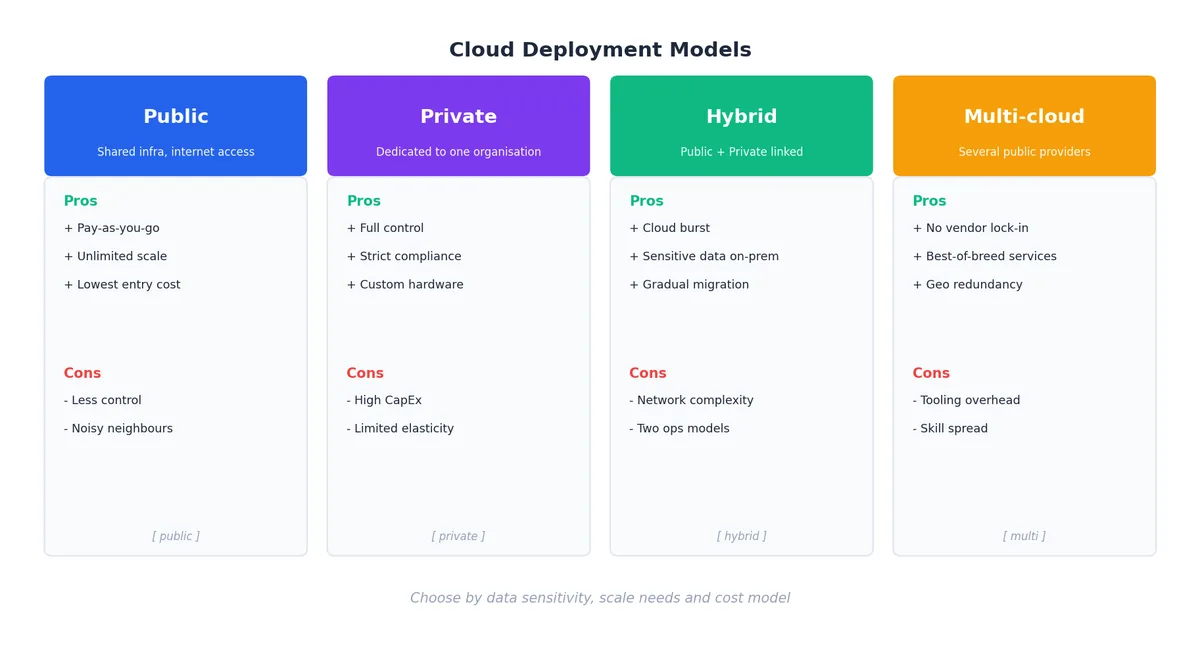
Service models tell you what to rent. Deployment models tell you whose data centre it lives in and how the network gets to it.
Public cloud#
A hyperscaler runs the data centres; you share the underlying hardware with strangers under cryptographic and hypervisor isolation. Best for the long tail of workloads — web apps, batch jobs, dev / test environments, almost everything a startup will ever build.
Private cloud#
You (or a managed-services partner) operate dedicated infrastructure for a single tenant. Best when regulation, latency or data-residency rules forbid shared hardware — defence, certain healthcare and banking workloads, or factory-floor systems with sub-millisecond tolerance to the controller.
Hybrid cloud#
Public and private operated as one logical estate, joined by a VPN or a dedicated link (AWS Direct Connect, Azure ExpressRoute, GCP Interconnect). The classic pattern: sensitive customer data lives on-prem, batch analytics and burst traffic spill into the public cloud. The dirty secret: you now operate two sets of tooling, two security postures and two on-call rotations.
Multi-cloud#
Two or more public clouds used in production. Adopted to avoid vendor lock-in, to leverage best-of-breed services (BigQuery on GCP, Bedrock on AWS) or to satisfy customers that demand it. The cost is real: identity, networking, observability and CI/CD must all become cloud-agnostic.
| Aspect | Public | Private | Hybrid | Multi-cloud |
|---|---|---|---|---|
| Cost shape | OpEx, low | CapEx, high | Mixed | Mixed, higher |
| Scalability | Unlimited | Bounded | Flexible | Very flexible |
| Control | Low | High | Medium | Low-Medium |
| Complexity | Low | Medium | High | Very high |
| Lock-in risk | Single vendor | None (you own it) | Reduced | Lowest |
Rule of thumb. Default to single-region public cloud. Add a second region when downtime starts costing real money. Add a second cloud only when a strategic reason — regulation, customer mandate, or a service that genuinely doesn’t exist on your primary — forces it.
The Market and Why It Concentrates#
Cloud is one of the most concentrated markets in modern infrastructure. Three vendors — AWS, Microsoft Azure, Google Cloud — account for roughly two-thirds of worldwide IaaS+PaaS spend; Alibaba Cloud leads in mainland China; the long tail of regional and specialty providers fills the remainder.
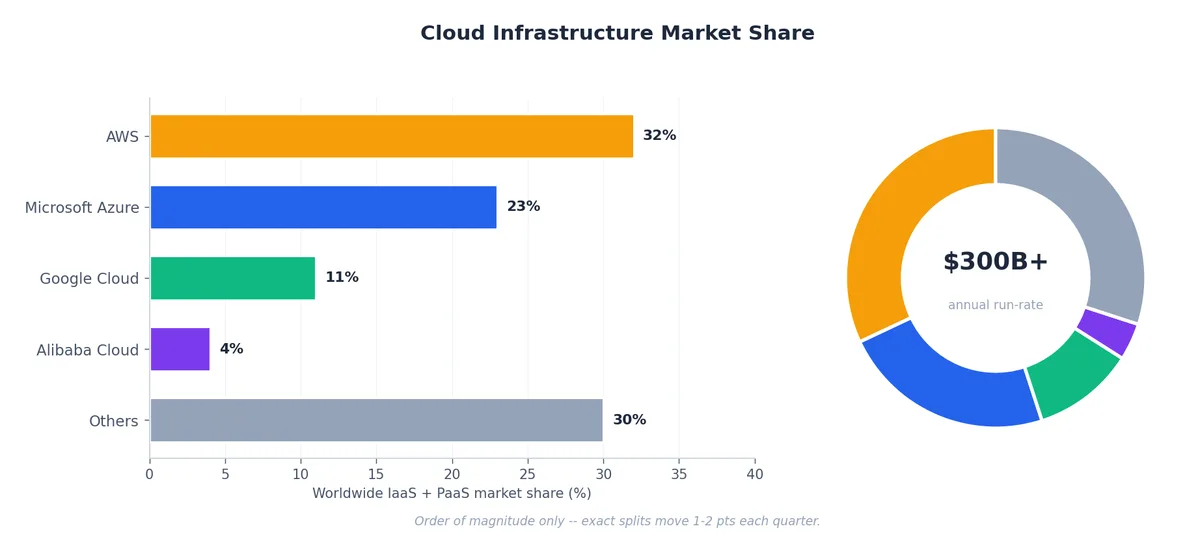
The concentration is not accidental. Cloud infrastructure is a CapEx-heavy business with strong economies of scale: every additional region or AZ unlocks more customers, every additional service compounds with the existing ones (S3 makes EC2 stickier, IAM makes both stickier still). Smaller providers compete on price, on a specific vertical (gaming, scientific computing) or on a specific region.
| Vendor | ~Share | Strengths | Best for |
|---|---|---|---|
| AWS | ~32% | Broadest catalogue, longest history, biggest ecosystem | Enterprises, startups, global scale, breadth of choice |
| Azure | ~23% | Microsoft / Active Directory / .NET integration, hybrid | Microsoft shops, regulated industries, government |
| GCP | ~10% | Data and ML leadership, K8s native, premium network | Data analytics, ML / AI, container-native architectures |
| Alibaba | ~4% | China-region depth, APAC, competitive pricing | China operations, APAC deployments, cost-sensitive |
| Others | ~30% | OCI, IBM, Tencent, Huawei, regional specialists | Niche, regional or vertical-specific workloads |
The Economics — CapEx vs OpEx Over Time#
The single most important business case for cloud is the shape of the cost curve. On-prem buys capacity in chunks ahead of demand; cloud buys it by the second as demand arrives.

Two effects compound:
- Wasted capacity. On-prem hardware sized for the peak sits idle for the average — typical utilisation across enterprise data centres hovers between 15% and 30%.
- Capacity shortfall. When demand spikes beyond the provisioned ceiling (a launch, a marketing event, a viral moment), on-prem cannot stretch; cloud absorbs it in minutes.
For variable workloads — and most are variable — cloud wins on raw cost almost regardless of the discount you assume on hardware. The picture is less obvious for steady-state, high-utilisation workloads (a video transcoding farm running 24/7 at 80%+, a stable internal database fleet). At that profile, three-year reserved instances or a private-cloud build-out can beat on-demand cloud by 30-50%.
Hidden costs to model#
The on-demand sticker price is rarely the full bill. Always add:
- Egress — moving data out of a cloud is priced; moving it between regions is also priced
- Inter-AZ traffic — charged on most providers; can dominate a chatty microservice bill
- Managed service premiums — RDS costs ~30% more than running PostgreSQL on EC2 yourself
- Support plans — typically 3-10% of monthly spend for Business or Enterprise tiers
- People — platform engineers, FinOps analysts, security engineers; the “cloud team” is real headcount
A defensible TCO model spans three years, includes refresh cycles for on-prem and reservations for cloud, and amortises people costs against both.
Architecture Building Blocks#
A cloud is more than VMs. The handful of primitives below recur in every serious architecture.
Virtualisation — the substrate#
A hypervisor lets many virtual machines share one physical server. Two flavours matter:
- Type 1 (bare-metal) — VMware ESXi, KVM, Hyper-V, Xen. Runs directly on hardware; this is what every public cloud uses
- Type 2 (hosted) — VirtualBox, VMware Workstation. Runs on top of a host OS; useful for development and testing
Containers are not a replacement for VMs at the substrate layer; they sit above them, sharing the kernel of the host VM. A typical EKS or AKS pod runs in a container, on a Linux VM, on a hypervisor, on a server. We dive deep into this in Part 2 (virtualisation) and Part 7 (cloud-native).
| Feature | VMs | Containers |
|---|---|---|
| Isolation | Full guest OS | Shared kernel; namespaces and cgroups |
| Boot | 30-90 s typical | 100 ms - 2 s typical |
| Overhead | GB of RAM per instance | Tens of MB per container |
| Use case | Mixed OS, legacy apps | Microservices, CI workers, ML training |
Storage — pick by access pattern, not by name#
| Type | Examples | Access | Best for | Notable spec |
|---|---|---|---|---|
| Object | S3, GCS, Azure Blob, OSS | HTTP/REST | Backups, media, static sites, data-lake landing | Eleven nines (99.999999999%) durability |
| Block | EBS, Azure Managed Disks, PD | iSCSI / virtio block | Databases, high-IOPS apps, boot disks | Up to 80k+ IOPS for io2 / Hyperdisk |
| File | EFS, Azure Files, Filestore, NAS | NFS / SMB | Shared content, lift-and-shift legacy | Multi-attach across instances |
| Archival | Glacier, Archive Blob, Coldline | Async retrieve | Compliance archive, long-term backup | Cents per TB-month, hours to retrieve |
S3-style storage classes let you trade retrieval latency for cost. A typical pattern: hot data in Standard, warm in Standard-IA after 30 days, cold in Glacier after 180 days, deep archive after one year — driven by lifecycle policies, not by hand.
Networking — the part that bites you#
- VPC (Virtual Private Cloud) — your isolated network in the cloud, with subnets per AZ, route tables, security groups, NACLs
- Load balancer — L4 (NLB, TCP) for raw throughput, L7 (ALB, HTTP) for routing by path / header
- CDN — caches static (and increasingly dynamic) content at edge POPs near users; CloudFront, Cloud CDN, Azure CDN, Cloudflare
- VPN / Direct Connect — IPSec tunnels for the cheap path, dedicated fibre for the predictable path (sub-2 ms typical, no internet path)
Auto-scaling — the elasticity engine#

Two axes:
- Horizontal (out / in) — add or remove instances; the cloud-native default
- Vertical (up / down) — resize an instance; usually requires a stop / start, so only used for stateful workloads like databases
Regions and availability zones — the blast-radius story#
A region is a geographic area (us-east-1, eu-west-1, ap-southeast-1, cn-hangzhou). Regions are isolated from each other — a region failure does not propagate. Each region contains multiple availability zones (AZs), which are physically separate data centres a few kilometres apart with independent power, cooling and network, but linked by sub-millisecond fibre.

The reasoning behind the structure:
- Multi-AZ inside a region is cheap and easy: replicas in different AZs, a load balancer that fails over automatically, no application changes needed
- Multi-region is much harder: data has to be replicated across long-haul links, eventual-consistency rears its head, and DNS or global load balancing has to redirect traffic on failure
- Edge / POP is for content delivery and DDoS absorption, not for stateful application logic
A pragmatic default: build everything multi-AZ from day one (the cost is marginal); add multi-region only when a minute of downtime costs more than a month of replication bandwidth.
The Shared Responsibility Model#
Almost every public cloud breach in the last decade has been a customer mis-configuration — a public S3 bucket, a leaked IAM key, a permissive security group. The shared responsibility model formalises why.

The provider always secures the substrate — physical access, hypervisor, the network plane between data centres. What changes by service model is where the boundary sits:
- IaaS — the customer is responsible for the OS, middleware, application, identity and data. The provider is responsible for everything below the VM
- PaaS — the OS and middleware shift to the provider; the customer keeps application code, identity and data
- SaaS — almost everything is the provider’s, except identity (who can log in) and data (what they can do)
Two practical consequences:
- Identity is your problem on every model. Multi-factor authentication, least-privilege roles, key rotation, JIT access — none of this is automatic.
- Data is your problem on every model. Encryption at rest is often on by default; encryption in transit is your responsibility to enforce; backups, retention and legal hold are entirely yours to design.
We go deep on this in Part 5 (security and privacy).
The Service Catalogue — Reading the Menu#
Each major vendor ships hundreds of services, but they cluster into a small number of families. The map below is enough to find your way around any of them.
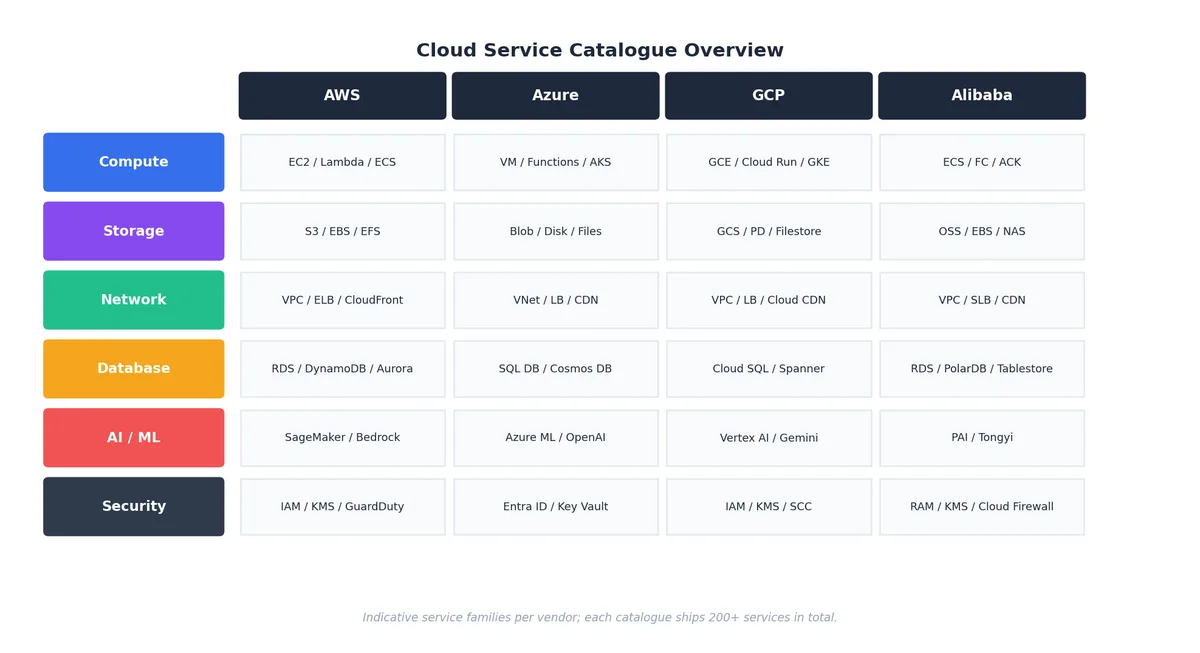
A few practical notes when navigating a catalogue:
- Names move, families don’t. Vendors rename and restructure; the underlying primitives (compute, object storage, managed SQL) stay stable
- Three concentric circles. The “core” — compute, storage, network, IAM, monitoring — is mature and broadly equivalent across vendors. The “managed” tier — databases, queues, container orchestration — is differentiated by ergonomics and price. The “frontier” tier — AI, data warehouse, custom silicon — is where vendors fight for mindshare and where lock-in is highest
- Quotas before architecture. Every account has soft and hard quotas (number of vCPUs, S3 buckets, API requests per second). Read them before designing for scale
Real-World Cases — Architecture in Anger#
Netflix — streaming at planetary scale#
Netflix shut its last data centre in 2016 and runs entirely on AWS, with a custom CDN (Open Connect) co-located inside ISPs for the actual video bytes. Hundreds of microservices, a self-built chaos-engineering toolchain (Chaos Monkey, Simian Army), and aggressive multi-AZ + multi-region failover. Outcome: 200M+ subscribers served at 99.99%-class availability, with the ability to absorb the launch of a single popular show that doubles peak traffic for a weekend.
Airbnb — startup to global platform#
A monolith on AWS in a single region in 2009. By 2018, hundreds of services across multiple regions, with Aurora and Vitess for the data tier, a service mesh for east-west traffic, ElastiCache (Redis) and CloudFront for the read path. The migration was incremental — one bounded context at a time — and took years rather than a big-bang rewrite. Outcome: millions of listings, scalable through unpredictable seasonal peaks.
Capital One — regulated enterprise migration#
Among the first US banks to commit “all-in” on a public cloud (AWS, announced 2015, completed 2020). The hard part was not technology but governance — proving to SOC, PCI-DSS and bank-specific regulators that controls in code (Terraform, Cloud Custodian, CloudFormation guardrails) were as auditable as physical controls. Outcome: all eight legacy data centres closed by 2020, infrastructure cost down 30-40%, software delivery cycles measured in days rather than quarters. (The 2019 incident — caused by a misconfigured WAF allowing SSRF — is a textbook example of why the shared-responsibility customer side matters.)
Spotify — multi-cloud by deliberate design#
Spotify runs the streaming service primarily on GCP, with the data and ML platform leveraging BigQuery, Dataflow, and Pub/Sub. AWS is used in select areas for storage and some compute. Outcome: petabytes of listening data processed daily to power Discover Weekly and Wrapped, with vendor concentration consciously managed.
A Decision Framework You Can Defend#
The hardest part of cloud is not picking the technology — it is justifying the choice in a year, when someone asks why. The seven-dimension framework below is the one I keep coming back to.
| Dimension | Question to answer | Where it bites later |
|---|---|---|
| Workload shape | Is this steady-state or bursty? CPU-, memory-, IO- or GPU-bound? | Wrong instance family doubles your bill |
| Data gravity | Where does the data live now and how big is it? | Egress fees and migration time can dwarf compute spend |
| Latency budget | What is the user-perceived latency target end-to-end? | Determines region count, edge usage, multi-AZ vs multi-region |
| Compliance | HIPAA / GDPR / PCI / region-specific data residency? | Constrains region list and sometimes vendor list |
| Team capability | What does your team already operate? | A “best” service your team can’t run is worse than a “good” one they can |
| Total cost of ownership | 3-year TCO including egress, support, people | Sticker shock at the 18-month mark |
| Lock-in tolerance | How costly is a migration off this service in 3 years? | Frontier-tier services are great until you want to leave |
Best practices that age well#
- Start small, scale gradually. A non-critical service in one region in one account is a fine first move
- Design for failure. Assume any component, including managed services, can fail at any time; multi-AZ from day one
- Prefer managed services for undifferentiated heavy lifting. Don’t run your own PostgreSQL unless you have a compelling reason
- Right-size and revisit. Most fleets are over-provisioned by 20-40%; weekly review is cheap and pays for itself
- Encrypt everything. Default-on encryption at rest is no longer optional; in-transit TLS 1.2+ is table stakes
- Treat infrastructure as code. Terraform, Pulumi or CloudFormation — never click in production
- Observe from day one. Logs, metrics, traces, and alerts wired up before traffic, not after
FAQ#
Is cloud always cheaper than on-prem? No. For variable workloads and most businesses, cloud wins. For very large, very steady-state workloads at 70%+ utilisation — think Dropbox’s storage tier, which famously moved off AWS to save hundreds of millions — a private build can win. Always model TCO over three years including refresh cycles, egress and people.
How secure is the cloud? The substrate is more secure than almost any organisation could build. The application and configuration on top are exactly as secure as you make them. The shared responsibility model is the line. Most breaches happen above it.
What happens during a provider outage? It happens; design for it. Multi-AZ handles the common case (data-centre failure within a region) cheaply. Multi-region handles the rare case (full-region failure) at significant cost. Multi-cloud handles the very rare case (provider-wide failure) at very significant cost. Match investment to your actual risk appetite, not headlines.
What skills should I learn first? A foundational certification on one provider (AWS Cloud Practitioner / Solutions Architect Associate, Azure Fundamentals, GCP ACE) is a fast on-ramp. Then Linux fundamentals, networking basics, infrastructure as code (Terraform), and containers (Docker, Kubernetes). The provider-specific knowledge transfers more than people think.
Should I learn AWS, Azure or GCP? Pick the one your employer or target employers use. They share enough conceptually that switching is a matter of weeks, not years. AWS has the broadest job market; Azure is dominant in enterprise IT; GCP is over-indexed in data and ML.
Summary#
| Concept | Key takeaway |
|---|---|
| Service models | IaaS (control) -> PaaS (managed runtime) -> FaaS (per-invocation) -> SaaS (just use it) |
| Deployment models | Public default; private for regulation; hybrid for legacy bridges; multi-cloud for real strategic reason |
| Economics | OpEx tracks demand; CapEx wastes off-peak and shortfalls on-peak; TCO over 3 years |
| Shared responsibility | Provider secures the substrate; you secure identity, data, configuration |
| Regions and AZs | Multi-AZ from day one; multi-region when downtime cost > replication cost |
| Vendors | AWS (breadth), Azure (enterprise / Microsoft), GCP (data / ML), Alibaba (China / APAC) |
| Choosing | Workload shape, data gravity, latency, compliance, team, TCO, lock-in — in that order |
The rest of this series unpacks each of these layers. The next instalment goes deep on virtualisation — the hypervisor magic that makes the whole edifice possible, from KVM internals to lightweight VMs like Firecracker that power Lambda.
Cloud Computing 8 parts
- 01 Cloud Computing (1): Fundamentals and Architecture you are here
- 02 Cloud Computing (2): Virtualization Technology Deep Dive
- 03 Cloud Computing (3): Cloud-Native and Container Technologies
- 04 Cloud Computing (4): Cloud Storage Systems and Distributed Architecture
- 05 Cloud Computing (5): Cloud Network Architecture and SDN
- 06 Cloud Computing (6): Cloud Security and Privacy Protection
- 07 Cloud Computing (7): Cloud Operations and DevOps Practices
- 08 Cloud Computing (8): Multi-Cloud and Hybrid Architecture