Cloud Computing (2): Virtualization Technology Deep Dive
A hands-on guide to virtualization -- hypervisors (VMware, KVM, Xen, Hyper-V), storage and network virtualization, performance tuning, and container comparison.

Without virtualization, there is no cloud. Every EC2 instance, every Lambda invocation, every Kubernetes pod ultimately stands on the same trick: lying convincingly to an operating system about the hardware underneath it. This article walks the full stack — from the CPU instructions that make the trick cheap, through the four hypervisors that dominate the market, to the production-grade tuning knobs that decide whether your VMs run at 70 % or 99 % of bare metal.
What You Will Learn#
- How CPU virtualization actually works (rings, VT-x, EPT) and why Type 1 and Type 2 hypervisors exist
- Hands-on configuration of VMware ESXi, KVM, Xen, and Hyper-V with the right defaults for production
- Storage virtualization with LVM and ZFS, and why disk format choice can change IOPS by 4x
- Network virtualization: VLANs, VXLAN overlays, Open vSwitch and SR-IOV
- Performance tuning: CPU pinning, NUMA, huge pages, virtio, vhost-net
- Live migration internals, nested virtualization, and GPU sharing (vGPU / MIG)
- Security hardening, isolation primitives, and a troubleshooting playbook
Prerequisites#
- Comfortable on a Linux command line
- Basic OS concepts (processes, kernel vs userspace, page tables)
- Part 1 of this series (Cloud Computing Fundamentals )
Virtualization Fundamentals#
Virtualization creates virtual versions of hardware resources — CPU, memory, disks, NICs — so that multiple operating systems can each believe they own a whole machine. The component that maintains the illusion is the hypervisor, also called the Virtual Machine Monitor (VMM).
Why It Took Hardware Help#
x86 was not originally virtualizable. The architecture exposes 17 sensitive instructions (e.g. POPF, SGDT) that change global state but do not trap when executed in user mode — which means a naive hypervisor cannot intercept them. Two workarounds emerged in the early 2000s:
- Binary translation (VMware): rewrite guest kernel code on the fly to replace dangerous instructions with calls into the hypervisor. Clever but slow and complex.
- Para-virtualization (Xen): modify the guest OS to call the hypervisor directly via “hypercalls”. Fast but only works for cooperating guests (Linux, BSD).
In 2005-2006 Intel VT-x and AMD-V added a new CPU mode — VMX root for the hypervisor and VMX non-root for the guest — with hardware-managed transitions (VMENTER / VMEXIT). Suddenly any unmodified OS could run at near-native speed. A few years later, Extended Page Tables (EPT) and Nested Page Tables (NPT) eliminated the second-biggest cost — shadow page table maintenance — by giving the MMU two-level translation in hardware.
This is the moment virtualization became cheap enough to build a public cloud on.
Type 1 vs Type 2 Hypervisors#
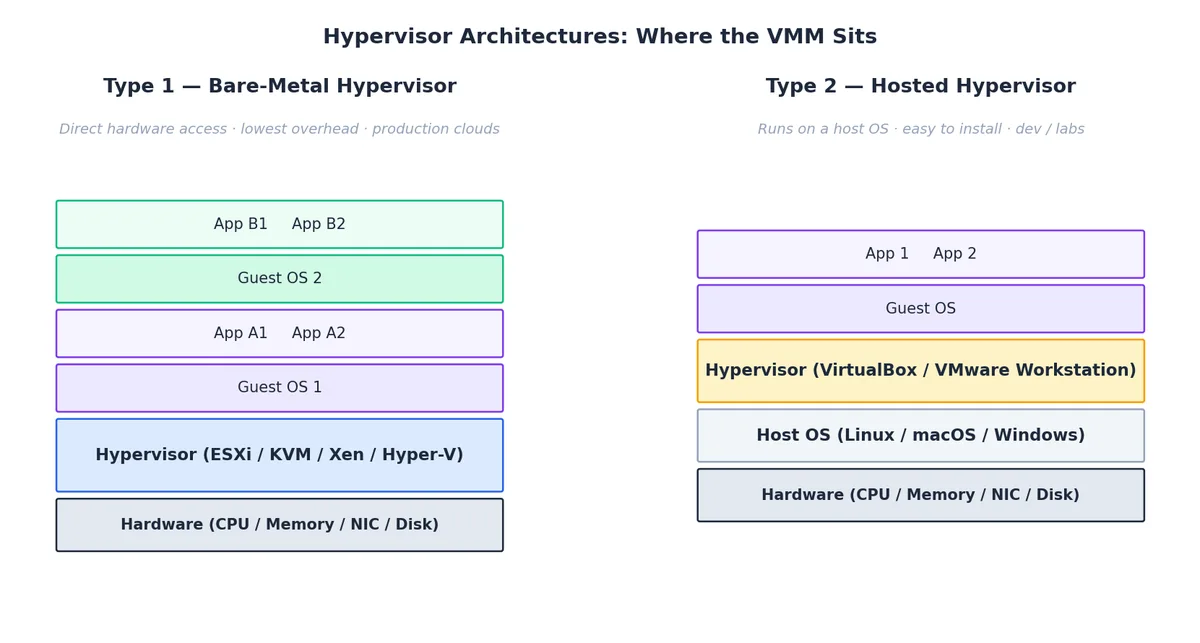
| Type 1 (bare-metal) | Type 2 (hosted) | |
|---|---|---|
| Runs on | Hardware directly | A host OS |
| Examples | VMware ESXi, KVM, Xen, Hyper-V | VirtualBox, VMware Workstation, Parallels |
| Overhead | Minimal | Adds host-OS scheduling layer |
| Use case | Production clouds, data centers | Dev laptops, training labs |
KVM is a slightly weird case: it is a kernel module that turns Linux into a Type 1 hypervisor — the host kernel and the hypervisor are the same kernel.
Key Concepts#
- Hypervisor (VMM): the layer that schedules vCPUs onto pCPUs, allocates memory, and traps privileged guest operations.
- Guest OS: the OS running inside a VM, unaware (or barely aware) it is virtualized.
- vCPU: a thread on the host scheduler that runs guest code in VMX non-root mode.
- Resource overcommit: allocating more virtual resources than physically exist. Safe within limits because guests rarely peak together. Typical safe ratios: CPU 4:1-8:1, memory 1.5:1-2:1.
- Ballooning: a guest driver that returns idle memory to the host on demand, enabling memory overcommit.
Historical Milestones#
| Year | Event |
|---|---|
| 1972 | IBM VM/370 — first commercial OS-level virtualization |
| 1999 | VMware Workstation ships, virtualizing x86 via binary translation |
| 2003 | Xen 1.0 introduces para-virtualization on Linux |
| 2005 | Intel VT-x and AMD-V bring hardware-assisted virtualization to x86 |
| 2006 | KVM merged into Linux 2.6.20 |
| 2008 | EPT / NPT eliminate shadow page table cost |
| 2013 | Docker launches; containers become the second wave |
| 2018 | Firecracker (microVMs) enables sub-second VM boot for serverless |
Types of Virtualization#
| Property | Full virt (BT) | Para-virt | HW-assisted | Containers |
|---|---|---|---|---|
| Guest OS modified? | No | Yes | No | N/A |
| CPU overhead | High | Medium | ~1-3 % | Near zero |
| Isolation | Strong | Strong | Strong | Process-level |
| Boot time | 30-60 s | 30-60 s | 20-45 s | < 1 s |
| Image size | GB | GB | GB | tens of MB |
| Example | Early VMware | Xen PV | KVM, ESXi 6+ | Docker, containerd |
Containers vs VMs: a Different Isolation Boundary#

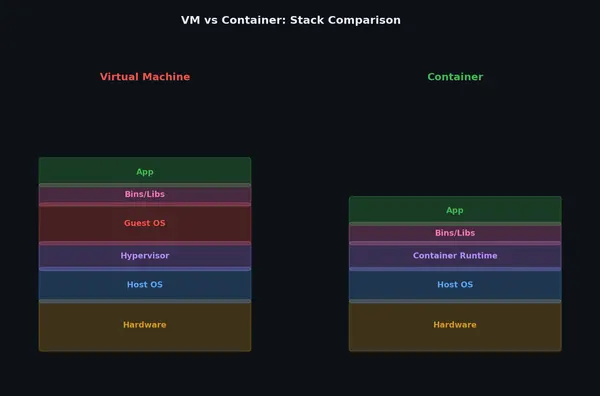
The single most important diagram in this article. A VM virtualizes the hardware — so each guest brings its own kernel. A container virtualizes the OS — it is just a Linux process bundled with namespaces (PID, mount, network, UTS, IPC, user) and cgroups for resource limits. Same kernel for everyone.
Consequences:
- A container that triggers a kernel bug can compromise the host. A VM that triggers a kernel bug only crashes itself.
- Containers cannot run a different OS (no Windows containers on a Linux host kernel, despite the marketing).
- Containers boot in milliseconds because there is no kernel to initialize.
This is why production workloads often run containers inside VMs: the VM gives you a security boundary, the container gives you density and speed.
Startup Latency and Memory Cost#

The numbers above are why “serverless” works on Firecracker microVMs (~125 ms cold start, ~30 MB overhead) and not on traditional KVM/QEMU VMs. Two orders of magnitude in startup time and memory completely change the economics of bursty workloads.
Hypervisor Choice#
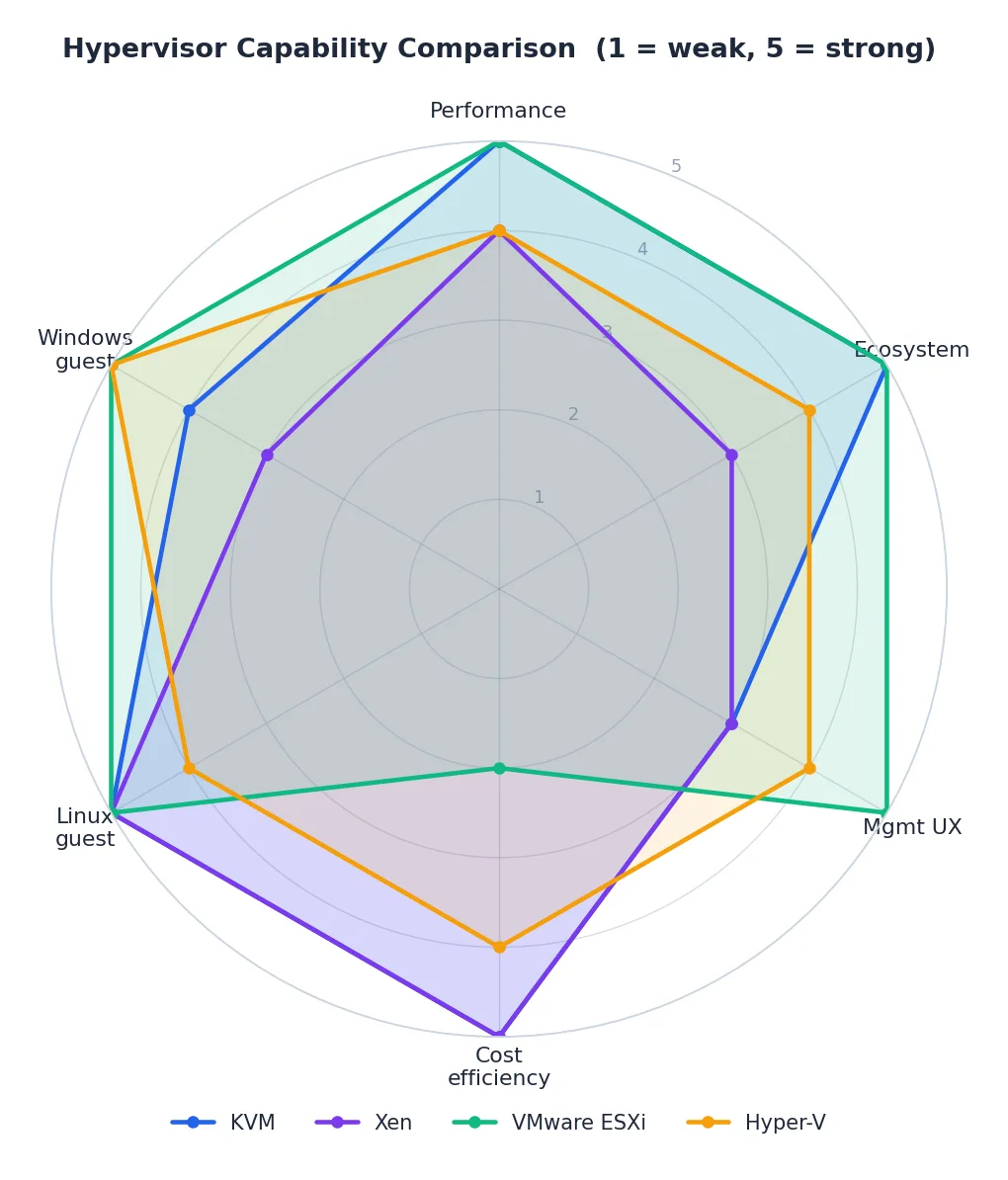
There is no single best hypervisor — the right choice depends on what you already run, who runs it, and what you can spend on licensing.
KVM (Kernel-based Virtual Machine)#
KVM turns Linux itself into a Type 1 hypervisor. It is open-source, ships in every major distro, and powers OpenStack, Proxmox, Amazon EC2 (Nitro), Google Cloud, and most of Alibaba Cloud’s ECS fleet.
Install on Ubuntu/Debian:
| |
Create a VM:
| |
Common virsh commands:
| |
VMware ESXi#
ESXi is a Type 1 hypervisor that runs directly on the server. It is the de facto enterprise standard and pairs with vCenter for cluster management.
The default VM hardware uses emulated SCSI (LSI Logic) and an emulated 1 Gbps NIC (E1000). This is fine for a Windows installer but cripples production workloads. Switch to paravirtual:
| |
| Setting | Default | Optimised | Win |
|---|---|---|---|
| SCSI controller | LSI Logic (~80 K IOPS) | PVSCSI (~300 K+ IOPS) | 3-4x IOPS |
| NIC | E1000 (~1 Gbps) | VMXNET3 (~9.5 Gbps) | ~10x throughput |
| CPU overhead | Higher (emulation) | Lower (paravirtual) | 30-50 % less CPU |
Both PVSCSI and VMXNET3 require the VMware Tools driver in the guest. Install with the legacy controllers, switch after first boot.
| |
Xen#
Xen is the original open-source Type 1 hypervisor and powered the first generation of AWS EC2. It supports both PV and HVM (hardware-assisted) modes. Today it is most common in security-focused stacks (Qubes OS) and a handful of legacy clouds.
| |
Microsoft Hyper-V#
Hyper-V is bundled with Windows Server and the Windows desktop SKUs. The right choice when most of your guests are Windows or your team lives in PowerShell.
| |
Choosing#
| Criterion | KVM | VMware ESXi | Hyper-V | Xen |
|---|---|---|---|---|
| Cost | Free | $$$ per socket | Bundled with WS | Free |
| Management | virsh, OpenStack | vSphere (excellent GUI) | PowerShell, Windows Admin Center | xl, XenCenter |
| Performance | Excellent | Excellent | Very good | Excellent |
| Best fit | Linux clouds, OpenStack | Enterprise data centers | Microsoft shops | Security niches, legacy |
Storage Virtualization#
LVM (Logical Volume Manager)#
LVM abstracts block devices into flexible, resizable logical volumes. The mental model: physical volumes (pv) -> volume groups (vg) -> logical volumes (lv).
| |
ZFS#
ZFS combines volume management and filesystem with built-in checksums, compression, snapshots, and send/receive replication. The cost is RAM (rule of thumb: 1 GB per TB for the ARC).
| |
Disk Format and I/O Path#
The format you pick for the virtual disk image — and the cache mode you give QEMU — often matters more than which CPU you bought.
| |
| |
| Format | Performance | Features | Best for |
|---|---|---|---|
| Raw | Best | None | Production DBs, latency-critical |
| QCOW2 | Very good | Snapshots, compression, thin | General use, dev/test |
| VMDK | Good | VMware ecosystem | VMware shops |
cache=none + io=native bypasses the host page cache and uses asynchronous direct I/O — the right default for any guest with its own filesystem cache (i.e. all of them). cache=writeback is faster but loses data on host crash; only use it for ephemeral workloads.
Network Virtualization#
VLANs#
A VLAN tag (802.1Q) carves one physical network into many isolated broadcast domains.
| |
Limit: 4 094 VLAN IDs is plenty for a single rack, nowhere near enough for a public cloud.
VXLAN#
VXLAN tunnels Layer-2 Ethernet frames inside UDP packets, giving you 16 million logical networks (24-bit VNI) over any IP fabric. This is the workhorse of multi-tenant cloud networks and Kubernetes overlays (Flannel, Calico VXLAN mode).
| |
| |
Open vSwitch#
OVS is a programmable virtual switch with OpenFlow support, used by OpenStack Neutron, Open Virtual Network (OVN), and many SDN stacks.
| |
SR-IOV: Bypass the Hypervisor#
SR-IOV (Single Root I/O Virtualization) lets a NIC expose Virtual Functions (VFs) that are mapped directly into VMs, bypassing the host’s network stack entirely. Latency drops from ~30 µs (virtio) to ~3 µs (SR-IOV); throughput becomes line-rate.
| |
The trade-off: live migration becomes harder (the VM is bound to a specific physical NIC) and you can only have as many VMs on a NIC as it has VFs.
Performance Optimization#
CPU: Pinning, NUMA, Topology#
On any multi-socket host, the worst case is a vCPU that wakes up on socket A but its memory lives on socket B — every cache line is a cross-socket round trip. Fix this with CPU pinning plus NUMA pinning:
| |
Expose the real CPU topology so the guest scheduler can make good decisions:
| |
mode='host-passthrough' exposes every CPU flag (AVX-512, AES-NI, etc.) but breaks live migration to dissimilar hosts; use host-model if you need migration across a heterogeneous fleet.
Memory: Huge Pages and Ballooning#
Each TLB entry maps one page. With 4 KB pages, walking 1 GB of RAM hits 262 144 entries; with 2 MB huge pages, just 512. For databases and JVMs the speedup is 5-15 %.
| |
Ballooning gives memory back dynamically:
| |
I/O: virtio Everywhere#
Always use virtio devices in KVM guests. They are paravirtual — the guest knows it is in a VM and uses ring buffers shared with the hypervisor instead of MMIO emulation. vhost-net moves the network ring processing into the kernel, eliminating one userspace round trip per packet.
| |
Tuning Checklist#
- VT-x / AMD-V enabled in BIOS
- virtio (KVM) or PVSCSI/VMXNET3 (VMware) for disk and NIC
- CPU pinning + NUMA pinning for any VM with > 8 vCPUs
- Host I/O scheduler =
none(NVMe) ormq-deadline(SATA) - Disk format = raw,
cache=none,io=nativefor production - Huge pages backing memory-intensive guests
- SR-IOV for network-intensive VMs that do not need live migration
- Multi-queue virtio-net with queue count = vCPU count
- CPU governor =
performanceon the host
Live Migration: Moving a Running VM#

Live migration is the single feature that turned VMs from “another way to run a server” into a fluid pool. The dominant algorithm is pre-copy:
- Initial copy. Send the entire guest memory image to the destination while the VM keeps running on the source.
- Dirty-page rounds. The source tracks pages dirtied during step 1 and re-sends them. Repeat until the dirty rate falls below network bandwidth, or you hit the round limit.
- Stop & switch. Pause the source VM, send the last dirty pages and CPU state, resume on the destination. Pause time is typically < 100 ms — TCP connections and user sessions survive.
| |
If the guest is dirtying memory faster than the link can move it (a busy in-memory database, for example), pre-copy never converges. The fallbacks are post-copy (switch first, page-fault memory across the network — lower total downtime, higher tail latency) and auto-converge (throttle the guest CPU until the dirty rate drops).
Requirements:
- Shared storage, or
--copy-storage-all(slower) - Compatible CPU features on source and destination (use
host-model, nothost-passthrough) - A network fast enough that dirty rate < bandwidth — 10 Gbps is the practical minimum for production VMs
Nested Virtualization#

Nested virtualization lets a guest VM itself be a hypervisor. Real uses:
- Running a hypervisor lab inside a cloud VM
- CI pipelines that spin up VMs as part of their build
- WSL 2 on Windows (Hyper-V running Linux running containers)
- Confidential computing (one hypervisor inside another for defence in depth)
Enable on KVM:
| |
Then expose vmx (or svm) to the L1 guest:
| |
Cost: each nesting level adds VM-exit hops. CPU-bound workloads typically lose 5-10 % at L1 and 25-40 % at L2; I/O-bound workloads can lose much more without paravirt drivers all the way down.
GPU Virtualization#

GPUs were designed for one process to own the whole device. Sharing them across VMs requires picking a point on the density-vs-isolation spectrum:
| Mode | How | Isolation | Density | Notes |
|---|---|---|---|---|
| Time-slicing | Hypervisor round-robins context | Weak (no perf isolation) | High | Cheapest, used in many ML training clusters |
| vGPU (NVIDIA GRID) | Mediated passthrough, virtual GPU per VM | Medium | Medium | Hard QoS for memory; requires NVIDIA license |
| MIG (A100 / H100) | Hardware partitions GPU into up to 7 instances | Strong (separate SMs, L2, memory) | Fixed shapes (1g.5gb, 2g.10gb, …) | True isolation, no fractional sharing within a slice |
| Passthrough (VFIO) | One whole GPU bound to one VM | Native | 1 VM per GPU | Bare-metal speed, no sharing at all |
A typical AI cloud uses MIG for inference (many small slices, hard QoS) and passthrough for training (one job, the whole device).
| |
Security and Isolation#
Threat Model#
The fundamental promise of a hypervisor is that one tenant cannot read or affect another. Real-world breaks have come from:
- VM escape via emulated device bugs (Venom, 2015 — floppy drive emulation in QEMU)
- Side channels on shared CPU caches (L1TF, MDS, Spectre v2)
- Hypervisor kernel bugs in the management plane
Defenses are layered, not perfect.
Hypervisor Hardening#
| |
Enable CPU side-channel mitigations on the host (spectre_v2=on, l1tf=full) and keep microcode current.
Guest Best Practices#
- Minimal install (no GUI, no
cups, noapt-listchanges) - Automatic security updates (
unattended-upgrades) - Full-disk encryption for sensitive data (LUKS in the guest)
- Per-trust-tier VLANs — never put PCI workloads on the same broadcast domain as developer VMs
- Keep guest agents (
qemu-guest-agent,vmtoolsd,Hyper-V Integration Services) up to date
Confidential Computing#
The newest layer: AMD SEV-SNP, Intel TDX, and ARM CCA encrypt guest memory with a key the hypervisor cannot see. Even a fully compromised host cannot read tenant data. Available today on Azure Confidential VMs, GCP Confidential VMs, and Alibaba Cloud ECS gN8v.
Troubleshooting Playbook#
| Symptom | First check | Likely fix |
|---|---|---|
| VM won’t start | journalctl -u libvirtd, qemu-img check vm.qcow2 | Disk corruption, permissions, SELinux/AppArmor labels |
| Slow CPU | virt-top, mpstat -P ALL on host | CPU pinning, governor = performance, check %steal |
| Slow disk | iostat -xz 1, guest iotop | Switch to virtio + cache=none io=native, raw format |
| Network packet loss | ethtool -S, tc -s qdisc | Multi-queue virtio, increase ring buffer, check vhost CPU |
| Live migration stalls | virsh domjobinfo <vm> | Dirty rate too high — enable auto-converge or use post-copy |
| Memory pressure | free -h, cat /proc/meminfo, numastat | Add huge pages, fix NUMA pinning, reduce overcommit |
| Random VM crash | dmesg, /var/log/libvirt/qemu/<vm>.log | EDAC errors -> bad RAM; otherwise check kernel + microcode |
KVM: entry failed, hardware error 0x80000021 | `dmesg | grep KVM` |
Resource Sizing Guidelines#
| Resource | Light | Medium | Heavy |
|---|---|---|---|
| vCPUs | 1-2 | 2-4 | 4-8+ |
| Memory | 2 GB | 4-8 GB | 16+ GB |
| OS disk | 20 GB | 30-50 GB | 50-100 GB |
| Network | 1 Gbps | 1-10 Gbps | 10+ Gbps (SR-IOV) |
Safe overcommit ratios:
- CPU: 4:1 to 8:1 — drop to 2:1 or 1:1 for latency-sensitive workloads
- Memory: 1.5:1 to 2:1 — never overcommit memory for databases
- Disk: thin provisioning OK if you monitor capacity
Case Studies#
Enterprise Data Center Consolidation#
A financial services company consolidated 200 physical servers onto 20 VMware ESXi hosts backed by a shared NVMe SAN. Result: 90 % rack reduction, 60 % cost saving, deployment time from weeks to hours. The bigger win was operational — a single vCenter cluster replaced four ticket queues.
HPC Research Cluster#
A research institute ran tightly-coupled MPI jobs on KVM with host-passthrough CPU, NUMA pinning, 1 GB huge pages, and SR-IOV InfiniBand. Sustained 95-98 % of bare-metal throughput while gaining the ability to snapshot whole experiments and ship them between sites.
Public Cloud Compute Plane#
Hyperscale clouds (AWS Nitro, Alibaba ECS Shenlong) push device emulation off the CPU entirely onto custom DPUs, leaving 100 % of the host CPU for guests and reducing the host’s attack surface to a thin KVM. Performance overhead in the single digits, security boundary smaller than any traditional ESXi host.
Aliyun-Specific Gotchas#
The neutral material above is the same on every cloud, but some details only show up on Aliyun ECS. Things I’ve actually been billed for:
- ECS instance families and underlying hypervisor. Modern ECS instances run on Aliyun’s “神龙 (Shenlong)” architecture — a Nitro-style DPU that offloads I/O entirely. Old
n4/mn4families still use a software hypervisor and behave noticeably differently for I/O-heavy workloads. Pickg7/c7/r7or newer for any production workload that touches the network or disks hard. The price difference vanishes against one weekend of debugging “why isp99weird on Tuesday.” - Burstable t-series surprise.
ecs.t6andecs.t5use CPU credits. The instance looks fine for the first day, then yourtopshows 100 % CPU usage but you’re only getting 20 % of one core because credits ran out. If your CPU spends more than ~20 % time busy on average, you don’t want a t-instance, ever. - System disk size cannot shrink, only grow. A 200 GB system disk allocated by accident is 200 GB for the instance’s lifetime. Re-create the instance from a smaller-disk image if you need to shrink.
- Snapshot pricing is by GB-month, not by snapshot count. Daily snapshot policies on a 500 GB disk add up fast. Use incremental snapshots (which Aliyun does by default) and prune retention to what you actually need.
- Live migration during maintenance is announced, not invisible. Aliyun emails you a window when a host needs maintenance. The VM pauses ~10 s during the cutover. Stateful workloads (databases, long TCP connections) need to handle that.
Region/AZ Choice — A Cost and Latency Story#
Region selection is the cheapest decision that has the largest blast radius. The numbers I’ve seen in practice:
| Choice | Latency to mainland China users | Latency to SEA users | Notes |
|---|---|---|---|
cn-hangzhou | 20-40 ms | 60-90 ms | Default and largest pool of services |
cn-shanghai | 20-40 ms | 60-90 ms | Fewer outages historically; some specialty SKUs missing |
cn-shenzhen | 30-50 ms | 40-60 ms | Best for HK/SEA reach |
cn-hongkong | 50-80 ms | 30-50 ms | Outside the GFW; useful for global services, no ICP filing required |
ap-southeast-1 (Singapore) | 80-120 ms | 10-30 ms | Standard SEA hub; full service catalog |
A few hard-earned lessons:
- AZ-level outages happen. Multi-AZ deployment isn’t paranoid; it’s the configuration that survives the next hardware failure. The SLA contract requires it.
- Cross-region latency is not free and not symmetric. Hangzhou to Singapore is ~80 ms; Hangzhou to Frankfurt is ~280 ms. If your replication is synchronous, that latency is in your write path.
- Bandwidth pricing changes with region. Mainland regions have generally cheaper intra-China traffic; cross-border egress to international regions is the most expensive line item on the bill for many companies.
When to Use a VM vs. a Container vs. a Function#
The “VMs are obsolete now” take is wrong. The real menu is:
- Bare-metal ECS (神龙裸金属 / Bare Metal Instance). When you need GPU passthrough, full PCIe access, or you’re running another hypervisor on top. Database workloads with strict latency budgets often want this.
- Standard VM (ECS). The default. Decade-stable interface, full root, every OS image you can think of. Pay for what you provision; pay even when idle.
- Container service (ACK / Serverless containers). When the workload is twelve-factor and you don’t want to manage the host. ACK Pro gives you a managed control plane; ECI (Elastic Container Instance) gives you per-second billing without any node management. The “no node” option is the right answer more often than people expect.
- Function compute (FC). When the workload is event-driven, bursty, and unpredictable. A handler that runs 10 times a day at random moments costs cents on FC and would burn $30/month of idle ECS time. Function cold starts are 100-500 ms — fine for webhooks, painful for user-facing requests.
The migration path that actually works for most companies: prototype on ECS, productionize on ACK, peel off cron-jobby tasks to FC. Going straight to Kubernetes on day one is a popular way to delay shipping by six months.
Cloud Computing 8 parts
- 01 Cloud Computing (1): Fundamentals and Architecture
- 02 Cloud Computing (2): Virtualization Technology Deep Dive you are here
- 03 Cloud Computing (3): Cloud-Native and Container Technologies
- 04 Cloud Computing (4): Cloud Storage Systems and Distributed Architecture
- 05 Cloud Computing (5): Cloud Network Architecture and SDN
- 06 Cloud Computing (6): Cloud Security and Privacy Protection
- 07 Cloud Computing (7): Cloud Operations and DevOps Practices
- 08 Cloud Computing (8): Multi-Cloud and Hybrid Architecture