Series · Databases · Chapter 1

Databases (1): Data Models and SQL — Why Tables Won (For Now)

A ground-up tour of the relational model, SQL fundamentals, normalization, and advanced query patterns — everything you need to speak fluent SQL.

Every application you have ever used sits on top of a data model. Pick the wrong one and you spend the next three years fighting your own database instead of shipping features.

For the past four decades, one model has dominated: the relational model. Flat tables, foreign keys, SQL. It is not glamorous. It is not trendy. But there is a reason almost every bank, airline, hospital, and e-commerce platform still runs on it — and understanding why is the first step to understanding databases at all.


The Relational Model: Codd’s Big Idea#

In 1970, Edgar F. Codd published “A Relational Model of Data for Large Shared Data Banks.” The core insight was radical at the time: separate the logical representation of data from its physical storage. Applications should not care whether data lives on disk, in memory, or across ten machines. They should see tables — nothing more.

Normalization forms comparison

A relational database organizes data into relations (tables). Each table has:

  • Columns (attributes) — typed fields like name VARCHAR(100) or price DECIMAL(10,2)
  • Rows (tuples) — individual records
  • Primary key — a column (or set of columns) that uniquely identifies each row
  • Foreign key — a column that references the primary key of another table, establishing a relationship

These four concepts give you everything you need to model surprisingly complex domains.

A Practical Schema: E-Commerce#

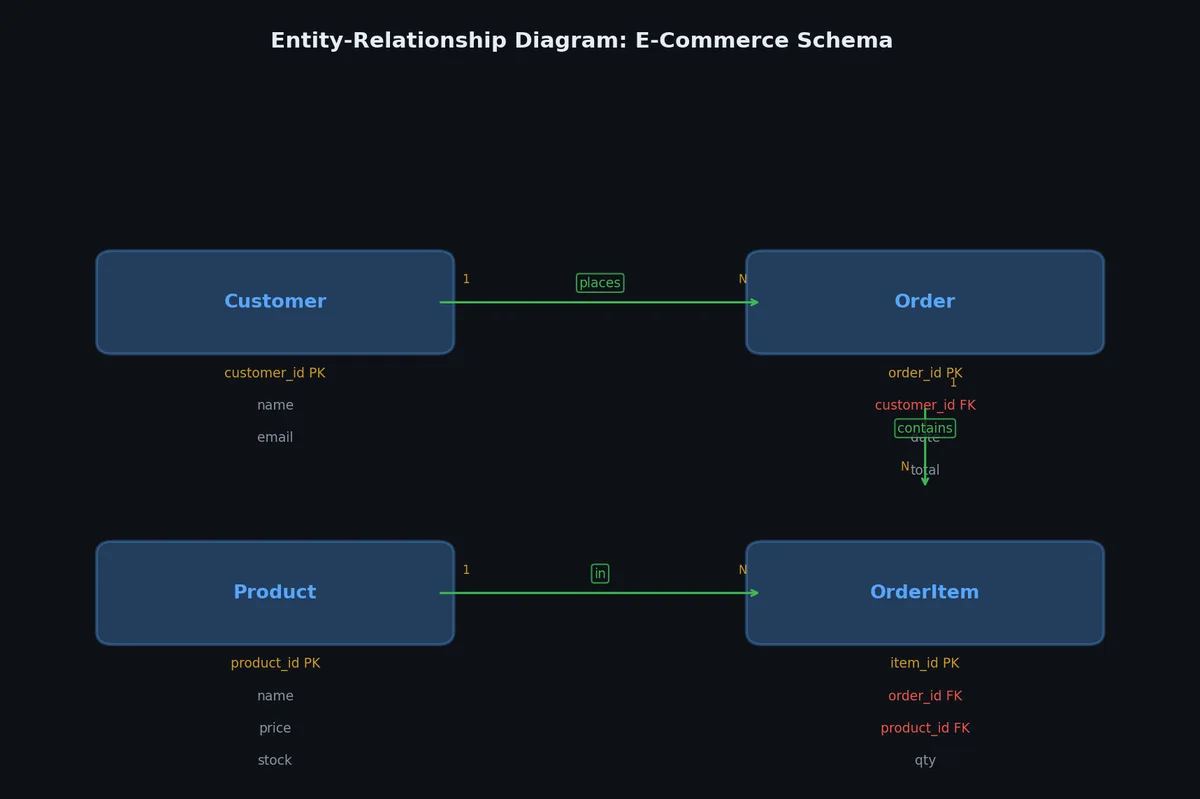
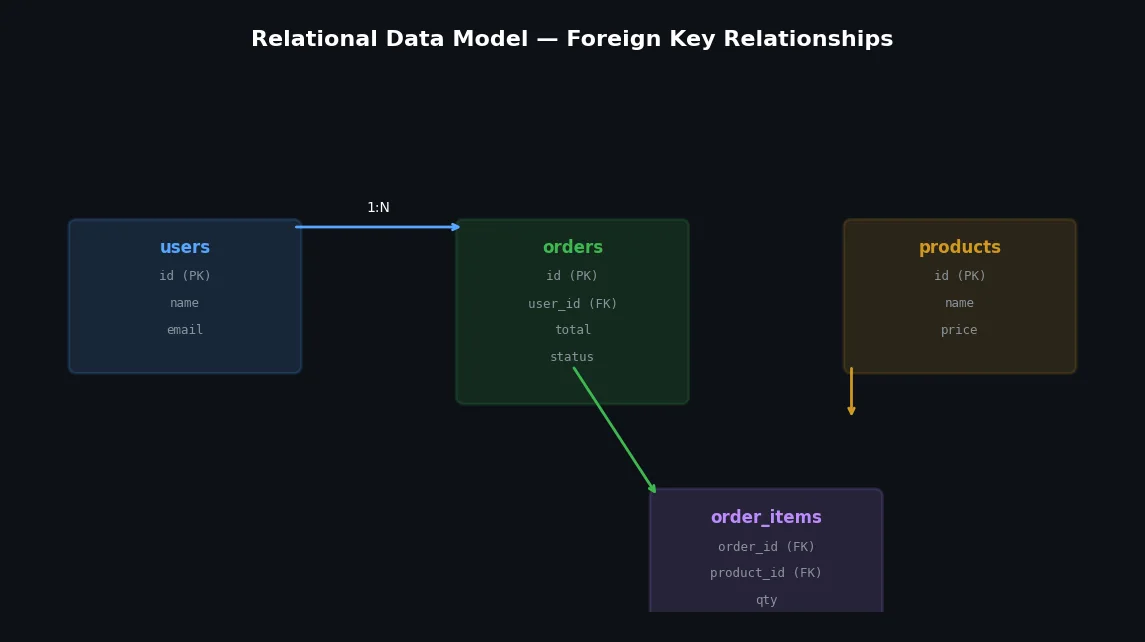
Theory is easier with concrete tables. Here is a minimal e-commerce schema that we will use throughout this article:

SQL query execution pipeline

 1
 2
 3
 4
 5
 6
 7
 8
 9
10
11
12
13
14
15
16
17
18
19
20
21
22
23
24
25
26
27
28
29
CREATE TABLE users (
    user_id     SERIAL PRIMARY KEY,
    email       VARCHAR(255) NOT NULL UNIQUE,
    full_name   VARCHAR(200) NOT NULL,
    created_at  TIMESTAMP NOT NULL DEFAULT NOW()
);

CREATE TABLE products (
    product_id  SERIAL PRIMARY KEY,
    name        VARCHAR(300) NOT NULL,
    category    VARCHAR(100),
    price       DECIMAL(10, 2) NOT NULL,
    stock       INT NOT NULL DEFAULT 0
);

CREATE TABLE orders (
    order_id    SERIAL PRIMARY KEY,
    user_id     INT NOT NULL REFERENCES users(user_id),
    status      VARCHAR(20) NOT NULL DEFAULT 'pending',
    created_at  TIMESTAMP NOT NULL DEFAULT NOW()
);

CREATE TABLE order_items (
    item_id     SERIAL PRIMARY KEY,
    order_id    INT NOT NULL REFERENCES orders(order_id),
    product_id  INT NOT NULL REFERENCES products(product_id),
    quantity    INT NOT NULL CHECK (quantity > 0),
    unit_price  DECIMAL(10, 2) NOT NULL
);

Four tables. Three foreign keys. That is enough to represent users placing orders containing multiple products — a model used by companies processing billions of dollars in revenue.

SQL Essentials#

Abstract visualization of relational database tables connect

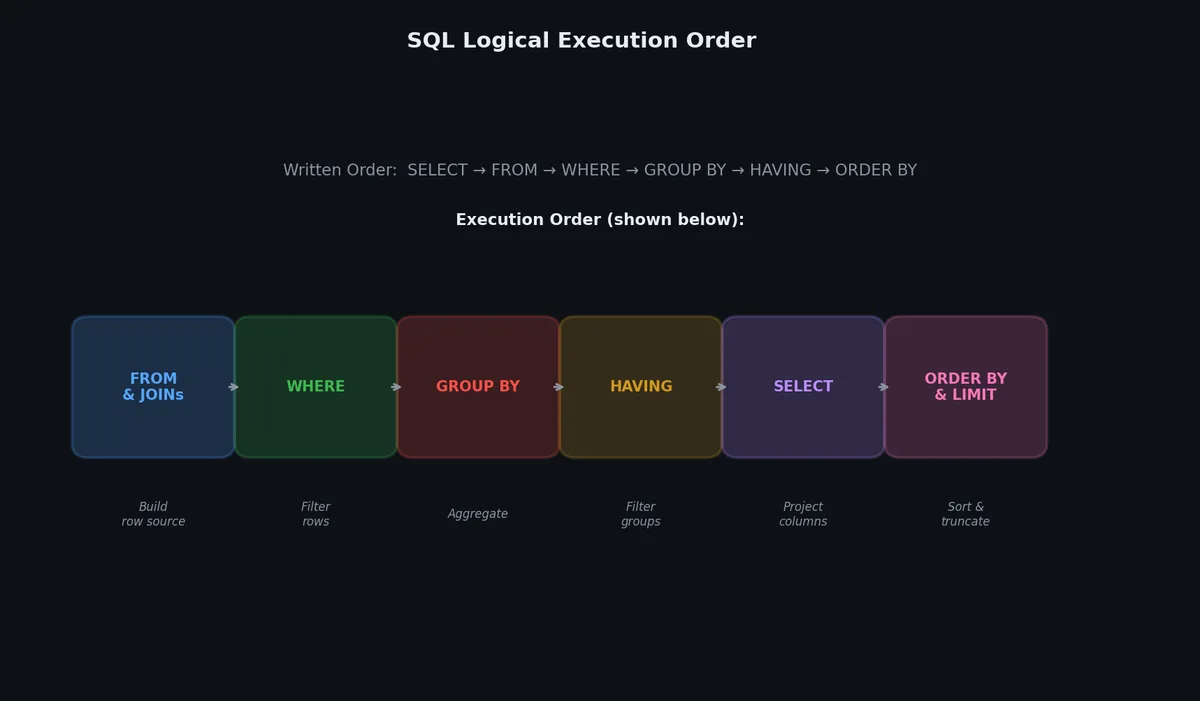
SQL (Structured Query Language) is how you talk to relational databases. It is declarative: you describe what data you want, not how to get it. The database engine figures out the execution plan.

SQL join types visualized

SELECT, FROM, WHERE#

The most basic query:

1
2
3
4
5
-- Find all products in the "Electronics" category under $500
SELECT product_id, name, price
FROM products
WHERE category = 'Electronics'
  AND price < 500.00;

Output:

1
2
3
4
5
6
 product_id |         name          | price  
------------+-----------------------+--------
          3 | Wireless Mouse        |  29.99
          7 | USB-C Hub             |  45.00
         12 | Mechanical Keyboard   | 149.99
         18 | Noise-Cancelling Buds | 199.00

ORDER BY and LIMIT#

1
2
3
4
5
-- Top 5 most expensive products
SELECT name, price
FROM products
ORDER BY price DESC
LIMIT 5;

JOINs: The Heart of Relational Queries#

JOINs combine rows from multiple tables. There are four types you need to know:

Entity-Relationship diagram

JOIN TypeReturns
INNER JOINOnly rows with matches in both tables
LEFT JOINAll rows from left table, NULLs where right has no match
RIGHT JOINAll rows from right table, NULLs where left has no match
FULL OUTER JOINAll rows from both tables, NULLs on both sides where no match
 1
 2
 3
 4
 5
 6
 7
 8
 9
10
11
12
13
14
-- Get all orders with user info and item details
SELECT
    u.full_name,
    o.order_id,
    p.name AS product_name,
    oi.quantity,
    oi.unit_price,
    (oi.quantity * oi.unit_price) AS line_total
FROM orders o
INNER JOIN users u ON o.user_id = u.user_id
INNER JOIN order_items oi ON o.order_id = oi.order_id
INNER JOIN products p ON oi.product_id = p.product_id
WHERE o.status = 'completed'
ORDER BY o.order_id;

Output:

1
2
3
4
5
6
  full_name   | order_id |    product_name     | quantity | unit_price | line_total
--------------+----------+---------------------+----------+------------+------------
 Alice Chen   |        1 | Mechanical Keyboard |        1 |     149.99 |     149.99
 Alice Chen   |        1 | USB-C Hub           |        2 |      45.00 |      90.00
 Bob Martinez |        3 | Wireless Mouse      |        3 |      29.99 |      89.97
 Bob Martinez |        3 | Standing Desk       |        1 |     599.00 |     599.00

A LEFT JOIN is essential when you want to keep rows even without a match:

1
2
3
4
5
-- Find users who have never placed an order
SELECT u.user_id, u.email, u.full_name
FROM users u
LEFT JOIN orders o ON u.user_id = o.user_id
WHERE o.order_id IS NULL;

GROUP BY and HAVING#

Aggregation collapses multiple rows into summary rows:

 1
 2
 3
 4
 5
 6
 7
 8
 9
10
11
12
13
-- Revenue per category, only categories with > $1000 revenue
SELECT
    p.category,
    COUNT(DISTINCT o.order_id) AS order_count,
    SUM(oi.quantity) AS total_units,
    SUM(oi.quantity * oi.unit_price) AS total_revenue
FROM order_items oi
JOIN products p ON oi.product_id = p.product_id
JOIN orders o ON oi.order_id = o.order_id
WHERE o.status = 'completed'
GROUP BY p.category
HAVING SUM(oi.quantity * oi.unit_price) > 1000.00
ORDER BY total_revenue DESC;

Output:

1
2
3
4
5
  category    | order_count | total_units | total_revenue
--------------+-------------+-------------+--------------
 Electronics  |          47 |         132 |      18432.50
 Furniture    |          23 |          31 |      12890.00
 Books        |          89 |         234 |       4567.80

WHERE filters rows before grouping. HAVING filters groups after aggregation. This distinction trips up most beginners.

Data Types: Know Your Options#

Choosing the right data type affects storage, performance, and correctness. Here is a comparison of common types across PostgreSQL and MySQL:

TypePostgreSQLMySQLBytesRange / Notes
Small integerSMALLINTSMALLINT2-32,768 to 32,767
IntegerINT / INTEGERINT4-2.1B to 2.1B
Big integerBIGINTBIGINT8-9.2 quintillion to 9.2 quintillion
Variable textVARCHAR(n)VARCHAR(n)1-4 + lenMax 1GB (PG), 65,535 bytes (MySQL)
Unlimited textTEXTTEXT / LONGTEXT1-4 + lenNo length limit (PG), 4GB (MySQL LONGTEXT)
Exact decimalDECIMAL(p,s) / NUMERICDECIMAL(p,s)variableUse for money. Never use FLOAT for money.
TimestampTIMESTAMP / TIMESTAMPTZTIMESTAMP / DATETIME8Always use TIMESTAMPTZ in PG
BooleanBOOLEANBOOLEAN / TINYINT(1)1MySQL BOOLEAN is actually TINYINT
JSONJSON / JSONBJSONvariableJSONB (PG) is binary, indexable, and faster
UUIDUUIDCHAR(36) or BINARY(16)16Native in PG, emulated in MySQL

Rules of thumb:

  • Use BIGINT for primary keys in any table that might grow large. An INT maxes out at ~2 billion rows.
  • Use DECIMAL(10,2) for monetary values. FLOAT/DOUBLE introduce rounding errors.
  • Use TIMESTAMPTZ (PostgreSQL) or store all times in UTC.
  • Use JSONB (PostgreSQL) when you genuinely need schema-flexible fields; do not use it to avoid proper schema design.

ALTER TABLE: Schema Evolution#

Schemas change. New features require new columns:

The relational model in action

 1
 2
 3
 4
 5
 6
 7
 8
 9
10
11
12
13
14
15
-- Add a phone number column
ALTER TABLE users ADD COLUMN phone VARCHAR(20);

-- Add a default value to an existing column
ALTER TABLE products ALTER COLUMN stock SET DEFAULT 0;

-- Rename a column (PostgreSQL)
ALTER TABLE products RENAME COLUMN name TO product_name;

-- Add a composite unique constraint
ALTER TABLE order_items ADD CONSTRAINT uq_order_product
    UNIQUE (order_id, product_id);

-- Drop a column (be careful in production)
ALTER TABLE users DROP COLUMN phone;

In production, ALTER TABLE on large tables can lock the table for minutes or hours. We will cover online DDL strategies in Article 8.

Normalization: Eliminating Redundancy#

Normalization is the process of organizing columns and tables to reduce data redundancy and prevent update anomalies.

Before Normalization (Denormalized Mess)#

Imagine storing everything in one table:

1
2
3
4
5
6
| order_id | customer_name | customer_email      | product_name | product_price | quantity |
|----------|---------------|---------------------|--------------|---------------|----------|
| 1        | Alice Chen    | alice@example.com   | Keyboard     | 149.99        | 1        |
| 1        | Alice Chen    | alice@example.com   | USB Hub      | 45.00         | 2        |
| 2        | Alice Chen    | alice@example.com   | Mouse        | 29.99         | 1        |
| 3        | Bob Martinez  | bob@example.com     | Keyboard     | 149.99        | 1        |

Problems:

  • Update anomaly: Alice changes her email? You must update every row she appears in.
  • Insert anomaly: You cannot add a new product without a corresponding order.
  • Delete anomaly: Delete Bob’s only order and you lose his customer record entirely.

First Normal Form (1NF)#

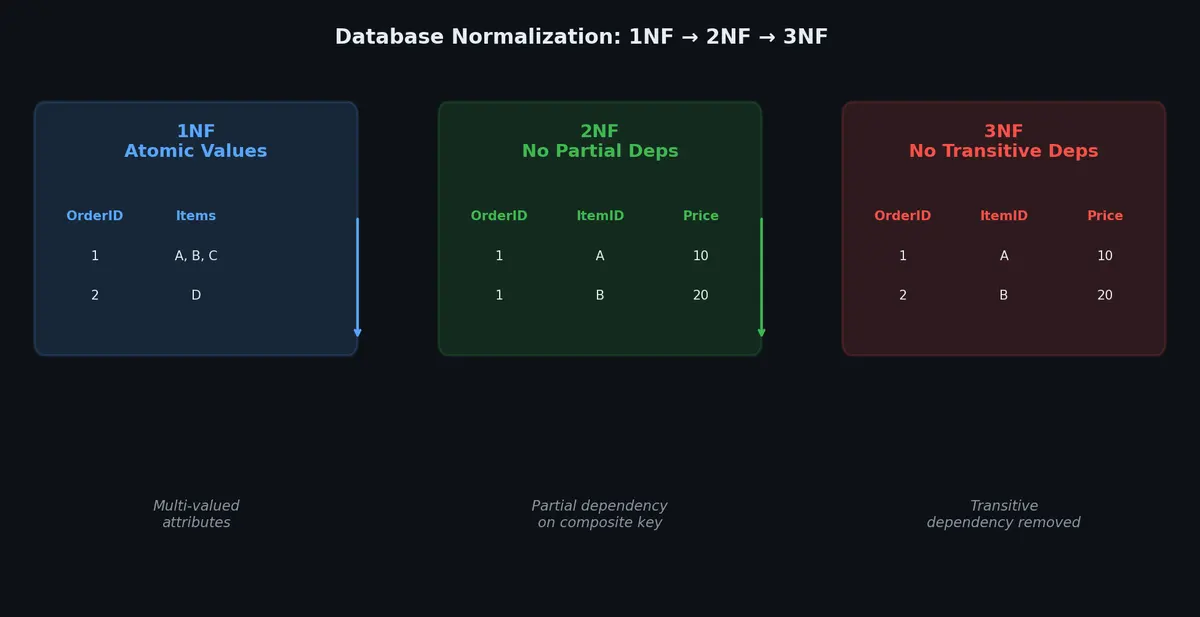
Rule: Every column contains only atomic (indivisible) values. No repeating groups.

A violation:

1
2
3
| order_id | products                |
|----------|-------------------------|
| 1        | Keyboard, USB Hub       |  -- comma-separated = NOT 1NF

Fix: one row per product per order (which our order_items table already does).

Second Normal Form (2NF)#

Rule: 1NF + every non-key column depends on the entire primary key, not just part of it.

This applies to tables with composite primary keys. If (order_id, product_id) is the key, then product_name depends only on product_id — it violates 2NF. Move product data to a separate products table.

Third Normal Form (3NF)#

Rule: 2NF + no non-key column depends on another non-key column (no transitive dependencies).

Violation example:

1
2
3
| user_id | zip_code | city       | state |
|---------|----------|------------|-------|
| 1       | 94105    | San Francisco | CA |

city and state depend on zip_code, not on user_id. Fix: create an addresses or zip_codes lookup table.

After Normalization#

Our four-table schema is already in 3NF:

  • users — user data only
  • products — product data only
  • orders — order metadata, references users
  • order_items — line items, references both orders and products

No redundancy. Every fact stored exactly once.

When to Denormalize#

Sql query processing engine mechanical gears and data pipes

Normalization eliminates redundancy. But reads often need to JOIN multiple tables — and JOINs have a cost. Sometimes you intentionally denormalize for performance:

 1
 2
 3
 4
 5
 6
 7
 8
 9
10
11
12
-- Instead of joining orders + order_items + products every time,
-- store a pre-calculated total on the order itself
ALTER TABLE orders ADD COLUMN total_amount DECIMAL(12, 2);

-- Update it when items change
UPDATE orders o
SET total_amount = (
    SELECT SUM(oi.quantity * oi.unit_price)
    FROM order_items oi
    WHERE oi.order_id = o.order_id
)
WHERE o.order_id = 42;

Common denormalization patterns:

PatternWhen to useTrade-off
Cached aggregatesDashboard queries that run constantlyMust keep in sync on every write
Materialized viewsComplex reporting queriesStale data between refreshes
Redundant columnsAvoid expensive JOINs in hot pathsUpdate anomalies return
Summary tablesTime-series rollups (hourly/daily)Extra storage, ETL complexity

The rule: normalize first, denormalize only when you have measured a performance problem.

Advanced SQL: Subqueries, CTEs, and Window Functions#

Subqueries#

A subquery is a query nested inside another query:

 1
 2
 3
 4
 5
 6
 7
 8
 9
10
11
12
13
14
15
16
17
18
19
20
21
-- Users whose total spending exceeds the average user's spending
SELECT u.full_name, user_totals.total_spent
FROM users u
JOIN (
    SELECT o.user_id, SUM(oi.quantity * oi.unit_price) AS total_spent
    FROM orders o
    JOIN order_items oi ON o.order_id = oi.order_id
    WHERE o.status = 'completed'
    GROUP BY o.user_id
) user_totals ON u.user_id = user_totals.user_id
WHERE user_totals.total_spent > (
    SELECT AVG(sub.total_spent)
    FROM (
        SELECT SUM(oi.quantity * oi.unit_price) AS total_spent
        FROM orders o
        JOIN order_items oi ON o.order_id = oi.order_id
        WHERE o.status = 'completed'
        GROUP BY o.user_id
    ) sub
)
ORDER BY user_totals.total_spent DESC;

This works but is hard to read. CTEs fix that.

Common Table Expressions (CTEs)#

The WITH clause lets you name intermediate result sets:

 1
 2
 3
 4
 5
 6
 7
 8
 9
10
11
12
13
14
15
16
17
18
19
20
21
22
23
WITH user_spending AS (
    SELECT
        o.user_id,
        SUM(oi.quantity * oi.unit_price) AS total_spent
    FROM orders o
    JOIN order_items oi ON o.order_id = oi.order_id
    WHERE o.status = 'completed'
    GROUP BY o.user_id
),
avg_spending AS (
    SELECT AVG(total_spent) AS avg_spent
    FROM user_spending
)
SELECT
    u.full_name,
    us.total_spent,
    a.avg_spent,
    ROUND(us.total_spent / a.avg_spent, 2) AS spending_ratio
FROM user_spending us
JOIN users u ON us.user_id = u.user_id
CROSS JOIN avg_spending a
WHERE us.total_spent > a.avg_spent
ORDER BY us.total_spent DESC;

Output:

1
2
3
4
5
  full_name    | total_spent | avg_spent | spending_ratio
---------------+-------------+-----------+----------------
 David Park    |     4523.90 |    892.34 |           5.07
 Alice Chen    |     2891.45 |    892.34 |           3.24
 Carol White   |     1567.20 |    892.34 |           1.76

CTEs are readable, reusable within the query, and some databases (PostgreSQL 12+) can inline them for better performance.

Recursive CTEs#

CTEs can reference themselves — useful for hierarchical data:

 1
 2
 3
 4
 5
 6
 7
 8
 9
10
11
12
13
14
15
16
17
-- Employee org chart: find all reports under a manager
WITH RECURSIVE reports AS (
    -- Base case: the manager themselves
    SELECT employee_id, name, manager_id, 0 AS depth
    FROM employees
    WHERE employee_id = 1

    UNION ALL

    -- Recursive case: find direct reports of current level
    SELECT e.employee_id, e.name, e.manager_id, r.depth + 1
    FROM employees e
    JOIN reports r ON e.manager_id = r.employee_id
)
SELECT depth, employee_id, name
FROM reports
ORDER BY depth, name;

Window Functions#

Window functions compute values across a set of rows related to the current row, without collapsing rows (unlike GROUP BY):

 1
 2
 3
 4
 5
 6
 7
 8
 9
10
11
12
13
14
15
16
17
18
19
-- Rank users by spending within each month
SELECT
    u.full_name,
    DATE_TRUNC('month', o.created_at) AS month,
    SUM(oi.quantity * oi.unit_price) AS monthly_spend,
    RANK() OVER (
        PARTITION BY DATE_TRUNC('month', o.created_at)
        ORDER BY SUM(oi.quantity * oi.unit_price) DESC
    ) AS spend_rank,
    ROW_NUMBER() OVER (
        PARTITION BY DATE_TRUNC('month', o.created_at)
        ORDER BY SUM(oi.quantity * oi.unit_price) DESC
    ) AS row_num
FROM orders o
JOIN users u ON o.user_id = u.user_id
JOIN order_items oi ON o.order_id = oi.order_id
WHERE o.status = 'completed'
GROUP BY u.full_name, DATE_TRUNC('month', o.created_at)
ORDER BY month, spend_rank;

Output:

1
2
3
4
5
6
7
8
  full_name    |   month    | monthly_spend | spend_rank | row_num
---------------+------------+---------------+------------+---------
 David Park    | 2023-10-01 |       1245.00 |          1 |       1
 Alice Chen    | 2023-10-01 |        892.50 |          2 |       2
 Carol White   | 2023-10-01 |        892.50 |          2 |       3
 Bob Martinez  | 2023-10-01 |        334.99 |          4 |       4
 Alice Chen    | 2023-11-01 |       1567.20 |          1 |       1
 David Park    | 2023-11-01 |        998.00 |          2 |       2

Notice that RANK gives the same rank to tied values (both Alice and Carol get rank 2), while ROW_NUMBER always assigns unique numbers.

LAG and LEAD let you access previous or next rows:

 1
 2
 3
 4
 5
 6
 7
 8
 9
10
11
12
13
14
15
16
17
18
19
20
21
-- Compare each month's revenue to the previous month
WITH monthly_revenue AS (
    SELECT
        DATE_TRUNC('month', o.created_at) AS month,
        SUM(oi.quantity * oi.unit_price) AS revenue
    FROM orders o
    JOIN order_items oi ON o.order_id = oi.order_id
    WHERE o.status = 'completed'
    GROUP BY DATE_TRUNC('month', o.created_at)
)
SELECT
    month,
    revenue,
    LAG(revenue) OVER (ORDER BY month) AS prev_month_revenue,
    ROUND(
        (revenue - LAG(revenue) OVER (ORDER BY month))
        / LAG(revenue) OVER (ORDER BY month) * 100,
        1
    ) AS growth_pct
FROM monthly_revenue
ORDER BY month;

Output:

1
2
3
4
5
6
7
   month    |  revenue  | prev_month_revenue | growth_pct
------------+-----------+--------------------+------------
 2023-08-01 |  12450.00 |                    |
 2023-09-01 |  15670.30 |          12450.00  |       25.9
 2023-10-01 |  14230.50 |          15670.30  |       -9.2
 2023-11-01 |  18900.00 |          14230.50  |       32.8
 2023-12-01 |  24560.80 |          18900.00  |       30.0

Common window functions you should know:

FunctionPurpose
ROW_NUMBER()Sequential number, no ties
RANK()Rank with gaps for ties (1, 2, 2, 4)
DENSE_RANK()Rank without gaps (1, 2, 2, 3)
LAG(col, n)Value from n rows before current row
LEAD(col, n)Value from n rows after current row
SUM() OVER(...)Running total
AVG() OVER(...)Moving average
NTILE(n)Divide rows into n buckets
FIRST_VALUE()First value in the window frame
LAST_VALUE()Last value in the window frame

JSON Columns: Relational Meets Document#

Modern databases blur the line between relational and document models. PostgreSQL’s jsonb and MySQL’s JSON type let you store semi-structured data alongside traditional columns — best of both worlds when used carefully.

When to Use JSON Columns#

Good fitBad fit
User preferences / settingsCore business entities (orders, users)
API response cachingFields you need to query frequently
Event metadata with varying schemaFields you need to JOIN on
Feature flags per userAnything that benefits from normalization
Audit log contextData with strict integrity constraints

PostgreSQL jsonb#

 1
 2
 3
 4
 5
 6
 7
 8
 9
10
11
12
13
14
-- Table with a JSONB column for flexible metadata
CREATE TABLE events (
    event_id BIGSERIAL PRIMARY KEY,
    event_type VARCHAR(50) NOT NULL,
    user_id INT REFERENCES users(user_id),
    payload JSONB NOT NULL DEFAULT '{}',
    created_at TIMESTAMPTZ DEFAULT NOW()
);

-- Insert events with varying payloads
INSERT INTO events (event_type, user_id, payload) VALUES
('page_view', 1, '{"url": "/products/42", "duration_ms": 3200, "referrer": "google"}'),
('purchase', 1, '{"order_id": 1001, "items": [{"sku": "KB-01", "qty": 1}], "total": 149.99}'),
('error', 2, '{"code": 500, "message": "timeout", "stack": "at Connection.query..."}');

Querying JSON#

 1
 2
 3
 4
 5
 6
 7
 8
 9
10
11
12
13
14
15
16
17
18
19
20
21
22
23
24
25
-- Extract a field (returns text)
SELECT payload->>'url' AS url, payload->>'duration_ms' AS ms
FROM events
WHERE event_type = 'page_view';

-- Nested access
SELECT payload->'items'->0->>'sku' AS first_item_sku
FROM events
WHERE event_type = 'purchase';

-- Filter on JSON fields
SELECT *
FROM events
WHERE event_type = 'error'
  AND (payload->>'code')::int >= 500;

-- Containment operator (uses GIN index)
SELECT *
FROM events
WHERE payload @> '{"code": 500}';

-- Check key existence
SELECT *
FROM events
WHERE payload ? 'referrer';

Indexing JSON#

1
2
3
4
5
6
-- GIN index for containment queries (@>, ?, ?|, ?&)
CREATE INDEX idx_events_payload ON events USING GIN (payload);

-- Expression index on a specific JSON path
CREATE INDEX idx_events_error_code ON events ((payload->>'code'))
WHERE event_type = 'error';

GIN indexes make @> containment checks fast — O(log n) instead of scanning every row.

MySQL JSON#

 1
 2
 3
 4
 5
 6
 7
 8
 9
10
-- MySQL uses -> for extraction (returns JSON), ->> for text
SELECT payload->>'$.url' AS url
FROM events
WHERE event_type = 'page_view';

-- Generated column + index (MySQL's approach to JSON indexing)
ALTER TABLE events
ADD COLUMN error_code INT GENERATED ALWAYS AS (payload->>'$.code') VIRTUAL;

CREATE INDEX idx_error_code ON events (error_code);

Anti-Patterns#

 1
 2
 3
 4
 5
 6
 7
 8
 9
10
11
12
13
14
-- BAD: Entire row is JSON (you just built a document DB with extra steps)
CREATE TABLE bad_design (
    id SERIAL PRIMARY KEY,
    data JSONB  -- everything in here
);

-- BAD: Querying JSON in WHERE without an index
SELECT * FROM events
WHERE payload->>'user_agent' LIKE '%Chrome%';  -- full table scan

-- GOOD: Promote frequently-queried fields to real columns
ALTER TABLE events ADD COLUMN error_code INT;
UPDATE events SET error_code = (payload->>'code')::int WHERE event_type = 'error';
CREATE INDEX idx_events_error_code ON events (error_code);

Rule of thumb: if you query a JSON field in WHERE or JOIN more than occasionally, it should be a real column.

Recursive CTEs: Querying Hierarchical Data#

Many real-world data structures are trees: org charts, category hierarchies, threaded comments, bill-of-materials. Recursive CTEs query these without application-level loops.

Syntax#

 1
 2
 3
 4
 5
 6
 7
 8
 9
10
WITH RECURSIVE cte_name AS (
    -- Base case: starting rows
    SELECT ... FROM table WHERE condition

    UNION ALL

    -- Recursive step: join back to the CTE
    SELECT ... FROM table JOIN cte_name ON ...
)
SELECT * FROM cte_name;

Example: Category Tree#

 1
 2
 3
 4
 5
 6
 7
 8
 9
10
11
12
13
14
15
16
17
18
19
20
21
22
23
24
25
26
27
28
29
30
31
32
CREATE TABLE categories (
    category_id INT PRIMARY KEY,
    name VARCHAR(100) NOT NULL,
    parent_id INT REFERENCES categories(category_id)
);

INSERT INTO categories VALUES
(1, 'All Products', NULL),
(2, 'Electronics', 1),
(3, 'Computers', 2),
(4, 'Laptops', 3),
(5, 'Desktops', 3),
(6, 'Phones', 2),
(7, 'Furniture', 1),
(8, 'Desks', 7);

-- Find all descendants of "Electronics" with their depth
WITH RECURSIVE subtree AS (
    -- Base: start at Electronics
    SELECT category_id, name, parent_id, 0 AS depth, name::text AS path
    FROM categories
    WHERE name = 'Electronics'

    UNION ALL

    -- Recursive: find children
    SELECT c.category_id, c.name, c.parent_id, s.depth + 1,
           s.path || ' > ' || c.name
    FROM categories c
    JOIN subtree s ON c.parent_id = s.category_id
)
SELECT depth, path FROM subtree ORDER BY path;

Output:

1
2
3
4
5
6
7
 depth |              path
-------+----------------------------------
     0 | Electronics
     1 | Electronics > Computers
     2 | Electronics > Computers > Desktops
     2 | Electronics > Computers > Laptops
     1 | Electronics > Phones

Example: Threaded Comments#

 1
 2
 3
 4
 5
 6
 7
 8
 9
10
11
12
13
14
15
-- Find a comment thread (all replies to a root comment)
WITH RECURSIVE thread AS (
    SELECT comment_id, parent_id, author, body, 0 AS depth
    FROM comments
    WHERE comment_id = 42  -- root comment

    UNION ALL

    SELECT c.comment_id, c.parent_id, c.author, c.body, t.depth + 1
    FROM comments c
    JOIN thread t ON c.parent_id = t.comment_id
)
SELECT depth, repeat('  ', depth) || author || ': ' || left(body, 50) AS display
FROM thread
ORDER BY depth, comment_id;

Safety: Preventing Infinite Loops#

 1
 2
 3
 4
 5
 6
 7
 8
 9
10
11
12
13
WITH RECURSIVE tree AS (
    SELECT id, parent_id, ARRAY[id] AS path, false AS cycle
    FROM nodes WHERE id = 1

    UNION ALL

    SELECT n.id, n.parent_id, t.path || n.id,
           n.id = ANY(t.path)  -- detect cycle
    FROM nodes n
    JOIN tree t ON n.parent_id = t.id
    WHERE NOT t.cycle  -- stop if cycle detected
)
SELECT * FROM tree WHERE NOT cycle;

LATERAL Joins: Correlated Subqueries Done Right#

LATERAL lets a subquery in the FROM clause reference columns from preceding tables — like a for-each loop in SQL. This solves problems that are awkward or impossible with regular JOINs.

Top-N Per Group#

The classic problem: find the 3 most recent orders per user.

 1
 2
 3
 4
 5
 6
 7
 8
 9
10
11
12
13
14
15
16
17
-- Without LATERAL: window function approach (loads all orders into memory)
WITH ranked AS (
    SELECT *, ROW_NUMBER() OVER (PARTITION BY user_id ORDER BY created_at DESC) AS rn
    FROM orders
)
SELECT * FROM ranked WHERE rn <= 3;

-- With LATERAL: stops after 3 per user (more efficient for large tables)
SELECT u.user_id, u.full_name, recent.*
FROM users u
CROSS JOIN LATERAL (
    SELECT order_id, total_amount, created_at
    FROM orders o
    WHERE o.user_id = u.user_id
    ORDER BY o.created_at DESC
    LIMIT 3
) recent;

The LATERAL version can use an index on (user_id, created_at DESC) and stops scanning after 3 rows per user.

Expanding Array/JSON Columns#

1
2
3
4
5
-- Unnest a JSONB array and join with referenced table
SELECT e.event_id, e.event_type, item->>'sku' AS sku, item->>'qty' AS qty
FROM events e
CROSS JOIN LATERAL jsonb_array_elements(e.payload->'items') AS item
WHERE e.event_type = 'purchase';

Dependent Calculations#

 1
 2
 3
 4
 5
 6
 7
 8
 9
10
11
12
13
14
-- For each product, compute running stats from the last 30 days of orders
SELECT p.name, stats.*
FROM products p
CROSS JOIN LATERAL (
    SELECT
        COUNT(*) AS orders_30d,
        COALESCE(SUM(oi.quantity), 0) AS units_30d,
        COALESCE(AVG(oi.unit_price), 0) AS avg_price_30d
    FROM order_items oi
    JOIN orders o ON oi.order_id = o.order_id
    WHERE oi.product_id = p.product_id
      AND o.created_at > NOW() - INTERVAL '30 days'
) stats
ORDER BY stats.units_30d DESC;

LATERAL vs Correlated Subqueries#

FeatureCorrelated subqueryLATERAL join
ReturnsSingle value onlyMultiple rows and columns
Used inSELECT, WHEREFROM clause
OptimizerOften slower (re-executed per row)Can be optimized like a join
ReadabilityNested, hard to composeFlat, composable

Use LATERAL when you need multiple columns or rows from a correlated computation.

Putting It All Together#

Here is a real-world query that combines CTEs, JOINs, and window functions. Given our e-commerce schema, find the top product in each category by total revenue, along with what percentage of category revenue it represents:

 1
 2
 3
 4
 5
 6
 7
 8
 9
10
11
12
13
14
15
16
17
18
19
20
21
22
23
24
25
26
27
28
WITH product_revenue AS (
    SELECT
        p.product_id,
        p.name AS product_name,
        p.category,
        SUM(oi.quantity * oi.unit_price) AS revenue
    FROM order_items oi
    JOIN products p ON oi.product_id = p.product_id
    JOIN orders o ON oi.order_id = o.order_id
    WHERE o.status = 'completed'
    GROUP BY p.product_id, p.name, p.category
),
ranked AS (
    SELECT
        *,
        RANK() OVER (PARTITION BY category ORDER BY revenue DESC) AS rank_in_category,
        SUM(revenue) OVER (PARTITION BY category) AS category_total
    FROM product_revenue
)
SELECT
    category,
    product_name,
    revenue,
    category_total,
    ROUND(revenue / category_total * 100, 1) AS pct_of_category
FROM ranked
WHERE rank_in_category = 1
ORDER BY revenue DESC;

Output:

1
2
3
4
5
  category    |    product_name     | revenue  | category_total | pct_of_category
--------------+---------------------+----------+----------------+-----------------
 Electronics  | Mechanical Keyboard |  8934.50 |      18432.50  |            48.5
 Furniture    | Standing Desk       |  7190.00 |      12890.00  |            55.8
 Books        | DDIA                |  1890.30 |       4567.80  |            41.4

This single query would require dozens of lines of application code — or multiple round trips to the database — without SQL.

Why Tables Won (For Now)#

The relational model won because it offers something no other model did at the time: data independence. You can change the physical storage, add indexes, partition tables, and replicate data — all without changing a single line of application code. The SQL interface stays the same.

It is not perfect. Some data (social graphs, time series, documents with deeply nested structures) fits awkwardly into tables. We will explore those alternatives in Article 5. But for most applications — especially those where data integrity matters — the relational model remains the default choice for good reason.

What’s Next#

Knowing SQL is necessary but not sufficient. Writing a correct query and writing a fast query are different skills. In the next article, we will look at indexing and query planning — how databases actually find your data, and how to make them find it faster.
In this series

Databases 8 parts

  1. 01 Databases (1): Data Models and SQL — Why Tables Won (For Now) you are here
  2. 02 Databases (2): Indexing and Query Planning — How Databases Find Your Data
  3. 03 Databases (3): Transactions and Concurrency — ACID, Isolation Levels, and Locking
  4. 04 Databases (4): Storage Engines — How Data Hits Disk
  5. 05 Databases (5): NoSQL — Document, Key-Value, Column, and Graph
  6. 06 Databases (6): Replication and Partitioning — Scaling Beyond One Machine
  7. 07 Databases (7): Distributed Transactions — 2PC, Saga, and Why Consensus Is Hard
  8. 08 Databases (8): Databases in Practice — Migration, Monitoring, and War Stories

Liked this piece?

Follow on GitHub for the next one — usually one a week.

GitHub