Databases (2): Indexing and Query Planning — How Databases Find Your Data
Deep dive into B-tree and B+tree indexes, hash indexes, composite indexes, covering indexes, and how to read EXPLAIN output to diagnose slow queries.
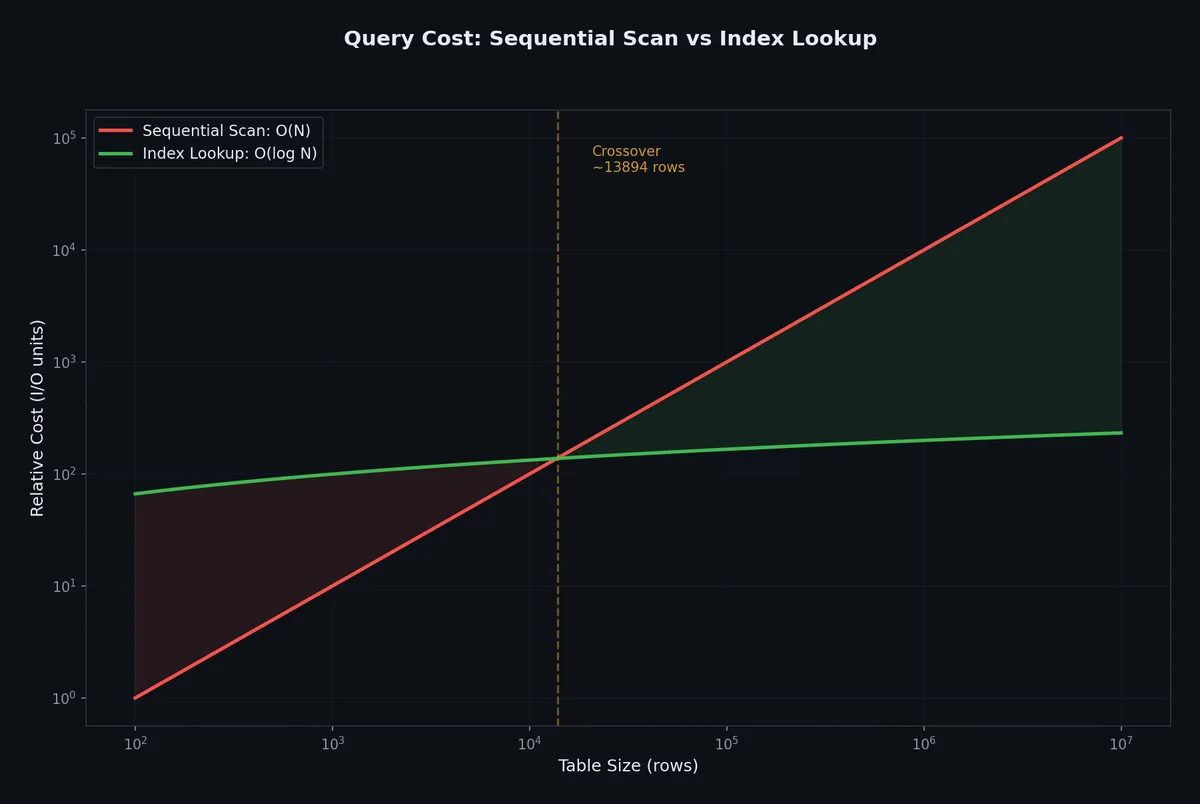
A query that returns in 2 milliseconds on your laptop with 1,000 rows will take 45 seconds on a production database with 50 million rows — unless you have the right indexes. Indexes are the single most impactful performance tool in your database toolkit, and understanding how they work changes the way you think about every schema and every query you write.
The Fundamental Problem: Finding a Row#
Imagine a table with 10 million rows, stored on disk as a heap file. Each row sits somewhere in a sequence of 8 KB pages. When you run:
| |
Without an index, the database must perform a sequential scan (also called a full table scan): read every single page, examine every single row, check if email matches. If the table occupies 2 GB on disk, the database reads 2 GB. For one row.
An index is a separate data structure that maps column values to row locations. With a B-tree index on email, the same lookup touches perhaps 3-4 pages instead of 250,000. That is the difference between milliseconds and minutes.
Sequential Scan vs Index Scan#
| Aspect | Sequential Scan | Index Scan |
|---|---|---|
| How it works | Reads every page in table order | Traverses index tree, then fetches matching rows |
| Best for | Small tables, queries returning >10-15% of rows | Selective queries returning few rows |
| I/O pattern | Sequential (fast on HDDs) | Random (each row may be on a different page) |
| CPU cost | Low per-row (just filter) | Higher per-row (tree traversal + heap fetch) |
| When chosen | No suitable index, or optimizer estimates scan is cheaper | Suitable index exists and query is selective |
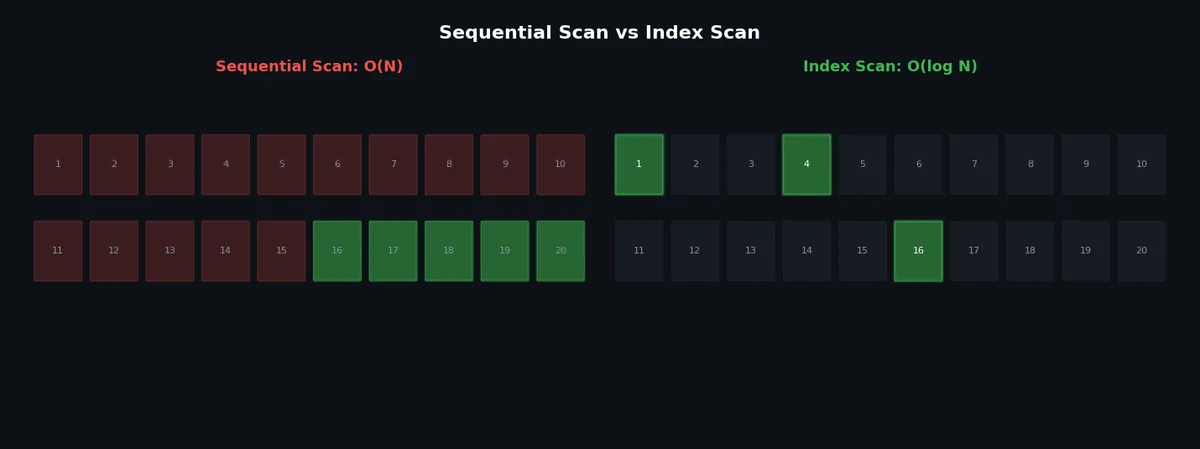
The database’s query optimizer makes this decision automatically. Sometimes a sequential scan is faster — for example, when your WHERE clause matches 80% of the table, random I/O from an index would be slower than just reading everything sequentially.
B-Tree Index: The Workhorse#
The B-tree (balanced tree) is the default index type in virtually every relational database. Here is how it works.
Structure#
A B-tree is a self-balancing tree where:
- Each node contains multiple keys in sorted order
- Each internal node has pointers to child nodes between and around keys
- All leaf nodes are at the same depth (balanced)
- The branching factor (number of children per node) is typically hundreds or thousands
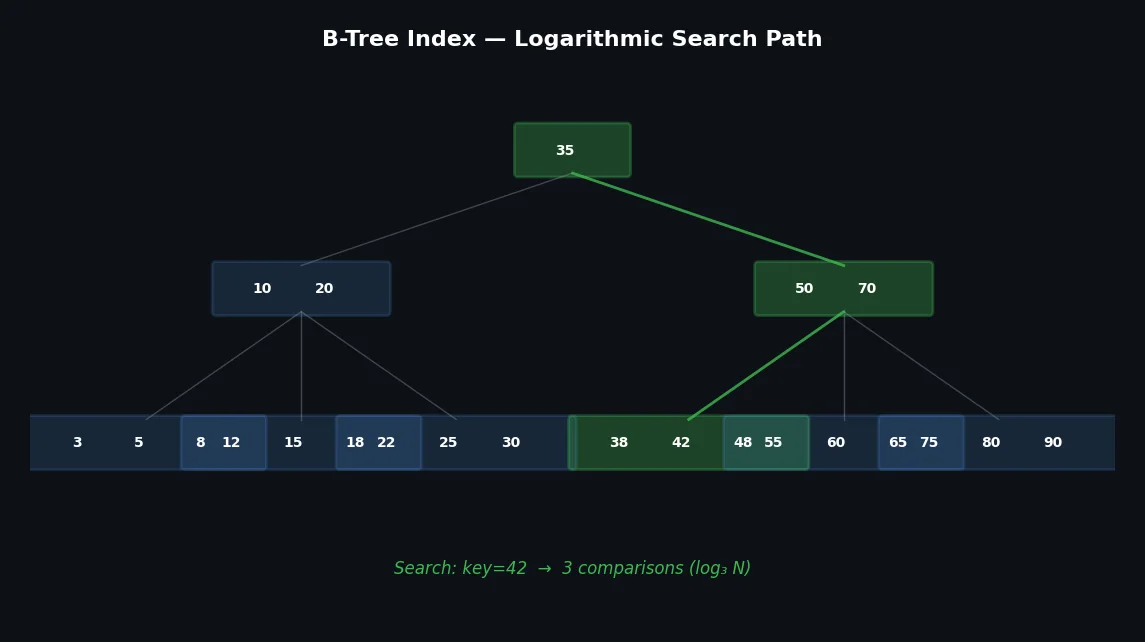
For a table with 10 million rows and a branching factor of 500:
- Level 0 (root): 1 node
- Level 1: up to 500 nodes
- Level 2: up to 250,000 nodes
- Level 3 (leaves): up to 125 million entries
Three levels of tree traversal — three page reads — to find any row among 10 million. That is the O(log N) guarantee, but with a very large base logarithm.
How a Lookup Works#
To find email = 'alice@example.com':
- Start at the root node. Binary search through keys to find which child pointer to follow.
- Load the child node. Binary search again.
- Repeat until you reach a leaf node.
- The leaf contains a pointer to the actual row on disk (a tuple ID or row ID).
- Fetch the row from the heap (the main table data).
| |
Creating B-Tree Indexes#
| |
B+Tree: Why Databases Prefer It#

Most database implementations actually use a B+tree, a variation of the B-tree:
| Feature | B-tree | B+tree |
|---|---|---|
| Data pointers | In both internal and leaf nodes | Only in leaf nodes |
| Leaf nodes linked | No | Yes, via sibling pointers |
| Internal node size | Larger (stores data pointers) | Smaller (keys + child pointers only) |
| Branching factor | Lower | Higher (more keys fit per node) |
| Range queries | Requires traversing back up the tree | Follow leaf pointers |
| Point lookups | Can terminate early at internal nodes | Always goes to leaf level |
The key advantage: because internal nodes only store keys (not data pointers), more keys fit per page, increasing the branching factor. A higher branching factor means a shallower tree, which means fewer disk reads.
The linked leaf nodes are critical for range queries:
| |
With a B+tree index on created_at, the database traverses to the first matching leaf, then follows sibling pointers to read all matching entries sequentially — no need to revisit internal nodes.
Hash Indexes#
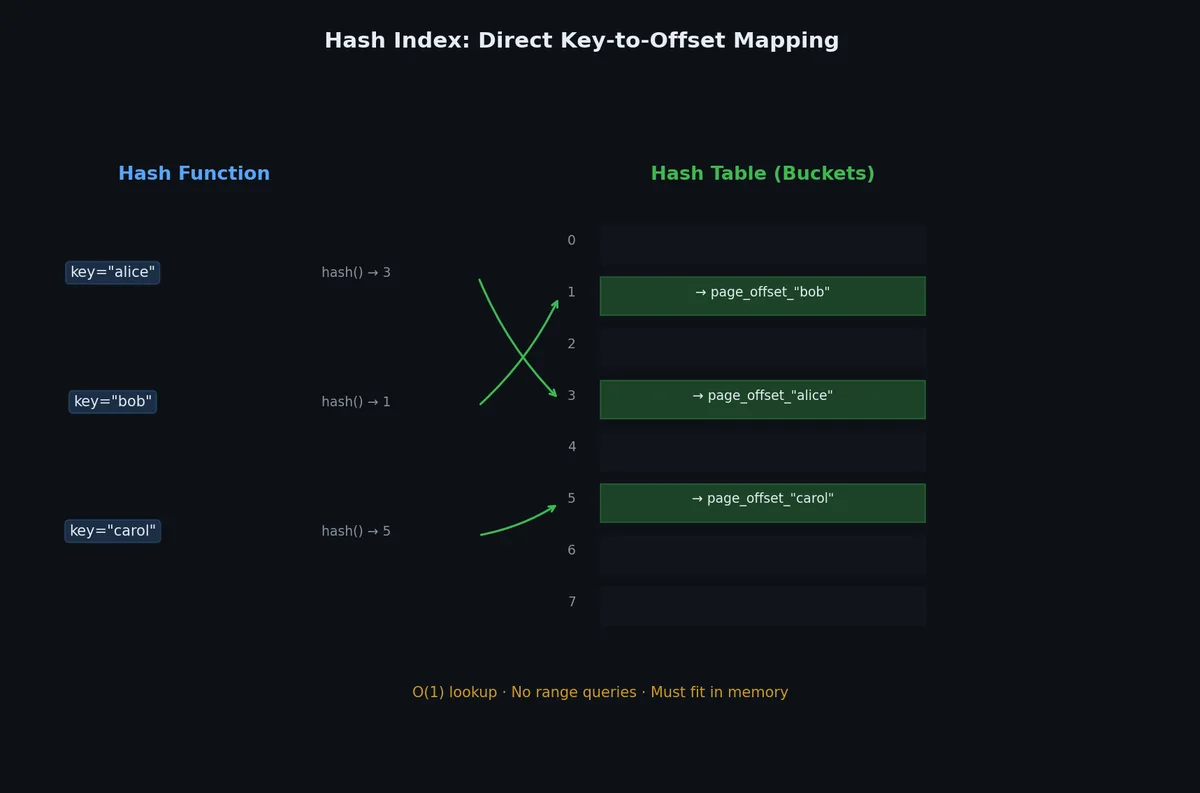
Hash indexes use a hash function to map keys directly to row locations.
| |
| Aspect | Hash Index | B-Tree Index |
|---|---|---|
Equality lookups (=) | O(1) average | O(log N) |
Range queries (>, <, BETWEEN) | Not supported | Supported |
Sorting / ORDER BY | Not supported | Supported |
Prefix matching (LIKE 'abc%') | Not supported | Supported |
| WAL-logged (crash-safe) | PostgreSQL 10+ | Always |
| Common usage | Rarely used in practice | Default, almost always preferred |
Hash indexes win on pure equality lookups but lose everywhere else. In practice, B-tree indexes are fast enough for equality lookups that the limited functionality of hash indexes is rarely worth it. PostgreSQL did not even make hash indexes crash-safe until version 10.
Composite Indexes: Column Order Matters#
A composite (multi-column) index indexes multiple columns together:
| |
This creates a B+tree sorted first by user_id, then by status within each user_id. Think of it like a phone book sorted by last name, then first name.
The Leftmost Prefix Rule#
A composite index on (a, b, c) can satisfy queries that filter on:
| Query filters on | Uses index? | Why |
|---|---|---|
a | Yes | Leftmost prefix |
a, b | Yes | Leftmost prefix |
a, b, c | Yes | Full index |
b | No | Skips leftmost column |
b, c | No | Skips leftmost column |
a, c | Partially | Uses a, then scans for c |
| |
Column order strategy: put the most selective column first (the one that filters out the most rows), followed by columns commonly used together.
Covering Indexes and Index-Only Scans#
Normally, an index scan involves two steps:
- Traverse the index to find matching entries
- Fetch the actual rows from the heap (table data) to get the remaining columns
Step 2 is called a “heap fetch” and involves random I/O. A covering index includes all columns needed by the query, eliminating the heap fetch entirely:
| |
In PostgreSQL, you use the INCLUDE clause for non-searchable but covered columns. In MySQL (InnoDB), covering indexes work because InnoDB’s secondary indexes can cover queries if all needed columns are in the index.
| |
EXPLAIN: Reading the Query Plan#
EXPLAIN shows you the execution plan the optimizer chose. EXPLAIN ANALYZE actually runs the query and shows real timing.
PostgreSQL EXPLAIN ANALYZE#
| |
Output:
| |
Key things to look for:
| Field | What it tells you |
|---|---|
Seq Scan | Full table scan — possibly needs an index |
Index Scan | Using an index — good for selective queries |
Index Only Scan | Covering index — best case |
Bitmap Index Scan | Combines multiple index results |
Hash Join / Nested Loop / Merge Join | Join strategy |
actual time | Real execution time (first row..last row) in ms |
rows | Actual number of rows processed |
Rows Removed by Filter | Rows read but discarded — high numbers suggest missing index |
loops | How many times this step ran |
MySQL EXPLAIN#
| |
| |
The type column is the most important in MySQL EXPLAIN:
| type | Meaning | Performance |
|---|---|---|
system / const | At most one matching row | Best |
eq_ref | One row per join (primary key / unique) | Excellent |
ref | Multiple rows via non-unique index | Good |
range | Index range scan | Good |
index | Full index scan (reads all index entries) | Moderate |
ALL | Full table scan | Worst — usually needs an index |
Spotting Problems#
Here is a bad query plan (PostgreSQL):
| |
| |
Red flags:
Seq Scanon a table with 50,000 rowsRows Removed by Filter: 49766— read 50,000 rows to find 234
Fix:
| |
After creating the index:
| |
From 18.6 ms to 0.23 ms — an 80x improvement — from one index.
Index Selection Strategies#
What to Index#
- Primary keys: automatically indexed in all databases
- Foreign keys: always index these — JOINs use them constantly
- Columns in WHERE clauses: especially in high-frequency queries
- Columns in ORDER BY: avoids expensive sorts
- Columns in GROUP BY: helps with aggregation
- Columns used in JOINs: besides foreign keys, any join condition
Cardinality Matters#
Cardinality = the number of distinct values in a column.
| Column | Cardinality | Good index candidate? |
|---|---|---|
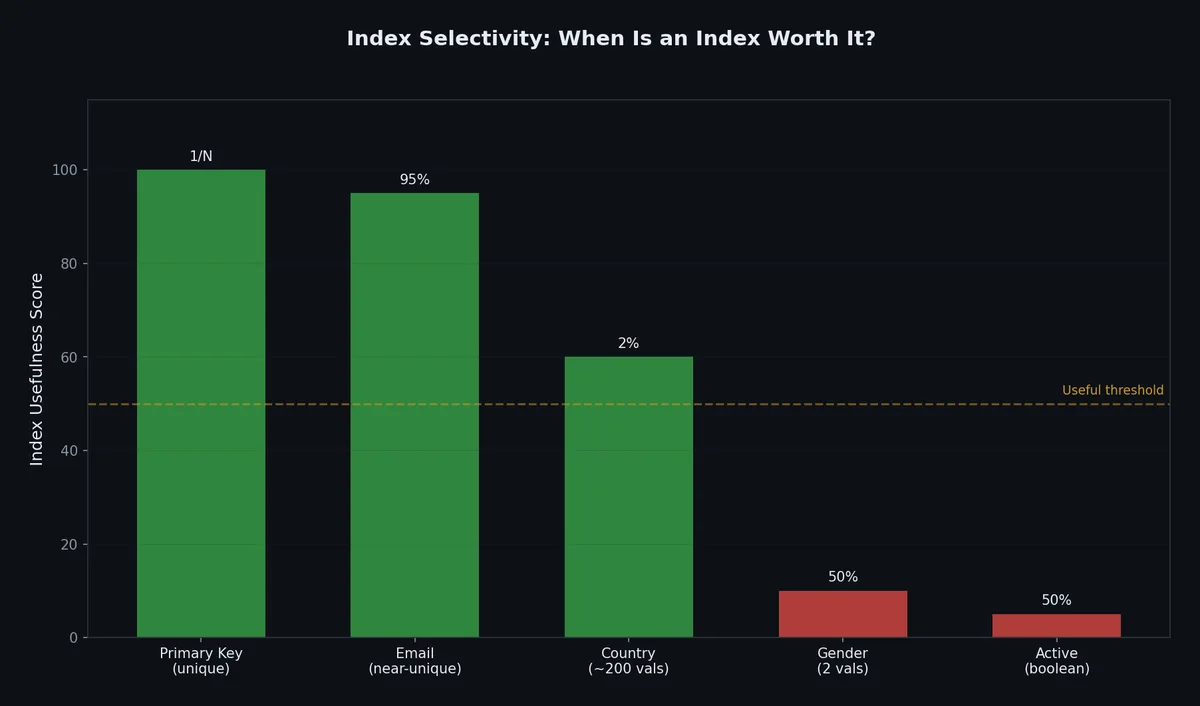
email (unique) | 10,000,000 | Yes — highly selective |
country | 195 | Maybe — depends on query patterns |
status (active/inactive) | 2 | Rarely — not selective enough |
is_deleted (true/false) | 2 | No — use partial index instead |
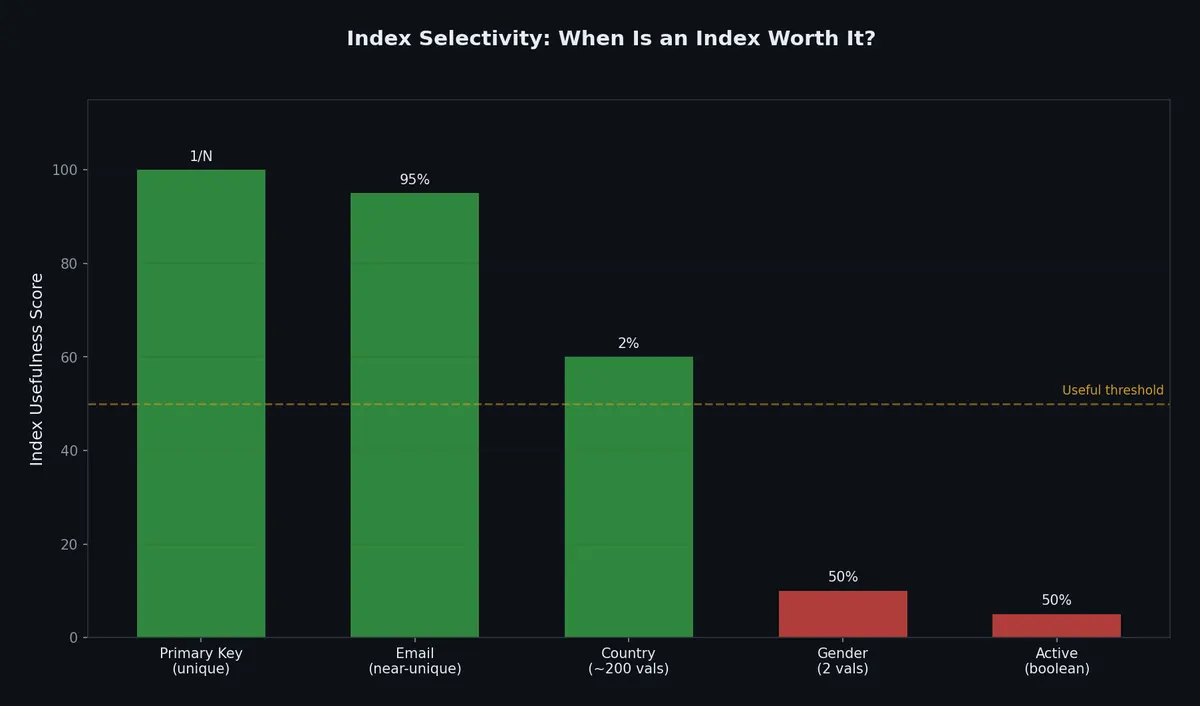
Low-cardinality columns return too many rows per value. The optimizer will often choose a sequential scan over an index scan for low-cardinality lookups.
Exception: if a low-cardinality value is rare (e.g., status = 'fraud' matches 0.01% of rows), it is selective and an index helps. A partial index is even better.
Over-Indexing: The Hidden Cost#

Every index you create has costs:
| Cost | Impact |
|---|---|
| Write amplification | Every INSERT/UPDATE/DELETE must update all affected indexes |
| Storage | Each index can be 10-30% the size of the table |
| Memory pressure | Indexes compete for buffer pool space |
| Planning time | More indexes = more options for the optimizer to evaluate |
| Maintenance | VACUUM, REINDEX, statistics updates |
A table with 10 indexes means every INSERT writes to 11 data structures (table + 10 indexes). For write-heavy workloads, this is devastating.
Rule of thumb: most OLTP tables should have 3-5 indexes. If you have more than 8, audit them.
Check for unused indexes in PostgreSQL:
| |
Partial Indexes#
A partial index only indexes rows that match a condition:
| |
Benefits:
- Much smaller than a full index
- Faster to maintain (fewer entries to update)
- Higher hit rate in the buffer pool
The query must include the partial index’s WHERE condition for the optimizer to use it:
| |
Expression Indexes#
You can index the result of an expression or function:
| |
Without an expression index, using a function in WHERE prevents the optimizer from using a regular index on that column:
| |
GIN and GiST Indexes (PostgreSQL)#
Beyond B-tree, PostgreSQL offers specialized index types:
| |
| Index Type | Best For | Supported Operations |
|---|---|---|
| B-tree | Equality, range, sorting | =, <, >, BETWEEN, ORDER BY, LIKE 'prefix%' |
| Hash | Equality only | = |
| GIN | Arrays, JSONB, full-text | @>, &&, @@, ?, ?& |
| GiST | Geometric, range, nearest-neighbor | <<, >>, &&, @>, <-> |
| BRIN | Large, naturally ordered tables | <, >, = (with reduced precision) |
BRIN Indexes: Block Range Indexes#
BRIN indexes are tiny indexes for naturally ordered data (timestamps, auto-incrementing IDs). Instead of indexing every row, they store min/max values per block range (typically 128 pages).
How BRIN Works#
| |
When you query WHERE date > '2024-02-01', PostgreSQL skips entire block ranges whose max_date is before the threshold.
| |
When BRIN Excels vs Fails#
| Condition | BRIN performance | B-tree performance |
|---|---|---|
| Data physically sorted by index column | Excellent (skip entire ranges) | Good |
| Data randomly ordered | Terrible (every range matches) | Good |
| Table size 100M+ rows | ~1000x smaller index | Works but huge index |
| Point lookups (WHERE id = X) | Slow (scan matching ranges) | Fast (single path) |
| Range scans on sorted data | Fast | Fast |
Rule: BRIN works when correlation between row position and column value is high. Check with:
| |
Bloom Filters in Databases#
Bloom filters answer “is this element possibly in the set?” with zero false negatives and tunable false positive rate. Databases use them to avoid unnecessary disk reads.
Where Bloom Filters Appear#
| Database | Usage |
|---|---|
| PostgreSQL (bloom extension) | Multi-column equality filters |
| RocksDB / LevelDB | Skip SSTable files that can’t contain the key |
| Cassandra | Skip SSTables during reads |
| HBase | Skip HFiles |
| Parquet files | Skip row groups |
PostgreSQL Bloom Index#
| |
A B-tree composite index only helps queries that use a prefix of the index columns. A bloom index helps with any combination, at the cost of higher false positive rate.
Index Maintenance and Bloat#
Indexes degrade over time. Dead tuples from updates/deletes leave holes. Understanding and managing bloat is essential for production databases.
Detecting Index Bloat (PostgreSQL)#
| |
REINDEX#
| |
Unused Index Detection#
| |
Every unused index consumes disk space and slows down every INSERT/UPDATE/DELETE. Drop them aggressively (after verifying with production traffic).
Automated Index Recommendations#
| |
Practical Index Design Workflow#
When you have a slow query, follow this process:
| |
A complete example:
| |
What’s Next#
Indexes tell the database where to find data. But what happens when two transactions try to modify the same data at the same time? In the next article, we will explore transactions and concurrency — ACID guarantees, isolation levels, locking, and the dark art of preventing deadlocks.
Databases 8 parts
- 01 Databases (1): Data Models and SQL — Why Tables Won (For Now)
- 02 Databases (2): Indexing and Query Planning — How Databases Find Your Data you are here
- 03 Databases (3): Transactions and Concurrency — ACID, Isolation Levels, and Locking
- 04 Databases (4): Storage Engines — How Data Hits Disk
- 05 Databases (5): NoSQL — Document, Key-Value, Column, and Graph
- 06 Databases (6): Replication and Partitioning — Scaling Beyond One Machine
- 07 Databases (7): Distributed Transactions — 2PC, Saga, and Why Consensus Is Hard
- 08 Databases (8): Databases in Practice — Migration, Monitoring, and War Stories


