Databases (3): Transactions and Concurrency — ACID, Isolation Levels, and Locking
A thorough guide to ACID properties, isolation levels, MVCC, locking strategies, and deadlock prevention — with concrete SQL examples for every concept.
Every application that handles money, inventory, or any state that matters eventually hits a concurrency bug. Two users buy the last item in stock. A bank transfer debits one account but crashes before crediting the other. A report reads half-updated data and produces nonsense numbers. Transactions exist to prevent these failures, and understanding how they work is non-negotiable for anyone building production systems.
If the server crashes between the two UPDATE statements, the transaction is rolled back. Account 1 does not lose $500 without Account 2 gaining it. This is the fundamental guarantee.
ACID is not just an acronym you memorize for interviews. Each letter represents a specific guarantee, and understanding what breaks without each one is more important than the definition itself.
Definition: A transaction either completes fully or has no effect at all.
What breaks without it:
1
2
3
4
5
-- Without atomicity: server crashes between these two statements
UPDATEinventorySETstock=stock-1WHEREproduct_id=42;-- CRASH HERE
INSERTINTOorder_items(order_id,product_id,quantity)VALUES(101,42,1);-- Stock decreased but order item never created. Inventory leak.
Atomicity means the database uses a write-ahead log (WAL) to record changes before applying them. On crash recovery, incomplete transactions are rolled back.
Definition: A transaction moves the database from one valid state to another. All constraints (foreign keys, CHECK, UNIQUE, NOT NULL) are enforced.
What breaks without it:
1
2
3
4
-- Without consistency enforcement:
INSERTINTOorders(order_id,user_id)VALUES(999,12345);-- user_id 12345 does not exist in the users table
-- Now we have an orphaned order with no associated user
The foreign key constraint REFERENCES users(user_id) prevents this. Consistency also includes application-level invariants — for example, “the sum of all account balances must remain constant during a transfer.”
Definition: Once a transaction commits, its changes survive any subsequent crash (power failure, OS crash, hardware failure).
What breaks without it: You commit a bank transfer, see “Success” on screen, and then the server reboots. The transfer is gone. The database reverted to a state before the commit because changes were only in memory.
Durability is enforced by flushing the WAL to persistent storage before reporting a commit as successful. The actual data pages may still be in memory (dirty pages), but the WAL contains enough information to reconstruct them after a crash.
-- Start a transaction
BEGIN;-- or: START TRANSACTION;
-- Do work
INSERTINTOorders(user_id,status)VALUES(1,'pending');UPDATEinventorySETstock=stock-1WHEREproduct_id=42;-- Create a savepoint (partial rollback target)
SAVEPOINTafter_inventory;-- More work
INSERTINTOshipping(order_id,address)VALUES(currval('orders_order_id_seq'),'123 Main St');-- Oops, wrong address. Roll back to savepoint.
ROLLBACKTOSAVEPOINTafter_inventory;-- Fix and retry
INSERTINTOshipping(order_id,address)VALUES(currval('orders_order_id_seq'),'456 Oak Ave');-- Commit everything
COMMIT;
Command
Effect
BEGIN
Start a new transaction
COMMIT
Make all changes permanent
ROLLBACK
Undo all changes since BEGIN
SAVEPOINT name
Create a named checkpoint within the transaction
ROLLBACK TO SAVEPOINT name
Undo changes back to the savepoint (transaction continues)
RELEASE SAVEPOINT name
Remove the savepoint (changes kept)
In autocommit mode (the default in most databases), every statement is its own transaction. An explicit BEGIN starts a multi-statement transaction.
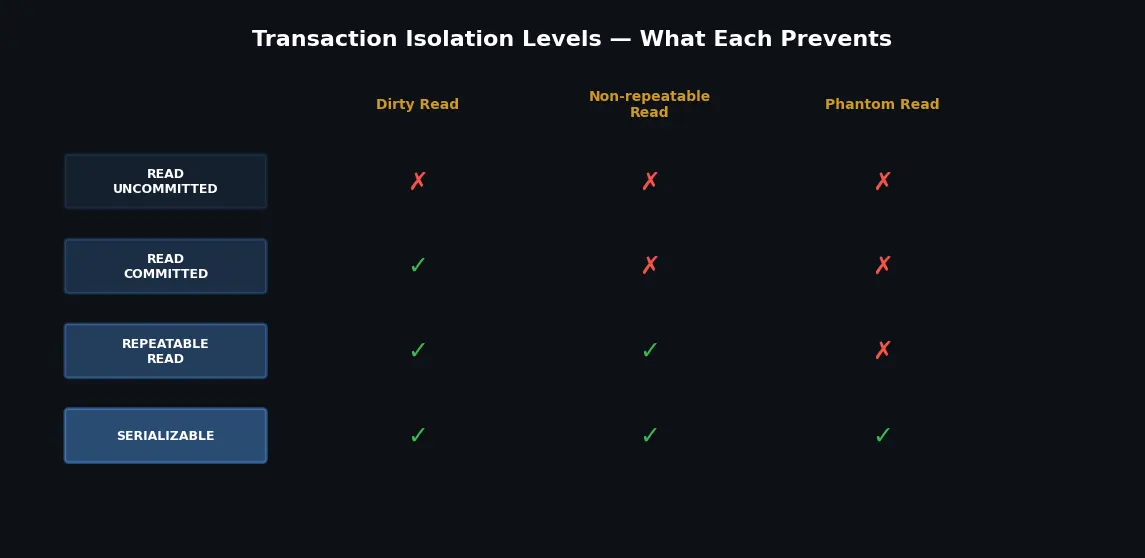
The SQL standard defines four isolation levels, each allowing different concurrency anomalies. Stronger isolation = fewer anomalies but lower throughput.
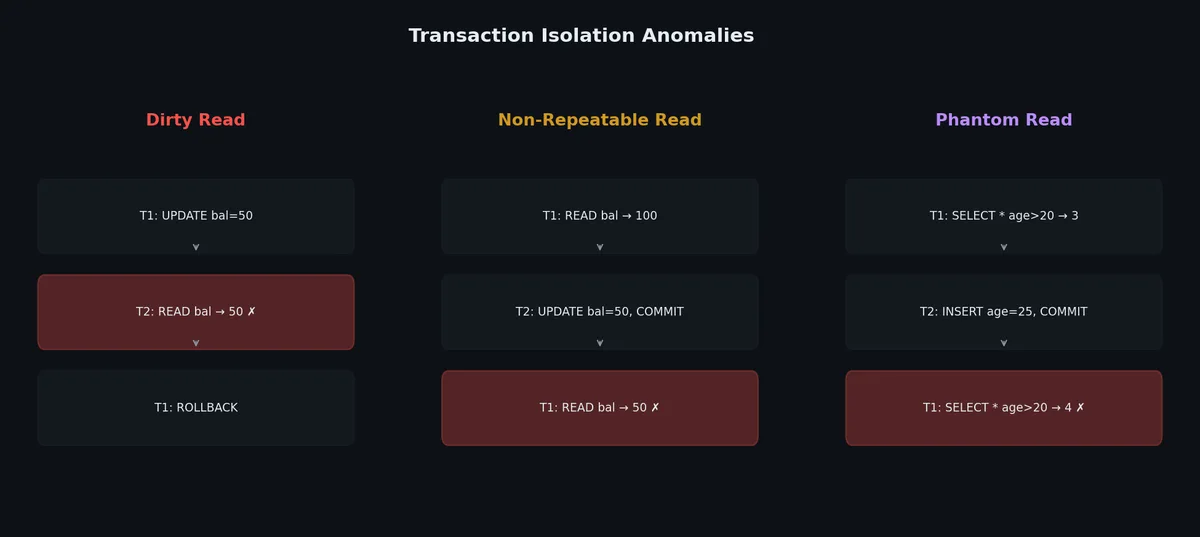
Before we look at isolation levels, let us define the anomalies precisely.
Dirty Read: Transaction A reads data written by Transaction B before B commits. If B rolls back, A has read data that never officially existed.
1
2
3
4
5
6
7
8
9
10
11
12
13
-- Session 1 -- Session 2
BEGIN;UPDATEproductsSETprice=0.01WHEREproduct_id=1;BEGIN;-- Dirty read: sees price = 0.01
SELECTpriceFROMproductsWHEREproduct_id=1;ROLLBACK;-- price reverts to 49.99
-- Session 2 used price 0.01 for
-- a decision, but that price
-- never existed.
COMMIT;
Non-Repeatable Read: Transaction A reads a row, Transaction B modifies and commits that row, then A reads the same row again and gets different data.
1
2
3
4
5
6
7
8
9
10
11
12
13
-- Session 1 -- Session 2
BEGIN;SELECTbalanceFROMaccountsWHEREid=1;-- Returns 1000
BEGIN;UPDATEaccountsSETbalance=500WHEREid=1;COMMIT;SELECTbalanceFROMaccountsWHEREid=1;-- Returns 500!
-- Same query, different result within
-- the same transaction.
COMMIT;
Phantom Read: Transaction A runs a query with a range condition, Transaction B inserts a new row that matches, then A re-runs the query and sees a new “phantom” row.
 1
 2
 3
 4
 5
 6
 7
 8
 9
10
11
12
-- Session 1 -- Session 2
BEGIN;SELECTCOUNT(*)FROMordersWHEREstatus='pending';-- Returns 5
BEGIN;INSERTINTOorders(user_id,status)VALUES(99,'pending');COMMIT;SELECTCOUNT(*)FROMordersWHEREstatus='pending';-- Returns 6!
-- A new row appeared (phantom).
COMMIT;
*In PostgreSQL, REPEATABLE READ also prevents phantom reads (it uses snapshot isolation, which is stronger than the SQL standard requires).
 1
 2
 3
 4
 5
 6
 7
 8
 9
10
11
12
13
14
-- Set isolation level for a transaction
BEGINTRANSACTIONISOLATIONLEVELREPEATABLEREAD;-- ... your queries ...
COMMIT;-- Set default isolation level for the session (PostgreSQL)
SETdefault_transaction_isolation='read committed';-- Check current isolation level (PostgreSQL)
SHOWdefault_transaction_isolation;-- MySQL
SETTRANSACTIONISOLATIONLEVELREPEATABLEREAD;SELECT@@transaction_isolation;
PostgreSQL defaults to READ COMMITTED. MySQL (InnoDB) defaults to REPEATABLE READ. Both are reasonable defaults for most applications.
MVCC: How Databases Implement Isolation Efficiently#
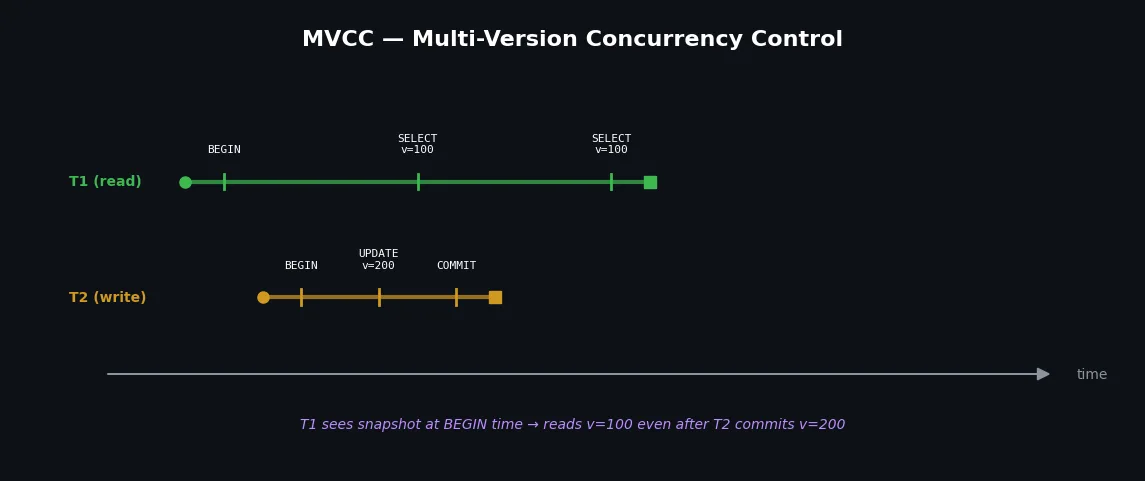
Multi-Version Concurrency Control (MVCC) is the mechanism that makes isolation levels practical. Instead of blocking readers when writers are active (which kills performance), MVCC keeps multiple versions of each row.
In PostgreSQL, each row has hidden system columns:
xmin — the transaction ID that created (inserted) this row version
xmax — the transaction ID that deleted/updated this row version (0 if still live)
When you UPDATE a row, PostgreSQL does not modify it in place. Instead:
Marks the old row version as expired (xmax = current transaction ID)
Creates a new row version (xmin = current transaction ID)
Both versions coexist. Each transaction sees only the version that was “alive” at its snapshot time.
1
2
3
4
5
6
7
8
-- Transaction 100 inserts a row
INSERTINTOaccounts(id,balance)VALUES(1,1000);-- Row: xmin=100, xmax=0, balance=1000
-- Transaction 200 updates the row
UPDATEaccountsSETbalance=500WHEREid=1;-- Old row: xmin=100, xmax=200, balance=1000 (still visible to old snapshots)
-- New row: xmin=200, xmax=0, balance=500 (visible to new snapshots)
This is why PostgreSQL needs VACUUM — dead row versions accumulate and must be cleaned up.
Each row has a hidden 6-byte transaction ID and a 7-byte roll pointer
The roll pointer points to an undo log entry containing the previous version
Multiple undo log entries form a chain for each row
To reconstruct an old version, InnoDB walks the undo log chain backwards. This means old versions do not consume extra space in the main table, but long-running transactions force InnoDB to keep long undo log chains.
The key insight: reads never block writes, and writes never block reads. This is why modern databases can handle thousands of concurrent connections without everything grinding to a halt.
-- SELECT FOR UPDATE acquires a row lock
-- Other transactions trying to update the same row will wait
BEGIN;SELECT*FROMaccountsWHEREid=1FORUPDATE;-- Row is now locked. Other transactions wait if they try to modify it.
UPDATEaccountsSETbalance=balance-100WHEREid=1;COMMIT;-- Lock released
1
2
3
4
5
6
-- SELECT FOR SHARE (read lock)
-- Other transactions can read but not modify
BEGIN;SELECT*FROMaccountsWHEREid=1FORSHARE;-- Row is read-locked. Others can read it but not UPDATE/DELETE.
COMMIT;
 1
 2
 3
 4
 5
 6
 7
 8
 9
10
11
12
13
-- SKIP LOCKED: non-blocking queue pattern
-- Great for job queues — workers grab unlocked tasks
BEGIN;SELECT*FROMtasksWHEREstatus='pending'ORDERBYcreated_atLIMIT1FORUPDATESKIPLOCKED;-- If a row is locked by another worker, skip it and get the next one
UPDATEtasksSETstatus='processing',worker_id='worker-3'WHEREtask_id=...;-- the ID from the SELECT above
COMMIT;
1
2
3
4
-- NOWAIT: fail immediately instead of waiting
BEGIN;SELECT*FROMaccountsWHEREid=1FORUPDATENOWAIT;-- If locked, immediately raises: ERROR: could not obtain lock on row
Application-level locks using the database as a coordination point:
1
2
3
4
5
6
7
8
9
10
11
-- Acquire an advisory lock (PostgreSQL)
-- The lock number is arbitrary — your application defines the meaning
SELECTpg_advisory_lock(12345);-- ... do work that needs exclusive access ...
SELECTpg_advisory_unlock(12345);-- Try to acquire without blocking
SELECTpg_try_advisory_lock(12345);-- Returns true/false
-- Session-level advisory locks (released when session ends)
SELECTpg_advisory_lock(hashtext('process_daily_report'));
Use cases: cron job coordination (only one instance runs), rate limiting, distributed locking without Redis.
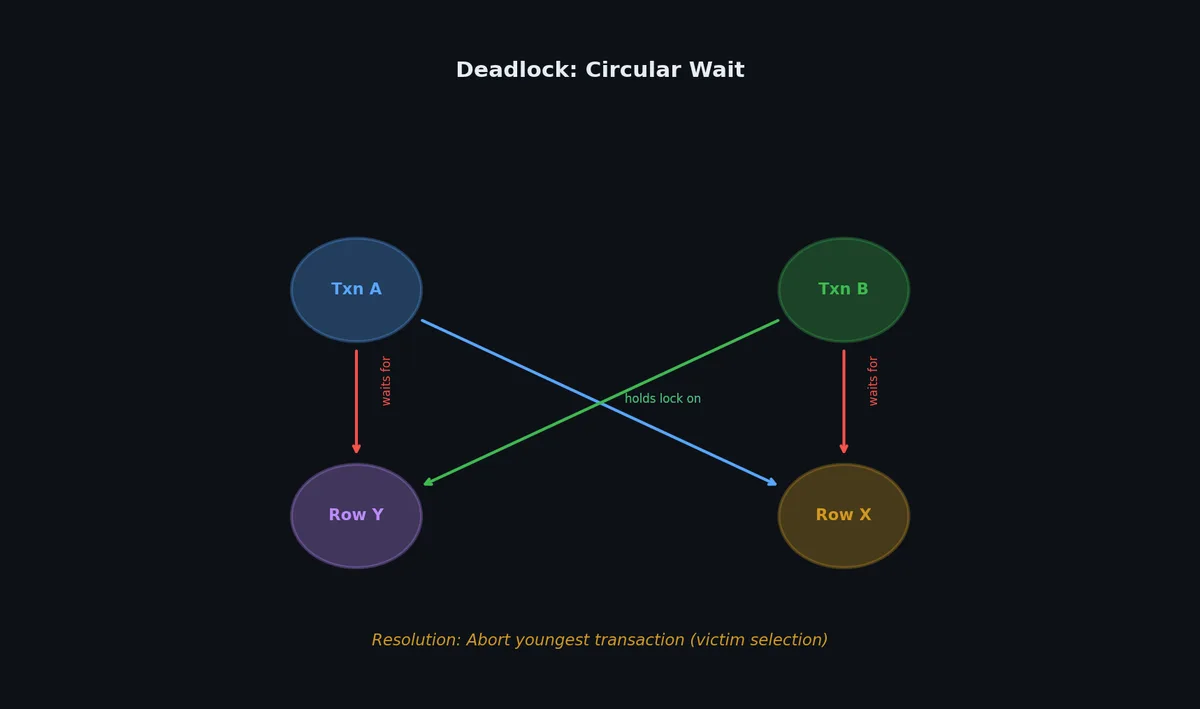
A deadlock occurs when two transactions each hold a lock that the other needs.
 1
 2
 3
 4
 5
 6
 7
 8
 9
10
11
12
13
-- Transaction A -- Transaction B
BEGIN;BEGIN;UPDATEaccountsSETbalance=900WHEREid=1;-- Locks row 1
UPDATEaccountsSETbalance=1100WHEREid=2;-- Locks row 2
UPDATEaccountsSETbalance=1100WHEREid=2;-- WAITS for B's lock
UPDATEaccountsSETbalance=900WHEREid=1;-- WAITS for A's lock
-- DEADLOCK! Both transactions are waiting for each other.
Databases detect deadlocks using a wait-for graph. When a cycle is detected, one transaction is chosen as the victim and rolled back:
1
2
3
4
5
6
ERROR: deadlock detected
DETAIL: Process 12345 waits for ShareLock on transaction 67890;
blocked by process 67891.
Process 67891 waits for ShareLock on transaction 12345;
blocked by process 12345.
HINT: See server log for query details.
Always lock resources in the same order: If every transaction that needs accounts 1 and 2 always locks account 1 first, deadlocks cannot occur.
1
2
3
4
5
6
7
-- Always lock the lower account_id first
BEGIN;SELECT*FROMaccountsWHEREid=LEAST(1,2)FORUPDATE;SELECT*FROMaccountsWHEREid=GREATEST(1,2)FORUPDATE;UPDATEaccountsSETbalance=balance-500WHEREid=1;UPDATEaccountsSETbalance=balance+500WHEREid=2;COMMIT;
Keep transactions short: The longer a transaction holds locks, the higher the chance of deadlock.
Use NOWAIT or lock timeouts:
1
2
3
4
5
-- PostgreSQL: fail fast on lock contention
SETlock_timeout='5s';BEGIN;SELECT*FROMaccountsWHEREid=1FORUPDATE;-- If locked for > 5 seconds, abort instead of waiting forever
Reduce lock scope: Lock only what you need, when you need it.
Lock the data before modifying it. This is what SELECT FOR UPDATE does.
1
2
3
4
5
6
-- Pessimistic: lock the row first
BEGIN;SELECT*FROMproductsWHEREproduct_id=42FORUPDATE;-- Check stock, calculate, etc.
UPDATEproductsSETstock=stock-1WHEREproduct_id=42;COMMIT;
Pros: Simple, guaranteed correctness.
Cons: Reduces throughput, risk of deadlocks, does not work across distributed systems.
Do not lock anything. Instead, detect conflicts at commit time using a version number or timestamp.
 1
 2
 3
 4
 5
 6
 7
 8
 9
10
11
12
13
14
-- Add a version column
ALTERTABLEproductsADDCOLUMNversionINTNOTNULLDEFAULT1;-- Read the current state (no lock)
SELECTproduct_id,stock,versionFROMproductsWHEREproduct_id=42;-- Returns: stock = 10, version = 5
-- Application does its computation...
-- Update with version check
UPDATEproductsSETstock=stock-1,version=version+1WHEREproduct_id=42ANDversion=5;-- If affected rows = 0, someone else modified the row. Retry.
# Application-side optimistic locking patterndefpurchase_product(product_id:int,quantity:int):max_retries=3forattemptinrange(max_retries):# Read current stateproduct=db.query("SELECT stock, version FROM products WHERE product_id = %s",[product_id])ifproduct.stock<quantity:raiseInsufficientStockError()# Try to update with version checkrows_affected=db.execute("""UPDATE products
SET stock = stock - %s, version = version + 1
WHERE product_id = %s AND version = %s""",[quantity,product_id,product.version])ifrows_affected==1:return# Success# Version mismatch — retryraiseConflictError("Too many retries")
Pros: Higher throughput when conflicts are rare, works across distributed systems.
Cons: Must handle retries, more complex application logic.
Savepoints let you undo part of a transaction without aborting the whole thing. Essential for complex workflows where one step might fail but others should persist.
1
2
3
4
5
6
7
8
9
10
11
12
13
14
15
16
17
18
BEGIN;INSERTINTOorders(user_id,total)VALUES(1,99.99);-- order_id = 1001 assigned
SAVEPOINTbefore_items;INSERTINTOorder_items(order_id,product_id,qty)VALUES(1001,42,1);INSERTINTOorder_items(order_id,product_id,qty)VALUES(1001,99,1);-- Oops, product 99 is out of stock (foreign key fails or business logic check)
ROLLBACKTOSAVEPOINTbefore_items;-- order still exists, items are gone
-- Try again with just the available product
INSERTINTOorder_items(order_id,product_id,qty)VALUES(1001,42,1);COMMIT;-- order with 1 item committed successfully
Advisory locks are database-managed locks that don’t lock any table or row — they lock an arbitrary application-defined resource. The database just provides the coordination mechanism.
1
2
3
4
5
6
7
8
-- Acquire an exclusive advisory lock (blocks if already held)
SELECTpg_advisory_lock(12345);-- Try without blocking (returns true/false)
SELECTpg_try_advisory_lock(12345);-- Release
SELECTpg_advisory_unlock(12345);
Normal MVCC (Read Committed / Repeatable Read):
- Readers never block writers
- Writers never block readers
- But anomalies are possible (write skew, phantom reads)
SSI adds:
- Track read dependencies between transactions
- If a cycle is detected → abort one transaction
- Still non-blocking! (optimistic approach)
-- Doctor on-call scheduling: at least one doctor must be on call
-- Two doctors try to go off-call simultaneously
-- Transaction A (Dr. Smith):
BEGINISOLATIONLEVELSERIALIZABLE;SELECTcount(*)FROMdoctorsWHEREon_call=true;-- sees 2
UPDATEdoctorsSETon_call=falseWHEREname='Smith';COMMIT;-- succeeds
-- Transaction B (Dr. Jones), running concurrently:
BEGINISOLATIONLEVELSERIALIZABLE;SELECTcount(*)FROMdoctorsWHEREon_call=true;-- sees 2
UPDATEdoctorsSETon_call=falseWHEREname='Jones';COMMIT;-- SERIALIZATION FAILURE! Rolled back.
Under Read Committed, both transactions would succeed — leaving zero doctors on call. SSI detects the dependency cycle and aborts one transaction.
-- The safe transfer function (PostgreSQL)
CREATEORREPLACEFUNCTIONtransfer(from_accountINT,to_accountINT,amountDECIMAL(12,2))RETURNSVOIDAS$$DECLAREfrom_balanceDECIMAL(12,2);BEGIN-- Lock both accounts in consistent order (lowest ID first)
-- This prevents deadlocks
IFfrom_account<to_accountTHENPERFORM1FROMaccountsWHEREaccount_id=from_accountFORUPDATE;PERFORM1FROMaccountsWHEREaccount_id=to_accountFORUPDATE;ELSEPERFORM1FROMaccountsWHEREaccount_id=to_accountFORUPDATE;PERFORM1FROMaccountsWHEREaccount_id=from_accountFORUPDATE;ENDIF;-- Check sufficient funds
SELECTbalanceINTOfrom_balanceFROMaccountsWHEREaccount_id=from_account;IFfrom_balance<amountTHENRAISEEXCEPTION'Insufficient funds: balance=%, amount=%',from_balance,amount;ENDIF;-- Perform transfer
UPDATEaccountsSETbalance=balance-amountWHEREaccount_id=from_account;UPDATEaccountsSETbalance=balance+amountWHEREaccount_id=to_account;-- Log the transfer
INSERTINTOtransfer_log(from_account,to_account,amount,transferred_at)VALUES(from_account,to_account,amount,NOW());END;$$LANGUAGEplpgsql;
1
2
3
4
-- Usage
BEGIN;SELECTtransfer(1,2,500.00);COMMIT;
This function:
Locks accounts in consistent order (prevents deadlocks)
Checks sufficient funds after locking (prevents race condition)
Performs both updates in a single transaction (atomicity)
Logs the transfer for audit trail
Runs at the default isolation level (READ COMMITTED is sufficient here because we hold explicit row locks)
Transactions guarantee correctness at the logical level. But how does the database actually store data on disk? How does a COMMIT survive a power failure? In the next article, we will go a level deeper and explore storage engines — the machinery that turns SQL into bytes on disk.