Databases (4): Storage Engines — How Data Hits Disk
How database storage engines work under the hood — B-tree vs LSM-tree, WAL, buffer pools, compaction, and why your choice of engine shapes everything.
Every SQL statement you write eventually becomes bytes written to a disk. The component responsible for this translation — the storage engine — determines your database’s performance characteristics more than almost any other factor. Two tables with identical schemas and identical data can perform wildly differently depending on the storage engine underneath. Understanding this layer explains why databases behave the way they do.
The Basics: Pages, Extents, and Tablespaces#
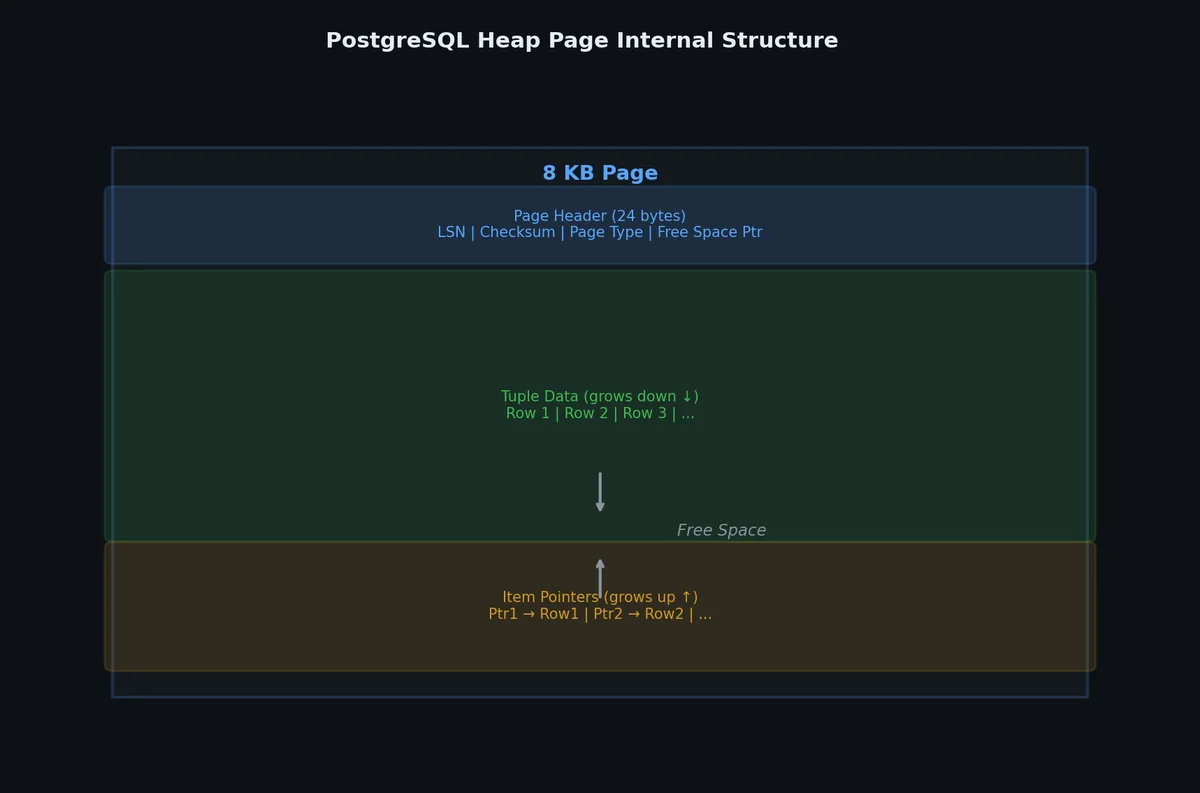
Databases do not read or write individual rows from disk. Disk I/O operates on pages (also called blocks), typically 4 KB, 8 KB, or 16 KB.
| |
| Concept | PostgreSQL | MySQL InnoDB |
|---|---|---|
| Page size | 8 KB (compile-time) | 16 KB (configurable: 4/8/16/32/64 KB) |
| Extent | 1 MB (128 pages) | 1 MB (64 pages) for tables > 32 MB |
| Tablespace | Directories on filesystem | .ibd files per table |
| Row storage | HEAP (unordered) | Clustered by primary key |
When you SELECT * FROM users WHERE id = 42, the database does not seek to row 42 on disk. It loads the page containing row 42 into memory, extracts the row, and returns it. If the page is already in the buffer pool (in-memory cache), no disk I/O is needed at all.
B-Tree Storage Engines#
B-tree engines (used by PostgreSQL, MySQL InnoDB, Oracle, SQL Server) organize data in B+tree structures on disk. The tree is the primary data structure for both tables and indexes.
InnoDB: MySQL’s Default Engine#
InnoDB is a B-tree engine with some distinctive characteristics.
Clustered Index#
In InnoDB, the table data itself is a B+tree, organized by the primary key. This is called the clustered index (or primary index).
| |
Every row in InnoDB lives inside the clustered index. There is no separate “heap” file.
Implications:
- Sequential primary key access is fast: Reading
id = 1, 2, 3, ...reads consecutive pages. - Random primary key inserts are expensive: Inserting with a UUID primary key causes random page splits across the tree.
- Secondary indexes are larger: A secondary index stores the primary key as the row pointer, not a physical address. Looking up by secondary index requires two tree traversals — one for the secondary index, one for the clustered index.
| |
Why Auto-Increment Primary Keys Matter in InnoDB#
| |
Random primary keys cause:
- Page splits: When a page is full and a new row belongs in the middle, the page must be split in two.
- Fragmentation: Pages are only partially filled after splits.
- Buffer pool thrashing: Random pages are accessed, evicting useful cached pages.
If you need UUIDs, consider UUIDv7 (time-ordered) or use a BIGINT AUTO_INCREMENT primary key with a separate UUID column.
Buffer Pool#
InnoDB’s buffer pool is a region of memory that caches data pages and index pages. It is the most important performance-related configuration.
| |
The buffer pool uses a modified LRU (Least Recently Used) algorithm with two sublists:
| |
New pages enter at the head of the old sublist. If accessed again (within a configurable window), they move to the young sublist. This prevents a one-time full table scan from evicting all hot pages — a pure LRU would push every hot page out.
PostgreSQL Storage#
PostgreSQL uses a different approach. Tables are stored as heap files — unordered collections of pages. There is no clustered index by default.
| |
Rows are not in any particular order. Every index (including the primary key index) stores a physical tuple ID (page_number, offset) pointing to the heap.
| |
This means:
- Primary key lookups require one index traversal + one heap fetch (same as InnoDB secondary indexes)
- No penalty for random primary keys — the heap is already unordered
- VACUUM is critical — deleted/updated rows leave dead tuples in the heap that must be reclaimed
PostgreSQL’s buffer pool is called the shared buffer pool, configured via shared_buffers:
| |
LSM-Tree Storage Engines#

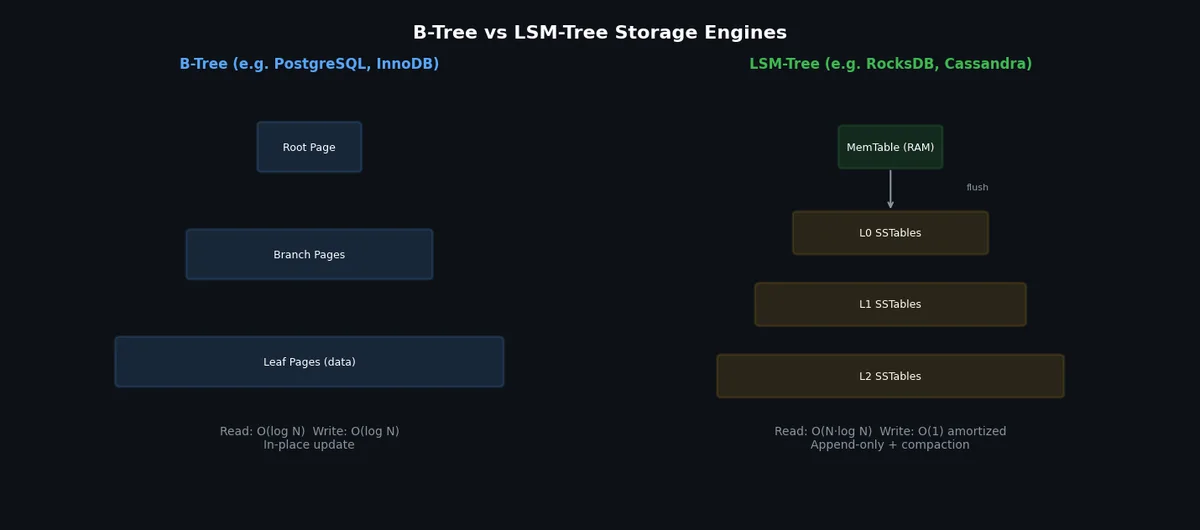
Log-Structured Merge-tree (LSM-tree) engines take a fundamentally different approach. Instead of updating data in place (like B-trees), they batch writes in memory and flush them sequentially. This makes writes much faster but reads more complex.
LSM-tree engines include: RocksDB, LevelDB, Cassandra’s storage engine, HBase, CockroachDB (built on RocksDB), and TiKV (TiDB’s storage layer).
How LSM-Trees Work#
| |
| |
SSTables (Sorted String Tables)#
An SSTable is an immutable, sorted file on disk. Once written, it is never modified — only replaced during compaction.
| |
Compaction#
Over time, SSTables accumulate. Multiple SSTables may contain different versions of the same key. Compaction merges SSTables to:
- Remove obsolete versions (keep only the latest)
- Remove tombstones (delete markers)
- Reduce the number of SSTables to check during reads
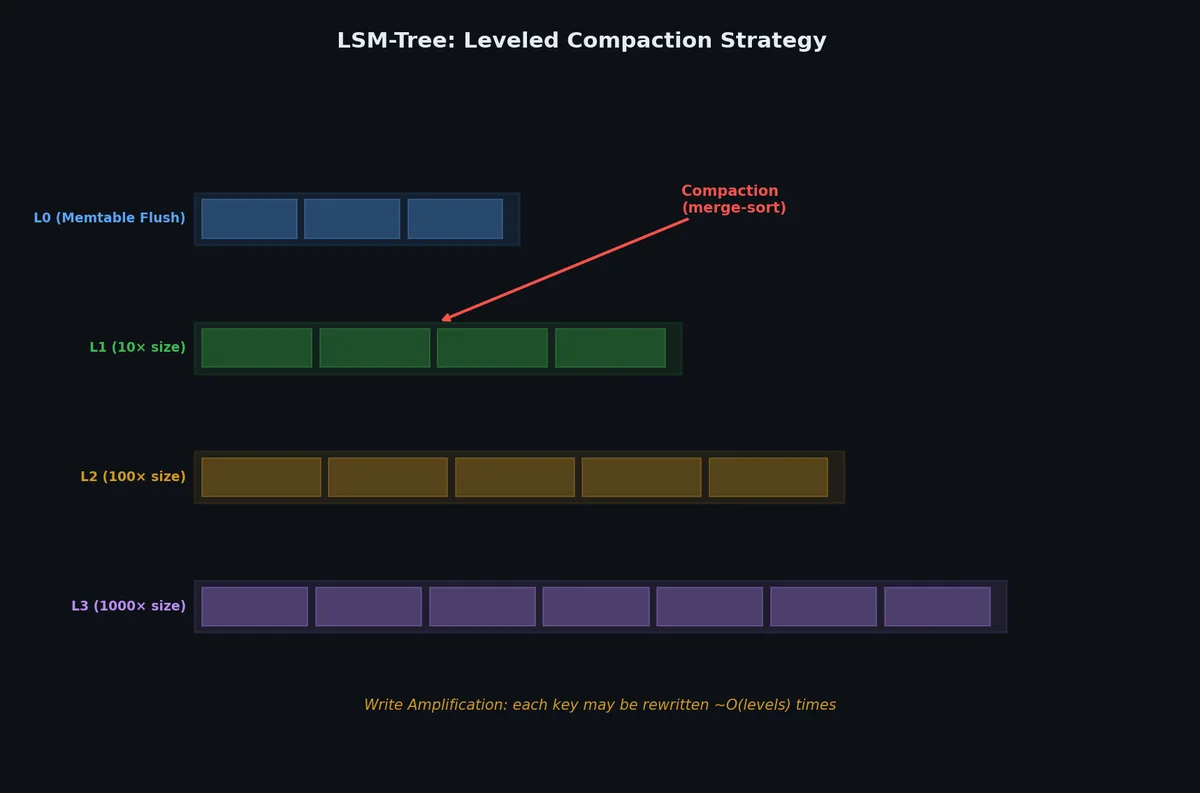
Two main compaction strategies:
Size-Tiered Compaction (write-optimized):
- Merge SSTables of similar size together
- Pros: Higher write throughput
- Cons: More space amplification (up to 2x), read latency spikes during compaction
Leveled Compaction (read-optimized):
- Each level has a size limit (level N+1 is 10x level N)
- SSTables at each level have non-overlapping key ranges
- Pros: More predictable read performance, lower space amplification
- Cons: Higher write amplification
Bloom Filters: Avoiding Unnecessary Disk Reads#
A Bloom filter is a probabilistic data structure that tells you:
- Definitely not in the set — skip this SSTable (no disk read needed)
- Possibly in the set — must check this SSTable
| |
False positive rate is configurable (typically 1%). A 1% false positive rate requires about 10 bits per key.
B-Tree vs LSM-Tree Comparison#

| Aspect | B-Tree (InnoDB, PostgreSQL) | LSM-Tree (RocksDB, LevelDB) |
|---|---|---|
| Write pattern | Random (update in place) | Sequential (append-only) |
| Write throughput | Lower (random I/O) | Higher (sequential I/O) |
| Read latency | Predictable (single tree traversal) | Variable (may check multiple levels) |
| Write amplification | ~10x (page rewrites) | ~10-30x (compaction rewrites) |
| Read amplification | 1 (one index traversal) | ~1-5 (multiple levels to check) |
| Space amplification | ~1.5x (page fragmentation) | ~1.1-2x (depends on compaction) |
| Best for | Read-heavy OLTP, random reads | Write-heavy workloads, time-series |
| Concurrency | MVCC + row locks | Lock-free reads (immutable SSTables) |
Write amplification: total bytes written to disk / bytes of actual data written. If you write 1 KB of data but the engine writes 10 KB total (including index updates, page rewrites, compaction), the write amplification is 10x.
Read amplification: number of disk reads needed to answer a point query. B-trees: typically 1 (the page is cached or one tree traversal). LSM-trees: potentially one read per level.
Space amplification: total disk space used / actual data size. B-trees waste space due to partially-filled pages. LSM-trees waste space due to multiple versions existing across levels before compaction.
Write-Ahead Log (WAL)#
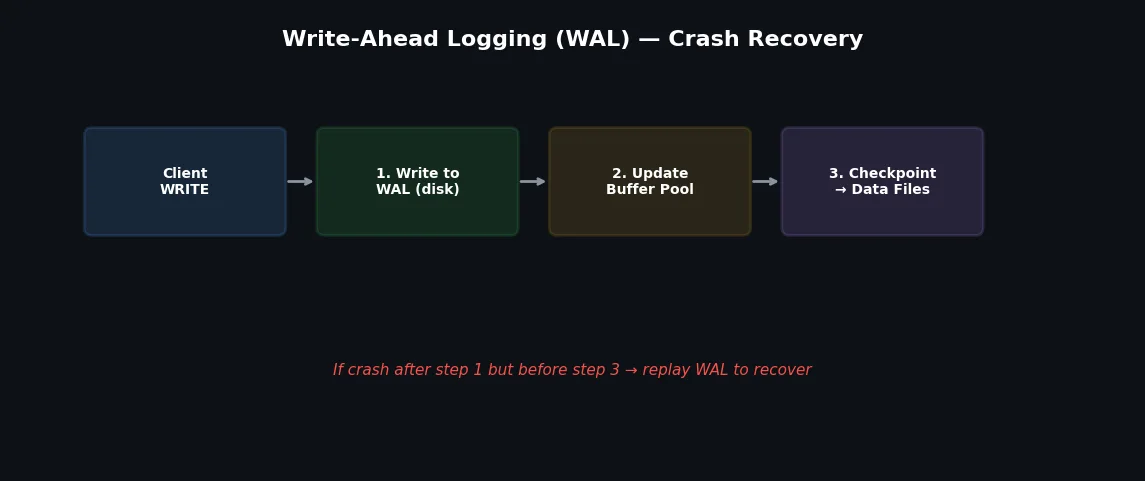
The WAL (also called redo log in MySQL) is the foundation of durability. Before any data page is modified, the change is written to the WAL.
| |
Why not write directly to data files?
- Data files require random I/O (the row could be anywhere)
- WAL is append-only (sequential I/O), which is 10-100x faster
- If the system crashes between step 4 and 5, the WAL contains enough information to replay the changes
| |
Checkpoint#
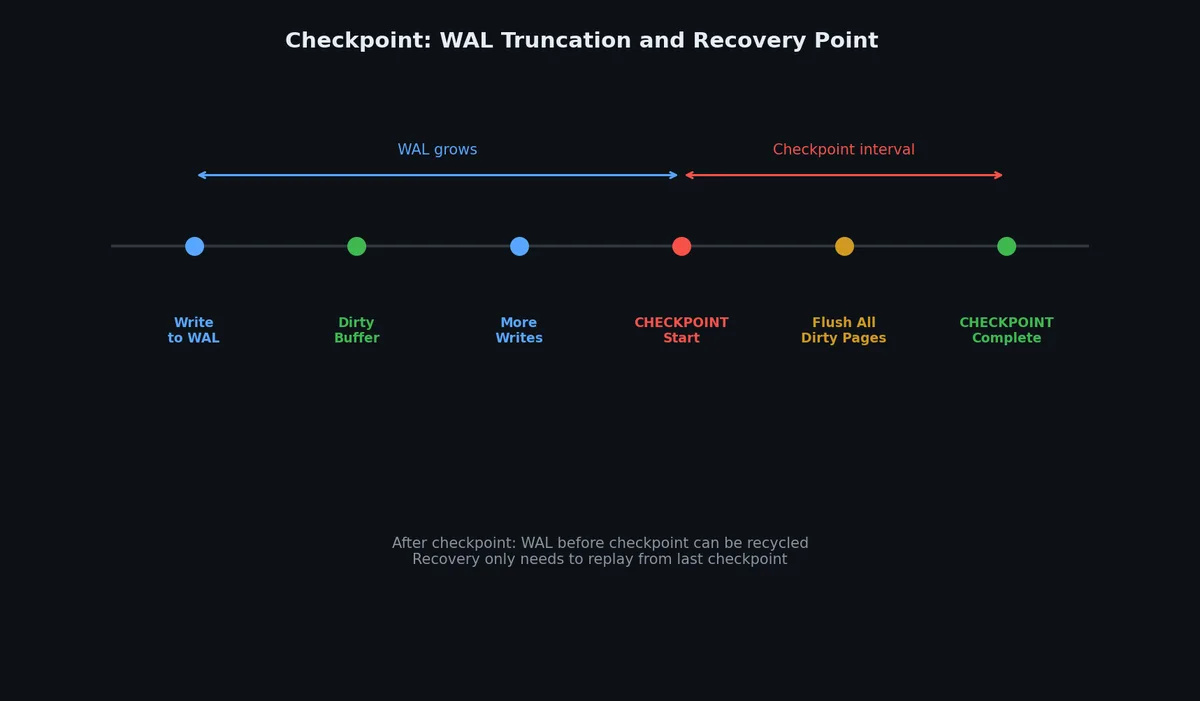
A checkpoint is when dirty pages in the buffer pool are flushed to the data files on disk. After a checkpoint, the WAL entries before that point are no longer needed for crash recovery.
| |
Without checkpoints, crash recovery would need to replay the entire WAL from the beginning of time. Checkpoints bound recovery time.
InnoDB Architecture: The Big Picture#
| |
The flow for an UPDATE:
- Find the page in the buffer pool (or load from disk)
- Write the change to the redo log (WAL)
- Modify the page in the buffer pool (mark as dirty)
- Write old row version to the undo log (for MVCC and rollback)
- On COMMIT: flush redo log to disk
- Eventually: checkpoint flushes dirty pages to data files
Compression#
Page Compression#
InnoDB supports transparent page compression:
| |
PostgreSQL uses TOAST (The Oversized-Attribute Storage Technique) for large values:
| |
Transparent Data Encryption (TDE)#
Encryption at the storage engine level — data is encrypted on disk but decrypted transparently when loaded into the buffer pool:
| |
Column-Oriented Storage#
Everything we have discussed so far is row-oriented storage: each page contains complete rows. This is optimal for OLTP (transactional) workloads where you typically access all columns of a few rows.
For analytical (OLAP) workloads, column-oriented storage is dramatically better:
| |
Why column-oriented is better for analytics:
| Benefit | Explanation |
|---|---|
| Less I/O | SELECT AVG(age) reads only the age column, not name/email/etc. |
| Better compression | Similar values in the same column compress 5-10x better |
| Vectorized processing | CPU can process batches of same-type values using SIMD |
| Cache efficiency | All values being processed fit in CPU cache lines |
Column-oriented databases include: ClickHouse, Apache Parquet (file format), DuckDB, Amazon Redshift, Google BigQuery.
| |
Most OLTP databases do not use column-oriented storage (InnoDB, PostgreSQL are row-oriented). But hybrid approaches are emerging:
- PostgreSQL’s cstore_fdw (columnar foreign data wrapper)
- MySQL HeatWave (in-memory columnar accelerator)
- Oracle’s in-memory column store
- SQL Server’s columnstore indexes
Page Layout Internals#
Understanding how data is physically stored on disk explains why some queries are fast and others are slow.
PostgreSQL Page Structure (8KB)#
| |
Key implications:
- Maximum row size ~2KB before TOAST kicks in (compresses or out-of-lines large values)
- Item pointers are stable: indexes point to (page, offset), so HOT updates can move the tuple within the page without updating indexes
- Free space determines whether an UPDATE can happen in-place (HOT) or needs a new page
InnoDB Page Structure (16KB)#
| |
InnoDB stores rows in primary key order (clustered index). This is why primary key choice dramatically affects performance — random UUIDs cause page splits on every insert.
IO Access Patterns#
| Pattern | Cause | Performance |
|---|---|---|
| Sequential scan | Full table scan, range on clustered key | Fast (OS prefetch, ~1GB/s SSD) |
| Random read | Index lookup, unclustered access | Slow (~10K IOPS on SSD) |
| Sequential write | INSERT into clustered table, WAL | Fast |
| Random write | UPDATE scattered rows, index maintenance | Slow |
TOAST: Large Value Storage#
| |
Vacuum and Compaction#
PostgreSQL’s MVCC creates dead tuples on every UPDATE and DELETE. Vacuum reclaims this space. Without it, tables grow without bound.
How Vacuum Works#
| |
Autovacuum Tuning#
| |
LSM Compaction (RocksDB / LevelDB)#
LSM-trees accumulate sorted runs (SSTables) over time. Compaction merges them:
| |
| Compaction strategy | Behavior | Best for |
|---|---|---|
| Leveled (default) | Minimize read amplification | Read-heavy workloads |
| Size-tiered | Minimize write amplification | Write-heavy workloads |
| FIFO | Drop oldest data | Time-series with TTL |
Measuring Storage Engine Performance#
When evaluating storage engines, three amplification metrics matter most. Let us make them concrete with numbers.
Write Amplification in Practice#
Write amplification is the ratio of total bytes written to storage versus the logical bytes written by the application.
| |
Benchmarking With Real Tools#
| |
Sample output:
| |
| |
Understanding the ratio between random read IOPS and sequential write throughput on your hardware directly explains why B-tree engines and LSM-tree engines perform differently on the same machine.
Choosing a Storage Engine#
| Workload | Recommended Engine | Why |
|---|---|---|
| General OLTP | InnoDB / PostgreSQL | Proven, ACID, MVCC |
| Write-heavy (logs, metrics) | LSM-based (RocksDB, TiKV) | Sequential writes, high throughput |
| Analytics / OLAP | Column-oriented (ClickHouse, DuckDB) | Scan efficiency, compression |
| Embedded / edge | SQLite / DuckDB | Zero configuration, single-file |
| Key-value workloads | RocksDB / LevelDB | Optimized for simple get/put |
| Time-series | TimescaleDB / InfluxDB | Time-partitioned, retention policies |
What’s Next#
We have now seen how individual storage engines organize data on a single machine. But not all data fits in tables, and not all workloads are best served by SQL. In the next article, we will explore the NoSQL landscape — document stores, key-value stores, wide-column databases, and graph databases — and when each one makes sense.
Databases 8 parts
- 01 Databases (1): Data Models and SQL — Why Tables Won (For Now)
- 02 Databases (2): Indexing and Query Planning — How Databases Find Your Data
- 03 Databases (3): Transactions and Concurrency — ACID, Isolation Levels, and Locking
- 04 Databases (4): Storage Engines — How Data Hits Disk you are here
- 05 Databases (5): NoSQL — Document, Key-Value, Column, and Graph
- 06 Databases (6): Replication and Partitioning — Scaling Beyond One Machine
- 07 Databases (7): Distributed Transactions — 2PC, Saga, and Why Consensus Is Hard
- 08 Databases (8): Databases in Practice — Migration, Monitoring, and War Stories