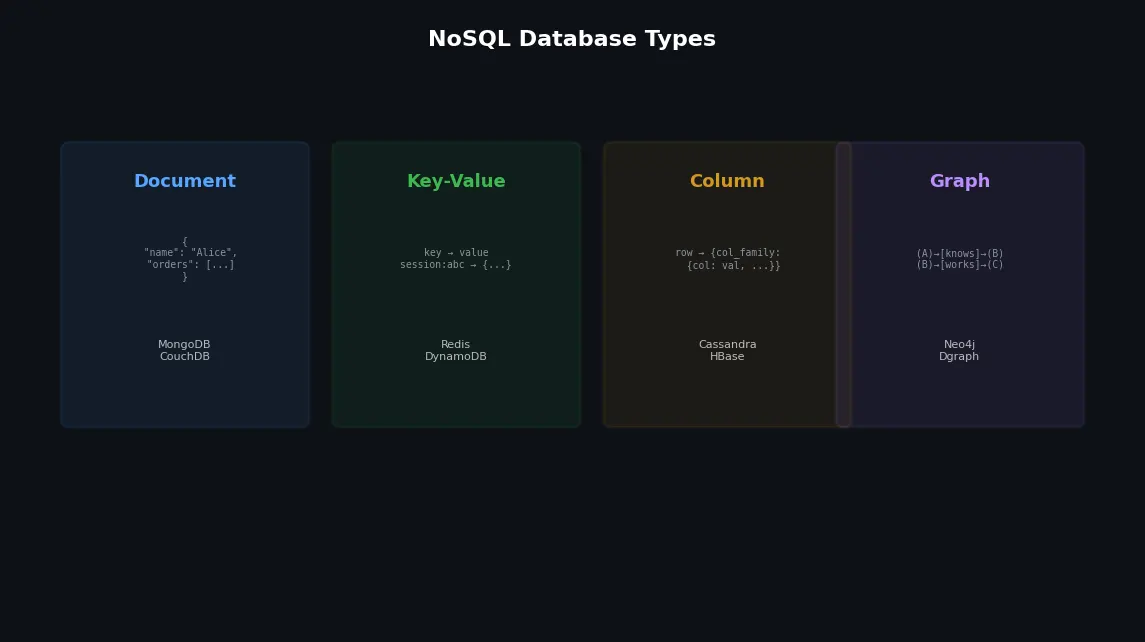
Databases (5): NoSQL — Document, Key-Value, Column, and Graph
A practical tour of the four major NoSQL families — document, key-value, wide-column, and graph — including the CAP theorem and when to use each model.
Not everything fits neatly into rows and columns. A social network’s friend graph, a product catalog with wildly varying attributes, a real-time leaderboard, a recommendation engine’s relationship web — these workloads push relational databases into awkward territory. NoSQL databases exist because different data models solve different problems better. The trick is knowing which one to reach for.
Why NoSQL?#
The term “NoSQL” is misleading. It does not mean “no SQL” — some NoSQL databases support SQL-like query languages. It means “not only SQL” or, more accurately, “non-relational.” The motivations for NoSQL fall into three categories:

- Schema flexibility: Your data does not have a fixed schema, or the schema changes frequently
- Scale-out architecture: You need horizontal scaling beyond what a single relational database can handle
- Data model fit: Your data is naturally a document, graph, key-value pair, or time series — not a table
Let us explore each family.
Document Stores: MongoDB#
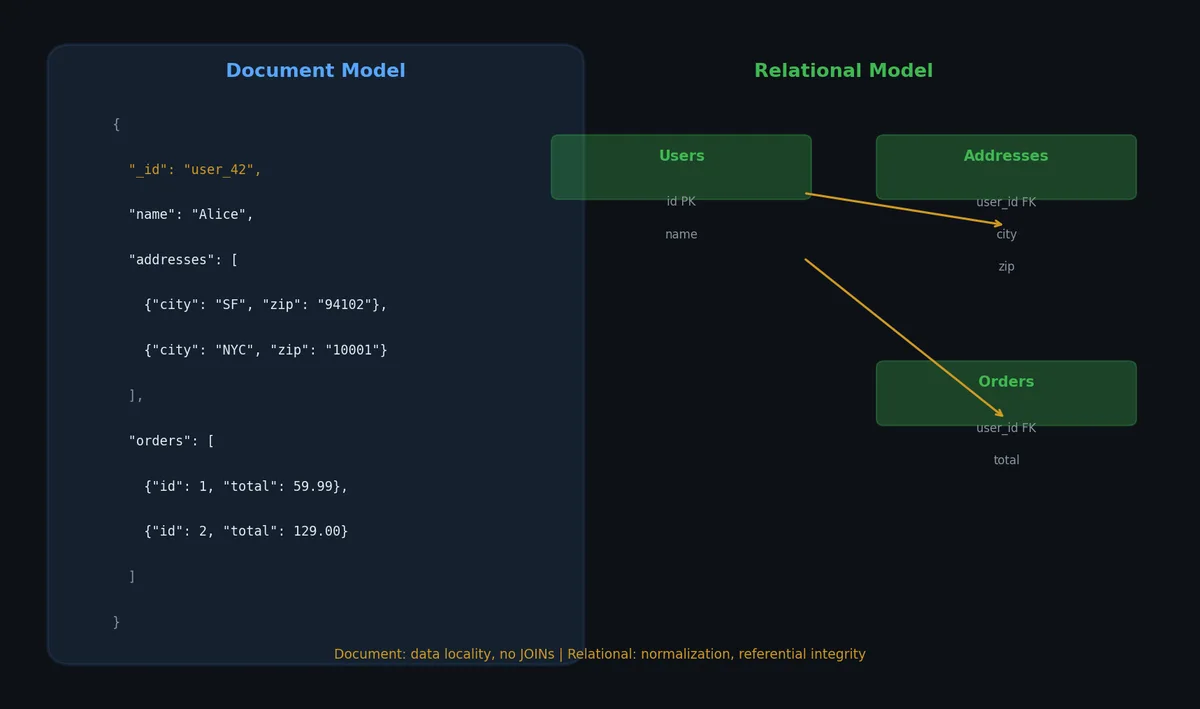
Document databases store data as semi-structured documents, typically JSON (or BSON in MongoDB’s case). Each document can have a different structure — no fixed schema.
Data Model#
| |
In a relational database, this would require at least 3 tables: users, addresses, user_preferences. In MongoDB, it is one document. No JOINs needed.
CRUD Operations#
| |
Querying and Filtering#
| |
Aggregation Pipeline#
MongoDB’s aggregation framework is surprisingly powerful — it can do many things that SQL does with GROUP BY, JOINs, and window functions:
| |
When Documents Work Well#
| Scenario | Why documents fit |
|---|---|
| Product catalogs | Products have different attributes (shoes vs laptops) |
| Content management | Articles, blog posts with nested comments |
| User profiles | Varying preferences and metadata |
| Event logging | Semi-structured event data |
| Mobile app backends | JSON in, JSON out, schema evolves fast |
When Documents Do Not Work Well#
- Many-to-many relationships: Duplication or manual reference management
- Complex transactions across documents: Limited multi-document transaction support
- Heavy aggregation/analytics: SQL databases and column stores are more efficient
- Strong consistency requirements: Eventual consistency is the default in distributed setups
Key-Value Stores: Redis#

A key-value store is the simplest NoSQL model: you give it a key, it gives you back a value. Redis takes this further by supporting rich data structures as values.
Data Structures#
| |
Persistence: RDB vs AOF#
Redis is primarily an in-memory database, but it offers two persistence mechanisms:
| Feature | RDB (Snapshotting) | AOF (Append-Only File) |
|---|---|---|
| How it works | Periodic full snapshot to disk | Logs every write command |
| Data loss risk | Up to last snapshot interval | Configurable: every second or every command |
| Recovery speed | Fast (load binary file) | Slower (replay all commands) |
| File size | Compact (binary format) | Larger (text commands, but can be compacted) |
| CPU impact | Spike during snapshot (fork) | Steady (append to file) |
| |
Common Redis Patterns#
| |
Wide-Column Stores: Cassandra#

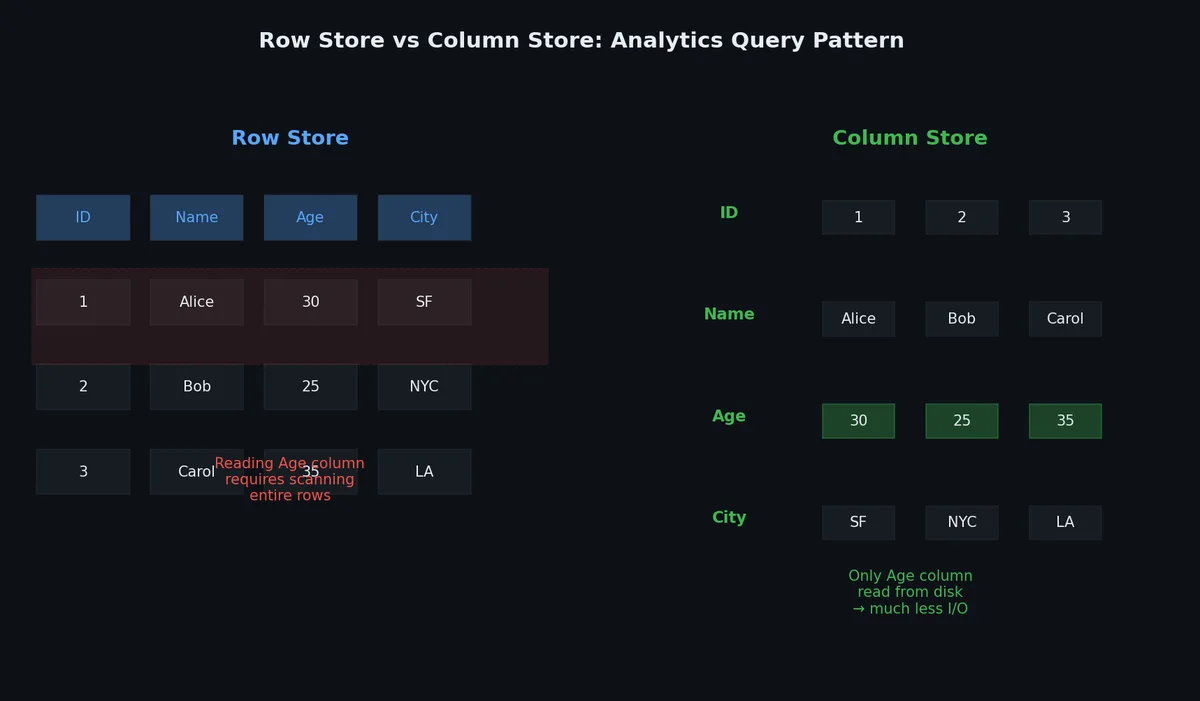
Wide-column databases (sometimes called column-family stores) are designed for massive scale with predictable performance. Apache Cassandra is the most prominent example.
Data Model#
Cassandra uses tables with a primary key composed of:
- Partition key: determines which node stores the data (distribution)
- Clustering key: determines sort order within a partition
| |
Here, user_id is the partition key and (activity_date, activity_time) is the clustering key. All activities for a single user are stored together on the same node, sorted by date and time descending.
| |
When to Use Cassandra#
| Use case | Why Cassandra fits |
|---|---|
| Time-series data | Partition by entity, cluster by time |
| IoT sensor data | Massive write throughput, predictable latency |
| User activity logs | Partition by user, query recent activity |
| Messaging / chat | Partition by conversation, cluster by timestamp |
| Geographic data | Replicate across data centers |
Cassandra Anti-Patterns#
- Random reads across partitions: Each partition may be on a different node
- Joins: Not supported — denormalize or use materialized views
- Lightweight transactions: Cassandra supports them but they are expensive (Paxos-based)
- Secondary indexes on high-cardinality columns: Poor performance
Graph Databases: Neo4j#
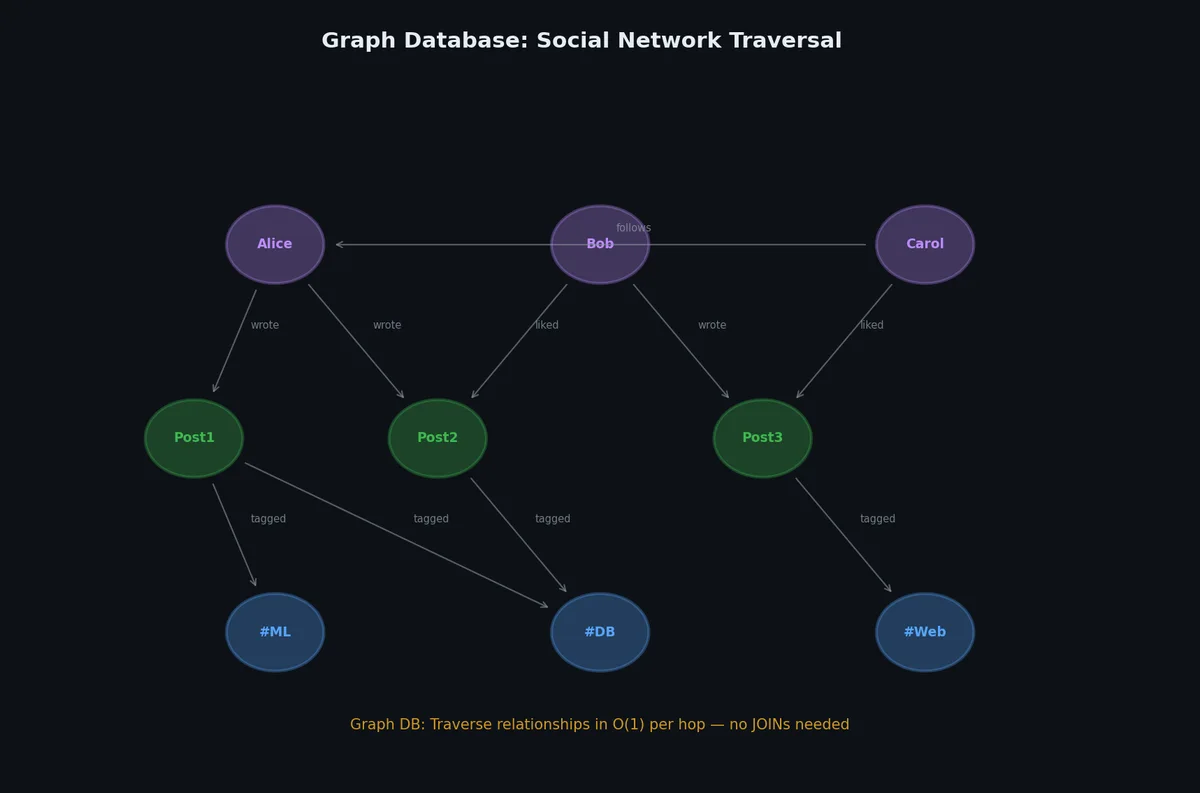
When relationships are the data — social networks, fraud detection, recommendation engines, knowledge graphs — a graph database is the natural fit.
Data Model#
Graphs have two primitives:
- Nodes (vertices): entities with labels and properties
- Relationships (edges): typed connections between nodes, also with properties
| |
Cypher Query Language#
// Create nodes and relationships
CREATE (alice:Person {name: "Alice", age: 30})
CREATE (bob:Person {name: "Bob", age: 28})
CREATE (carol:Person {name: "Carol", age: 32})
CREATE (acme:Company {name: "Acme Corp"})
CREATE (alice)-[:FRIENDS_WITH {since: 2020}]->(bob)
CREATE (alice)-[:FRIENDS_WITH {since: 2019}]->(carol)
CREATE (bob)-[:WORKS_AT {role: "Engineer", since: 2021}]->(acme)
CREATE (carol)-[:WORKS_AT {role: "Designer", since: 2020}]->(acme)

// Find Alice's friends
MATCH (alice:Person {name: "Alice"})-[:FRIENDS_WITH]->(friend)
RETURN friend.name, friend.age

// Find friends of friends (2 hops)
MATCH (alice:Person {name: "Alice"})-[:FRIENDS_WITH*2]->(fof)
WHERE fof <> alice
RETURN DISTINCT fof.name

// Shortest path between two people
MATCH path = shortestPath(
  (alice:Person {name: "Alice"})-[:FRIENDS_WITH*]-(bob:Person {name: "Bob"})
)
RETURN path, length(path)

// Recommendation: people who work at the same company as Alice's friends
MATCH (alice:Person {name: "Alice"})-[:FRIENDS_WITH]->(friend)-[:WORKS_AT]->(company)<-[:WORKS_AT]-(colleague)
WHERE NOT (alice)-[:FRIENDS_WITH]->(colleague)
  AND colleague <> alice
RETURN colleague.name, company.name, count(*) AS mutual_connections
ORDER BY mutual_connections DESC
Graph vs Relational: The JOIN Problem#
Finding friends-of-friends-of-friends in SQL:
| |
The same in Cypher:
MATCH (alice:Person {id: 1})-[:FRIENDS_WITH*3]->(fofof)
WHERE fofof <> alice
RETURN DISTINCT fofof.name
// Graph databases use index-free adjacency — each node directly
// references its neighbors. No join tables, no index lookups.
// Performance depends on the number of results, not the total graph size.
Time-Series Databases#
Time-series data — metrics, IoT sensor readings, financial ticks, application logs — has unique access patterns: write-heavy, append-only, queries almost always filter by time range, and old data can be downsampled or expired.
Why Not Just PostgreSQL?#
PostgreSQL can store time-series data, but at scale it struggles:
| Challenge | RDBMS approach | Time-series DB approach |
|---|---|---|
| Billions of rows | Table bloat, slow vacuum | Partitioned by time, automatic retention |
| Write throughput | WAL bottleneck at >100K rows/s | Batched append, LSM/columnar |
| Range queries | B-tree seeks per row | Sequential scan of time-ordered chunks |
| Data retention | Manual DELETE + vacuum | Automatic TTL policies |
| Aggregation | Full scan or materialized views | Pre-computed rollups |
TimescaleDB (PostgreSQL Extension)#
TimescaleDB adds time-series superpowers to PostgreSQL — you keep full SQL compatibility:
| |
InfluxDB#
InfluxDB uses a custom query language (Flux) optimized for time-series operations:
from(bucket: "monitoring")
  |> range(start: -1h)
  |> filter(fn: (r) => r._measurement == "cpu" and r.host == "web-01")
  |> aggregateWindow(every: 5m, fn: mean)
  |> yield()
Choosing a Time-Series Database#
| Database | Best for | Query language | Deployment |
|---|---|---|---|
| TimescaleDB | Teams already on PostgreSQL | SQL (full) | Extension (self-host or cloud) |
| InfluxDB | Metrics/monitoring pipelines | Flux / InfluxQL | Standalone / Cloud |
| QuestDB | Ultra-low-latency ingestion | SQL subset | Standalone |
| ClickHouse | Analytics on event data | SQL (extended) | Standalone / Cloud |
| Prometheus | Pull-based metrics collection | PromQL | Standalone (with remote storage) |
Vector Databases#
Vector databases store high-dimensional embeddings and support similarity search. They power semantic search, recommendation systems, RAG (Retrieval-Augmented Generation), and image retrieval.
How Vector Search Works#
Traditional databases find exact matches. Vector databases find the nearest neighbors in embedding space:
| |
Index Types#
| Algorithm | Speed | Accuracy | Memory | Best for |
|---|---|---|---|---|
| Flat (brute force) | Slow | 100% | Low | <100K vectors |
| IVF (Inverted File) | Fast | ~95% | Medium | 100K-10M vectors |
| HNSW (Hierarchical NSW) | Very fast | ~98% | High | General purpose |
| PQ (Product Quantization) | Fast | ~90% | Very low | Billions of vectors |
Milvus / Zilliz#
| |
pgvector (PostgreSQL Extension)#
For teams already on PostgreSQL who want vector search without a new database:
| |
When to Use a Dedicated Vector DB vs pgvector#
| Factor | pgvector | Dedicated (Milvus, Pinecone, Qdrant) |
|---|---|---|
| Vector count | <5M | Millions to billions |
| Existing stack | Already on PostgreSQL | Greenfield or specialized |
| Hybrid queries | SQL + vector in one query | Separate systems |
| Throughput | Moderate (~1K QPS) | High (~100K QPS) |
| Filtering | Full SQL WHERE clause | Metadata filtering (limited) |
| Operational cost | Zero (extension) | New infrastructure |
Multi-Model Databases#
Some databases support multiple data models in a single system, eliminating the need to synchronize between separate databases.
Examples#
| Database | Models supported | Use case |
|---|---|---|
| PostgreSQL + extensions | Relational, Document (jsonb), Vector (pgvector), Time-series (TimescaleDB), Graph (Apache AGE) | “Everything database” for medium scale |
| ArangoDB | Document, Graph, Key-Value | Applications needing graph + document |
| SurrealDB | Document, Graph, Relational | New projects wanting flexibility |
| FaunaDB | Document, Relational, Temporal | Serverless, multi-region |
| CosmosDB | Document, Graph, Key-Value, Column-family, Table | Azure ecosystem |
The PostgreSQL Ecosystem Approach#
Instead of learning a new database, extend PostgreSQL:
| |
One deployment, one backup strategy, one connection pool, full ACID across all models. The tradeoff: each extension is competent but not best-in-class at extreme scale.
The CAP Theorem#
The CAP theorem states that a distributed system can provide at most two of these three guarantees:
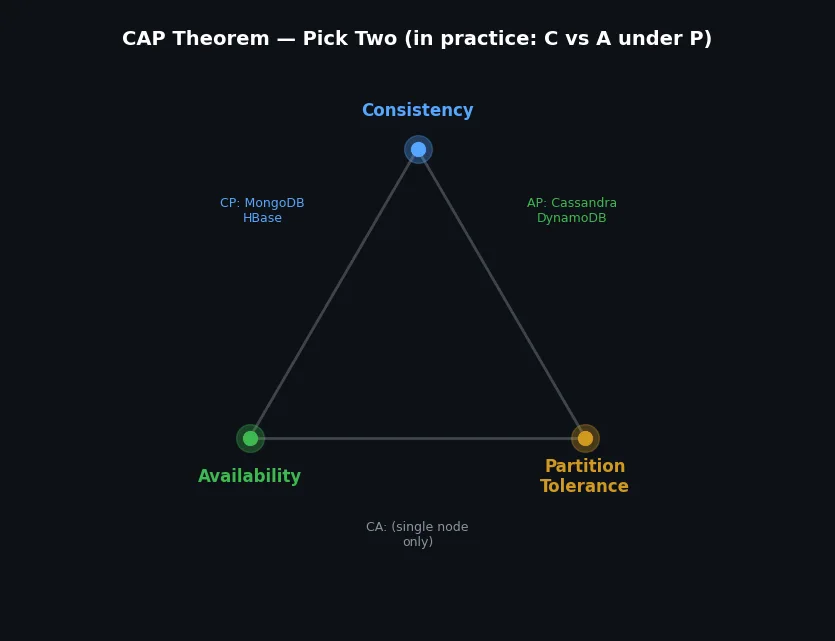
- Consistency: Every read receives the most recent write
- Availability: Every request receives a response (even if not the most recent data)
- Partition Tolerance: The system continues operating despite network partitions
Since network partitions are unavoidable in distributed systems, the real choice is between CP and AP:
| Choice | Behavior during partition | Examples |
|---|---|---|
| CP (Consistency + Partition Tolerance) | Refuses requests it cannot guarantee are consistent | HBase, MongoDB (with majority write concern), etcd, ZooKeeper |
| AP (Availability + Partition Tolerance) | Serves requests but may return stale data | Cassandra, DynamoDB, CouchDB, Riak |
| CA (Consistency + Availability) | Not possible in a distributed system | Single-node PostgreSQL / MySQL (not distributed) |
In practice, most databases let you tune the consistency/availability trade-off per operation:
| |
| |
NewSQL: The Best of Both Worlds?#
NewSQL databases attempt to provide SQL + ACID + horizontal scaling:
| Database | Architecture | Key feature |
|---|---|---|
| CockroachDB | Raft consensus, range-based sharding | PostgreSQL wire protocol, survives zone failures |
| TiDB | TiKV storage (RocksDB) + TiDB SQL layer | MySQL protocol compatible, HTAP (hybrid) |
| YugabyteDB | DocDB storage, Raft consensus | PostgreSQL and Cassandra compatible APIs |
| Google Spanner | TrueTime (atomic clocks), Paxos | Global consistency with external consistency |
| |
Decision Table: Choosing the Right Database#
| Requirement | Best fit | Examples |
|---|---|---|
| ACID transactions, complex queries | Relational | PostgreSQL, MySQL |
| Flexible schema, nested documents | Document store | MongoDB, Firestore |
| Ultra-low latency caching | Key-value | Redis, Memcached |
| Massive write throughput, time-series | Wide-column | Cassandra, HBase |
| Relationship-heavy queries | Graph | Neo4j, Amazon Neptune |
| SQL + horizontal scaling | NewSQL | CockroachDB, TiDB |
| Real-time analytics | Column-oriented | ClickHouse, DuckDB |
| Full-text search | Search engine | Elasticsearch, Meilisearch |
| Global distribution with strong consistency | Managed NewSQL | Google Spanner, CockroachDB |
The right answer is often “PostgreSQL” for your primary data store, with a specialized database for specific workloads. Most successful systems use 2-3 databases, not one.
What’s Next#
Whether you choose relational or NoSQL, a single machine eventually becomes a bottleneck. In the next article, we will explore replication and partitioning — the techniques that let databases scale beyond one server while maintaining (some level of) consistency.
Databases 8 parts
- 01 Databases (1): Data Models and SQL — Why Tables Won (For Now)
- 02 Databases (2): Indexing and Query Planning — How Databases Find Your Data
- 03 Databases (3): Transactions and Concurrency — ACID, Isolation Levels, and Locking
- 04 Databases (4): Storage Engines — How Data Hits Disk
- 05 Databases (5): NoSQL — Document, Key-Value, Column, and Graph you are here
- 06 Databases (6): Replication and Partitioning — Scaling Beyond One Machine
- 07 Databases (7): Distributed Transactions — 2PC, Saga, and Why Consensus Is Hard
- 08 Databases (8): Databases in Practice — Migration, Monitoring, and War Stories


