Databases (6): Replication and Partitioning — Scaling Beyond One Machine
How databases replicate data for availability and partition data for scale — covering leader-follower, multi-leader, leaderless, sharding strategies, and consistent hashing.
A single database server can handle a remarkable amount of load — a well-tuned PostgreSQL instance can serve tens of thousands of queries per second. But eventually you hit a wall. Maybe you need more read throughput than one CPU can provide. Maybe you need your data to survive a data center fire. Maybe your dataset exceeds what fits on a single disk. That is when you need replication and partitioning.
These are two orthogonal strategies:
Replication: copy the same data to multiple machines (for availability and read scaling)
Partitioning (sharding): split the data into pieces, each stored on a different machine (for write scaling and data size)
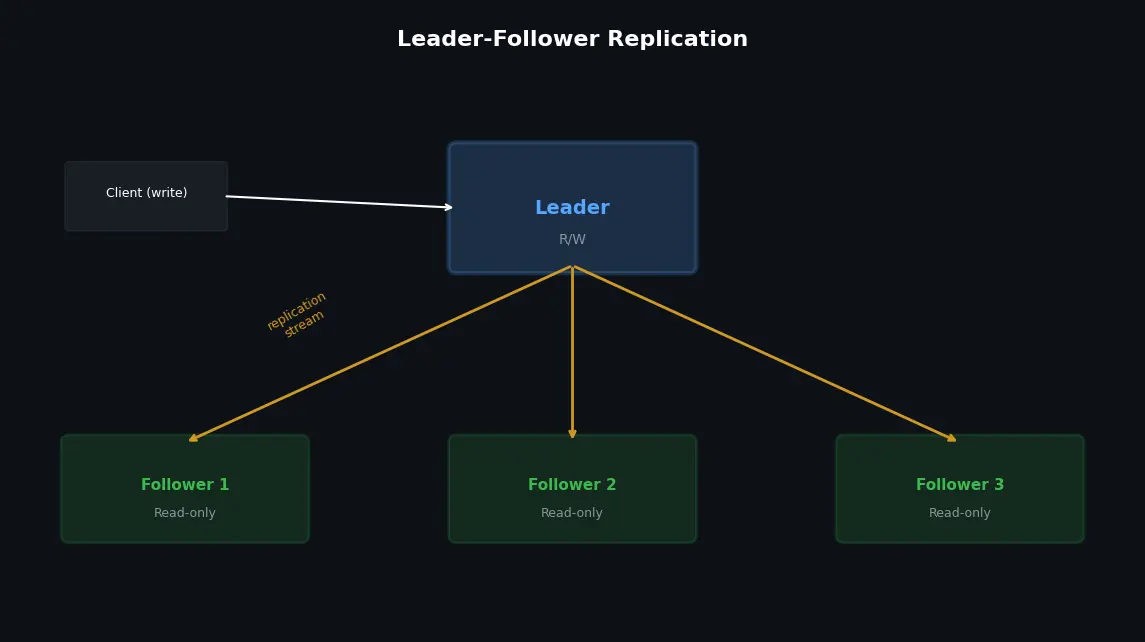
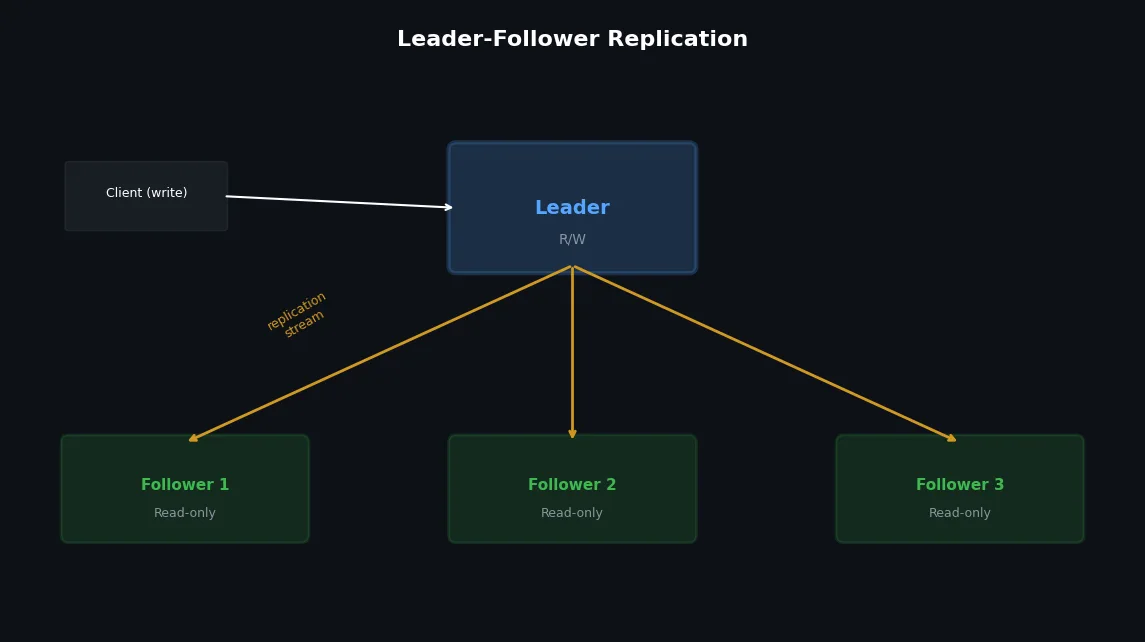
The most common replication topology. One node (the leader/master/primary) handles all writes. One or more followers (slaves/replicas/standbys) receive a copy of every write and serve read queries.
-- PostgreSQL: configure synchronous replication
-- postgresql.conf on primary
synchronous_standby_names='FIRST 1 (replica1, replica2)'-- FIRST 1 = wait for at least 1 of the listed replicas
-- This means writes block until replica1 OR replica2 confirms
-- Check replication status
SELECTclient_addr,state,sync_state,sent_lsn,write_lsn,flush_lsn,replay_lsn,(sent_lsn-replay_lsn)ASreplication_lag_bytesFROMpg_stat_replication;
In practice, most setups use semi-synchronous replication: one follower is synchronous (guarantees no data loss), the rest are asynchronous (for read scaling).
A user writes data, then immediately reads it — but the read goes to a follower that has not received the write yet.
1
2
3
4
5
6
Timeline:
1. User posts a comment (goes to leader)
2. Leader writes: OK
3. User reloads page (goes to follower)
4. Follower hasn't received step 2 yet
5. User sees: "No comments" — their comment disappeared!
Solutions:
 1
 2
 3
 4
 5
 6
 7
 8
 9
10
11
12
13
14
15
# Solution 1: Read from leader for recently-written datadefget_user_profile(user_id,requesting_user_id):ifuser_id==requesting_user_id:# User is viewing their own profile — read from leaderreturndb_leader.query("SELECT * FROM users WHERE id = %s",user_id)else:# Viewing someone else's profile — replica is finereturndb_replica.query("SELECT * FROM users WHERE id = %s",user_id)# Solution 2: Track the write timestampdefget_comments(post_id,last_write_ts=None):iflast_write_tsand(time.time()-last_write_ts)<5:# Written within last 5 seconds — read from leaderreturndb_leader.query("SELECT * FROM comments WHERE post_id = %s",post_id)returndb_replica.query("SELECT * FROM comments WHERE post_id = %s",post_id)
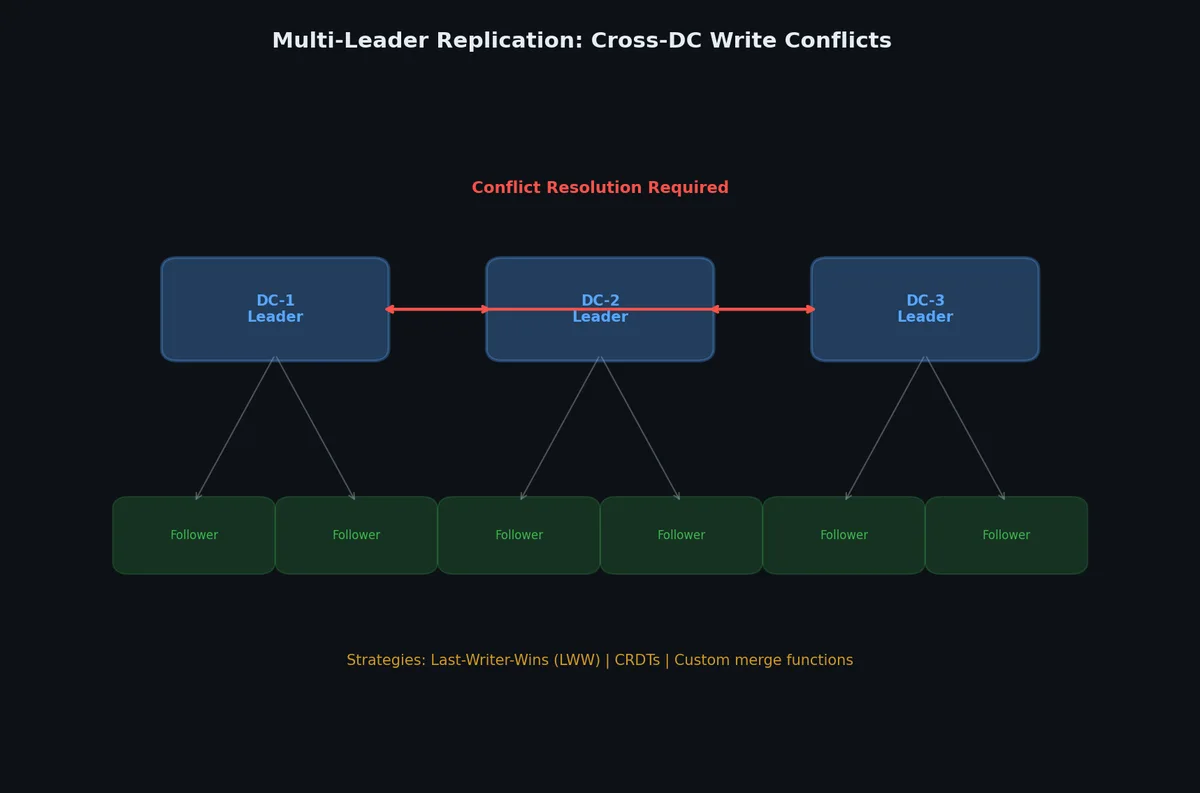
Each of several leaders accepts writes independently. Changes are replicated between leaders. Common in multi-datacenter setups.
1
2
3
4
5
6
7
8
Data Center A Data Center B
┌──────────────┐ ┌──────────────┐
│ Leader A │◄────────►│ Leader B │
│ (read/write)│ │ (read/write)│
│ │ │ │ │ │
│ Follower │ │ Follower │
│ Follower │ │ Follower │
└──────────────┘ └──────────────┘
The hard part: conflict resolution. If user A updates a row in DC-A and user B updates the same row in DC-B at the same time, which write wins?
Strategy
How it works
Trade-off
Last-writer-wins (LWW)
Highest timestamp wins
Simple but loses data silently
Merge values
Application-specific merge logic
Complex but preserves both changes
Conflict-free (CRDT)
Data structures that merge automatically
Limited to specific operations (counters, sets)
Manual resolution
Flag conflicts for human review
Slow but accurate
1
2
3
4
5
6
7
8
9
10
11
12
13
14
-- Example: last-writer-wins with a version timestamp
-- Both leaders accept updates independently
-- On sync, the row with the latest updated_at wins
-- Leader A: user updates their name
UPDATEusersSETname='Alice Chen',updated_at='2023-12-15T10:00:01Z'WHEREuser_id=1;-- Leader B: same user updates their name (at almost the same time)
UPDATEusersSETname='Alice C.',updated_at='2023-12-15T10:00:02Z'WHEREuser_id=1;-- After replication sync: Leader B's update wins (later timestamp)
-- But Leader A's change is silently lost
The simplest strategy: each write carries a timestamp, the latest wins.
 1
 2
 3
 4
 5
 6
 7
 8
 9
10
11
12
13
14
15
16
17
-- Each row has a version timestamp
CREATETABLEproducts(product_idINTPRIMARYKEY,nameVARCHAR(200),priceDECIMAL(10,2),updated_atTIMESTAMPTZNOTNULLDEFAULTNOW());-- On conflict: keep the newer write
INSERTINTOproducts(product_id,name,price,updated_at)VALUES(42,'Widget',19.99,'2024-03-15 10:30:00+00')ONCONFLICT(product_id)DOUPDATESETname=EXCLUDED.name,price=EXCLUDED.price,updated_at=EXCLUDED.updated_atWHEREproducts.updated_at<EXCLUDED.updated_at;
Problem: LWW silently discards the “losing” write. If two users update different fields of the same row at the same time, one update is completely lost.
CRDTs are data structures designed to be merged without conflicts by mathematical guarantee:
CRDT type
Behavior
Use case
G-Counter
Only increments, merge = take max per node
Page views, like counts
PN-Counter
Increment and decrement
Shopping cart quantities
LWW-Register
Single value, last write wins
User profile fields
OR-Set (Observed-Remove Set)
Add/remove elements, concurrent adds survive
Tags, feature flags
MV-Register (Multi-Value)
Keeps all concurrent values for app-level resolution
Collaborative editing
1
2
3
4
5
6
7
8
9
10
11
12
13
14
15
16
# G-Counter: each node maintains its own counterclassGCounter:def__init__(self,node_id:str):self.node_id=node_idself.counts:dict[str,int]={}defincrement(self):self.counts[self.node_id]=self.counts.get(self.node_id,0)+1defvalue(self)->int:returnsum(self.counts.values())defmerge(self,other:"GCounter"):"""Merge is commutative, associative, idempotent."""fornode,countinother.counts.items():self.counts[node]=max(self.counts.get(node,0),count)
For complex domains, store all conflicting versions and let the application (or user) decide:
1
2
3
4
5
6
7
8
9
10
11
12
13
-- Store conflicts explicitly
CREATETABLEdocument_versions(doc_idINT,version_idUUIDDEFAULTgen_random_uuid(),contentTEXT,authorVARCHAR(50),written_atTIMESTAMPTZ,is_conflictBOOLEANDEFAULTFALSE,resolved_byUUIDREFERENCESdocument_versions(version_id),PRIMARYKEY(doc_id,version_id));-- Application presents conflicting versions to user for manual merge
importrandomclassDatabaseRouter:def__init__(self,primary:str,replicas:list[str]):self.primary=primaryself.replicas=replicasdefget_connection(self,operation:str,consistency:str="eventual"):"""Route to primary or replica based on operation type."""ifoperationin("INSERT","UPDATE","DELETE"):returnself.primaryifconsistency=="strong":returnself.primary# reads-after-writes need primaryreturnrandom.choice(self.replicas)
The critical problem: a user writes data, then immediately reads it — but the read hits a replica that hasn’t received the write yet.
 1
 2
 3
 4
 5
 6
 7
 8
 9
10
11
12
13
14
15
16
17
importtimeclassSessionConsistency:"""Guarantee read-your-own-writes per session."""def__init__(self,router:DatabaseRouter):self.router=routerself.last_write_time:float=0self.lag_threshold:float=2.0# secondsdefget_read_connection(self):iftime.time()-self.last_write_time<self.lag_threshold:returnself.router.primary# too recent, use primaryreturnself.router.get_connection("SELECT")defrecord_write(self):self.last_write_time=time.time()
Patroni ↗
uses consensus (etcd/ZooKeeper/Consul) to manage PostgreSQL HA:
1
2
3
4
5
6
7
8
9
10
11
12
13
14
15
16
17
18
19
# patroni.ymlscope:my-clustername:node1etcd3:hosts:etcd1:2379,etcd2:2379,etcd3:2379bootstrap:dcs:ttl:30loop_wait:10maximum_lag_on_failover:1048576# 1MB max lag for promotionpostgresql:listen:0.0.0.0:5432data_dir:/var/lib/postgresql/dataparameters:max_connections:200synchronous_commit:"on"
Failover sequence:
Leader fails health check → etcd lease expires (30s TTL)
Patroni candidates check their replication lag
Most up-to-date replica acquires leader lock in etcd
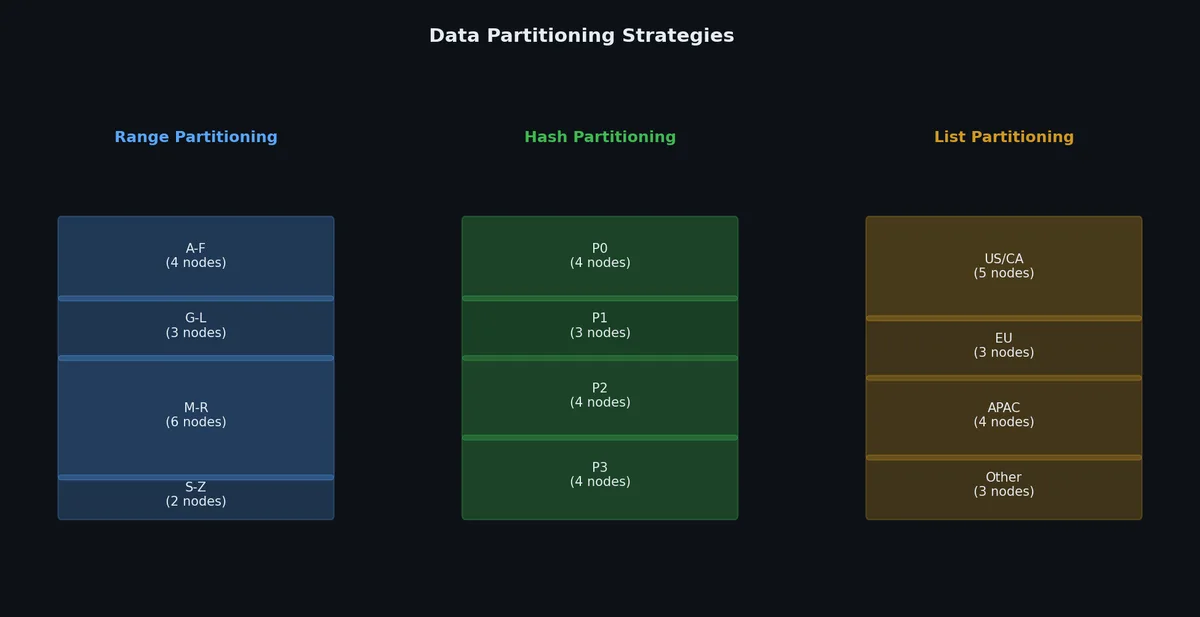
-- PostgreSQL declarative partitioning (range)
CREATETABLEorders(order_idBIGSERIAL,user_idINTNOTNULL,created_atTIMESTAMPNOTNULL,totalDECIMAL(10,2))PARTITIONBYRANGE(created_at);CREATETABLEorders_2023_q4PARTITIONOFordersFORVALUESFROM('2023-10-01')TO('2024-01-01');CREATETABLEorders_2024_q1PARTITIONOFordersFORVALUESFROM('2024-01-01')TO('2024-04-01');CREATETABLEorders_2024_q2PARTITIONOFordersFORVALUESFROM('2024-04-01')TO('2024-07-01');-- Queries automatically route to the correct partition
SELECT*FROMordersWHEREcreated_at='2023-11-15';-- Only scans orders_2023_q4, skips other partitions
Advantage: Range scans are efficient (adjacent keys are on the same shard).
Disadvantage: Hot spots — if most writes have recent timestamps, the latest partition gets all the write traffic.
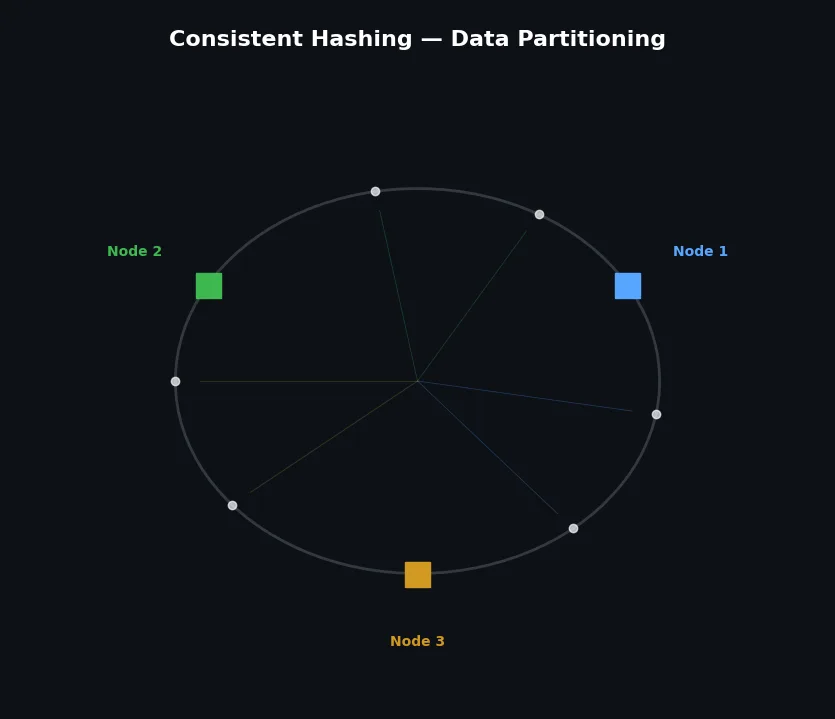
The problem with hash(key) % N: when you add or remove a shard, almost every key maps to a different shard, requiring massive data migration.
Consistent hashing solves this by mapping both keys and nodes onto a ring (0 to 2^32):
 1
 2
 3
 4
 5
 6
 7
 8
 9
10
11
12
13
14
15
0 / 2^32
│
Node C ●
╱ ╲
╱ ╲
●──────╱──────●
Node A ╱ Node B
╱
╱
Key "user:42" hashes to position X
→ Walk clockwise → first node encountered = owner
Adding Node D:
Only keys between Node C and Node D need to move
(not all keys in the cluster)
With virtual nodes (vnodes), each physical node appears at multiple positions on the ring, improving balance:
1
2
3
4
5
Physical Node A → Virtual nodes: A1, A2, A3, A4, A5 (5 positions on ring)
Physical Node B → Virtual nodes: B1, B2, B3, B4, B5
More virtual nodes = more even distribution
Cassandra default: 256 vnodes per physical node
When you add or remove nodes, data must move. There are two approaches:
Fixed number of partitions: Create many more partitions than nodes (e.g., 1,000 partitions for 10 nodes). When adding a node, move entire partitions to it.
Primary key lookups are straightforward — hash or range the key, go to the right shard. But what about secondary indexes?
1
2
3
4
-- Table partitioned by user_id
-- But we also query by email
SELECT*FROMusersWHEREemail='alice@example.com';-- Which shard has this user? We don't know without checking all of them.
Two approaches:
Local (document-partitioned) index: Each shard maintains its own secondary index covering only its data.
1
2
3
4
5
Shard 1: local index on email → {alice@...: row 1, bob@...: row 2}
Shard 2: local index on email → {carol@...: row 3, dave@...: row 4}
Query by email → scatter to ALL shards, gather results
(called "scatter-gather" — expensive for fan-out)
Global (term-partitioned) index: The secondary index itself is partitioned across shards.
1
2
3
4
5
Email index shard A (emails a-m): alice@... → shard 1, carol@... → shard 2
Email index shard B (emails n-z): zara@... → shard 3
Query by email → go to the right index shard → then to the data shard
(2 hops but no scatter-gather)
# /etc/mysql/mysql.conf.d/mysqld.cnf on the leader[mysqld]server-id =1log_bin= /var/log/mysql/mysql-bin
binlog_format= ROW # safest formatbinlog_expire_logs_seconds=604800# 7 days retentionsync_binlog=1# sync binlog on every commitinnodb_flush_log_at_trx_commit=1# full durability
1
2
3
4
5
6
7
8
9
10
11
12
-- Create a replication user on the leader
CREATEUSER'repl_user'@'%'IDENTIFIEDBY'strong_password_here';GRANTREPLICATIONSLAVEON*.*TO'repl_user'@'%';FLUSHPRIVILEGES;-- Get the current binlog position
SHOWMASTERSTATUS;-- +------------------+----------+
-- | File | Position |
-- +------------------+----------+
-- | mysql-bin.000003 | 785 |
-- +------------------+----------+
# /etc/mysql/mysql.conf.d/mysqld.cnf on the follower[mysqld]server-id =2# must be uniquerelay_log= /var/log/mysql/mysql-relay
read_only= ON # prevent accidental writessuper_read_only= ON # even root can't write
 1
 2
 3
 4
 5
 6
 7
 8
 9
10
11
12
13
14
15
16
17
18
19
-- Restore the backup on the follower
-- Then configure replication
CHANGEREPLICATIONSOURCETOSOURCE_HOST='leader-hostname',SOURCE_USER='repl_user',SOURCE_PASSWORD='strong_password_here',SOURCE_LOG_FILE='mysql-bin.000003',SOURCE_LOG_POS=785;-- Start replication
STARTREPLICA;-- Check replication status
SHOWREPLICASTATUS\G-- Key fields to check:
-- Replica_IO_Running: Yes
-- Replica_SQL_Running: Yes
-- Seconds_Behind_Source: 0
-- Last_Error: (should be empty)
-- On the follower to be promoted:
STOPREPLICA;RESETREPLICAALL;-- The follower is now a standalone server
-- Reconfigure other followers to point to the new leader
-- On remaining followers:
STOPREPLICA;CHANGEREPLICATIONSOURCETOSOURCE_HOST='new-leader-hostname',SOURCE_LOG_FILE='...',SOURCE_LOG_POS=...;STARTREPLICA;-- Application configuration must also be updated
-- (or use a proxy like ProxySQL / HAProxy)
In production, use orchestration tools for automated failover:
Orchestrator (MySQL): Detects leader failure, promotes a follower, reconfigures replicas
Patroni (PostgreSQL): Manages leader election via etcd/ZooKeeper/Consul
pg_auto_failover: Simpler alternative for PostgreSQL
Replication and partitioning get data onto multiple machines. But what happens when a single transaction needs to update data on multiple machines? That is the problem of distributed transactions — 2PC, Saga, consensus, and why most people avoid them when they can. We will cover that next.