Databases (8): Databases in Practice — Migration, Monitoring, and War Stories
The operational side of databases — schema migrations, connection pooling, monitoring, backup strategies, managed database options, and hard-won lessons from production incidents.
Knowing how databases work internally is half the battle. The other half is keeping them running in production without losing data, dropping availability, or waking up at 3 AM. This article covers the operational knowledge that comes from experience — the things nobody teaches you until something breaks.
Schema Migrations: Changing the Engine While Flying#
Your schema will change. New features require new columns, new tables, new indexes. The question is how to evolve the schema without downtime.
# golang-migrate example# Apply all pending migrationsmigrate -path ./migrations -database "postgresql://user:pass@localhost/mydb?sslmode=disable" up
# Roll back the last migrationmigrate -path ./migrations -database "postgresql://user:pass@localhost/mydb?sslmode=disable" down 1# Check current versionmigrate -path ./migrations -database "postgresql://user:pass@localhost/mydb?sslmode=disable" version
1
2
3
4
5
6
7
8
9
10
11
12
# Alembic (Python) example# Generate migration from model changesalembic revision --autogenerate -m "add phone to users"# Apply migrationsalembic upgrade head
# Rollback one stepalembic downgrade -1
# Show current revisionalembic current
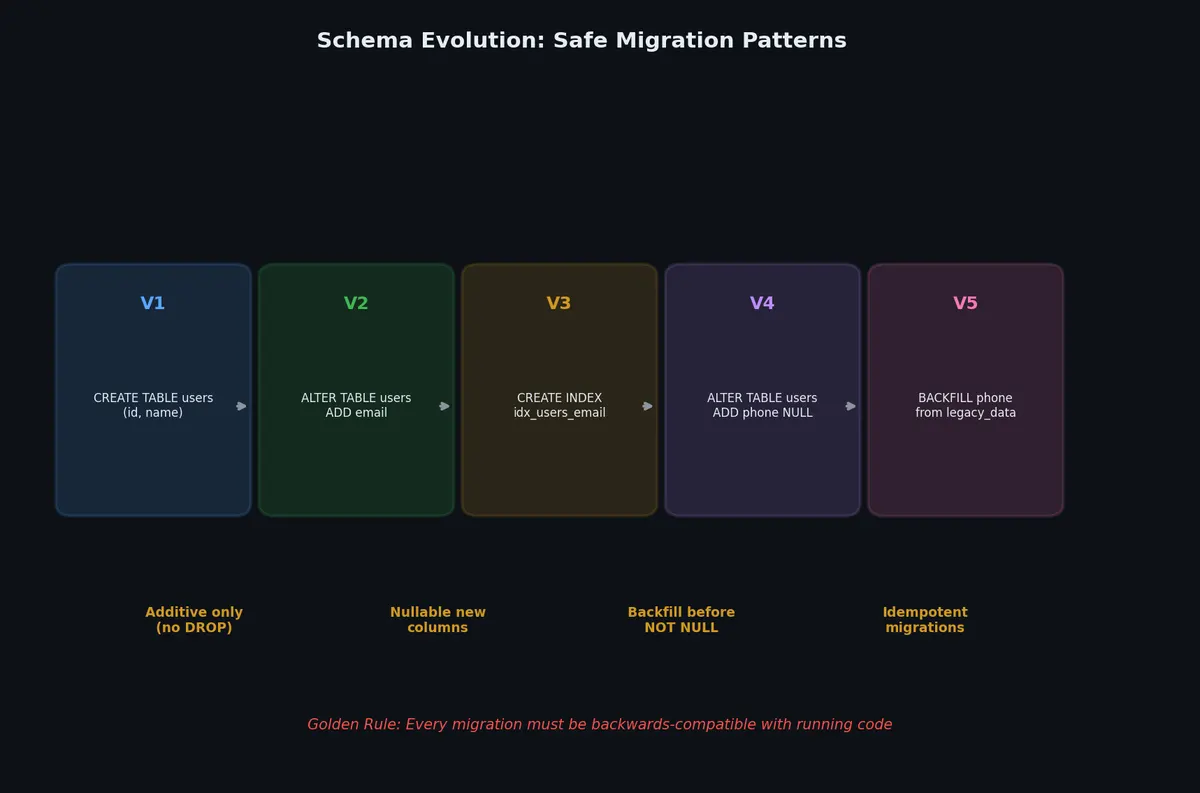
Never break the current running application. This means migrations must be compatible with both the old and new code:
1
2
3
4
5
Deployment timeline:
1. Run migration (add column, make nullable)
2. Deploy new code (writes to new column)
3. Backfill old rows
4. Run second migration (add NOT NULL constraint)
Bad (breaks old code):
1
2
-- This immediately breaks the old code that doesn't know about the column
ALTERTABLEusersADDCOLUMNphoneVARCHAR(20)NOTNULL;
Some DDL operations lock the entire table, blocking reads and writes for the duration. On a 100 million row table, this can mean minutes of downtime.
Operations that are safe (no lock or very brief lock in PostgreSQL):
1
2
3
4
5
6
7
8
9
-- Adding a nullable column: instant (no table rewrite)
ALTERTABLEusersADDCOLUMNphoneVARCHAR(20);-- Adding a column with a constant default (PostgreSQL 11+): instant
ALTERTABLEusersADDCOLUMNactiveBOOLEANDEFAULTTRUE;-- Creating an index concurrently: no table lock
CREATEINDEXCONCURRENTLYidx_users_emailONusers(email);-- Note: takes longer but doesn't block writes
Operations that are dangerous (full table rewrite or extended lock):
1
2
3
4
5
6
7
8
9
10
11
12
13
14
-- DANGEROUS: Changing column type rewrites the entire table
ALTERTABLEusersALTERCOLUMNphoneTYPETEXT;-- DANGEROUS in MySQL: Adding index without ALGORITHM=INPLACE
ALTERTABLEusersADDINDEXidx_email(email);-- Use instead:
ALTERTABLEusersADDINDEXidx_email(email),ALGORITHM=INPLACE,LOCK=NONE;-- DANGEROUS: Adding NOT NULL with default to existing column (older PG versions)
ALTERTABLEusersALTERCOLUMNphoneSETNOTNULL;-- Safe approach: add a CHECK constraint first
ALTERTABLEusersADDCONSTRAINTusers_phone_not_nullCHECK(phoneISNOTNULL)NOTVALID;ALTERTABLEusersVALIDATECONSTRAINTusers_phone_not_null;
For MySQL, tools like pt-online-schema-change (Percona) and gh-ost (GitHub) perform online schema changes by creating a shadow table, copying data, and swapping:
 1
 2
 3
 4
 5
 6
 7
 8
 9
10
11
12
13
14
# gh-ost: online schema change for MySQLgh-ost \
--host=localhost \
--database=mydb \
--table=users \
--alter="ADD COLUMN phone VARCHAR(20)"\
--execute
# What gh-ost does:# 1. Creates _users_gho (ghost table) with new schema# 2. Creates _users_ghc (changelog table)# 3. Copies existing rows in batches# 4. Captures ongoing changes via binlog# 5. Atomically renames: users → _users_old, _users_gho → users
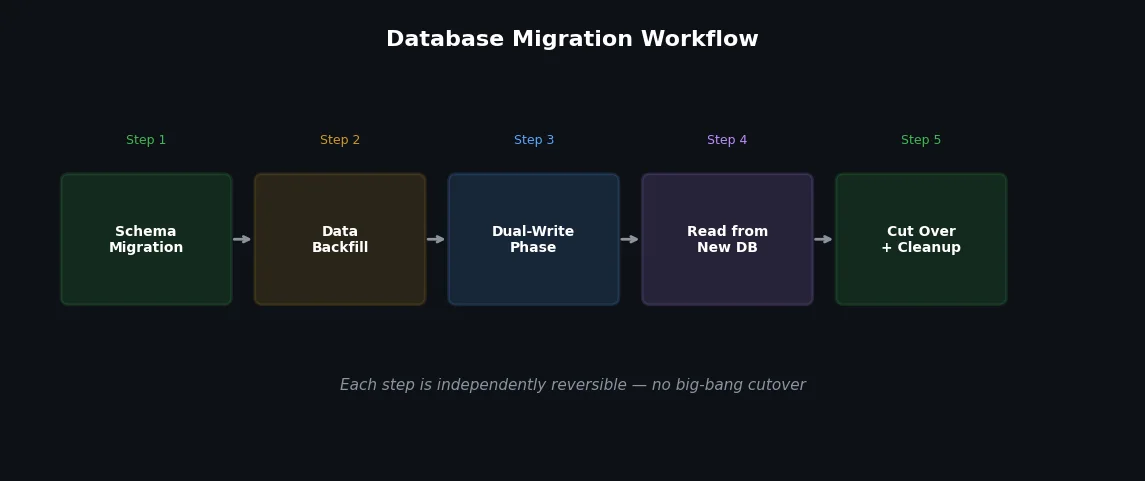
Renaming a column is tricky — old code references the old name, new code references the new name:
1
2
3
4
5
6
7
8
9
10
11
12
13
14
15
16
17
-- Step 1: Add new column
ALTERTABLEusersADDCOLUMNfull_nameVARCHAR(200);-- Step 2: Dual-write (application writes to both columns)
-- Deploy code that writes to both 'name' and 'full_name'
-- Step 3: Backfill
UPDATEusersSETfull_name=nameWHEREfull_nameISNULL;-- Step 4: Switch reads to new column
-- Deploy code that reads from 'full_name'
-- Step 5: Stop writing to old column
-- Deploy code that only writes to 'full_name'
-- Step 6: Drop old column
ALTERTABLEusersDROPCOLUMNname;
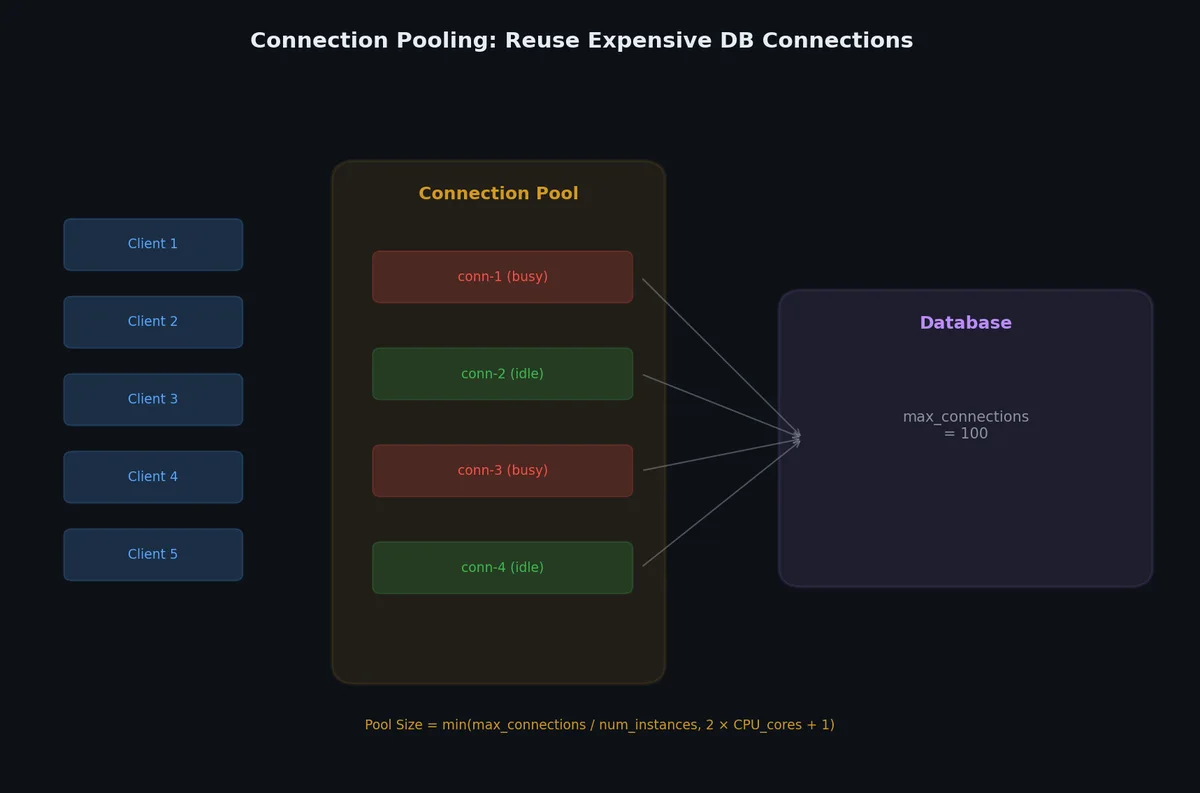
Every database connection consumes resources: memory (5-10 MB per connection in PostgreSQL), file descriptors, and CPU for process/thread management. Without connection pooling, a spike in application instances can exhaust the database’s connection limit.
; pgbouncer.ini[databases]mydb=host=localhost port=5432 dbname=mydb[pgbouncer]listen_addr=0.0.0.0listen_port=6432auth_type=md5auth_file=/etc/pgbouncer/userlist.txt; Pool sizingdefault_pool_size=20 ; connections per user/db pairmax_client_conn=1000 ; max client connections to pgbouncermin_pool_size=5 ; keep at least 5 connections readyreserve_pool_size=5 ; extra connections for burst; Pool modepool_mode=transaction; session = connection held for entire client session (safest, least efficient); transaction = connection returned after each transaction (best balance); statement = connection returned after each statement (most efficient, limited features)
1
2
3
4
5
6
7
8
9
10
11
12
13
14
15
16
17
# Connect to PgBouncer admin consolepsql -h localhost -p 6432 -U pgbouncer pgbouncer
# Show pool statusSHOW POOLS;# database | user | cl_active | cl_waiting | sv_active | sv_idle | sv_used# ----------+-----------+-----------+------------+-----------+---------+--------# mydb | app_user | 45 | 0 | 18 | 2 | 0# Show client connectionsSHOW CLIENTS;# Show server (database) connectionsSHOW SERVERS;# Show statsSHOW STATS;
# Python: SQLAlchemy connection poolfromsqlalchemyimportcreate_engineengine=create_engine("postgresql://user:pass@localhost:5432/mydb",pool_size=20,# number of persistent connectionsmax_overflow=10,# additional connections during burstpool_timeout=30,# seconds to wait for a connectionpool_recycle=3600,# recycle connections after 1 hourpool_pre_ping=True,# test connections before use)
 1
 2
 3
 4
 5
 6
 7
 8
 9
10
11
12
13
// Java: HikariCP (fastest JDBC pool)HikariConfigconfig=newHikariConfig();config.setJdbcUrl("jdbc:postgresql://localhost:5432/mydb");config.setUsername("user");config.setPassword("pass");config.setMaximumPoolSize(20);config.setMinimumIdle(5);config.setConnectionTimeout(30000);// 30 secondsconfig.setIdleTimeout(600000);// 10 minutesconfig.setMaxLifetime(1800000);// 30 minutesconfig.setLeakDetectionThreshold(60000);// warn if connection held > 60sHikariDataSourceds=newHikariDataSource(config);
-- Current activity: what is running right now?
SELECTpid,usename,state,wait_event_type,wait_event,age(now(),query_start)ASquery_duration,left(query,80)ASquery_previewFROMpg_stat_activityWHEREstate!='idle'ORDERBYquery_start;-- Table statistics: which tables are hot?
SELECTschemaname,relnameAStable_name,seq_scan,idx_scan,n_tup_insASinserts,n_tup_updASupdates,n_tup_delASdeletes,n_live_tupASlive_rows,n_dead_tupASdead_rows,ROUND(n_dead_tup::numeric/NULLIF(n_live_tup+n_dead_tup,0)*100,1)ASdead_pct,last_autovacuumFROMpg_stat_user_tablesORDERBYn_dead_tupDESCLIMIT20;-- Index usage: are your indexes being used?
SELECTschemaname,tablename,indexname,idx_scanASscans,idx_tup_readAStuples_read,idx_tup_fetchAStuples_fetched,pg_size_pretty(pg_relation_size(indexrelid))ASsizeFROMpg_stat_user_indexesORDERBYidx_scanASCLIMIT20;-- Indexes with 0 scans are candidates for removal
-- Cache hit ratio
SELECT'index hit rate'ASname,ROUND(sum(idx_blks_hit)::numeric/NULLIF(sum(idx_blks_hit+idx_blks_read),0),4)ASratioFROMpg_statio_user_indexesUNIONALLSELECT'table hit rate',ROUND(sum(heap_blks_hit)::numeric/NULLIF(sum(heap_blks_hit+heap_blks_read),0),4)FROMpg_statio_user_tables;-- Both should be > 0.99
-- Database size
SELECTdatname,pg_size_pretty(pg_database_size(datname))ASsizeFROMpg_databaseORDERBYpg_database_size(datname)DESC;
Step 1: Find the slow query
→ slow query log, pg_stat_statements, or monitoring tool
Step 2: Run EXPLAIN ANALYZE
→ Understand the execution plan
Step 3: Identify bottleneck
→ Seq Scan? Missing index? Bad join order? Large sort?
Step 4: Test fix
→ Add index, rewrite query, or adjust configuration
Step 5: Verify with EXPLAIN ANALYZE again
→ Confirm improvement
Step 6: Monitor in production
→ Watch for regression
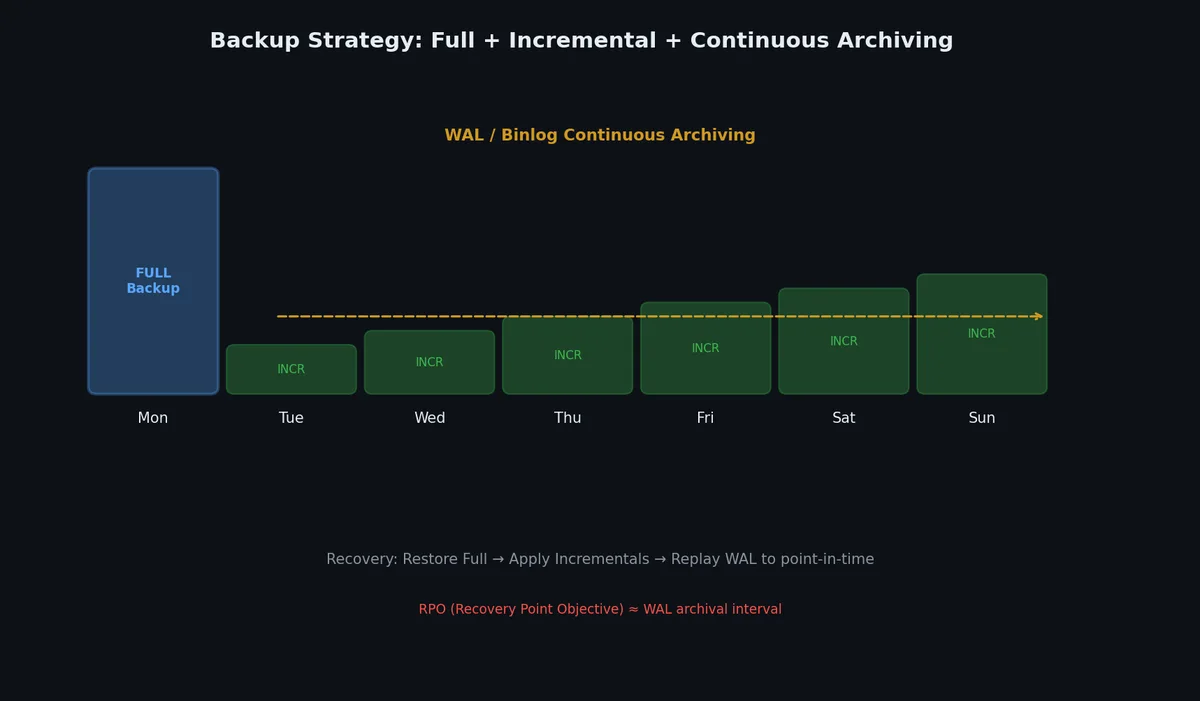
Physical backups copy the actual data files. Much faster for large databases.
1
2
3
4
5
6
7
8
# PostgreSQL: pg_basebackuppg_basebackup -h localhost -U repl_user -D /backup/base \
--checkpoint=fast --wal-method=stream -P
# This creates a complete copy of the data directory# including WAL files needed for consistent recovery# Restore: stop PostgreSQL, replace data directory, start
Scale UP (vertical):
More CPU, RAM, faster storage on the same server
+ Simpler (no application changes)
+ All features work (transactions, joins)
- Has a ceiling (largest available instance)
- Single point of failure without replication
Scale OUT (horizontal):
Add more servers (replication + sharding)
+ No ceiling (add nodes as needed)
+ Built-in redundancy
- Application complexity (query routing, distributed transactions)
- Not all operations work across shards (cross-shard joins)
Regular migrations lock tables and block queries. At scale, even a 30-second lock on a billion-row table causes cascading timeouts. Zero-downtime migrations restructure the database while it serves live traffic.
-- WRONG: locks table, breaks running queries
ALTERTABLEusersRENAMECOLUMNnameTOfull_name;-- RIGHT: expand-contract pattern
-- Step 1: Add new column
ALTERTABLEusersADDCOLUMNfull_nameVARCHAR(200);-- Step 2: Backfill (in batches to avoid long locks)
UPDATEusersSETfull_name=nameWHEREfull_nameISNULLANDuser_idBETWEEN1AND100000;-- ... repeat for all ranges
-- Step 3: Application reads from full_name, writes to both
-- Step 4: After all code deploys, drop old column
ALTERTABLEusersDROPCOLUMNname;
-- Active connections vs max
SELECTcount(*)ASactive,setting::intASmax_connectionsFROMpg_stat_activity,pg_settingsWHEREpg_settings.name='max_connections'GROUPBYsetting;-- Cache hit ratio (should be >99%)
SELECTsum(heap_blks_hit)/(sum(heap_blks_hit)+sum(heap_blks_read))AScache_hit_ratioFROMpg_statio_user_tables;-- Transaction rate
SELECTxact_commit+xact_rollbackAStotal_txn,xact_rollbackASrollbacksFROMpg_stat_databaseWHEREdatname=current_database();-- Replication lag
SELECTextract(epochFROMreplay_lag)ASlag_secondsFROMpg_stat_replication;-- Table bloat candidates
SELECTrelname,n_dead_tup,n_live_tup,round(n_dead_tup::numeric/greatest(n_live_tup,1)*100,1)ASdead_pctFROMpg_stat_user_tablesWHEREn_dead_tup>10000ORDERBYn_dead_tupDESC;
Formula: pool_size = (core_count * 2) + effective_spindle_count
For a 4-core server with SSD:
pool_size = (4 * 2) + 1 = 9
Common mistake: setting pool size too high (100+)
Result: context switching overhead kills throughput
1
2
3
4
5
6
7
8
9
10
11
# PgBouncer config for connection pooling[databases]mydb=host=127.0.0.1 port=5432 dbname=mydb[pgbouncer]pool_mode=transaction # release connection after each transactionmax_client_conn=1000 # accept many app connectionsdefault_pool_size=20 # but only 20 actual DB connectionsreserve_pool_size=5 # extra for burstsreserve_pool_timeout=3 # seconds before using reserveserver_idle_timeout=300 # close idle server connections after 5min
Always have backups. Test your restores. A backup you have never restored is a hope, not a strategy.
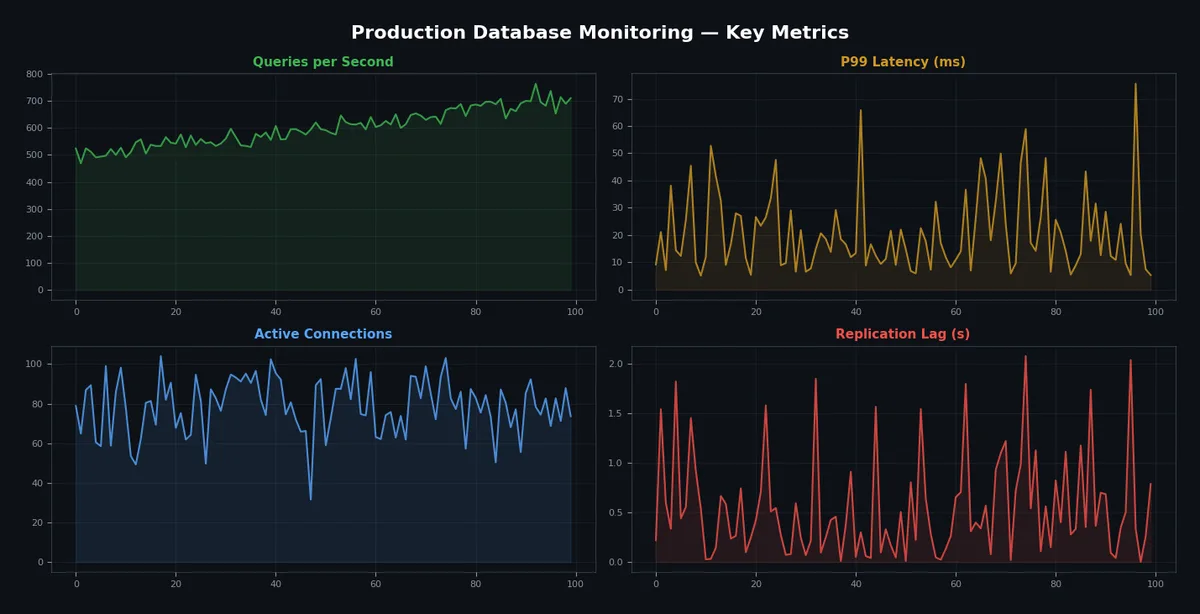
Monitor before you need to. Set up dashboards and alerts before the first production user. Key metrics: connection count, query latency p99, replication lag, disk usage.
Use connection pooling. Always. Even if your application framework claims to handle it.
Set timeouts everywhere. Statement timeout, lock timeout, connection timeout, idle-in-transaction timeout. A query without a timeout is a query that will eventually hold a lock forever.
1
2
3
4
-- PostgreSQL: set safety timeouts
ALTERDATABASEmydbSETstatement_timeout='30s';ALTERDATABASEmydbSETlock_timeout='10s';ALTERDATABASEmydbSETidle_in_transaction_session_timeout='60s';
Never run untested migrations in production. Test every migration against a copy of production data. Time it. Check for locks.
Read replicas are not a scaling strategy for writes. They only help with reads. If writes are your bottleneck, you need sharding.
Keep transactions short. A transaction that holds locks for 30 seconds blocks every other transaction that needs those rows.
The database is not a queue. If you are polling a table with SELECT ... WHERE status = 'pending' FOR UPDATE SKIP LOCKED, you should probably be using an actual message queue.
Over these eight articles, we have gone from the relational model and SQL basics all the way to distributed transactions and production operations. The path was intentional: you cannot understand why replication lag matters until you understand isolation levels, and you cannot appreciate the Saga pattern until you understand why 2PC blocks.
Databases are one of those areas where superficial knowledge is dangerous. A developer who does not understand indexing will build systems that work perfectly on small datasets and fail catastrophically in production. A team that does not understand isolation levels will ship concurrency bugs that only appear under load. An organization that does not test its backups will discover they are useless precisely when they are needed most.
The fundamentals do not change much. B-trees, WALs, MVCC, and consensus have been the core building blocks for decades. Master them once, and every new database you encounter — whether it is PostgreSQL, CockroachDB, DynamoDB, or whatever comes next — is a variation on ideas you already understand.