Docker and Containers (8): Beyond Docker — Kubernetes, Swarm, and What Comes Next
Single-host Docker breaks down at scale. This article previews container orchestration — Docker Swarm for simplicity, Kubernetes for everything else — and maps out the broader cloud-native ecosystem.
So far, this series has focused on single-host Docker: one machine running containers. This setup works well for development, small projects, and applications with modest traffic. However, when you need your service to survive server failures, handle traffic spikes, or deploy updates without downtime, single-host Docker falls short. Container orchestration addresses these issues, and Kubernetes has become the go-to solution.
Why Single-Host Docker Isn’t Enough#
Consider what happens when your Docker host fails:
| Problem | Single-Host Docker | With Orchestration |
|---|---|---|
| Server crashes | All containers die, manual restart | Containers automatically rescheduled to healthy nodes |
| Traffic spike | Scale up manually with --scale | Auto-scaling based on metrics |
| Deployment | docker compose down && up (downtime) | Rolling update with zero downtime |
| Service discovery | Custom network DNS (single host only) | Cluster-wide DNS, load balancing |
| Secret rotation | Restart containers with new env vars | Rolling secret rotation, no restart |
| Resource allocation | Hope you have enough RAM | Scheduler places containers optimally |
| Monitoring | docker stats on one host | Cluster-wide metrics, alerting |
| Storage | Local volumes (lost if host dies) | Persistent volumes with replication |
These are operational problems, not Docker problems. Docker does exactly what it’s designed to do: run containers on a single host. Orchestrators add the multi-host coordination layer.
Docker Swarm: The Simple Path#
Docker Swarm is Docker’s built-in orchestration. If you know docker compose, you already know 80% of Swarm. It uses the same YAML format and similar commands.
Initializing a Swarm#
| |
| |
| |
| |
| |
| |
Three-node cluster in four commands. That’s Swarm’s appeal.
Deploying Services#
Swarm uses the concept of “services” — a service is a definition of how to run containers, and Swarm manages the desired number of replicas:

| |
| |
| |
| |
Swarm distributes the three replicas across all three nodes. It also provides built-in load balancing: any node in the swarm can accept traffic on port 80, and Swarm routes it to a container running the service.
Rolling Updates#
| |
| |
Swarm updates one container at a time, waiting 10 seconds between each. If a new container fails its health check, Swarm rolls back automatically.
Deploying a Stack (Compose in Swarm)#
You can deploy a compose file directly to Swarm:
| |
| |
| |
| |
Swarm Secrets and Configs#
Swarm has native support for secrets and config files:
| |
Inside the container, secrets appear as files in /run/secrets/:
| |
When Swarm Makes Sense#
Swarm is a good choice when:
- You have a small team (< 5 engineers)
- You have a small cluster (< 10 nodes)
- You want orchestration without the Kubernetes learning curve
- You’re already using Docker Compose and want a smooth migration
- You don’t need auto-scaling, custom schedulers, or the CNCF ecosystem
Kubernetes: The Industry Standard#

Kubernetes (K8s) is the dominant container orchestration platform. It’s more complex than Swarm but much more capable. Most cloud providers offer managed Kubernetes services (EKS, GKE, AKS, ACK), eliminating the operational burden of managing the control plane.

Architecture#
Kubernetes clusters have two types of nodes:
Control Plane (master) components:
| Component | Role |
|---|---|
kube-apiserver | REST API that all components and users interact with |
etcd | Distributed key-value store for all cluster state |
kube-scheduler | Decides which node to place new pods on |
kube-controller-manager | Runs controllers (deployment, replicaset, node, etc.) |
cloud-controller-manager | Integrates with cloud provider APIs (optional) |
Worker node components:
| Component | Role |
|---|---|
kubelet | Agent that manages pods on the node, communicates with API server |
kube-proxy | Network proxy for service routing |
| Container runtime | Runs containers (containerd, CRI-O — not Docker daemon) |
The architecture looks like this (described, not drawn):
| |
Core Kubernetes Objects#
Everything in Kubernetes is a declarative object — you describe the desired state, and Kubernetes works to make it real.
Pod#
The smallest deployable unit. A pod contains one or more containers that share network and storage:

| |
You rarely create pods directly. Instead, you use higher-level objects.
Deployment#
A Deployment manages a set of identical pods and handles rolling updates:
| |
| |
| |
| |
| |
| |
Service#
A Service provides a stable endpoint (DNS name and IP) for a set of pods:
| |
Service types:
| Type | Accessibility | Use Case |
|---|---|---|
ClusterIP | Internal cluster only | Internal microservices |
NodePort | External via <NodeIP>:<NodePort> | Development, simple exposure |
LoadBalancer | External via cloud load balancer | Production web services |
ExternalName | DNS CNAME to external service | Accessing external databases |
ConfigMap and Secret#
| |
Use them in a pod:
| |
Essential kubectl Commands#
| |
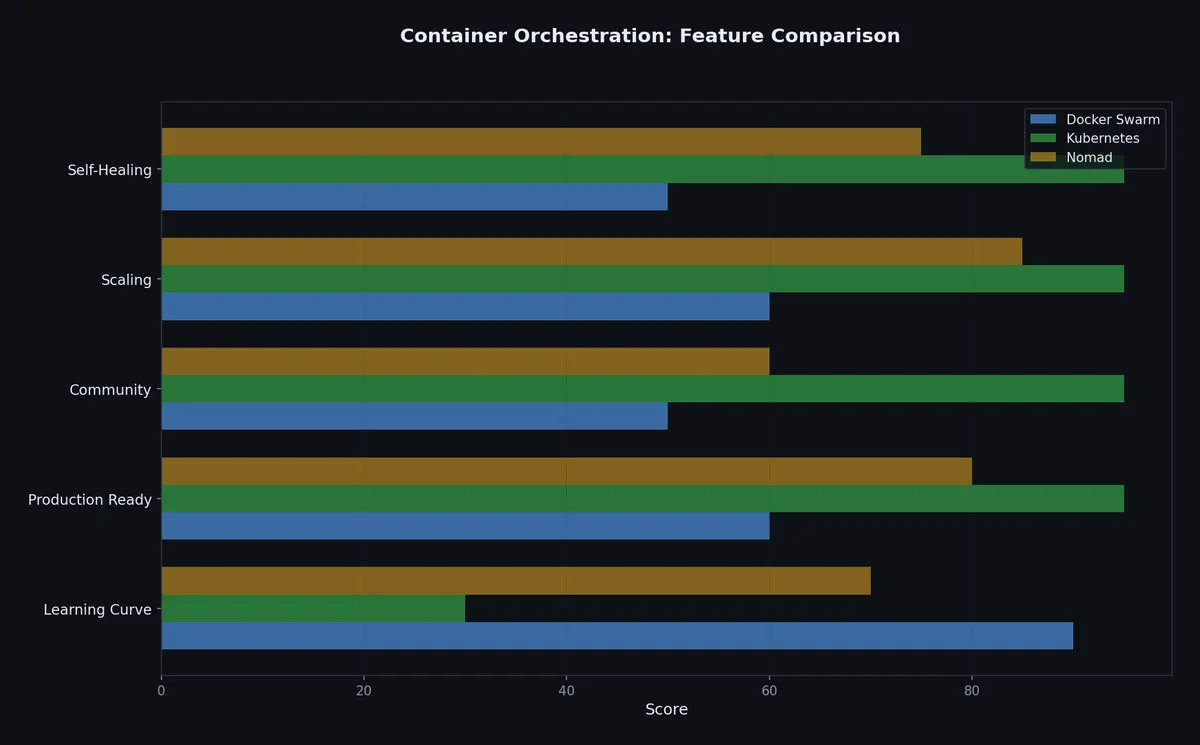
Kubernetes vs Docker Swarm#
| Feature | Docker Swarm | Kubernetes |
|---|---|---|
| Setup complexity | Minutes | Hours (managed services simplify this) |
| Learning curve | Low (Docker CLI knowledge transfers) | Steep (new concepts, YAML-heavy) |
| Scaling | Manual (docker service scale) | Manual + Horizontal Pod Autoscaler |
| Rolling updates | Built-in, simple | Built-in, highly configurable |
| Service discovery | Docker DNS | CoreDNS, Services |
| Load balancing | Built-in (routing mesh) | Services, Ingress controllers |
| Secret management | Docker secrets | Kubernetes Secrets (+ external integrations) |
| Storage | Docker volumes | PersistentVolumes, StorageClasses, CSI drivers |
| Networking | Overlay networks | CNI plugins (Calico, Cilium, Flannel, etc.) |
| Health checks | HEALTHCHECK instruction | Liveness, readiness, startup probes |
| Package management | None | Helm charts |
| Community/ecosystem | Small, declining | Massive, CNCF ecosystem |
| Managed offerings | Few | EKS, GKE, AKS, ACK, and many more |
| Best for | Small teams, simple deployments | Production at scale, microservices |
When You DON’T Need Orchestration#
Not every application needs Kubernetes. Be honest about your requirements:
| Your Situation | Recommendation |
|---|---|
| Single server, few services | Docker Compose |
| Small team, < 5 services | Docker Compose or Swarm |
| Need zero-downtime deploys on single host | Docker Compose with rolling restart |
| Serverless workloads | Cloud Functions (Lambda, Cloud Run) |
| Batch processing | Docker Compose or single-host scheduler |
| Multi-region, high availability | Kubernetes (managed) |
| Microservices architecture | Kubernetes |
| Compliance requires orchestration | Kubernetes |
| Team > 10 engineers | Kubernetes |
A common mistake is adopting Kubernetes for a three-service application that runs on a single $20/month VPS. The operational overhead of Kubernetes (even managed) exceeds the benefit until you’re at a certain scale.
If you’re running on a single host and want better deployment workflows, look at tools like:
- Docker Compose with a simple CI/CD pipeline
- Kamal (from Basecamp) — zero-downtime deploys to bare servers
- Dokku — a self-hosted PaaS (like a private Heroku)
- Coolify — an open source and self-hostable alternative to Heroku/Netlify/Vercel
The Cloud-Native Ecosystem#

Kubernetes spawned an ecosystem of tools. Here’s a map of the most important ones:
Package Management: Helm#
Helm is the package manager for Kubernetes. A Helm “chart” bundles all the YAML files for an application:
| |
Helm charts are like Docker images for entire application stacks — pre-packaged, versioned, and shareable.
Service Mesh: Istio and Linkerd#
A service mesh adds observability, security, and traffic management between microservices:
| Feature | Without Service Mesh | With Service Mesh |
|---|---|---|
| mTLS between services | Manual certificate management | Automatic, transparent |
| Traffic splitting | Application-level | Declarative (80/20 canary) |
| Retry policies | Code in each service | Configurable per-route |
| Observability | Each service adds instrumentation | Automatic tracing, metrics |
| Access control | Application-level auth | Policy-based (YAML) |
Istio is feature-rich but complex. Linkerd is simpler and lighter. Neither is needed unless you have many (10+) communicating services and need fine-grained traffic control.
GitOps: ArgoCD and Flux#
GitOps treats your Git repository as the source of truth for cluster state:
- You push a change to Git (e.g., update an image tag in a Deployment YAML)
- ArgoCD detects the change and syncs the cluster to match
- The cluster converges to the desired state
| |
Benefits:
- Every change is auditable (Git history)
- Rollback =
git revert - No manual
kubectl applyin production - Cluster state is always reproducible from Git
Monitoring and Observability#
| Tool | Purpose | Collects |
|---|---|---|
| Prometheus | Metrics collection and alerting | CPU, memory, request rates, custom metrics |
| Grafana | Visualization and dashboards | Displays Prometheus data (and others) |
| Jaeger / Zipkin | Distributed tracing | Request paths across microservices |
| Fluentd / Fluent Bit | Log aggregation | Container logs → central storage |
| Elasticsearch + Kibana | Log storage and search | Searchable log index |
The “standard” open-source observability stack for Kubernetes is Prometheus + Grafana + Fluentd (or Fluent Bit) + Jaeger, though many alternatives exist.
Container Security in Kubernetes#
| Tool | Purpose |
|---|---|
| Trivy | Image vulnerability scanning |
| Falco | Runtime security monitoring (detect anomalous container behavior) |
| OPA/Gatekeeper | Policy enforcement (e.g., “no containers may run as root”) |
| cert-manager | Automatic TLS certificate management (Let’s Encrypt) |
| Kyverno | Kubernetes-native policy engine |
From Docker to Production: A Typical Path#
Here’s a realistic progression for a team growing from a side project to a production service:

| Stage | Infrastructure | Deployment |
|---|---|---|
| 1. Local development | Docker Compose on laptop | docker compose up |
| 2. Single server | Docker Compose on VPS | git pull && docker compose up -d |
| 3. CI/CD pipeline | Docker Compose + GitHub Actions | Auto-deploy on push to main |
| 4. Multi-server | Docker Swarm or managed K8s | docker stack deploy or kubectl apply |
| 5. Production at scale | Managed Kubernetes (EKS/GKE/AKS/ACK) | Helm + ArgoCD |
| 6. Multi-region | Managed K8s + service mesh | GitOps + traffic management |
Most teams never need to go past stage 3 or 4. Don’t jump to stage 5 because it sounds impressive — jump when the problems at your current stage justify the complexity.
Key Takeaways from This Series#
Looking back across all eight articles, here are the principles that matter most:
Containers are processes, not VMs. They share the host kernel and use namespaces + cgroups for isolation. Understanding this shapes how you think about security, performance, and debugging.
Images are layers. Layer caching drives build performance. Instruction order matters. Multi-stage builds separate build-time dependencies from runtime.
Networks and volumes are the connective tissue. Custom bridge networks provide DNS-based service discovery. Named volumes persist data independently of container lifecycle.
Compose is the developer’s interface. A single YAML file replaces dozens of docker run commands. It’s version-controlled, shareable, and deterministic.
Security is opt-in. Docker’s defaults favor convenience. Running as non-root, dropping capabilities, using read-only filesystems, and scanning images are all things you must explicitly do.
Orchestration is a spectrum. Docker Compose for single-host, Swarm for simple multi-host, Kubernetes for production at scale. Choose the simplest tool that solves your actual problems.
The container ecosystem moves fast, but the fundamentals in this series are stable. Namespaces haven’t changed since 2013. The OCI image format is settled. Kubernetes API objects have been stable for years. Learn these foundations, and the tools built on top of them will make sense.
Docker and Containers 8 parts
- 01 Docker and Containers (1): Why Containers — The Problem VMs Didn't Solve
- 02 Docker and Containers (2): Images and Layers — What docker pull Actually Downloads
- 03 Docker and Containers (3): Dockerfile Patterns — From Naive to Production
- 04 Docker and Containers (4): Networking and Volumes — How Containers Talk and Persist
- 05 Docker and Containers (5): Docker Compose — Multi-Container Applications
- 06 Docker and Containers (6): Debugging and Logging — When Things Go Wrong Inside a Box
- 07 Docker and Containers (7): Security — Running Containers Without Giving Away the Keys
- 08 Docker and Containers (8): Beyond Docker — Kubernetes, Swarm, and What Comes Next you are here