Linux (2): File Permissions — rwx, chmod, chown, and Beyond
Master the Linux permission model: rwx semantics on files vs directories, numeric and symbolic notation, chmod/chown usage, umask defaults, SUID/SGID/Sticky bit, and ACLs.

File permissions look elementary — chmod 755, done — but they remain one of the top causes of production incidents I see: a service won’t start, a deploy script silently does nothing, Nginx returns 403, a shared directory leaks, or rm refuses on a file that “should” be removable. Memorising magic numbers does not get you out of any of these. What does is understanding three things at the same time:
- The same
r/w/xbits mean different things on a regular file than on a directory — the directory case is what trips most people up. - The kernel’s check uses owner / group / others as a 3-step
if/else if/else, not as a sum — so being in the group is sometimes worse than being “everyone else.” umask,setuid,setgid, sticky bit, and ACLs all exist for a specific reason, and using them outside that reason is how systems get owned.
This article works through the model from the smallest concept up: bit semantics, numeric vs symbolic notation, chmod/chown/chgrp, default permissions via umask, the three special bits, ACL with getfacl/setfacl, and a concrete troubleshooting checklist. Examples are the kind you actually meet — webroot, shared team folders, /tmp, immutable config files — not toy puzzles.
The permission model: owner / group / others#

Linux is a multi-user system, so every inode (file, directory, symlink, device, etc.) has three identity attributes:
- Owner (
u): the UID that owns the inode. Usually whoever created it. - Group (
g): a single GID. Members of that group share group-level access. - Others (
o): every authenticated principal that is neither the owner nor in the group.
The kernel’s access check is not “add up the matching bits.” It is a strict first-match cascade:
| |
That ordering has a practical consequence that surprises people: if the owner’s bits forbid an action, being in the group does not help. chmod 047 myfile makes the owner unable to read their own file even though “others” can read/write/execute it.
root (uid 0) bypasses the check entirely via CAP_DAC_OVERRIDE. The sticky bit is the one exception in the other direction — see below.
The 10-character mode string#
ls -l prints something like -rwxr-xr-x. Read it left to right:
| Position | Meaning |
|---|---|
| 1 | File type: - regular, d directory, l symlink, c/b char/block device, s socket, p FIFO |
| 2–4 | Owner bits rwx |
| 5–7 | Group bits rwx |
| 8–10 | Others bits rwx |
Each bit is one of:
r(4) — readw(2) — writex(1) — execute (or, on a directory, “traverse”)
Sum within a triplet to get the octal digit; concatenate the three digits to get the familiar 755, 644, 600. Where you see s/S/t/T in the x slot, a special bit is also set — keep reading.
rwx on files vs directories — the most common pitfall#
This is where most permission bugs live. Same letters, different semantics.
On a regular file#
| Bit | Means | Without it you can’t |
|---|---|---|
r | read the bytes | cat, less, cp src=... |
w | overwrite, truncate, or O_TRUNC open | >, in-place edit |
x | exec the file as a program (must have a valid header — ELF, or a shebang for scripts) | ./prog |
Note that w is only about modifying the file’s contents. You do not need write to delete the file — that is controlled by w on the parent directory.
On a directory#
| Bit | Means | Without it you can’t |
|---|---|---|
r | list the names of entries | ls dir/ |
w | create, delete, or rename entries (requires x too) | touch dir/x, rm dir/x, mv within dir |
x | look up a name in the directory and traverse through it | cd dir, cat dir/known-name, opening any path that contains dir as a component |
Three quick experiments make the rules concrete:
Case A — r without x (mode 644)
| |
Case B — x without r (mode 311)
| |
This is the basis of “private bin” tricks — make the dir traversable but not listable.
Case C — w without x (mode 622)
| |
w on a directory is useless without x. Always pair them.
Rule of thumb for directories: x is the load-bearing bit. w only matters together with x. r is convenience.
chmod: numeric vs symbolic notation#
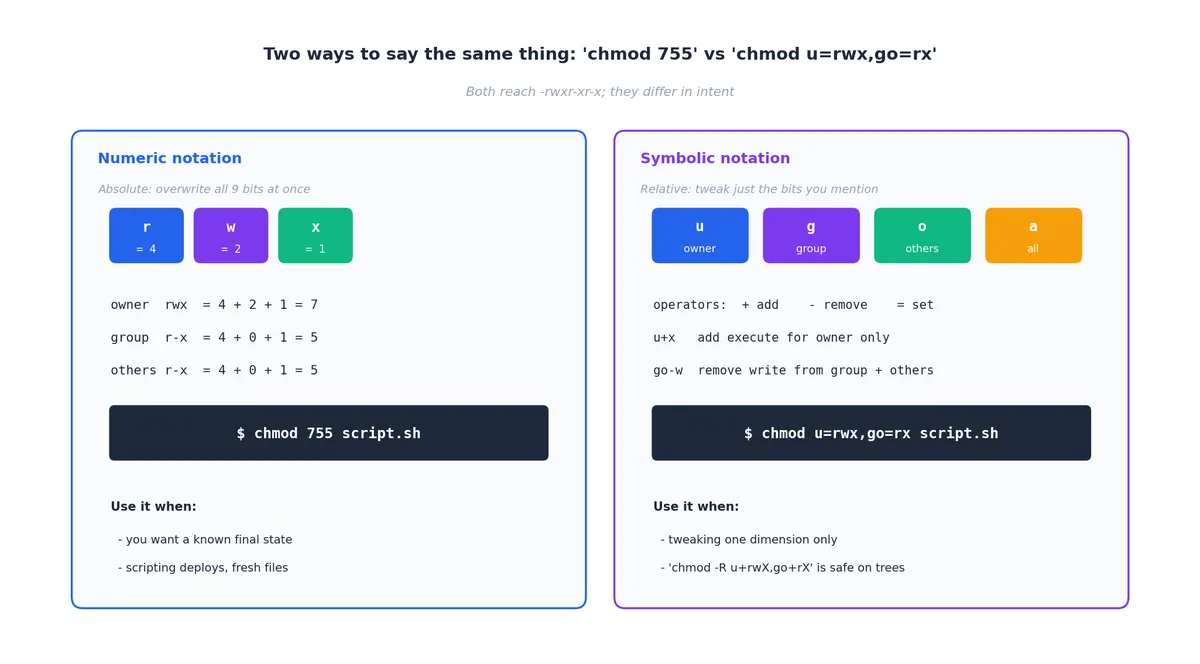
Both notations end up writing the same nine bits. They differ in whether you are stating an absolute target or making a relative edit.
Numeric notation — absolute#
Sum the bits per identity (r=4, w=2, x=1), concatenate three digits:
| |
Use it when you need a known final state, such as in scripted deployments or for new files where the previous state doesn’t matter.
Symbolic notation — relative#
who (u, g, o, a for all) + operator (+, -, =) + bits (r, w, x, X, s, t):
| |
The capital X is the killer feature for trees:
| |
X adds x only to directories and to files that already have at least one x bit. Without it, chmod -R 755 project/ makes every .md, .png, and .csv “executable” — harmless but ugly, and a gift to anyone scanning for misconfigured webroots.
Use symbolic notation when you want to tweak one aspect without changing the rest.
chown / chgrp: changing ownership#
| |
Ground rules:
- Only root can change ownership freely. A regular user cannot give a file away (otherwise users would dodge disk quota by re-parenting their files to someone else).
- The owner can
chgrpto any group they themselves belong to. They cannot move a file into a group they’re not a member of. chownresetssetuid/setgidbits on regular files for safety — important to remember if youchown roota SUID binary, you must re-set the SUID afterwards.
Common patterns you’ll write a hundred times:
| |
umask: the default-permission filter#
umask is the mask of bits to subtract from the system default when a process creates a new inode. The system default is:
0666for regular files (nox— preventing accidentally-executable data)0777for directories (xis needed for traversal)
Effective permissions = default AND NOT umask.
| umask | new file | new dir | who is this for |
|---|---|---|---|
022 | 644 | 755 | desktop default; world-readable |
027 | 640 | 750 | server / production — group-only outside owner |
002 | 664 | 775 | dev shared workstations with a per-user primary group (USERGROUPS) |
077 | 600 | 700 | strictest — ~/.ssh, secrets dirs |
Inspect and change:
| |
System-wide defaults live in /etc/login.defs (UMASK) and /etc/profile / /etc/pam.d/*. On systemd units, set UMask= in the unit file rather than relying on shell config — services don’t read ~/.bashrc.
Special permission bits: SUID, SGID, sticky#

chmod actually takes a four-digit octal. The leading digit packs three flags: 4 (SUID), 2 (SGID), 1 (sticky). They can combine: chmod 6755 sets SUID + SGID + 755.
SUID (4xxx) — run as owner#
When set on an executable, the process runs with the file owner’s effective UID, regardless of who launched it. The canonical example:
| |
passwd needs to write /etc/shadow (mode 0640 root:shadow) but unprivileged users have to be able to change their own password. SUID + a tiny, audited program is the classic answer.
| |
s (lowercase) means SUID and the underlying x is set; S (uppercase) means SUID is set but x is not — almost always a misconfiguration.
SUID is genuinely dangerous. A bug in a SUID-root binary becomes a local privilege escalation. Audit them periodically:
| |
Anything outside the standard set (passwd, sudo, mount, su, ping on older distros, …) deserves a justification.
SGID (2xxx) — two distinct uses#
On an executable: the process runs with the file’s group as its effective GID. Used by tools that need access to a private group resource (e.g., wall writes to /dev/tty* owned by tty).
On a directory (the much more common use): files and subdirectories created inside inherit the directory’s group instead of the creator’s primary group. This is the right way to build a team-shared folder:
| |
Now anyone in developers who creates a file inside automatically gets group=developers, so other team members can read/write it. Without SGID you would have to remember to chgrp every file you create — and people will forget.
Sticky bit (1xxx) — restricted delete#
On a directory, the sticky bit changes one rule: only the file’s owner (or root) may unlink or rename entries, even though the directory itself is world-writable. /tmp is the canonical case:
| |
Without sticky, /tmp (mode 1777) would be a free-for-all where anyone could rm anyone else’s session sockets, lock files, etc.
| |
Sticky on a file exists historically (used to mean “keep text segment in swap”) and is ignored on modern Linux.
Common scenarios — copy-pasteable, with reasoning#

“Permission denied” running a script#
| |
No x. Fix:
| |
If you still see “exec format error,” the script is missing a shebang (#!/usr/bin/env bash on the first line) and the kernel doesn’t know what interpreter to use.
Web server returns 403#
nginx/apache runs as www-data (Debian/Ubuntu) or nginx (RHEL family). It needs:
ron the file it servesxon every directory in the path down to that file
The second part is what bites people — /home/alice/site/ typically has mode 700, so www-data cannot even traverse into it. Either move the docroot under /var/www/, or open the path:
| |
Team-shared project directory#
Goal: everyone in developers can read and write everything; nobody else can even peek.
| |
2 (SGID) makes inheritance work; 770 keeps outsiders out; umask 002 ensures new files end up 664 rather than the default 644, so other team members can edit them.
Multi-user temp directory#
Already done by your distro — /tmp is 1777. If you need a similar shared scratch space:
| |
Locking down a private key#
| |
ssh will outright refuse to use a key that is group- or world-readable. This is a feature.
ACL: when three buckets aren’t enough#
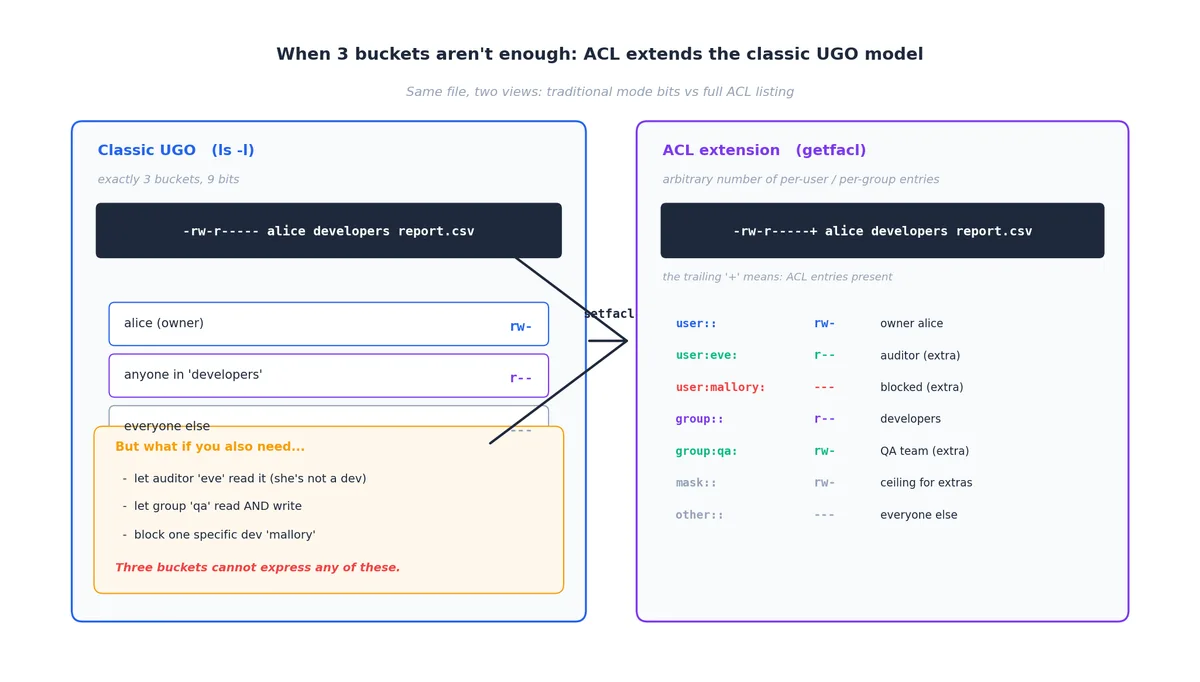
Classic mode bits give you exactly three buckets. Real-world requirements often need more: “let auditor eve read this report, but she’s not in developers,” or “block one specific contractor from this folder.” That is what POSIX ACLs are for.
Reading ACLs#
| |
A trailing + in ls -l (e.g. -rw-r-----+) is the visible signal that ACL entries are present.
Setting ACLs#
| |
For directories, -R recurses, and default ACLs propagate to new children — much like SGID, but per-user:
| |
The ACL mask#
The mask:: line is the maximum effective permission for any entry except user:: (the owner) and other::. chmod g=... on an ACL’d file edits the mask, not the actual group entry — which is a frequent surprise. To set the group entry directly:
| |
Filesystem must be mounted with ACL support. On modern ext4/xfs/btrfs this is the default; check with tune2fs -l or mount | grep acl.
chattr / lsattr: filesystem-level attributes#
chattr writes ext4/xfs attributes that sit below the permission system — they apply even to root.
| |
Use +i to pin critical config (/etc/fstab, /etc/passwd, /etc/sudoers) so a fat-fingered sed -i can’t destroy a recovery boot. Use +a on log files to make tamper-after-the-fact harder. Both are the right answer to “how do I stop root deleting this by accident” — short of chattr -i first, root can’t.
Troubleshooting checklist#
A short, ordered sequence covers ~90% of permission bugs.
Step 1 — who am I, really?#
| |
If a service is the consumer, the relevant identity is the systemd User= / Group=, not your login.
Step 2 — every directory in the path#
r+x on the leaf file isn’t enough; the kernel re-checks x on every component. The fastest tool is namei:
| |
The first line where the relevant identity lacks x is the culprit.
Step 3 — ACL? attribute? mount option?#
| |
/tmp mounted noexec will silently refuse ./script.sh no matter what chmod you ran.
Step 4 — selinux / apparmor#
On RHEL/Fedora/CentOS, getenforce says Enforcing? Then ls -lZ file shows the SELinux label and audit2why explains the latest denial. On Ubuntu, aa-status lists AppArmor profiles. These can deny access even when classic permissions say “allowed.”
Specific symptoms#
Permission denied on a known-good script → missing x, missing shebang, or noexec mount.
Web server 403 → www-data is “others” everywhere; check namei -l for a missing x along the path.
rm: cannot remove ...: Operation not permitted (note: not “Permission denied”) → lsattr will show +i. chattr -i first.
You can write to a file you don’t own → check the parent directory’s w bit. Owning the file is irrelevant for delete/rename.
Mental model and further reading#
Three patterns will carry you through almost every real situation:
- Files vs directories: on a file,
xis “is it a program.” On a directory,xis the only gate to even reaching the contents. - First-match cascade: owner OR group OR others — never additive. Audit by asking “which bucket does this caller fall into?”
- Special bits exist for one job each: SUID = “let unprivileged callers do this exact privileged thing”; SGID-on-dir = “team folder”; sticky = “shared writable space without mutual sabotage.” Outside those jobs, don’t set them.
Where to go next:
man 1 chmod,man 2 chmod,man 5 acl,man 1 chattr— the authoritative references, surprisingly readable.- Linux User Management (next article in this series) —
/etc/passwd,/etc/shadow, groups, sudoers, PAM. - Linux Pipelines and Redirection — building on file descriptors and
stdin/stdout/stderr. - MAC frameworks: SELinux (RHEL family) and AppArmor (Debian/SUSE family) layer mandatory access control on top of the discretionary model covered here. Same questions, different answers.
If you can now read drwxr-s---+ 4 alice developers and immediately tell me the owner, the group, the special bit that’s set, the fact that an ACL is in play, and what bob in developers versus eve outside it can each do — you have the model. The rest is muscle memory.
Linux 9 parts
- 01 Linux (1): Basics — Core Concepts and Essential Commands
- 02 Linux (2): File Permissions — rwx, chmod, chown, and Beyond you are here
- 03 Linux (3): Disk Management — Partitions, Filesystems, LVM, and the Mount Stack
- 04 Linux (4): Package Management — apt, dnf, pacman, and Building from Source
- 05 Linux (5): User Management — Users, Groups, sudo, and Security
- 06 Linux (6): Service Management — systemd, systemctl, and journald
- 07 Linux (7): Process and Resource Management: From `top` to cgroups
- 08 Linux (8): Pipelines and File Operations — Composing Tools into Data Flows
- 09 Linux (9): Vim Essentials