
LLM Engineering (7): Function Calling and Tool Use
JSON-mode vs function-mode vs free-form, parallel tool calls, structured-output guarantees with grammars, error recovery patterns, and the agent loops that survive contact with reality.
Function calling connects an LLM to the world outside its weights. It combines chat-template details (Chapter 2 ), structured-output kernels (Chapter 5 ), and prompt engineering (Chapter 9 ). This chapter explores what happens under the hood, the guarantees you can rely on, and the agent-loop patterns that handle real workloads.
The intellectual lineage matters. Tool use as an LLM capability traces back to two near-simultaneous papers in 2022: MRKL Systems (Karpas et al., AI21) which proposed expert-routing among neuro-symbolic modules, and ReAct (Yao et al., 2022 ) which interleaved chain-of-thought reasoning with tool actions. Toolformer (Schick et al., 2023 ) showed self-supervised teaching of tool use, generating training data by having a model insert tool-call markers into existing text. By 2024 every frontier model had post-training data structured around the tool-use format, and tool calling moved from “research demo” to “API feature.”

What “function calling” actually means#
When an API exposes “function calling,” several different things might be happening:
- Trained behavior + chat template marker. The model was post-trained to emit a tool call when one is appropriate, wrapped in special tokens. Examples: Qwen3 uses
tool_calltags, Mistral uses[TOOL_CALLS]. - JSON-mode constrained decoding. The output is forced to be valid JSON via grammar-constrained decoding. The model wasn’t necessarily trained for it; the decoder enforces it.
- Schema-guided structured output. JSON-mode plus the constraint that the JSON match a specific schema (function name, parameter types).
- Free-form prompted. You write “respond in JSON with keys X, Y” in the system prompt and hope. This still works for capable models but has no guarantees.
Production systems mix all four. The OpenAI/Anthropic APIs use 1+3 (trained behavior + schema enforcement). vLLM and SGLang implement 2+3 for any model. The free-form approach (4) is the fallback when nothing else is available.
A subtle but important distinction: JSON vs. XML for tool format. OpenAI defaults to JSON tool calls, while Anthropic Claude trains on XML-like structured output and exposes it as JSON in the API. In 2024, Anthropic’s team argued that XML tags are easier for models to learn because the angle-bracket structure aligns with how training data marks special regions, and partial XML is easier to parse mid-stream than partial JSON. Both formats work, but the choice mainly affects parsing tooling. Inside the model, both look like sequences of tokens with a learned grammar.
A real function-call request#

Anthropic Claude API:
| |
The model returns a structured ToolUseBlock. Your code executes the tool, then sends a follow-up message:
| |
The conversation now has a tool call and a tool result; the next assistant turn can use that information. This is the basic loop.
Tool definition best practices#
Tool definitions are essentially prompts. Models read them as part of the system prompt during each call, and the quality of the definition directly affects whether the model selects the right tool, calls it correctly, and recovers from errors. Effective patterns include:
Descriptions are the most-read text in your prompt. A good description includes (a) what the tool does in one sentence, (b) when to use it (and when not to), (c) what it returns. A bad description is just a function name restated. “Search the database” is bad; “Search the customer database for orders matching the given criteria. Use this when the user asks about specific orders or order history. Returns up to 10 most recent matches.” is good.
Parameter descriptions matter more than parameter names. The model can infer from the name location that it wants a place, but it doesn’t know whether to format as “Tokyo,” “Tokyo, Japan,” or “JP/Tokyo” without a description. Always include format examples.
Use enums where possible. A unit parameter with enum: ["celsius", "fahrenheit"] is much harder to misuse than a free-string unit. Schema constraints prevent the model from inventing “Kelvin” or “C°”.
Provide example calls in the description for tricky tools. “Example: transfer_money({from_account: 'A123', to_account: 'B456', amount: 100, currency: 'USD'})” is more useful than three paragraphs of prose.
Document error formats. “Returns 404 if the account does not exist. Returns 403 if the caller lacks permission.” This lets the model interpret error responses correctly and decide whether to retry or escalate.
Don’t over-define tools. I’ve seen tool registries with 80 tools where the model regularly picks the wrong one. Group related tools into a smaller number of polymorphic tools (e.g., one query_orders with optional filters instead of query_orders_by_id, query_orders_by_date, query_orders_by_customer, etc.). Models are better at filling parameters than at picking from a long menu.
Parallel tool calls#

In 2026, every frontier model supports parallel tool calls — emitting multiple tool-use blocks in one turn. If a user asks “What’s the weather in Tokyo and New York?”, the model emits two tool calls simultaneously, you execute both in parallel, and pass both results back.
Why this matters: serial tool calls compound latency. A 5-tool agent making 5 sequential calls at 200 ms each is 1 second of pure tool latency. Parallel cuts that to 200 ms. For agents (chapter 7-12 of OpenClaw, anything with multiple data sources), this is the difference between “snappy” and “frustrating.”
The catch: parallel tool calls only make sense for tools that don’t depend on each other. Looking up weather in two cities is parallel-safe. “Search for flights, then book the cheapest one” is not — the second tool call depends on the first’s result. The model should know this from training, but it doesn’t always. Production code should verify the parallel calls are actually independent before running them in parallel.
The dependency analysis can be subtle. If two tools both write to the same external resource (e.g., two update_database calls on the same row), running them in parallel introduces race conditions even if neither depends on the other’s return value. The safer pattern is to declare side-effect classes for tools (read-only, write-isolated, write-shared) and only parallelize within compatible classes. Anthropic’s Claude as of late 2025 emits parallel calls more conservatively than GPT-class models for exactly this reason — it errs toward serial when uncertain about dependencies.
Structured output with grammars#

Function-calling APIs guarantee well-formed JSON. But what if you want the JSON to match a specific schema, every time, no exceptions?
vLLM and SGLang both implement grammar-constrained decoding. At every decode step, mask the output distribution to only tokens that could continue a valid string under the grammar. The implementation traces back to Outlines (Willard & Louf, 2023 ), which compiled regex and JSON-schema constraints into finite-state machines that mask logits at each step. Faster successors include XGrammar (used by SGLang), llama.cpp’s GBNF, and Microsoft’s Guidance library.
| |
This is the strongest output guarantee: not “usually JSON,” not “JSON with right keys,” but “valid JSON conforming exactly to the schema.” Latency cost is small (3-5 % overhead with XGrammar).
Token-level masking: how it actually works#
Internally, grammar-constrained decoding maintains a state machine that tracks where in the grammar the current generation is. At each decode step:
- The model produces logits over the full vocabulary (~100K-150K tokens).
- The state machine computes which tokens are valid continuations from the current state. For a JSON schema, this might be: “after the opening brace and a key name, the next token must be
:or whitespace.” Most tokens are invalid. - Logits for invalid tokens are set to
-infbefore the softmax sample. - The sampled token advances the state machine to a new state.
The challenge is performance. Naive implementations re-compute the valid-token mask every step, which is $O(\text{vocab\_size})$ — about 0.5 ms per step on a single GPU thread, comparable to the actual model forward pass for small models. The Outlines insight was to precompute, for each grammar state, a bitmap of valid tokens (using regex-to-FSM compilation). XGrammar pushes this further with bytecode-style state representations and incremental mask updates.
Modern implementations have <2 % decode-step overhead. The compile cost (turning a JSON schema into the state machine) is typically <100 ms for reasonable schemas, so it’s negligible at request time.
A subtle limitation: grammar constraints affect structure, not content. If your schema doesn’t include the enum for conditions, the model could write "conditions": "elephant" and pass schema validation. Schema constraints don’t make outputs true, they make them parseable.
Free-form: when grammars aren’t available#
Many APIs (most non-OpenAI/Anthropic providers, on-device inference, internal services) don’t expose grammar-constrained decoding. The fallback is prompt-engineered structured output:
| |
Capable models (LLaMA-3.3-70B+, Qwen3-32B+) follow this 95-99 % of the time. The 1-5 % failure mode is usually one of:
- Wrapping JSON in markdown fences.
- Adding a preamble (“Sure, here’s the JSON: …”).
- Including a trailing comma.
- Splitting the JSON across multiple paragraphs.
Defensive parsing handles most of these:
| |
I run this parser on every free-form structured-output call. Failure rate dropped from ~3 % to <0.1 % for our production pipeline.
Error recovery patterns#
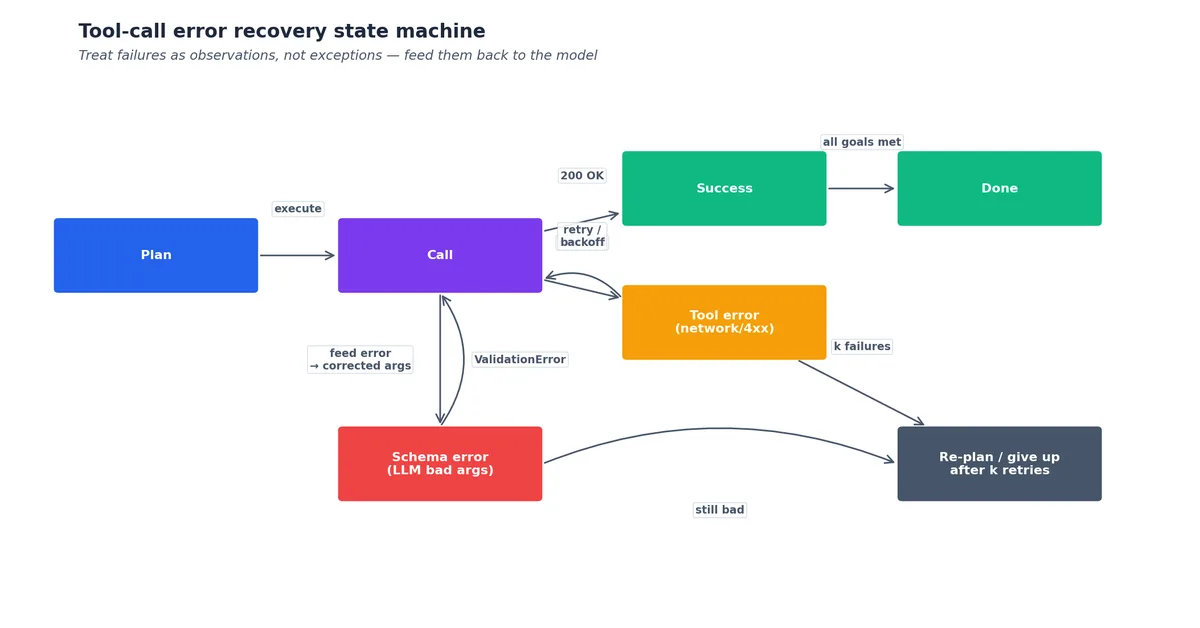
Tools fail. The API was down, the database returned an unexpected schema, the function timed out, the parameters were invalid. The agent has to handle this without spiraling.
Pattern 1: Tool error as tool result. Return the error message as the tool result content, not as an exception:
| |
The model sees the error in context and can decide to retry, switch to a different tool, or give up gracefully. If you raise an exception, you’ve taken the model out of the loop.
Pattern 2: Validation in the tool, not the schema. Schema enforces types. Business logic validates semantics. A transfer_money(from_account, to_account, amount) tool should reject amount=-100 with a clear error message — the schema can’t know your business rules.
Pattern 3: Bounded retries. If the model keeps calling the same broken tool, terminate the loop. Set a max_tool_calls=10 ceiling and a max_consecutive_errors=3 ceiling. Most agent runaways I’ve debugged were the model in a “tool fails → retry same way” loop.
Pattern 4: Don’t show stack traces. A Python stack trace is hundreds of tokens and confuses small models. Return a one-sentence error description, log the full trace separately for debugging.
Pattern 5: Retry with rationale. When the model retries a tool, prepend a short reasoning block explaining what changed. “The previous call failed because the date format was wrong; I’ll use ISO 8601 this time” is a more reliable corrective than just resubmitting with new parameters. Some agent frameworks (LangGraph, CrewAI) bake this in by injecting reflection prompts after errors.
Pattern 6: Ask for help. For unrecoverable errors, the right behavior is often not to retry indefinitely but to escalate to the user. “I tried to send an email to that address but the SMTP server returned ‘invalid recipient.’ Could you double-check the address?” is better UX than 5 silent retries followed by a generic failure.
Pattern 7: Give up gracefully. If the agent has exhausted reasonable tool options, returning a partial answer with explicit caveats (“I couldn’t retrieve the latest data, so this answer is based on cached information from yesterday”) is better than fabricating a complete-looking answer.
The agent loop#


A minimal agent loop in production:
| |
This is enough for 80 % of agent use cases. The remaining 20 % needs:
- Tool-output truncation: a
read_filethat returns 100K tokens will blow your context. Truncate to ~10K with a “[truncated]” marker. - Memory compaction: at step 15 the conversation is 50K tokens; summarize older steps into a single message before continuing.
- Sub-agents: factor a complex sub-task (“research X”) into a separate agent with its own conversation history, return only the final summary.
- Tool-call streaming: emit tool calls as they’re generated rather than waiting for the full response. Reduces TTFT for parallel tool execution.
ReAct, Voyager, and the lineage of agent loops#
The minimal loop above is a refinement of the ReAct pattern (Yao et al., 2022 ). ReAct interleaved three steps: Thought (model reasons about the next action), Action (tool call), Observation (tool result). The “thought” step was crucial — it gave the model an explicit place to plan and self-correct. Modern agent loops still implement ReAct, just with the thought happening implicitly inside the model’s tool-call rationale rather than as a separate text block.
Voyager (Wang et al., 2023 ) extended ReAct with three additions for long-horizon agency: an automatic curriculum (the agent picks its own next subtask based on what it knows), a skill library (successful tool-use patterns are stored and reused), and an iterative prompting loop with environment feedback. Voyager was demonstrated in Minecraft but its architecture became the template for production code agents (Cursor, Cline, Claude Code) and research agents.
Generative Agents (Park et al., 2023 ) explored a related direction: agents with persistent memory streams and reflection-based memory consolidation. Park’s Smallville simulation showed 25 agents with simple reactive behavior plus memory + reflection produced believable emergent social behavior. The memory architecture (embedding-based retrieval + scheduled reflection summarization) is now standard in long-running agent systems like SWE-bench solutions and personal AI assistants.
The 2024-2026 evolution: agents got tools that themselves return rich structured data, recursive sub-agent invocation, and explicit task planning steps separated from execution steps. The OpenClaw “Memory-Planning-Tool-Reflection” architecture (chapters 7-12 of the OpenClaw series) is a specific instance of this lineage.
MCP: the protocol layer#
Through 2024 every framework had its own tool-spec format (LangChain tools, OpenAI function specs, Anthropic tool blocks, etc.). Each one had to be re-implemented for every framework. Anthropic released the Model Context Protocol (MCP) in late 2024 as a standardized JSON-RPC interface for connecting LLMs to tool servers.
The MCP architecture: clients (LLM applications like Claude Desktop, Cursor, custom agents) speak JSON-RPC to servers (tool providers — file systems, databases, APIs, etc.). Servers expose three primitives: resources (read-only context like file contents), tools (callable functions), and prompts (reusable prompt templates). The protocol handles discovery, schema validation, streaming responses, and authentication.
MCP matters because it decouples tool development from agent framework choice. If you write an MCP server for your internal API, it works with any MCP-compatible client without rewrites. By mid-2025 the MCP server ecosystem included GitHub, GitLab, Slack, Postgres, Sentry, Linear, and hundreds more. The protocol has become for tool integration what OpenAI’s chat-completions schema became for inference APIs: a de facto standard that everyone targets.
A practical observation: MCP servers can be embedded in existing apps (you write a small Python server alongside your codebase) or run as standalone services. The local-only mode is what makes Claude Desktop’s filesystem access secure — the server runs on the user’s machine with their permissions, the LLM has no direct disk access. This locality model is what differentiates MCP from older tool-server protocols.
Things that go wrong in production#
Hallucinated tool names. The model calls a tool that doesn’t exist. Fix: validate tu.name in TOOLS and return a tool-not-found error. Some models (especially small ones under 7B) hallucinate tools that almost match a real name — get_weather_info instead of get_weather. Helpful to suggest the closest match in the error.
Hallucinated tool parameters. The model invents a force=True argument that doesn’t exist in the schema. Schema validation catches this; return a clear “parameter X not supported” error.
Confidently wrong tool results. A search tool returns “no results” but the model hallucinates the answer anyway. Symptoms: the tool result was used by the model but its claim contradicts the result. Defense: include explicit reminders in the system prompt (“If a tool returns no results, say so”). For high-stakes use cases, post-validate the answer against the tool transcript with a separate model.
Looping on tool errors. Pattern 3 above. Always cap.
Tool latency cascading. A 30-second tool call holds the user-facing request open. Use timeouts on every tool call. Surface “this tool is slow, want to try without it?” as fallback UX.
Schema drift. Your tool’s actual return shape changes (a field renamed, a new required field added) but the schema definition you give the model didn’t update. The model formats requests against the old schema and the tool fails opaquely. Fix: validate tool outputs against the schema in your dispatcher and surface mismatches as version-skew errors. Better: generate the schema definitions from the tool implementation (e.g., Pydantic models reflected to JSON schema) so they can’t drift.
Token budget exhaustion in tool transcripts. A 20-step agent run with tool calls and results easily reaches 50-100K tokens. The model hits its context limit and either gets truncated or starts losing earlier context. Fix: implement memory compaction (summarize earlier tool transcripts before they age out), use sub-agents for long branches, and monitor token usage per step.
Ambiguous tool selection. Two tools with overlapping descriptions (“search documents” vs “find documents”) cause the model to oscillate. Fix: write distinct, mutually exclusive descriptions, or merge into one tool with a parameter that disambiguates.
What’s Next#
Function calling is trained behavior plus chat template plus optional grammar enforcement. Use the strongest guarantee available (schema-constrained decoding > JSON mode > prompted JSON). Parallel tool calls when the model supports them; serial when there’s data dependence. Surface tool errors as tool results so the model can recover. Always cap loops; always timeout tools; always truncate large outputs. The intellectual lineage runs ReAct → Toolformer → Voyager → modern production agents; the protocol lineage is converging on MCP.
Next chapter: retrieval-augmented generation. Chunking strategies, embedding model choice, hybrid retrieval (dense + sparse), reranking, and the long-context-vs-RAG decision in practice.
References#
- Yao et al., “ReAct: Synergizing Reasoning and Acting in Language Models,” ICLR 2023.
- Schick et al., “Toolformer: Language Models Can Teach Themselves to Use Tools,” NeurIPS 2023.
- Wang et al., “Voyager: An Open-Ended Embodied Agent with Large Language Models,” 2023.
- Park et al., “Generative Agents: Interactive Simulacra of Human Behavior,” UIST 2023.
- Willard & Louf, “Efficient Guided Generation for Large Language Models (Outlines),” 2023.
- Anthropic, “Introducing the Model Context Protocol (MCP),” 2024.
- Karpas et al., “MRKL Systems,” 2022 (AI21).
- Microsoft Guidance library
- JSONformer: structured output for any LLM
- OpenAI function calling docs
- Anthropic tool use docs
LLM Engineering 12 parts
- 01 LLM Engineering (1): Architectures from Transformer to MoE
- 02 LLM Engineering (2): Tokenization Deep Dive
- 03 LLM Engineering (3): Pretraining at Scale
- 04 LLM Engineering (4): Post-training — SFT, DPO, RLHF, RLAIF
- 05 LLM Engineering (5): Inference Optimization
- 06 LLM Engineering (6): Long Context — RoPE, YaRN, Sinks
- 07 LLM Engineering (7): Function Calling and Tool Use you are here
- 08 LLM Engineering (8): Retrieval-Augmented Generation
- 09 LLM Engineering (9): Prompting at Production Scale
- 10 LLM Engineering (10): Evaluation
- 11 LLM Engineering (11): Safety and Alignment
- 12 LLM Engineering (12): Production — Deployment, Monitoring, Cost