Python Engineering (1): Environment Setup — pyenv, venv, and Dependency Hell
Master Python environment management with pyenv, virtual environments, and modern dependency tools. Escape dependency hell for good.
Every Python developer has lived through this moment: you run a script on your colleague’s machine and it crashes because they have Python 3.8 while you wrote it on 3.11. Or worse, you pip install something globally and break a completely unrelated project. Python’s environment story is powerful once you understand it, but the default experience is a minefield.
This article walks through the entire toolchain from scratch. By the end, you’ll have a reproducible, isolated, and version-pinned setup that works the same way on every machine.
The Python Version Problem#
Most operating systems come with a system Python. On macOS, it was Python 2.7 (removed in Monterey). On Ubuntu 22.04, it’s Python 3.10. This system Python is used by OS-level tools, and installing or upgrading packages in it can break your operating system.
The core problems:
| Problem | Example |
|---|---|
| System Python is outdated | Ubuntu 20.04 ships 3.8, you need 3.11 features |
| Multiple projects need different versions | Project A needs 3.9, Project B needs 3.12 |
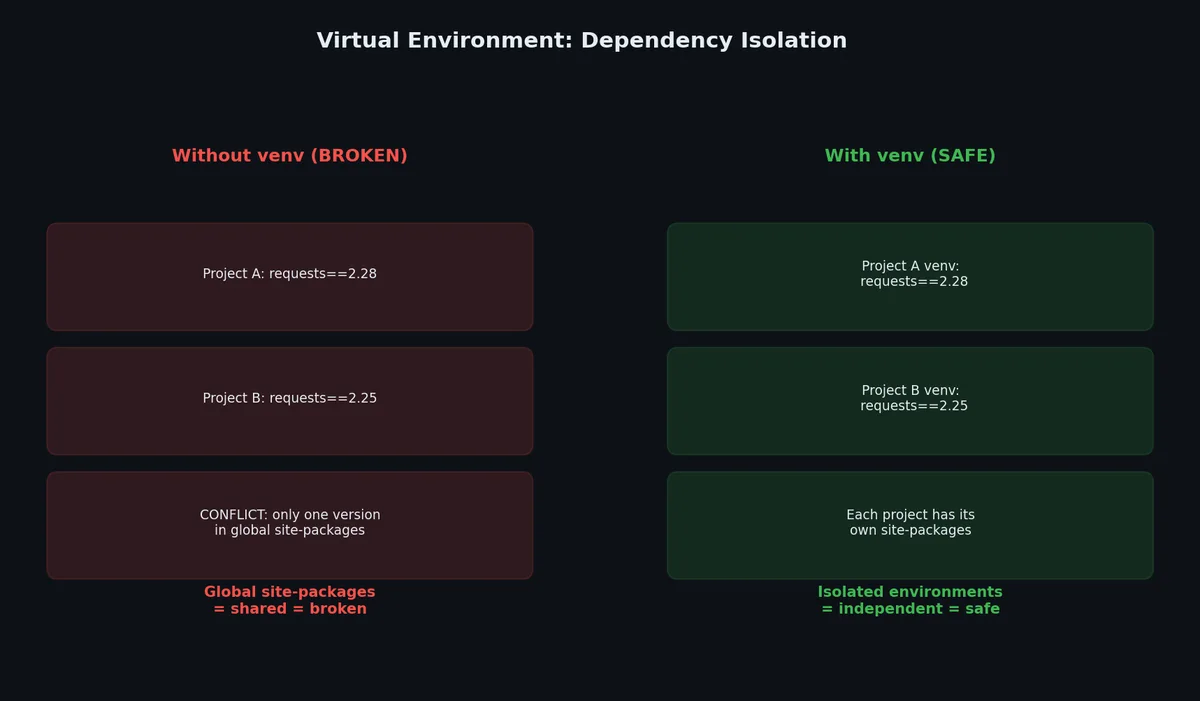
| Global pip installs cause conflicts | Package X needs requests>=2.28, Package Y pins requests==2.25 |
| Reproducibility fails | “Works on my machine” because versions differ |
| OS tools depend on system Python | apt on Ubuntu uses system Python internally |
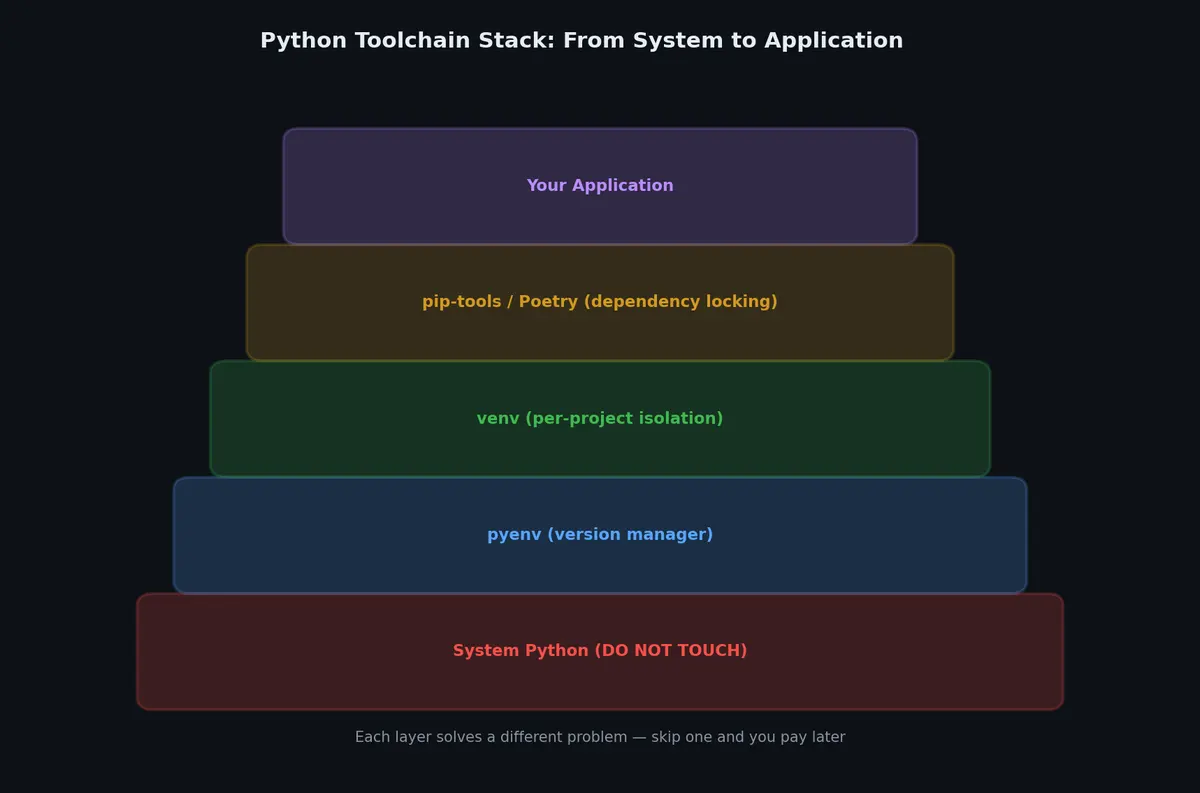
The solution is a three-layer stack:
- pyenv manages Python versions (install 3.9, 3.10, and 3.11 side by side)
- venv isolates per-project dependencies
- pip-tools or Poetry pin exact versions for reproducibility
pyenv: Multiple Python Versions Without Pain#
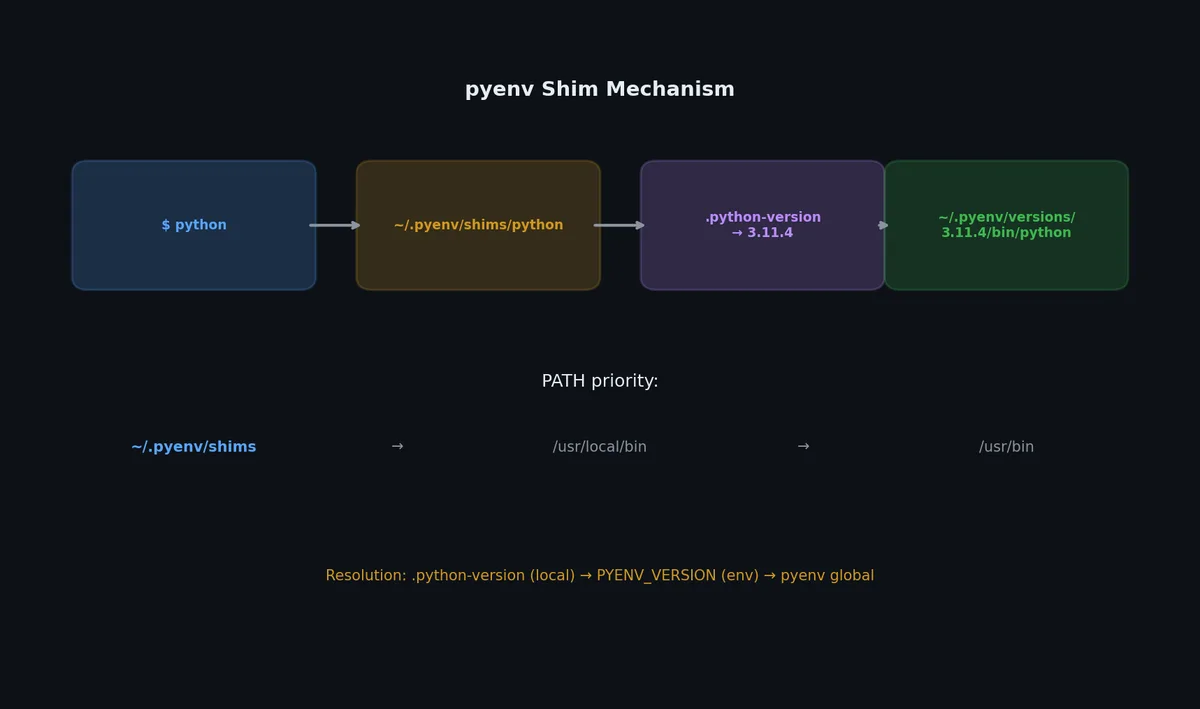
pyenv intercepts the python command and redirects it to whichever version you have configured. It does this by inserting shims into your $PATH.
Installation#
On macOS:
| |
On Linux:
| |
After installation, add these lines to your shell config (~/.bashrc, ~/.zshrc, or ~/.bash_profile):
| |
Reload your shell:
| |
Verify the installation:
| |
Installing Python Versions#
List available versions:
| |
Install a specific version:
| |
On macOS, if the build fails, you likely need:
| |
On Ubuntu/Debian:
| |
Setting the Active Version#
pyenv has three levels of version selection, from most specific to least:
| |
The resolution order is: shell > local (.python-version) > global (~/.pyenv/version).
Check which version is active and why:
| |
Commit .python-version to your repo. This ensures every developer uses the same Python version. It costs nothing and prevents version-mismatch bugs.
Virtual Environments: Isolating Dependencies#
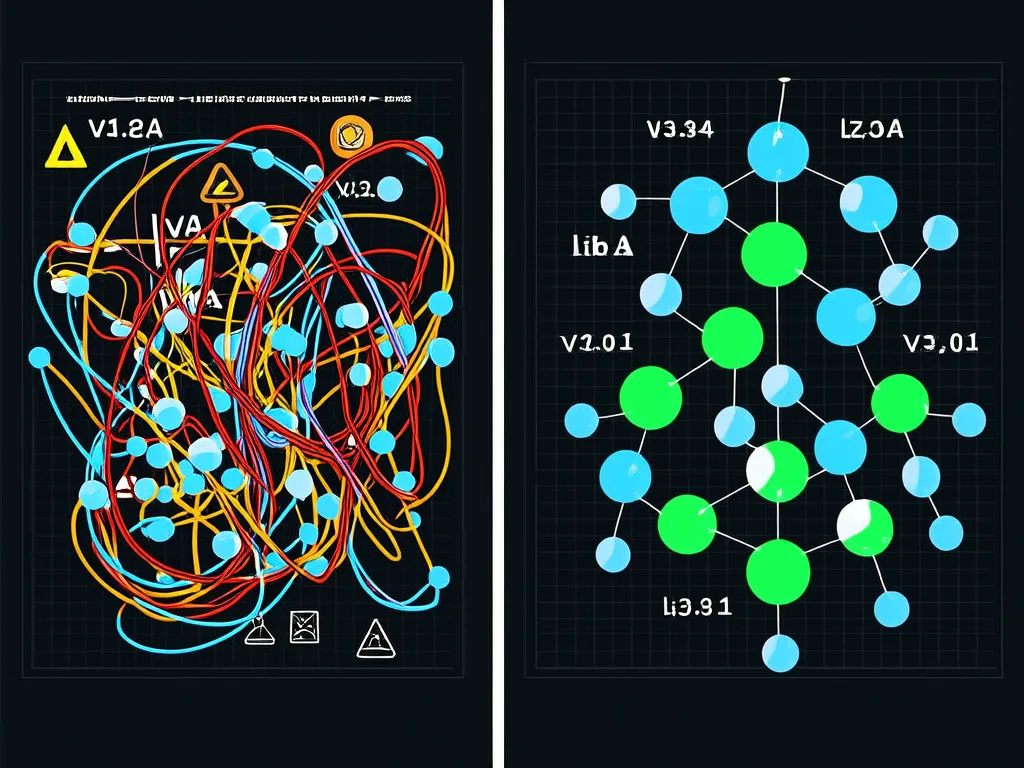
Even with the right Python version, you still need dependency isolation. Without it, pip install puts packages into a shared location, and two projects needing different versions of the same package will conflict.
Creating a Virtual Environment#
| |
This creates a .venv directory containing:
| |
Activation#
| |
When activated, python and pip point to the venv copies:
| |
Deactivate when done:
| |
Why .venv?#
The . prefix hides it in file listings. Most tools (VS Code, PyCharm, pytest) auto-detect .venv. Add it to .gitignore immediately:
| |
Never commit the virtual environment, as it contains platform-specific binaries and is not portable.
venv vs virtualenv vs conda#
| Feature | venv | virtualenv | conda |
|---|---|---|---|
| Included in stdlib | Yes (3.3+) | No (pip install) | No (separate installer) |
| Speed | Moderate | Fast | Slow |
| Python version management | No | No | Yes |
| Non-Python dependencies | No | No | Yes (C libs, etc.) |
| Cross-platform | Yes | Yes | Yes |
| Environment size | Small | Small | Large (200MB+) |
| Best for | General Python | Legacy/speed | Data science with C deps |
Recommendation: Use venv for most projects. Use conda only if you need compiled scientific libraries (CUDA, MKL) that are painful to build from source.
pip: The Package Installer#

With your venv activated, pip installs packages into the isolated environment.
Basic Commands#
| |
requirements.txt#
The traditional way to record dependencies:
| |
A typical requirements.txt from pip freeze:
| |
The problem with pip freeze: it dumps every installed package, including transitive dependencies. You cannot tell which packages you actually need versus which are dependencies of dependencies. Removing a package leaves its dependencies behind.
pip-tools: Reproducible Installs#
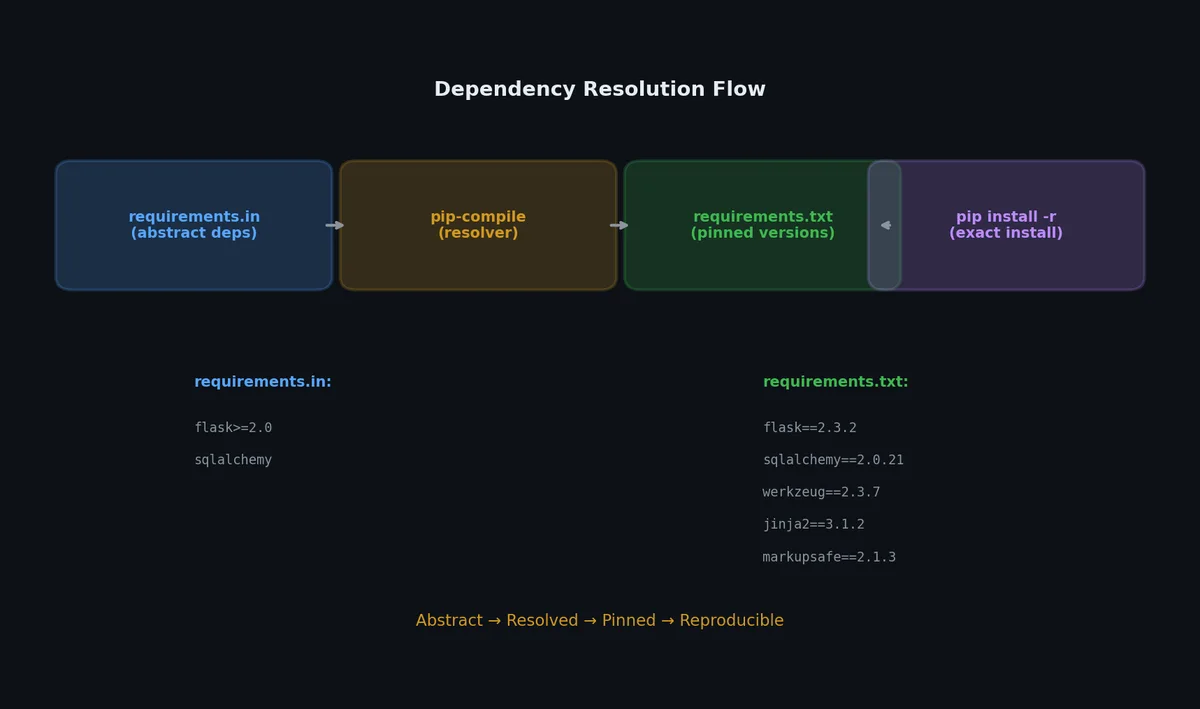
pip-tools solves the pip freeze problem by separating what you want from what gets installed.
Installation#
| |
Workflow#
Create requirements.in with your direct dependencies:
| |
Compile it to a fully pinned requirements.txt:
| |
Every line shows where each dependency comes from. Sync your environment exactly:
| |
pip-sync removes packages not in the file, unlike pip install -r which only adds.
Upgrading#
| |
Dev Dependencies#
Create a separate file for development tools:
| |
The -c requirements.txt constrains dev deps to be compatible with production deps.
| |
uv: The Modern Alternative (2024+)#
uv is a Rust-based Python package manager that replaces pip, pip-tools, virtualenv, and pyenv in a single binary. It is 10-100x faster than pip and handles the entire workflow.
Installation#
| |
Python Version Management (replaces pyenv)#
| |
uv downloads pre-built Python binaries — no compilation needed, unlike pyenv which builds from source.
Project Initialization#
| |
This creates a pyproject.toml with PEP 621 metadata and a uv.lock lockfile.
Dependency Management#
| |
uv add does in one command what previously required editing requirements.in, running pip-compile, and running pip-sync.
Running Commands#
| |
Migration from pip-tools#
| |
uv.lock vs requirements.txt#
| Aspect | requirements.txt (pip-tools) | uv.lock |
|---|---|---|
| Format | Plain text, pip-compatible | TOML, uv-specific |
| Cross-platform | Single platform | Multi-platform resolution |
| Hash verification | Optional (--generate-hashes) | Always included |
| Speed | Seconds | Milliseconds |
| Resolution | Platform-specific | Universal (resolves for all platforms at once) |
The uv.lock file resolves dependencies for all platforms simultaneously. A Linux developer and a macOS developer using the same lockfile get compatible (but potentially different) packages for their platform — automatically.
When to Use uv vs pip-tools#
| Scenario | Recommendation |
|---|---|
| New projects (2024+) | uv — faster, simpler, fewer tools to manage |
| Legacy projects with established CI | pip-tools — proven, no migration risk |
| Libraries published to PyPI | uv or Poetry — both handle build+publish |
| Corporate environments with strict tool approval | pip-tools — zero external dependencies beyond pip |
| Docker builds where layer caching matters | uv — deterministic, fast installs |
CI/CD: Verifying Your Dependency Lock#
A lockfile only works if it stays in sync with your declared dependencies. CI should verify this automatically.
GitHub Actions: Lock File Freshness Check#
| |
uv lock --check exits with code 1 if uv.lock would change — meaning someone edited pyproject.toml but forgot to update the lockfile.
Dependabot / Renovate Integration#
| |
Security Auditing in CI#
| |
Docker: Reproducible Builds with Pinned Dependencies#
Docker images should produce identical results regardless of when or where they are built. This requires careful handling of Python dependencies.
Multi-Stage Build Pattern#
| |
Docker + uv (Faster Builds)#
| |
--frozen refuses to update the lockfile — if it is outdated, the build fails rather than silently installing different versions.
Layer Caching Strategy#
| |
Copy dependency files first, install, then copy source. Docker reuses the cached dependency layer as long as requirements.txt (or uv.lock) hasn’t changed.
Environment Variables and .env Files#
Production applications often need runtime configuration (API keys, database URLs). Never hardcode these.
python-dotenv#
| |
| |
| |
| |
Pydantic Settings (Type-Safe Configuration)#
For larger applications, use Pydantic to validate environment variables at startup:
| |
This gives you type validation, default values, and clear error messages when configuration is wrong.
Poetry vs pip-tools vs PDM#
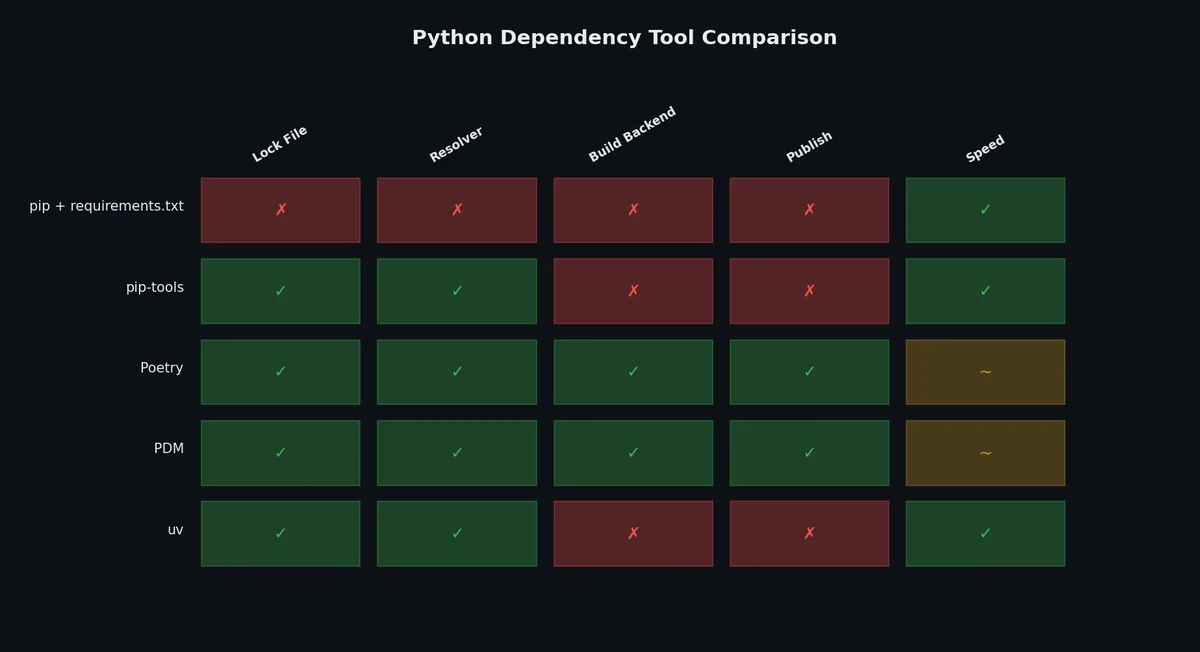
| Feature | pip-tools | Poetry | PDM |
|---|---|---|---|
| Config file | requirements.in | pyproject.toml | pyproject.toml |
| Lock file | requirements.txt | poetry.lock | pdm.lock |
| Venv management | No (manual) | Yes (auto) | Yes (auto) |
| Build & publish | No | Yes | Yes |
| Speed | Fast | Moderate | Fast |
| PEP 621 compliant | N/A | No (custom format) | Yes |
| Learning curve | Low | Medium | Medium |
| Stability | Very stable | Stable | Stable |
| Resolver | pip’s resolver | Custom | Custom |
pip-tools is the simplest choice: it stays close to pip and adds only what is needed. Poetry is popular for libraries and applications that need build+publish. PDM follows PEP standards most closely.
pyproject.toml: The Modern Standard#
pyproject.toml replaces setup.py, setup.cfg, MANIFEST.in, and most tool-specific config files. It is defined by PEP 518 and PEP 621.
| |
All tool configuration in one file. No more scattered .flake8, mypy.ini, pytest.ini.
Real Workflow: Clone to Running#
Here is what a correct setup looks like from zero:
| |
Automate steps 2-4 with a Makefile:
| |
Common Pitfalls#
| Pitfall | Symptom | Solution |
|---|---|---|
| Using system pip | pip install X modifies system packages | Always activate venv first |
| Forgetting to pin versions | pip install requests installs latest | Use pip-compile to pin |
| Committing .venv | Huge repo, platform-specific binaries | Add .venv/ to .gitignore |
| pyenv not in PATH | pyenv: command not found | Add init lines to shell config |
| Build deps missing on Linux | ModuleNotFoundError during pyenv install | Install build-essential, libssl-dev, etc. |
| Conflicting global/local Python | Wrong version active | Check pyenv version to see which config wins |
| pip cache stale | Old package version installed despite upgrade | pip install --no-cache-dir or pip cache purge |
| Mixing conda and pip | Broken environment state | Pick one: conda OR venv+pip |
| requirements.txt has no hashes | Supply chain attack risk | pip-compile --generate-hashes |
| Forgot to update lock file | New dev gets different versions | CI should verify lock file is up to date |
Directory Structure After Setup#
| |
What’s Next#
With your environment locked down, the next question is how to organize your code. A single main.py works for scripts, but anything beyond 200 lines needs structure. In the next article, we will build a proper Python project from scratch, covering package layouts, imports, entry points, and CLI tools.
Python Engineering 8 parts
- 01 Python Engineering (1): Environment Setup — pyenv, venv, and Dependency Hell you are here
- 02 Python Engineering (2): Project Structure — From Script to Package
- 03 Python Engineering (3): Testing — pytest, Fixtures, and the Confidence Loop
- 04 Python Engineering (4): Type Hints, Linting, and Code Quality
- 05 Python Engineering (5): I/O, Serialization, and Data Formats
- 06 Python Engineering (6): Concurrency — Threads, Processes, and asyncio
- 07 Python Engineering (7): Packaging — From pip install to PyPI
- 08 Python Engineering (8): Performance — Profiling, Caching, and Knowing When to Stop