Every project starts as a single file. You write main.py, it works, you add features, and one day you realize you have 1,500 lines in one file with functions that call other functions that depend on globals defined 800 lines above. The code works, but nobody (including future you) can understand it.
The jump from script to package is the first real engineering decision in a Python project. Get it right early, and testing, packaging, and deployment become easier. Get it wrong, and you’ll spend weeks untangling circular imports.
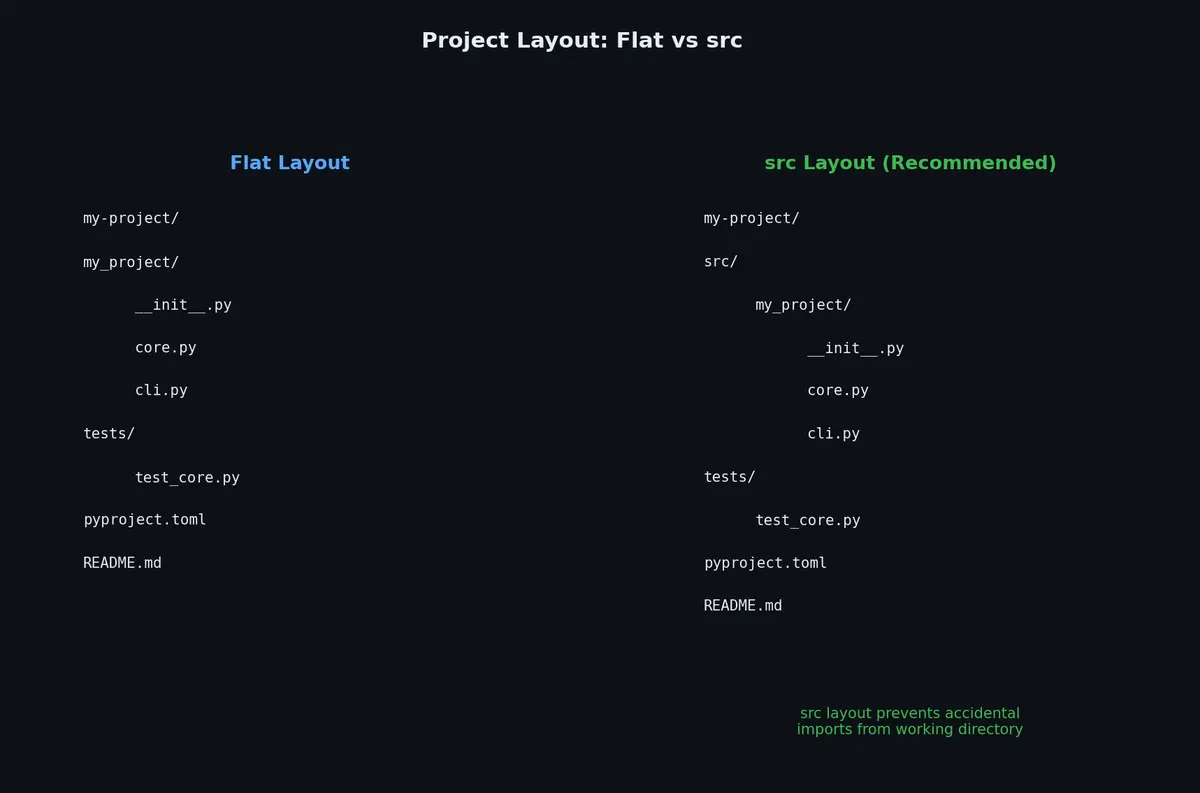
The package directory is inside src/. This layout is recommended by the Python Packaging Authority (PyPA) and has one critical advantage: it forces you to install your package before testing it. This catches packaging errors (missing files, broken imports) before you ship.
With the flat layout, import my_tool resolves to the local directory even if the package is not properly installable. With src layout, Python cannot find my_tool unless you run pip install -e . first. This is a feature, not a bug.
Use src layout for libraries you plan to publish. Use flat layout for applications where you control the deployment environment. When in doubt, use src layout.
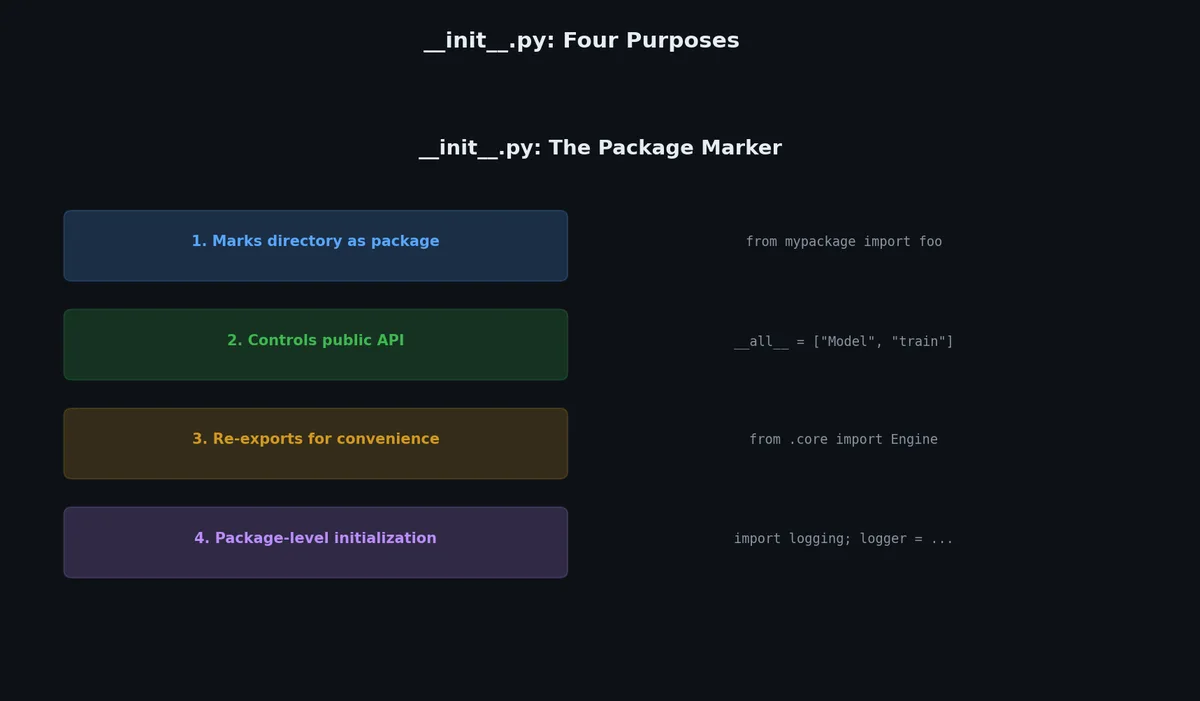
There are circular dependency risks between submodules
Example: import numpy has a large __init__.py that wires everything together. import sqlalchemy keeps __init__.py minimal and expects from sqlalchemy.orm import Session.
Since Python 3.3, directories without __init__.py are namespace packages. These allow a package to span multiple directories on disk. Unless you are building a plugin system, always include __init__.py.
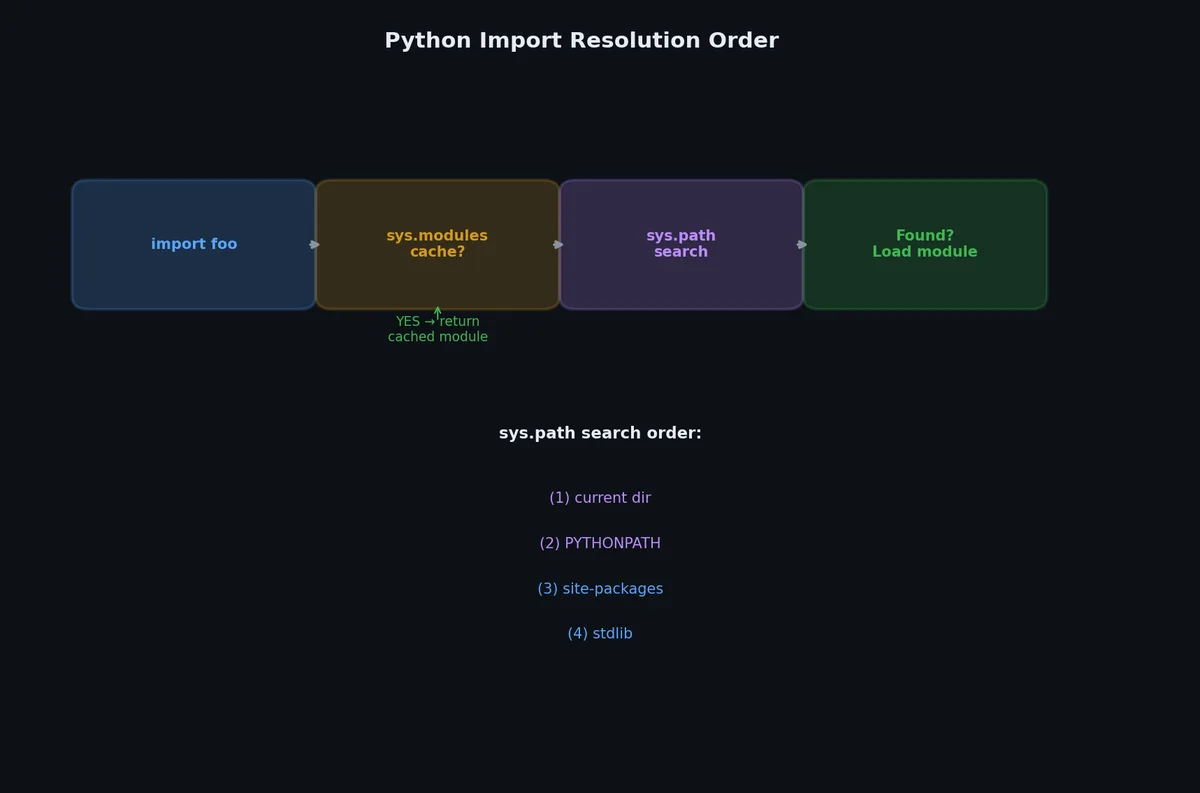
Relative imports fail when you run a module directly as a script (python src/my_tool/core.py) because Python does not know the package context. Use python -m my_tool.core instead.
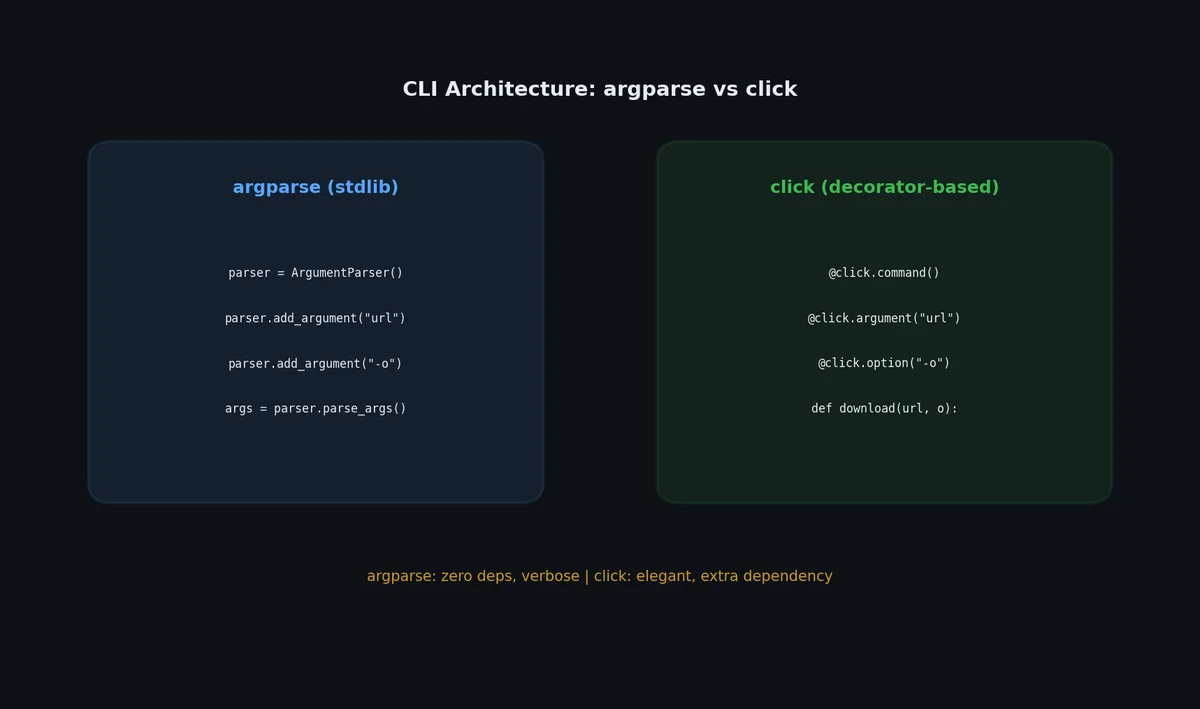
@click.group()@click.version_option()defcli():"""My Tool — file downloader and converter."""pass@cli.command()@click.argument("url")@click.option("-o","--output",default=None)defdownload(url:str,output:str|None)->None:"""Download a file from a URL."""path=download_file(url=url,output=output)click.echo(f"Downloaded: {path}")@cli.command()@click.argument("input_file",type=click.Path(exists=True))@click.argument("output_format",type=click.Choice(["csv","json","parquet"]))defconvert(input_file:str,output_format:str)->None:"""Convert a file to another format."""result=convert_file(input_file,output_format)click.echo(f"Converted: {result}")
# src/my_downloader/config.py"""Application constants and defaults."""DEFAULT_TIMEOUT=30DEFAULT_CHUNK_SIZE=8192MAX_RETRIES=3USER_AGENT="my-downloader/0.1.0"
# src/my_downloader/utils.py"""Utility functions for file operations and formatting."""frompathlibimportPathfromurllib.parseimporturlparsedefformat_size(size_bytes:int)->str:"""Format byte count as human-readable string.
Args:
size_bytes: Number of bytes.
Returns:
Formatted string like '2.4 MB'.
"""forunitin("B","KB","MB","GB","TB"):ifabs(size_bytes)<1024:returnf"{size_bytes:.1f}{unit}"size_bytes/=1024# type: ignore[assignment]returnf"{size_bytes:.1f} PB"deffilename_from_url(url:str)->str:"""Extract filename from a URL.
Args:
url: The URL to parse.
Returns:
The filename portion of the URL path,
or 'download' if none can be determined.
"""parsed=urlparse(url)name=Path(parsed.path).namereturnnameifnameelse"download"
# src/my_downloader/core.py"""Core download logic."""frompathlibimportPathimportrequestsfrommy_downloader.configimportDEFAULT_CHUNK_SIZE,DEFAULT_TIMEOUT,USER_AGENTfrommy_downloader.utilsimportfilename_from_url,format_sizedefdownload_file(url:str,output:str|None=None,quiet:bool=False,timeout:int=DEFAULT_TIMEOUT,)->Path:"""Download a file from a URL.
Args:
url: The URL to download from.
output: Output file path. Derived from URL if None.
quiet: If True, suppress progress output.
timeout: Request timeout in seconds.
Returns:
Path to the downloaded file.
Raises:
requests.HTTPError: If the request fails.
"""headers={"User-Agent":USER_AGENT}response=requests.get(url,headers=headers,stream=True,timeout=timeout)response.raise_for_status()dest=Path(output)ifoutputelsePath(filename_from_url(url))total=int(response.headers.get("content-length",0))downloaded=0withopen(dest,"wb")asf:forchunkinresponse.iter_content(chunk_size=DEFAULT_CHUNK_SIZE):f.write(chunk)downloaded+=len(chunk)ifnotquietandtotal>0:pct=downloaded/total*100print(f"\rDownloading: {dest.name} "f"[{pct:5.1f}%] {format_size(downloaded)}",end="",flush=True,)ifnotquiet:print()# newline after progressreturndest
As projects grow, you often end up with multiple related packages: a core library, a CLI tool, a web API, and shared utilities. A monorepo keeps them together with shared CI and synchronized releases.
# Install all packages in the workspace$ uv sync
# Run tests for one package$ uv run --package my-platform-api pytest
# Add a dependency to a specific package$ uv add --package my-platform-cli typer
Namespace packages work well with entry points for discoverable plugins:
1
2
3
4
# In plugin package's pyproject.toml[project.entry-points."my_app.plugins"]csv_export="my_plugin_csv:CsvExporter"json_export="my_plugin_json:JsonExporter"
1
2
3
4
5
6
7
8
9
10
# In the main application: discover all installed pluginsfromimportlib.metadataimportentry_pointsdefload_plugins():plugins={}forepinentry_points(group="my_app.plugins"):plugins[ep.name]=ep.load()returnplugins# Returns: {"csv_export": <class CsvExporter>, "json_export": <class JsonExporter>}
This pattern lets users install plugins via pip without the main application knowing about them at build time.
# src/my_tool/cli.pyimporttyperfrompathlibimportPathfromenumimportEnumapp=typer.Typer(help="File processing toolkit")classFormat(str,Enum):json="json"csv="csv"parquet="parquet"@app.command()defconvert(input_file:Path,output_format:Format=Format.json,verbose:bool=False,limit:int=typer.Option(0,help="Max rows (0=unlimited)"),):"""Convert a file to another format."""ifverbose:typer.echo(f"Converting {input_file} → {output_format.value}")# ... conversion logic@app.command()defvalidate(files:list[Path],strict:bool=typer.Option(False,"--strict","-s"),):"""Validate one or more data files."""forfinfiles:ifnotf.exists():typer.echo(f"✗ {f}: not found",err=True)raisetyper.Exit(1)typer.echo(f"✓ {f}: valid")if__name__=="__main__":app()
Usage:
 1
 2
 3
 4
 5
 6
 7
 8
 9
10
11
12
13
14
15
$ my-tool convert data.csv --output-format parquet --verbose
Converting data.csv → parquet

$ my-tool validate *.json --strict
✓ users.json: valid
✓ config.json: valid

$ my-tool --help
Usage: my-tool [OPTIONS] COMMAND [ARGS]...

  File processing toolkit

Commands:
  convert   Convert a file to another format.
  validate  Validate one or more data files.
Recommendation: Use Typer for new CLIs (simplest, most modern). Use click if you need advanced plugin systems. Use argparse only for zero-dependency scripts.
With a proper project structure in place, the next step is making sure it actually works. Testing is not about writing tests for the sake of coverage numbers. It is about building confidence that your code does what you think it does. In the next article, we will set up pytest, write meaningful tests with fixtures and parametrize, and learn to debug efficiently when tests reveal problems.