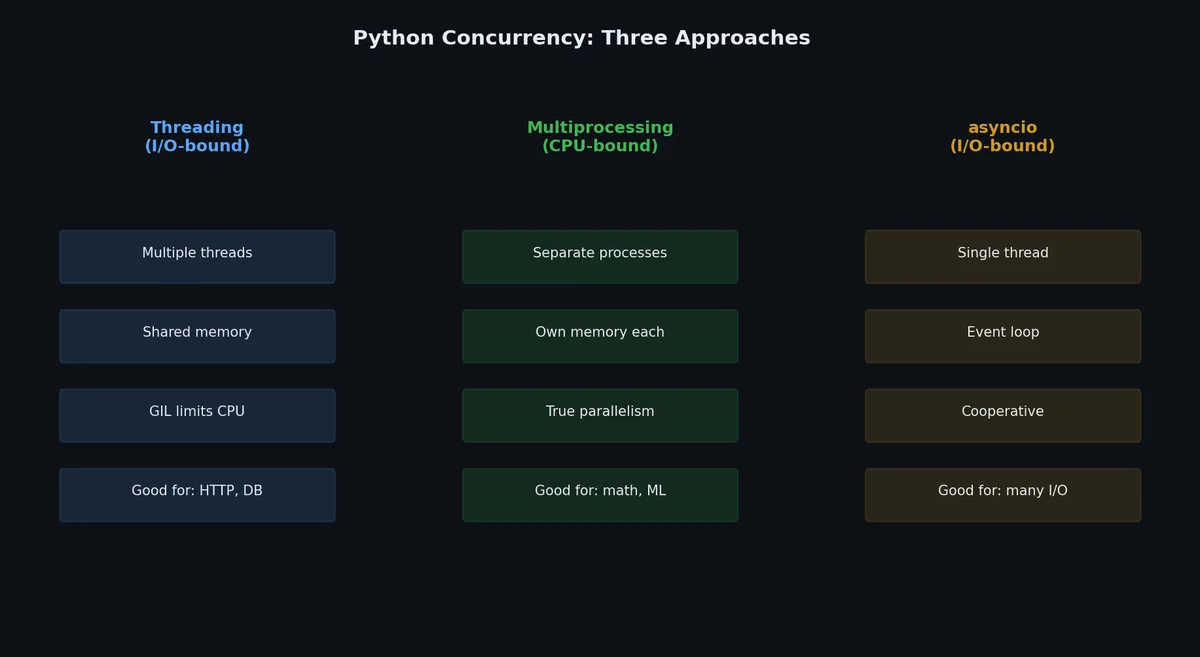
Your script downloads 100 files one at a time. Each download takes 2 seconds, mostly waiting for the server to respond. Total time: 200 seconds. Your CPU is idle for 99% of that time, wasting compute and money on network latency. Concurrency can fix this.
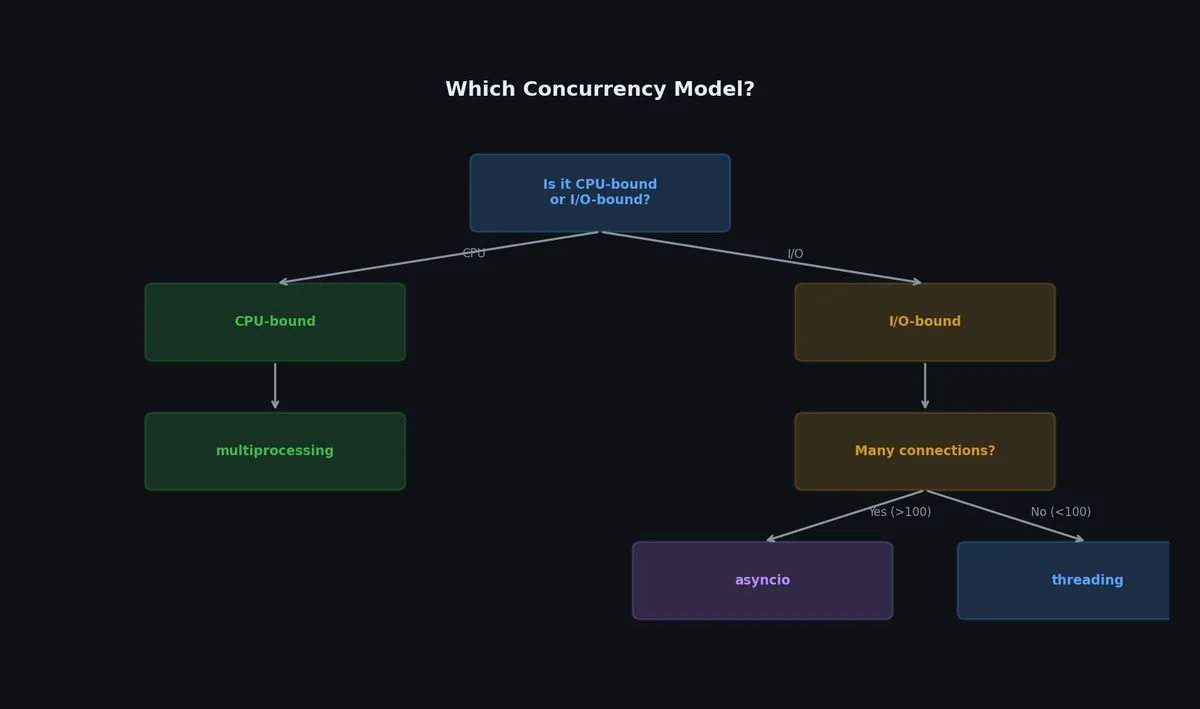
Python has three concurrency models, each designed for different problems. Choosing the wrong one can make your code slow or full of race conditions. This article explains when to use each.
The Global Interpreter Lock (GIL) is a mutex that protects access to Python objects. Only one thread can execute Python bytecode at a time, even on a multi-core machine.
importthreadingcounter=0defincrement():globalcounterfor_inrange(1_000_000):counter+=1# This is NOT atomicthreads=[threading.Thread(target=increment)for_inrange(4)]fortinthreads:t.start()fortinthreads:t.join()print(counter)# Without GIL: race condition, counter < 4_000_000# With GIL: still a race condition! counter < 4_000_000
Wait, the GIL does not prevent this? Correct. counter += 1 compiles to multiple bytecodes (LOAD, ADD, STORE), and the GIL can release between them. The GIL protects interpreter internals, not your application logic.
PEP 703 introduced an experimental build of CPython without the GIL. Starting with Python 3.13, you can install a “free-threaded” build (python3.13t) that allows true parallel thread execution:
1
2
3
4
5
6
# Install free-threaded build (experimental)$ pyenv install 3.13.0t
# Check if GIL is disabled$ python3.13t -c "import sys; print(sys._is_gil_enabled())"False
With the GIL disabled, the threading example from above actually achieves true parallel speedup on CPU-bound work. However, as of 2025 the ecosystem is still adapting — many C extensions assume the GIL exists and may crash or produce incorrect results. Use it for experiments, not production. The plan is to make free-threading the default in Python 3.15 or 3.16.
For now, the practical advice remains unchanged: use threads for I/O, processes for CPU, asyncio for high-concurrency I/O.
Threads share the same memory space and are lightweight. The GIL releases during I/O operations, making them effective for network calls, file operations, and database queries.
fromconcurrent.futuresimportThreadPoolExecutor,as_completedimportrequestsdefdownload(url:str)->tuple[str,int]:response=requests.get(url,timeout=10)returnurl,len(response.content)urls=["https://httpbin.org/delay/1","https://httpbin.org/delay/2","https://httpbin.org/delay/1","https://httpbin.org/delay/3",]withThreadPoolExecutor(max_workers=4)asexecutor:# Submit all tasksfutures={executor.submit(download,url):urlforurlinurls}# Process results as they completeforfutureinas_completed(futures):url=futures[future]try:result_url,size=future.result()print(f"Downloaded {result_url}: {size} bytes")exceptExceptionase:print(f"Failed {url}: {e}")
importthreadingfromcollectionsimportdeque# Lock for protecting shared statelock=threading.Lock()results=[]defworker(item):processed=expensive_computation(item)withlock:# Only one thread can execute this block at a timeresults.append(processed)# Queue for producer-consumer patternsfromqueueimportQueuework_queue:Queue[str]=Queue()forurlinurls:work_queue.put(url)defconsumer():whileTrue:url=work_queue.get()ifurlisNone:# Poison pillbreakdownload(url)work_queue.task_done()# Start consumersthreads=[threading.Thread(target=consumer)for_inrange(4)]fortinthreads:t.start()# Wait for all work to completework_queue.join()# Send poison pillsfor_inthreads:work_queue.put(None)fortinthreads:t.join()
Same API as ThreadPoolExecutor, making it easy to switch between the two:
 1
 2
 3
 4
 5
 6
 7
 8
 9
10
11
12
13
14
15
16
17
18
19
fromconcurrent.futuresimportProcessPoolExecutordeffactorize(n:int)->list[int]:"""Find all factors of n."""factors=[]foriinrange(1,int(n**0.5)+1):ifn%i==0:factors.append(i)ifi!=n//i:factors.append(n//i)returnsorted(factors)numbers=[112272535095293,112582705942171,115280095190773,115797848077099]withProcessPoolExecutor(max_workers=4)asexecutor:results=list(executor.map(factorize,numbers))forn,factorsinzip(numbers,results):print(f"{n}: {factors}")
Note the if __name__ == "__main__": guard. This is required on macOS and Windows because multiprocessing uses spawn to create new processes, which re-imports the module.
The beauty of concurrent.futures is that switching between threads and processes requires changing one line:
1
2
3
4
5
6
7
8
9
10
11
12
13
14
15
fromconcurrent.futuresimportThreadPoolExecutor,ProcessPoolExecutordefprocess_item(item):# ... some work ...returnresultitems=range(100)# For I/O-bound work:withThreadPoolExecutor(max_workers=10)asexecutor:results=list(executor.map(process_item,items))# For CPU-bound work (change only this line):withProcessPoolExecutor(max_workers=4)asexecutor:results=list(executor.map(process_item,items))
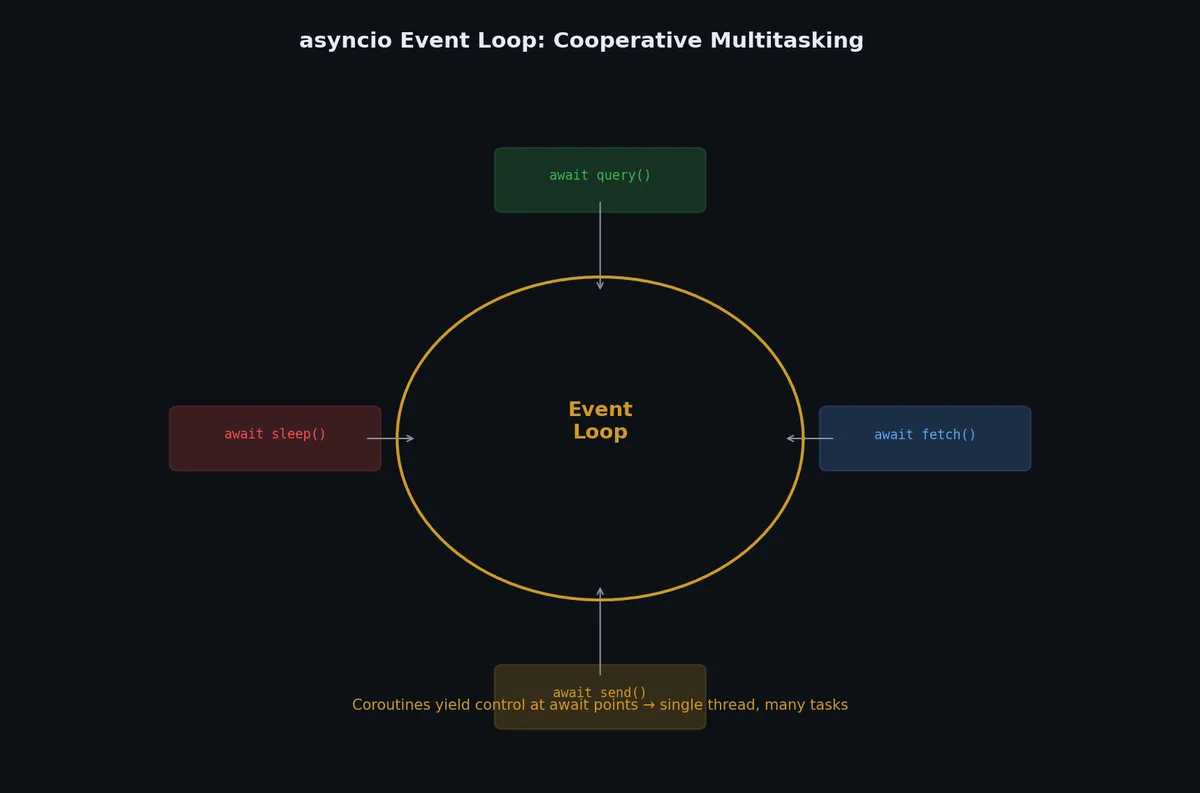
asyncio uses a single thread with an event loop. Functions voluntarily give up control at await points, allowing other tasks to run. No threads, no locks, no GIL worries.
importasyncioasyncdefdownload(url:str)->str:print(f"Start: {url}")awaitasyncio.sleep(1)# Simulate network I/Oprint(f"Done: {url}")returnf"Content of {url}"asyncdefmain():# Create tasks (start running immediately)tasks=[asyncio.create_task(download(f"https://example.com/{i}"))foriinrange(5)]# Wait for all to completeresults=awaitasyncio.gather(*tasks)print(f"Downloaded {len(results)} pages")asyncio.run(main())
importasyncioimportaiohttpasyncdefdownload(session:aiohttp.ClientSession,url:str,semaphore:asyncio.Semaphore,)->int:asyncwithsemaphore:# At most N concurrent downloadsasyncwithsession.get(url)asresponse:content=awaitresponse.read()returnlen(content)asyncdefmain():urls=[f"https://httpbin.org/delay/1"for_inrange(100)]semaphore=asyncio.Semaphore(10)# Max 10 concurrent requestsasyncwithaiohttp.ClientSession()assession:tasks=[download(session,url,semaphore)forurlinurls]results=awaitasyncio.gather(*tasks)print(f"Downloaded {len(results)} URLs")asyncio.run(main())
importasyncioasyncdefslow_operation():awaitasyncio.sleep(10)return"done"asyncdefmain():try:result=awaitasyncio.wait_for(slow_operation(),timeout=3.0)exceptasyncio.TimeoutError:print("Operation timed out after 3 seconds")asyncio.run(main())
importasyncioimporttimedefblocking_io()->str:"""Simulate a blocking I/O operation (legacy library, file I/O, etc.)."""time.sleep(2)return"result from blocking call"asyncdefmain():# Old way (verbose):# loop = asyncio.get_event_loop()# result = await loop.run_in_executor(None, blocking_io)# New way (Python 3.9+):result=awaitasyncio.to_thread(blocking_io)print(result)# Run multiple blocking calls concurrently:results=awaitasyncio.gather(asyncio.to_thread(blocking_io),asyncio.to_thread(blocking_io),asyncio.to_thread(blocking_io),)# Takes ~2s total, not 6sasyncio.run(main())
Use asyncio.to_thread() when you need to call a synchronous library (database driver, file parser, legacy SDK) from async code without blocking the event loop.
asyncio.gather() has a problem: if one task raises an exception, other tasks keep running (or get cancelled inconsistently). TaskGroup (Python 3.11+) fixes this with structured concurrency — all tasks in a group are guaranteed to finish before the block exits:
importasyncioasyncdeffetch(url:str)->str:awaitasyncio.sleep(1)if"bad"inurl:raiseValueError(f"Bad URL: {url}")returnf"Content of {url}"asyncdefmain():try:asyncwithasyncio.TaskGroup()astg:task1=tg.create_task(fetch("https://example.com/a"))task2=tg.create_task(fetch("https://example.com/b"))task3=tg.create_task(fetch("https://example.com/bad"))except*ValueErroraseg:# ExceptionGroup: one handler for all ValueErrorsforexcineg.exceptions:print(f"Caught: {exc}")else:# All tasks succeededprint(task1.result(),task2.result(),task3.result())asyncio.run(main())
Key differences from gather():
Feature
asyncio.gather()
asyncio.TaskGroup
Cancel on failure
Only with return_exceptions=False
Always cancels remaining tasks
Exception handling
First exception propagates, rest lost
ExceptionGroup collects all
Cleanup guarantee
No — tasks may leak
Yes — all tasks done when block exits
Dynamic task creation
No (fixed list)
Yes (tg.create_task() inside the block)
Python version
3.4+
3.11+
Prefer TaskGroup over gather() for new code on Python 3.11+. It prevents the “fire-and-forget” bugs that plague gather()-based code.
importasyncioasyncdefrisky_download(url:str)->str:awaitasyncio.sleep(1)if"fail"inurl:raiseConnectionError(f"Cannot reach {url}")returnf"OK: {url}"asyncdefmain():urls=["https://a.com","https://fail.com","https://b.com"]# Option 1: return_exceptions=True (collect all, check manually)results=awaitasyncio.gather(*[risky_download(url)forurlinurls],return_exceptions=True,)forurl,resultinzip(urls,results):ifisinstance(result,Exception):print(f"FAILED {url}: {result}")else:print(f"OK {url}: {result}")# Option 2: return_exceptions=False (default) — first exception cancels all# This is usually NOT what you want for independent tasksasyncio.run(main())
Output:
1
2
3
OK https://a.com: OK: https://a.com
FAILED https://fail.com: Cannot reach https://fail.com
OK https://b.com: OK: https://b.com
importasyncioimportrandomimportaiohttpasyncdeffetch_with_retry(session:aiohttp.ClientSession,url:str,max_retries:int=3,base_delay:float=1.0,)->str:"""Fetch URL with exponential backoff on failure."""forattemptinrange(max_retries+1):try:asyncwithsession.get(url)asresponse:response.raise_for_status()returnawaitresponse.text()except(aiohttp.ClientError,asyncio.TimeoutError)ase:ifattempt==max_retries:raisedelay=base_delay*(2**attempt)+random.uniform(0,1)print(f"Retry {attempt+1}/{max_retries} for {url} in {delay:.1f}s: {e}")awaitasyncio.sleep(delay)raiseRuntimeError("unreachable")asyncdefmain():timeout=aiohttp.ClientTimeout(total=10)asyncwithaiohttp.ClientSession(timeout=timeout)assession:content=awaitfetch_with_retry(session,"https://httpbin.org/status/200")print(f"Got {len(content)} bytes")asyncio.run(main())
The jitter (random.uniform(0, 1)) prevents thundering herd problems when many clients retry simultaneously.
importasynciofromconcurrent.futuresimportProcessPoolExecutorimportaiohttpdefcpu_work(data:bytes)->dict:"""CPU-intensive processing (runs in separate process)."""# Parse, transform, compute...return{"result":len(data)}asyncdeffetch_and_process(session,url,process_pool):"""Fetch data (async I/O) then process it (CPU in process pool)."""asyncwithsession.get(url)asresponse:data=awaitresponse.read()# Offload CPU work to process poolloop=asyncio.get_event_loop()result=awaitloop.run_in_executor(process_pool,cpu_work,data)returnresultasyncdefmain():urls=[f"https://example.com/{i}"foriinrange(20)]withProcessPoolExecutor(max_workers=4)asprocess_pool:asyncwithaiohttp.ClientSession()assession:tasks=[fetch_and_process(session,url,process_pool)forurlinurls]results=awaitasyncio.gather(*tasks)
"""Benchmark: download 20 URLs with different concurrency models."""importasyncioimporttimefromconcurrent.futuresimportThreadPoolExecutorimportaiohttpimportrequestsURL="https://httpbin.org/delay/1"COUNT=20defsequential():for_inrange(COUNT):requests.get(URL,timeout=10)defthreaded():defdownload(url):requests.get(url,timeout=10)withThreadPoolExecutor(max_workers=COUNT)asexecutor:list(executor.map(download,[URL]*COUNT))asyncdefasync_download():asyncwithaiohttp.ClientSession()assession:tasks=[]for_inrange(COUNT):tasks.append(session.get(URL))responses=awaitasyncio.gather(*tasks)forrinresponses:awaitr.read()r.close()defbenchmark(name,func):start=time.perf_counter()func()elapsed=time.perf_counter()-startprint(f"{name:12s}: {elapsed:.2f}s")benchmark("Sequential",sequential)benchmark("Threaded",threaded)benchmark("Async",lambda:asyncio.run(async_download()))
Both threaded and async complete in about 1 second (the server delay). Async uses fewer system resources because it doesn’t have thread stacks or context switches.
Your code is now concurrent and fast. But before you share it with the world, you need to package it properly. In the next article, we will build distributable Python packages, publish to PyPI, create Docker images, and set up a complete distribution pipeline.