You wrote a useful utility. A colleague asks you to share it. You zip the folder and email it. They unzip it, run python main.py, and get ModuleNotFoundError because they do not have the dependencies. Then they install the dependencies, but the wrong versions. Then they have Python 3.8 and your f-string walrus operators do not parse.
Proper packaging eliminates all of this. With pip install your-tool, everything just works: correct dependencies, correct versions, and a clean CLI command.
Package vs Module vs Library# These terms are used loosely, but they have specific meanings in Python:
Term Definition Example Module A single .py file utils.pyPackage A directory with __init__.py containing modules my_tool/ directoryLibrary A package (or collection of packages) distributed for reuse requests, flaskDistribution An installable archive (wheel or sdist) on PyPI requests-2.31.0-py3-none-any.whlScript A standalone .py file run directly download.py
When someone says “install the requests library,” they mean: download the requests distribution from PyPI, which contains the requests package and its subpackages.
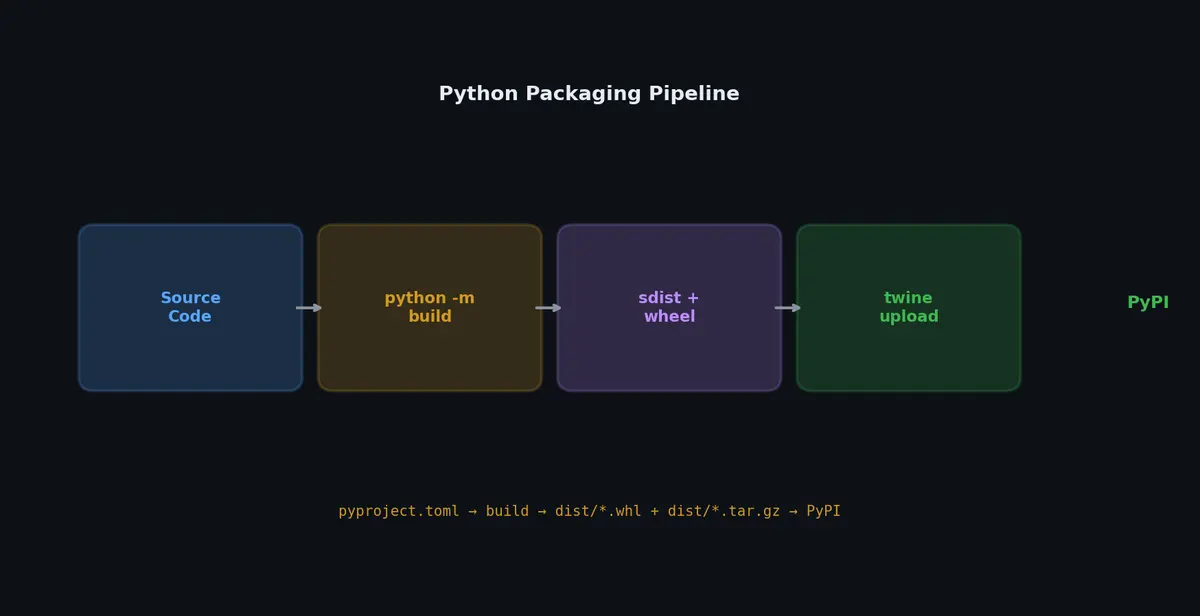
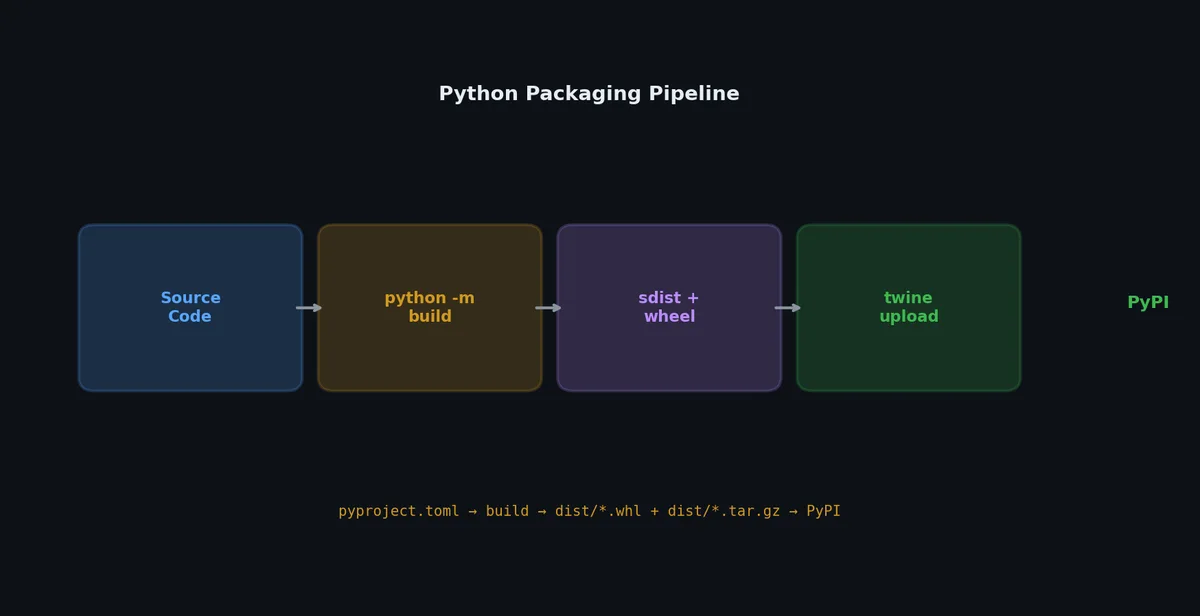
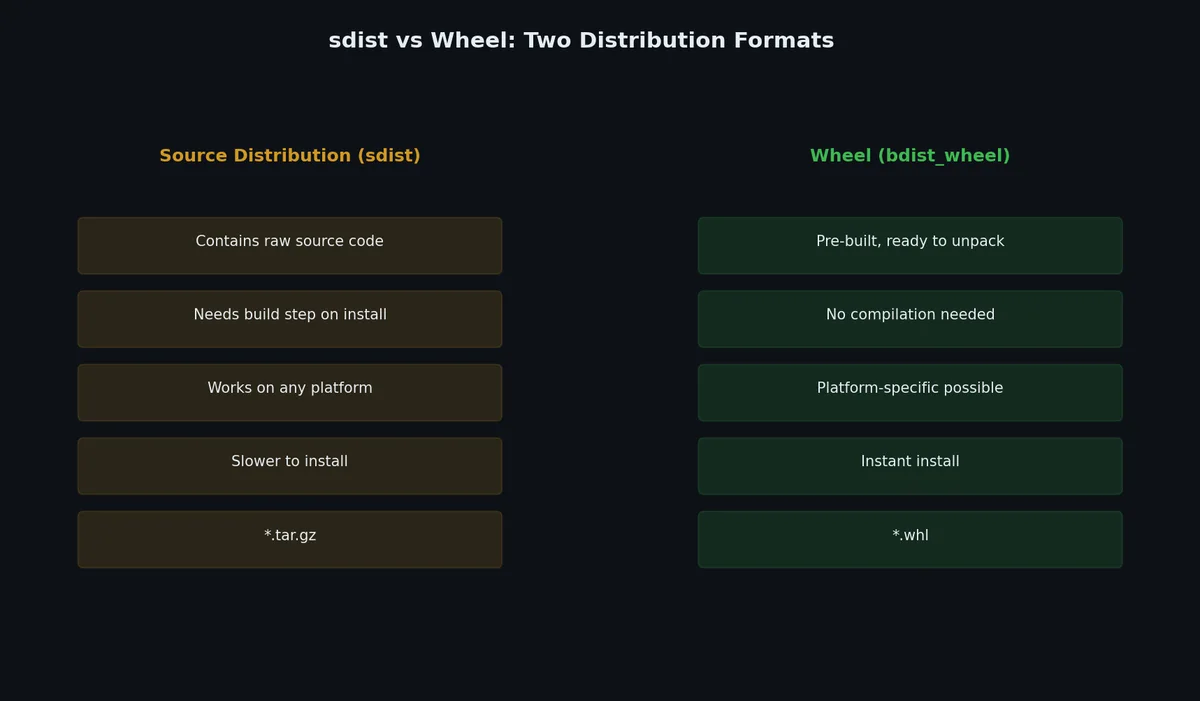
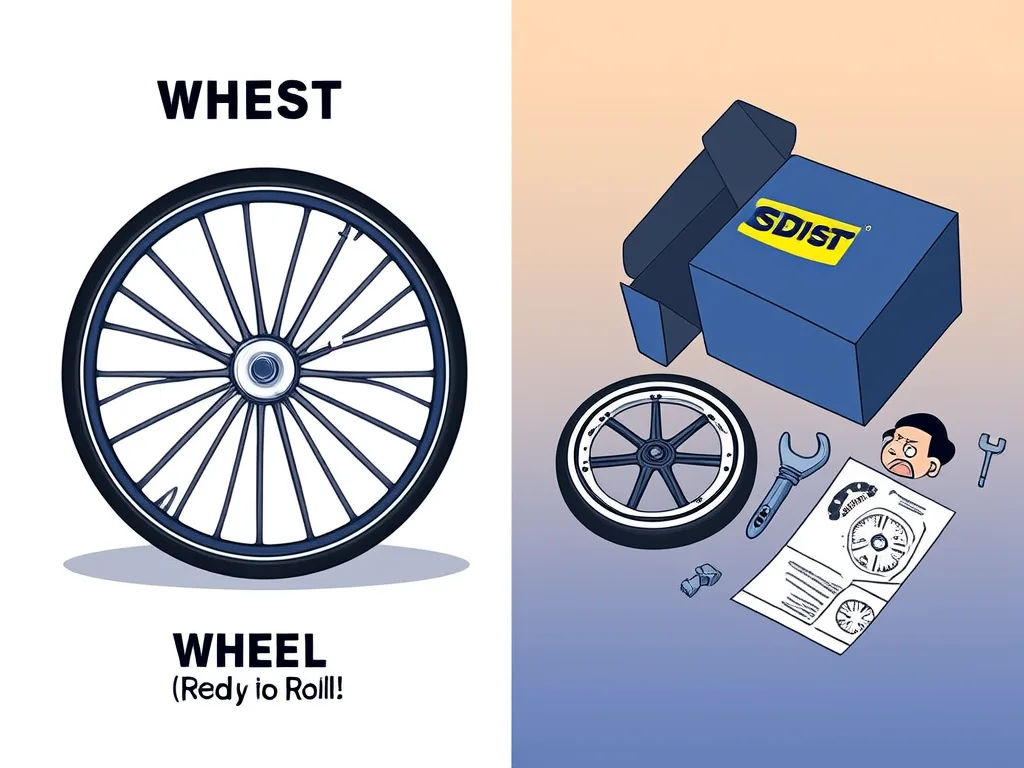
Building Distributions# Python packages are distributed in two formats:
sdist (Source Distribution)# A .tar.gz archive of the source code. The recipient needs a build toolchain to install it (compiler for C extensions, etc.).
wheel (Built Distribution)# A .whl file (which is actually a zip archive). Pre-built, no compilation needed. Faster to install. This is what pip uses by default.
 1
 2
 3
 4
 5
 6
 7
 8
 9
10
11
# Install build tool
( .venv) $ pip install build
# Build both sdist and wheel
( .venv) $ python -m build
* Creating venv isolated environment...
* Installing packages in isolated environment... ( setuptools>= 68.0, wheel)
* Getting build dependencies for sdist...
* Building sdist...
* Building wheel from sdist
Successfully built my_tool-0.1.0.tar.gz and my_tool-0.1.0-py3-none-any.whl
The output goes to dist/:
1
2
3
dist/
  my_tool-0.1.0.tar.gz                    # sdist
  my_tool-0.1.0-py3-none-any.whl          # wheel
The wheel filename encodes metadata: {name}-{version}-{python}-{abi}-{platform}.whl. py3-none-any means “Python 3, no ABI dependency, any platform” (a pure Python package).
Inspecting a Wheel# 1
2
3
4
5
6
7
8
9
10
11
12
13
14
# A .whl is just a zip file
$ unzip -l dist/my_tool-0.1.0-py3-none-any.whl
Archive: dist/my_tool-0.1.0-py3-none-any.whl
Length Date Time Name
--------- ---------- ----- ----
142 2024-01-15 10:00 my_tool/__init__.py
1845 2024-01-15 10:00 my_tool/core.py
923 2024-01-15 10:00 my_tool/cli.py
456 2024-01-15 10:00 my_tool/utils.py
178 2024-01-15 10:00 my_tool/config.py
631 2024-01-15 10:00 my_tool-0.1.0.dist-info/METADATA
92 2024-01-15 10:00 my_tool-0.1.0.dist-info/WHEEL
50 2024-01-15 10:00 my_tool-0.1.0.dist-info/entry_points.txt
654 2024-01-15 10:00 my_tool-0.1.0.dist-info/RECORD
pyproject.toml for Packaging#
The complete packaging configuration:
 1
 2
 3
 4
 5
 6
 7
 8
 9
10
11
12
13
14
15
16
17
18
19
20
21
22
23
24
25
26
27
28
29
30
31
32
33
34
35
36
37
38
39
40
41
42
43
44
45
46
47
48
49
50
51
52
53
54
55
56
57
[ build-system ]
requires = [ "setuptools>=68.0" , "wheel" ]
build-backend = "setuptools.backends._legacy:_Backend"
[ project ]
name = "my-tool"
version = "0.1.0"
description = "A CLI tool for downloading and converting files"
readme = "README.md"
requires-python = ">=3.10"
license = { text = "MIT" }
authors = [
{ name = "Your Name" , email = "you@example.com" },
]
keywords = [ "download" , "convert" , "cli" ]
classifiers = [
"Development Status :: 3 - Alpha" ,
"Environment :: Console" ,
"Intended Audience :: Developers" ,
"License :: OSI Approved :: MIT License" ,
"Programming Language :: Python :: 3" ,
"Programming Language :: Python :: 3.10" ,
"Programming Language :: Python :: 3.11" ,
"Programming Language :: Python :: 3.12" ,
"Topic :: Utilities" ,
]
dependencies = [
"requests>=2.28,<3" ,
"click>=8.0" ,
"rich>=13.0" ,
]
[ project . optional-dependencies ]
dev = [
"pytest>=7.0" ,
"pytest-cov" ,
"ruff>=0.3" ,
"mypy" ,
"build" ,
"twine" ,
]
[ project . scripts ]
my-tool = "my_tool.cli:main"
[ project . urls ]
Homepage = "https://github.com/you/my-tool"
Documentation = "https://my-tool.readthedocs.io"
Repository = "https://github.com/you/my-tool"
Issues = "https://github.com/you/my-tool/issues"
Changelog = "https://github.com/you/my-tool/blob/main/CHANGELOG.md"
[ tool . setuptools . packages . find ]
where = [ "src" ]
[ tool . setuptools . package-data ]
my_tool = [ "py.typed" ]
Key Sections# [build-system]
[project]
[project.scripts]pip install, my-tool appears in PATH.
[project.optional-dependencies]pip install my-tool[dev].
[tool.setuptools.packages.find]src/.
Including Data Files# If your package needs non-Python files (templates, configs, data), declare them:
1
2
3
4
5
6
[ tool . setuptools . package-data ]
my_tool = [
"templates/*.html" ,
"data/*.json" ,
"py.typed" , # marker for PEP 561 type checking
]
Or create a MANIFEST.in for sdist-specific includes:
1
2
3
4
include LICENSE
include README.md
recursive-include src/my_tool/templates *.html
recursive-include src/my_tool/data *.json
Publishing to PyPI# TestPyPI First# Always test on TestPyPI before publishing to the real PyPI:
 1
 2
 3
 4
 5
 6
 7
 8
 9
10
11
12
13
14
# Install twine
( .venv) $ pip install twine
# Build
( .venv) $ python -m build
# Upload to TestPyPI
( .venv) $ twine upload --repository testpypi dist/*
Uploading distributions to https://test.pypi.org/legacy/
Uploading my_tool-0.1.0-py3-none-any.whl [========================================] 100%
Uploading my_tool-0.1.0.tar.gz [========================================] 100%
# Test installation from TestPyPI
( .venv) $ pip install --index-url https://test.pypi.org/simple/ my-tool
Create PyPI Account and API Token# Register at https://pypi.org/account/register/ ↗ Go to Account Settings > API Tokens Create a token scoped to your project (or all projects for the first upload) Configure ~/.pypirc:
 1
 2
 3
 4
 5
 6
 7
 8
 9
10
11
12
13
[distutils]
index-servers =
    pypi
    testpypi

[pypi]
username = __token__
password = pypi-XXXXXXXXXXXXXXXXXXXXXXXXXXXXXXXXXX

[testpypi]
repository = https://test.pypi.org/legacy/
username = __token__
password = pypi-XXXXXXXXXXXXXXXXXXXXXXXXXXXXXXXXXX
Upload to PyPI# 1
2
3
4
5
6
7
( .venv) $ twine upload dist/*
Uploading distributions to https://upload.pypi.org/legacy/
Uploading my_tool-0.1.0-py3-none-any.whl [========================================] 100%
Uploading my_tool-0.1.0.tar.gz [========================================] 100%
View at:
https://pypi.org/project/my-tool/0.1.0/
Now anyone can install it:
Pre-Upload Checklist# 1
2
3
4
# Check the distribution for common errors
( .venv) $ twine check dist/*
Checking dist/my_tool-0.1.0-py3-none-any.whl: PASSED
Checking dist/my_tool-0.1.0.tar.gz: PASSED
Common issues twine catches:
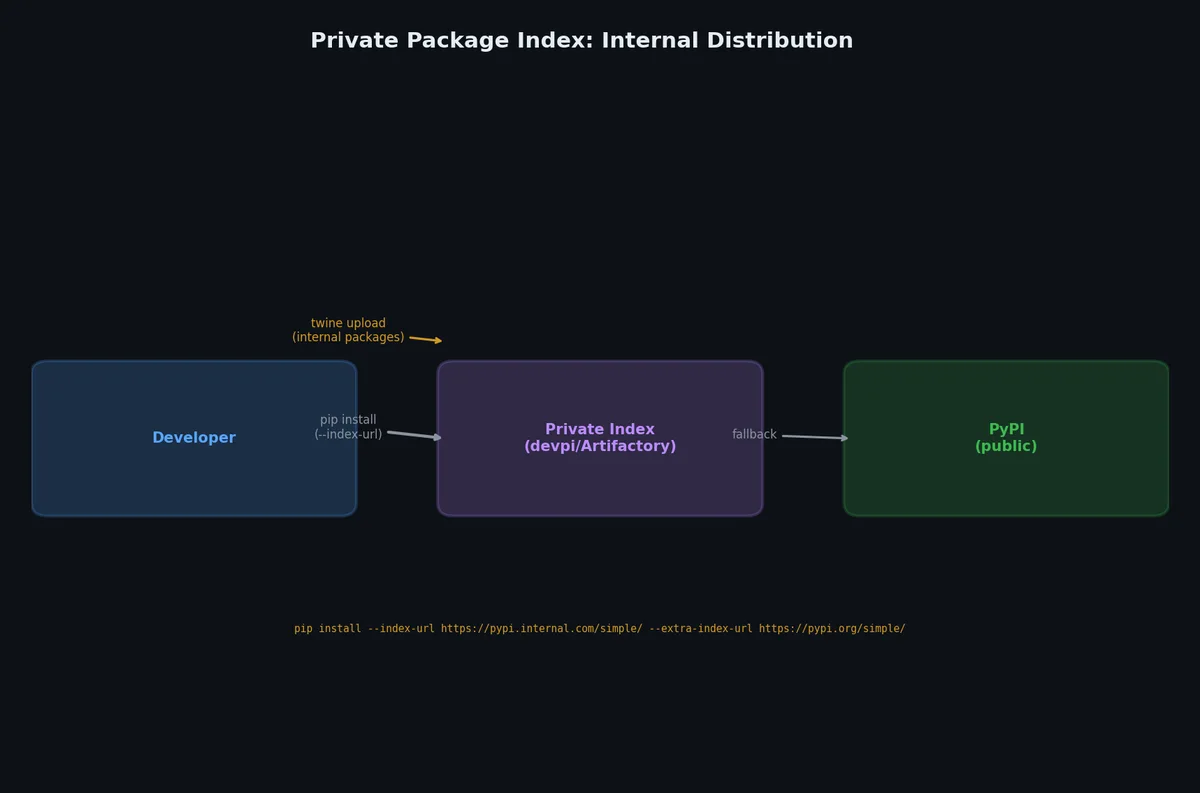
Missing README Invalid long_description format Missing required metadata Private Package Indexes# Not everything belongs on public PyPI. For internal packages:
devpi# 1
2
3
4
5
6
7
8
9
10
11
12
13
14
15
16
# Install devpi server and client
$ pip install devpi-server devpi-client
# Start server
$ devpi-server --start --port 3141
# Configure
$ devpi use http://localhost:3141
$ devpi login root --password ""
$ devpi index -c dev
# Upload
$ devpi upload dist/*
# Install from private index
$ pip install my-tool --index-url http://localhost:3141/root/dev/+simple/
pip Configuration for Private Index# 1
2
3
4
5
# ~/.pip/pip.conf (Linux/macOS) or %APPDATA%\pip\pip.ini (Windows)
[global]
extra-index-url = http://internal-pypi.company.com/simple/
trusted-host = internal-pypi.company.com
Or per-project in pyproject.toml:
1
2
# This is not standard but supported by pip-tools
# For pip itself, use pip.conf or command-line flags
1
2
# Per-command
$ pip install my-internal-tool --extra-index-url http://internal-pypi.company.com/simple/
Docker Images with Python#
Choosing a Base Image# Base Image Size Use Case python:3.11~900MB Development, includes build tools python:3.11-slim~150MB Production, stripped down python:3.11-alpine~50MB Minimal, but musl libc can cause issues python:3.11-bookworm~900MB Debian Bookworm, good compatibility python:3.11-slim-bookworm~150MB Production on Debian Bookworm
Recommendation: Use python:3.11-slim for production. Avoid alpine unless you specifically need the small size and are prepared to deal with musl compatibility issues (numpy, pandas, and other packages with C extensions may fail).
Basic Dockerfile# 1
2
3
4
5
6
7
8
9
10
11
12
13
14
15
16
17
18
19
20
21
22
23
24
25
26
FROM python:3.11-slim
WORKDIR /app
# Install system dependencies (if needed)
RUN apt-get update && apt-get install -y --no-install-recommends \
\
&& rm -rf /var/lib/apt/lists/*
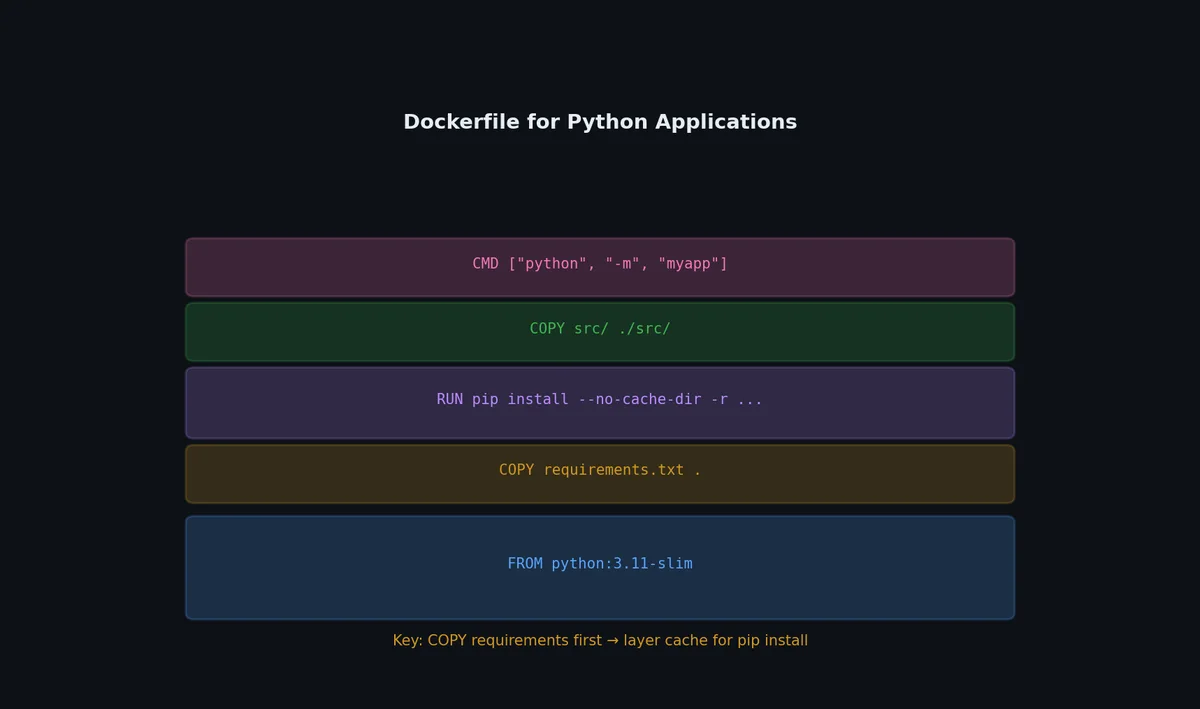
# Copy dependency files first (better cache)
COPY requirements.txt .
RUN pip install --no-cache-dir -r requirements.txt
# Copy application code
COPY src/ src/
COPY pyproject.toml .
# Install the package
RUN pip install --no-cache-dir .
# Run as non-root user
RUN useradd --create-home appuser
USER appuser
EXPOSE 8000
CMD [ "my-tool" , "serve" , "--host" , "0.0.0.0" , "--port" , "8000" ]
Multi-Stage Build# Reduce final image size by building in one stage and running in another:
1
2
3
4
5
6
7
8
9
10
11
12
13
14
15
16
17
18
19
20
21
22
23
24
25
26
# Stage 1: Build
FROM python:3.11 AS builder
WORKDIR /build
COPY requirements.txt .
RUN pip install --no-cache-dir --prefix= /install -r requirements.txt
COPY src/ src/
COPY pyproject.toml .
RUN pip install --no-cache-dir --prefix= /install .
# Stage 2: Runtime
FROM python:3.11-slim
WORKDIR /app
# Copy only installed packages from builder
COPY --from= builder /install /usr/local
# Create non-root user
RUN useradd --create-home appuser
USER appuser
EXPOSE 8000
CMD [ "my-tool" , "serve" , "--host" , "0.0.0.0" , "--port" , "8000" ]
The builder stage includes gcc and build tools. The runtime stage only has the installed packages.
.dockerignore# 1
2
3
4
5
6
7
8
9
10
11
12
13
.venv/
.git/
.mypy_cache/
__pycache__/
*.pyc
dist/
build/
*.egg-info/
.env
.env.*
tests/
docs/
*.md
Build and Run# 1
2
3
4
5
6
7
8
9
10
11
# Build
$ docker build -t my-tool:0.1.0 .
# Run
$ docker run -p 8000:8000 my-tool:0.1.0
# Run with environment variables
$ docker run -p 8000:8000 \
DATABASE_URL = postgresql://db:5432/mydb \
API_KEY = sk-abc123 \
Modern Build Backends# The Python packaging ecosystem has moved beyond setuptools. Newer backends are faster, simpler to configure, and handle more use cases.
Hatch: All-in-One Project Manager# Hatch ↗
manages environments, builds, and publishing with a single tool:
1
2
3
4
5
6
7
8
9
10
11
12
13
14
# pyproject.toml
[ build-system ]
requires = [ "hatchling" ]
build-backend = "hatchling.build"
[ project ]
name = "my-library"
dynamic = [ "version" ]
[ tool . hatch . version ]
path = "src/my_library/__init__.py"
[ tool . hatch . build . targets . wheel ]
packages = [ "src/my_library" ]
1
2
3
4
5
6
7
8
9
10
11
# Build
$ hatch build
dist/my_library-0.1.0-py3-none-any.whl
dist/my_library-0.1.0.tar.gz
# Publish
$ hatch publish
# Run in isolated environment
$ hatch run pytest
$ hatch run docs:build
Hatch’s environment matrix runs tests across Python versions without tox:
1
2
3
4
5
6
7
8
9
[ tool . hatch . envs . test ]
dependencies = [ "pytest" , "pytest-cov" ]
[[ tool . hatch . envs . test . matrix ]]
python = [ "3.10" , "3.11" , "3.12" , "3.13" ]
[ tool . hatch . envs . test . scripts ]
run = "pytest {args}"
cov = "pytest --cov {args}"
1
2
$ hatch run test:run # runs on all 4 Python versions
$ hatch run test.py3.12:run # run on specific version
uv Build and Publish# uv handles the full lifecycle without additional tools:
1
2
3
4
5
6
7
8
9
10
# Build wheel and sdist
$ uv build
Building source distribution...
Building wheel from source distribution...
Successfully built dist/my_lib-0.1.0.tar.gz and dist/my_lib-0.1.0-py3-none-any.whl
# Publish to PyPI
$ uv publish
# Or to a private index:
$ uv publish --index-url https://private.pypi.org/simple/
Maturin: Python + Rust Extensions# Maturin ↗
builds Python packages containing Rust extensions (via PyO3):
1
2
3
4
5
6
7
8
9
10
11
# pyproject.toml
[ build-system ]
requires = [ "maturin>=1.0,<2.0" ]
build-backend = "maturin"
[ project ]
name = "my-fast-lib"
requires-python = ">=3.9"
[ tool . maturin ]
features = [ "pyo3/extension-module" ]
1
2
3
4
5
6
7
8
9
10
11
12
13
// src/lib.rs
use pyo3 ::prelude ::* ;
#[pyfunction]
fn fast_sum ( data : Vec < f64 > ) -> f64 {
data . iter (). sum ()
}
#[pymodule]
fn my_fast_lib ( m : & Bound < '_ , PyModule > ) -> PyResult < () > {
m . add_function ( wrap_pyfunction! ( fast_sum , m ) ? ) ? ;
Ok (())
}
1
2
3
4
5
# Build and install for development
$ maturin develop
# Build wheels for distribution
$ maturin build --release
This pattern is how high-performance libraries like pydantic-core, ruff, and polars ship Rust-backed Python packages.
Build Backend Comparison# Backend Speed Use case Rust/C support setuptools Slow Legacy, complex builds Yes (C only) hatchling Fast Pure Python libraries No flit Fast Simple pure Python No maturin Fast Rust extensions Yes (Rust) scikit-build-core Medium C/C++/Fortran extensions Yes
Reproducible Builds and SBOM# Reproducible builds ensure that building the same source produces bit-for-bit identical outputs. This matters for security auditing and supply chain integrity.
Pinning Build Dependencies# 1
2
3
[ build-system ]
requires = [ "hatchling==1.21.1" ] # pin exact version
build-backend = "hatchling.build"
Hash Verification# 1
2
3
4
5
6
# pip-tools: generate hashes for supply chain security
$ pip-compile --generate-hashes requirements.in
# Output includes hashes for every package:
# requests==2.31.0 \
# --hash=sha256:942c5a758f98d790eaed1a29cb6eefc7f0edf3fcb0fce8afe0f44505355fed97
With uv, hashes are always included in uv.lock — no extra flag needed.
Software Bill of Materials (SBOM)# Generate an SBOM for compliance and vulnerability tracking:
1
2
3
4
5
6
7
# Using pip-licenses
$ pip install pip-licenses
$ pip-licenses --format= json --output-file= sbom.json
# Using cyclonedx (standard SBOM format)
$ pip install cyclonedx-bom
$ cyclonedx-py environment -o sbom.cdx.json
Attach the SBOM to releases for downstream consumers to audit dependencies.
Real-world packages need different dependencies on different platforms or Python versions.
Environment Markers# 1
2
3
4
5
6
7
[ project ]
dependencies = [
"tomli>=1.0; python_version < '3.11'" , # stdlib tomllib in 3.11+
"colorama>=0.4; sys_platform == 'win32'" ,
"uvloop>=0.17; sys_platform != 'win32'" ,
"typing-extensions>=4.0; python_version < '3.12'" ,
]
Common markers:
Marker Example values python_version'3.10', '3.11'sys_platform'linux', 'darwin', 'win32'platform_machine'x86_64', 'aarch64'implementation_name'cpython', 'pypy'
Optional Dependency Groups# 1
2
3
4
5
6
7
[ project . optional-dependencies ]
postgres = [ "psycopg[binary]>=3.0" ]
mysql = [ "mysqlclient>=2.0" ]
redis = [ "redis>=5.0" ]
all = [ "my-lib[postgres,mysql,redis]" ]
dev = [ "pytest" , "mypy" , "ruff" ]
docs = [ "sphinx" , "sphinx-rtd-theme" ]
1
2
3
# Install with specific extras
$ pip install "my-lib[postgres,redis]"
$ uv add "my-lib[all]"
For packages with compiled extensions, build wheels for each platform:
1
2
3
4
5
6
7
8
9
10
# .github/workflows/release.yml using cibuildwheel
jobs :
build :
strategy :
matrix :
os : [ ubuntu-latest, macos-latest, windows-latest]
steps :
- uses : pypa/cibuildwheel@v2
env :
CIBW_PYTHON : "cp310 cp311 cp312 cp313"
cibuildwheel ↗
automates building wheels across platforms and Python versions in CI.
Poetry Build and Publish#
If your project uses Poetry instead of setuptools:
1
2
3
4
5
6
7
8
9
# Install Poetry
$ curl -sSL https://install.python-poetry.org | python3 -
# Initialize a new project
$ poetry new my-tool
$ cd my-tool
# Or convert existing project
$ poetry init
Poetry uses its own [tool.poetry] section in pyproject.toml:
 1
 2
 3
 4
 5
 6
 7
 8
 9
10
11
12
13
14
15
16
17
18
19
20
21
22
23
[ tool . poetry ]
name = "my-tool"
version = "0.1.0"
description = "A CLI tool"
authors = [ "Your Name <you@example.com>" ]
readme = "README.md"
packages = [{ include = "my_tool" , from = "src" }]
[ tool . poetry . dependencies ]
python = "^3.10"
requests = "^2.28"
click = "^8.0"
[ tool . poetry . group . dev . dependencies ]
pytest = "^7.0"
ruff = "^0.3"
[ tool . poetry . scripts ]
my-tool = "my_tool.cli:main"
[ build-system ]
requires = [ "poetry-core" ]
build-backend = "poetry.core.masonry.api"
1
2
3
4
5
6
7
8
9
10
11
12
13
14
# Build
$ poetry build
Building my-tool ( 0.1.0)
- Building sdist
- Built my_tool-0.1.0.tar.gz
- Building wheel
- Built my_tool-0.1.0-py3-none-any.whl
# Publish to TestPyPI
$ poetry config repositories.testpypi https://test.pypi.org/legacy/
$ poetry publish --repository testpypi
# Publish to PyPI
$ poetry publish
Versioning#
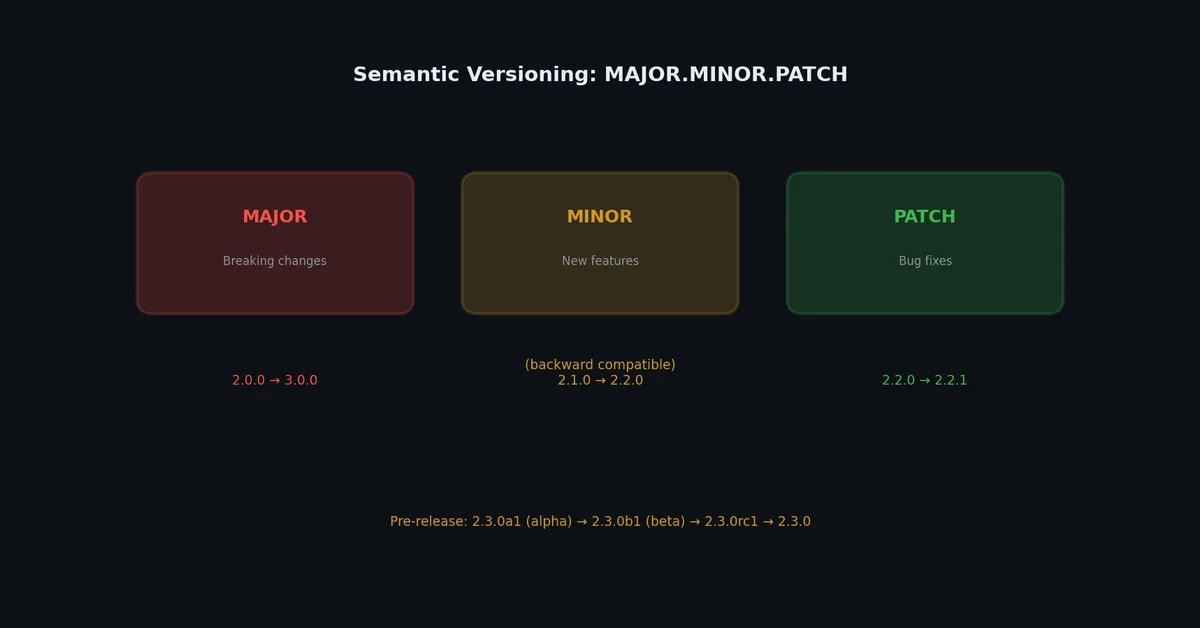
SemVer (Semantic Versioning)# The standard format: MAJOR.MINOR.PATCH
Component Increment When Example MAJOR Breaking API changes 1.0.0 -> 2.0.0 MINOR New features, backward compatible 1.0.0 -> 1.1.0 PATCH Bug fixes, backward compatible 1.0.0 -> 1.0.1
Pre-release versions: 1.0.0a1 (alpha), 1.0.0b1 (beta), 1.0.0rc1 (release candidate).
Setting the Version# Option 1: Single source of truth in pyproject.toml
1
2
[ project ]
version = "0.1.0"
Access at runtime:
1
2
3
from importlib.metadata import version
__version__ = version ( "my-tool" )
Option 2: __version__ in __init__.py
1
2
# src/my_tool/__init__.py
__version__ = "0.1.0"
Reference in pyproject.toml:
1
2
3
4
5
[ project ]
dynamic = [ "version" ]
[ tool . setuptools . dynamic ]
version = { attr = "my_tool.__version__" }
Option 3: Dynamic versioning from git tags
1
( .venv) $ pip install setuptools-scm
1
2
3
4
5
6
7
[ build-system ]
requires = [ "setuptools>=68.0" , "setuptools-scm>=8.0" ]
[ project ]
dynamic = [ "version" ]
[ tool . setuptools_scm ]
Version is derived from git tags:
1
2
3
$ git tag v0.1.0
$ python -m build
# Package version is 0.1.0
Real Example: Package and Publish# Here is the complete workflow for publishing the downloader tool from earlier in this series:
 1
 2
 3
 4
 5
 6
 7
 8
 9
10
11
12
13
14
15
16
17
18
19
20
21
22
23
24
25
26
27
28
29
30
31
32
33
34
35
36
37
38
39
40
41
42
43
# 1. Verify tests pass
( .venv) $ pytest -v --cov= my_tool
========================= 14 passed in 0.45s ==========================
# 2. Verify linting
( .venv) $ ruff check src/ tests/
All checks passed!
# 3. Verify type checking
( .venv) $ mypy src/
Success: no issues found
# 4. Build
( .venv) $ python -m build
# 5. Check the built package
( .venv) $ twine check dist/*
Checking dist/my_tool-0.1.0-py3-none-any.whl: PASSED
Checking dist/my_tool-0.1.0.tar.gz: PASSED
# 6. Test install in a fresh venv
$ python -m venv /tmp/test-install
$ source /tmp/test-install/bin/activate
( test-install) $ pip install dist/my_tool-0.1.0-py3-none-any.whl
( test-install) $ my-tool --help
Usage: my-tool [ OPTIONS] URL
...
( test-install) $ deactivate
# 7. Upload to TestPyPI first
( .venv) $ twine upload --repository testpypi dist/*
# 8. Test from TestPyPI
$ pip install --index-url https://test.pypi.org/simple/ my-tool
$ my-tool --version
my-tool 0.1.0
# 9. Upload to real PyPI
( .venv) $ twine upload dist/*
# 10. Tag the release
$ git tag -a v0.1.0 -m "Release 0.1.0"
$ git push origin v0.1.0
Automating with GitHub Actions# 1
2
3
4
5
6
7
8
9
10
11
12
13
14
15
16
17
18
19
20
21
22
23
24
25
26
27
28
29
30
31
32
33
# .github/workflows/publish.yml
name : Publish to PyPI
on :
release :
types : [ published]
jobs :
publish :
runs-on : ubuntu-latest
permissions :
id-token : write # Required for trusted publishing
steps :
- uses : actions/checkout@v4
- name : Set up Python
uses : actions/setup-python@v5
with :
python-version : "3.11"
- name : Install dependencies
run : |
python -m pip install --upgrade pip
pip install build
- name : Build
run : python -m build
- name : Publish to PyPI
uses : pypa/gh-action-pypi-publish@release/v1
# Uses trusted publishing (no API token needed)
With trusted publishing, you configure PyPI to trust your GitHub Actions workflow. No API tokens to manage.
What’s Next# Your package is published and installable. But is it fast enough? In the next article, we will profile Python code to find bottlenecks, apply caching and vectorization, and learn the crucial skill of knowing when optimization matters and when it does not.