Operating System Fundamentals: A Deep Dive
Walk through processes, virtual memory, file systems, the I/O stack, system calls and schedulers, with the actual numbers and the commands you can verify each claim with on a Linux box.
Open a terminal and type cat hello.txt. The instant you press Enter, at least seven layers of machinery wake up: bash parses the line, fork+execve launches the cat process, the kernel hands it a virtual address space, cat issues a read() syscall, the CPU traps into kernel mode, VFS dispatches to ext4, the block layer queues an NVMe request, the SSD DMA-writes the bytes back, an interrupt wakes cat, the bytes are copied through the page cache into the user buffer, and finally something appears on your screen.
This entire round trip takes about 100 microseconds. You see only the final result. This article aims to break down this path layer by layer, so the next time you debug a strange permission, a stuck process, or unexplained latency, you can pinpoint exactly which layer is responsible.
What You Will Learn#
- Explain monolithic vs microkernel honestly, and why Linux still has not gone microkernel after thirty years.
- Read a
D/S/R/Zinpsoutput and say which slot in the process lifecycle it sits in and what event releases it. - Trace one variable access through the MMU, TLB, page table, page-fault handler, and (if needed) swap, and quote the latency at each level.
- Read
ls -lioutput and explain the inode, nlink, and blocks columns — including whyrmsometimes does not free space. - Follow one
read()syscall from glibc all the way down to an NVMe submission queue, and locate “why is this I/O slow” at the right layer. - Compare FCFS, SJF, Round Robin and CFS, and articulate why Linux chose CFS over RR.
Prerequisites#
- Some C, or enough Python to have called
os.read/os.fork. - Comfortable on Linux: you know what
top,ps,strace, and/procare for. - Having read OSTEP helps but is not required.
What an operating system actually does#
The name “operating system” is misleading — it sounds monolithic, but it is really a pile of code solving one fundamental problem: multiple things sharing one machine. If only one program ever ran, only one user ever logged in, and hardware never failed, you could delete most of the kernel. The OS is complex because reality is not that:
- CPU has dozens of cores, but hundreds of processes want to run -> scheduler.
- Physical memory is tens of GB, but every process wants to think it owns the machine -> virtual memory.
- Thousands of hardware models exist, but apps don’t want to know NVMe vs SATA -> drivers + VFS.
- Many processes share files, memory, and sockets, but must not corrupt each other -> permissions + isolation.
Keep these four in mind, and every section below builds on them. We start with the kernel architecture and move outward: processes, memory, files, I/O, system calls, and scheduling.
Kernel architecture: monolithic vs microkernel#

“Kernel mode” and “user mode” are CPU hardware features (ring 0 vs ring 3 on x86). In kernel mode you can execute privileged instructions, touch any physical memory, and control interrupts. In user mode you cannot — your browser, your database, your shell all run in ring 3 and must borrow access to hardware through the kernel.
Once that line is drawn, the question is: how much code goes on the kernel side? This is the monolithic vs. microkernel distinction.
Monolithic: stuff everything in#
Linux, FreeBSD, and Windows NT (technically a hybrid) take this approach. Scheduler, memory management, file systems, the TCP/IP stack, and device drivers all reside in the kernel address space and call each other as plain functions, with no isolation overhead.
- Pro: fast. A file system module passing data to the network stack is a simple function call. No boundary cost.
- Con: fragile. Any driver crash equals a kernel panic. About 70% of the Linux source is drivers; every new piece of hardware introduces a new risk.
- Mitigation: modules. Linux ships drivers as loadable modules (
*.ko) that youinsmod/rmmodat runtime. But modules still live in the kernel address space — a buggy module can still crash the kernel; modules just decouple build and shipping.
Microkernel: only the bare essentials#
Mach, L4, seL4, and QNX take the other approach. The kernel retains only inter-process communication (IPC), the scheduler, and minimal memory management. File systems, network stacks, and drivers all run as ordinary user-mode processes.
- Pro: isolation. A NIC driver crash is a user process crash; restart it, kernel is fine. seL4 has even been formally proven correct: under its specification, the kernel cannot crash.
- Con: slow. What used to be a function call (“open this file”) now involves app -> kernel IPC -> file server -> kernel IPC -> block service. Each step requires a context switch.
- Where they live in production: QNX has run cars, medical devices, and industrial controllers for decades; macOS / iOS use XNU, which is Mach (microkernel) plus a BSD layer (monolithic) glued together. Pure microkernels remain a minority on general-purpose desktops and servers.
Why Linux did not switch#
In the famous Tanenbaum-vs-Linus debate of 1992, Tanenbaum argued that Linux’s monolithic design was already obsolete. Thirty years later, Linux is still monolithic. The reasons are unromantic:
- Performance numbers. Even L4-class IPC is an order of magnitude more costly than a function call.
- Ecosystem inertia. Rewriting hundreds of thousands of Linux drivers as user-mode services is a non-starter.
- “Good enough” middle paths. KASLR (kernel address space randomization), module signing, eBPF (sandboxing untrusted code in the kernel), and FUSE (user-mode file systems) all let monolithic kernels approximate microkernel-style isolation in the cases that matter.
Once this picture is in your head, every kernel oops or BSOD is “the cost of monolithic”; every piece of hardware that crashes without taking down the system (your phone’s Wi-Fi driver restarting silently) is “microkernel ideas leaking in”.
Processes and the state machine#
A process is the OS’s accounting unit for a “running program”. Each one has its own address space, file descriptor table, signal handler table, CPU context (registers), and scheduling state. When the OS decides to take one off the CPU and put another on, it saves the first’s registers to memory and restores the second’s from memory — that is a context switch, about 1-5 microseconds each.
Five-state lifecycle#

At any instant, every process is in exactly one of five states:
| State | ps letter | Meaning | Event that releases it |
|---|---|---|---|
| NEW | (transient) | Being created (between fork and execve) | Kernel finishes setup -> READY |
| READY | R (Runnable) | Everything ready, waiting for CPU | Scheduler picks me -> RUNNING |
| RUNNING | R (actually on CPU) | Executing user or kernel code | Time slice up / blocking syscall / exit |
| BLOCKED | S (interruptible) / D (uninterruptible) | Waiting on I/O, lock, child | Event arrives -> READY |
| TERMINATED | Z (Zombie) | Done, but PCB still around for parent’s wait() | Parent reaps exit code -> gone |
Two non-obvious facts worth memorising:
- READY and RUNNING both show as
Rin ps. Linux merges “could run” with “is running” because the time resolution is too short to be meaningful. Dstate cannot be killed. Not even withkill -9. ADprocess is stuck inside the kernel waiting on a hardware operation that cannot be cancelled (typically NFS or a hung disk). Lots ofDprocesses? Your first suspect is the storage or network layer.
The real cost of a context switch#
| |
Direct cost is 1-5 us (saving and restoring registers, switching the page table, updating scheduler stats). Indirect cost is cache pollution — the new process’s working set has to be reloaded into L1/L2, which can add tens of microseconds. So threads vastly outnumbering cores almost always loses, not because the CPU runs out, but because switching burns time.
Process vs thread vs coroutine#
These three words get muddled daily. One sentence each:
- Process: separate address space. Best isolation, most expensive to create (fork has to clone page tables).
- Thread: same address space. Sharing memory is trivial, but you own the synchronisation. On Linux a thread is just a “process that shares more things” —
clone()is the single underlying syscall, and what is shared is a flag. - Coroutine: user-mode scheduling. The OS does not see them. No syscall overhead, but the program must voluntarily yield (
await). One machine can run hundreds of thousands.
| Dimension | Process | Thread | Coroutine |
|---|---|---|---|
| Scheduler | OS kernel | OS kernel | User-mode runtime |
| Switch cost | ~5 us | ~3 us | ~100 ns |
| Memory isolation | Strong | None (same proc) | None |
| Best for | Multiple services, security boundary | CPU-bound + shared memory | High-concurrency I/O |
Virtual memory: every process believes it owns the machine#

Letting processes touch physical addresses directly has three unsolvable problems:
- Conflict. Two programs both want address 0x1000. Who wins?
- Isolation. Can process A read process B’s password?
- Overcommit. 32 processes each want 4 GB; the machine has 16 GB.
Virtual memory dissolves all three. Each process gets its own virtual address space (256 TB on 64-bit), and a hardware MMU plus a kernel-maintained page table translates virtual addresses to physical ones at every access.
The translation#
Addresses are split into pages (typically 4 KiB). A virtual address is [VPN | offset]; the page table maps VPN to a PFN (physical frame number); the physical address is [PFN | offset].
- TLB (Translation Lookaside Buffer): a small cache on the MMU, hundreds to a few thousand entries. A hit is one cycle; a miss walks the page table (4-level table = 4 memory accesses, ~100 cycles).
- Multi-level page tables: a flat 64-bit page table would take petabytes. Linux now uses 5-level page tables (PML5), expanded on demand so only the actually-used virtual address ranges have entries.
- PTE flag bits: R/W/X (permissions), Present (is the page in RAM?), Dirty, Accessed, User/Supervisor. All of memory safety and most of memory optimisation rests on these bits — COW, mmap, swap, KSM all use them.
The page-fault path#
If a PTE has Present=0, the CPU raises a page fault and jumps into the kernel. Three common cases:
- Minor fault (lazy allocation). The process
malloc’d 1 GB but never touched it — the kernel allocates a physical page now, fills in the PTE, returns. Microseconds. - Major fault (swap-in). That page is on disk in swap. Read it back. Milliseconds.
- Segfault (illegal access). The address is not in any legal mapping for this process. Kernel raises SIGSEGV; the process usually dies.
| |
maj_flt climbing means active swapping; performance will collapse. That is the hard signal that the machine is “in swap”, much more direct than reading the free column.
Things you use every day that are silently virtual memory#
fork()’s copy-on-write. Fork does not actually copy 4 GB. It marks every page in both parent and child as read-only and shared; the first writer triggers a fault and only that page gets copied.mmap()-ing a file. You think you are reading memory; the OS is reading the disk on demand./usr/bin/pythonmapped by every Python process points to the same physical pages.- OOM killer. When physical + swap runs out, the kernel picks the process with the highest “score” and shoots it.
/proc/<pid>/oom_scoredecides who dies. - Huge pages. Bumping page size from 4 KiB to 2 MiB or 1 GiB makes a single TLB entry cover 512x more memory. Databases (PostgreSQL, Redis) routinely enable this.
Latency hierarchy worth memorising:
| Event | Time | Slowdown |
|---|---|---|
| L1 cache hit | 1 ns | 1x |
| TLB hit + L1 hit | ~1 ns | 1x |
| TLB miss + page walk | ~30 ns | 30x |
| RAM access | ~100 ns | 100x |
| Page fault (minor, no I/O) | ~1 us | 1,000x |
| Page fault (major, SSD swap) | ~80 us | 80,000x |
| Page fault (major, HDD swap) | ~10 ms | 10,000,000x |
“Slow” comes in orders of magnitude. The first step of any optimisation is naming which order of magnitude you are stuck in.
File systems: name, metadata, and data are three different things#

Most users think “a file = some bytes + a name”. The kernel splits it into three layers:
- Directory entry (dirent): name -> inode number. A directory is just a special file containing a list of dirents.
- Inode: metadata + pointers to data blocks. No name lives here.
- Data block: where the bytes actually live, usually 4 KiB chunks.
This three-layer split is the heart of Unix file system design and explains a pile of otherwise-puzzling behaviours.
Why is mv instant within the same partition?#
mv a.txt b.txt: the only change is “a.txt -> ino 42” becoming “b.txt -> ino 42” in the directory. The inode does not move. The data does not move. Zero bytes copied. Across partitions it is a real copy because each file system has its own independent inode table.
Why does rm not always free space?#
rm removes the dirent and decrements nlink. The inode (and its blocks) are released only when nlink hits 0 AND no process still has the file open.
| |
This is the canonical “disk full but I cannot find the big file”: a log got rotated and unlinked, but the application still has the file descriptor open and is still writing. Restarting that application releases the space.
Hard link vs symlink#
- Hard link (
ln a b): another name on the same inode.nlink++. Deleting either name leaves the other intact. Cannot cross partitions (inode numbers are partition-local) and cannot link directories (would create cycles). - Symlink (
ln -s a b): a separate inode whose contents are just a path string. Crosses partitions, can point at non-existent targets (dangling), breaks if the target moves.
| |
Block pointers: how a fixed-size inode addresses huge files#
A classic Unix inode has 12 direct block pointers, 1 single-indirect, 1 double-indirect, 1 triple-indirect. With 4 KiB blocks:
- direct: 12 * 4 KiB = 48 KiB
- single indirect: (4 KiB / 4 B) * 4 KiB = 4 MiB
- double indirect: ~4 GiB
- triple indirect: ~4 TiB
Most files are small (< 48 KiB) and resolve in zero extra reads. Big files cost 1-3 extra reads to find any 4 KiB inside. Classic “optimise the common case”.
Modern file systems (ext4, xfs, btrfs, ZFS) replace per-block pointers with extents (contiguous ranges) to shrink metadata further, but the structural idea — inode is metadata + locator — is unchanged.
VFS: everything that looks like a file#
Linux puts a VFS (Virtual File System) layer on top, so all file systems, network mounts, and pseudo file systems expose the same open/read/write/seek/close API. That is why you can:
cat /proc/cpuinfoto read CPU info (procfs, totally synthesised)cat /sys/class/net/eth0/addressto get the MACecho mem > /sys/power/stateto suspend the machine- Use FUSE to mount a remote SSH directory as a local path
“Everything is a file” is not a slogan. It is the engineering output of VFS.
The I/O subsystem: one read() drills down seven layers#
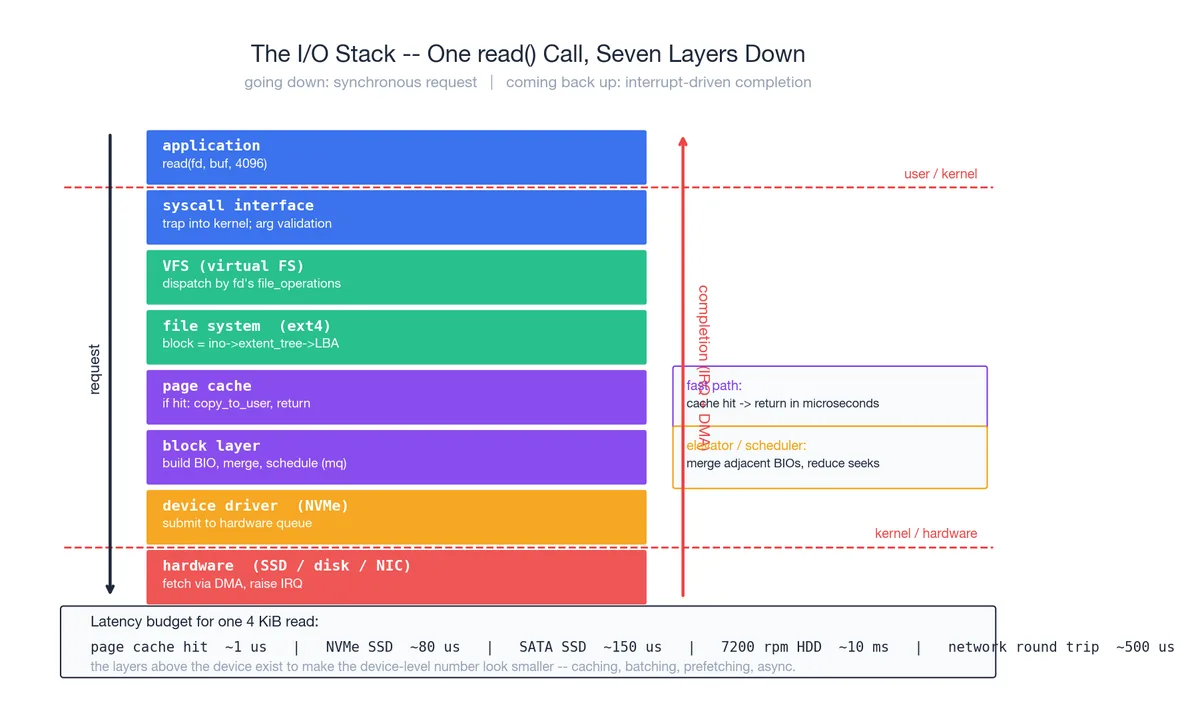
read(fd, buf, 4096) looks like one line of code. It is a seven-layer descent followed by an interrupt-driven completion. Layer by layer:
- Application. Calls glibc’s
read()wrapper. - Syscall interface. Wrapper sets up registers, executes
syscall, CPU drops to ring 0, lands atentry_SYSCALL_64. - VFS. Uses fd to find
struct file *, dispatches via itsfile_operations.readto the right file system. - File system (ext4). Translates file offset to block number via the inode’s extent tree.
- Page cache. Is this block already in memory? Hit ->
copy_to_user(buf)and return in microseconds. This is the path 99% of hot data takes. - Block layer. Miss. Build a BIO (block I/O descriptor), hand to the block-layer scheduler. The scheduler merges adjacent BIOs (elevator / mq-deadline / kyber) to cut seeks.
- Device driver. NVMe driver translates BIO into NVMe commands, posts to a hardware submission queue.
- Hardware. SSD controller executes the command, DMA’s data straight into a kernel-allocated physical page (no CPU involvement), then raises an interrupt.
The interrupt handler copies the data into the user buf and wakes the sleeping process. Control returns to the read() caller.
Why so many layers#
Each layer abstracts something real:
| Layer | Abstracts |
|---|---|
| Syscall interface | User/kernel privilege boundary |
| VFS | Differences between file systems |
| File system | Byte stream -> on-disk blocks |
| Page cache | Slow device + fast memory speed gap |
| Block layer | Reordering for device efficiency |
| Driver | Hardware-specific command sets |
Strip a layer and the application has to solve the abstraction itself. That is why bypassing the OS to write your own database engine does not magically make it faster — the OS already encodes decades of these optimisations.
Sync, async, io_uring#
Classic read() is synchronous-blocking: the caller is parked until data arrives. Fine for one-thing-at-a-time programs; fatal for a server juggling 10,000 connections (10,000 threads -> context-switch storm).
The historical answers:
select/poll/epoll: one thread watches many fds and learns which are ready. Tells you when read() will not block; the read itself is still synchronous.aio: Linux’s earlier real-async API. Direct-I/O only, buggy, never quite caught on.io_uring(Linux 5.1+): the modern answer. User space and kernel share two ring buffers (submission and completion); one syscall can submit dozens of I/Os; the kernel posts results to the completion ring; user space reads them back. Syscall counts drop dramatically. It is now the default for high-performance I/O libraries (QUIC servers, next-generation databases).
Diagnosing “slow I/O” top-down#
| |
Walk it from app to device. Common trap: you see CPU is 5% busy and assume the box is idle — it might be entirely waiting on I/O. The wa column in vmstat is the truth.
System calls: the only legal cry for help from user mode#

A user-mode program that wants to do anything privileged (read a file, send a packet, allocate memory, fork) must go through a system call. This is the bedrock of OS security: the CPU literally refuses certain instructions in ring 3, and the only way to switch to ring 0 is a trap instruction — syscall, int 0x80, sysenter.
Steps in one syscall#
- C library wrapper.
read(fd, buf, n)in your code is a plain glibc function. - Register setup. glibc puts the syscall number in
rax(Linux x86_64 convention), arguments inrdi,rsi,rdx,r10,r8,r9. syscallinstruction. CPU saves RIP/RSP/EFLAGS to MSRs, switches to ring 0, jumps to the kernel’s pre-registeredentry_SYSCALL_64.- Dispatch. Kernel uses
raxas an index intosys_call_table, jumps to the right kernel function (sys_read). - Execute. Walk VFS, file system, block layer … (chapter 6).
- Return. Result in
rax,sysretflips back to ring 3.
The real cost of a syscall#
A no-op syscall (a getpid() that does nothing) is ~100 ns on a modern CPU. Sounds small, but in context:
- Plain function call: ~1 ns. A syscall is 100x more expensive than a function call.
- Cache impact: mode switch pollutes L1/L2; subsequent IPC drops for a few hundred instructions.
- Spectre/Meltdown mitigations (KPTI): page tables are flushed across the boundary, adding 30-50%.
This is exactly why every high-performance I/O library batches syscalls: sendmmsg (many packets per call), io_uring (many I/Os per call), vmsplice (move pages directly). The whole game is amortising those 100 ns.
strace as your microscope#
| |
For most performance investigations, strace -c tells you the bottleneck in 30 seconds. read 80% -> I/O bound. futex 80% -> lock contention. epoll_wait 80% -> probably healthy (waiting on events).
Schedulers: four policies, the same workload#

The scheduler decides who gets the CPU next. Run the same three jobs (P1 burst=8, P2 burst=4, P3 burst=2, arriving in order) through four classic policies and the contrast jumps out.
FCFS — first come first served#
Whoever arrives first runs to completion. One line of code to implement. The pathology is the convoy effect: one CPU-bound long job in front and every short job behind it starves. In the diagram, P3 doesn’t even start until t=12, and the average wait is 5.67.
Use case: batch back-end. Never use for interactive systems.
SJF — shortest job first#
Always pick the runnable job with the smallest remaining burst. Provably optimal average wait time. Two real problems:
- Who knows future bursts? You don’t. You can only estimate via history (Linux’s old nice + ageing).
- Starvation. A long job may never run if short jobs keep arriving.
Round Robin — time-slice rotation#
Each process runs for a fixed quantum (typically 10-100 ms), then is preempted to the back of the queue. No starvation, even response. This is what made early time-sharing possible — 20 people sharing one machine without any of them feeling the others.
The whole game is choosing the quantum:
- Too small (< 1 ms): switching overhead dominates, throughput tanks.
- Too large (> 1 s): interactive feel dies, long jobs camp the CPU, degenerates to FCFS.
In the diagram, quantum=2 gives average wait 4.33.
CFS — Linux today#
Linux switched to CFS (Completely Fair Scheduler) in 2.6.23. Core idea: maintain a vruntime for each process; always schedule the smallest one. vruntime is weighted by nice value — niced-down processes accumulate vruntime faster, so they run less often.
Implementation:
- vruntime is kept in a red-black tree; picking the smallest is O(log n).
- No fixed quantum — divide a target latency (say 6 ms) by the number of runnable tasks. 8 runnables -> 0.75 ms each.
- I/O-bound processes spend most of their time asleep, so their vruntime barely grows — meaning they automatically get high priority when they wake up. Interactivity falls out for free, with no special “interactive class”.
In the diagram, CFS finishes with the lowest and most even waits (4.0). The short P3 is done in one unit of waiting.
Linux 6.6 (2024) introduced EEVDF (Earliest Eligible Virtual Deadline First), a CFS successor that handles modern NUMA + many-small-tasks workloads better. Same lineage, different bookkeeping.
Real-time scheduling#
CFS is fair, not real-time. For audio/video, robotics, automotive, Linux also has:
SCHED_FIFO: strict priorities; the highest-priority RT task runs until it blocks or yields.SCHED_RR: same priority round-robined.SCHED_DEADLINE(3.14+): you declare (runtime, deadline, period); the kernel guarantees you that runtime before each deadline. EDF-based.
| |
Stitching the seven figures back together: one full cat hello.txt#
Back to the opening example, narrated with everything we have built:
- bash parses -> calls
fork(). Kernel allocates a PCB, COW-clones the address space (instant). Both parent and child return. - Child calls
execve("/bin/cat", ...). Wipes its current address space, mmaps cat’s text segment, loads the dynamic linker, jumps into main(). Many minor page faults follow — cat’s code pages are populated lazily. - cat calls
open("hello.txt")-> syscall (user/kernel transition, ~100 ns) -> VFS -> ext4 -> finds the dirent “hello.txt -> ino 1234” -> reads inode 1234 -> returns an fd. - cat calls
read(fd, buf, 4096)-> syscall -> VFS -> ext4 -> file offset 0 maps to LBA 19528 -> page cache lookup: miss -> build BIO -> block layer -> NVMe driver -> hardware DMA writes 4096 bytes into a kernel page. - Interrupt fires. cat is moved BLOCKED -> READY. CFS picks it. Context switch. Kernel runs
copy_to_user(buf, page, 4096). Returns to user mode. - cat calls
write(1, buf, n)-> syscall -> VFS -> /dev/pts/0 (pseudo terminal) -> tty subsystem -> terminal emulator -> screen. - cat calls
_exit(0)-> syscall -> kernel reclaims resources, parks the exit code in the PCB (now ZOMBIE) -> bash’swait()reaps it.
In total: 4 main syscalls, several page faults, one full NVMe round trip, several context switches, several CFS scheduling decisions. Every step maps to one of the figures above. That is what “understanding the OS” means — not memorising terminology, but watching a concrete action and being able to name what is happening at every level beneath it.
Where to read next#
In rough order of how deep you want to go:
- Entry: Operating Systems: Three Easy Pieces (OSTEP, free online — strongly recommended).
- Linux internals: Understanding the Linux Kernel (older but classical); Linux Kernel Development by Robert Love (newer, more readable).
- Performance lens: Brendan Gregg’s Systems Performance and his website — the bible of modern systems performance.
- Microkernel / formal verification: the seL4 paper, seL4: Formal Verification of an OS Kernel.
- Hands on: xv6 (MIT’s 6.S081 teaching kernel) — 10k lines of C and you have a real multi-process kernel running.
- Linux subsystems: the in-tree
Documentation/directory is the most underrated reference;/procand/sysare the live documentation.
The lovely thing about operating systems is that the concepts have been stable for fifty years. The process model, virtual memory, and file system abstractions you learn today were just as true in 1985 BSD and will almost certainly still be true in 2050. Few subjects pay back the time investment as well.