System Design (1): Thinking in Systems — Load, Latency, and the Art of Estimation
Learn the foundational skills of system design: back-of-envelope estimation, availability math, SLA definitions, and a repeatable framework for tackling any design problem.
A friend once asked me to help debug a performance problem. Their photo-sharing app worked fine in development but collapsed under production traffic. The database was melting, the API gateway was timing out, and users were seeing 504 errors. When I asked how many requests per second the system was handling, the answer was “I don’t know.” When I asked what the expected load was, the answer was “I didn’t think about that.”
That conversation captures the core reason system design matters. It is not about drawing boxes and arrows on a whiteboard. It is about building the mental models that let you reason about systems before they break.
What System Design Actually Is#
System design is the process of defining the architecture, components, modules, interfaces, and data flow of a system to satisfy specified requirements. But that textbook definition misses the point. In practice, system design is the discipline of making informed trade-offs under uncertainty.
Every system design decision involves a trade-off:
- More caching means lower latency but harder consistency
- More replicas mean higher availability but more operational complexity
- More microservices mean independent deployability but distributed systems headaches
- Stronger consistency guarantees mean higher latency and lower throughput
- More data denormalization means faster reads but harder writes
The goal is never perfection. The goal is understanding the consequences of your choices before you commit to them.
System Design Beyond Interviews#
System design is often framed as an interview skill. That framing undersells it. The same thinking applies every time you:
- Choose between a SQL and NoSQL database for a new service
- Decide whether to add a cache or scale up the database
- Evaluate whether your system can handle a 10x traffic increase from a marketing campaign
- Propose a migration plan from a monolith to microservices
- Debug a production outage caused by a cascading failure
The difference between a junior engineer and a senior engineer is often not coding ability — it is the ability to reason about systems at scale. A junior engineer builds a feature. A senior engineer asks: “What happens when 10,000 users hit this feature simultaneously? What happens when the downstream service is slow? What happens when the database is full?”
The Core Principles#
Before diving into estimation techniques, here are the principles that underpin every good system design:
Scalability: The system can handle growth — more users, more data, more requests — without a fundamental redesign. Scalability comes in two flavors: vertical scaling (bigger machines) and horizontal scaling (more machines). Horizontal scaling is almost always preferred because it has no ceiling and provides redundancy.
Reliability: The system continues to work correctly even when things go wrong — hardware failures, software bugs, operator errors, traffic spikes. Reliability is built through redundancy, fault isolation, and graceful degradation.
Maintainability: The system can be understood, modified, and operated by the team over time. This means clean abstractions, good monitoring, simple deployment procedures, and clear documentation. A system that works perfectly but cannot be debugged when something goes wrong is not well-designed.
These three qualities are often in tension. A highly scalable system may be harder to maintain (more moving parts). A highly reliable system may sacrifice some performance (consensus protocols add latency). System design is the art of finding the right balance for your specific context.
Back-of-Envelope Estimation#
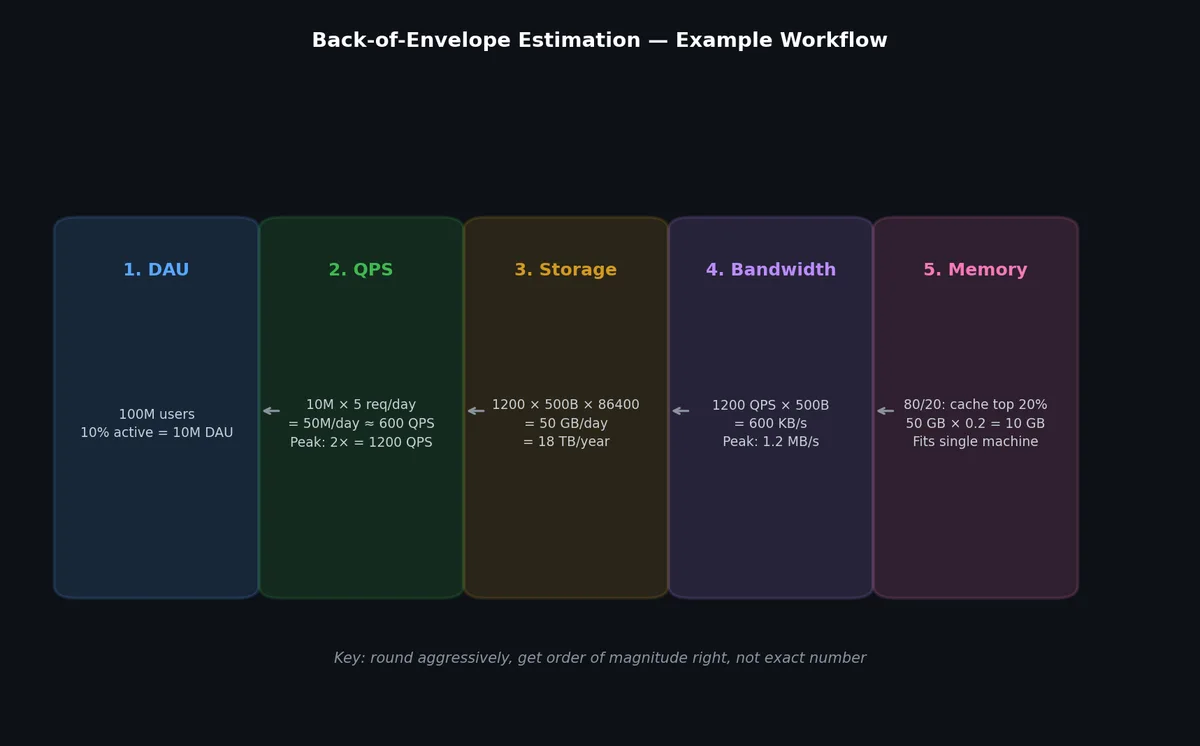
The single most valuable system design skill is the ability to estimate quantities quickly and approximately. You do not need exact numbers. You need order-of-magnitude correctness. Being off by 2x is fine. Being off by 100x means your architecture is wrong.
Powers of 2#
Memorize these. They come up constantly when reasoning about storage, memory, and network capacity.

| Power | Exact Value | Approximate |
|---|---|---|
| 2^10 | 1,024 | 1 Thousand (1 KB) |
| 2^20 | 1,048,576 | 1 Million (1 MB) |
| 2^30 | 1,073,741,824 | 1 Billion (1 GB) |
| 2^40 | ~1.1 Trillion | 1 Trillion (1 TB) |
| 2^50 | ~1.1 Quadrillion | 1 Petabyte (1 PB) |
Latency Numbers Every Programmer Should Know#
These numbers, originally compiled by Jeff Dean and updated over the years, form the foundation of performance reasoning. The exact values shift with hardware generations, but the relative magnitudes stay remarkably stable.

| Operation | Latency | Notes |
|---|---|---|
| L1 cache reference | 0.5 ns | On-die, practically free |
| L2 cache reference | 7 ns | Still on-die, 14x L1 |
| Main memory reference | 100 ns | Off-die, but local |
| SSD random read | 16 us | 150x memory |
| HDD random read | 2 ms | 20,000x memory |
| Send 1 KB over 1 Gbps network | 10 us | Network is fast for small payloads |
| Read 1 MB sequentially from memory | 250 us | Memory bandwidth is high |
| Read 1 MB sequentially from SSD | 1 ms | SSD sequential is good |
| Read 1 MB sequentially from HDD | 20 ms | HDD sequential is acceptable |
| Round trip within same datacenter | 500 us | Network hop cost |
| Round trip cross-continent | 150 ms | Speed of light matters |
The key takeaways from this table:
- Memory is 100-1000x faster than disk for random access
- Sequential access is dramatically faster than random access on all media
- Network round trips within a datacenter are cheap (0.5 ms)
- Cross-region network calls are expensive (150 ms)
- Caching in memory eliminates the most expensive operations
Time Unit Conversions#
Keep these handy for estimation:
| |
Storage Estimation#

Here is the general process for estimating storage requirements.
Step 1: Identify daily active users (DAU)
Start with a product assumption. For a new photo-sharing app, you might assume 10 million DAU.
Step 2: Estimate actions per user per day
Each user might upload 2 photos and view 50 photos per day.
Step 3: Calculate requests per second
| |
Step 4: Estimate storage per item
A single photo might be stored in multiple sizes:
- Original: 2 MB
- Medium: 200 KB
- Thumbnail: 20 KB
- Metadata (JSON): 1 KB
- Total per photo: ~2.2 MB
Step 5: Calculate storage growth
| |
Step 6: Plan for retention and replication
If you keep photos forever and replicate 3x for durability:
- Year 1: 16 PB × 3 = 48 PB raw storage
Now you know you need a distributed object storage system, not a single database server. That single estimation saved you from a fundamentally wrong architecture.
Bandwidth Estimation#
Bandwidth estimation follows directly from your QPS and payload size estimates.
| |
These numbers tell you:
- You need a CDN. No single origin server can serve 8 Gbps of images.
- Write ingestion requires distributed storage with high write throughput.
- Peak traffic (typically 2-5x average) could push read bandwidth to 20-40 Gbps.
Network Capacity Quick Reference#
When estimating bandwidth, it helps to know what common infrastructure can handle:
| Component | Typical Throughput |
|---|---|
| Single NIC (1 GbE) | ~100 MB/sec |
| Single NIC (10 GbE) | ~1 GB/sec |
| Single NIC (25 GbE) | ~2.5 GB/sec |
| Single SSD (NVMe) | ~3 GB/sec sequential read |
| Single HDD | ~200 MB/sec sequential read |
| Redis single instance | ~100K ops/sec, ~1 GB/sec |
| PostgreSQL single instance | ~5K-20K QPS (depends on query) |
| Kafka single broker | ~100 MB/sec per partition |
If your estimated bandwidth exceeds what a single component can handle, you need to distribute the load across multiple instances. This is the core value of estimation: it tells you where you need horizontal scaling before you build anything.
Memory Estimation#
Memory estimation determines how much data you can keep in RAM, which directly impacts caching strategy and cost.
The 80/20 Rule (Pareto Principle)#
In most systems, 20% of the data is responsible for 80% of the requests. Caching that hot 20% in memory can serve 80% of traffic without hitting the database.
| |
The numbers above are illustrative, but they demonstrate why caching is one of the most cost-effective optimizations in system design.
Practical Memory Limits#
| Machine Type | RAM | Typical Use |
|---|---|---|
| Standard cloud instance (r6g.xlarge) | 32 GB | Small cache, single-service |
| Large cloud instance (r6g.4xlarge) | 128 GB | Medium cache, Redis node |
| Extra-large (r6g.16xlarge) | 512 GB | Large in-memory database |
| Redis Cluster (10 nodes) | 320 GB - 5 TB | Distributed cache |
| In-memory database (SAP HANA) | Up to 24 TB | Enterprise analytics |
When your cache memory estimate exceeds what a single machine can handle, you need a distributed cache (Redis Cluster, Memcached). When it exceeds what a cluster can reasonably manage, you need to rethink your caching strategy — perhaps cache only metadata, not full objects.
SLAs, SLOs, and SLIs#
These three terms are often confused. Here is the precise distinction.
SLI (Service Level Indicator): A quantitative measure of some aspect of the service. Examples:
- Request latency (p50, p95, p99)
- Error rate (percentage of 5xx responses)
- Throughput (requests per second)
- Availability (percentage of time the service is up)
SLO (Service Level Objective): A target value or range for an SLI. Examples:
- p99 latency < 200ms
- Error rate < 0.1%
- Availability > 99.9%
SLA (Service Level Agreement): A contract between a service provider and a customer that specifies SLOs and the consequences of missing them. Examples:
- “If monthly availability drops below 99.9%, customer receives 10% credit”
- “If p99 latency exceeds 500ms for more than 1 hour, an incident is declared”
The relationship flows upward: SLIs are measured, SLOs set targets for SLIs, and SLAs formalize SLOs into contractual obligations.
Availability Math#
Availability is expressed as a percentage of uptime over a given period. The industry shorthand uses “nines.”

| Availability | Downtime/year | Downtime/month | Downtime/week |
|---|---|---|---|
| 99% (two nines) | 3.65 days | 7.31 hours | 1.68 hours |
| 99.9% (three nines) | 8.77 hours | 43.83 min | 10.08 min |
| 99.95% | 4.38 hours | 21.92 min | 5.04 min |
| 99.99% (four nines) | 52.60 min | 4.38 min | 1.01 min |
| 99.999% (five nines) | 5.26 min | 26.30 sec | 6.05 sec |
Serial vs Parallel Availability#
When components are in series (all must work for the system to work):
| |
Three nines on each component gives you less than three nines overall. This is why every component in the chain matters.
When components are in parallel (any one working means the system works):
| |
Redundancy dramatically improves availability. Two components at three nines give you six nines combined. This is why replication is the fundamental building block of reliable systems.
The Cost of Nines#
Each additional nine of availability roughly costs 10x more. Going from 99.9% to 99.99% is not a 0.09% improvement. It means reducing your allowable downtime from 8.77 hours/year to 52.6 minutes/year. That demands:
- Automated failover (no human in the loop)
- Multi-region deployment (survive datacenter failures)
- Comprehensive monitoring and alerting
- Automated rollback for bad deploys
- Chaos engineering to find failure modes before they find you
Most applications should target 99.9% to 99.95%. Four nines and above are reserved for critical infrastructure like payment systems and core databases.
Capacity Planning#
Capacity planning is the process of determining the production capacity needed to meet changing demands. Here are the key concepts.
Peak vs Average#
Production systems must handle peak traffic, not average traffic. The ratio between peak and average varies by application:
| Application Type | Peak/Average Ratio |
|---|---|
| E-commerce (normal) | 2-3x |
| E-commerce (Black Friday) | 5-10x |
| Social media | 2-4x |
| Enterprise SaaS | 1.5-2x |
| Gaming | 3-5x |
Headroom#
Never run at 100% capacity. Standard practice is to maintain 30-50% headroom:
| |
Burst Handling#
Even with headroom, traffic spikes can exceed planned capacity. Strategies include:
- Auto-scaling: Add instances based on load metrics (works for stateless services)
- Rate limiting: Shed excess traffic gracefully (return 429 instead of crashing)
- Queue-based load leveling: Accept requests into a queue, process at sustainable rate
- Circuit breakers: Fail fast when downstream services are overwhelmed
The System Design Framework#

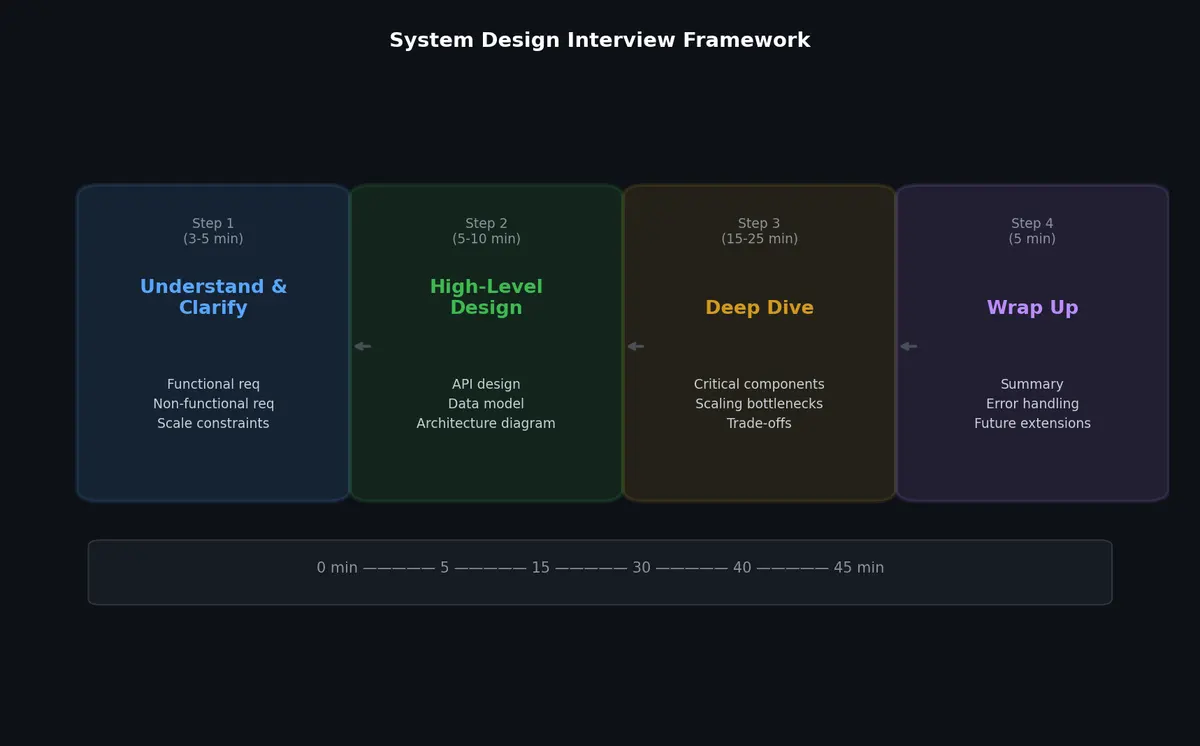
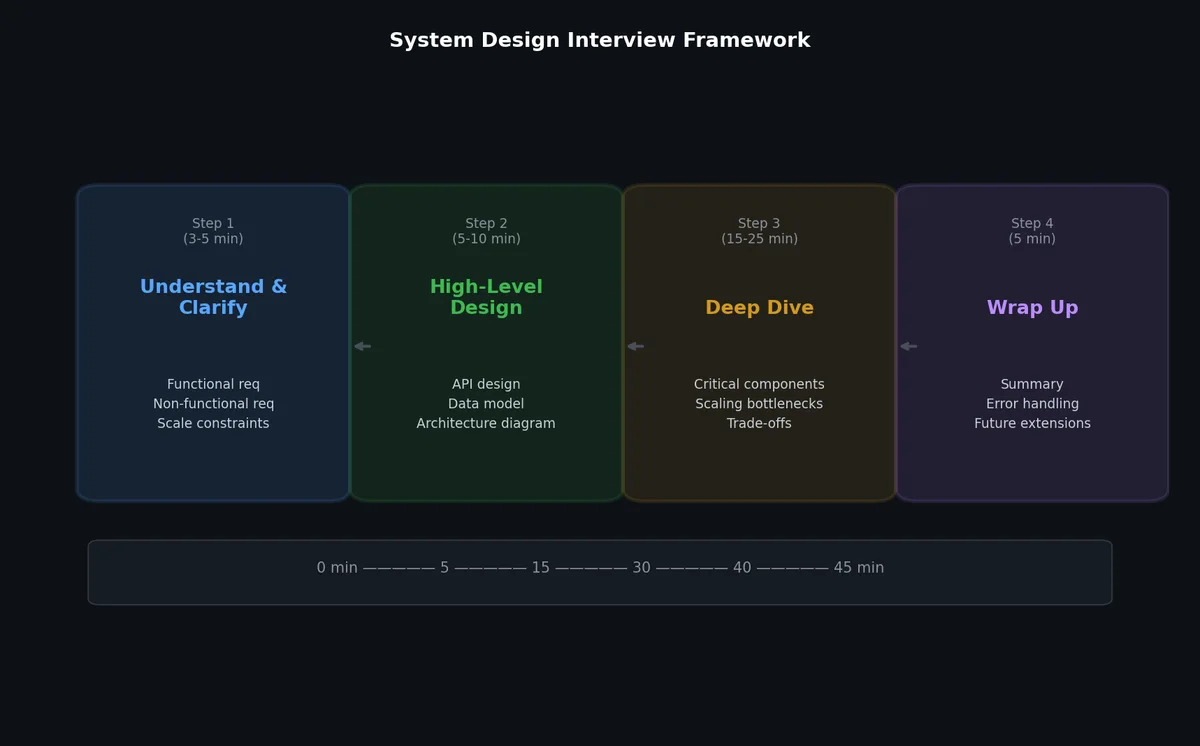
Whether in an interview or a real architectural discussion, a structured approach prevents you from getting lost. Here is a repeatable framework.
Step 1: Clarify Requirements (5 minutes)#
Ask about functional requirements (what the system does) and non-functional requirements (how well it does it).
Functional:
- What are the core features?
- Who are the users?
- What are the inputs and outputs?
Non-functional:
- What is the expected scale (users, requests, data volume)?
- What are the latency requirements?
- What availability level is needed?
- What consistency model is acceptable?
Step 2: Back-of-Envelope Estimation (5 minutes)#
Calculate:
- QPS (read and write separately)
- Storage requirements (daily, monthly, yearly)
- Bandwidth requirements
- Memory requirements (for caching)
Step 3: High-Level Design (10 minutes)#
Sketch the main components:
- Client layer
- API layer (what endpoints, what protocol)
- Application layer (business logic)
- Data layer (database, cache, object storage)
- Supporting infrastructure (queues, search, CDN)
Describe the data flow for the primary use case end to end.
Step 4: Deep Dive (15 minutes)#
Pick 2-3 components and go deep:
- Database schema design
- Caching strategy
- Data partitioning
- Replication and consistency
- API design details
Step 5: Identify Bottlenecks and Improvements (5 minutes)#
- Single points of failure and how to eliminate them
- Performance bottlenecks and how to optimize
- Monitoring and alerting strategy
- Future scaling considerations
Real Example: Estimating Requirements for a Photo Sharing App#
Let us walk through a complete estimation for a photo-sharing application similar to Instagram.
Requirements#
Functional:
- Upload photos
- View a feed of photos from followed users
- Follow/unfollow users
- Like and comment on photos
Non-functional:
- 500 million total users, 100 million DAU
- Each user uploads 1 photo per day on average
- Each user views their feed 10 times per day, seeing ~20 photos per view
- Photos should load within 200ms
- Availability: 99.9%
- Eventual consistency is acceptable for feed updates
Estimation#
Write QPS (uploads):
| |
Read QPS (feed views):
| |
This is a read-heavy system with a read:write ratio of about 200:1.
Storage:
| |
Bandwidth:
| |
920 Gbps of read bandwidth is enormous. This confirms we need:
- A multi-region CDN to serve images from edge locations
- Aggressive caching of popular photos
- Multiple layers of caching (CDN, application-level, database-level)
Memory for cache: Following the 80/20 rule (20% of photos generate 80% of traffic), we cache the hot set:
| |
200 GB of cache is feasible across a cluster of Redis instances (say, 10 machines with 32 GB RAM each, leaving headroom for Redis overhead).
Architecture Summary#
Based on these estimates, the system needs:
- Object storage (S3/GCS) for photo files — no relational database can handle 91 PB/year
- CDN for read path — 920 Gbps cannot come from origin servers
- Distributed cache (Redis cluster) — 200 GB hot set for photo metadata
- Relational database for user data, follow relationships, likes — relatively small data
- Message queue for async operations — feed generation, notifications, image processing
- Search/indexing for discovery features
The estimation drove us toward the right architecture without drawing a single diagram. That is the power of back-of-envelope math.
Common Estimation Mistakes#
Forgetting about peaks: Average QPS is meaningless for capacity planning. Always multiply by 2-5x for peak.
Ignoring the read:write ratio: Most systems are read-heavy (100:1 or more). This ratio determines your caching strategy, replication topology, and database choice.
Assuming linear growth: User bases and data volumes rarely grow linearly. Plan for exponential growth over 3-5 years.
Conflating storage and bandwidth: 100 TB of stored data does not mean you need 100 TB of bandwidth. Bandwidth depends on access patterns, not total volume.
Forgetting replication overhead: If you replicate 3x for durability, your actual storage cost is 3x what you estimated.
Using exact numbers instead of orders of magnitude: The purpose of estimation is to determine whether you need 1 server or 100 servers, not whether you need 47 or 53. Round aggressively. Use powers of 10.
Estimation Cheat Sheet#
Here is a quick reference for common system design estimates. Keep these numbers in your head for rapid reasoning.
| |
Consistency Models: A Preview#
When reasoning about distributed systems, you will encounter different consistency models. A brief preview, since these concepts appear throughout the series:
Strong consistency: After a write completes, all subsequent reads return the updated value. This is what you get from a single database server with ACID transactions. It is simple to reason about but expensive to achieve in a distributed system.
Eventual consistency: After a write completes, reads may return stale data for a period, but eventually all reads will return the updated value. This is the model used by most caching layers, DNS propagation, and many NoSQL databases. It allows higher availability and lower latency.
Causal consistency: If operation A causally depends on operation B (e.g., a reply depends on the original message), then any process that sees A will also see B. This is stronger than eventual consistency but weaker than strong consistency, and it is a sweet spot for many social applications.
The choice of consistency model is one of the most consequential decisions in system design, and it connects directly to the CAP theorem: in the presence of network partitions, a distributed system must choose between consistency and availability. Most large-scale systems choose availability and eventual consistency for the majority of their operations, reserving strong consistency for critical paths like payment processing.
What’s Next#
With estimation skills in hand, the next article covers the first three hops of every web request: DNS resolution, CDN caching, and load balancing. These are the components that sit between your users and your application servers, and getting them right determines whether your system can handle the load you just estimated.
System Design 8 parts
- 01 System Design (1): Thinking in Systems — Load, Latency, and the Art of Estimation you are here
- 02 System Design (2): DNS, CDN, and Load Balancing — The First Three Hops
- 03 System Design (3): API Design — REST, gRPC, GraphQL, and Choosing Wisely
- 04 System Design (4): Caching — Where to Cache, What to Evict, and When Caching Hurts
- 05 System Design (5): Message Queues and Event-Driven Architecture
- 06 System Design (6): Microservices vs Monoliths — The Honest Tradeoff
- 07 System Design (7): Data Pipelines — Batch, Stream, and the Lambda Architecture
- 08 System Design (8): Case Studies — URL Shortener, Chat System, News Feed