System Design (2): DNS, CDN, and Load Balancing — The First Three Hops
Every web request begins with DNS resolution, may traverse a CDN edge, and lands on a load balancer before reaching your application. Understanding these three hops is essential to building systems that are fast, reliable, and globally distributed.
In 2017, a single misconfigured DNS record at a major cloud provider took down a significant portion of the internet for several hours. Thousands of websites became unreachable — not because their servers were down, but because the system that translates domain names into IP addresses stopped working correctly. The incident was a stark reminder that the infrastructure we take for granted — DNS, CDN, load balancers — is the foundation everything else rests on.
Every HTTP request your users make passes through at least two of these systems before it reaches your application code. If any of them fails or performs poorly, nothing downstream matters.
DNS Resolution#
The Domain Name System is a distributed, hierarchical database that maps human-readable domain names to IP addresses. When a user types photos.example.com into their browser, a cascade of lookups happens before a single byte of your application code executes.

The Resolution Process#
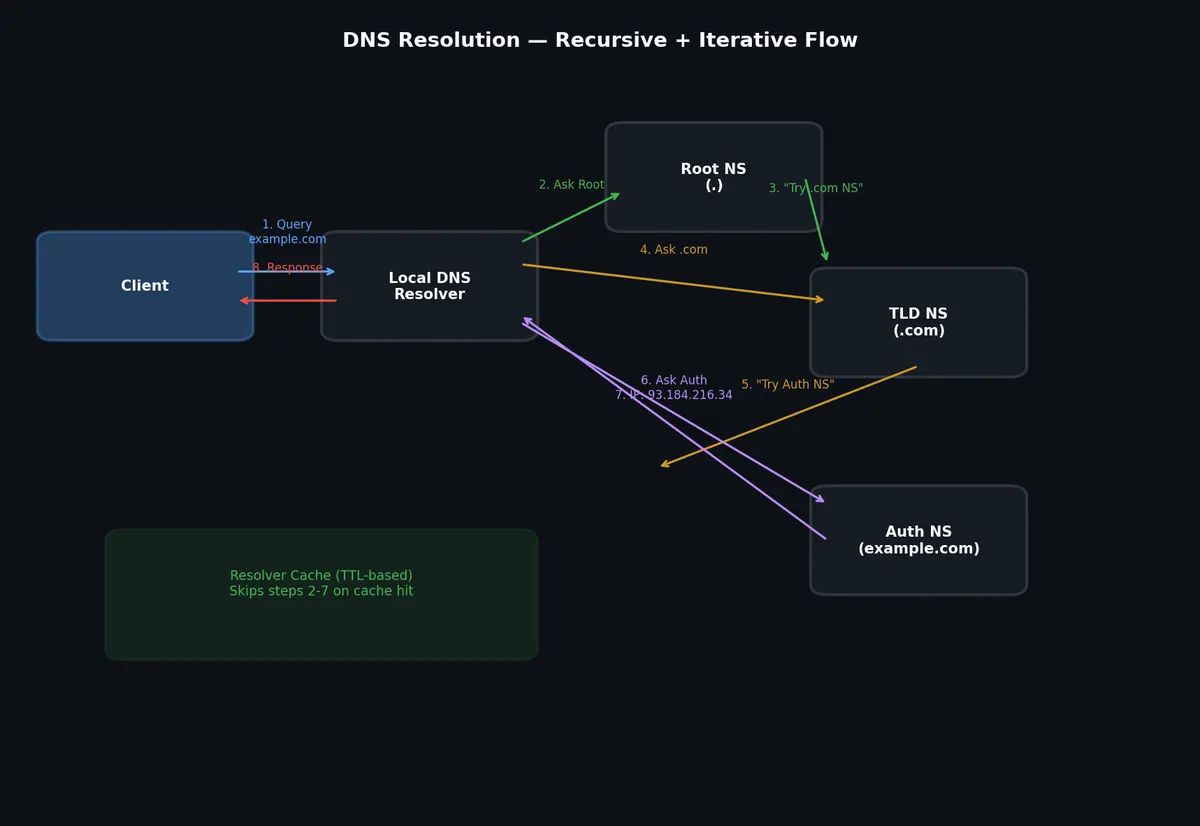
DNS resolution involves two query styles: recursive and iterative.
Recursive resolution is what your browser does. It sends a query to a recursive resolver (typically your ISP’s DNS server or a public resolver like 8.8.8.8) and expects a complete answer. The resolver does all the work.
Iterative resolution is what the recursive resolver does internally. It queries a chain of authoritative servers, each of which either provides the answer or refers the resolver to a more specific server.
The full chain for resolving photos.example.com:
- Browser checks its local DNS cache
- OS checks its DNS cache (
/etc/hosts, then system resolver cache) - Query goes to the configured recursive resolver
- Resolver queries a root nameserver: “Who handles
.com?” - Root nameserver responds with the
.comTLD nameserver addresses - Resolver queries the
.comTLD nameserver: “Who handlesexample.com?” - TLD nameserver responds with the authoritative nameserver for
example.com - Resolver queries the authoritative nameserver: “What is the IP for
photos.example.com?” - Authoritative nameserver responds with the IP address
- Resolver caches the result and returns it to the client
This entire chain typically completes in 20-120ms for uncached queries. Cached queries resolve in under 1ms.
DNS Record Types#
| Record Type | Purpose | Example |
|---|---|---|
| A | Maps name to IPv4 address | photos.example.com → 93.184.216.34 |
| AAAA | Maps name to IPv6 address | photos.example.com → 2606:2800:220:1:... |
| CNAME | Alias one name to another | www.example.com → example.com |
| MX | Mail exchange servers | example.com → mail.example.com (priority 10) |
| NS | Authoritative nameservers | example.com → ns1.example.com |
| TXT | Arbitrary text (SPF, DKIM, verification) | example.com → "v=spf1 include:..." |
| SRV | Service location (host + port) | _sip._tcp.example.com → sipserver.example.com:5060 |
| PTR | Reverse lookup (IP to name) | 34.216.184.93 → photos.example.com |
TTL and Caching#
Every DNS record has a TTL (Time To Live) in seconds. When a resolver caches a record, it honors the TTL before re-querying.
| |
TTL trade-offs:
- Short TTL (30-300 seconds): Faster failover, more DNS queries, higher resolver load
- Long TTL (3600-86400 seconds): Fewer queries, slower failover, better performance
- During migration: Set TTL low (60s) days before the change, then switch records, then raise TTL back
DNS-Based Load Balancing#
DNS can distribute traffic across multiple servers by returning different IP addresses.
Round Robin DNS: Return multiple A records. Clients pick one (usually the first). Simple but provides no health checking — DNS will happily return the IP of a dead server.
| |
Weighted DNS: Return different records with different probabilities. AWS Route 53 and similar services support this.
GeoDNS: Return different IP addresses based on the geographic location of the resolver. A user in Tokyo gets the IP of your Tokyo datacenter; a user in London gets your Frankfurt datacenter.
GeoDNS is the foundation of global load balancing, but it has limitations:
- Location is determined by the resolver’s IP, not the user’s IP (VPN users get wrong results)
- DNS caching means changes propagate slowly
- No real-time health awareness unless combined with health-checking DNS services
Content Delivery Networks#
A CDN is a globally distributed network of proxy servers that cache content close to end users. When a user in Sydney requests an image from your server in Virginia, the CDN serves it from an edge server in Sydney instead.
How CDN Caching Works#
The basic flow:

- User requests
https://photos.example.com/img/abc123.jpg - DNS resolves
photos.example.comto the nearest CDN edge server (via GeoDNS or anycast) - Edge server checks its local cache for the object
- Cache hit: Return the object directly (latency: 5-20ms)
- Cache miss: Edge server fetches from the origin server, caches it, returns to user
Origin Pull vs Origin Push#
Origin Pull (lazy loading): The CDN fetches content from your origin server on the first request (cache miss), then caches it. This is the default model for most CDNs.
Advantages:
- Simple setup — just point DNS to CDN
- Only caches content that is actually requested
- No need to pre-populate the cache
Disadvantages:
- First request for each object is slow (origin fetch)
- Origin server must handle cache miss traffic
- Thundering herd on cache expiration of popular objects
Origin Push (proactive): You upload content directly to the CDN’s storage. Used for large files, video content, and software downloads.
Advantages:
- No cache miss latency for users
- Origin server never needs to serve the content
- Better for large files that are expensive to transfer
Disadvantages:
- Requires integration with CDN’s upload API
- You manage cache lifecycle explicitly
- Storage costs on the CDN side
Cache Invalidation at the CDN#
CDN cache invalidation is notoriously difficult. Common strategies:
TTL-based: Set Cache-Control headers on your responses.
| |
Versioned URLs: Append a version or hash to the URL. When content changes, the URL changes, so old cached versions are never served.
| |
Purge API: Most CDNs offer an API to explicitly invalidate cached objects. Use this sparingly — it can take 5-30 seconds to propagate globally.
| |
When CDN Helps and When It Hurts#
CDN helps when:
- Content is static or semi-static (images, CSS, JS, videos)
- Users are geographically distributed
- Read-to-write ratio is high
- Content is shared across many users (same image served to millions)
CDN hurts when:
- Content is personalized per user (user dashboards, account pages)
- Content changes very frequently (real-time data)
- Content is accessed very rarely (long-tail content with low hit rates)
- You need strong consistency (CDN caches may serve stale data)
CDN Architecture#
A major CDN provider operates hundreds of Points of Presence (PoPs) across dozens of countries. Each PoP contains:
- Edge servers: Cache and serve content, handle TLS termination
- Regional caches (mid-tier): Larger caches that sit between edge servers and origin, reducing origin load
- Routing infrastructure: Anycast IP addresses or GeoDNS to direct users to nearest PoP
The tiered caching architecture is important. Without mid-tier caches, every edge server would independently fetch cache misses from the origin. With mid-tier caches, only one fetch per region reaches the origin.
Layer 4 Load Balancing#

Layer 4 load balancers operate at the transport layer (TCP/UDP). They make routing decisions based on IP addresses and port numbers without inspecting the application-layer payload.

How It Works#
A Layer 4 load balancer receives a TCP connection, selects a backend server, and forwards the raw TCP packets. It does not parse HTTP headers, URLs, or cookies. This makes it extremely fast — it can handle millions of connections per second with minimal latency overhead.
Load Balancing Algorithms#
Round Robin: Distribute connections sequentially across backends. Simple, stateless, works well when all servers have equal capacity and all requests have similar cost.
Weighted Round Robin: Assign weights to backends based on capacity. A server with weight 3 gets 3x the connections of a server with weight 1.
Least Connections: Send new connections to the backend with the fewest active connections. Better than round robin when request processing times vary widely.
IP Hash: Hash the client IP to deterministically select a backend. Ensures the same client always reaches the same server (poor man’s session affinity). Breaks when clients are behind a NAT that shares one IP.
Random: Randomly select a backend. Surprisingly effective and very simple. With enough backends, random selection approximates even distribution.
Power of Two Choices: Randomly pick two backends, then send the request to the one with fewer connections. Provides near-optimal distribution with minimal state.
Layer 4 in Practice#
Linux IPVS (IP Virtual Server) is a widely-used kernel-level Layer 4 load balancer:
| |
Cloud providers offer managed Layer 4 load balancers: AWS Network Load Balancer, GCP Network Load Balancer, Azure Load Balancer.
Layer 7 Load Balancing#
Layer 7 load balancers operate at the application layer. They parse HTTP requests and make routing decisions based on URLs, headers, cookies, and request content. This enables far more sophisticated routing than Layer 4, at the cost of higher latency and lower throughput.
Routing Capabilities#
URL-based routing: Route requests to different backend pools based on the URL path.
| |
Header-based routing: Route based on HTTP headers.
| |
Cookie-based routing: Route based on session cookies for sticky sessions.
Method-based routing: Route GET requests to read replicas, POST/PUT/DELETE to write servers.
Nginx as a Layer 7 Load Balancer#
Nginx is one of the most widely-used Layer 7 load balancers. Here is a production-grade configuration.
| |
This configuration demonstrates:
- Different backend pools for different URL paths
- Per-pool load balancing algorithms (least_conn, ip_hash)
- Weighted backends for heterogeneous server capacities
- WebSocket support with connection upgrade headers
- Proxy caching for static content
- Automatic failover with
proxy_next_upstream
Health Checks#
Load balancers must detect unhealthy backends and stop sending traffic to them. There are two approaches.

Active Health Checks#
The load balancer periodically sends probe requests to each backend and evaluates the response.
| |
For open-source Nginx, health checks rely on real traffic (passive checks). HAProxy offers active health checks in its free version:
| |
Passive Health Checks#
The load balancer monitors actual request traffic. If a backend returns too many errors or times out, it is marked unhealthy.
Advantages:
- No extra probe traffic
- Detects failures in real request handling (not just health endpoint)
Disadvantages:
- Requires real traffic to detect failures (idle backends appear healthy)
- Users experience the failed requests that trigger the detection
Graceful Degradation#
When a backend is detected as unhealthy:
- Remove from rotation immediately — stop sending new requests
- Drain existing connections — let in-flight requests complete (configurable timeout)
- Retry on another backend — if the request is idempotent, retry transparently
- Re-add when healthy — after consecutive successful health checks
| |
This configuration marks a server as unavailable after 3 failures within 30 seconds, and tries it again after 30 seconds.
Global Server Load Balancing (GSLB)#

GSLB distributes traffic across multiple geographic regions. It combines DNS-based routing with health checking to direct users to the closest healthy datacenter.

GSLB Architecture#
A typical GSLB setup:
- DNS layer: GeoDNS or anycast routing directs users to the nearest region
- Regional load balancers: Each region has its own Layer 4/7 load balancers
- Health monitoring: A global health checker monitors all regions
- Failover logic: If a region goes down, DNS is updated to redirect traffic
The data flow for a multi-region deployment:
| |
Failover Timing#
The speed of regional failover depends on DNS TTL:
| |
This is why many large-scale systems use anycast instead of GeoDNS for critical services. With anycast, the same IP address is advertised from multiple locations via BGP. Network routing automatically directs packets to the nearest healthy location, with failover happening at the network layer (seconds) rather than the DNS layer (minutes).
Comparison: Layer 4 vs Layer 7 Load Balancers#
| Feature | Layer 4 (Transport) | Layer 7 (Application) |
|---|---|---|
| Operates on | TCP/UDP packets | HTTP requests |
| Routing decisions | IP + port | URL, headers, cookies, body |
| Performance | Very high (millions of conn/sec) | High (hundreds of thousands req/sec) |
| TLS termination | Pass-through or terminate | Typically terminates |
| Content inspection | No | Yes |
| URL-based routing | No | Yes |
| Sticky sessions | IP hash only | Cookie, header, or URL-based |
| WebSocket support | Transparent (just TCP) | Requires explicit support |
| Cost | Lower (simpler logic) | Higher (more processing) |
| Use cases | TCP services, databases, high-volume | HTTP APIs, web apps, microservices |
| Examples | AWS NLB, IPVS, LVS | Nginx, HAProxy, AWS ALB, Envoy |
In practice, many architectures use both layers:
| |
The Layer 4 balancer provides high throughput and DDoS protection. The Layer 7 balancer provides intelligent routing. Together they handle both volume and complexity.
Putting It All Together#
A request from a user in London to your photo-sharing application traverses these components:
- Browser DNS cache: Check for cached resolution (< 1ms)
- OS DNS resolver: Check system cache (< 1ms)
- Recursive DNS resolver: Query authoritative servers if not cached (20-100ms)
- GeoDNS: Return IP of nearest CDN edge or load balancer
- CDN edge: Check cache for the requested resource
- Cache hit: Return directly from edge server in London (5ms)
- Cache miss: Fetch from origin, cache, return (100-200ms first time)
- Layer 4 load balancer: Distribute TCP connection to a Layer 7 LB
- Layer 7 load balancer: Parse HTTP request, route to appropriate backend pool
- Application server: Process the request and return response
For a cached static asset, total latency is 5-20ms. For an uncached API call, total latency is 50-200ms depending on geography and backend processing time. The gap between these two numbers is why CDN and caching strategy matter so much.
What’s Next#
DNS, CDN, and load balancing get the request to your application. But what shape should that request take? The next article covers API design — REST, gRPC, and GraphQL — and the trade-offs that determine which protocol fits your system.
System Design 8 parts
- 01 System Design (1): Thinking in Systems — Load, Latency, and the Art of Estimation
- 02 System Design (2): DNS, CDN, and Load Balancing — The First Three Hops you are here
- 03 System Design (3): API Design — REST, gRPC, GraphQL, and Choosing Wisely
- 04 System Design (4): Caching — Where to Cache, What to Evict, and When Caching Hurts
- 05 System Design (5): Message Queues and Event-Driven Architecture
- 06 System Design (6): Microservices vs Monoliths — The Honest Tradeoff
- 07 System Design (7): Data Pipelines — Batch, Stream, and the Lambda Architecture
- 08 System Design (8): Case Studies — URL Shortener, Chat System, News Feed


