System Design (3): API Design — REST, gRPC, GraphQL, and Choosing Wisely
A practical comparison of REST, gRPC, and GraphQL — covering protocol design, real-world trade-offs, rate limiting algorithms, idempotency, and a decision framework for choosing the right API style.
In 2015, Facebook published a blog post introducing GraphQL, describing how their mobile app was drowning in REST API calls. A single news feed screen required data from posts, users, comments, likes, and media — each a separate endpoint, each returning far more data than the client needed. The over-fetching was killing mobile performance on slow networks. GraphQL was their solution, but it was not a universal solution.
Every API style exists because it solves a specific set of problems well, and every API style creates new problems. The skill is matching the right protocol to the right context.
REST: The Lingua Franca of Web APIs#
REST (Representational State Transfer) is an architectural style, not a protocol. It was defined by Roy Fielding in his 2000 doctoral dissertation, but what most people call “REST” is really “HTTP-based APIs that use JSON.”

Core Concepts#
REST models everything as a resource, identified by a URL. Operations on resources map to HTTP methods.
| HTTP Method | CRUD Operation | Example |
|---|---|---|
| GET | Read | GET /users/123 |
| POST | Create | POST /users |
| PUT | Replace | PUT /users/123 |
| PATCH | Partial update | PATCH /users/123 |
| DELETE | Delete | DELETE /users/123 |
Status Codes#
Status codes communicate the result of an operation. Using them correctly is the difference between a good API and a frustrating one.
| |
REST Best Practices#
URL Design: Use nouns for resources, not verbs. The HTTP method is the verb.
| |
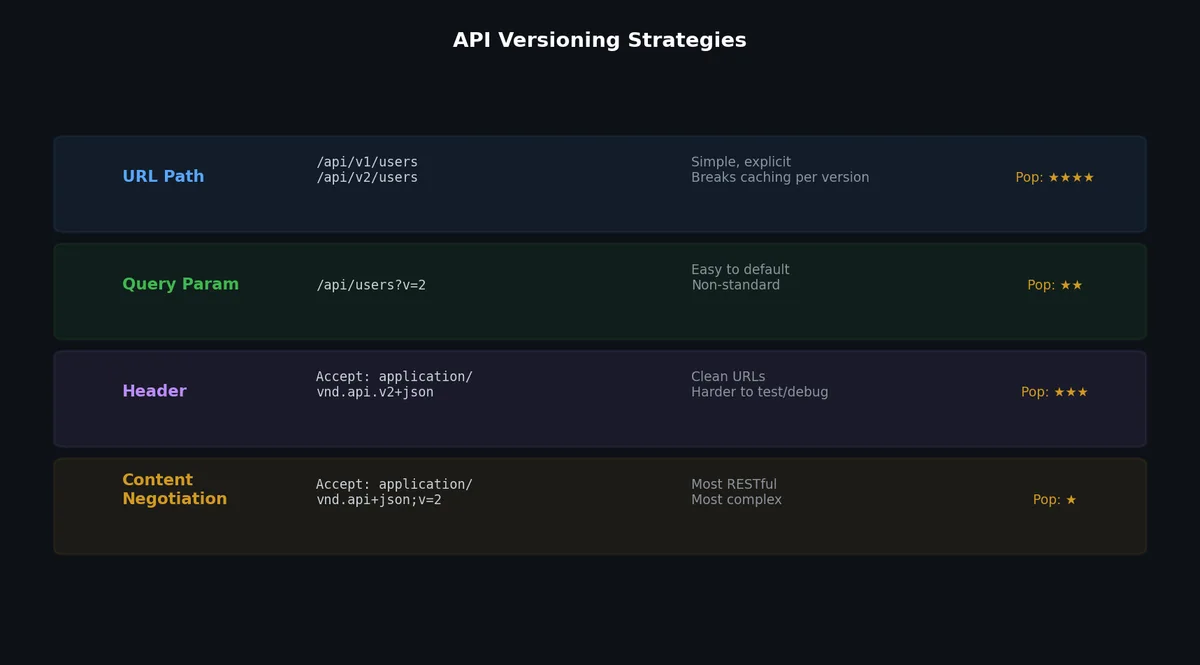
Versioning: Two common approaches, each with trade-offs.
URL versioning (/v1/photos):
- Easy to understand and implement
- Clear in logs and documentation
- Clutters URL namespace
- Forces clients to update URLs on version change
Header versioning (Accept: application/vnd.example.v1+json):
- Cleaner URLs
- More RESTful (same resource, different representation)
- Harder to test in browser
- Easy to forget, leading to implicit versioning bugs
In practice, URL versioning wins for public APIs because of its simplicity. Header versioning works for internal APIs where you control all clients.
Pagination: Never return unbounded lists.
| |
Cursor-based pagination is superior for large, actively-changing datasets. Offset-based pagination breaks when items are inserted or deleted between page requests (you skip or duplicate items).
Filtering and Sorting:
| |
The fields parameter reduces payload size — a lightweight alternative to GraphQL’s field selection.
REST Anti-Patterns#
RPC-style URLs: Using POST for everything and encoding the operation in the URL.
| |
This loses all the benefits of REST: cacheability (GET is cacheable, POST is not), discoverability, standard tooling.
Ignoring HTTP semantics: Returning 200 for errors with an error flag in the body.
| |
HTTP status codes exist for a reason. Middleware, proxies, and client libraries all depend on them.
Deeply nested resources: URLs like /companies/1/departments/2/teams/3/members/4/roles suggest your API models your database schema rather than your use cases. Flatten when depth exceeds 2 levels.
gRPC: The Performance Protocol#
gRPC is a high-performance, open-source RPC framework developed by Google. It uses Protocol Buffers (protobuf) for serialization and HTTP/2 for transport.
Protocol Buffers#
Protobuf is a binary serialization format. You define your data structures and service interfaces in .proto files, and code generators produce client and server stubs in your target language.
| |
gRPC Streaming Modes#
gRPC supports four communication patterns:
Unary: Standard request-response. Client sends one message, server returns one message.
Server streaming: Client sends one request, server returns a stream of messages. Use case: subscribing to real-time updates, downloading large datasets.
Client streaming: Client sends a stream of messages, server returns one response. Use case: file upload, batch ingestion.
Bidirectional streaming: Both client and server send streams of messages independently. Use case: chat applications, collaborative editing.
Using gRPC in Python#
| |
| |
Why Choose gRPC#
gRPC excels in service-to-service communication within a backend:
- Binary serialization: 5-10x smaller payloads than JSON
- HTTP/2: Multiplexed streams over a single connection, header compression
- Code generation: Type-safe client/server stubs in 10+ languages
- Streaming: Native support for all four streaming patterns
- Deadlines: Built-in timeout propagation across service chains
Why Not gRPC#
gRPC is a poor fit for browser-to-server communication:
- Browsers do not support HTTP/2 trailers (required by gRPC)
- Binary format is not human-readable (harder to debug)
- gRPC-Web exists but adds complexity and limitations
- No native browser support means you need a proxy
GraphQL: Client-Driven Queries#
GraphQL is a query language for APIs. Instead of the server defining fixed endpoint shapes, the client specifies exactly what data it needs.
Schema Definition#
| |
Client Queries#
The client requests exactly the fields it needs:
| |
Both queries hit the same endpoint (POST /graphql) but return different shapes. The mobile app fetches only 3 fields per photo; the web app fetches 8+ fields including nested user and comment data. This eliminates the over-fetching problem that motivated GraphQL’s creation.
GraphQL Drawbacks#
N+1 Query Problem: A naive resolver implementation fetches related data one at a time.
| |
The solution is a DataLoader that batches and caches lookups:
| |
Caching Complexity: REST APIs can use HTTP caching (CDN, browser cache) because each URL is a unique cacheable resource. GraphQL uses a single endpoint with POST requests, which are not cacheable by default. You need application-level caching (persisted queries, response caching by query hash).
Authorization Complexity: In REST, you authorize at the endpoint level. In GraphQL, a single query can traverse multiple resource types, each with different authorization rules. You need field-level authorization.
Query Complexity Attacks: A malicious client can craft deeply nested queries that consume enormous server resources.
| |
Mitigation: query depth limiting, query cost analysis, persisted queries (only allow pre-registered queries).
Rate Limiting#

Rate limiting protects your API from abuse and ensures fair resource allocation. Three common algorithms:


Token Bucket#
A bucket holds tokens. Each request consumes one token. Tokens are added at a fixed rate. When the bucket is empty, requests are rejected.
| |
Token bucket allows bursts up to the bucket capacity, then throttles to the refill rate. This matches real-world traffic patterns well.
Sliding Window Log#
Track the timestamp of every request. Count requests within the window. Reject if count exceeds limit.
| |
Precise but memory-intensive (stores every timestamp). Not practical for high-traffic APIs.
Fixed Window Counter#
Divide time into fixed windows (e.g., 1-minute intervals). Count requests per window. Reject if count exceeds limit.
| |
Simple and memory-efficient, but has a boundary problem: a burst at the end of window N and start of window N+1 can allow 2x the limit. The sliding window counter variant fixes this by weighting the previous window’s count.
Rate Limit Headers#
Always communicate rate limit status in response headers:
| |
Idempotency#
An operation is idempotent if performing it multiple times has the same effect as performing it once. This is critical for reliability because network failures cause retries, and retries must not create duplicate side effects.
HTTP methods and idempotency:
- GET: Naturally idempotent (reading data does not change state)
- PUT: Naturally idempotent (replacing a resource with the same data is a no-op)
- DELETE: Naturally idempotent (deleting an already-deleted resource is a no-op)
- POST: NOT naturally idempotent (creating a resource twice creates duplicates)
- PATCH: May or may not be idempotent (depends on the operation)
Idempotency Keys#
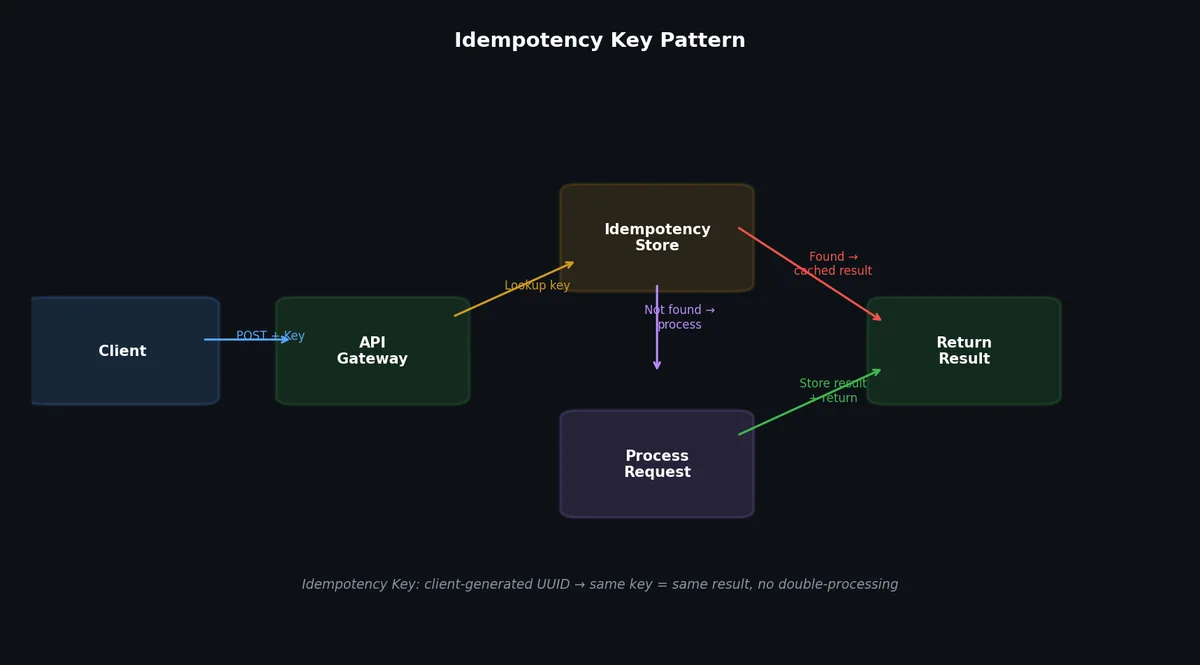
For non-idempotent operations, the client generates a unique key and includes it with the request. The server uses this key to detect duplicates.
| |
| |
If the client retries (network timeout, 5xx error), the server recognizes the duplicate key and returns the cached response without processing the payment again.
API Authentication#
A brief overview of common authentication mechanisms:
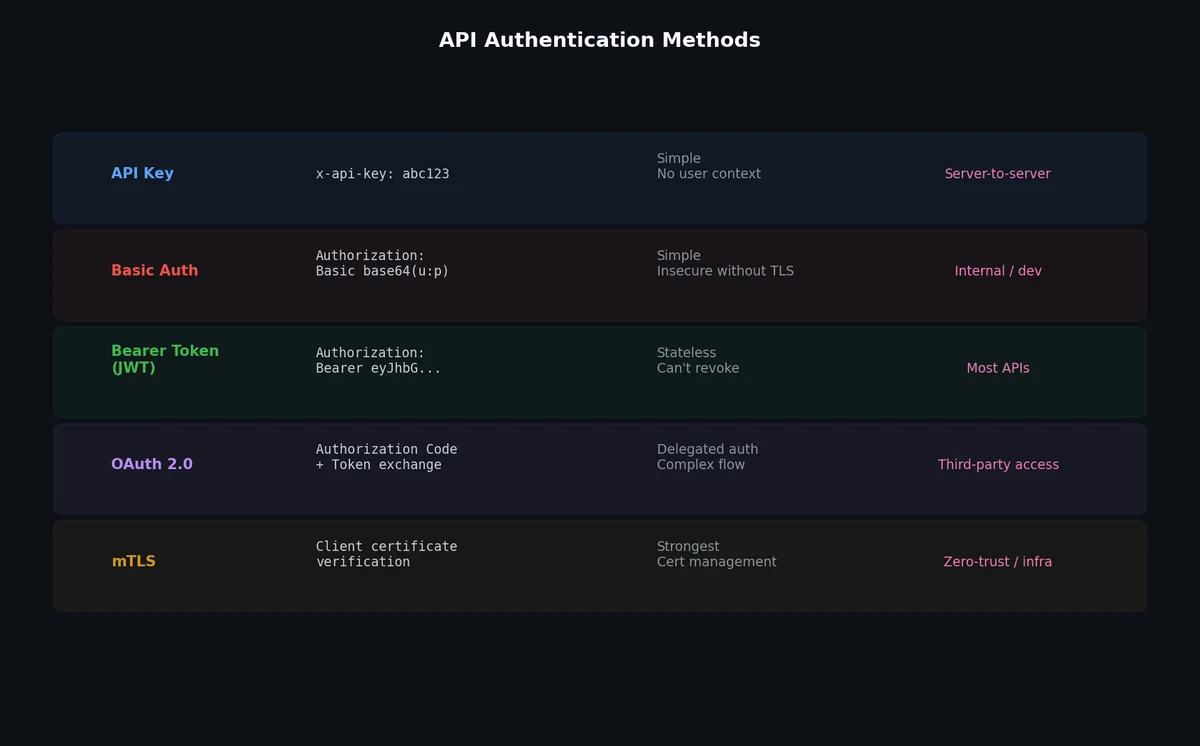
API Keys: Simple, suitable for server-to-server communication. Include in a header (X-API-Key: abc123) or query parameter. Easy to implement but hard to scope (all-or-nothing access).
OAuth 2.0: Delegated authorization. The user grants a third-party application limited access to their resources. Four grant types (authorization code, implicit, client credentials, device code). Complex but industry standard for user-facing APIs.
JWT (JSON Web Tokens): Self-contained tokens that encode claims (user ID, roles, expiration). The server validates the token’s signature without a database lookup. Useful for stateless authentication but cannot be revoked individually (use short expiration + refresh tokens).
| |
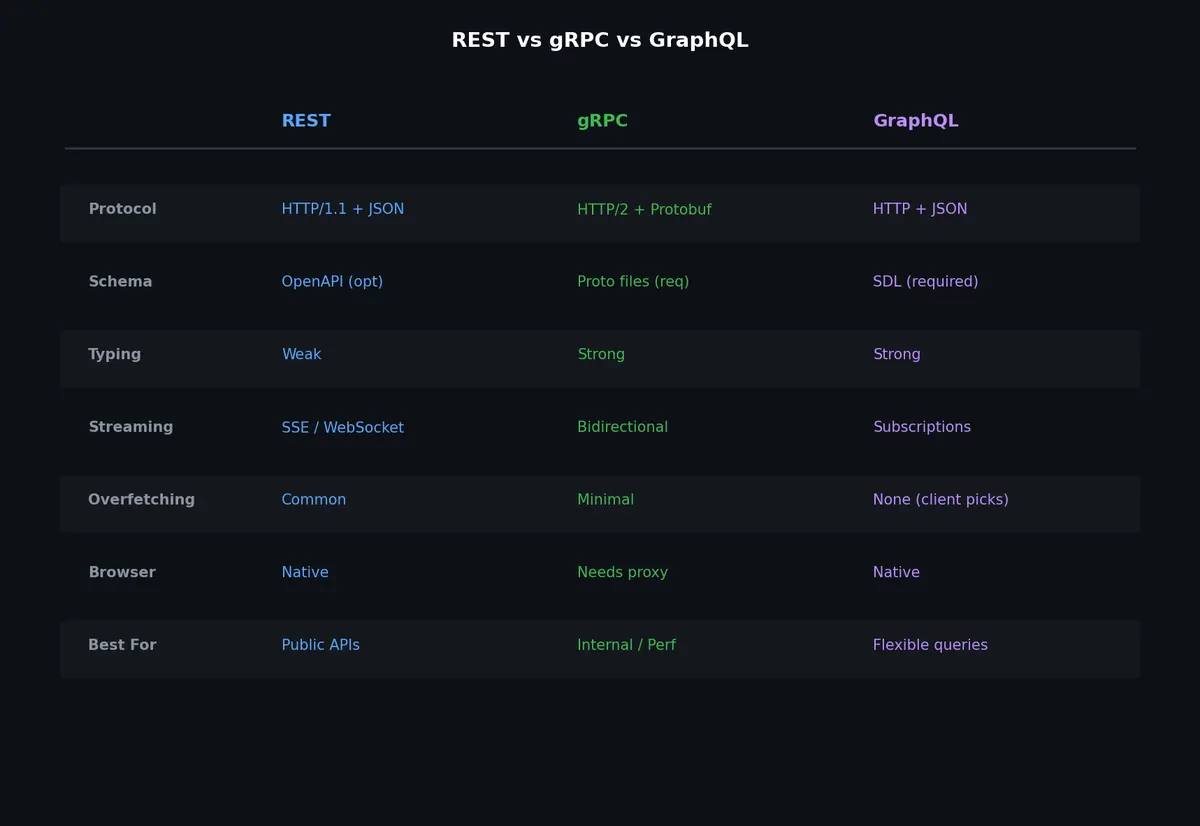
Comparison: REST vs gRPC vs GraphQL#

| Feature | REST | gRPC | GraphQL |
|---|---|---|---|
| Protocol | HTTP/1.1 or HTTP/2 | HTTP/2 | HTTP/1.1 or HTTP/2 |
| Data format | JSON (text) | Protobuf (binary) | JSON (text) |
| Schema/contract | OpenAPI (optional) | .proto (required) | GraphQL schema (required) |
| Code generation | Optional | Built-in | Optional |
| Streaming | SSE, WebSocket | Native (4 modes) | Subscriptions (WebSocket) |
| Browser support | Native | Via gRPC-Web proxy | Native |
| Caching | HTTP caching (native) | No standard caching | Complex (single endpoint) |
| Learning curve | Low | Medium | Medium-High |
| Over-fetching | Common problem | Minimal (typed messages) | Solved (client selects fields) |
| Under-fetching | Common (multiple calls) | Minimal (design per RPC) | Solved (nested queries) |
| Tooling maturity | Excellent | Good | Good |
| Best for | Public APIs, web apps | Internal microservices | Mobile apps, complex UIs |
| Worst for | Complex nested data | Browser clients | Simple CRUD APIs |
Decision Framework#
Use REST when:
- Building a public API consumed by third-party developers
- Clients are primarily web browsers
- The data model is simple and resource-oriented
- HTTP caching is important
- You want maximum ecosystem compatibility
Use gRPC when:
- Building internal service-to-service communication
- Low latency and high throughput are critical
- You need streaming (real-time data, file transfers)
- You want strong typing and code generation
- All clients are backend services you control
Use GraphQL when:
- Multiple clients need different data shapes (mobile vs web vs TV)
- The data model has many relationships (graph-like)
- Reducing network requests is critical (mobile on slow networks)
- Frontend teams need to iterate independently of backend
- You are willing to invest in the tooling (DataLoader, caching, authorization)
Hybrid approaches are common. Many systems use REST for public APIs, gRPC for internal services, and GraphQL for their frontend-facing gateway.
What’s Next#
Once your API design is solid, the next performance lever is caching. The next article covers caching strategies — where to cache, what to evict, and the surprisingly common ways that caching makes things worse instead of better.
System Design 8 parts
- 01 System Design (1): Thinking in Systems — Load, Latency, and the Art of Estimation
- 02 System Design (2): DNS, CDN, and Load Balancing — The First Three Hops
- 03 System Design (3): API Design — REST, gRPC, GraphQL, and Choosing Wisely you are here
- 04 System Design (4): Caching — Where to Cache, What to Evict, and When Caching Hurts
- 05 System Design (5): Message Queues and Event-Driven Architecture
- 06 System Design (6): Microservices vs Monoliths — The Honest Tradeoff
- 07 System Design (7): Data Pipelines — Batch, Stream, and the Lambda Architecture
- 08 System Design (8): Case Studies — URL Shortener, Chat System, News Feed