System Design (4): Caching — Where to Cache, What to Evict, and When Caching Hurts
A deep dive into caching strategies across every layer of the stack — from CDN to database buffer pools — covering cache-aside, write-through, write-behind patterns, eviction policies, thundering herd mitigation, and practical Redis configurations.
There is an old joke in computer science that the two hardest problems are cache invalidation, naming things, and off-by-one errors. The joke works because cache invalidation really is that hard. But caching is also the single most effective technique for improving system performance. A well-placed cache can reduce latency by 100x, cut database load by 90%, and save thousands of dollars in infrastructure costs per month.
The trick is knowing where to cache, what patterns to use, and — critically — when caching will make your system worse instead of better.
Caching exploits a fundamental property of most systems: access patterns are not uniform. A small fraction of data is accessed far more frequently than the rest.
Consider a social media platform. At any given moment, a tiny percentage of posts are trending and being viewed by millions of users. The remaining 99% of posts are viewed rarely. If you cache that top 1% in memory, you handle 80% of your read traffic without touching the database.
The benefits cascade:
Latency reduction: Redis serves a cached value in 0.1-0.5ms. A database query takes 5-50ms. A cross-service API call takes 10-100ms. Caching eliminates the most expensive operations.
Throughput amplification: A single Redis instance handles 100,000+ operations per second. A PostgreSQL instance handles 5,000-20,000 queries per second. Caching multiplies your system’s effective throughput.
Cost savings: One Redis instance replaces 10-20 database read replicas. At cloud pricing, this can save $10,000-$
50,000 per month.
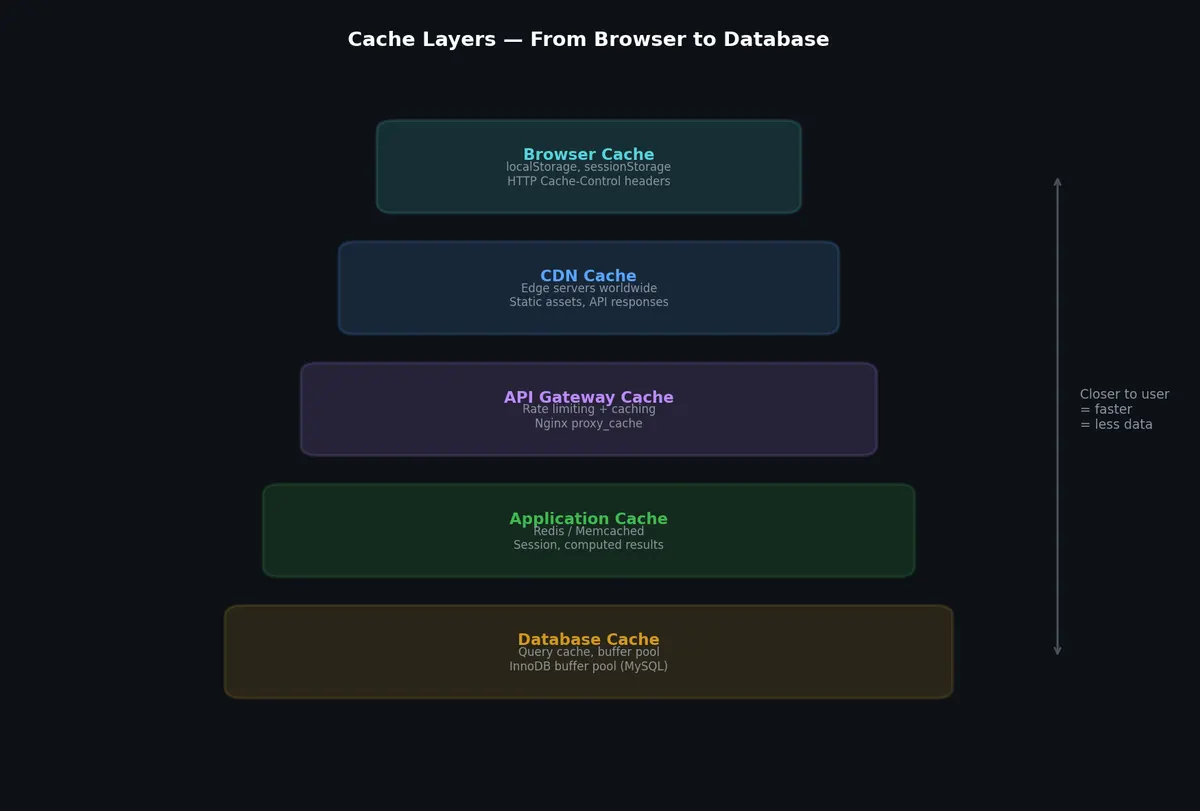
As covered in the previous article, CDNs cache static assets at edge locations worldwide. For API responses, CDN caching is possible but requires careful Cache-Control headers and Vary headers to avoid serving one user’s data to another.
1
2
3
4
5
6
# Cacheable at CDN (public data)Cache-Control: public, max-age=300, s-maxage=600Vary: Accept-Encoding
# NOT cacheable at CDN (user-specific data)Cache-Control: private, max-age=60
s-maxage overrides max-age for shared caches (CDN), letting you cache longer at the edge than in the browser.
This is where Redis, Memcached, and in-process caches like Caffeine or Guava live. The application explicitly manages what is cached, when it is invalidated, and how it is refreshed.
PostgreSQL shared buffers: Caches frequently accessed table and index pages in memory. Default is 128 MB; production systems typically set this to 25% of available RAM.
1
2
3
# postgresql.confshared_buffers= 8GB # 25% of 32GB RAMeffective_cache_size= 24GB # 75% of RAM (OS + PG cache combined)
MySQL InnoDB Buffer Pool: Caches table data and indexes. Should be 70-80% of available memory on a dedicated database server.
1
2
3
# my.cnfinnodb_buffer_pool_size= 24G # 75% of 32GB RAMinnodb_buffer_pool_instances=8# Reduce contention
Query Cache (MySQL, deprecated in 8.0): Cached the result set of SELECT queries. Invalidated on any write to any table referenced in the query. Caused more problems than it solved for write-heavy workloads — every write invalidated all cached queries on that table, creating lock contention.
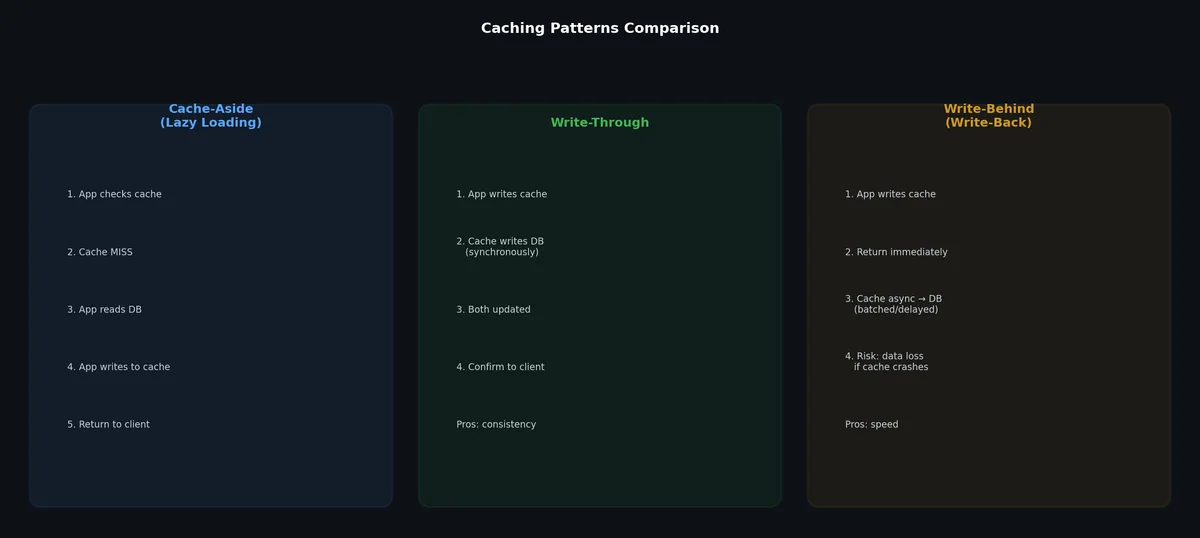
importredisimportjsonr=redis.Redis(host="localhost",port=6379,decode_responses=True)defget_user(user_id:str)->dict:# Step 1: Check cachecached=r.get(f"user:{user_id}")ifcached:returnjson.loads(cached)# Step 2: Cache miss — read from databaseuser=db.query("SELECT * FROM users WHERE id = %s",user_id)ifuserisNone:returnNone# Step 3: Populate cache with TTLr.setex(f"user:{user_id}",3600,json.dumps(user))returnuserdefupdate_user(user_id:str,data:dict):# Update databasedb.execute("UPDATE users SET name=%s WHERE id=%s",data["name"],user_id)# Invalidate cache (NOT update — delete is safer)r.delete(f"user:{user_id}")
Why delete instead of update the cache? Consider two concurrent requests that update the same user. If both try to update the cache, a race condition can leave the cache with stale data. Deleting the cache forces the next read to fetch from the database, which is always authoritative.
Advantages:
Simple to implement and reason about
Cache only contains data that is actually requested (no wasted space)
Cache failure is not catastrophic (falls through to database)
Disadvantages:
First request for each key always hits the database (cold start)
Potential for stale data between database update and cache invalidation
Every write goes to the cache and the database simultaneously. The cache is always up-to-date.
 1
 2
 3
 4
 5
 6
 7
 8
 9
10
11
12
13
14
15
16
17
18
19
defupdate_user_write_through(user_id:str,data:dict):# Write to databasedb.execute("UPDATE users SET name=%s WHERE id=%s",data["name"],user_id)# Write to cache (same transaction conceptually)user=db.query("SELECT * FROM users WHERE id = %s",user_id)r.setex(f"user:{user_id}",3600,json.dumps(user))defget_user_write_through(user_id:str)->dict:# Always read from cachecached=r.get(f"user:{user_id}")ifcached:returnjson.loads(cached)# Only on cold start or evictionuser=db.query("SELECT * FROM users WHERE id = %s",user_id)ifuser:r.setex(f"user:{user_id}",3600,json.dumps(user))returnuser
Advantages:
Cache is always consistent with database (no stale reads)
Read path is simple (always hit cache)
Disadvantages:
Write latency increases (must write to both cache and DB)
Caches data that may never be read (waste of cache space)
Cache and DB writes are not truly atomic (failure between them causes inconsistency)
importthreadingimporttimefromcollectionsimportdefaultdictclassWriteBehindCache:def__init__(self,flush_interval=5):self.dirty={}self.lock=threading.Lock()self.flush_interval=flush_intervalself._start_flusher()defwrite(self,key:str,value:dict):withself.lock:r.set(f"user:{key}",json.dumps(value))self.dirty[key]=valuedefread(self,key:str)->dict:cached=r.get(f"user:{key}")ifcached:returnjson.loads(cached)returnNonedef_flush(self):whileTrue:time.sleep(self.flush_interval)withself.lock:batch=dict(self.dirty)self.dirty.clear()forkey,valueinbatch.items():try:db.execute("INSERT INTO users (id, name) VALUES (%s, %s) ""ON CONFLICT (id) DO UPDATE SET name = %s",key,value["name"],value["name"])exceptExceptionase:# Re-add to dirty set for retrywithself.lock:self.dirty[key]=valuelogger.error(f"Flush failed for {key}: {e}")def_start_flusher(self):t=threading.Thread(target=self._flush,daemon=True)t.start()
Advantages:
Extremely low write latency (only writes to cache)
Batches database writes, reducing DB load
Absorbs write spikes
Disadvantages:
Data loss risk: if cache crashes before flushing, unflushed writes are lost
The cache sits in front of the database and handles reads transparently. On cache miss, the cache itself loads from the database (not the application).
This pattern is typically implemented by cache libraries or frameworks rather than application code. It is functionally similar to cache-aside but encapsulates the loading logic within the cache layer.
1
2
3
4
5
6
7
8
9
10
11
12
13
14
fromcachetoolsimportTTLCache# Python example using cachetools with a loader functioncache=TTLCache(maxsize=10000,ttl=3600)defget_user_read_through(user_id:str)->dict:ifuser_idincache:returncache[user_id]# Cache loads from DB on missuser=db.query("SELECT * FROM users WHERE id = %s",user_id)ifuser:cache[user_id]=userreturnuser
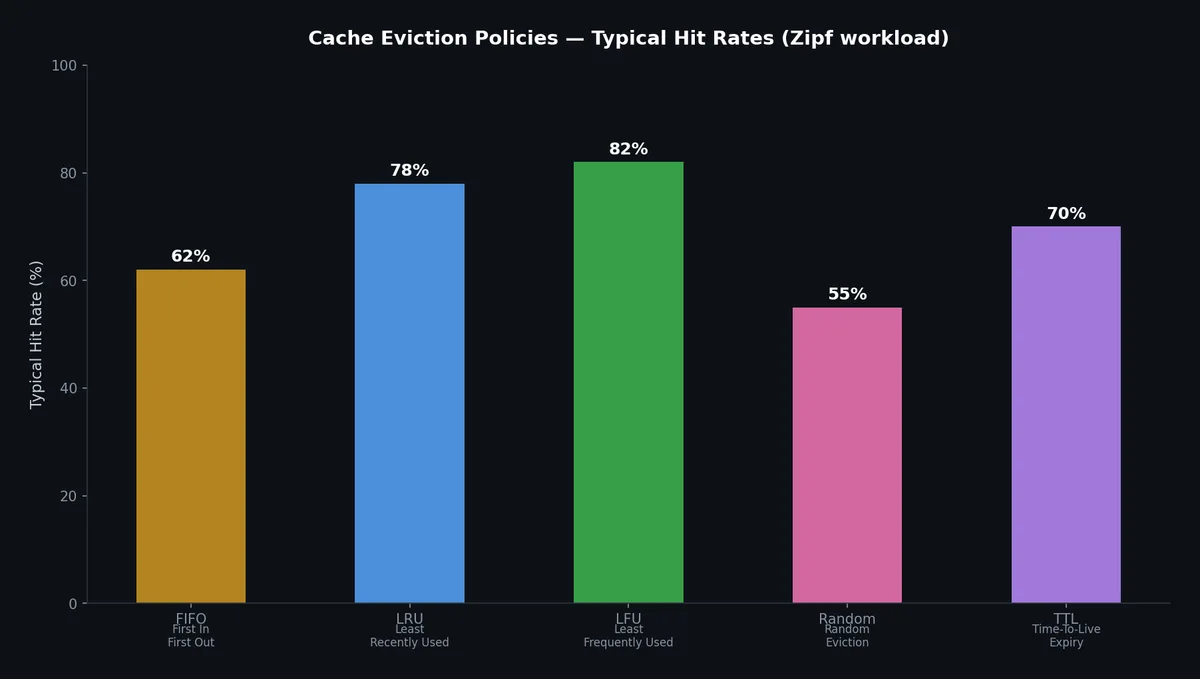
fromcollectionsimportOrderedDictclassLRUCache:def__init__(self,capacity:int):self.capacity=capacityself.cache=OrderedDict()defget(self,key:str):ifkeynotinself.cache:returnNone# Move to end (most recently used)self.cache.move_to_end(key)returnself.cache[key]defput(self,key:str,value):ifkeyinself.cache:self.cache.move_to_end(key)self.cache[key]=valueiflen(self.cache)>self.capacity:# Remove from front (least recently used)self.cache.popitem(last=False)
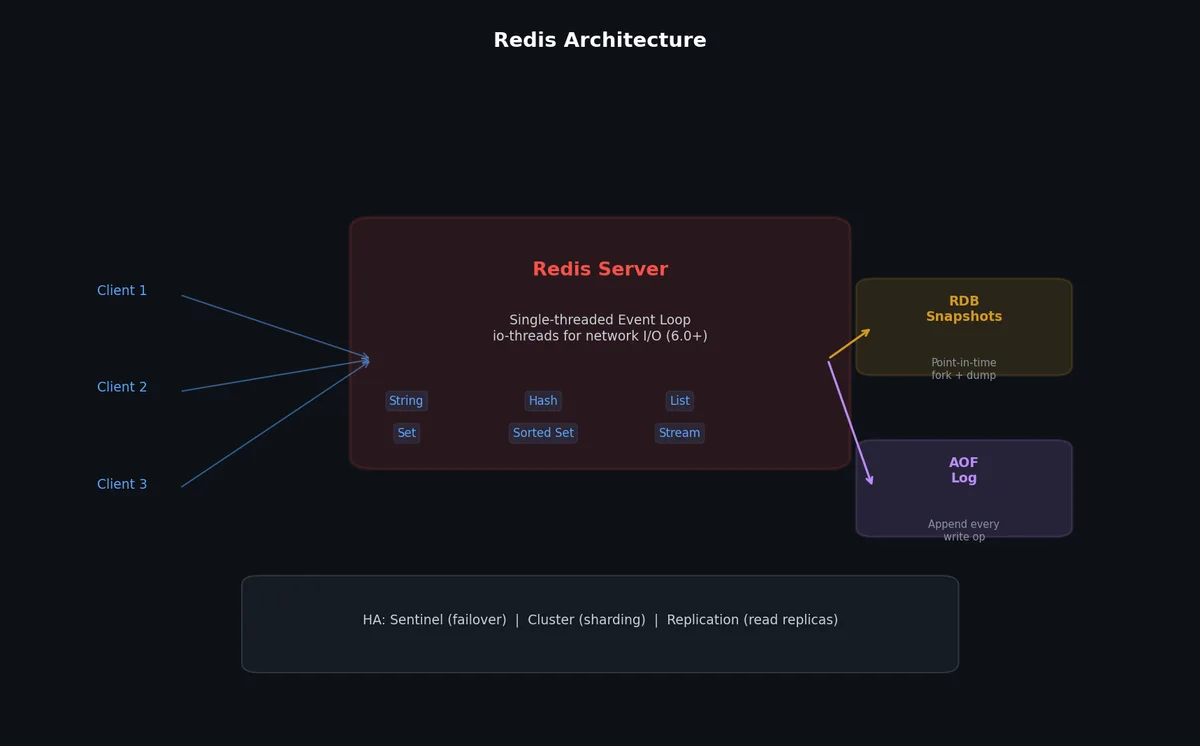
Redis uses an approximated LRU algorithm. Instead of tracking the exact LRU order (which would require significant memory), it samples a configurable number of keys and evicts the least recently used among the sample. With the default sample size of 5, the approximation is remarkably close to true LRU.
# redis.conf for caching use case# Memory limitmaxmemory 8gb
# Eviction policy when memory limit is reached# allkeys-lru: Evict any key using approximated LRU# volatile-lru: Only evict keys with TTL set# allkeys-lfu: Evict any key using approximated LFU# noeviction: Return errors when memory is fullmaxmemory-policy allkeys-lru
# LRU approximation sample size (higher = more accurate, more CPU)maxmemory-samples 10# Persistence: disable for pure caching (faster, no disk I/O)save ""appendonly no
# Connection limitsmaxclients 10000# TCP keepalivetcp-keepalive 300# Timeout for idle connections (0 = no timeout)timeout 300
importredisimportjsonr=redis.Redis(host="cache.internal",port=6379,decode_responses=True)# Cache a user profile for 1 hourdefcache_user(user_id:str,user_data:dict):r.setex(f"user:{user_id}",3600,json.dumps(user_data))# Cache with conditional set (only if not exists — prevent overwrite)defcache_user_if_missing(user_id:str,user_data:dict):r.set(f"user:{user_id}",json.dumps(user_data),ex=3600,nx=True)
Hash-based caching (more memory-efficient for objects):
1
2
3
4
5
6
7
8
9
# Store user as a Redis hashdefcache_user_hash(user_id:str,user_data:dict):key=f"user:{user_id}"r.hset(key,mapping=user_data)r.expire(key,3600)# Read specific fields without deserializing entire objectdefget_user_name(user_id:str)->str:returnr.hget(f"user:{user_id}","name")
Sorted set for leaderboards/rankings:
1
2
3
4
5
6
7
8
# Add score for a userr.zadd("leaderboard:daily",{"user:123":1500,"user:456":2300})# Get top 10top_10=r.zrevrange("leaderboard:daily",0,9,withscores=True)# Get a user's rankrank=r.zrevrank("leaderboard:daily","user:123")
The simplest approach: every cache entry expires after a fixed time. After expiration, the next read triggers a fresh database lookup.
1
2
3
4
5
6
7
8
# User profile: changes infrequently, can tolerate 5 minutes of stalenessr.setex(f"user:{user_id}",300,json.dumps(user_data))# Product price: changes rarely, can tolerate 1 hour of stalenessr.setex(f"product:{product_id}:price",3600,json.dumps(price_data))# Session data: should expire for securityr.setex(f"session:{session_id}",86400,json.dumps(session_data))
TTL is easy to implement but provides no consistency guarantee. Data can be stale for up to the TTL duration.
# On user update — publish invalidation eventdefupdate_user(user_id:str,data:dict):db.execute("UPDATE users SET name=%s WHERE id=%s",data["name"],user_id)# Publish to Redis Pub/Subr.publish("cache:invalidate",json.dumps({"type":"user","id":user_id,}))# Cache invalidation subscriber (runs as a separate process)definvalidation_listener():pubsub=r.pubsub()pubsub.subscribe("cache:invalidate")formessageinpubsub.listen():ifmessage["type"]=="message":event=json.loads(message["data"])ifevent["type"]=="user":r.delete(f"user:{event['id']}")logger.info(f"Invalidated cache for user {event['id']}")
Append a version number or hash to cache keys. When data changes, increment the version. Old cached data becomes unreachable (and eventually evicted by LRU).
1
2
3
4
5
6
7
# Write with versionversion=db.query("SELECT version FROM users WHERE id=%s",user_id)r.setex(f"user:{user_id}:v{version}",3600,json.dumps(user_data))# Read with current versionversion=db.query("SELECT version FROM users WHERE id=%s",user_id)cached=r.get(f"user:{user_id}:v{version}")
This requires a version lookup but guarantees you never read stale data. The trade-off is that the version lookup itself may need to be cached (and now you have a meta-caching problem).
When a popular cache entry expires, hundreds of concurrent requests simultaneously experience a cache miss and all query the database for the same data. This spike can overwhelm the database.
importtimedefget_user_with_lock(user_id:str)->dict:cache_key=f"user:{user_id}"lock_key=f"lock:{cache_key}"# Check cachecached=r.get(cache_key)ifcached:returnjson.loads(cached)# Try to acquire locklock_acquired=r.set(lock_key,"1",ex=10,nx=True)iflock_acquired:try:# We have the lock — fetch from DB and populate cacheuser=db.query("SELECT * FROM users WHERE id = %s",user_id)ifuser:r.setex(cache_key,3600,json.dumps(user))returnuserfinally:r.delete(lock_key)else:# Another request is fetching — wait and retryfor_inrange(50):# Wait up to 5 secondstime.sleep(0.1)cached=r.get(cache_key)ifcached:returnjson.loads(cached)# Timeout — fall through to DB (safety valve)returndb.query("SELECT * FROM users WHERE id = %s",user_id)
Instead of all entries expiring at exactly the same time, add random jitter to the TTL. Entries expire at slightly different times, spreading the database load.
1
2
3
4
5
6
7
8
9
10
importrandomdefcache_with_jitter(key:str,value:str,base_ttl:int):# Add +/- 10% jitter to TTLjitter=int(base_ttl*0.1)ttl=base_ttl+random.randint(-jitter,jitter)r.setex(key,ttl,value)# Base TTL: 3600 seconds# Actual TTL: 3240-3960 seconds (spread over 12 minutes)
A more sophisticated approach: proactively refresh the cache before it expires, using a probabilistic trigger.
 1
 2
 3
 4
 5
 6
 7
 8
 9
10
11
12
13
14
15
16
17
defget_with_early_refresh(key:str,base_ttl:int)->dict:cached=r.get(key)remaining_ttl=r.ttl(key)ifcachedandremaining_ttl>0:# Probabilistically refresh when TTL is getting low# Probability increases as TTL approaches 0refresh_probability=max(0,1-(remaining_ttl/base_ttl))ifrandom.random()<refresh_probability*0.1:# Scale factor# Refresh in background (non-blocking)threading.Thread(target=refresh_cache,args=(key,base_ttl)).start()returnjson.loads(cached)# Cache miss — fetch and populatereturnfetch_and_cache(key,base_ttl)
After a deploy, restart, or failover, the cache is empty. All requests hit the database until the cache is populated organically. For high-traffic systems, this cold start can overwhelm the database.
Preload on startup: Before marking the server as healthy, preload the cache with frequently accessed data.
 1
 2
 3
 4
 5
 6
 7
 8
 9
10
11
12
13
14
15
defwarm_cache():"""Preload top 1000 users and hot content on startup."""# Top users by request frequency (from analytics)top_users=db.query("SELECT id FROM users ORDER BY last_active DESC LIMIT 1000")foruserintop_users:user_data=db.query("SELECT * FROM users WHERE id = %s",user.id)r.setex(f"user:{user.id}",3600,json.dumps(user_data))logger.info(f"Warmed cache with {len(top_users)} users")# Call before registering with load balancerwarm_cache()register_with_load_balancer()
Shadow traffic: Route a copy of production traffic to the new cache to warm it before it serves real traffic.
Staggered rollout: Deploy to one server at a time, letting each server warm its cache before moving to the next.
Caching is not always beneficial. Here are cases where it hurts.
Write-heavy workloads: If data changes more often than it is read, cache invalidation overhead exceeds the benefit. A cache that is invalidated on every write and read once provides zero benefit and adds latency (the invalidation step).
1
2
3
Read:Write ratio 100:1 → Cache helps (100 reads served from cache per invalidation)
Read:Write ratio   1:1 → Cache breaks even at best
Read:Write ratio   1:5 → Cache hurts (5 invalidations per read)
Low hit rate: If the data access pattern is uniform (no hot set), caching does not help. A cache with a 10% hit rate saves only 10% of database load while adding the complexity of a cache layer.
Consistency-critical paths: Payment processing, inventory management, and ledger updates must read the authoritative data source. Caching introduces staleness that is unacceptable for these use cases. You can still cache read-only views of this data (account balance display), but the write path must bypass the cache.
Large, rarely-accessed objects: Caching a 10 MB report that is accessed once per day wastes 10 MB of cache memory that could store 10,000 frequently-accessed 1 KB objects.
Caching handles the read path. But what about the write path when you need to decouple producers from consumers, smooth out traffic spikes, and build event-driven architectures? The next article covers message queues — Kafka, RabbitMQ, delivery guarantees, and the patterns that make asynchronous systems reliable.