Series · System Design · Chapter 5

System Design (5): Message Queues and Event-Driven Architecture

A practical guide to message queues and event-driven systems — covering Kafka and RabbitMQ architectures, delivery guarantees, event sourcing, CQRS, dead letter queues, backpressure, and a complete order processing pipeline design.

In 2011, LinkedIn’s engineering team was struggling with a problem that many growing companies face. Their monolithic application had become a web of tightly-coupled services, each making synchronous calls to half a dozen others. When any single service went down, cascading failures rippled through the entire system. Deploying a change to one service required coordinating with every team whose service it called.

Their solution was Apache Kafka — a distributed event log that decoupled producers from consumers. Instead of Service A calling Service B directly, Service A writes an event to Kafka, and Service B reads it when it is ready. If Service B is down, the events wait. If Service B is slow, it processes at its own pace. The producer does not need to know or care about the consumer.

That architectural pattern — decoupling through asynchronous messaging — is one of the most powerful tools in system design.


Synchronous vs Asynchronous Communication#

In a synchronous system, the caller waits for the callee to respond before proceeding. This is simple, intuitive, and works perfectly for many use cases. But it creates tight coupling.
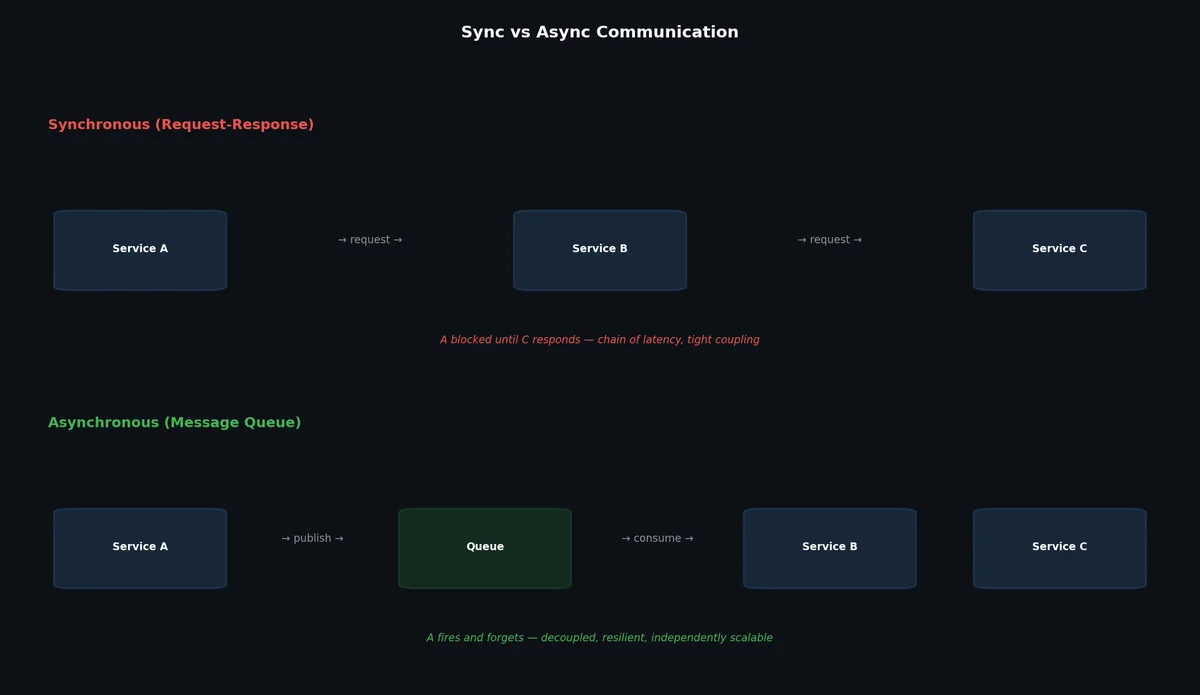
Sync vs async communication

1
2
3
4
5
6
7
Synchronous (REST):
  Client → Order Service → Payment Service → Inventory Service → Notification Service
  
  Problems:
  - If Payment Service takes 5 seconds, the client waits 5+ seconds
  - If Notification Service is down, the entire order fails
  - Each service must handle the load of all upstream services

In an asynchronous system, the caller sends a message and moves on. The callee processes the message independently.

 1
 2
 3
 4
 5
 6
 7
 8
 9
10
11
Asynchronous (Message Queue):
  Client → Order Service → Message Queue
                                
                           Payment Service (reads when ready)
                           Inventory Service (reads when ready)
                           Notification Service (reads when ready)
  
  Benefits:
  - Client gets immediate response ("order accepted")
  - Each service processes independently at its own pace
  - If Notification Service is down, messages queue up and are processed when it recovers

When to Use Async#

Use asynchronous communication when:

  • The downstream operation is slow (payment processing, email sending)
  • The downstream service is unreliable (third-party APIs)
  • You need to fan out to multiple consumers
  • The operation is not needed for the user’s immediate response
  • You need to absorb traffic spikes

Stay synchronous when:

  • The user needs an immediate result (login, search)
  • The operation must be transactional (debit account, check authorization)
  • Latency is already low and complexity is not justified
  • You have fewer than 3-4 services (the overhead is not worth it)

Message Queue Fundamentals#

Every message queue system has these core components:

Producer: Application that sends messages to the queue.

Consumer: Application that reads and processes messages from the queue.

Broker: The server that stores and routes messages. May be a single server or a cluster.

Topic/Queue: A named channel for messages. Producers write to a topic; consumers read from a topic.

Partition: A subdivision of a topic for parallelism. Each partition is an ordered, immutable sequence of messages.

Consumer Group: A set of consumers that cooperatively consume a topic. Each partition is assigned to exactly one consumer within a group, enabling parallel processing.

Offset: The position of a consumer within a partition. Tracks which messages have been processed.

Apache Kafka#

Kafka is a distributed event streaming platform designed for high throughput, durability, and scalability. It models messages as an append-only log rather than a traditional queue.

Apache Kafka architecture

Architecture#

A Kafka cluster consists of:

Brokers: Server instances that store data and serve client requests. A production cluster typically has 3-12+ brokers.

Topics: Categories for organizing messages. A topic is divided into partitions.

Partitions: The unit of parallelism. Each partition is an ordered, append-only log stored on a single broker (with replicas on other brokers).

Replication: Each partition has a configurable number of replicas. One replica is the leader (handles reads and writes); the others are followers (replicate from the leader).

ZooKeeper/KRaft: Manages cluster metadata, broker coordination, and leader election. Kafka is migrating from ZooKeeper to KRaft (built-in consensus) as of Kafka 3.x.

How Kafka Stores Data#

Kafka partitions are stored as a sequence of segment files on disk. Each segment is a file containing messages in order. New messages are appended to the active segment. Old segments are retained based on a time or size policy and eventually deleted or compacted.

 1
 2
 3
 4
 5
 6
 7
 8
 9
10
Topic: orders (3 partitions)

Partition 0: [msg0, msg1, msg2, msg3, msg4, ...]  → Broker 1 (leader)
                                                     Broker 2 (replica)

Partition 1: [msg0, msg1, msg2, ...]               → Broker 2 (leader)
                                                     Broker 3 (replica)

Partition 2: [msg0, msg1, msg2, msg3, ...]          → Broker 3 (leader)
                                                     Broker 1 (replica)

Kafka Producer Configuration#

 1
 2
 3
 4
 5
 6
 7
 8
 9
10
11
12
13
14
15
16
17
18
19
20
21
22
23
24
25
26
27
28
29
30
31
32
33
34
35
from kafka import KafkaProducer
import json

producer = KafkaProducer(
    bootstrap_servers=["kafka1:9092", "kafka2:9092", "kafka3:9092"],
    value_serializer=lambda v: json.dumps(v).encode("utf-8"),
    key_serializer=lambda k: k.encode("utf-8") if k else None,

    # Durability settings
    acks="all",              # Wait for all replicas to acknowledge
    retries=3,               # Retry on transient failures
    retry_backoff_ms=100,    # Wait between retries

    # Batching for throughput
    batch_size=16384,        # 16 KB batch size
    linger_ms=10,            # Wait up to 10ms to fill a batch

    # Compression
    compression_type="lz4",  # Compress batches (lz4 is fast)
)

# Send an order event
# Key determines partition assignment (same key → same partition → ordering)
producer.send(
    topic="orders",
    key="user_123",
    value={
        "order_id": "ord_789",
        "user_id": "user_123",
        "items": [{"product_id": "prod_456", "quantity": 2}],
        "total": 59.98,
        "timestamp": "2025-07-19T10:30:00Z",
    },
)
producer.flush()

The key parameter is important. Kafka hashes the key to determine the partition. Messages with the same key always go to the same partition, guaranteeing ordering for that key. This is critical for use cases like “all events for a given user must be processed in order.”

Kafka Consumer Configuration#

 1
 2
 3
 4
 5
 6
 7
 8
 9
10
11
12
13
14
15
16
17
18
19
20
21
22
23
24
25
26
27
28
29
from kafka import KafkaConsumer
import json

consumer = KafkaConsumer(
    "orders",
    bootstrap_servers=["kafka1:9092", "kafka2:9092", "kafka3:9092"],
    group_id="payment-service",
    value_deserializer=lambda m: json.loads(m.decode("utf-8")),

    # Offset management
    auto_offset_reset="earliest",   # Start from beginning if no offset saved
    enable_auto_commit=False,       # Manual commit for at-least-once semantics

    # Performance
    max_poll_records=500,           # Process up to 500 messages per poll
    fetch_max_wait_ms=500,          # Wait up to 500ms for data
)

for message in consumer:
    order = message.value
    try:
        # Process the order
        process_payment(order)

        # Commit offset only after successful processing
        consumer.commit()
    except Exception as e:
        logger.error(f"Failed to process order {order['order_id']}: {e}")
        # Do NOT commit — message will be reprocessed

Kafka Retention#

Unlike traditional queues where messages are deleted after consumption, Kafka retains messages based on time or size:

1
2
3
4
5
6
# Kafka topic configuration
retention.ms: 604800000        # 7 days (default)
retention.bytes: -1            # No size limit (default)
cleanup.policy: delete         # Delete old segments
# OR
cleanup.policy: compact        # Keep latest value per key (for changelogs)

Log compaction is particularly useful for maintaining a changelog. Kafka keeps the latest value for each key and discards older values. This lets consumers rebuild state by reading the entire compacted topic.

RabbitMQ#

Event sourcing history book recording every change as an eve

RabbitMQ is a traditional message broker based on the AMQP protocol. It focuses on flexible routing, acknowledgment-based delivery, and message-level features.

Architecture#

RabbitMQ uses a different model than Kafka:

Exchange: Receives messages from producers and routes them to queues based on routing rules. There are four exchange types.

Queue: Stores messages until a consumer retrieves them. Messages are deleted after acknowledgment.

Binding: A rule that connects an exchange to a queue, optionally with a routing key pattern.

Exchange Types#

Direct Exchange: Routes messages to queues where the routing key exactly matches the binding key.

 1
 2
 3
 4
 5
 6
 7
 8
 9
10
11
12
13
# Producer sends to direct exchange with routing key
channel.basic_publish(
    exchange="orders",
    routing_key="payment",     # Exact match routing
    body=json.dumps(order_data),
)

# Queue "payment_queue" bound to exchange "orders" with key "payment"
channel.queue_bind(
    queue="payment_queue",
    exchange="orders",
    routing_key="payment",
)

Topic Exchange: Routes messages based on wildcard pattern matching on the routing key.

 1
 2
 3
 4
 5
 6
 7
 8
 9
10
11
12
13
# Routing key: "order.created.us"
channel.basic_publish(
    exchange="events",
    routing_key="order.created.us",
    body=json.dumps(event),
)

# Bindings with wildcards
channel.queue_bind(queue="all_orders", exchange="events", routing_key="order.#")
# Matches: order.created.us, order.cancelled, order.created.eu

channel.queue_bind(queue="us_events", exchange="events", routing_key="*.*.us")
# Matches: order.created.us, user.registered.us

Fanout Exchange: Routes messages to all bound queues regardless of routing key. Used for broadcast.

1
2
3
4
5
6
# All bound queues receive every message
channel.basic_publish(
    exchange="notifications",
    routing_key="",  # Ignored for fanout
    body=json.dumps(notification),
)

Headers Exchange: Routes based on message header attributes instead of routing key.

RabbitMQ Consumer with Acknowledgment#

 1
 2
 3
 4
 5
 6
 7
 8
 9
10
11
12
13
14
15
16
17
18
19
20
21
22
23
24
25
26
27
28
29
30
31
32
import pika
import json

connection = pika.BlockingConnection(
    pika.ConnectionParameters(host="rabbitmq.internal")
)
channel = connection.channel()

# Declare queue (idempotent — creates if not exists)
channel.queue_declare(queue="payment_queue", durable=True)

def callback(ch, method, properties, body):
    order = json.loads(body)
    try:
        process_payment(order)
        # Acknowledge successful processing
        ch.basic_ack(delivery_tag=method.delivery_tag)
    except Exception as e:
        logger.error(f"Payment failed: {e}")
        # Negative acknowledge — requeue for retry
        ch.basic_nack(delivery_tag=method.delivery_tag, requeue=True)

# Prefetch: only send 10 unacknowledged messages at a time
channel.basic_qos(prefetch_count=10)

channel.basic_consume(
    queue="payment_queue",
    on_message_callback=callback,
    auto_ack=False,  # Manual acknowledgment
)

channel.start_consuming()

Kafka vs RabbitMQ#

FeatureApache KafkaRabbitMQ
ModelDistributed log (append-only)Message broker (queue-based)
Message retentionRetained after consumption (time/size-based)Deleted after acknowledgment
OrderingPer-partition ordering guaranteedPer-queue ordering guaranteed
ThroughputVery high (millions/sec per cluster)High (tens of thousands/sec per node)
Routing flexibilityTopic + partition keyExchanges, routing keys, patterns
Consumer modelPull-based (consumer polls)Push-based (broker delivers)
ReplayYes (re-read from any offset)No (messages deleted after ack)
ScalingAdd partitions (horizontal)Add queues + consumers
ProtocolCustom binary protocolAMQP 0-9-1
Best forEvent streaming, logs, high-volume pipelinesTask queues, routing, request-reply
Worst forComplex routing logicEvent replay, ultra-high throughput

Choose Kafka when you need event replay, high throughput, consumer groups, and stream processing. Think audit logs, clickstream data, change data capture, and real-time analytics.

Choose RabbitMQ when you need complex routing, message-level acknowledgment, priority queues, and traditional task distribution. Think email sending, image processing, order fulfillment, and background jobs.

Delivery Guarantees#

Message delivery semantics are a fundamental design decision.

Message delivery guarantees

At-Most-Once#

The message is delivered zero or one time. If the consumer crashes before processing, the message is lost.

Implementation: Auto-commit offsets (Kafka) or auto-acknowledge (RabbitMQ) before processing.

1
2
3
4
# Kafka: auto-commit before processing
consumer = KafkaConsumer("orders", enable_auto_commit=True)
for msg in consumer:
    process(msg)  # If this crashes, the offset was already committed. Message lost.

Use when: Message loss is acceptable (metrics, logs where approximation is fine).

At-Least-Once#

The message is delivered one or more times. If the consumer crashes after processing but before committing, the message is redelivered.

Implementation: Commit offset / acknowledge only after successful processing.

1
2
3
4
5
# Kafka: manual commit after processing
consumer = KafkaConsumer("orders", enable_auto_commit=False)
for msg in consumer:
    process(msg)         # Process first
    consumer.commit()    # Then commit. If crash between process and commit, redelivered.

Use when: You can handle duplicates (or make processing idempotent). This is the most common choice.

Exactly-Once#

The message is delivered and processed exactly one time. This is the hardest to achieve and usually involves transactions.

Kafka supports exactly-once semantics within its ecosystem (producer transactions + consumer read_committed isolation). But true end-to-end exactly-once requires the consumer’s side effects (database writes, API calls) to be part of the same transaction — which is often impractical.

In practice, most systems use at-least-once delivery with idempotent processing. If processing the same message twice produces the same result, duplicates are harmless.

 1
 2
 3
 4
 5
 6
 7
 8
 9
10
11
12
13
14
15
16
17
18
19
def process_order_idempotently(order):
    """Process an order, handling duplicates gracefully."""
    order_id = order["order_id"]

    # Check if already processed (idempotency check)
    if db.query("SELECT 1 FROM processed_orders WHERE id = %s", order_id):
        logger.info(f"Order {order_id} already processed, skipping")
        return

    # Process the order
    db.execute(
        "INSERT INTO processed_orders (id, status) VALUES (%s, 'processing')",
        order_id,
    )
    payment_result = charge_payment(order)
    db.execute(
        "UPDATE processed_orders SET status = 'completed' WHERE id = %s",
        order_id,
    )

Event Sourcing#

Event sourcing is an architectural pattern where state changes are stored as a sequence of events rather than as the current state. The current state is derived by replaying all events.

CRUD vs event sourcing

Traditional vs Event-Sourced#

 1
 2
 3
 4
 5
 6
 7
 8
 9
10
11
12
13
14
15
16
Traditional (state-based):
  Account table: { id: "acc_123", balance: 150.00 }
  
  On deposit of $50: UPDATE accounts SET balance = 200.00 WHERE id = 'acc_123'
   Previous balance (150.00) is lost

Event-Sourced:
  Event log:
    1. AccountCreated { id: "acc_123", initial_balance: 0 }
    2. Deposited { id: "acc_123", amount: 100.00 }
    3. Deposited { id: "acc_123", amount: 50.00 }
    4. Withdrawn { id: "acc_123", amount: 30.00 }
    5. Deposited { id: "acc_123", amount: 50.00 }
    
  Current state = replay all events = $0 + $100 + $50 - $30 + $50 = $170.00
   Complete audit trail preserved

Benefits of Event Sourcing#

  • Complete audit trail: Every change is recorded and immutable
  • Temporal queries: What was the account balance at 3 PM yesterday?
  • Event replay: Rebuild state from scratch, or build new projections from historical events
  • Debugging: Reproduce any bug by replaying events up to the point of failure

Drawbacks#

  • Complexity: More code, more infrastructure, more concepts to understand
  • Storage: Event logs grow forever (though compaction helps)
  • Eventual consistency: Read models are asynchronous projections, so they lag behind writes
  • Schema evolution: Changing event formats requires versioning and migration strategies

CQRS#

Command Query Responsibility Segregation separates the write model (commands) from the read model (queries). This pairs naturally with event sourcing.

CQRS pattern

1
2
3
4
5
6
7
8
9
Write Side (Command):
  Client → Command Handler → Event Store (Kafka)
  
  "Create order" → validate → store OrderCreated event

Read Side (Query):
  Event Store → Event Processor → Read Database → Client
  
  OrderCreated event → update denormalized view → query returns fast read

The write model stores events in a durable event store (Kafka, EventStoreDB). The read model subscribes to events and maintains denormalized views optimized for queries. Different read models can be built for different query patterns — a search index, a reporting database, and a real-time dashboard can all consume the same event stream.

CQRS Trade-offs#

Benefits: Independent scaling of reads and writes, optimized query models, natural fit with event sourcing.

Costs: Eventual consistency between write and read models, duplicate data, operational complexity of maintaining multiple databases.

Dead Letter Queues#
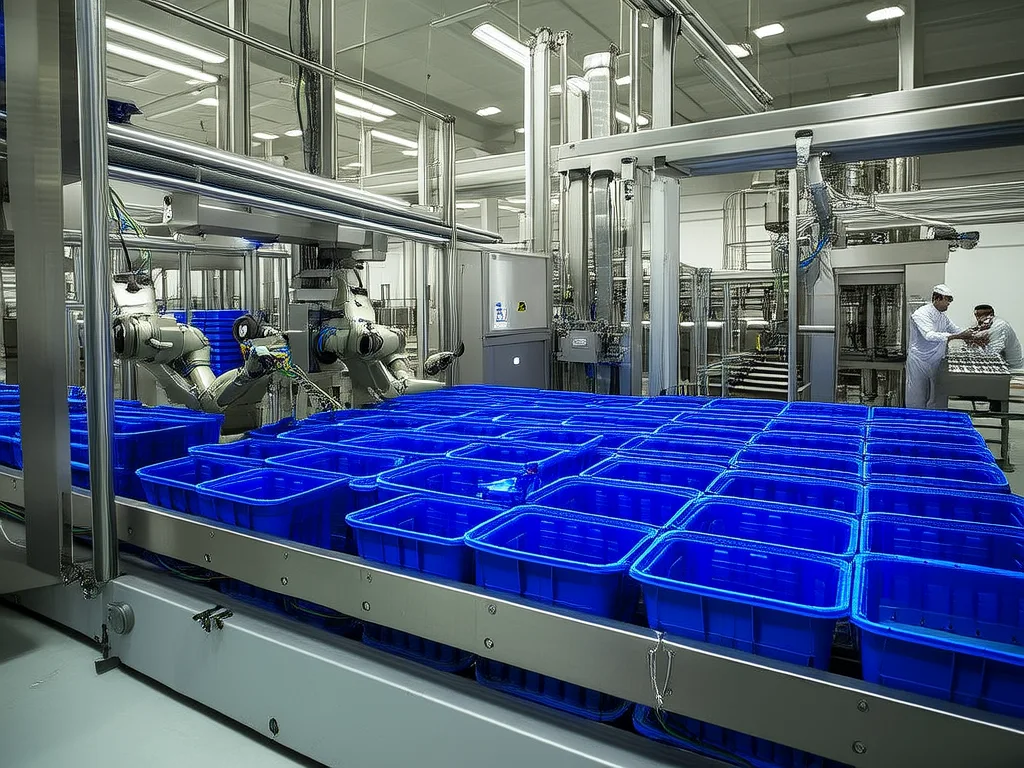
Message queue conveyor belt decoupling producers from consum

When a message cannot be processed after repeated attempts, it should not block the queue forever. A dead letter queue (DLQ) is a separate queue where failed messages are sent for investigation.

 1
 2
 3
 4
 5
 6
 7
 8
 9
10
11
12
13
14
# RabbitMQ DLQ configuration
channel.queue_declare(
    queue="orders",
    durable=True,
    arguments={
        "x-dead-letter-exchange": "dlx",
        "x-dead-letter-routing-key": "orders.dead",
        "x-message-ttl": 60000,  # Messages expire after 60 seconds
    },
)

# Dead letter queue
channel.queue_declare(queue="orders_dlq", durable=True)
channel.queue_bind(queue="orders_dlq", exchange="dlx", routing_key="orders.dead")
 1
 2
 3
 4
 5
 6
 7
 8
 9
10
11
12
13
14
15
16
17
18
19
20
21
22
23
24
25
26
27
# Consumer with retry and DLQ logic
MAX_RETRIES = 3

def callback(ch, method, properties, body):
    retry_count = (properties.headers or {}).get("x-retry-count", 0)

    try:
        process_order(json.loads(body))
        ch.basic_ack(delivery_tag=method.delivery_tag)
    except Exception as e:
        if retry_count < MAX_RETRIES:
            # Re-publish with incremented retry count
            ch.basic_publish(
                exchange="",
                routing_key="orders",
                body=body,
                properties=pika.BasicProperties(
                    headers={"x-retry-count": retry_count + 1},
                    delivery_mode=2,  # Persistent
                ),
            )
            ch.basic_ack(delivery_tag=method.delivery_tag)
        else:
            # Max retries exceeded — send to DLQ via negative ack
            logger.error(f"Message failed after {MAX_RETRIES} retries: {e}")
            ch.basic_nack(delivery_tag=method.delivery_tag, requeue=False)
            # RabbitMQ routes to DLQ via dead letter exchange

Backpressure#

Backpressure occurs when consumers cannot keep up with producers. Without handling, queues grow unbounded, memory is exhausted, and the system crashes.

Backpressure Strategies#

Producer throttling: The producer slows down when the queue depth exceeds a threshold.

 1
 2
 3
 4
 5
 6
 7
 8
 9
10
MAX_QUEUE_DEPTH = 100000

def produce_with_backpressure(producer, topic, message):
    # Check queue depth (via Kafka admin API or monitoring)
    lag = get_consumer_lag(topic)
    if lag > MAX_QUEUE_DEPTH:
        logger.warning(f"Consumer lag {lag} exceeds threshold, throttling producer")
        time.sleep(1)  # Simple throttle

    producer.send(topic, message)

Consumer scaling: Add more consumer instances when lag increases. In Kafka, you can add consumers up to the number of partitions.

Message dropping: Drop low-priority messages when the system is overwhelmed. Use a priority queue and drop the lowest-priority messages first.

Bounded queues: Set a maximum queue size. When full, either block the producer (synchronous backpressure) or reject new messages (shedding load).

Real Example: Order Processing Pipeline#

Here is a complete event-driven order processing system.

Architecture#

The system processes an order through these stages:

  1. Order Service: Accepts the order from the user, validates it, publishes OrderCreated event
  2. Payment Service: Consumes OrderCreated, charges the customer, publishes PaymentCompleted or PaymentFailed
  3. Inventory Service: Consumes PaymentCompleted, reserves stock, publishes InventoryReserved or OutOfStock
  4. Notification Service: Consumes all events, sends emails/push notifications to the user
  5. Analytics Service: Consumes all events, updates dashboards and reports

Data flow:

1
2
3
4
5
6
7
8
User places order
  → Order Service validates and publishes to Kafka topic "orders"
    → Payment Service reads from "orders", processes payment
      → Publishes to "payments" topic
        → Inventory Service reads from "payments", reserves stock
          → Publishes to "inventory" topic
        → Notification Service reads from "payments", sends receipt email
    → Analytics Service reads from "orders", updates metrics

Implementation#

 1
 2
 3
 4
 5
 6
 7
 8
 9
10
11
12
13
14
15
16
17
18
19
20
21
22
23
24
25
26
27
28
29
30
31
32
33
34
35
36
37
38
39
# order_service.py — Accepts and validates orders

from kafka import KafkaProducer
import json
import uuid
from datetime import datetime

producer = KafkaProducer(
    bootstrap_servers=["kafka:9092"],
    value_serializer=lambda v: json.dumps(v).encode(),
    key_serializer=lambda k: k.encode(),
    acks="all",
)

def create_order(user_id: str, items: list) -> dict:
    order_id = str(uuid.uuid4())

    # Validate order
    if not items:
        raise ValueError("Order must have at least one item")

    total = sum(item["price"] * item["quantity"] for item in items)

    # Create order event
    event = {
        "event_type": "OrderCreated",
        "order_id": order_id,
        "user_id": user_id,
        "items": items,
        "total": total,
        "currency": "USD",
        "timestamp": datetime.utcnow().isoformat(),
    }

    # Publish to Kafka (key = user_id for ordering)
    producer.send("orders", key=user_id, value=event)
    producer.flush()

    return {"order_id": order_id, "status": "accepted"}
 1
 2
 3
 4
 5
 6
 7
 8
 9
10
11
12
13
14
15
16
17
18
19
20
21
22
23
24
25
26
27
28
29
30
31
32
33
34
35
36
37
38
39
40
41
42
43
44
45
46
47
48
49
50
51
52
53
54
55
56
57
58
59
60
61
62
63
64
65
66
67
68
69
70
71
# payment_service.py — Processes payments

from kafka import KafkaConsumer, KafkaProducer
import json

consumer = KafkaConsumer(
    "orders",
    bootstrap_servers=["kafka:9092"],
    group_id="payment-service",
    value_deserializer=lambda m: json.loads(m.decode()),
    enable_auto_commit=False,
    auto_offset_reset="earliest",
)

producer = KafkaProducer(
    bootstrap_servers=["kafka:9092"],
    value_serializer=lambda v: json.dumps(v).encode(),
    key_serializer=lambda k: k.encode(),
    acks="all",
)

def run():
    for message in consumer:
        event = message.value
        if event["event_type"] != "OrderCreated":
            consumer.commit()
            continue

        order_id = event["order_id"]
        user_id = event["user_id"]

        # Idempotency check
        if is_already_processed(order_id):
            consumer.commit()
            continue

        try:
            # Charge the customer
            charge_result = payment_gateway.charge(
                user_id=user_id,
                amount=event["total"],
                currency=event["currency"],
                idempotency_key=order_id,
            )

            # Publish success event
            producer.send("payments", key=user_id, value={
                "event_type": "PaymentCompleted",
                "order_id": order_id,
                "user_id": user_id,
                "payment_id": charge_result["payment_id"],
                "amount": event["total"],
                "timestamp": datetime.utcnow().isoformat(),
            })

            mark_as_processed(order_id, "completed")

        except PaymentFailedError as e:
            # Publish failure event
            producer.send("payments", key=user_id, value={
                "event_type": "PaymentFailed",
                "order_id": order_id,
                "user_id": user_id,
                "reason": str(e),
                "timestamp": datetime.utcnow().isoformat(),
            })

            mark_as_processed(order_id, "failed")

        producer.flush()
        consumer.commit()

Handling Failures#

The pipeline handles failures at each stage:

  • Payment fails: PaymentFailed event triggers notification to user. Order status set to “payment_failed”. No inventory reserved.
  • Inventory unavailable: OutOfStock event triggers payment refund (compensating transaction) and user notification.
  • Consumer crashes: At-least-once delivery ensures the message is reprocessed. Idempotency checks prevent duplicate charging.
  • Kafka broker failure: Replication factor of 3 ensures no data loss. Clients reconnect to surviving brokers.

Monitoring#

1
2
3
4
5
6
7
8
# Key metrics to track for each consumer
metrics = {
    "consumer_lag": "messages behind in the partition",
    "processing_rate": "messages processed per second",
    "error_rate": "failed messages per second",
    "processing_latency_p99": "99th percentile processing time",
    "dlq_size": "messages in dead letter queue",
}

Consumer lag is the most important metric. If lag is increasing, consumers are falling behind. If lag is stable, the system is keeping up. If lag is decreasing, consumers are catching up after a spike.

What’s Next#

Message queues decouple individual services, but how do you decide what constitutes a service in the first place? The next article tackles the monolith-vs-microservices debate honestly — when microservices help, when they hurt, and how to draw service boundaries using domain-driven design.

In this series

System Design 8 parts

  1. 01 System Design (1): Thinking in Systems — Load, Latency, and the Art of Estimation
  2. 02 System Design (2): DNS, CDN, and Load Balancing — The First Three Hops
  3. 03 System Design (3): API Design — REST, gRPC, GraphQL, and Choosing Wisely
  4. 04 System Design (4): Caching — Where to Cache, What to Evict, and When Caching Hurts
  5. 05 System Design (5): Message Queues and Event-Driven Architecture you are here
  6. 06 System Design (6): Microservices vs Monoliths — The Honest Tradeoff
  7. 07 System Design (7): Data Pipelines — Batch, Stream, and the Lambda Architecture
  8. 08 System Design (8): Case Studies — URL Shortener, Chat System, News Feed

Liked this piece?

Follow on GitHub for the next one — usually one a week.

GitHub