System Design (7): Data Pipelines — Batch, Stream, and the Lambda Architecture
A practical guide to data pipeline architectures — covering ETL vs ELT, batch processing with Spark, stream processing with Flink, Lambda vs Kappa architectures, Change Data Capture, and a complete real-time analytics pipeline design.
Every second, a large e-commerce platform generates thousands of data points: page views, search queries, add-to-cart events, purchases, inventory changes, price updates, and delivery status changes. This raw data is useless in its original form — scattered across dozens of services, stored in different formats, and arriving at unpredictable rates. The system that transforms this raw data into actionable insights — real-time dashboards, personalized recommendations, fraud detection alerts, business reports — is the data pipeline.
Data pipelines are not glamorous. They do not face users directly. But they are the nervous system of every data-driven organization, and designing them well is the difference between decisions made on yesterday’s data and decisions made on data from 30 seconds ago.
ETL vs ELT#
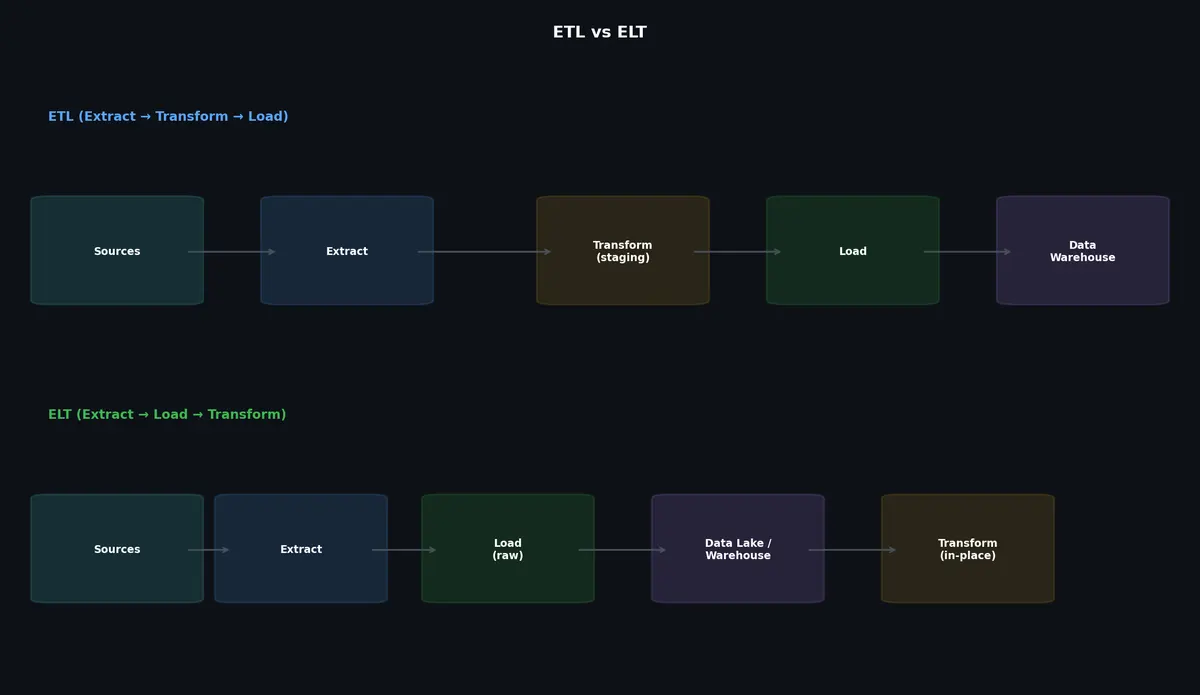
The two fundamental approaches to data pipeline design differ in when transformation happens.

ETL: Extract, Transform, Load#
The traditional approach. Data is extracted from source systems, transformed in a staging area, and loaded into the destination (typically a data warehouse).
| |
The transformation happens before loading. This means:
- Only clean, validated data enters the warehouse
- The warehouse schema is controlled and predictable
- Transformations can be complex (joins, aggregations, deduplication)
- Changes to transformation logic require re-running the pipeline
ELT: Extract, Load, Transform#
The modern approach. Data is extracted from sources and loaded raw into a data lake or cloud warehouse. Transformation happens inside the destination using its compute power.
| |
Transformation happens after loading. This means:
- Raw data is preserved (you can re-transform without re-extracting)
- Cloud warehouses provide cheap, scalable compute for transformations
- Schema-on-read: the raw data does not need a predefined schema
- Faster to get data in; slower to get clean data out
When to Use Each#
| Factor | ETL | ELT |
|---|---|---|
| Data volume | Moderate | Large to massive |
| Transformation complexity | Complex, multi-step | SQL-expressible |
| Data quality requirements | High (pre-validated) | Flexible (raw + validated layers) |
| Infrastructure | On-premise or custom | Cloud data warehouse |
| Schema stability | Stable, pre-defined | Evolving, schema-on-read |
| Latency requirements | Batch (hourly/daily) | Batch or near-real-time |
| Cost model | Compute-heavy staging | Storage-cheap, compute-on-demand |
Batch Processing#
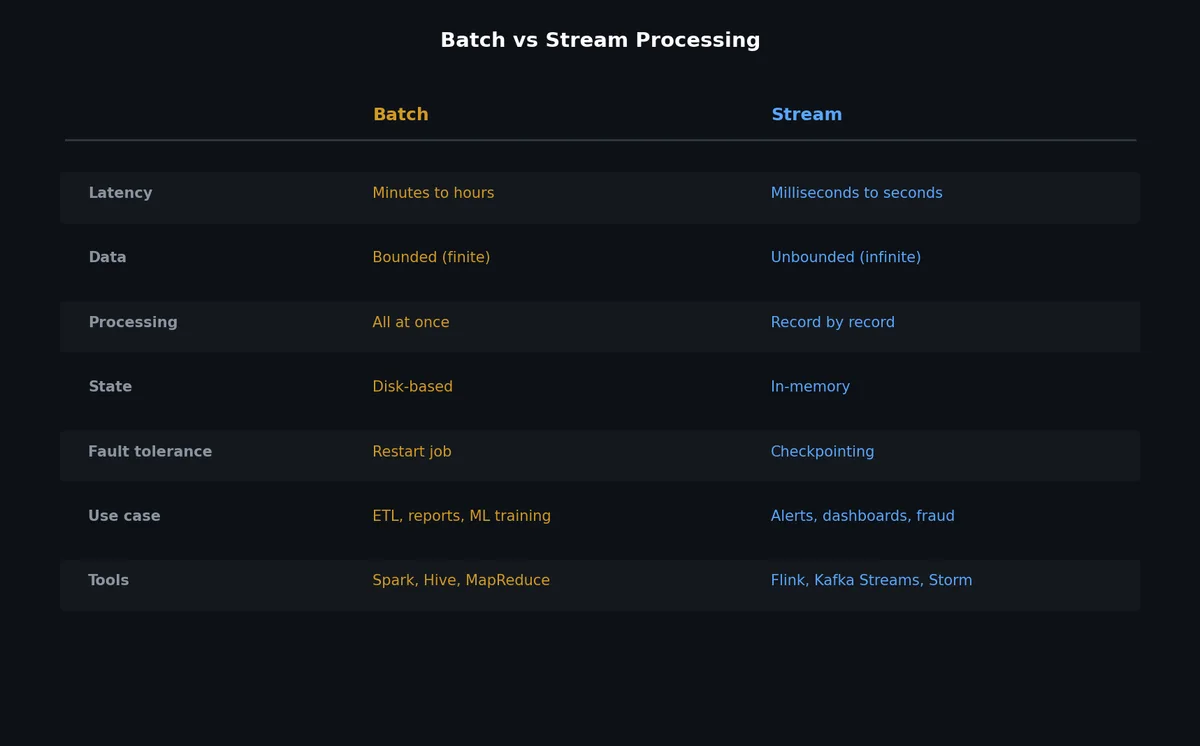
Batch processing handles large volumes of data in scheduled intervals — hourly, daily, or weekly. The data is collected, stored, and processed as a complete set.
MapReduce (Conceptual)#
MapReduce, introduced by Google in 2004, is the foundational model for distributed batch processing. While it has been largely superseded by higher-level frameworks, understanding the concept is essential.
The model has two phases:
Map: Process each input record independently, emitting key-value pairs.
Reduce: Group all values by key, aggregate them.
| |
MapReduce’s limitation is that multi-step transformations require chaining multiple MapReduce jobs, each reading from and writing to disk. This disk I/O between stages makes complex pipelines slow.
Apache Spark#
Spark replaced MapReduce for most batch processing workloads. Its key innovation: in-memory computation. Instead of writing intermediate results to disk, Spark keeps data in memory across transformation steps, making iterative algorithms 10-100x faster.
| |
Batch Processing Characteristics#
- High throughput: Processes entire datasets; optimized for volume, not latency
- Complete data: Can re-process historical data, handle late arrivals in the next batch
- Simple error handling: If a job fails, re-run it
- High latency: Results are available only after the batch completes (hours or days)
- Predictable resource usage: Runs at scheduled times, resources can be provisioned accordingly
Stream Processing#
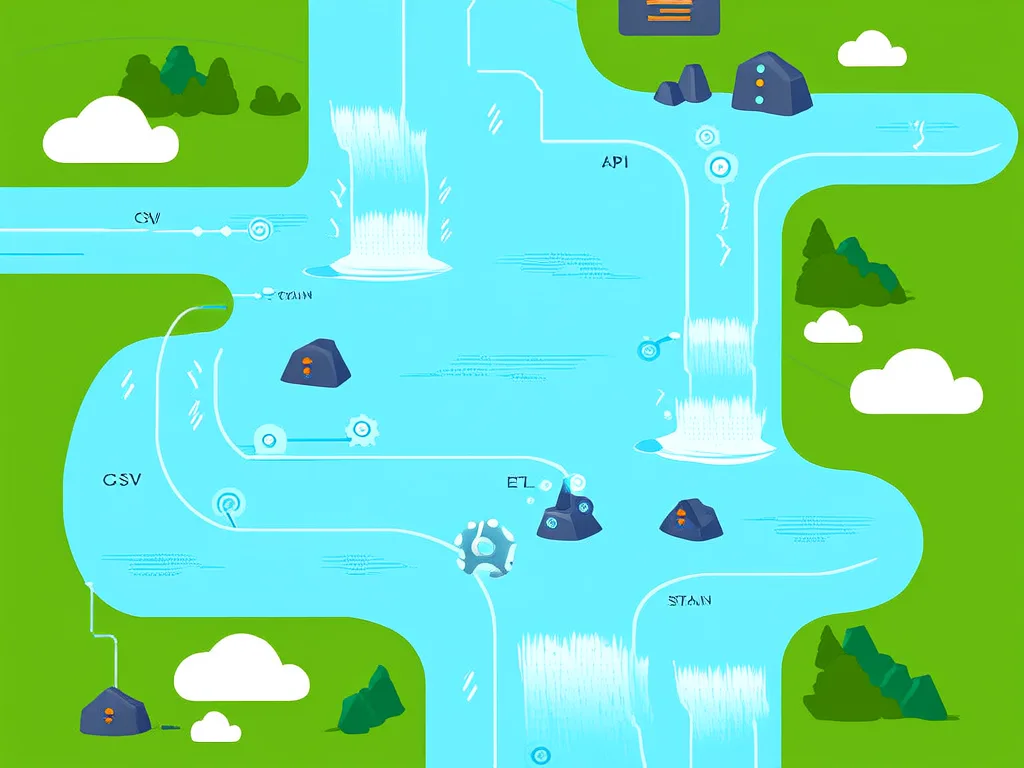
Stream processing handles data continuously as it arrives, producing results with sub-second to minute-level latency.
Core Concepts#
Event: A single data point with a timestamp. Examples: a page view, a transaction, a sensor reading.
Stream: An unbounded, continuously-arriving sequence of events.
Windowing: Grouping events into finite sets for aggregation. Without windowing, you cannot compute aggregates like “count per minute” on an infinite stream.
Window Types#
Tumbling window: Fixed-size, non-overlapping time intervals. Every event belongs to exactly one window.
| |
Sliding window: Fixed-size windows that advance by a fixed step. Windows overlap.
| |
Session window: Dynamic windows based on activity gaps. A window closes when no events arrive for a specified gap duration.
| |
Watermarks#
In a distributed system, events can arrive out of order. An event with timestamp T=100 might arrive after an event with timestamp T=105. Watermarks track the progress of event time and tell the system when it is safe to close a window.
| |
Apache Flink#
Flink is the leading open-source stream processing framework. It provides exactly-once processing guarantees, event time processing, and sophisticated windowing.

Key Concepts#
DataStream API: The core abstraction for stream processing. A DataStream represents a stream of events that can be transformed through operators (map, filter, keyBy, window, aggregate).
Event Time vs Processing Time: Event time is when the event actually occurred (embedded in the data). Processing time is when the system processes the event. Event time is preferred for correctness because processing delays do not affect results.
Checkpointing: Flink periodically snapshots the state of all operators to durable storage. On failure, the system restores from the latest checkpoint and replays events from the source (e.g., Kafka offsets). This provides exactly-once processing semantics.
Flink Pipeline Example (Conceptual Python)#
| |
Lambda Architecture#
The Lambda architecture, proposed by Nathan Marz, combines batch and stream processing to provide both accurate historical results and low-latency approximate results.
Three Layers#
Batch layer: Processes the complete dataset periodically (e.g., every hour). Produces accurate, comprehensive results. Stored in a batch view.
Speed layer: Processes new data in real-time since the last batch run. Produces approximate, low-latency results. Stored in a real-time view.
Serving layer: Merges batch and real-time views to answer queries. Queries check the batch view for historical data and the speed view for recent data.
| |
Lambda Example: Page View Counter#
| |
Lambda Drawbacks#
The main problem: you maintain two codebases (batch and stream) that must produce consistent results. Bugs in one but not the other cause discrepancies. Every business logic change must be implemented twice.
Kappa Architecture#
The Kappa architecture, proposed by Jay Kreps (co-creator of Kafka), simplifies Lambda by using only stream processing. The key insight: if your stream processor can replay historical data (by re-reading from Kafka), you do not need a separate batch layer.
How It Works#
| |
Lambda vs Kappa Comparison#
| Factor | Lambda | Kappa |
|---|---|---|
| Codebases | Two (batch + stream) | One (stream only) |
| Complexity | Higher (two systems to maintain) | Lower (one system) |
| Accuracy | Batch is always accurate | Depends on stream processor correctness |
| Reprocessing | Natural (just re-run batch job) | Re-read Kafka from beginning |
| Late data handling | Batch corrects in next run | Depends on watermark/window strategy |
| Storage cost | Data lake + Kafka | Kafka (with long retention) |
| Latency | Real-time from speed layer | Real-time |
| Maturity | Well-established pattern | Newer, growing adoption |
| Best for | Complex analytics with strict accuracy | Event-driven systems with simpler logic |
Use Lambda when: You need guaranteed accuracy for historical data and your batch logic is too complex for stream processing (e.g., complex ML model training, graph algorithms).
Use Kappa when: Your processing logic can be expressed as stream operations, Kafka retention covers your reprocessing needs, and you want to avoid maintaining two codebases.
Data Lake vs Data Warehouse#
| Feature | Data Lake | Data Warehouse |
|---|---|---|
| Schema | Schema-on-read (raw data) | Schema-on-write (structured) |
| Data format | Any (JSON, Parquet, Avro, CSV, images) | Structured tables |
| Processing | Spark, Flink, Presto | SQL (BigQuery, Snowflake, Redshift) |
| Users | Data engineers, data scientists | Business analysts, BI tools |
| Cost | Cheap storage (S3, GCS) | Expensive compute (per-query pricing) |
| Governance | Harder (unstructured data) | Easier (defined schemas) |
| Use cases | ML training, raw data exploration | Business reporting, dashboards |
| Examples | S3 + Spark, Delta Lake, Apache Iceberg | Snowflake, BigQuery, Redshift |
The modern trend is the Lakehouse — combining data lake storage (cheap, schema-flexible) with data warehouse features (ACID transactions, SQL queries, schema enforcement). Technologies like Delta Lake, Apache Iceberg, and Apache Hudi enable this pattern.
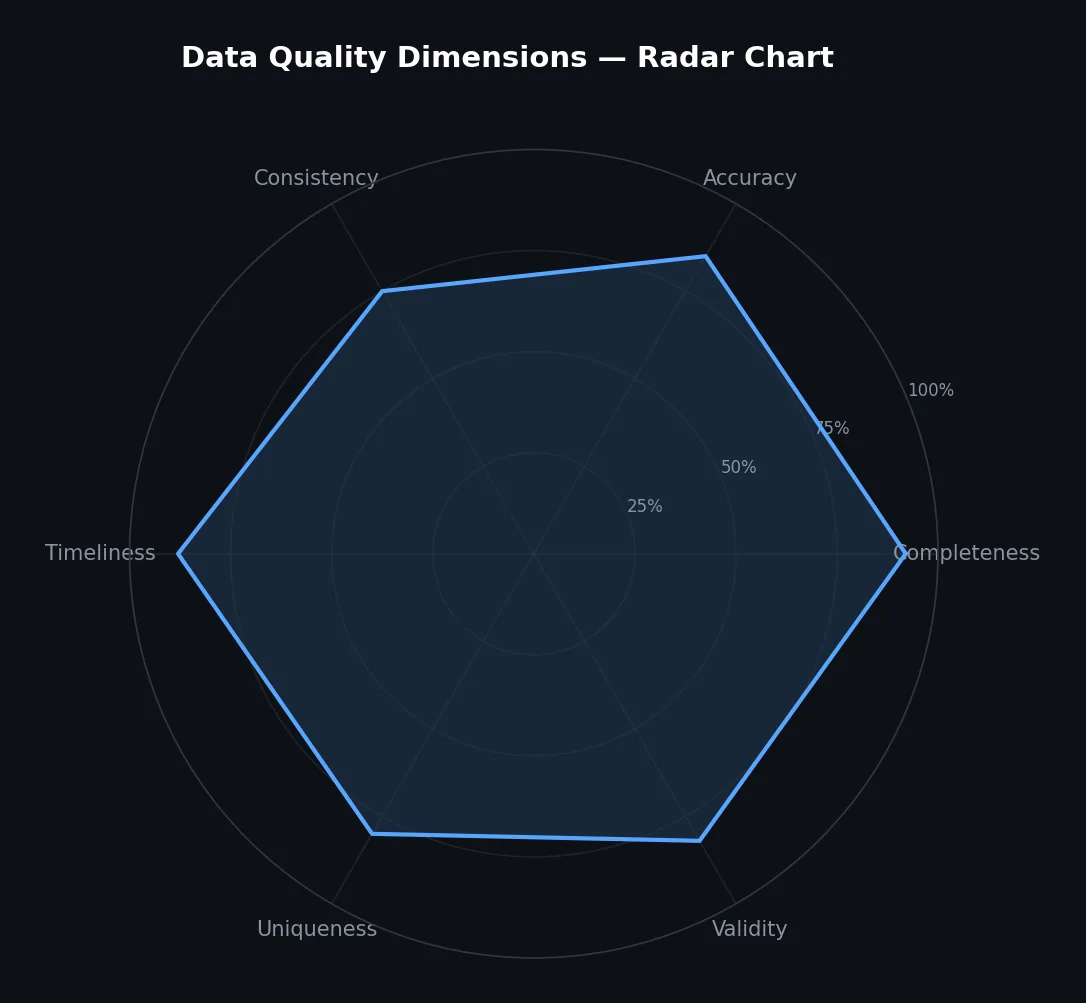
Data Quality#

Schema Validation#
Validate incoming data against an expected schema before processing:
| |
Data Lineage#
Track where data came from and how it was transformed. This is critical for debugging, compliance, and impact analysis.
| |
Change Data Capture (CDC)#
CDC captures row-level changes (INSERT, UPDATE, DELETE) from a database’s transaction log and streams them as events. This enables real-time data synchronization without polling.

Debezium#
Debezium is the most widely used open-source CDC platform. It reads the database’s write-ahead log (WAL/binlog) and publishes change events to Kafka.
| |
A CDC change event looks like:
| |
The op field indicates the operation type: c (create/insert), u (update), d (delete), r (read/snapshot).
CDC Use Cases#
- Real-time analytics: Stream database changes to an analytics pipeline without querying the database
- Search index sync: Keep Elasticsearch in sync with the source database
- Cache invalidation: Invalidate Redis cache entries when the underlying database row changes
- Cross-service data sync: Replicate data between services without API calls
- Audit logging: Capture every data change for compliance
Idempotent Processing in Pipelines#
Duplicate events are inevitable in distributed pipelines (at-least-once delivery, retries, reprocessing). Every pipeline stage must handle duplicates gracefully.
| |
Real Example: Real-Time Analytics for E-Commerce#
Requirements#
- Track page views, add-to-cart, and purchase events in real-time
- Display a live dashboard showing metrics per minute (views, conversions, revenue)
- Support drilling down by product category, country, and device type
- Data must be available within 30 seconds of the event
- Handle 50,000 events per second at peak
Architecture#
| |
Components:
Event Collector: A lightweight HTTP API that validates events and publishes to Kafka. Runs as a stateless service behind a load balancer.
Kafka: Three topics —
page-views,add-to-cart,purchases. Each partitioned by user ID for ordering. Retention: 30 days for reprocessing.Flink: Three stream processing jobs:
- Per-minute aggregation of page views by URL, country, and device
- Per-minute conversion funnel (view → cart → purchase)
- Per-minute revenue by product category and country
PostgreSQL: Stores aggregated metrics (not raw events). TimescaleDB extension for time-series optimization.
S3 Data Lake: Raw events stored in Parquet format, partitioned by date and event type. Used for ad-hoc analysis and batch reprocessing.
Grafana: Dashboard querying PostgreSQL for real-time metrics.
Estimation#
| |
This architecture handles the requirements with reasonable infrastructure: a 3-broker Kafka cluster, 2-4 Flink task managers, and a single PostgreSQL instance for aggregated metrics.
What’s Next#
With all the building blocks in place — estimation, networking, APIs, caching, message queues, microservices, and data pipelines — the final article puts them together. Three complete case studies: a URL shortener, a real-time chat system, and a news feed. Each walks through the full design process from requirements to scaling strategies.
System Design 8 parts
- 01 System Design (1): Thinking in Systems — Load, Latency, and the Art of Estimation
- 02 System Design (2): DNS, CDN, and Load Balancing — The First Three Hops
- 03 System Design (3): API Design — REST, gRPC, GraphQL, and Choosing Wisely
- 04 System Design (4): Caching — Where to Cache, What to Evict, and When Caching Hurts
- 05 System Design (5): Message Queues and Event-Driven Architecture
- 06 System Design (6): Microservices vs Monoliths — The Honest Tradeoff
- 07 System Design (7): Data Pipelines — Batch, Stream, and the Lambda Architecture you are here
- 08 System Design (8): Case Studies — URL Shortener, Chat System, News Feed