System Design (8): Case Studies — URL Shortener, Chat System, News Feed
Three complete system design walkthroughs — a URL shortener, a real-time chat system, and a news feed — each following the full process from requirements and estimation through high-level design, deep dives, and scaling strategies.
The best way to learn system design is to practice it. Reading about individual components — caching, queues, load balancers — builds your vocabulary, but designing a complete system is where you learn to compose those components into something that actually works.
This article walks through three classic system design problems end to end. Each follows the framework from the first article in this series: clarify requirements, estimate scale, design the architecture, deep dive into critical components, and identify bottlenecks.
A URL shortener takes a long URL and produces a short alias (e.g., https://short.ly/abc123) that redirects to the original. It sounds trivially simple, but at scale it touches hashing, distributed storage, caching, and analytics.
Problem: Collisions. Two different URLs can produce the same 7-character code. You must check for collisions and append a counter or use a different hash seed if one occurs.
Approach 3: Pre-generated key pool
Pre-generate a large pool of unique short codes in a separate service. When a new URL is created, grab the next available code from the pool.
classKeyGenerationService:"""Pre-generates unique short codes for the URL shortener."""def__init__(self,redis_client):self.redis=redis_clientself.pool_key="available_codes"defgenerate_batch(self,batch_size:int=100000):"""Generate a batch of unique codes and add to the pool."""codes=set()whilelen(codes)<batch_size:code=encode_base62(random.randint(0,62**7-1))code=code.ljust(7,"0")# Pad to 7 charscodes.add(code)# Add to Redis set (automatically deduplicates)pipeline=self.redis.pipeline()forcodeincodes:pipeline.sadd(self.pool_key,code)pipeline.execute()defget_code(self)->str:"""Pop a code from the pool. Thread-safe and atomic."""code=self.redis.spop(self.pool_key)ifcodeisNone:raiseRuntimeError("Code pool exhausted — generate more codes")returncode.decode()
For this design, I will use Approach 1 (base62 encoding of a distributed ID) because it is simple, collision-free, and produces predictably short codes.
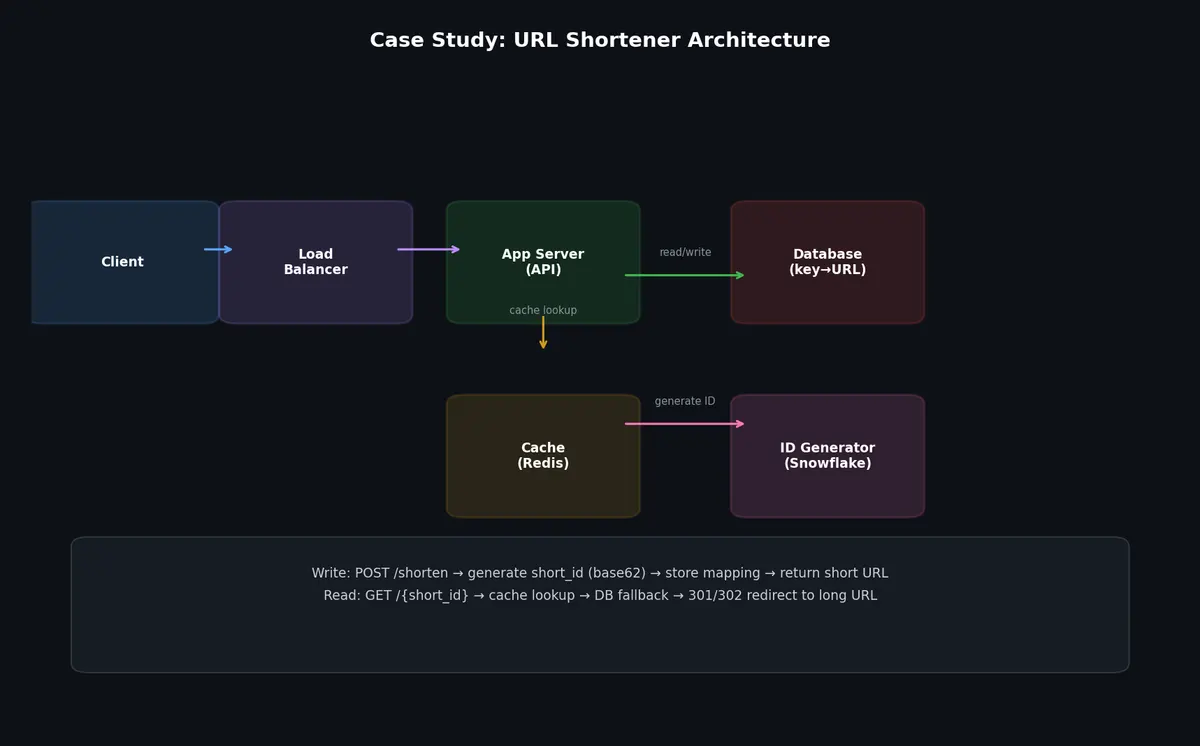
API servers (stateless) — handle create and redirect requests
Distributed ID generator — produces unique IDs for new URLs
Database — stores URL mappings (short code → long URL)
Redis cache — caches hot URL mappings for fast redirects
Analytics pipeline — records click events for analytics
Data flow for URL creation:
1
2
3
4
5
Client → Load Balancer → API Server
→ Generate unique ID (Snowflake)
→ Encode as base62 short code
→ Store mapping in database
→ Return short URL to client
Data flow for redirect:
1
2
3
4
5
Client → Load Balancer → API Server
→ Look up short code in Redis cache
→ Cache hit: redirect immediately
→ Cache miss: look up in database, populate cache, redirect
→ Async: record click event to Kafka for analytics
fromfastapiimportFastAPI,Response,HTTPExceptionfromfastapi.responsesimportRedirectResponseimportredisimportjsonapp=FastAPI()cache=redis.Redis(host="cache.internal",port=6379,decode_responses=True)@app.get("/{short_code}")asyncdefredirect(short_code:str):# Step 1: Check cachelong_url=cache.get(f"url:{short_code}")iflong_urlisNone:# Step 2: Cache miss — check databaserecord=awaitdb.fetch_one("SELECT long_url, expires_at FROM urls WHERE short_code = $1",short_code,)ifrecordisNone:raiseHTTPException(status_code=404,detail="Short URL not found")ifrecord["expires_at"]andrecord["expires_at"]<datetime.utcnow():raiseHTTPException(status_code=410,detail="Short URL has expired")long_url=record["long_url"]# Populate cache (TTL: 24 hours)cache.setex(f"url:{short_code}",86400,long_url)# Step 3: Record analytics event (async, non-blocking)awaitkafka_producer.send("click-events",{"short_code":short_code,"timestamp":datetime.utcnow().isoformat(),"referrer":request.headers.get("referer"),"user_agent":request.headers.get("user-agent"),"ip":request.client.host,})# Step 4: Redirect# 301 (permanent) is more cache-friendly but hides analytics# 302 (temporary) forces the browser to always hit our server (better for analytics)returnRedirectResponse(url=long_url,status_code=302)
Database partitioning: Hash the short code to determine the partition. This distributes writes evenly and allows lookups without scanning.
1
2
3
4
5
Partition 0: short codes starting with [0-9]
Partition 1: short codes starting with [a-m]
Partition 2: short codes starting with [n-z]
Partition 3: short codes starting with [A-M]
Partition 4: short codes starting with [N-Z]
Cache hot URLs: The top 1% of URLs receive 90%+ of traffic. A Redis cluster caching these hot URLs handles the vast majority of redirects without touching the database.
Analytics pipeline: Click events go to Kafka, not directly to the database. A Flink job aggregates clicks per minute/hour/day and writes to a time-series database. This decouples the real-time redirect path from the analytics path.
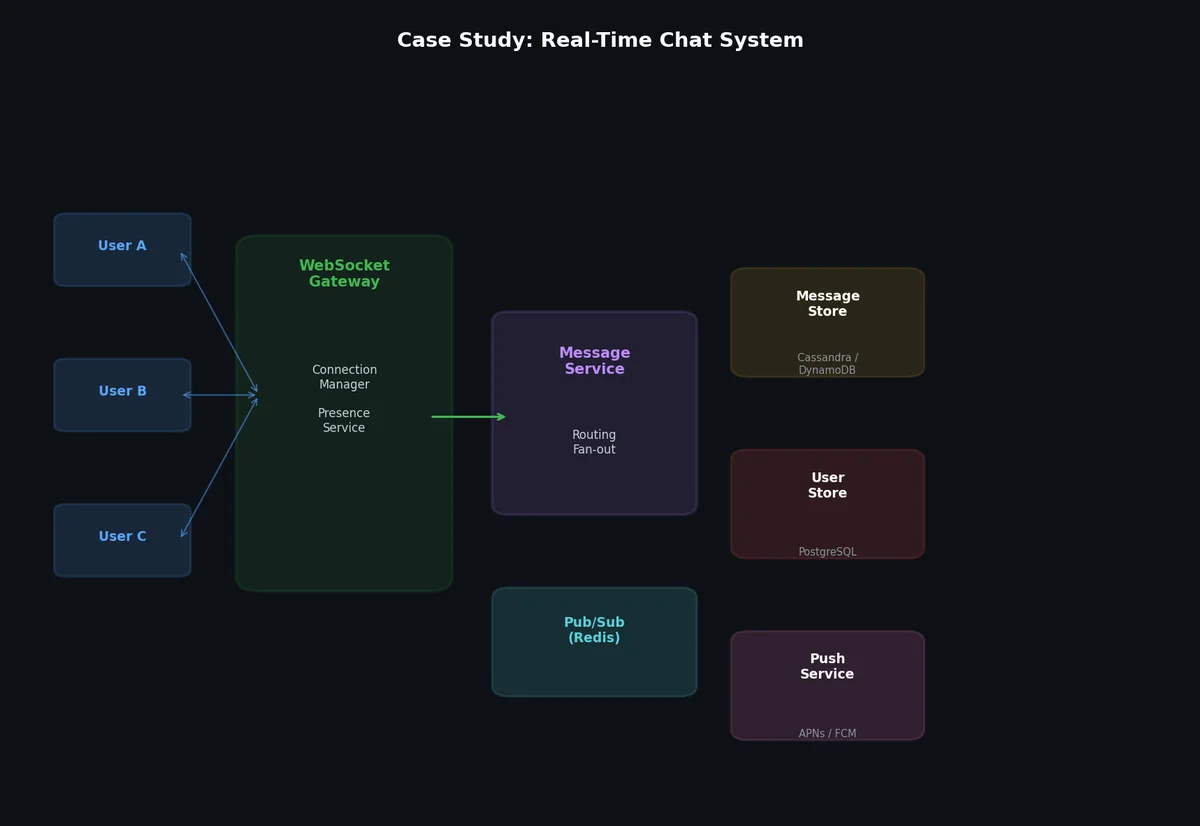
A chat application requires real-time bidirectional communication, persistent message storage, presence awareness, and efficient fan-out for group messages.
# Connection manager (runs on each WebSocket server)importasyncioimportwebsocketsfromcollectionsimportdefaultdictclassConnectionManager:def__init__(self,server_id:str,redis_client):self.server_id=server_idself.connections={}# user_id → websocketself.redis=redis_clientasyncdefconnect(self,user_id:str,websocket):self.connections[user_id]=websocket# Register in Redis: user_id → server_idself.redis.hset("user_connections",user_id,self.server_id)# Publish presence eventself.redis.publish("presence",json.dumps({"user_id":user_id,"status":"online"}))asyncdefdisconnect(self,user_id:str):self.connections.pop(user_id,None)self.redis.hdel("user_connections",user_id)self.redis.publish("presence",json.dumps({"user_id":user_id,"status":"offline"}))asyncdefsend_to_user(self,user_id:str,message:dict):ws=self.connections.get(user_id)ifws:awaitws.send(json.dumps(message))returnTruereturnFalsedeffind_server(self,user_id:str)->str:"""Find which server a user is connected to."""returnself.redis.hget("user_connections",user_id)
classChatService:asyncdefhandle_message(self,message:dict):sender_id=message["sender_id"]recipient_id=message["recipient_id"]conversation_id=message["conversation_id"]# Generate message ID and timestamp (server-side for consistency)message["message_id"]=str(uuid.uuid4())message["server_timestamp"]=datetime.utcnow().isoformat()# Persist to Kafka (for ordering and durability)awaitkafka_producer.send(topic=f"chat-messages",key=conversation_id,# Same conversation → same partition → orderedvalue=message,)# Send acknowledgment to senderawaitself.connection_manager.send_to_user(sender_id,{"type":"ack","message_id":message["message_id"],"status":"sent",})# Deliver to recipientrecipient_server=self.connection_manager.find_server(recipient_id)ifrecipient_server:ifrecipient_server==self.server_id:# Same server — deliver directlyawaitself.connection_manager.send_to_user(recipient_id,message)else:# Different server — route via Redis Pub/Subself.redis.publish(f"deliver:{recipient_server}",json.dumps(message),)else:# User is offline — send push notificationawaitpush_service.notify(recipient_id,message)
asyncdefhandle_group_message(self,message:dict):group_id=message["group_id"]sender_id=message["sender_id"]# Get group membersmembers=awaitdb.fetch_all("SELECT user_id FROM group_members WHERE group_id = $1",group_id,)# Persist messagemessage["message_id"]=str(uuid.uuid4())message["server_timestamp"]=datetime.utcnow().isoformat()awaitkafka_producer.send(topic="chat-messages",key=group_id,value=message,)# Fan-out to all members (except sender)delivery_tasks=[]formemberinmembers:ifmember["user_id"]!=sender_id:delivery_tasks.append(self.deliver_to_user(member["user_id"],message))# Deliver in parallelawaitasyncio.gather(*delivery_tasks,return_exceptions=True)
For large groups (100+ members), fan-out should be asynchronous. The chat service publishes the message to Kafka, and a separate delivery worker handles the fan-out.
classPresenceService:HEARTBEAT_INTERVAL=30# secondsOFFLINE_THRESHOLD=90# seconds without heartbeat = offlinedef__init__(self,redis_client):self.redis=redis_clientasyncdefheartbeat(self,user_id:str):"""Called every 30 seconds by connected clients."""self.redis.setex(f"presence:{user_id}",self.OFFLINE_THRESHOLD,"online",)defis_online(self,user_id:str)->bool:returnself.redis.exists(f"presence:{user_id}")defget_online_friends(self,user_id:str)->list:friend_ids=self.get_friends(user_id)pipeline=self.redis.pipeline()forfidinfriend_ids:pipeline.exists(f"presence:{fid}")results=pipeline.execute()return[fidforfid,onlineinzip(friend_ids,results)ifonline]
Partition WebSocket connections by user ID hash: Consistent hashing maps each user to a specific gateway server. If a server fails, only its users need to reconnect.
Message ordering: Kafka partitions by conversation_id, guaranteeing ordering within a conversation. Different conversations can be processed in parallel across partitions.
Hot groups: A group with 500 active members generates 500x fan-out per message. Isolate hot groups on dedicated delivery workers to prevent them from affecting 1:1 chat latency.
A news feed system displays a personalized, ranked stream of content from users and pages that you follow. This is the core product feature of platforms like Facebook, Twitter, and Instagram.
The central design challenge: how to build each user’s feed from the posts of the people they follow.
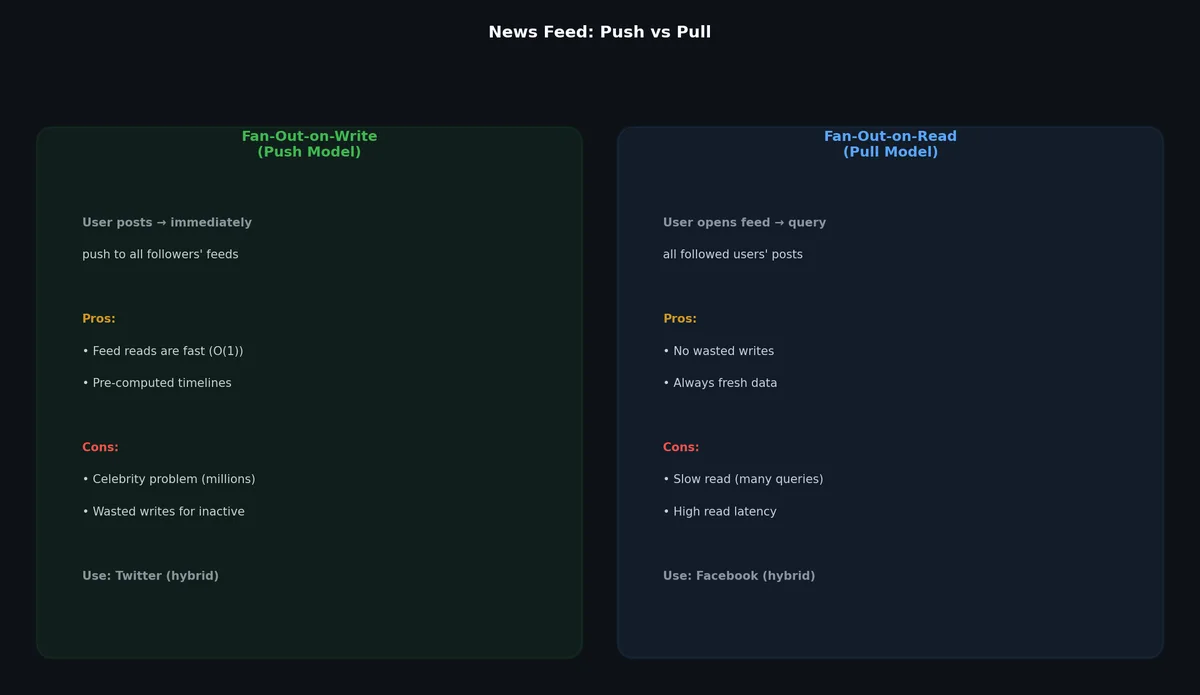
Fan-Out on Write (Push Model): When a user publishes a post, immediately write it to each follower’s feed cache.
1
2
3
4
5
6
User A publishes a post:
→ For each of A's 200 followers:
→ Add post to follower's pre-computed feed cache
When a user opens their feed:
→ Read directly from their pre-computed feed cache (fast!)
Advantages:
Feed reads are extremely fast (pre-computed)
No complex query at read time
Disadvantages:
High write amplification (1 post → 200+ writes)
Celebrity problem: a user with 10M followers triggers 10M writes per post
Wasted work for inactive users who never read their feed
Fan-Out on Read (Pull Model): When a user opens their feed, query the posts from everyone they follow in real-time.
1
2
3
4
5
User opens their feed:
→ Get list of followed users (200 users)
→ Query recent posts from each followed user
→ Merge and rank all posts
→ Return top N posts
Advantages:
No write amplification
No wasted work (only compute when someone reads)
Handles celebrities naturally (no special case)
Disadvantages:
Slow feed reads (must query 200+ users’ posts and merge)
High database load at read time
Latency spikes during traffic peaks
Hybrid Model (the practical choice): Use fan-out on write for regular users and fan-out on read for celebrities.
1
2
User with < 10,000 followers: fan-out on write (push to followers' feeds)
User with >= 10,000 followers: fan-out on read (followers pull at read time)
This is the approach used by Twitter and most large social platforms.
classPostService:asyncdefcreate_post(self,user_id:str,content:dict)->dict:# Create post in databasepost_id=str(uuid.uuid4())post={"post_id":post_id,"user_id":user_id,"content":content["text"],"media_urls":content.get("media_urls",[]),"created_at":datetime.utcnow().isoformat(),}awaitdb.execute("INSERT INTO posts (id, user_id, content, media_urls, created_at) ""VALUES ($1, $2, $3, $4, $5)",post_id,user_id,post["content"],json.dumps(post["media_urls"]),post["created_at"],)# Cache the postawaitredis.setex(f"post:{post_id}",86400,json.dumps(post))# Publish event for fan-outawaitkafka_producer.send(topic="new-posts",key=user_id,value=post,)returnpost
classFanOutService:CELEBRITY_THRESHOLD=10000asyncdefprocess_new_post(self,post:dict):user_id=post["user_id"]# Get follower countfollower_count=awaitsocial_graph.get_follower_count(user_id)iffollower_count>=self.CELEBRITY_THRESHOLD:# Celebrity: skip fan-out, fans will pull at read timeawaitredis.sadd("celebrity_users",user_id)return# Regular user: fan-out on writefollowers=awaitsocial_graph.get_followers(user_id)# Batch fan-out for efficiencypipeline=redis.pipeline()forfollower_idinfollowers:feed_key=f"feed:{follower_id}"# Add post ID to follower's feed (sorted set, scored by timestamp)pipeline.zadd(feed_key,{post["post_id"]:float(post["created_at_epoch"])},)# Trim feed to last 1000 posts (prevent unbounded growth)pipeline.zremrangebyrank(feed_key,0,-1001)awaitpipeline.execute()
classFeedService:FEED_SIZE=50# Posts per pageasyncdefget_feed(self,user_id:str,cursor:str=None)->dict:feed_key=f"feed:{user_id}"# Step 1: Get pre-computed feed (fan-out on write posts)ifcursor:max_score=float(cursor)else:max_score=float("inf")post_ids=awaitredis.zrevrangebyscore(feed_key,max_score,"-inf",start=0,num=self.FEED_SIZE,withscores=True,)# Step 2: Merge with celebrity posts (fan-out on read)celebrity_ids=awaitself.get_followed_celebrities(user_id)ifcelebrity_ids:celebrity_posts=awaitself.fetch_celebrity_posts(celebrity_ids,max_score,self.FEED_SIZE)# Merge celebrity posts with pre-computed feedall_posts=self.merge_sorted(post_ids,celebrity_posts)else:all_posts=post_ids# Step 3: Fetch full post data (batch from cache/DB)enriched_posts=awaitself.enrich_posts([pidforpid,_inall_posts[:self.FEED_SIZE]])# Step 4: Rank postsranked_posts=awaitself.ranking_service.rank(user_id,enriched_posts)# Step 5: Build response with cursor for paginationnext_cursor=Noneiflen(ranked_posts)==self.FEED_SIZE:next_cursor=str(all_posts[self.FEED_SIZE-1][1])return{"posts":ranked_posts,"next_cursor":next_cursor,}asyncdeffetch_celebrity_posts(self,celebrity_ids:list,max_timestamp:float,limit:int)->list:"""Pull recent posts from celebrity users (fan-out on read)."""tasks=[db.fetch_all("SELECT post_id, created_at_epoch FROM posts ""WHERE user_id = $1 AND created_at_epoch < $2 ""ORDER BY created_at_epoch DESC LIMIT $3",celeb_id,max_timestamp,limit,)forceleb_idincelebrity_ids]results=awaitasyncio.gather(*tasks)# Merge all celebrity posts, sort by timestampmerged=[]forresultinresults:merged.extend([(r["post_id"],r["created_at_epoch"])forrinresult])merged.sort(key=lambdax:x[1],reverse=True)returnmerged[:limit]
classRankingService:asyncdefrank(self,user_id:str,posts:list)->list:"""Score and rank posts based on relevance signals."""scored_posts=[]forpostinposts:score=self.compute_score(user_id,post)scored_posts.append((score,post))scored_posts.sort(key=lambdax:x[0],reverse=True)return[postfor_,postinscored_posts]defcompute_score(self,user_id:str,post:dict)->float:"""Simple scoring function combining multiple signals."""score=0.0# Recency: exponential decay over timeage_hours=(time.time()-post["created_at_epoch"])/3600recency_score=math.exp(-0.1*age_hours)score+=recency_score*10# Engagement: posts with more likes/comments rank higherengagement=post.get("like_count",0)+post.get("comment_count",0)*2score+=math.log1p(engagement)*3# Affinity: how often the user interacts with the post authorinteraction_count=self.get_interaction_count(user_id,post["user_id"])affinity_score=math.log1p(interaction_count)score+=affinity_score*5# Content type boost: images and videos rank higher than textifpost.get("media_urls"):score+=2returnscore
In production, this simple scoring function is replaced by an ML model trained on user behavior (click-through rate, dwell time, likes, shares). But the simple version illustrates the concept.
When a user with 50 million followers publishes a post, fan-out on write would require 50 million cache writes. At 1 microsecond per write, that takes 50 seconds. Meanwhile, the next post from another celebrity starts its own fan-out. The system falls behind.
The hybrid model solves this: celebrities are handled via fan-out on read. But there is a spectrum between “regular user” and “celebrity.” Some practical thresholds:
1
2
3
Followers < 10,000:    Fan-out on write (pre-compute feed)
Followers 10K-1M:      Fan-out on write with lower priority (async, may be delayed)
Followers > 1M:        Fan-out on read only (pull at query time)
The threshold is not fixed. It depends on your infrastructure capacity, acceptable latency, and the percentage of followers who are actually active.
Feed cache partitioning: Partition by user ID hash across Redis cluster nodes. Each user’s feed lives on a deterministic shard.
Post storage: Partition by user ID for write-optimized access (all of a user’s posts on the same shard). Use a secondary index or search service for cross-user queries.
Fan-out workers: The fan-out service is a pool of Kafka consumers. Scale workers horizontally to handle post volume. Each worker processes fan-out for a subset of posts.
Read path optimization: Pre-compute and cache the top 200 posts per user’s feed. Most users only scroll through the first 20-50 posts, so cache hit rates are high.
Looking across all three case studies, several patterns recur:
Read-heavy systems benefit from caching: The URL shortener, chat history, and news feed all have read:write ratios of 10:1 to 100:1. Caching transforms an unscalable system into a scalable one.
Async processing via message queues: All three systems use Kafka to decouple the write path from downstream processing. The URL shortener decouples analytics. The chat system decouples message storage from delivery. The news feed decouples post creation from fan-out.
The right data store for the right access pattern: The URL shortener uses a key-value store (hash lookup). The chat system uses a wide-column store (time-ordered messages per conversation). The news feed uses a sorted set cache (ranked posts per user). No single database fits all three.
Estimation drives architecture: The numbers calculated in the estimation phase determine which components are needed. 350,000 reads/sec demands a cache. 460,000 fan-out writes/sec demands a message queue. 15 million concurrent connections demands a distributed WebSocket gateway. Without the math, these decisions are guesswork.
This article concludes the System Design series. The eight articles together cover the full spectrum from estimation fundamentals to complete system designs. The next step is practice: pick a system you use daily, define its requirements, estimate its scale, and design its architecture. The more systems you design, the more patterns you recognize, and the faster you converge on good solutions.