阿里云全栈实战(八):Serverless 与事件驱动

在阿里云上无服务器化:Function Compute 触发器、运行时、冷启动、定价。EventBridge 事件路由。API Gateway 集成。构建事件驱动的图像处理流水线。

第一次看到函数计算的账单——处理 1 万次请求仅需 0.03 元时,我彻底重构了原有架构。此前,为了支撑一个每小时仅约 200 次请求的 API,我常年运行一台 2 核 ECS 实例,每月花费约 490 元;而同样的工作负载迁移到函数计算后,月成本不到 5 元——不是每天 5 元,而是整月不到 5 元。成本差距如此悬殊,以至于那个周末我把所有无需常驻进程的服务都从 ECS 迁移到了函数。

Serverless 并非没有服务器,而是让你彻底摆脱对服务器的操心。你只需编写函数、定义触发条件,平台便会自动处理资源分配、弹性伸缩、安全补丁和实例回收。计费精确到毫秒——代码不运行就不收费。即便五分钟内涌入百万请求,平台也能瞬间拉起百万个函数实例,全程无需手动调整任何容量配置。

本文将介绍阿里云 Serverless 的两大核心组件:函数计算(Function Compute,执行引擎)事件总线(EventBridge,事件路由层)。读完后,我们将动手搭建一条完整的事件驱动图像处理流水线:当文件上传至 OSS 后,系统会自动触发图片缩放、添加水印并生成多种尺寸的缩略图。


什么时候该用 Serverless(什么时候不该用)#

Serverless 并非万能解药,它有明确的适用边界。提前厘清这一点,能避免数月后被迫回迁至 ECS 的痛苦。

适合 Serverless 的场景#

使用场景为什么合适示例
事件处理天然无状态,由外部事件触发处理 OSS 上传、解析 SLS 日志
Webhooks流量低频且不可预测GitHub webhook 处理、支付回调
定时任务每天/每小时执行一次,其余时间空闲日报生成、数据清理
突发流量 API 后端空闲时缩容至零,显著节省成本营销活动 API、季节性电商接口
数据转换短生命周期、CPU 密集、高度并行ETL 流水线、格式转换
聊天机器人后端请求-响应模式,负载波动大钉钉机器人、Slack 集成

不适合 Serverless 的场景#

使用场景为什么不行更好的替代方案
长运行进程(>15 分钟)FC 执行超时限制为 15 分钟ECS、容器服务(ACK)
GPU 工作负载FC 不支持 GPUECS GPU 实例、PAI-EAS
超低延迟要求(<10ms)冷启动增加 100ms–2s 延迟常驻进程的 ECS 实例
WebSocket / 持久连接函数基于请求-响应模型ECS、带会话保持的 ALB
高稳态吞吐量持续运行在 ECS 上更经济包年包月 ECS 实例
大内存状态依赖函数无状态,最大仅 3 GiB 内存ECS、Redis

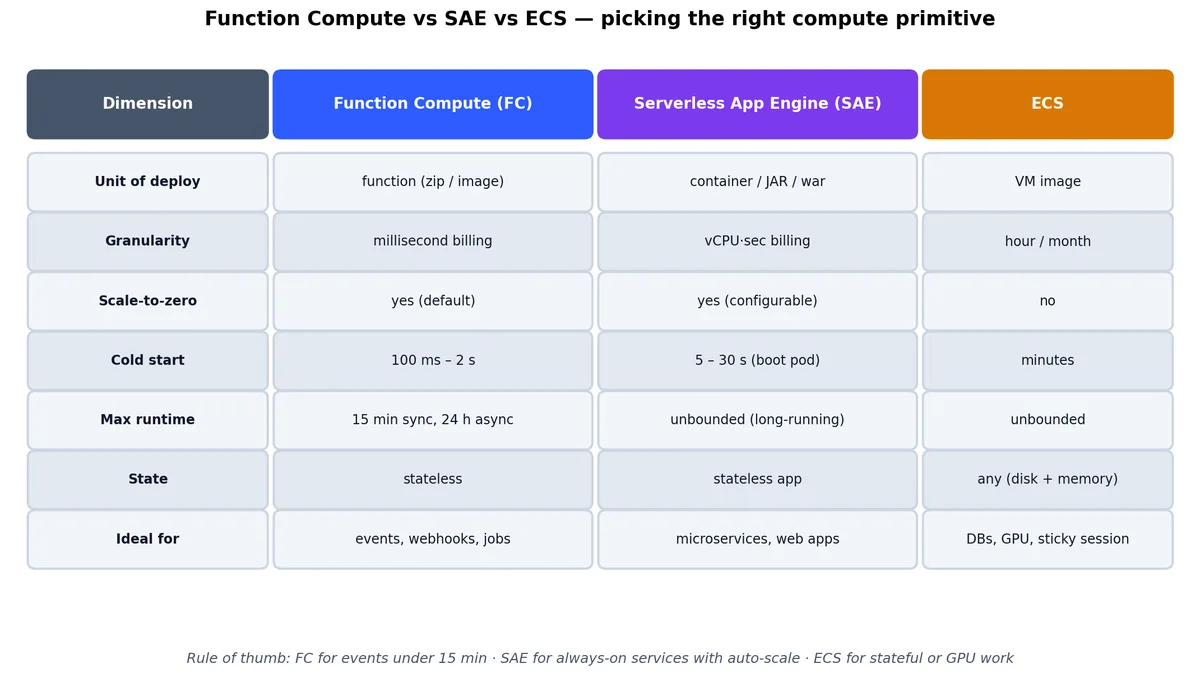
函数计算 vs Serverless 应用引擎 vs ECS

在比较价格前,先明确三种计算原语的定位:FC、SAE 和 ECS 在“资源粒度”与“生命周期”光谱上各占一席。我见过的多数架构失误,都源于为工作负载选错了计算模型。

成本交叉点#

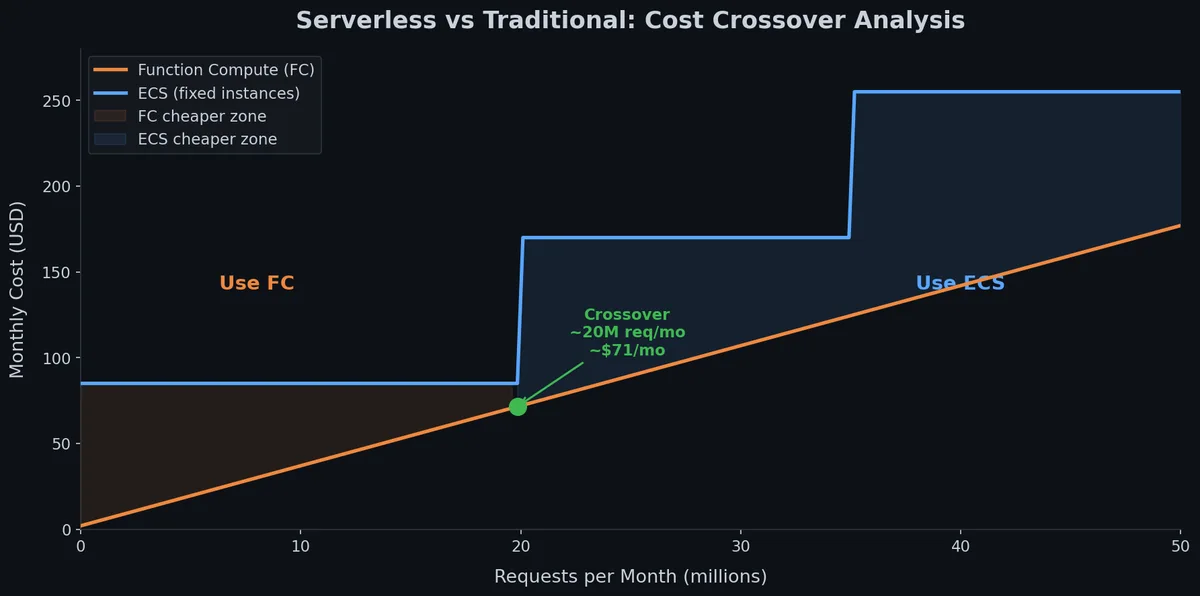
大家最关心的问题是:流量达到什么水平时,ECS 会比函数计算更便宜?

以一个 Python 函数为例(512 MiB 内存,平均执行 200ms),计算如下:

每月请求数FC 成本(CNY)等价 ECS 成本(CNY)胜出方
10,000~0.03~490(c7.large)FC 便宜 16,000 倍
100,000~0.30~490FC 便宜 1,600 倍
1,000,000~3.00~490FC 便宜 160 倍
10,000,000~30~490FC 便宜 16 倍
100,000,000~300~490FC
500,000,000~1,500~490ECS
1,000,000,000~3,000~490ECS 便宜 6 倍

在此配置下,成本交叉点大约在每月 2–3 亿次请求。低于此阈值,函数计算完胜;高于此值,专用 ECS 实例更便宜——但你需要自行处理扩缩容、安全补丁和高可用保障。

我的经验法则:如果你的函数平均每秒持续请求少于 100 次(约每月 2.5 亿次),Serverless 几乎肯定更便宜且运维更简单。若持续超过该阈值,则应评估 ECS 或容器化方案。

函数计算(FC)基础#

函数计算是阿里云的 Serverless 执行服务,对标 AWS Lambda,核心概念一一对应:

函数计算架构

FC 概念说明AWS 等价物
Service相关函数的逻辑分组,共享 VPC 配置、日志设置、NAS 挂载和执行角色(无直接等价;Lambda 使用标签或前缀)
Function执行单元,包含你的代码与配置Lambda function
Trigger触发函数执行的事件源Event source mapping / trigger
Layer与函数代码分离打包的共享依赖Lambda layer
Custom domain将自有域名映射到 HTTP 触发的函数API Gateway custom domain
Alias / Version带流量切换能力的不可变快照Lambda versions and aliases

执行模型#

当请求到达时,FC 按以下流程处理:

  1. 检查温热实例:若近期调用过的函数实例仍存活(保温约 5–15 分钟),则直接复用,无冷启动。
  2. 冷启动(如需):下载代码包、初始化运行时、执行初始化代码(如模块级导入、数据库连接池)。耗时 100ms–2s,取决于运行时和包大小。
  3. 执行 handler:传入事件载荷运行你的函数逻辑——从此刻开始计费。
  4. 返回响应:实例保持温热状态,等待后续请求。

关键限制如下:

限制项
最大执行时间15 分钟(异步调用可达 86,400 秒)
最大内存32 GiB
最大代码包(直接上传)100 MiB(压缩后)
最大代码包(OSS 引用)500 MiB(未压缩)
每函数最大 Layers 数5
默认最大并发实例数每函数 300
最大同步载荷32 MiB
最大异步载荷128 KiB
临时磁盘(/tmp10 GiB

FC 请求生命周期:热路径 vs 冷启动

热路径与冷路径的性能差距,构成了 Serverless 的全部性能故事:热路径仅需几毫秒;而冷路径在你的 handler 开始执行前,还需完成四个额外步骤。

运行时支持#

FC 支持以下托管运行时:

运行时版本典型冷启动时间备注
Python3.9, 3.10200–400ms最流行,生态丰富
Node.js14, 16, 18150–300ms冷启动快,适合 API 后端
Java8, 11, 171–3s冷启动最慢,建议使用 GraalVM 或 SnapStart
Go1.x(自定义运行时)50–150ms最快,编译为静态二进制,无运行时初始化
PHP7.2200–400ms遗留支持
C#.NET Core 6500ms–1s中等表现
Custom Runtime任意(基于 Docker)视情况而定完全控制,适用于 ML 模型或系统库
Custom Container任意 Docker 镜像1–10s支持大包,但需拉取镜像

若冷启动至关重要:Go 是绝对首选——函数编译为单一静态二进制,无需运行时初始化。Python 则是实用主义的最佳平衡点:冷启动适中、库生态庞大、开发效率高。除非使用 GraalVM 原生编译,否则应避免在延迟敏感场景使用 Java。

编写你的第一个函数#

我们从零开始构建一个函数,使用 Python 3.10 和 Serverless Devs(s)CLI——这是 FC 开发的标准工具链。

安装 Serverless Devs#

1
2
3
4
5
6
7
8
9
# Install the s CLI
npm install -g @serverless-devs/s

# Configure credentials
s config add \
  --AccountID <your-account-id> \
  --AccessKeyID <your-ak> \
  --AccessKeySecret <your-sk> \
  -a default

项目结构#

1
2
3
4
5
6
image-processor/
  ├── s.yaml              # Serverless Devs config
  ├── code/
  │   ├── index.py        # Function handler
  │   └── requirements.txt
  └── README.md

处理函数#

这是最简单的 HTTP 触发 Hello World 函数:

 1
 2
 3
 4
 5
 6
 7
 8
 9
10
11
12
13
14
15
16
17
18
19
20
21
22
23
24
25
26
27
28
29
30
31
32
33
34
35
36
37
38
39
40
41
42
# code/index.py
import json
import logging

logger = logging.getLogger()

def handler(event, context):
    """
    FC handler for HTTP trigger.
    
    Args:
        event: The HTTP request body (bytes).
        context: FC context object with request ID, credentials, 
                 function name, memory limit, etc.
    
    Returns:
        dict with statusCode, headers, and body for HTTP response.
    """
    logger.info(f"Request ID: {context.request_id}")
    logger.info(f"Function: {context.function.name}")
    logger.info(f"Memory limit: {context.function.memory_size} MiB")
    
    # Parse the event (HTTP trigger sends the request body)
    try:
        body = json.loads(event)
    except (json.JSONDecodeError, TypeError):
        body = {}
    
    name = body.get("name", "World")
    
    response = {
        "statusCode": 200,
        "headers": {
            "Content-Type": "application/json"
        },
        "body": json.dumps({
            "message": f"Hello, {name}!",
            "request_id": context.request_id
        })
    }
    
    return response

拆解 handler 签名:

  • event:输入载荷。HTTP 触发器收到的是原始请求体(bytes);OSS 触发器则收到描述上传文件的 JSON 对象——具体结构取决于触发器类型。
  • context:包含请求 ID(用于日志关联)、函数元数据(名称、内存、超时)、服务信息、临时 STS 凭证(用于调用其他阿里云服务)及区域信息。
  • 返回值:HTTP 触发器需返回含 statusCodeheadersbody 的字典;非 HTTP 触发器可返回任意 JSON 可序列化值。

Serverless Devs 配置#

 1
 2
 3
 4
 5
 6
 7
 8
 9
10
11
12
13
14
15
16
17
18
19
20
21
22
23
24
25
# s.yaml
edition: 3.0.0
name: image-processor
access: default

resources:
  hello:
    component: fc3
    props:
      region: cn-beijing
      functionName: 入门示例
      description: "Simple hello world function"
      runtime: python3.10
      handler: index.handler
      memorySize: 256
      timeout: 30
      code: ./code
      triggers:
        - triggerName: http-trigger
          triggerType: http
          triggerConfig:
            authType: anonymous
            methods:
              - GET
              - POST

部署与测试#

 1
 2
 3
 4
 5
 6
 7
 8
 9
10
11
12
13
# Deploy the function
cd image-processor
s deploy

# Invoke locally (for development)
s local invoke -e '{"name": "Alibaba Cloud"}'

# Invoke remotely (the deployed function)
s invoke -e '{"name": "Alibaba Cloud"}'

# Get the HTTP trigger URL
s info
# Output includes: url: https://入门示例-xxxx.cn-beijing.fcapp.run

用 curl 测试:

1
2
3
4
5
6
7
8
# Test the deployed function
curl -X POST \
  https://入门示例-xxxx.cn-beijing.fcapp.run \
  -H "Content-Type: application/json" \
  -d '{"name": "Serverless"}'

# Response:
# {"message": "Hello, Serverless!", "request_id": "1-6789abcd-..."}

查看日志#

FC 将所有 print()logging 输出发送至简单日志服务(SLS)。你可在控制台查看,或通过 CLI 查询:

1
2
3
4
5
# View recent function logs
s logs --tail

# View logs for a specific request
s logs --request-id "1-6789abcd-..."

触发器:什么唤醒了你的函数#

触发器才是 Serverless 实现事件驱动的核心,而非仅仅是“廉价托管”。每种触发器将函数连接到不同事件源。以下是全部触发器类型及配置示例。

函数计算触发器类型

HTTP 触发器#

最简单的触发方式,函数直接获得一个 HTTP 端点。

1
2
3
4
5
6
7
8
9
# Create via CLI
aliyun fc CreateTrigger \
  --functionName my-api \
  --triggerName http-trigger \
  --triggerType http \
  --triggerConfig '{
    "authType": "anonymous",
    "methods": ["GET", "POST", "PUT", "DELETE"]
  }'

函数接收完整 HTTP 请求并返回响应,这是在 Function Compute 上构建 REST API 的基础。

OSS 触发器#

当 OSS Bucket 中的对象被创建、修改或删除时触发,是大多数 Serverless 数据流水线的骨干。

 1
 2
 3
 4
 5
 6
 7
 8
 9
10
11
12
13
14
15
# Trigger on file uploads to a specific prefix
aliyun fc CreateTrigger \
  --functionName image-processor \
  --triggerName oss-upload \
  --triggerType oss \
  --triggerConfig '{
    "bucketName": "my-upload-bucket",
    "events": ["oss:ObjectCreated:PutObject", "oss:ObjectCreated:PostObject"],
    "filter": {
      "key": {
        "prefix": "uploads/",
        "suffix": ".jpg"
      }
    }
  }'

事件载荷结构如下:

 1
 2
 3
 4
 5
 6
 7
 8
 9
10
11
12
13
14
15
16
17
18
19
{
  "events": [
    {
      "eventName": "ObjectCreated:PutObject",
      "eventSource": "acs:oss",
      "eventTime": "2026-05-22T08:30:00.000Z",
      "region": "cn-beijing",
      "oss": {
        "bucket": {
          "name": "my-upload-bucket"
        },
        "object": {
          "key": "uploads/photo-001.jpg",
          "size": 2048576
        }
      }
    }
  ]
}

作为本流水线的存储层,OSS 已在 第 4 部分 中详细介绍。

定时触发器(cron)#

按计划执行函数,支持 cron 或 rate 表达式。

 1
 2
 3
 4
 5
 6
 7
 8
 9
10
11
12
13
14
15
16
17
18
19
20
# Run every day at 02:00 UTC+8
aliyun fc CreateTrigger \
  --functionName daily-report \
  --triggerName daily-cron \
  --triggerType timer \
  --triggerConfig '{
    "cronExpression": "0 0 2 * * *",
    "enable": true,
    "payload": "{\"report_type\": \"daily_summary\"}"
  }'

# Run every 5 minutes
aliyun fc CreateTrigger \
  --functionName health-checker \
  --triggerName every-5min \
  --triggerType timer \
  --triggerConfig '{
    "cronExpression": "@every 5m",
    "enable": true
  }'

这相当于 Serverless 版的 crontab——再也不必为每日一次的脚本维持一台 ECS 实例。

SLS 触发器(日志事件)#

近实时处理 Simple Log Service 的日志条目。

 1
 2
 3
 4
 5
 6
 7
 8
 9
10
11
12
13
14
15
16
17
18
19
20
21
aliyun fc CreateTrigger \
  --functionName log-analyzer \
  --triggerName sls-trigger \
  --triggerType log \
  --triggerConfig '{
    "sourceConfig": {
      "logstore": "access-log"
    },
    "jobConfig": {
      "maxRetryTime": 3,
      "triggerInterval": 60
    },
    "logConfig": {
      "project": "my-log-project",
      "logstore": "fc-error-log"
    },
    "functionParameter": {
      "alert_threshold": 100
    },
    "enable": true
  }'

MNS 触发器(消息队列)#

消费 Message Service 队列或主题中的消息。

1
2
3
4
5
6
7
8
9
aliyun fc CreateTrigger \
  --functionName order-processor \
  --triggerName mns-queue \
  --triggerType mns_topic \
  --triggerConfig '{
    "topicName": "order-events",
    "region": "cn-beijing",
    "filterTag": "new-order"
  }'

EventBridge 触发器#

最灵活的选项。EventBridge 将在后文深入探讨,此处仅展示触发器配置:

EventBridge 事件路由管道

1
2
3
4
5
6
7
8
9
aliyun fc CreateTrigger \
  --functionName event-handler \
  --triggerName eb-trigger \
  --triggerType eventbridge \
  --triggerConfig '{
    "triggerEnable": true,
    "asyncInvocationType": false,
    "eventRuleFilterPattern": "{\"source\":[\"acs.oss\"],\"type\":[\"oss:BucketCreated\"]}"
  }'

触发器对比#

触发器延迟典型场景最大批量
HTTP同步,<100msAPI 端点1 请求
OSS异步,1–5s文件处理1 事件
TimerN/A定时任务N/A
SLS1–60s日志分析可配置
MNS1–5s消息处理1 消息
EventBridge1–5s复杂事件路由1 事件

冷启动与性能优化#

冷启动是 Serverless 最受关注的短板。要在生产环境可靠使用,必须理解其成因及缓解策略。

函数计算冷启动分析

冷启动成因#

当 FC 需创建新函数实例时,会经历以下步骤:

  1. 下载代码(小包 10–100ms,大包 1–5s)
  2. 启动运行时(50–500ms,取决于语言)
  3. 执行初始化代码(模块级导入、连接池建立等)
  4. 运行 handler

前三步构成冷启动开销;第四步才是温热调用的计费起点。冷启动期间,四步全部计费。

测量冷启动#

在函数中加入计时逻辑即可量化差异:

 1
 2
 3
 4
 5
 6
 7
 8
 9
10
11
12
13
14
15
16
17
18
19
20
21
22
23
24
25
26
27
28
# code/index.py
import time
import json

# Module-level code runs during cold start
INIT_TIME = time.time()
print(f"Cold start initialization at {INIT_TIME}")

# Expensive imports happen here
import numpy as np
from PIL import Image

INIT_DURATION = time.time() - INIT_TIME
print(f"Init took {INIT_DURATION:.3f}s")

def handler(event, context):
    start = time.time()
    
    # Your business logic here
    result = {"cold_start_init_ms": round(INIT_DURATION * 1000)}
    
    duration = time.time() - start
    result["handler_ms"] = round(duration * 1000)
    
    return {
        "statusCode": 200,
        "body": json.dumps(result)
    }

各运行时冷启动基准#

我在 cn-beijing 区域测试了一个最小化函数(Hello World + 单次导入)的冷启动表现:

运行时冷启动(p50)冷启动(p99)温热调用(p50)
Go 1.x60ms150ms1ms
Node.js 18180ms400ms3ms
Python 3.10250ms600ms5ms
C# .NET 6400ms900ms8ms
Java 171,200ms3,000ms5ms
Custom Container2,000ms8,000ms5ms

Java 的冷启动主要受 JVM 启动拖累。若必须使用 Java,GraalVM 原生镜像可将冷启动压至 200–400ms,但构建流程复杂。

缓解策略#

FC 并发:典型一天内 on-demand 与预留对比

典型一天的并发曲线呈现两种模式:按需扩缩容虽能贴合请求速率,但每次流量突增都伴随冷启动代价;预留并发则维持基线温热实例,代价是夜间空转仍需付费。以下策略本质上是在这两种模式间权衡。

1. 预留并发(Provisioned Concurrency)

始终保持指定数量的实例处于温热状态。你需为闲置时间付费,但彻底消除冷启动。

1
2
3
4
5
# Keep 5 instances always warm
aliyun fc PutProvisionConfig \
  --functionName image-processor \
  --qualifier LATEST \
  --target 5

成本测算:5 个 512 MiB 实例持续运行,费用约为 0.000110592 CNY/GiB·秒,即约 0.055 CNY/秒,月成本约 143 元。这对延迟敏感的 API 值得投入,但对批处理任务则属浪费。

2. 定时预热

若流量可预测(如每日 9:00 高峰),可用定时触发器在高峰前几分钟预热函数:

1
2
3
4
5
6
# pre-warm function (called by timer trigger)
def handler(event, context):
    """
    Do nothing — the point is to create warm instances.
    """
    return {"statusCode": 200, "body": "warm"}
1
2
3
4
5
6
7
# Timer trigger: warm up at 8:55 AM every weekday
triggers:
  - triggerName: pre-warm
    triggerType: timer
    triggerConfig:
      cronExpression: "0 55 8 ? * MON-FRI"
      enable: true

3. 减小部署包体积

部署包每增加一字节,冷启动时间就可能延长。代码下载阶段往往是最大瓶颈。

1
2
3
4
5
6
7
8
# Bad: 150 MiB package with all of scipy/numpy/pandas
pip install -r requirements.txt -t ./code/

# Good: only install what you need
pip install Pillow requests -t ./code/ --no-cache-dir

# Better: use layers for shared dependencies
# (covered in the next section)

4. 优化初始化代码

尽可能将耗时操作移出模块作用域:

 1
 2
 3
 4
 5
 6
 7
 8
 9
10
11
12
13
14
15
16
17
18
19
20
21
22
# Bad: connects to DB on every cold start, even if the request
# doesn't need it
import pymysql
conn = pymysql.connect(host="...", db="...")  # Runs on cold start

def handler(event, context):
    cursor = conn.cursor()
    ...

# Good: lazy initialization
_conn = None

def get_connection():
    global _conn
    if _conn is None or not _conn.open:
        _conn = pymysql.connect(host="...", db="...")
    return _conn

def handler(event, context):
    conn = get_connection()
    cursor = conn.cursor()
    ...

5. 选择合适运行时

若冷启动是首要考量,优先级为:Go > Node.js > Python > C# > Java。若更看重开发效率,Python 仍是实际最佳选择。

Layers 与自定义运行时#

Layers:共享依赖#

函数层架构

Layer 是包含库、自定义运行时或其他依赖的 ZIP 包,支持版本管理并可跨函数共享,主要解决两大问题:

  1. 减小部署包体积:将大型依赖(如 numpy、Pillow)移至 Layer,使函数代码保持轻量——加快部署速度并缩短冷启动。
  2. 依赖复用:十个使用 Pillow 的函数可共用同一 Layer,避免重复打包。

创建 Layer#

 1
 2
 3
 4
 5
 6
 7
 8
 9
10
11
12
13
14
15
16
17
# Create a directory matching the runtime's expected path
mkdir -p layer/python/lib/python3.10/site-packages

# Install dependencies into the layer
pip install Pillow numpy requests \
  -t layer/python/lib/python3.10/site-packages \
  --no-cache-dir

# Zip it
cd layer && zip -r ../image-processing-layer.zip . && cd ..

# Create the layer in FC
aliyun fc CreateLayerVersion \
  --layerName image-processing-deps \
  --code '{"zipFile":"'$(base64 -w0 image-processing-layer.zip)'"}'  \
  --compatibleRuntime '["python3.10"]' \
  --description "Pillow + numpy + requests for image processing"

在函数中使用 Layer#

 1
 2
 3
 4
 5
 6
 7
 8
 9
10
11
12
13
14
# s.yaml
resources:
  image-processor:
    component: fc3
    props:
      region: cn-beijing
      functionName: image-processor
      runtime: python3.10
      handler: index.handler
      memorySize: 1024
      timeout: 120
      code: ./code
      layers:
        - acs:fc:cn-beijing:123456789:layers/image-processing-deps/versions/1

如此一来,函数代码仅保留业务逻辑,重型依赖由 Layer 提供,部署时间从分钟级降至秒级。

自定义运行时#

当托管运行时无法满足需求(如需特定系统库、编译二进制或 ML 模型)时,可选用 Custom Runtime 或 Custom Container。

自定义运行时(HTTP 服务器模式)#

你的代码以 HTTP 服务器形式运行。FC 启动你的程序并将请求转发至 localhost:9000,支持任意语言或框架。

 1
 2
 3
 4
 5
 6
 7
 8
 9
10
# Dockerfile for a Rust-based function
FROM rust:1.78-slim as builder
WORKDIR /app
COPY . .
RUN cargo build --release

FROM debian:bookworm-slim
COPY --from=builder /app/target/release/my-function /app/bootstrap
EXPOSE 9000
CMD ["/app/bootstrap"]
 1
 2
 3
 4
 5
 6
 7
 8
 9
10
11
12
13
14
# s.yaml for custom container
resources:
  rust-function:
    component: fc3
    props:
      region: cn-beijing
      functionName: rust-processor
      runtime: custom-container
      handler: not-used
      memorySize: 512
      timeout: 60
      customContainerConfig:
        image: registry.cn-beijing.aliyuncs.com/my-repo/rust-function:latest
        port: 9000

何时使用自定义容器#

  • ML 推理:打包模型权重(通过 NAS 挂载最高 10 GiB)及推理框架
  • 系统依赖:FFmpeg(视频处理)、ImageMagick(图像处理)、wkhtmltopdf(PDF 生成)
  • 非官方支持语言:Rust、C++ 等可编译为二进制的语言

代价是冷启动时间:自定义容器需在冷启动时拉取镜像,耗时 2–10 秒。对延迟敏感场景,务必搭配预留并发。

EventBridge#

EventBridge 是事件路由中枢。如果说 Function Compute 是执行引擎,EventBridge 就是智能交换机,决定哪个事件触发哪段代码。其 AWS 对应产品为 Amazon EventBridge(原 CloudWatch Events)。

核心概念#

概念说明示例
事件总线(Event bus)接收事件的通道。默认总线接收所有阿里云服务事件;自定义总线用于自有事件default, my-app-bus
事件源(Event source)事件来源。内置源(OSS、ECS、RDS)或自定义源(你的应用)acs.oss, my.app
事件规则(Event rule)过滤器 + 目标映射:“当事件匹配此模式时,投递至该目标”“OSS PutObject in uploads/ → FC 函数”
事件目标(Event target)匹配事件的投递目的地:FC、MNS、SLS、HTTP 端点或另一总线acs:fc:cn-beijing:123456:functions/process-image

事件格式#

EventBridge 所有事件均遵循 CloudEvents 1.0 规范:

 1
 2
 3
 4
 5
 6
 7
 8
 9
10
11
12
13
14
15
16
17
18
19
20
{
  "id": "a]b-1234-efgh-5678",
  "source": "acs.oss",
  "type": "oss:ObjectCreated:PutObject",
  "specversion": "1.0",
  "datacontenttype": "application/json",
  "time": "2026-05-22T08:30:00Z",
  "subject": "acs:oss:cn-beijing:123456789:my-bucket",
  "data": {
    "region": "cn-beijing",
    "bucket": {
      "name": "my-upload-bucket"
    },
    "object": {
      "key": "uploads/photo-001.jpg",
      "size": 2048576,
      "eTag": "abc123..."
    }
  }
}

标准化格式使事件处理代码无需适配各阿里云服务的私有事件结构——统一解析即可。

内置事件源#

EventBridge 自动接收以下阿里云服务事件(部分列表):

服务事件类型示例场景
OSS对象创建/删除/访问文件上传处理
ECS实例状态变更、磁盘事件故障自动修复
RDS实例创建、故障转移、高 CPU数据库告警
容器服务Pod 事件、部署变更部署追踪
SLS告警触发事件响应
ActionTrailAPI 调用(审计日志)安全监控
云监控告警状态变更自定义告警流水线
MNS消息发布消息路由

创建事件规则#

事件规则是 EventBridge 的核心,通过 JSON 模式匹配过滤事件并路由至目标。

 1
 2
 3
 4
 5
 6
 7
 8
 9
10
11
12
13
14
15
16
17
18
19
20
21
22
23
24
25
26
# Create a custom event bus
aliyun eventbridge CreateEventBus \
  --EventBusName my-app-bus \
  --Description "Custom events for my application"

# Create a rule: route OSS uploads to a Function Compute function
aliyun eventbridge CreateRule \
  --EventBusName default \
  --RuleName oss-upload-to-fc \
  --Description "Route OSS uploads to image processor" \
  --FilterPattern '{
    "source": ["acs.oss"],
    "type": ["oss:ObjectCreated:PutObject", "oss:ObjectCreated:PostObject"],
    "subject": ["acs:oss:cn-beijing:*:my-upload-bucket"]
  }' \
  --Targets '[{
    "Id": "fc-image-processor",
    "Type": "acs.fc.function",
    "Endpoint": "acs:fc:cn-beijing:123456789:functions/image-processor",
    "ParamList": [
      {
        "ResourceKey": "Body",
        "Form": "ORIGINAL"
      }
    ]
  }]'

事件模式匹配#

过滤模式支持多种运算符:

 1
 2
 3
 4
 5
 6
 7
 8
 9
10
{
  "source": ["acs.oss"],
  "type": [{"prefix": "oss:ObjectCreated"}],
  "data": {
    "object": {
      "size": [{"numeric": [">", 1048576]}],
      "key": [{"prefix": "uploads/"}, {"suffix": ".jpg"}]
    }
  }
}

此模式匹配:OSS 上传事件中,对象大于 1 MiB、键名以 uploads/ 开头且以 .jpg 结尾。

可用运算符:

运算符语法匹配条件
精确匹配["value1", "value2"]字段等于任一指定值
前缀[{"prefix": "abc"}]字段以 “abc” 开头
后缀[{"suffix": ".jpg"}]字段以 “.jpg” 结尾
数值比较[{"numeric": [">", 100]}]字段值 > 100
IP 地址[{"cidr": "10.0.0.0/8"}]IP 属于 CIDR 范围
存在性[{"exists": true}]字段存在
排除[{"anything-but": "error"}]字段值 ≠ “error”

事件转换#

投递前可转换事件载荷,适配目标函数的预期格式:

 1
 2
 3
 4
 5
 6
 7
 8
 9
10
11
12
13
14
15
16
17
18
# Create a rule with event transformation
aliyun eventbridge CreateRule \
  --EventBusName default \
  --RuleName transform-example \
  --FilterPattern '{"source": ["acs.oss"]}' \
  --Targets '[{
    "Id": "fc-target",
    "Type": "acs.fc.function",
    "Endpoint": "acs:fc:cn-beijing:123456789:functions/my-func",
    "ParamList": [
      {
        "ResourceKey": "Body",
        "Form": "TEMPLATE",
        "Template": "{\"bucket\":\"$.data.bucket.name\",\"key\":\"$.data.object.key\",\"size\":$.data.object.size}",
        "Value": "{\"bucket\":\"$.data.bucket.name\",\"key\":\"$.data.object.key\",\"size\":\"$.data.object.size\"}"
      }
    ]
  }]'

转换后,函数接收的不再是完整 CloudEvent,而是精简结构:

1
2
3
4
5
{
  "bucket": "my-upload-bucket",
  "key": "uploads/photo-001.jpg",
  "size": 2048576
}

自定义事件#

你的应用也可向 EventBridge 发布事件供其他服务消费:

 1
 2
 3
 4
 5
 6
 7
 8
 9
10
11
12
13
14
15
16
17
from alibabacloud_eventbridge.client import Client
from alibabacloud_eventbridge.models import CloudEvent

client = Client(
    access_key_id="<ak>",
    access_key_secret="<sk>",
    endpoint="cn-beijing.eventbridge.aliyuncs.com"
)

event = CloudEvent(
    source="my.application",
    type="order.created",
    data='{"order_id": "ORD-12345", "amount": 99.99, "currency": "CNY"}',
    subject="acs:my-app:cn-beijing:123456789:orders/ORD-12345"
)

client.put_events(event_bus_name="my-app-bus", event_list=[event])

这使微服务可通过 EventBridge 松耦合通信,而非直接 API 调用——实现架构解耦的最佳实践。

EventBridge vs 直接触发器#

你或许会问:FC 已有直接 OSS 触发器,为何还要用 EventBridge?

特性直接触发器EventBridge
配置复杂度简单较复杂
过滤能力仅前缀/后缀丰富模式匹配
扇出能力1 触发器 → 1 函数1 规则 → 多目标
死信队列不支持支持
重试策略有限可配置
跨服务路由仅限 OSS→FC任意源→任意目标
事件转换不支持支持
审计追踪有限完整事件历史

建议:简单单函数场景(如“处理所有上传图片”)用直接触发器;需复杂路由、多目标或跨服务流时,选用 EventBridge。

API Gateway + 函数计算#

构建生产级 REST API 时,需在函数前部署 API Gateway——它提供 FC 原生 HTTP 触发器缺失的关键能力:认证鉴权、限流、请求校验和版本管理。

API Gateway 与函数计算集成

创建 FC 后端 API#

以下 CLI 命令演示如何创建以 Function Compute 为后端的 API:

 1
 2
 3
 4
 5
 6
 7
 8
 9
10
11
12
13
14
15
16
17
18
19
20
21
22
23
24
25
26
27
28
29
30
# Step 1: Create an API Group
aliyun cloudapi CreateApiGroup \
  --RegionId cn-beijing \
  --GroupName "my-serverless-api" \
  --Description "Serverless API backed by FC"

# Step 2: Create an API definition
aliyun cloudapi CreateApi \
  --RegionId cn-beijing \
  --GroupId <group-id> \
  --ApiName "GetUser" \
  --Visibility PUBLIC \
  --AuthType APP \
  --RequestConfig '{
    "RequestProtocol": "HTTPS",
    "RequestHttpMethod": "GET",
    "RequestPath": "/users/[userId]",
    "RequestMode": "MAPPING"
  }' \
  --ServiceConfig '{
    "ServiceProtocol": "FunctionCompute",
    "FunctionComputeConfig": {
      "RegionId": "cn-beijing",
      "FunctionName": "get-user",
      "Qualifier": "LATEST",
      "RoleArn": "acs:ram::123456789:role/api-gateway-fc"
    }
  }' \
  --ResultType JSON \
  --ResultSample '{"user_id": "123", "name": "Test User"}'

自定义域名#

将自有域名映射至 API:

1
2
3
4
5
6
7
8
# Bind a custom domain to your API Group
aliyun cloudapi SetDomain \
  --RegionId cn-beijing \
  --GroupId <group-id> \
  --DomainName api.example.com \
  --CertificateName my-cert \
  --CertificateBody "$(cat cert.pem)" \
  --CertificatePrivateKey "$(cat key.pem)"

限流与节流#

通过 API Gateway 配置限流策略,例如设置默认节流规则:

1
2
3
4
5
6
7
8
9
# Create a throttling policy
aliyun cloudapi CreateTrafficControl \
  --RegionId cn-beijing \
  --TrafficControlName "default-limit" \
  --ApiDefault 1000 \
  --UserDefault 100 \
  --AppDefault 200 \
  --TrafficControlUnit MINUTE \
  --Description "1000 req/min total, 100 per user, 200 per app"

CORS 配置#

若 API 需被浏览器调用,必须处理 CORS。建议在函数中直接返回所需头:

 1
 2
 3
 4
 5
 6
 7
 8
 9
10
11
12
13
14
15
16
17
18
19
20
21
22
23
24
25
26
27
28
29
def handler(event, context):
    # Handle CORS preflight
    http_method = event.get("httpMethod", "GET")
    
    cors_headers = {
        "Access-Control-Allow-Origin": "https://example.com",
        "Access-Control-Allow-Methods": "GET, POST, PUT, DELETE, OPTIONS",
        "Access-Control-Allow-Headers": "Content-Type, Authorization",
        "Access-Control-Max-Age": "86400"
    }
    
    if http_method == "OPTIONS":
        return {
            "statusCode": 204,
            "headers": cors_headers,
            "body": ""
        }
    
    # Normal request handling
    result = {"message": "Hello from API"}
    
    return {
        "statusCode": 200,
        "headers": {
            "Content-Type": "application/json",
            **cors_headers
        },
        "body": json.dumps(result)
    }

解决方案:事件驱动图像处理流水线#

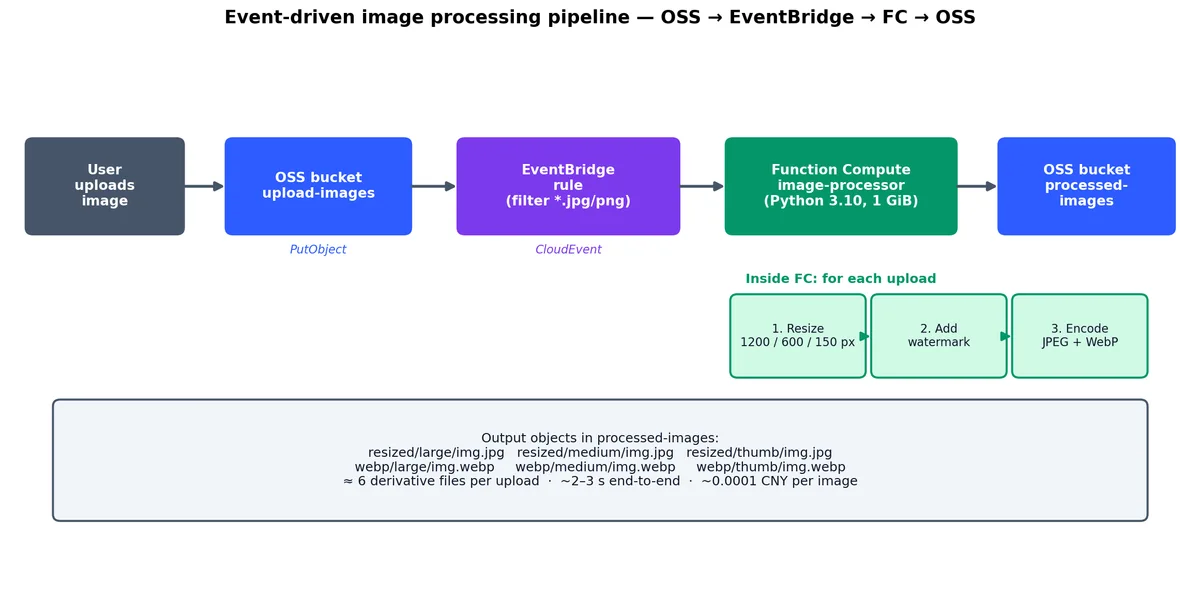
我们将前述技术整合为生产级系统,架构如下:

 1
 2
 3
 4
 5
 6
 7
 8
 9
10
11
12
13
14
15
16
17
18
19
20
21
22
23
24
25
26
27
28
29
  User uploads image to OSS
    ┌──────────────┐
    │     OSS      │  (source bucket: upload-images)
    │  PutObject   │
    └──────┬───────┘
           │  CloudEvent
    ┌──────────────┐
    │  EventBridge │  (filter: *.jpg, *.png, > 10KB)
    │  Event Rule  │
    └──────┬───────┘
           │  Invoke
    ┌──────────────┐
    │   Function   │  (image-processor)
    │   Compute    │  - Resize to 1200px, 600px, 150px
    │              │  - Add watermark
    │              │  - Generate WebP variants
    └──────┬───────┘
           │  PutObject
    ┌──────────────┐
    │     OSS      │  (target bucket: processed-images)
    │   /resized/  │
    │   /thumbs/   │
    │   /webp/     │
    └──────────────┘

事件驱动的图片处理流水线

下图展示了完整流水线:源 Bucket 一次 PutObject 操作,将在目标 Bucket 生成 6 个衍生文件(3 种尺寸 × 2 种格式),全程 2–3 秒完成,且无需管理任何服务器。

第一步:函数代码#

核心逻辑见此 Python 文件。注意 get_oss_client 使用 FC 提供的临时 STS 凭证,避免硬编码 AccessKey,更安全。水印逻辑也已集成,会根据图片尺寸自动调整字体大小。

  1
  2
  3
  4
  5
  6
  7
  8
  9
 10
 11
 12
 13
 14
 15
 16
 17
 18
 19
 20
 21
 22
 23
 24
 25
 26
 27
 28
 29
 30
 31
 32
 33
 34
 35
 36
 37
 38
 39
 40
 41
 42
 43
 44
 45
 46
 47
 48
 49
 50
 51
 52
 53
 54
 55
 56
 57
 58
 59
 60
 61
 62
 63
 64
 65
 66
 67
 68
 69
 70
 71
 72
 73
 74
 75
 76
 77
 78
 79
 80
 81
 82
 83
 84
 85
 86
 87
 88
 89
 90
 91
 92
 93
 94
 95
 96
 97
 98
 99
100
101
102
103
104
105
106
107
108
109
110
111
112
113
114
115
116
117
118
119
120
121
122
123
124
125
126
127
128
129
130
131
132
133
134
135
136
137
138
139
140
141
142
143
144
145
146
147
148
149
150
151
152
153
154
155
156
157
158
159
160
161
162
163
164
165
166
167
168
169
# code/index.py
import json
import logging
import os
import io
from urllib.parse import unquote

import oss2
from PIL import Image, ImageDraw, ImageFont

logger = logging.getLogger()
logger.setLevel(logging.INFO)

# Configuration
SOURCE_BUCKET = os.environ.get("SOURCE_BUCKET", "upload-images")
TARGET_BUCKET = os.environ.get("TARGET_BUCKET", "processed-images")
OSS_ENDPOINT = os.environ.get("OSS_ENDPOINT", "https://oss-cn-beijing-internal.aliyuncs.com")
WATERMARK_TEXT = os.environ.get("WATERMARK_TEXT", "chenk.top")

# Resize configurations
SIZES = {
    "large": 1200,
    "medium": 600,
    "thumb": 150
}

def get_oss_client(context, bucket_name):
    """Create OSS client using FC's temporary STS credentials."""
    creds = context.credentials
    auth = oss2.StsAuth(
        creds.access_key_id,
        creds.access_key_secret,
        creds.security_token
    )
    return oss2.Bucket(auth, OSS_ENDPOINT, bucket_name)

def add_watermark(image, text):
    """Add a semi-transparent text watermark to the bottom-right corner."""
    draw = ImageDraw.Draw(image)
    
    # Use a size proportional to the image
    font_size = max(20, image.width // 30)
    try:
        font = ImageFont.truetype("/usr/share/fonts/truetype/dejavu/DejaVuSans.ttf", font_size)
    except (IOError, OSError):
        font = ImageFont.load_default()
    
    # Calculate position (bottom-right with padding)
    bbox = draw.textbbox((0, 0), text, font=font)
    text_width = bbox[2] - bbox[0]
    text_height = bbox[3] - bbox[1]
    padding = 20
    x = image.width - text_width - padding
    y = image.height - text_height - padding
    
    # Draw with semi-transparent white
    draw.text((x, y), text, fill=(255, 255, 255, 128), font=font)
    
    return image

def resize_image(image, max_width):
    """Resize image maintaining aspect ratio."""
    if image.width <= max_width:
        return image.copy()
    
    ratio = max_width / image.width
    new_height = int(image.height * ratio)
    return image.resize((max_width, new_height), Image.LANCZOS)

def process_image(source_client, target_client, object_key):
    """Download, process, and upload image variants."""
    logger.info(f"Processing: {object_key}")
    
    # Download the original image
    result = source_client.get_object(object_key)
    image_data = result.read()
    image = Image.open(io.BytesIO(image_data))
    
    # Convert to RGBA for watermark support
    if image.mode != "RGBA":
        image = image.convert("RGBA")
    
    # Extract the filename without extension
    base_name = os.path.splitext(os.path.basename(object_key))[0]
    results = []
    
    for size_name, max_width in SIZES.items():
        # Resize
        resized = resize_image(image, max_width)
        
        # Add watermark (skip for thumbnails)
        if size_name != "thumb":
            resized = add_watermark(resized, WATERMARK_TEXT)
        
        # Convert to RGB for JPEG output
        rgb_image = resized.convert("RGB")
        
        # Save as JPEG
        jpeg_buffer = io.BytesIO()
        rgb_image.save(jpeg_buffer, format="JPEG", quality=85, optimize=True)
        jpeg_buffer.seek(0)
        
        jpeg_key = f"resized/{size_name}/{base_name}.jpg"
        target_client.put_object(jpeg_key, jpeg_buffer.getvalue())
        results.append({"key": jpeg_key, "format": "jpeg", "size": size_name})
        logger.info(f"  Uploaded: {jpeg_key}")
        
        # Save as WebP
        webp_buffer = io.BytesIO()
        resized.save(webp_buffer, format="WebP", quality=80)
        webp_buffer.seek(0)
        
        webp_key = f"webp/{size_name}/{base_name}.webp"
        target_client.put_object(webp_key, webp_buffer.getvalue())
        results.append({"key": webp_key, "format": "webp", "size": size_name})
        logger.info(f"  Uploaded: {webp_key}")
    
    return results

def handler(event, context):
    """
    EventBridge trigger handler.
    Receives CloudEvent when an image is uploaded to OSS.
    """
    logger.info(f"Event received: {event}")
    
    # Parse the CloudEvent from EventBridge
    evt = json.loads(event)
    
    # Extract bucket and object key from the event
    data = evt.get("data", {})
    bucket_name = data.get("bucket", {}).get("name", SOURCE_BUCKET)
    object_key = unquote(data.get("object", {}).get("key", ""))
    
    if not object_key:
        logger.error("No object key in event")
        return {"statusCode": 400, "body": "Missing object key"}
    
    # Validate file extension
    ext = os.path.splitext(object_key)[1].lower()
    if ext not in (".jpg", ".jpeg", ".png", ".webp"):
        logger.info(f"Skipping non-image file: {object_key}")
        return {"statusCode": 200, "body": "Skipped: not an image"}
    
    # Create OSS clients
    source_client = get_oss_client(context, bucket_name)
    target_client = get_oss_client(context, TARGET_BUCKET)
    
    # Process the image
    try:
        results = process_image(source_client, target_client, object_key)
        
        response = {
            "statusCode": 200,
            "body": json.dumps({
                "source": object_key,
                "processed": results,
                "count": len(results)
            })
        }
        logger.info(f"Processed {len(results)} variants for {object_key}")
        return response
        
    except Exception as e:
        logger.error(f"Error processing {object_key}: {str(e)}", exc_info=True)
        return {
            "statusCode": 500,
            "body": json.dumps({"error": str(e), "source": object_key})
        }

第二步:依赖管理#

requirements.txt 仅包含 Pillow(图像处理)和 oss2(OSS 操作):

1
2
3
# code/requirements.txt
Pillow>=10.0.0
oss2>=2.18.0

第三步:Serverless Devs 配置#

s.yaml 定义函数及触发器。此处配置 EventBridge 触发器,仅监听 OSS 上传事件,并通过 eventRuleFilterPattern 确保只处理图片。

 1
 2
 3
 4
 5
 6
 7
 8
 9
10
11
12
13
14
15
16
17
18
19
20
21
22
23
24
25
26
27
28
29
30
31
32
33
34
35
36
37
38
39
40
# s.yaml
edition: 3.0.0
name: image-pipeline
access: default

resources:
  image-processor:
    component: fc3
    props:
      region: cn-beijing
      functionName: image-processor
      description: "Event-driven image processing pipeline"
      runtime: python3.10
      handler: index.handler
      memorySize: 1024
      timeout: 120
      code: ./code
      layers:
        - acs:fc:cn-beijing:123456789:layers/image-processing-deps/versions/1
      environmentVariables:
        SOURCE_BUCKET: upload-images
        TARGET_BUCKET: processed-images
        OSS_ENDPOINT: https://oss-cn-beijing-internal.aliyuncs.com
        WATERMARK_TEXT: "chenk.top"
      role: acs:ram::123456789:role/fc-oss-access
      triggers:
        - triggerName: eb-oss-upload
          triggerType: eventbridge
          triggerConfig:
            triggerEnable: true
            asyncInvocationType: true
            eventRuleFilterPattern: >
              {
                "source": ["acs.oss"],
                "type": [
                  "oss:ObjectCreated:PutObject",
                  "oss:ObjectCreated:PostObject",
                  "oss:ObjectCreated:CompleteMultipartUpload"
                ]
              }              

第四步:Terraform 基础设施#

基础设施即代码,全自动化。此 Terraform 脚本将创建 OSS Bucket、RAM 角色、函数计算及 EventBridge 规则,并通过环境变量支持多环境管理。

  1
  2
  3
  4
  5
  6
  7
  8
  9
 10
 11
 12
 13
 14
 15
 16
 17
 18
 19
 20
 21
 22
 23
 24
 25
 26
 27
 28
 29
 30
 31
 32
 33
 34
 35
 36
 37
 38
 39
 40
 41
 42
 43
 44
 45
 46
 47
 48
 49
 50
 51
 52
 53
 54
 55
 56
 57
 58
 59
 60
 61
 62
 63
 64
 65
 66
 67
 68
 69
 70
 71
 72
 73
 74
 75
 76
 77
 78
 79
 80
 81
 82
 83
 84
 85
 86
 87
 88
 89
 90
 91
 92
 93
 94
 95
 96
 97
 98
 99
100
101
102
103
104
105
106
107
108
109
110
111
112
113
114
115
116
117
118
119
120
121
122
123
124
125
126
127
128
129
130
131
132
133
134
135
136
137
138
139
140
141
142
143
144
145
146
147
148
149
150
151
152
153
154
155
156
157
158
159
160
161
162
163
164
165
166
167
168
169
170
171
172
# main.tf — Infrastructure for the image processing pipeline

terraform {
  required_providers {
    alicloud = {
      source  = "aliyun/alicloud"
      version = "~> 1.220"
    }
  }
}

provider "alicloud" {
  region = "cn-beijing"
}

# --- OSS Buckets ---

resource "alicloud_oss_bucket" "source" {
  bucket = "upload-images-${var.env}"
  acl    = "private"

  cors_rule {
    allowed_origins = ["https://example.com"]
    allowed_methods = ["PUT", "POST"]
    allowed_headers = ["*"]
    max_age_seconds = 3600
  }

  lifecycle_rule {
    id      = "cleanup-uploads"
    enabled = true
    prefix  = "uploads/"

    expiration {
      days = 30
    }
  }
}

resource "alicloud_oss_bucket" "target" {
  bucket = "processed-images-${var.env}"
  acl    = "private"

  lifecycle_rule {
    id      = "archive-old"
    enabled = true

    transition {
      days          = 90
      storage_class = "IA"
    }
  }
}

# --- RAM Role for Function Compute ---

resource "alicloud_ram_role" "fc_role" {
  name     = "fc-image-processor-role"
  document = jsonencode({
    Version   = "1"
    Statement = [
      {
        Action    = "sts:AssumeRole"
        Effect    = "Allow"
        Principal = {
          Service = ["fc.aliyuncs.com"]
        }
      }
    ]
  })
}

resource "alicloud_ram_policy" "fc_oss_policy" {
  policy_name = "fc-oss-readwrite"
  policy_document = jsonencode({
    Version   = "1"
    Statement = [
      {
        Action = [
          "oss:GetObject",
          "oss:PutObject",
          "oss:ListObjects"
        ]
        Effect   = "Allow"
        Resource = [
          "acs:oss:*:*:upload-images-${var.env}/*",
          "acs:oss:*:*:processed-images-${var.env}/*"
        ]
      }
    ]
  })
}

resource "alicloud_ram_role_policy_attachment" "fc_oss" {
  role_name   = alicloud_ram_role.fc_role.name
  policy_name = alicloud_ram_policy.fc_oss_policy.policy_name
  policy_type = "Custom"
}

# --- Function Compute ---

resource "alicloud_fcv3_function" "image_processor" {
  function_name = "image-processor"
  description   = "Event-driven image processing pipeline"
  handler       = "index.handler"
  runtime       = "python3.10"
  memory_size   = 1024
  timeout       = 120
  role          = alicloud_ram_role.fc_role.arn

  code {
    zip_file = filebase64("${path.module}/code.zip")
  }

  environment_variables = {
    SOURCE_BUCKET  = alicloud_oss_bucket.source.bucket
    TARGET_BUCKET  = alicloud_oss_bucket.target.bucket
    OSS_ENDPOINT   = "https://oss-cn-beijing-internal.aliyuncs.com"
    WATERMARK_TEXT  = "chenk.top"
  }
}

# --- EventBridge Rule ---

resource "alicloud_event_bridge_rule" "oss_to_fc" {
  event_bus_name = "default"
  rule_name      = "oss-upload-to-image-processor"
  description    = "Route OSS uploads to image processor function"

  filter_pattern = jsonencode({
    source  = ["acs.oss"]
    type    = [
      "oss:ObjectCreated:PutObject",
      "oss:ObjectCreated:PostObject",
      "oss:ObjectCreated:CompleteMultipartUpload"
    ]
    subject = ["acs:oss:cn-beijing:*:${alicloud_oss_bucket.source.bucket}"]
  })

  targets {
    target_id = "fc-image-processor"
    type      = "acs.fc.function"
    endpoint  = alicloud_fcv3_function.image_processor.arn

    param_list {
      resource_key = "Body"
      form         = "ORIGINAL"
    }
  }
}

# --- Variables ---

variable "env" {
  description = "Environment name (dev, staging, prod)"
  type        = string
  default     = "dev"
}

# --- Outputs ---

output "source_bucket" {
  value = alicloud_oss_bucket.source.bucket
}

output "target_bucket" {
  value = alicloud_oss_bucket.target.bucket
}

output "function_name" {
  value = alicloud_fcv3_function.image_processor.function_name
}

第五步:部署与测试#

执行命令验证:先用 Terraform 创建资源,再用 Serverless Devs 部署函数。

 1
 2
 3
 4
 5
 6
 7
 8
 9
10
11
12
13
14
15
16
17
18
19
20
21
22
23
24
25
26
27
28
# Deploy infrastructure with Terraform
cd terraform
terraform init
terraform plan -var="env=dev"
terraform apply -var="env=dev" -auto-approve

# Package and deploy the function
cd ../image-pipeline
pip install -r code/requirements.txt -t code/ --no-cache-dir
s deploy

# Test: upload an image to the source bucket
aliyun oss cp test-image.jpg \
  oss://upload-images-dev/uploads/test-image.jpg \
  --endpoint oss-cn-beijing.aliyuncs.com

# Wait a few seconds for the pipeline to process
sleep 5

# Verify the processed images exist
aliyun oss ls oss://processed-images-dev/resized/ \
  --endpoint oss-cn-beijing.aliyuncs.com

aliyun oss ls oss://processed-images-dev/webp/ \
  --endpoint oss-cn-beijing.aliyuncs.com

# Check function logs
s logs --tail

上传一张图片,生成六个输出文件。整套流水线耗时约 2–3 秒,单张处理成本约 0.0001 元——处理 10,000 张仅需约 1 元。

1
2
3
4
5
6
resized/large/test-image.jpg      (1200px wide, watermarked)
resized/medium/test-image.jpg     (600px wide, watermarked)
resized/thumb/test-image.jpg      (150px wide, no watermark)
webp/large/test-image.webp        (1200px wide, watermarked)
webp/medium/test-image.webp       (600px wide, watermarked)
webp/thumb/test-image.webp        (150px wide, no watermark)

第六步:监控与异常处理#

FC 异步调用:重试策略与死信队列

异步调用自带托管重试队列。配置重试预算和 onFailure 目标后,耗尽重试的事件将进入 MNS 待人工处理,而非静默丢失。

生产环境务必配置死信队列和告警:函数执行失败时,事件应进入 DLQ 供排查,而非直接丢弃。

 1
 2
 3
 4
 5
 6
 7
 8
 9
10
11
12
13
14
15
16
17
18
19
# Create an MNS queue for failed events
aliyun mns CreateQueue \
  --QueueName image-processor-dlq \
  --DelaySeconds 0 \
  --MaximumMessageSize 65536 \
  --MessageRetentionPeriod 1209600 \
  --VisibilityTimeout 60

# Configure async invocation with retry and DLQ
aliyun fc PutAsyncInvokeConfig \
  --functionName image-processor \
  --qualifier LATEST \
  --destinationConfig '{
    "onFailure": {
      "destination": "acs:mns:cn-beijing:123456789:/queues/image-processor-dlq/messages"
    }
  }' \
  --maxAsyncRetryAttempts 2 \
  --maxAsyncEventAgeInSeconds 3600

Function Compute 计费模型#

FC 计费沿三个独立维度展开,理解它们可避免账单意外。

函数计算计费:三个独立维度

FC 费用由三部分构成:调用次数、内存×时间消耗量、公网出流量。免费额度足以覆盖多数个人项目及中小企业负载。

Serverless 与传统服务器成本对比

计费维度单价(cn-beijing)免费额度(每月)
调用次数0.0133 CNY / 10,000 次1,000,000 次
执行时长0.000110592 CNY / GiB·秒400,000 GiB·秒
公网出流量0.50 CNY / GiB1 GiB

免费额度相当慷慨。以实际场景为例:

场景:API 函数(512 MiB 内存,平均执行 200ms),月调用量 500 万次。

 1
 2
 3
 4
 5
 6
 7
 8
 9
10
Invocations:
  5,000,000 - 1,000,000 (free) = 4,000,000 billable
  4,000,000 / 10,000 * 0.0133 = 5.32 CNY

Execution duration:
  5,000,000 * 0.2s * 0.5 GiB = 500,000 GiB-seconds
  500,000 - 400,000 (free) = 100,000 billable
  100,000 * 0.000110592 = 11.06 CNY

Total: 5.32 + 11.06 = 16.38 CNY/month

月成本仅 16 元,承载 500 万次 API 调用。同等负载若用 ECS,成本将高出 30–50 倍。

预留并发产生额外费用:维持 5 个 512 MiB 实例常热,月成本约 717 元(5 × 0.5 GiB × 86,400 秒/天 × 30 天 × 0.000110592)。仅当冷启动不可接受时才值得投入。

关于结合 Serverless 函数使用 Bailian API 进行 AI 处理的方案,请参考 Bailian 系列文章

FC vs AWS Lambda:实战对比#

若在 FC 与 Lambda 间抉择,以下差异最为关键:

特性Function Compute (FC)AWS Lambda
最大超时15 分钟(同步),24 小时(异步)15 分钟
最大内存32 GiB10 GiB
最大包大小500 MiB(OSS)250 MiB(S3)
临时存储10 GiB10 GiB
预留并发支持支持
容器支持支持(Custom Container)支持(Container Image)
VPC 访问支持(服务级配置)支持(函数级配置)
Layers支持(每函数 5 个)支持(每函数 5 个)
免费额度100 万次调用 + 40 万 GiB·秒100 万次调用 + 40 万 GiB·秒
GPU 支持不支持标准版不支持,Bedrock 支持
SnapStart(Java)不支持支持
ARM 支持不支持支持(Graviton2)
定价中国区便宜约 15%全球标准定价

两者功能高度相似。FC 优势在于中国区价格更低、内存上限更高(32 GiB vs 10 GiB)、Service 抽象便于函数分组。Lambda 优势则是 ARM 支持(降低算力成本)、Java SnapStart 及更成熟的扩展生态。

核心建议#

Serverless 并非万能:它擅长事件驱动、突发流量、短任务;长运行进程、GPU 任务、超低延迟场景并非其所长。务必明确自身流量模式的成本拐点。

新 API 优先选用 Function Compute:除非明确需要持久连接或持续高吞吐,否则 FC 更便宜、简单、运维负担轻。未来可随时迁移至 ECS,反向迁移则困难得多。

冷启动完全可控:优先选择 Go 或 Python;用 Layers 控制包体积;仅对延迟敏感路径启用预留并发;对可预测流量使用定时预热。

用 EventBridge 实现架构解耦:避免点对点集成(如 OSS 直接触发 FC),通过 EventBridge 路由事件。过滤、转换、扇出、死信队列、审计轨迹等能力,将在首次需要为同一事件添加第二消费者时显现价值。

生产 API 必配 API Gateway:FC 原生 HTTP 触发器适用于内部服务或原型;对外服务务必前置 API Gateway 以实现认证、限流和监控。

图像处理流水线是通用模板:OSS 上传 → EventBridge → Function Compute → OSS 回写 的模式,适用于 PDF 生成、视频转码、数据导入、日志解析等任何文件处理场景。只需替换处理逻辑,即可快速构建新流水线。

本系列下一篇将探讨容器编排服务 ACK——适用于超出 Serverless 承载能力但仍需云原生运维的工作负载。若希望以基础设施即代码方式部署 FC 函数,本文解决方案中的 Terraform 集成是推荐起点。

本系列

阿里云全栈实战 12 篇

  1. 01 阿里云全栈实战(一):生态全景图——阿里云到底是什么
  2. 02 阿里云全栈实战(二):ECS——让计算回归本质
  3. 03 阿里云全栈实战(三):VPC、SLB 构建网络基石
  4. 04 阿里云全栈实战(四):OSS——对象存储最佳实践
  5. 05 阿里云全栈实战(五):RDS 与 PolarDB 数据基石
  6. 06 阿里云全栈实战(六):RAM、KMS 筑牢云安全
  7. 07 阿里云全栈实战(七):SLS 打造可观测性体系
  8. 08 阿里云全栈实战(八):Serverless 与事件驱动 当前
  9. 09 阿里云全栈实战(九):OpenSearch 与 AI 搜索
  10. 10 阿里云全栈实战(十):DashScope 与大模型层
  11. 11 阿里云全栈实战(十一):PAI 打造机器学习平台
  12. 12 阿里云全栈实战(十二):Terraform 全栈统一交付

读有所得?

GitHub 关注我 → 新文周更

GitHub