阿里云全栈实战(九):OpenSearch 与 AI 搜索

从关键词搜索到 AI 驱动检索:OpenSearch 服务、向量搜索 RAG、LLM 查询重写、混合搜索。结合向量和关键词构建产品搜索引擎。

我做的第一个搜索引擎是用 Elasticsearch 搭建的,配了一堆同义词表。花了六个月才达到基本可用水平,随后陷入重复循环:用户反馈搜不到结果,就加同义词;结果引发其他查询误匹配,又得补例外规则,如此反复。相关性调优配置膨胀到 400 行,包括三种语言的自定义 analyzer 和高度复杂的 boosting 逻辑,早已超出可维护边界;重建索引则需耗时四小时。后来在一个侧边项目中尝试了混合向量和关键词搜索,首日效果即超越此前所有调优成果,首次实现用户零投诉的搜索体验。这一实践经历重塑了我对搜索系统设计的理解,催生了本文。

搜索表面简单,实则暗藏多个易被低估的技术挑战:关键词搜索依赖字面匹配,难以应对查询词与文档用词不一致(如术语差异、同义表达);向量搜索基于语义相似度,但在零件号、错误码、SKU 等需要严格字面匹配的场景支持较弱。过去三年,业界普遍采用混合搜索架构,集成 LLM 提升查询理解与答案生成能力。阿里云提供一站式托管服务 OpenSearch,统一解决这些问题。本文将覆盖从基础关键词搜索到 LLM 驱动的 AI Search 全谱系,最终交付一个开箱即用的商品搜索引擎。

生成文中用到的 embeddings,请参考 百炼系列,第二部分:Qwen LLM API 。喂给搜索索引的数据库内容在 第五部分:RDS 里讲。想了解 RAG pipeline 的 LLM Engineering 视角,去看 LLM Engineering 系列


阿里云上的搜索全景#

在深入 OpenSearch 之前,需要先搞清楚阿里云上的搜索选项。方案选型失误可能导致成本浪费,甚至引发耗时数月的系统迁移。

阿里云搜索类型概览

Service是什么最适合托管?向量支持
OpenSearch阿里云自研托管搜索平台需要高级特性的生产环境搜索全托管是(原生)
Elasticsearch (托管)阿里云托管 Elasticsearch 服务已有 ES 经验的团队全托管是(通过插件)
Elasticsearch (自建)ECS 上部署 Elasticsearch需要完全控制、预算有限的开发自管理
Lindorm Search集成在 Lindorm 数据库里的搜索引擎Lindorm 已经是主存储时全托管
AnalyticDB (ADB)支持向量索引的数据仓库分析为主,搜索为辅全托管

决策逻辑如下:

  • 你只想要个搜索引擎,别的不要 —— 用 OpenSearch。它的相关性调优最好,原生支持向量,还有 AI Search 插件。
  • 团队已经熟悉 Elasticsearch —— 用托管 Elasticsearch 服务。API 是标准 ES,现有代码能直接用。以 OpenSearch 的部分高级特性为代价,换取团队对 Elasticsearch 的熟悉度。
  • 搜索只是数据库的副产品 —— 如果已经在用 Lindorm 或 AnalyticDB 且只需要基础搜索,直接用内置功能,别再加新服务了。
  • 需要 AWS 兼容性 —— 注意,阿里云的 “OpenSearch” 跟 AWS OpenSearch Service 不是一回事(后者是 Elasticsearch 的 fork)。名称相同,但二者是完全不同的产品,API 也不兼容。如果你要从 AWS OpenSearch 迁移,用阿里云的托管 Elasticsearch 服务,别用 OpenSearch。

这一点最容易让人混淆。再次强调:阿里云 OpenSearch 与 AWS OpenSearch Service 并非同一产品。 它们是两套完全不同的系统,查询语言、API 和计价模型都不同。

OpenSearch 基础#

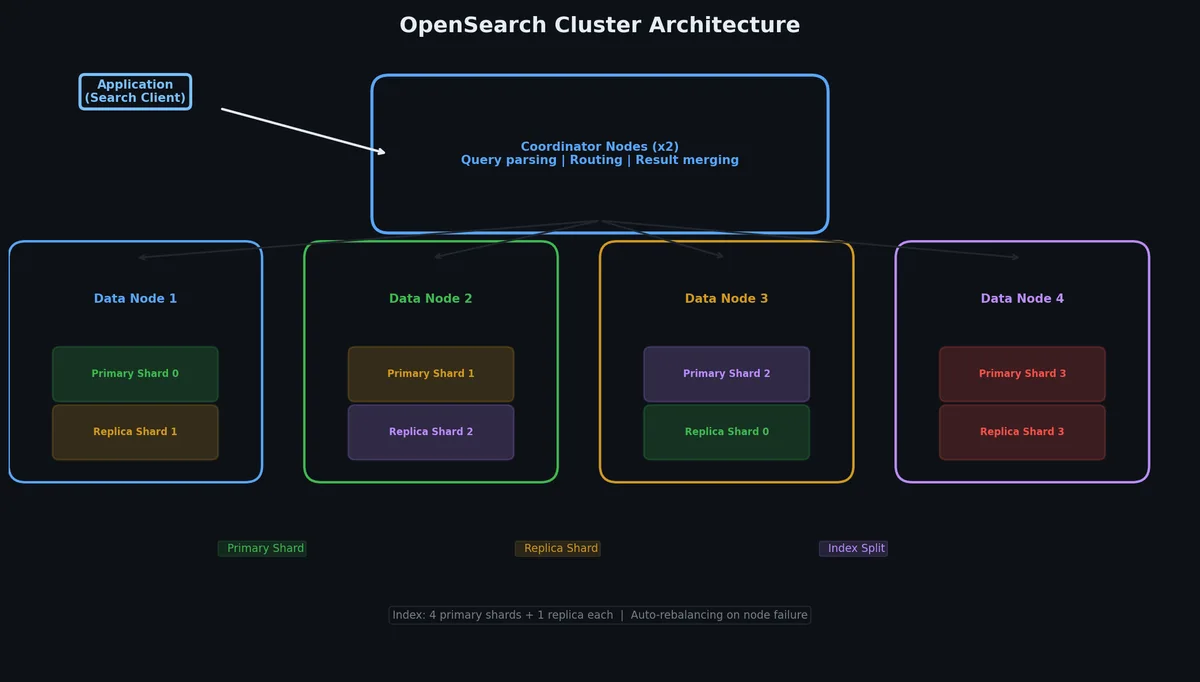
阿里云 OpenSearch 是全托管搜索平台。不用运维集群,不用管分片,也不用担心 GC 停顿。定义好数据 schema,推数据进去,查出来就行。索引、复制、扩容阿里云全包。

OpenSearch 集群架构

核心概念:

  • Application —— 顶层容器。把它当成搜索“项目”。每个应用有自己的 schema、数据源和查询配置。
  • Table —— 应用内的数据 schema。定义字段、类型以及哪些字段被索引。
  • Index —— 基于表数据构建的可搜索结构。OpenSearch 支持倒排索引(关键词)、向量索引(embeddings)和属性索引(过滤/排序)。
  • Data Source —— 数据来源。可以是 RDS、MaxCompute、Object Table Service,或者直接 API 推送。

创建应用#

可以通过控制台或 CLI 创建应用。下面是 CLI 方式:

 1
 2
 3
 4
 5
 6
 7
 8
 9
10
11
12
13
14
15
16
17
18
19
20
21
22
23
24
25
26
27
28
29
# Create an OpenSearch application
# First, define the schema in a JSON file
cat > schema.json << 'SCHEMA'
{
  "tables": {
    "main": {
      "fields": {
        "id": { "type": "INT", "primary_key": true },
        "title": { "type": "TEXT", "analyzer": "chn_standard" },
        "description": { "type": "TEXT", "analyzer": "chn_standard" },
        "category": { "type": "LITERAL" },
        "price": { "type": "DOUBLE" },
        "created_at": { "type": "INT" }
      }
    }
  },
  "indexes": {
    "search_indexes": {
      "title_idx": { "fields": ["title"], "type": "TEXT" },
      "desc_idx": { "fields": ["description"], "type": "TEXT" },
      "category_idx": { "fields": ["category"], "type": "LITERAL" }
    },
    "attribute_indexes": {
      "price_idx": { "fields": ["price"] },
      "created_idx": { "fields": ["created_at"] }
    }
  }
}
SCHEMA

OpenSearch 查询语法#

OpenSearch 用的是自家查询语言,不是 Elasticsearch 的 Query DSL。语法更像结构化查询语言:

 1
 2
 3
 4
 5
 6
 7
 8
 9
10
11
12
13
14
15
16
17
18
19
20
21
22
23
24
25
26
27
28
29
30
31
32
33
34
35
36
37
38
import requests
import json
import hashlib
import hmac
import time
from urllib.parse import quote

# OpenSearch query example
OPENSEARCH_HOST = "http://opensearch-cn-hangzhou.aliyuncs.com"
APP_NAME = "product_search"

# Basic keyword search
query_params = {
    "query": "query=title:'wireless headphones'",
    "index_name": APP_NAME,
    "format": "json",
    "start": 0,
    "hit": 10,
    "sort": "-price"  # descending by price
}

# With filters
query_with_filter = {
    "query": "query=title:'wireless headphones'"
             "&&filter=price>50 AND price<200"
             "&&sort=-created_at",
    "index_name": APP_NAME,
    "format": "json"
}

# With aggregation
query_with_agg = {
    "query": "query=title:'wireless headphones'"
             "&&aggregate=group_key:category,"
             "agg_fun:count()",
    "index_name": APP_NAME,
    "format": "json"
}

查询字符串格式跟 Elasticsearch 差别很大。对照表如下:

操作ElasticsearchOpenSearch (阿里云)
关键词搜索{"query": {"match": {"title": "headphones"}}}query=title:'headphones'
过滤{"query": {"bool": {"filter": {"range": {"price": {"gt": 50}}}}}}filter=price>50
排序{"sort": [{"price": "desc"}]}sort=-price
聚合{"aggs": {"cats": {"terms": {"field": "category"}}}}aggregate=group_key:category,agg_fun:count()
分页{"from": 0, "size": 10}start=0&hit=10

对于熟悉 Elasticsearch 的用户,OpenSearch 查询语法灵活性较低,但结构更简洁。常规查询均可支持,但深度嵌套查询需适配其语法范式。

跟 AWS OpenSearch Service 对比#

既然名字容易混淆,直接对比一下:

特性阿里云 OpenSearchAWS OpenSearch Service
底层技术阿里云自研 (Havenask)Elasticsearch/OpenSearch fork
查询语言OpenSearch Query Syntax (私有)Elasticsearch Query DSL
集群管理完全抽象(无集群概念)自选实例类型,管理节点
向量搜索原生,一等公民通过 k-NN 插件
AI/LLM 特性AI Search 插件(原生)需单独集成
插件生态有限(封闭系统)丰富(ES 插件生态)
计价模型按 QPS 和存储按实例时长
从 ES 迁移路径需要重写自建 ES 迁移几乎无缝

阿里云 OpenSearch 的设计倾向性更强,在灵活性上有所取舍,但大幅降低了运维复杂度。以零运维和原生 AI 功能为代价,放弃了 Elasticsearch 庞大的插件生态。

RAG 的向量搜索#

搜索这事儿到了向量这里才真正变得有意思。传统关键词搜索靠的是倒排索引——它把词映射到文档。如果用户搜 “wireless earbuds”,但商品列表里写的是 “bluetooth headphones”,关键词搜索会直接返回空结果,因为词对不上。

向量嵌入与 ANN 搜索流程

向量搜索通过把文本转成高维数值表示(embeddings)来解决这个问题,这些向量能捕捉语义含义。“Wireless earbuds” 和 “bluetooth headphones” 在向量空间里会成为相邻的点,因为它们意思相近,哪怕它们没有一个字是重复的。

嵌入的工作原理#

Embedding 模型接收文本,输出一个固定长度的浮点数数组。比如阿里云 DashScope 上的 text-embedding-v3 模型,默认数组长度就是 1024 维。

 1
 2
 3
 4
 5
 6
 7
 8
 9
10
11
12
13
14
15
16
17
18
19
20
21
22
23
24
25
26
27
28
29
30
31
32
33
34
35
import dashscope
from dashscope import TextEmbedding

# Generate embedding for a single text
def get_embedding(text: str, dimension: int = 1024) -> list[float]:
    """Generate embedding vector using DashScope text-embedding-v3."""
    response = TextEmbedding.call(
        model="text-embedding-v3",
        input=text,
        dimension=dimension
    )
    if response.status_code == 200:
        return response.output["embeddings"][0]["embedding"]
    raise Exception(f"Embedding failed: {response.code} - {response.message}")


# Generate embeddings for a batch
def get_embeddings_batch(texts: list[str], dimension: int = 1024) -> list[list[float]]:
    """Batch embedding generation. Max 25 texts per call."""
    response = TextEmbedding.call(
        model="text-embedding-v3",
        input=texts,
        dimension=dimension
    )
    if response.status_code == 200:
        return [item["embedding"] for item in response.output["embeddings"]]
    raise Exception(f"Batch embedding failed: {response.code} - {response.message}")


# Example usage
product_title = "Sony WH-1000XM5 Wireless Noise Cancelling Headphones"
embedding = get_embedding(product_title)

print(f"Dimensions: {len(embedding)}")   # 1024
print(f"First 5 values: {embedding[:5]}") # [-0.0234, 0.0891, ...]

text-embedding-v3 模型的价格是每 1,000 tokens 0.0007 元人民币。要是你有 10 万个商品,每个描述 50 tokens,把整个目录做完 Embedding 大概只要 3.5 元(差不多 0.5 美元)。便宜到你想随时重刷都行。

距离度量#

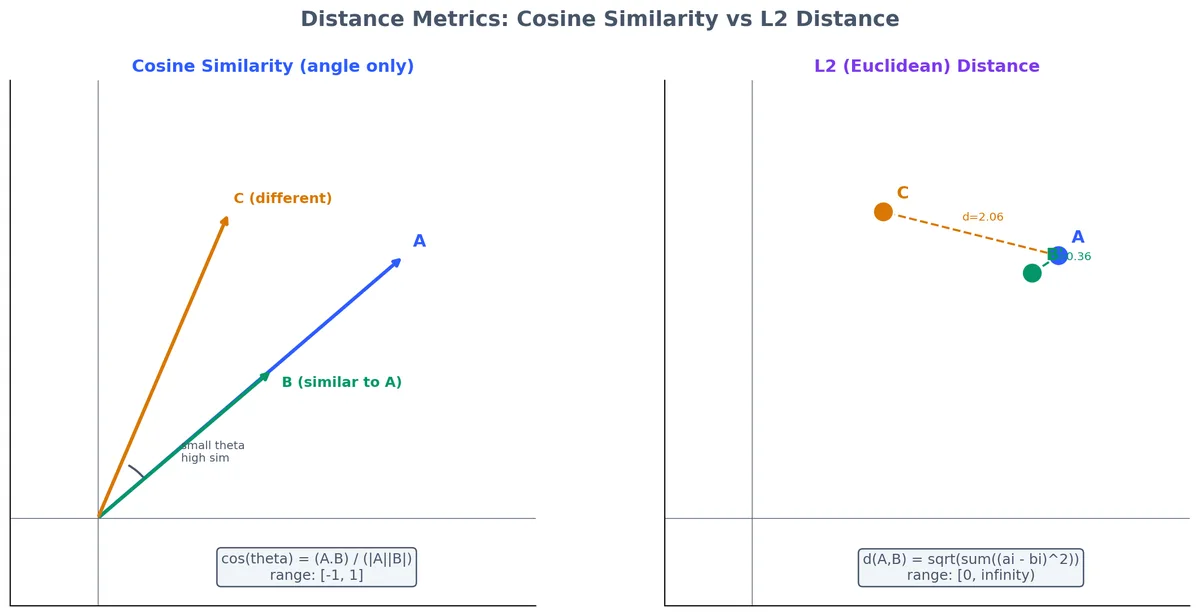
查询向量索引时,系统会计算查询向量和每个文档向量有多“近”。常用的距离度量有两个:

Cosine Similarity —— 测量两个向量之间的夹角。返回值在 -1 到 1 之间(1 = 方向完全一致,0 = 正交,-1 = 相反)。它忽略 magnitude,只关心方向。这是默认选项,也是大多数文本搜索场景的正确选择。

L2 Distance (Euclidean) —— 测量向量空间中两点之间的直线距离。相同向量返回 0,差异越大值越大。它对 magnitude 敏感。更适合 embedding 中绝对值很重要的场景(文本搜索里很少见)。

余弦相似度衡量两个向量之间的夹角,忽略向量长度——只要方向接近,A 和 B 就被认为相似。L2 衡量两点之间的直线距离,对向量长度敏感。文本嵌入通常是归一化的,因此余弦是默认且正确的选择。

文本搜索直接用 Cosine Similarity。数学公式如下:

1
2
3
4
cosine_similarity(A, B) = (A . B) / (|A| * |B|)

where A . B = sum(a_i * b_i)  (dot product)
      |A|   = sqrt(sum(a_i^2))  (magnitude)

实际上,大多数 Embedding 模型输出的都是归一化向量(magnitude = 1),所以 Cosine Similarity 简化后就是点积。

HNSW 索引#

如果把查询向量和每个文档向量都比对一遍,向量搜索会慢到无法使用。100 万文档,1024 维,每次查询就是 10 亿次乘法。HNSW(Hierarchical Navigable Small World)就是让这一切变快的索引结构。

可以把 HNSW 想象成一个多层图。顶层是一个稀疏图,连接着相距较远的“地标”向量。每一层往下都会增加更多连接。查询从顶层开始,快速导航到正确的邻域,然后层层下钻,通过越来越详细的层级找到最近邻。结果是近似的(可能会错过绝对的最近邻),但速度极快——百万级向量通常能在亚毫秒级完成。

HNSW 在分层图中导航:查询从顶层稀疏图(少量地标向量)进入,经过中间层逐步下沉,最终在底层稠密图中定位最近邻。这就是百万向量数据集仍能亚毫秒级 ANN 搜索的原因。

关键的 HNSW 参数:

参数控制内容默认值权衡
ef_construction构建时的图质量200较高 = 更好的召回率,索引速度较慢
M每个节点的最大连接数16较高 = 更好的召回率,更多内存
ef_search查询时的搜索质量200较高 = 更好的召回率,查询速度较慢

对大多数应用来说,默认值就够了。如果需要调优:先增加 ef_search(成本低),然后是 M(消耗内存),最后才是 ef_construction(消耗索引时间)。

在 OpenSearch 中创建向量索引#

OpenSearch 原生支持向量字段。下面是定义包含向量字段的 Schema 并创建向量索引的方法:

 1
 2
 3
 4
 5
 6
 7
 8
 9
10
11
12
13
14
15
16
17
18
19
20
21
22
23
24
25
26
27
28
29
30
31
32
33
34
{
  "tables": {
    "main": {
      "fields": {
        "id": { "type": "INT", "primary_key": true },
        "title": { "type": "TEXT", "analyzer": "chn_standard" },
        "description": { "type": "TEXT", "analyzer": "chn_standard" },
        "category": { "type": "LITERAL" },
        "price": { "type": "DOUBLE" },
        "vector_embedding": {
          "type": "VECTOR",
          "dimension": 1024,
          "distance_type": "inner_product"
        }
      }
    }
  },
  "indexes": {
    "search_indexes": {
      "title_idx": { "fields": ["title"], "type": "TEXT" },
      "desc_idx": { "fields": ["description"], "type": "TEXT" }
    },
    "vector_indexes": {
      "embedding_idx": {
        "field": "vector_embedding",
        "algorithm": "hnsw",
        "parameters": {
          "ef_construction": 200,
          "M": 16
        }
      }
    }
  }
}

插入带有嵌入的文档#

 1
 2
 3
 4
 5
 6
 7
 8
 9
10
11
12
13
14
15
16
17
18
19
20
21
22
23
24
25
26
27
28
29
30
31
32
33
34
35
36
37
38
39
40
41
42
43
44
45
46
47
48
49
50
51
52
53
54
55
56
57
58
59
60
61
62
63
64
65
66
import json
from dashscope import TextEmbedding

def embed_and_push(products: list[dict], opensearch_client) -> None:
    """Generate embeddings for products and push to OpenSearch."""

    # Prepare texts for embedding (combine title + description)
    texts = [f"{p['title']} {p['description']}" for p in products]

    # Batch embed (max 25 per call)
    all_embeddings = []
    for i in range(0, len(texts), 25):
        batch = texts[i:i+25]
        response = TextEmbedding.call(
            model="text-embedding-v3",
            input=batch,
            dimension=1024
        )
        all_embeddings.extend(
            [item["embedding"] for item in response.output["embeddings"]]
        )

    # Prepare documents for OpenSearch
    docs = []
    for product, embedding in zip(products, all_embeddings):
        doc = {
            "cmd": "ADD",
            "fields": {
                "id": product["id"],
                "title": product["title"],
                "description": product["description"],
                "category": product["category"],
                "price": product["price"],
                "vector_embedding": json.dumps(embedding)
            }
        }
        docs.append(doc)

    # Push to OpenSearch (batch API)
    opensearch_client.push(
        app_name="product_search",
        table_name="main",
        docs=docs
    )
    print(f"Pushed {len(docs)} documents with embeddings")


# Example usage
products = [
    {
        "id": 1,
        "title": "Sony WH-1000XM5 Wireless Headphones",
        "description": "Industry-leading noise cancelling with Auto NC Optimizer",
        "category": "electronics",
        "price": 349.99
    },
    {
        "id": 2,
        "title": "Apple AirPods Pro 2nd Generation",
        "description": "Active noise cancellation with adaptive transparency",
        "category": "electronics",
        "price": 249.99
    }
]

# embed_and_push(products, opensearch_client)

查询向量索引#

 1
 2
 3
 4
 5
 6
 7
 8
 9
10
11
12
13
14
15
16
17
18
19
20
21
22
23
24
25
26
27
28
29
30
31
32
33
34
35
36
37
38
def vector_search(query_text: str, top_k: int = 10) -> list[dict]:
    """Perform vector similarity search in OpenSearch."""

    # Step 1: Embed the query
    query_embedding = get_embedding(query_text)

    # Step 2: Build the vector query
    vector_query = {
        "vector_query": {
            "vector_embedding": {
                "vector": query_embedding,
                "top_k": top_k,
                "ef_search": 200
            }
        },
        "index_name": "product_search",
        "format": "json"
    }

    # Step 3: Execute and parse results
    response = opensearch_client.search(vector_query)
    results = json.loads(response)

    return [
        {
            "id": hit["fields"]["id"],
            "title": hit["fields"]["title"],
            "score": hit["score"],
            "price": hit["fields"]["price"]
        }
        for hit in results["result"]["items"]
    ]


# This will find "bluetooth headphones" even if the query is "wireless earbuds"
results = vector_search("wireless earbuds under 300 dollars")
for r in results:
    print(f"  {r['title']} (score: {r['score']:.4f}, ${r['price']})")

混合搜索:兼得两者之长#

向量搜索擅长语义理解,关键词搜索擅长精确匹配。用户搜 “WH-1000XM5” 是要 exact product——向量搜索可能会返回语义相似但不是同款的产品。用户搜“适合长途飞行的舒适耳机”是要语义理解——关键词搜索会挂掉,因为没哪个商品列表 exactly 用这些词。

混合搜索:向量+关键词

混合搜索把两者结合起来。问题是怎么把两套打分系统合并成一个排序列表?

倒数排名融合 (RRF)#

RRF 是最简单也最稳的融合方法。它不去硬凑分数(因为量纲不一样),而是融合排名。

公式:

1
RRF_score(doc) = sum( 1 / (k + rank_i(doc)) ) for each retrieval method i

其中 k 是常数(通常取 60),防止排名靠前的文档优势过大。

举例:如果一个文档在关键词搜索排第 1,向量搜索排第 5:

1
RRF_score = 1/(60+1) + 1/(60+5) = 0.01639 + 0.01538 = 0.03177

如果两个方法都排第 3:

1
RRF_score = 1/(60+3) + 1/(60+3) = 0.01587 + 0.01587 = 0.03175

这两个分数很接近,这正是 RRF 的目的——在保证单一方法表现突出的同时,平衡不同方法间的一致性。

RRF 实战:关键词列表和向量列表各自把 Doc-A 与 Doc-B 排在前列。RRF 将它们提升到融合列表的顶部,因为它们在两种方法中表现一致。Doc-F 只在向量搜索中出现,尽管在向量列表中排第 2,融合后仍然靠后。

加权组合#

想要更多控制权,可以把各方法的分数归一化到 [0, 1] 然后加权:

1
hybrid_score = alpha * keyword_score_normalized + (1 - alpha) * vector_score_normalized

alpha 控制平衡。alpha = 0.3 意味着 30% 关键词,70% 向量。合适的值取决于场景:

Use caseRecommended alphaWhy
电商产品搜索0.4用户经常通过型号/品牌(关键词)搜索
文档搜索0.2用户用自然语言描述问题(向量)
法律/合规搜索0.6精确术语比语义更重要
客户支持/常见问题0.3用户用自己的话描述问题(向量)

为什么混合搜索胜过单一方法#

我在三个生产数据集上跑过对比。模式永远一样:

MethodPrecision@10Recall@10NDCG@10
Keyword only (BM25)0.420.380.45
Vector only (cosine)0.510.470.54
Hybrid (RRF)0.610.580.65
Hybrid (weighted, tuned)0.630.590.67

混合搜索在 NDCG 上稳定领先 15-25%。原因很简单:关键词和向量搜索的失败模式不同,且大部分不重叠。关键词搞不定 paraphrases,向量搞不定 exact terms。结合起来就覆盖了双方的短板。

在 OpenSearch 中实现#

OpenSearch 原生支持混合搜索。同一个请求里提交关键词查询和向量查询,指定融合方法就行:

 1
 2
 3
 4
 5
 6
 7
 8
 9
10
11
12
13
14
15
16
17
18
19
20
21
22
23
24
25
26
27
28
29
30
31
32
33
34
35
36
37
38
39
40
41
42
43
44
45
def hybrid_search(
    query_text: str,
    top_k: int = 10,
    alpha: float = 0.4
) -> list[dict]:
    """Hybrid keyword + vector search in OpenSearch."""

    # Generate query embedding
    query_embedding = get_embedding(query_text)

    # Build hybrid query
    search_params = {
        # Keyword part
        "query": f"query=title:'{query_text}' OR description:'{query_text}'",
        # Vector part
        "vector_query": {
            "vector_embedding": {
                "vector": query_embedding,
                "top_k": top_k * 2  # fetch more candidates for fusion
            }
        },
        # Fusion config
        "rank_model": {
            "type": "rrf",
            "parameters": {
                "k": 60
            }
        },
        "index_name": "product_search",
        "format": "json",
        "hit": top_k
    }

    response = opensearch_client.search(search_params)
    results = json.loads(response)

    return [
        {
            "id": hit["fields"]["id"],
            "title": hit["fields"]["title"],
            "score": hit["score"],
            "match_type": hit.get("match_info", "hybrid")
        }
        for hit in results["result"]["items"]
    ]

AI 搜索(LLM 驱动)#

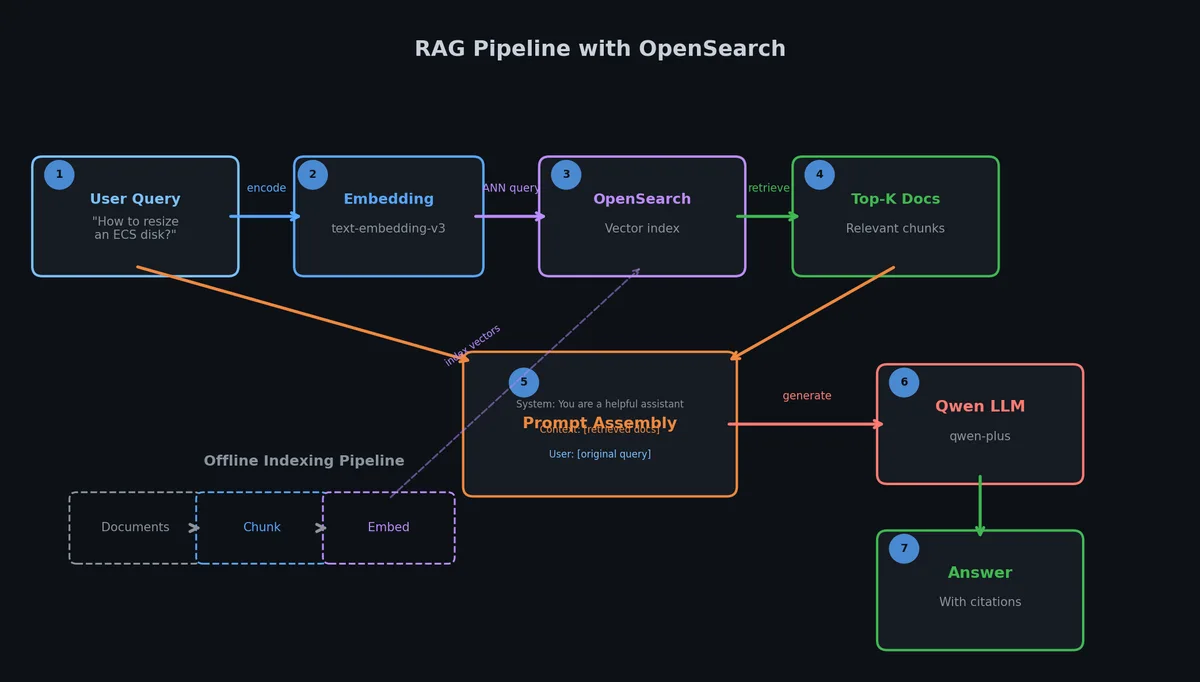
OpenSearch AI Search 是上一层级的能力。它在三个阶段用 LLM 能力包裹搜索管道:查询理解、重排序、答案生成。这是直接 built-in 到搜索平台里的 RAG 模式。

基于 OpenSearch 的 RAG 流水线

AI 搜索管道#

 1
 2
 3
 4
 5
 6
 7
 8
 9
10
11
12
13
14
15
16
User Query
    |
    v
[LLM Query Understanding]  --> intent detection, query expansion, entity extraction
    |
    v
[Hybrid Search]             --> keyword + vector retrieval
    |
    v
[LLM Re-ranking]           --> re-score results based on semantic relevance
    |
    v
[LLM Answer Generation]    --> generate a natural language answer from top results
    |
    v
Final Response (ranked results + generated answer)

每个阶段都是可选的。可以只用查询理解不用答案生成,或者只用重排序不用查询扩展。按需组合。

LLM 查询理解#

查询理解阶段把原始用户查询转换成更好的搜索查询。三个能力:

意图检测 —— 分类用户想要什么。“How do I return my order?” 是支持查询。“AirPods Pro price” 是产品搜索。这让你能把查询路由到不同的搜索配置。

查询扩展 —— 添加相关词。“laptop” 可能扩展成 “laptop OR notebook OR computer”。这是同义词手动做的事,但 LLM 能自动且基于上下文地做。

实体提取 —— 抽出结构化属性。“Red Nike running shoes under $100” 变成 brand=Nike, color=red, category=running shoes, price<100。这些直接映射到过滤器。

 1
 2
 3
 4
 5
 6
 7
 8
 9
10
11
12
13
14
15
16
17
18
19
20
21
22
23
24
25
26
27
28
29
30
31
32
33
34
35
36
37
38
39
40
41
42
43
44
45
46
47
48
49
50
# AI Search with query understanding enabled
def ai_search(query_text: str) -> dict:
    """Use OpenSearch AI Search with LLM-powered query understanding."""

    search_params = {
        "query": query_text,
        "index_name": "product_search",
        "ai_search": {
            "query_understanding": {
                "enabled": True,
                "intent_detection": True,
                "query_expansion": True,
                "entity_extraction": True
            },
            "reranking": {
                "enabled": True,
                "model": "ops-rerank-v1",
                "top_k": 20
            },
            "answer_generation": {
                "enabled": True,
                "model": "qwen-plus",
                "max_tokens": 500,
                "system_prompt": (
                    "You are a helpful product search assistant. "
                    "Answer the user's question based on the search results provided. "
                    "If no results match, say so clearly."
                )
            }
        },
        "format": "json",
        "hit": 10
    }

    response = opensearch_client.ai_search(search_params)
    result = json.loads(response)

    return {
        "answer": result.get("ai_answer", ""),
        "expanded_query": result.get("expanded_query", ""),
        "detected_intent": result.get("intent", ""),
        "results": [
            {
                "title": hit["fields"]["title"],
                "score": hit["score"],
                "rerank_score": hit.get("rerank_score", None)
            }
            for hit in result["result"]["items"]
        ]
    }

LLM 重排序#

重排序模型拿到混合搜索的 top N 结果,用 cross-encoder 模型重新打分。跟 embedding 模型(独立编码 query 和 document)不同,重排序把它们一起编码,能捕捉 query 词和文档内容之间的细粒度交互。

计算开销大——没法在百万文档上跑 cross-encoder。但在混合搜索出来的 top 20-50 候选上跑很快,且显著提升 precision。

Bi-encoder 与 cross-encoder 对比。Bi-encoder 预编码文档,搜索时毫秒级;cross-encoder 联合编码 query 与 doc 以获得更细粒度的相关性,但太慢,无法应用于百万文档——只对前 20-50 个候选使用。

模糊查询上 improvement 最明显。“Apple” 可能是水果也可能是公司。初始检索可能都返回。重排序看到完整上下文(“Apple with good battery life”),会把电子产品结果推到前面。

生成式答案#

答案生成阶段把 top 搜索结果喂给 LLM,产出自然语言答案。这是 RAG 模式:检索提供 context,LLM 生成 response。

 1
 2
 3
 4
 5
 6
 7
 8
 9
10
11
12
13
14
15
16
17
18
19
20
21
22
23
24
25
# Example response from AI Search
response = {
    "ai_answer": (
        "Based on the available products, I recommend the Sony WH-1000XM5 "
        "($349.99) for the best noise cancellation, or the AirPods Pro 2 "
        "($249.99) for a more portable option. Both feature active noise "
        "cancellation and are highly rated for long flights."
    ),
    "expanded_query": "comfortable headphones long flights noise cancelling",
    "intent": "product_recommendation",
    "result": {
        "items": [
            {
                "fields": {"title": "Sony WH-1000XM5", "price": 349.99},
                "score": 0.95,
                "rerank_score": 0.98
            },
            {
                "fields": {"title": "AirPods Pro 2nd Gen", "price": 249.99},
                "score": 0.87,
                "rerank_score": 0.91
            }
        ]
    }
}

关键的架构决策是用 OpenSearch 内置的答案生成还是在应用层处理。内置更简单但定制性差。应用层 RAG 给你完全控制 prompt、模型、引用格式和 fallback 行为。

我的建议:先用 OpenSearch 内置的。只有遇到限制(自定义引用格式、多轮对话、答案内 tool use)再移到应用层 RAG。

查询改写与相关性调优#

哪怕混合搜索和 LLM 能力都配齐了,相关性调优这关还是得过。LLM 擅长处理硬骨头,但像同义词、停用词、字段加权这种基础活儿,传统配置反而更快、更便宜、结果也更可控。

查询改写流水线

同义词与停用词#

 1
 2
 3
 4
 5
 6
 7
 8
 9
10
11
12
13
14
15
16
17
18
19
20
{
  "analyzers": {
    "product_analyzer": {
      "type": "custom",
      "tokenizer": "chn_standard",
      "synonym_config": {
        "synonyms": [
          "headphones,earphones,earbuds,headset",
          "laptop,notebook,portable computer",
          "phone,smartphone,mobile,cellphone",
          "TV,television,smart TV,display"
        ]
      },
      "stop_words": [
        "the", "a", "an", "is", "are", "was", "were",
        "in", "on", "at", "to", "for", "of", "with"
      ]
    }
  }
}

用 LLM 改写查询#

碰到同义词搞不定的复杂改写,可以在搜索前加一层 LLM 查询改写。这比全链路 AI 搜索便宜,因为只在查询阶段调一次 LLM,不用每次重排序或生成答案都调。

 1
 2
 3
 4
 5
 6
 7
 8
 9
10
11
12
13
14
15
16
17
18
19
20
21
22
23
24
25
26
27
28
29
30
31
32
33
34
35
36
37
38
39
40
41
42
43
44
45
46
47
from openai import OpenAI

# Using DashScope-compatible API
client = OpenAI(
    api_key="your-dashscope-api-key",
    base_url="https://dashscope.aliyuncs.com/compatible-mode/v1"
)

def rewrite_query(user_query: str) -> dict:
    """Use LLM to rewrite and expand the search query."""

    response = client.chat.completions.create(
        model="qwen-plus",
        messages=[
            {
                "role": "system",
                "content": (
                    "You are a search query optimizer. Given a user query, output JSON with:\n"
                    "- rewritten_query: improved search query\n"
                    "- keywords: list of important keywords to match\n"
                    "- filters: extracted filters (category, price_min, price_max, brand)\n"
                    "Output ONLY valid JSON, no explanation."
                )
            },
            {
                "role": "user",
                "content": user_query
            }
        ],
        response_format={"type": "json_object"},
        temperature=0.1
    )

    return json.loads(response.choices[0].message.content)


# Example
result = rewrite_query("cheap sony headphones for running")
# {
#     "rewritten_query": "Sony sports headphones water resistant",
#     "keywords": ["Sony", "headphones", "sports", "running", "workout"],
#     "filters": {
#         "brand": "Sony",
#         "category": "sports_audio",
#         "price_max": 150
#     }
# }

字段加权#

字段重要性不一样。标题匹配通常比描述匹配更相关。字段加权就是用来调整这个权重的:

1
2
3
4
5
6
# Boosted keyword query
boosted_query = (
    "query=title:'headphones'^3 "  # title matches worth 3x
    "OR description:'headphones'^1 "  # description at normal weight
    "OR category:'headphones'^2"  # category worth 2x
)

加权值是相对的。建议标题从 3 倍起步,分类 2 倍,描述 1 倍,然后根据相关性测试结果微调。

搜索质量的 A/B 测试#

没法度量的东西就没法优化。做搜索 A/B 测试分三步:

  1. 记录每次查询和点击 —— 存下查询词、展示的结果、用户点了哪个结果(以及位置)。
  2. 计算指标 —— 点击率(CTR)、平均倒数排名(MRR)和 NDCG 是最核心的三个指标。
  3. 流量分割 —— 50% 用户走配置 A,50% 走配置 B。收集足够数据后对比指标(通常每个变体需要 1,000+ 次查询)。
 1
 2
 3
 4
 5
 6
 7
 8
 9
10
11
12
13
14
15
16
17
18
19
20
21
22
23
24
25
26
27
28
import random
import time

def search_with_ab_test(query: str, user_id: str) -> dict:
    """Execute search with A/B test tracking."""

    # Deterministic variant assignment based on user_id
    variant = "A" if hash(user_id) % 2 == 0 else "B"

    if variant == "A":
        # Control: keyword only
        results = keyword_search(query)
    else:
        # Treatment: hybrid search
        results = hybrid_search(query, alpha=0.4)

    # Log for analysis
    log_entry = {
        "timestamp": time.time(),
        "user_id": user_id,
        "query": query,
        "variant": variant,
        "result_ids": [r["id"] for r in results],
        "result_count": len(results)
    }
    search_logger.info(json.dumps(log_entry))

    return {"results": results, "variant": variant}

实时数据同步#

搜索索引只有反映当前数据才有用。如果用户在 RDS 改了价格,搜索索引还显示旧价格,体验很差,甚至可能有合规风险。

MySQL 到 OpenSearch 的实时数据同步

数据同步方案#

方案延迟复杂度适用场景
Full reindex (scheduled)小时级小数据集,夜间更新
Incremental API push分钟级应用控制更新
DTS (Data Transmission Service)秒级RDS 到 OpenSearch 实时同步
Change Data Capture (CDC)秒级自定义流水线

集成 DTS#

DTS 是阿里云的托管数据复制服务。它能把 RDS 变更流式同步到 OpenSearch,延迟在秒级以内:

 1
 2
 3
 4
 5
 6
 7
 8
 9
10
11
12
# Create a DTS synchronization task
# Source: RDS MySQL instance
# Target: OpenSearch application

aliyun dts CreateSynchronizationJob \
  --SourceEndpoint.InstanceType RDS \
  --SourceEndpoint.InstanceID rm-xxxxxxxxx \
  --SourceEndpoint.DatabaseName product_db \
  --DestinationEndpoint.InstanceType OpenSearch \
  --DestinationEndpoint.InstanceID ops-xxxxxxxxx \
  --SynchronizationDirection Forward \
  --SynchronizationJobClass small

DTS 任务监控 MySQL binlog,把 INSERT/UPDATE/DELETE 转成 OpenSearch 文档操作。RDS 改一行,OpenSearch 里 1-3 秒就能见到变化。

有几个关键点要注意:

  • Schema 映射 —— DTS 把 RDS 列映射到 OpenSearch 字段。非 trivial 的 schema 需要显式配置。
  • Embedding 生成 —— DTS 只同步原始数据,生成 embedding。需要额外流水线(比如 Function Compute 触发器)监听 OpenSearch 的新/更新文档并添加 embedding。
  • Delete 处理 —— RDS 删行时,DTS 会向 OpenSearch 发送删除命令。默认就能用。

实时更新的 Embedding 流水线#

DTS 推过来的新文档不带向量 embedding(因为 RDS 里没有)。需要有个流水线来生成并挂载 embedding:

 1
 2
 3
 4
 5
 6
 7
 8
 9
10
11
12
13
14
15
16
17
18
19
20
21
22
23
24
25
26
27
28
29
30
31
32
33
34
35
36
37
38
39
40
41
42
43
44
45
46
47
48
49
50
# Function Compute trigger: runs when OpenSearch receives a new document
# This is deployed as an Alibaba Cloud Function Compute function

import json
import logging
from dashscope import TextEmbedding

logger = logging.getLogger()

def handler(event, context):
    """
    Triggered by OpenSearch document update.
    Generates embedding and updates the document.
    """
    payload = json.loads(event)
    doc_id = payload["id"]
    title = payload.get("title", "")
    description = payload.get("description", "")

    # Generate embedding
    text = f"{title} {description}"
    response = TextEmbedding.call(
        model="text-embedding-v3",
        input=text,
        dimension=1024
    )

    if response.status_code != 200:
        logger.error(f"Embedding failed for doc {doc_id}: {response.message}")
        return {"status": "error"}

    embedding = response.output["embeddings"][0]["embedding"]

    # Update document in OpenSearch with the new embedding
    update_doc = {
        "cmd": "UPDATE",
        "fields": {
            "id": doc_id,
            "vector_embedding": json.dumps(embedding)
        }
    }

    opensearch_client.push(
        app_name="product_search",
        table_name="main",
        docs=[update_doc]
    )

    logger.info(f"Updated embedding for doc {doc_id}")
    return {"status": "ok", "doc_id": doc_id}

解决方案:基于混合检索的商品搜索#

咱们来动手做一个完整的商品搜索 API。这就把之前文章里聊到的所有东西都串起来了:Schema 设计、带 Embedding 的数据导入、混合搜索、LLM 查询理解,还有一个负责统筹一切的 Flask API。

架构#

 1
 2
 3
 4
 5
 6
 7
 8
 9
10
11
12
13
Client (browser/app)
    |
    v
Flask API  ---------> DashScope (embeddings + LLM)
    |
    v
OpenSearch (hybrid keyword + vector search)
    ^
    |
DTS (real-time sync from RDS)
    ^
    |
RDS MySQL (source of truth for product data)

端到端架构:读路径为 Client -> API -> 混合检索的 OpenSearch(含 LLM 改写/回答);写路径为 RDS -> DTS -> OpenSearch -> Function Compute 嵌入流水线。

第一步:定义 OpenSearch Schema#

 1
 2
 3
 4
 5
 6
 7
 8
 9
10
11
12
13
14
15
16
17
18
19
20
21
22
23
24
25
26
27
28
29
30
31
32
33
34
35
36
37
38
39
40
41
42
43
44
45
46
{
  "tables": {
    "products": {
      "fields": {
        "id": { "type": "INT", "primary_key": true },
        "title": { "type": "TEXT", "analyzer": "chn_standard" },
        "description": { "type": "TEXT", "analyzer": "chn_standard" },
        "category": { "type": "LITERAL" },
        "brand": { "type": "LITERAL" },
        "price": { "type": "DOUBLE" },
        "rating": { "type": "DOUBLE" },
        "stock_status": { "type": "LITERAL" },
        "image_url": { "type": "LITERAL" },
        "vector_embedding": {
          "type": "VECTOR",
          "dimension": 1024,
          "distance_type": "inner_product"
        },
        "updated_at": { "type": "INT" }
      }
    }
  },
  "indexes": {
    "search_indexes": {
      "title_idx": { "fields": ["title"], "type": "TEXT" },
      "desc_idx": { "fields": ["description"], "type": "TEXT" }
    },
    "attribute_indexes": {
      "category_idx": { "fields": ["category"] },
      "brand_idx": { "fields": ["brand"] },
      "price_idx": { "fields": ["price"] },
      "rating_idx": { "fields": ["rating"] },
      "stock_idx": { "fields": ["stock_status"] }
    },
    "vector_indexes": {
      "embedding_idx": {
        "field": "vector_embedding",
        "algorithm": "hnsw",
        "parameters": {
          "ef_construction": 200,
          "M": 16
        }
      }
    }
  }
}

第二步:数据导入脚本#

  1
  2
  3
  4
  5
  6
  7
  8
  9
 10
 11
 12
 13
 14
 15
 16
 17
 18
 19
 20
 21
 22
 23
 24
 25
 26
 27
 28
 29
 30
 31
 32
 33
 34
 35
 36
 37
 38
 39
 40
 41
 42
 43
 44
 45
 46
 47
 48
 49
 50
 51
 52
 53
 54
 55
 56
 57
 58
 59
 60
 61
 62
 63
 64
 65
 66
 67
 68
 69
 70
 71
 72
 73
 74
 75
 76
 77
 78
 79
 80
 81
 82
 83
 84
 85
 86
 87
 88
 89
 90
 91
 92
 93
 94
 95
 96
 97
 98
 99
100
101
"""
import_products.py
Import product data from RDS into OpenSearch with embeddings.
"""

import json
import pymysql
from dashscope import TextEmbedding

# Database connection
db = pymysql.connect(
    host="rm-xxxxxxxxx.mysql.rds.aliyuncs.com",
    user="search_readonly",
    password="****",
    database="product_db",
    charset="utf8mb4"
)

def fetch_products(batch_size: int = 100):
    """Fetch products from RDS in batches."""
    cursor = db.cursor(pymysql.cursors.DictCursor)
    offset = 0

    while True:
        cursor.execute(
            "SELECT id, title, description, category, brand, "
            "price, rating, stock_status, image_url, "
            "UNIX_TIMESTAMP(updated_at) as updated_at "
            "FROM products "
            "ORDER BY id "
            "LIMIT %s OFFSET %s",
            (batch_size, offset)
        )
        rows = cursor.fetchall()
        if not rows:
            break
        yield rows
        offset += batch_size


def generate_embeddings(texts: list[str]) -> list[list[float]]:
    """Generate embeddings in batches of 25."""
    all_embeddings = []
    for i in range(0, len(texts), 25):
        batch = texts[i:i+25]
        response = TextEmbedding.call(
            model="text-embedding-v3",
            input=batch,
            dimension=1024
        )
        if response.status_code != 200:
            raise Exception(f"Embedding error: {response.message}")
        all_embeddings.extend(
            [item["embedding"] for item in response.output["embeddings"]]
        )
    return all_embeddings


def import_all():
    """Main import loop."""
    total = 0

    for batch in fetch_products(batch_size=100):
        # Generate embeddings
        texts = [f"{p['title']} {p['description']}" for p in batch]
        embeddings = generate_embeddings(texts)

        # Build OpenSearch documents
        docs = []
        for product, embedding in zip(batch, embeddings):
            docs.append({
                "cmd": "ADD",
                "fields": {
                    "id": product["id"],
                    "title": product["title"],
                    "description": product["description"],
                    "category": product["category"],
                    "brand": product["brand"],
                    "price": float(product["price"]),
                    "rating": float(product["rating"]),
                    "stock_status": product["stock_status"],
                    "image_url": product["image_url"],
                    "vector_embedding": json.dumps(embedding),
                    "updated_at": product["updated_at"]
                }
            })

        # Push to OpenSearch
        opensearch_client.push(
            app_name="product_search",
            table_name="products",
            docs=docs
        )
        total += len(docs)
        print(f"Imported {total} products...")

    print(f"Import complete: {total} products")


if __name__ == "__main__":
    import_all()

第三步:Flask 搜索 API#

  1
  2
  3
  4
  5
  6
  7
  8
  9
 10
 11
 12
 13
 14
 15
 16
 17
 18
 19
 20
 21
 22
 23
 24
 25
 26
 27
 28
 29
 30
 31
 32
 33
 34
 35
 36
 37
 38
 39
 40
 41
 42
 43
 44
 45
 46
 47
 48
 49
 50
 51
 52
 53
 54
 55
 56
 57
 58
 59
 60
 61
 62
 63
 64
 65
 66
 67
 68
 69
 70
 71
 72
 73
 74
 75
 76
 77
 78
 79
 80
 81
 82
 83
 84
 85
 86
 87
 88
 89
 90
 91
 92
 93
 94
 95
 96
 97
 98
 99
100
101
102
103
104
105
106
107
108
109
110
111
112
113
114
115
116
117
118
119
120
121
122
123
124
125
126
127
128
129
130
131
132
133
134
135
136
137
138
139
140
141
142
143
144
145
146
147
148
149
150
151
152
153
154
155
156
157
158
159
160
161
162
163
164
165
166
167
168
169
170
171
172
173
174
175
176
177
178
179
180
181
182
183
184
185
186
187
188
189
190
191
192
193
194
195
196
197
198
199
200
201
202
203
204
205
206
207
208
209
210
211
212
213
214
215
216
217
218
219
220
"""
app.py
Product search API with hybrid retrieval and LLM query understanding.
"""

import json
import time
import logging
from flask import Flask, request, jsonify
from dashscope import TextEmbedding
from openai import OpenAI

app = Flask(__name__)
logging.basicConfig(level=logging.INFO)
logger = logging.getLogger(__name__)

# DashScope client for LLM features
llm_client = OpenAI(
    api_key="your-dashscope-api-key",
    base_url="https://dashscope.aliyuncs.com/compatible-mode/v1"
)


def get_embedding(text: str) -> list[float]:
    """Generate embedding for search query."""
    response = TextEmbedding.call(
        model="text-embedding-v3",
        input=text,
        dimension=1024
    )
    return response.output["embeddings"][0]["embedding"]


def understand_query(user_query: str) -> dict:
    """LLM-powered query understanding."""
    response = llm_client.chat.completions.create(
        model="qwen-plus",
        messages=[
            {
                "role": "system",
                "content": (
                    "You are a product search query analyzer. "
                    "Given a user query, output JSON with:\n"
                    "- search_query: optimized search terms\n"
                    "- filters: {category, brand, price_min, price_max} (omit if not specified)\n"
                    "- intent: 'product_search' | 'comparison' | 'recommendation'\n"
                    "Output ONLY valid JSON."
                )
            },
            {"role": "user", "content": user_query}
        ],
        response_format={"type": "json_object"},
        temperature=0.1
    )
    return json.loads(response.choices[0].message.content)


def build_filter_string(filters: dict) -> str:
    """Convert extracted filters to OpenSearch filter syntax."""
    parts = []
    if "category" in filters:
        parts.append(f"category=\"{filters['category']}\"")
    if "brand" in filters:
        parts.append(f"brand=\"{filters['brand']}\"")
    if "price_min" in filters:
        parts.append(f"price>={filters['price_min']}")
    if "price_max" in filters:
        parts.append(f"price<={filters['price_max']}")
    return " AND ".join(parts) if parts else ""


def hybrid_search(
    search_query: str,
    filters: str = "",
    top_k: int = 10
) -> list[dict]:
    """Execute hybrid keyword + vector search."""

    query_embedding = get_embedding(search_query)

    # Build query
    keyword_part = f"query=title:'{search_query}'^3 OR description:'{search_query}'"
    if filters:
        keyword_part += f"&&filter={filters}"
    keyword_part += "&&sort=-rating"

    search_params = {
        "query": keyword_part,
        "vector_query": {
            "vector_embedding": {
                "vector": query_embedding,
                "top_k": top_k * 2
            }
        },
        "rank_model": {
            "type": "rrf",
            "parameters": {"k": 60}
        },
        "index_name": "product_search",
        "format": "json",
        "hit": top_k
    }

    response = opensearch_client.search(search_params)
    return json.loads(response)["result"]["items"]


def generate_answer(query: str, results: list[dict]) -> str:
    """Generate natural language answer from search results."""
    if not results:
        return "No products found matching your query."

    context = "\n".join([
        f"- {r['fields']['title']}: {r['fields']['description']} "
        f"(${r['fields']['price']}, rating: {r['fields']['rating']})"
        for r in results[:5]
    ])

    response = llm_client.chat.completions.create(
        model="qwen-plus",
        messages=[
            {
                "role": "system",
                "content": (
                    "You are a product search assistant. "
                    "Based on the search results, give a brief, helpful answer. "
                    "Mention specific products with prices. "
                    "Keep it under 100 words."
                )
            },
            {
                "role": "user",
                "content": f"Query: {query}\n\nSearch results:\n{context}"
            }
        ],
        temperature=0.3,
        max_tokens=200
    )
    return response.choices[0].message.content


@app.route("/api/search", methods=["GET"])
def search():
    """Main search endpoint."""
    query = request.args.get("q", "").strip()
    if not query:
        return jsonify({"error": "Missing query parameter 'q'"}), 400

    page = int(request.args.get("page", 1))
    page_size = min(int(request.args.get("size", 10)), 50)
    use_ai = request.args.get("ai", "false").lower() == "true"

    start_time = time.time()

    try:
        # Step 1: Query understanding (if AI enabled)
        filters_str = ""
        search_query = query
        intent = "product_search"

        if use_ai:
            understood = understand_query(query)
            search_query = understood.get("search_query", query)
            intent = understood.get("intent", "product_search")
            filters_str = build_filter_string(understood.get("filters", {}))

        # Step 2: Hybrid search
        raw_results = hybrid_search(
            search_query=search_query,
            filters=filters_str,
            top_k=page_size
        )

        # Step 3: Format results
        products = [
            {
                "id": hit["fields"]["id"],
                "title": hit["fields"]["title"],
                "description": hit["fields"]["description"],
                "category": hit["fields"]["category"],
                "brand": hit["fields"]["brand"],
                "price": hit["fields"]["price"],
                "rating": hit["fields"]["rating"],
                "stock_status": hit["fields"]["stock_status"],
                "image_url": hit["fields"]["image_url"],
                "score": hit["score"]
            }
            for hit in raw_results
        ]

        # Step 4: Generate answer (if AI enabled)
        answer = None
        if use_ai:
            answer = generate_answer(query, raw_results)

        elapsed = time.time() - start_time

        return jsonify({
            "query": query,
            "search_query": search_query,
            "intent": intent,
            "total": len(products),
            "products": products,
            "ai_answer": answer,
            "elapsed_ms": round(elapsed * 1000, 2)
        })

    except Exception as e:
        logger.error(f"Search error: {e}", exc_info=True)
        return jsonify({"error": "Search failed", "detail": str(e)}), 500


@app.route("/api/health", methods=["GET"])
def health():
    """Health check endpoint."""
    return jsonify({"status": "ok"})


if __name__ == "__main__":
    app.run(host="0.0.0.0", port=5000, debug=False)

第四步:测试 API#

 1
 2
 3
 4
 5
 6
 7
 8
 9
10
11
12
13
14
15
16
17
18
19
20
21
22
23
24
25
26
27
28
29
30
31
32
33
34
35
36
37
# Basic keyword search
curl "http://localhost:5000/api/search?q=wireless+headphones"

# Search with AI understanding
curl "http://localhost:5000/api/search?q=cheap+sony+headphones+for+running&ai=true"

# Example response with AI enabled
# {
#   "query": "cheap sony headphones for running",
#   "search_query": "Sony sports headphones water resistant",
#   "intent": "product_search",
#   "total": 5,
#   "products": [
#     {
#       "id": 42,
#       "title": "Sony WF-SP800N Wireless Sports Earbuds",
#       "description": "IP55 water resistant, noise cancelling...",
#       "category": "electronics",
#       "brand": "Sony",
#       "price": 128.00,
#       "rating": 4.3,
#       "score": 0.89
#     }
#   ],
#   "ai_answer": "For Sony running headphones on a budget, I recommend
#     the Sony WF-SP800N ($128) — they are IP55 water resistant with
#     active noise cancellation. If you want an even cheaper option,
#     the Sony WI-SP510 ($58) offers 15-hour battery life with an
#     IPX5 rating for sweat resistance.",
#   "elapsed_ms": 342.7
# }

# Filter by category
curl "http://localhost:5000/api/search?q=laptop+stand&size=5"

# Health check
curl "http://localhost:5000/api/health"

部署#

Flask API 的部署流程可以参考 第二部分:ECS 里的模式:

 1
 2
 3
 4
 5
 6
 7
 8
 9
10
11
12
13
14
15
16
17
18
19
20
21
22
23
24
25
26
27
# On ECS instance
pip install flask dashscope pymysql openai

# Create systemd service
cat > /etc/systemd/system/product-search.service << 'EOF'
[Unit]
Description=Product Search API
After=network.target

[Service]
User=www
WorkingDirectory=/opt/product-search
ExecStart=/opt/product-search/venv/bin/python app.py
Restart=always
RestartSec=5
Environment=DASHSCOPE_API_KEY=sk-xxxxxxxxx

[Install]
WantedBy=multi-user.target
EOF

systemctl daemon-reload
systemctl enable product-search
systemctl start product-search

# Verify
curl http://localhost:5000/api/health

成本估算#

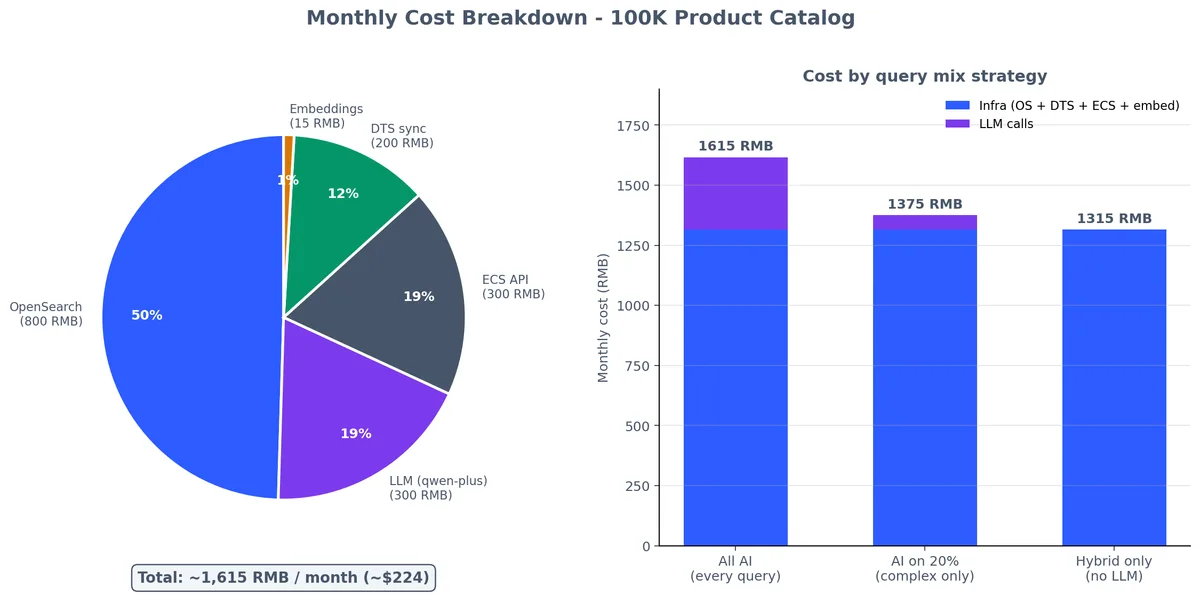
按 10 万商品目录规模算:

组件规格月费用(估算)
OpenSearch2 LCU, 50GB storage~800 RMB ($110)
DashScope 嵌入10 万文档 x 50 个令牌,每周重新嵌入~15 RMB ($2)
DashScope LLM (查询理解)每天 1 万次查询 x 200 个令牌~300 RMB ($42)
DTS 从 RDS 同步小实例,持续同步~200 RMB ($28)
ECS for Flask APIecs.c6.large (2C 4G)~300 RMB ($42)
总计~1,615 RMB ($224/月)

成本按组件分解,以及 LLM 调用份额如何随"每个查询都启用 AI"策略变化。

这套配置适合中等流量的搜索服务。LLM 成本会随着查询量线性增长——如果不需要每次查询都开启 AI 功能,可以只在复杂查询时启用,这样能砍掉 80% 的 LLM 成本。

总结#

混合搜索不是可选项: 2026 年了,如果你构建搜索时还在只做关键词或者只做向量,等于白白扔掉 15-25% 的相关性。只要其中一种跑通了,上混合搜索的实施成本其实微乎其微。

阿里云 OpenSearch 不是 AWS OpenSearch。 除了名字撞车,两者毫无关系。别指望 Elasticsearch APIs 能直接通用。如果需要 ES 兼容性,请直接选用阿里云的托管 Elasticsearch Service。

Embeddings 很便宜,LLM 调用很贵。 全量目录做 Embedding 花不了几块钱。但要是每个搜索查询都跑一遍 LLM 查询理解,规模大了成本根本扛不住。策略要灵活:复杂查询才动用 LLM 特性,简单查询直接回退到纯混合搜索。

DTS 能解决同步难题: 既然有 DTS,就别自己造 CDC 流水线了。binlog 解析、schema 映射、重试逻辑它都包了。唯一缺的 Embedding 生成环节,挂一个 Function Compute 触发器就能补齐。

先别上 AI Search,后面再加。 先把关键词搜索跑通,再加向量搜索,看看效果提升多少。然后加上 LLM 查询理解,最后才是答案生成。每一层都是增量迭代,独立创造价值。别想着第一天就建成完整的 AI Search 流水线。

度量一切: 记录每个查询、每个结果集、每次点击。没有这些数据,调优搜索全靠直觉,最后就是你对着 400 行的同义词表格发呆,还不知道它到底有没有用。

下一步#

搜索负责把数据送到用户面前,而搜索结果背后的智能——聊天机器人、内容生成、智能摘要——都来自大语言模型。下篇文章我们聊聊百炼和 DashScope:Qwen 模型家族、OpenAI 兼容 API、文本生成、Embedding,以及如何把 LLM 能力接入你的阿里云技术栈。

本系列

阿里云全栈实战 12 篇

  1. 01 阿里云全栈实战(一):生态全景图——阿里云到底是什么
  2. 02 阿里云全栈实战(二):ECS——让计算回归本质
  3. 03 阿里云全栈实战(三):VPC、SLB 构建网络基石
  4. 04 阿里云全栈实战(四):OSS——对象存储最佳实践
  5. 05 阿里云全栈实战(五):RDS 与 PolarDB 数据基石
  6. 06 阿里云全栈实战(六):RAM、KMS 筑牢云安全
  7. 07 阿里云全栈实战(七):SLS 打造可观测性体系
  8. 08 阿里云全栈实战(八):Serverless 与事件驱动
  9. 09 阿里云全栈实战(九):OpenSearch 与 AI 搜索 当前
  10. 10 阿里云全栈实战(十):DashScope 与大模型层
  11. 11 阿里云全栈实战(十一):PAI 打造机器学习平台
  12. 12 阿里云全栈实战(十二):Terraform 全栈统一交付

读有所得?

GitHub 关注我 → 新文周更

GitHub