系列 · 阿里云全栈实战 · 第 10 篇

阿里云全栈实战(十):DashScope 与大模型层

阿里云完整 LLM 工具包:Qwen 模型系列、DashScope API(兼容 OpenAI)、万象图像/视频生成、Qwen TTS、异步任务模式、微调。构建多模态 AI 流水线。

早年在国内开发生产级 LLM 应用时,可选方案极少且成本高昂:国际大厂要么未在中国内地部署服务端点(endpoint),要么计费需绑定境外信用卡;若调用其美国 API,首 token 延迟普遍超过 800ms。后来 Qwen 接入 DashScope 并提供 OpenAI 兼容接口,国内开发 AI 产品的体验因此与海外接轨——SDK 一样,请求结构一样,流式协议也一样,只需改个 base_url,再从百炼控制台拿个 Key 就行。该方案已在生产环境稳定运行一年以上。本文系统梳理了我初上手时最急需的实战经验。

本文不是泛泛而谈的概览。读完后,你将厘清完整的模型目录,掌握文本、图像、视频、音频、embeddings 等所有模态的调用方法,理解各团队高频遭遇的异步任务模式,并动手实现端到端的多模态流水线——生成文章、配图和语音合成,全程基于 Python。


Bailian vs DashScope:到底啥是啥#

这两个名称容易混淆,就连阿里云官方文档有时也界定不清。真相如下:

Bailian(百炼) 是产品平台,地址为 bailian.console.aliyun.com。在这里,你可以管理 API Key、浏览模型目录、启动微调任务、搭建 RAG 应用、创建提示词模板、评估模型表现以及查看账单。可将其理解为控制平面。

DashScope 是 API 服务,所有 HTTP 请求都打到 dashscope.aliyuncs.com。Python SDK 是 pip install dashscope。代码调用模型时是在跟 DashScope 对话;查账单或部署微调模型时,用的是 Bailian。

实际流程是:先在 Bailian 获取 API Key 并完成配置,然后编写代码对接 DashScope 使用模型。

对应到 AWS 是怎么个概念#

概念阿里云AWS 对应物
模型市场 + 管理控制台BailianBedrock console + SageMaker Studio
模型推理 APIDashScopeBedrock Runtime API
微调平台Bailian fine-tuningBedrock Custom Models / SageMaker Training
Agent 构建器Bailian AgentBedrock Agents
提示词工程工作室Bailian Prompt LabBedrock Playground
RAG 服务Bailian Knowledge BaseBedrock Knowledge Bases

与 AWS 的关键区别在于:在阿里云平台上,Qwen 是阿里自研的第一方模型家族;而在 AWS 上,所有模型(Claude、Llama、Mistral)都是第三方的。这意味着 Qwen 模型在 DashScope 上功能迭代更快、定价更具竞争力(没有中间商加价),且中文能力业界领先——因为 Qwen 从训练之初就将中文作为首要语言,而非后期适配。

想深入了解 Bailian 平台本身,可参考我们的专门系列 Bailian 系列

Qwen 模型家族#

Qwen 不是一个模型,而是一个覆盖文本、视觉、音频、代码、数学和多模态理解的完整家族。以下是生产环境中值得关注的核心成员:

Qwen 模型家族概览

文本生成模型#

model_idContext适用场景输入 / 输出 (CNY per 1M tokens)
qwen-turbo128K高吞吐分类、简单提取、廉价批量任务0.3 / 0.6
qwen-plus128K默认首选——聊天、总结、翻译、轻度推理0.8 / 2.0
qwen-max128K高难度推理、法律/医疗准确性、容错率低的场景2.4 / 9.6
qwen3-max128K高难度推理新默认;开启 thinking 模式比 qwen-max 更便宜2.0 / 6.0
qwen3-coder-plus128K代码生成、diff/patch、AST 操作1.0 / 4.0
qwen-turbo-longcontext1M128K 装不下的超大文档0.6 / 2.0

我的原则: 默认选 qwen-plus。只有当评估证明 Plus 准确度不够时,才升级到 qwen3-max;只有当你的业务体量下成本真正成为瓶颈时,才降级到 qwen-turbo。开启 enable_thinking=Trueqwen3-max 模型能以更低价格达到 qwen-max 的准确度,但必须使用流式输出——后文会详述。

多模态和专用模型#

model_id模态功能定价
qwen3-omni-flash视频 + 音频 + 图像 + 文本快速多模态理解(我的默认选择)按 token,随输入类型变化
qwen3.5-omni-plus视频 + 音频 + 图像 + 文本更高质量、更长推理、支持音频输出按 token
text-embedding-v3文本 → 向量1024 维 embeddings,用于 RAG 和搜索0.7 / 1M tokens
text-embedding-v4文本 → 向量更新版本,基准测试表现略优0.7 / 1M tokens
wan2.5-t2v-plus文本 → 视频根据提示生成 5 秒视频按视频秒数
wan2.5-i2v-plus图像 → 视频根据起始帧生成 5 秒视频按视频秒数
qwen3-tts-flash文本 → 音频语音合成,40+ 音色,支持方言0.8 CNY / 10K 字符

每种模态都有其特定的 API 模式和常见陷阱。文章剩余部分将逐一拆解。

DashScope API:OpenAI 兼容#

这是关于 DashScope 最重要的一点:它提供了 OpenAI 兼容的 endpoint。只需两行配置,即可直接使用官方 OpenAI Python SDK:

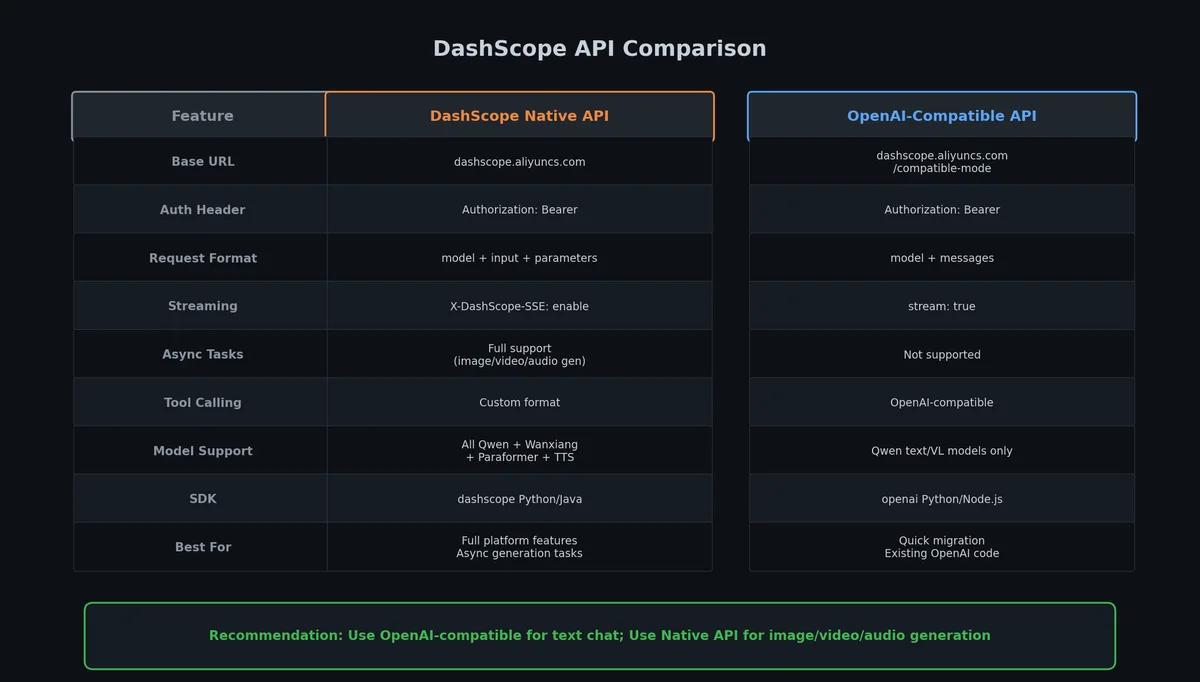
DashScope API 比较

1
2
3
4
5
6
7
import os
from openai import OpenAI

client = OpenAI(
    api_key=os.environ["DASHSCOPE_API_KEY"],
    base_url="https://dashscope.aliyuncs.com/compatible-mode/v1",
)

就这么简单。你之前从 OpenAI 那里熟悉的所有 client.chat.completions.create() 调用、流式模式、函数调用 schema,在这里都能无缝使用。该 SDK 是线程安全的且自带连接池——建议在进程生命周期内只构造一次客户端。每次调用都新建 client 会额外增加 50–100ms 的 TLS 握手开销。

OpenAI 兼容 endpoint 支持哪些功能#

功能支持?备注
Chat completionsYes所有 Qwen 文本模型
StreamingYes标准 SSE 协议
Function calling / toolsYesschema 与 OpenAI 相同
JSON modeYesresponse_format={"type": "json_object"}
Vision(图像输入)Yes通过带 image_url 的内容块
EmbeddingsYesclient.embeddings.create()
Qwen-Omni(多模态)Yes支持视频/音频/图像内容块
TTSNo仅限 DashScope 原生 API
图像生成(Wanxiang)No仅限 DashScope 原生 API
视频生成(Wanxiang)No仅限 DashScope 原生 API

规律很简单:任何符合 OpenAI 请求/响应结构的功能都走兼容 endpoint;而异步任务(如视频、图像生成)或非标准响应格式(如 TTS 音频流)则必须使用 DashScope 原生 API。

两个 endpoint 对比#

EndpointURLSDK适用场景
OpenAI-compatiblehttps://dashscope.aliyuncs.com/compatible-mode/v1openai Python SDK文本、embeddings、视觉、Omni
DashScope nativehttps://dashscope.aliyuncs.com/api/v1/services/aigc/...dashscope Python SDK 或 raw HTTPTTS、图像生成、视频生成

我默认所有支持的功能都走 OpenAI 兼容 endpoint——请求结构熟悉,错误处理文档丰富,未来切换 provider 也只需修改一行 base_url

Qwen LLM API 的详细内容见 Bailian 第二部分:Qwen LLM API

文本生成深入解析#

下面聊聊你每天都会用到的几种核心模式。

基础聊天补全#

 1
 2
 3
 4
 5
 6
 7
 8
 9
10
11
12
response = client.chat.completions.create(
    model="qwen-plus",
    messages=[
        {"role": "system", "content": "You are a helpful assistant that writes product descriptions."},
        {"role": "user", "content": "Write a 50-word description for a portable Bluetooth speaker."},
    ],
    temperature=0.7,
    max_tokens=200,
)

print(response.choices[0].message.content)
print(f"Tokens used: {response.usage.prompt_tokens} in, {response.usage.completion_tokens} out")

流式输出#

只要面向用户,就必须使用流式输出。用户感知的“快”取决于首字延迟(Time-to-first-token),而监控系统关注的是总延迟——这是两个不同的问题。

 1
 2
 3
 4
 5
 6
 7
 8
 9
10
11
12
13
14
15
16
17
stream = client.chat.completions.create(
    model="qwen-plus",
    messages=[
        {"role": "user", "content": "Explain serverless computing in 3 sentences."},
    ],
    stream=True,
    stream_options={"include_usage": True},
)

full_response = ""
for chunk in stream:
    delta = chunk.choices[0].delta.content
    if delta:
        full_response += delta
        print(delta, end="", flush=True)

# The last chunk with include_usage=True contains token counts

这里有两大常见陷阱:最后一个 chunk 的 delta.contentNone,但会携带 finish_reason,因此务必加上 if delta: 判断;此外,若想在流式模式下获取 token 用量,必须传入 stream_options={"include_usage": True}——否则最终 chunk 中不会有 usage 字段,你将无法得知本次调用的实际消耗。

enable_thinking 陷阱(Qwen3 系列)#

这个 bug 曾让我白白浪费半天时间。Qwen3 模型(如 qwen3-maxqwen3-coder-plus)提供 enable_thinking 参数以激活思维链推理。该功能强大——开启后,qwen3-max 能以更低价格达到 qwen-max 的准确率——但有一条硬性规则:

enable_thinking=True 必须配合 stream=True。非流式调用将直接失败。

 1
 2
 3
 4
 5
 6
 7
 8
 9
10
11
12
13
14
15
16
17
# This works
stream = client.chat.completions.create(
    model="qwen3-max",
    messages=[{"role": "user", "content": "What is 127 * 389?"}],
    stream=True,
    extra_body={"enable_thinking": True},
)

reasoning = ""
answer = ""
for chunk in stream:
    delta = chunk.choices[0].delta
    # Thinking tokens come first, then the answer
    if hasattr(delta, "reasoning_content") and delta.reasoning_content:
        reasoning += delta.reasoning_content
    if delta.content:
        answer += delta.content
1
2
3
4
5
6
7
# This FAILS with a 400 error
response = client.chat.completions.create(
    model="qwen3-max",
    messages=[{"role": "user", "content": "What is 127 * 389?"}],
    extra_body={"enable_thinking": True},
    # Missing stream=True!
)

结构化输出(JSON 模式)#

当你需要模型返回结构化数据(如产品属性、实体抽取、分类结果)时,请直接启用 JSON 模式:

 1
 2
 3
 4
 5
 6
 7
 8
 9
10
11
12
13
14
15
16
17
18
response = client.chat.completions.create(
    model="qwen-plus",
    messages=[
        {
            "role": "system",
            "content": "Extract product attributes. Return JSON with keys: name, category, price_range, target_audience.",
        },
        {
            "role": "user",
            "content": "The AirPods Max are premium over-ear headphones by Apple, retailing at $549, aimed at audiophiles and professionals.",
        },
    ],
    response_format={"type": "json_object"},
)

import json
data = json.loads(response.choices[0].message.content)
# {"name": "AirPods Max", "category": "headphones", "price_range": "premium", "target_audience": "audiophiles and professionals"}

JSON 模式远比仅在 prompt 中要求返回 JSON 更可靠。若不启用,模型偶尔会添加 markdown 代码框或解释性文字;启用后,输出始终可直接解析。但需注意:它并非 schema 验证器——如需严格合规,解析后仍需自行校验。

函数调用#

DashScope 支持 OpenAI 风格的函数调用,这也是构建 tool-using agent 的标准方式:

 1
 2
 3
 4
 5
 6
 7
 8
 9
10
11
12
13
14
15
16
17
18
19
20
21
22
23
24
25
26
27
28
29
30
31
tools = [
    {
        "type": "function",
        "function": {
            "name": "get_weather",
            "description": "Get current weather for a city",
            "parameters": {
                "type": "object",
                "properties": {
                    "city": {"type": "string", "description": "City name, e.g. 'Shanghai'"},
                    "unit": {"type": "string", "enum": ["celsius", "fahrenheit"]},
                },
                "required": ["city"],
            },
        },
    }
]

response = client.chat.completions.create(
    model="qwen-plus",
    messages=[{"role": "user", "content": "What is the weather like in Beijing today?"}],
    tools=tools,
    tool_choice="auto",
)

# The model returns a tool_call instead of a text response
tool_call = response.choices[0].message.tool_calls[0]
print(f"Function: {tool_call.function.name}")
print(f"Arguments: {tool_call.function.arguments}")
# Function: get_weather
# Arguments: {"city": "Beijing", "unit": "celsius"}

拿到结果后,你需自行执行函数,将结果作为 tool 消息回传,再让模型生成最终回复。整个流程与 OpenAI 完全一致——JSON schema 相同,消息流转逻辑也相同。

多轮对话#

维护对话历史只需将消息追加到数组中:

 1
 2
 3
 4
 5
 6
 7
 8
 9
10
11
12
13
14
15
16
17
18
19
20
21
messages = [
    {"role": "system", "content": "You are a cloud architecture advisor."},
]

def chat(user_input: str) -> str:
    messages.append({"role": "user", "content": user_input})
    response = client.chat.completions.create(
        model="qwen-plus",
        messages=messages,
        temperature=0.7,
    )
    assistant_msg = response.choices[0].message.content
    messages.append({"role": "assistant", "content": assistant_msg})
    return assistant_msg

# Turn 1
print(chat("I need to host a Python API with about 200 req/hour."))
# Turn 2 -- the model remembers the context
print(chat("Would serverless be cheaper than ECS for that?"))
# Turn 3
print(chat("What about cold starts?"))

务必监控 token 消耗。每轮对话都会将完整历史作为输入发送。对于长对话,建议实现滑动窗口或摘要策略。我通常限制在 20 轮以内,一旦超限,便将前 15 轮摘要为一条 system 消息。

几个关键参数的调优建议:

参数默认值范围控制内容
temperature1.00.0 – 2.0随机性。0.0 用于确定性任务,0.7–0.9 用于创意生成
top_p1.00.0 – 1.0核采样。值越低,输出越聚焦
max_tokensModel-dependent1 – 8192最大输出长度
stopNoneList of strings遇到指定序列时停止生成
presence_penalty0.0-2.0 – 2.0惩罚重复话题
frequency_penalty0.0-2.0 – 2.0惩罚重复 token

我的生产环境默认值: 抽取和分类任务用 temperature=0.3(追求稳定性),创意写作和聊天用 temperature=0.7(追求多样性);max_tokens 永远显式设置(切勿依赖默认值——不同模型默认值不同,你肯定不想因意外生成 8K token 的回复而吃掉预算)。

嵌入向量#

Embeddings 将文本转化为向量,是 RAG(检索增强生成)、语义搜索、聚类和去重的基础。DashScope 提供 text-embedding-v3 和更新的 text-embedding-v4

嵌入向量与 RAG 流水线

1
2
3
4
5
6
7
8
response = client.embeddings.create(
    model="text-embedding-v3",
    input="Alibaba Cloud provides elastic compute services through ECS.",
)

vector = response.data[0].embedding
print(f"Dimensions: {len(vector)}")  # 1024
print(f"First 5 values: {vector[:5]}")

批量嵌入#

为提升效率,可单次嵌入多个文本(每批最多 25 条,每条最多 2048 token):

 1
 2
 3
 4
 5
 6
 7
 8
 9
10
11
12
13
14
15
texts = [
    "ECS is Alibaba Cloud's virtual machine service.",
    "OSS provides object storage similar to AWS S3.",
    "Function Compute is a serverless execution engine.",
    "PolarDB is a cloud-native distributed database.",
    "DashScope is the API service for Qwen models.",
]

response = client.embeddings.create(
    model="text-embedding-v3",
    input=texts,
)

vectors = [item.embedding for item in response.data]
print(f"Embedded {len(vectors)} texts, each {len(vectors[0])} dimensions")

用 Embeddings 做语义搜索#

典型流程:离线嵌入知识库,将向量存入向量数据库(或 OpenSearch,我们在 第 9 部分:OpenSearch 中已介绍);查询时嵌入用户问题,并检索最近邻。

 1
 2
 3
 4
 5
 6
 7
 8
 9
10
11
12
13
14
15
16
17
18
19
20
21
22
23
24
25
import numpy as np

def cosine_similarity(a, b):
    return np.dot(a, b) / (np.linalg.norm(a) * np.linalg.norm(b))

# Embed the query
query = "How do I attach a disk to a virtual machine?"
query_response = client.embeddings.create(
    model="text-embedding-v3",
    input=query,
)
query_vector = query_response.data[0].embedding

# Compare against our document vectors
similarities = [
    (texts[i], cosine_similarity(query_vector, vectors[i]))
    for i in range(len(vectors))
]
similarities.sort(key=lambda x: x[1], reverse=True)

for text, score in similarities[:3]:
    print(f"  {score:.4f}  {text}")
# 0.8234  ECS is Alibaba Cloud's virtual machine service.
# 0.6891  OSS provides object storage similar to AWS S3.
# ...

生产环境中,切勿在 Python 循环中计算余弦相似度。应使用 OpenSearch 的向量搜索功能或专用向量数据库(如 Milvus)。上述代码仅用于理解概念。

万象:图像和视频生成#

万相(Wanxiang)是 DashScope 旗下的生成式媒体家族,覆盖文生图、图生视频和文生视频。所有媒体生成均使用 DashScope 原生 API(非 OpenAI 兼容接口),并遵循异步任务模式。

万象异步生成流水线

媒体生成的异步任务模式

异步任务模式#

每次调用万相,都遵循相同的三步流程:

  1. 创建任务:POST 请求需携带 header X-DashScope-Async: enable,立即返回 task_id
  2. 轮询状态:GET /api/v1/tasks/{task_id},直至 task_status 变为 SUCCEEDEDFAILED
  3. 下载结果:成功响应包含一个 URL,必须在 24 小时内下载——超时后 URL 返回 404,媒体文件永久丢失。

24 小时过期是运维中最常见的“坑”。我见过多个团队(包括我自己)因轮询后仅记录 URL,却因其他 bug 未及时下载,次日发现链接已失效。请将此 URL 视为一次性下载链接:立即下载并存入自有 OSS,切勿假设它明天仍在。

文本转视频示例#

 1
 2
 3
 4
 5
 6
 7
 8
 9
10
11
12
13
14
15
16
17
18
19
20
21
22
23
24
25
26
27
28
29
30
31
32
33
34
35
36
37
38
39
40
41
42
43
44
45
46
47
48
49
50
51
52
53
54
55
56
57
58
59
60
61
62
63
64
65
66
67
68
69
70
71
import os
import time
import requests

API_KEY = os.environ["DASHSCOPE_API_KEY"]
HEADERS = {
    "Authorization": f"Bearer {API_KEY}",
    "Content-Type": "application/json",
    "X-DashScope-Async": "enable",
}

def create_video_task(prompt: str, size: str = "1280*720", duration: int = 5) -> str:
    """Submit a text-to-video generation task. Returns task_id."""
    url = "https://dashscope.aliyuncs.com/api/v1/services/aigc/video-generation/video-synthesis"
    payload = {
        "model": "wan2.5-t2v-plus",
        "input": {"prompt": prompt},
        "parameters": {"size": size, "duration": duration},
    }
    resp = requests.post(url, json=payload, headers=HEADERS)
    resp.raise_for_status()
    return resp.json()["output"]["task_id"]


def poll_task(task_id: str, max_wait: int = 600) -> dict:
    """Poll until task completes. Returns the full output dict."""
    url = f"https://dashscope.aliyuncs.com/api/v1/tasks/{task_id}"
    headers = {"Authorization": f"Bearer {API_KEY}"}
    
    elapsed = 0
    interval = 5
    while elapsed < max_wait:
        resp = requests.get(url, headers=headers)
        result = resp.json()
        status = result["output"]["task_status"]
        
        if status == "SUCCEEDED":
            return result["output"]
        elif status == "FAILED":
            raise RuntimeError(f"Task failed: {result['output'].get('message', 'unknown')}")
        
        time.sleep(interval)
        elapsed += interval
        interval = min(interval * 1.5, 30)  # Exponential backoff, cap at 30s
    
    raise TimeoutError(f"Task {task_id} did not complete within {max_wait}s")


def download_video(video_url: str, output_path: str):
    """Download the video before the 24-hour expiry."""
    resp = requests.get(video_url, stream=True)
    resp.raise_for_status()
    with open(output_path, "wb") as f:
        for chunk in resp.iter_content(chunk_size=8192):
            f.write(chunk)


# Usage
task_id = create_video_task(
    prompt="A drone shot flying over Shanghai's Pudong skyline at sunset, cinematic, 4K quality",
    size="1280*720",
    duration=5,
)
print(f"Task submitted: {task_id}")

output = poll_task(task_id)
video_url = output["video_url"]
print(f"Video ready: {video_url}")

download_video(video_url, "shanghai_sunset.mp4")
print("Downloaded to shanghai_sunset.mp4")

图像转视频#

模式相同,仅模型和输入参数不同:

 1
 2
 3
 4
 5
 6
 7
 8
 9
10
11
12
13
14
def create_i2v_task(prompt: str, image_url: str, duration: int = 5) -> str:
    """Image-to-video: animate a starting frame."""
    url = "https://dashscope.aliyuncs.com/api/v1/services/aigc/video-generation/video-synthesis"
    payload = {
        "model": "wan2.5-i2v-plus",
        "input": {
            "prompt": prompt,
            "img_url": image_url,
        },
        "parameters": {"duration": duration},
    }
    resp = requests.post(url, json=payload, headers=HEADERS)
    resp.raise_for_status()
    return resp.json()["output"]["task_id"]

两个模型均限制为 5 秒。若需 10 秒视频,可生成两段 clips 并拼接——将第一段最后一帧作为第二段的 img_url 输入。

万相视频生成的完整解析见 Bailian Part 4: Wanxiang Video Generation

文本转图像#

生图使用略有不同的 endpoint,但异步模式不变:

 1
 2
 3
 4
 5
 6
 7
 8
 9
10
11
def create_image_task(prompt: str, size: str = "1024*1024") -> str:
    """Submit a text-to-image generation task."""
    url = "https://dashscope.aliyuncs.com/api/v1/services/aigc/text2image/image-synthesis"
    payload = {
        "model": "wanx2.1-t2i-plus",
        "input": {"prompt": prompt},
        "parameters": {"size": size, "n": 1},
    }
    resp = requests.post(url, json=payload, headers=HEADERS)
    resp.raise_for_status()
    return resp.json()["output"]["task_id"]

轮询仍使用 poll_task() 函数。成功响应中字段为 output.results[0].url 而非 output.video_url——这点小差异,稍作适配即可。

Qwen TTS:文本转语音#

Qwen TTS 是最容易让人踩坑的部分。许多人想当然认为:“既然 Qwen LLM 能通过 OpenAI 客户端调用,TTS 肯定也行。”

Qwen-TTS 不支持 OpenAI 兼容接口,仅限 DashScope 原生调用。

你无法通过 openai SDK 的 audio.speech.create 指向兼容 URL 实现 TTS——目前没有兼容层。必须使用 dashscope SDK 或直接调用 HTTP。

最简单的调用#

 1
 2
 3
 4
 5
 6
 7
 8
 9
10
11
import os
import dashscope
from dashscope.audio.tts_v2 import SpeechSynthesizer

dashscope.api_key = os.environ["DASHSCOPE_API_KEY"]

synth = SpeechSynthesizer(model="qwen3-tts-flash", voice="Cherry")
audio_bytes = synth.call("Welcome to the product demo. Today we will show you three new features.")

with open("demo_narration.mp3", "wb") as f:
    f.write(audio_bytes)

语音选择#

模型支持 40+ 音色。以下是我实际常用的几种:

VoiceGenderCharacterBest for
Cherry女性温暖、自然、积极产品演示、教程
Serena女性温柔、平静冥想、柔和旁白
Ethan男性温暖、充满活力营销视频
Andre男性深沉、稳重、有磁性专业旁白
Neil男性新闻主播风格报告、公告
Maia女性知性、温柔教育内容
Stella女性甜美、年轻社交媒体内容
Bellona女性响亮、有力行动号召

音色名称区分大小写:Cherry 有效,cherry 无效。

实时播放的流式 TTS#

对于长文本或实时应用,建议使用流式音频传输:

 1
 2
 3
 4
 5
 6
 7
 8
 9
10
11
12
13
14
15
16
17
18
19
20
21
22
23
24
25
26
27
import dashscope
from dashscope.audio.tts_v2 import SpeechSynthesizer

dashscope.api_key = os.environ["DASHSCOPE_API_KEY"]

synth = SpeechSynthesizer(
    model="qwen3-tts-flash",
    voice="Ethan",
    format="mp3",
    sample_rate=24000,
)

# Streaming callback
chunks = []
def on_audio(data):
    chunks.append(data)

synth.streaming_call(
    text="This is a longer piece of text that will be synthesized incrementally. "
         "Each chunk of audio is delivered as soon as it is ready, "
         "reducing time-to-first-audio for the user.",
    callback=on_audio,
)

with open("streamed_output.mp3", "wb") as f:
    for chunk in chunks:
        f.write(chunk)

语言和方言覆盖#

此处 Qwen TTS 几乎无可匹敌。除普通话和英语外,还支持粤语、四川话、上海话、东北话、日语和韩语——且发音地道,不像游客照本宣科。我尚未发现其他 TTS API 能在同等价位下将粤语处理得如此出色。

Qwen TTS 的完整深度解析(含声音克隆和 instruct 模式)见 Bailian Part 5: Qwen TTS

在百炼上进行微调#

微调是最后的杀手锏。在决定使用前,请先自问:提示词工程、few-shot 示例或 RAG 能否解决问题?据我观察,80% 喊着“我们需要微调”的讨论,最终都以“其实换个更好的 system prompt 就搞定了”收场。

百炼平台概览

什么时候才真的需要微调#

场景为什么微调有用优先尝试的替代方案
模型总是搞错领域专有名词训练数据能教会正确术语在 prompt 中加入 few-shot 示例
输出格式必须严格一致(如始终返回带特定标签的 XML)微调可将格式固化到模型权重中JSON mode + 结构化 prompt
大规模调用时的成本优化微调后的 qwen-turbo 在特定任务上可达 qwen-plus 效果测算成本差异是否显著
降低延迟更小的微调模型运行更快压缩 prompt,缩短 system prompt
语气风格保持一致模型可学习品牌语调在 system prompt 中写入详细风格指南

准备训练数据#

百炼要求 JSONL 格式,结构与标准 chat completion 一致:

{"messages": [{"role": "system", "content": "You are a product description writer for electronics."}, {"role": "user", "content": "Write a description for: Sony WH-1000XM5 headphones"}, {"role": "assistant", "content": "Premium wireless noise-cancelling headphones with 30-hour battery life..."}]}
{"messages": [{"role": "system", "content": "You are a product description writer for electronics."}, {"role": "user", "content": "Write a description for: Apple AirPods Pro 2"}, {"role": "assistant", "content": "True wireless earbuds with adaptive noise cancellation..."}]}

高质量训练数据的几条准则:

  • 最少 50 条示例,200–500 条为最佳区间;除非领域极广,否则超过 1000 条收益有限。
  • 所有示例的 system prompt 必须一致——模型会将其视为任务定义的一部分。
  • 仅使用高质量输出——每条 assistant 回复都应是你期望模型生成的理想结果;一条劣质样本可能引入坏习惯。
  • 输入需多样化——避免重复相似问题,应覆盖生产环境中可能出现的所有输入类型。
  • 上传前务必验证 JSONL——单行格式错误会导致整个任务静默失败。
 1
 2
 3
 4
 5
 6
 7
 8
 9
10
11
12
13
14
15
16
17
18
19
20
21
22
23
24
25
26
27
28
29
30
31
32
33
34
import json

def validate_training_data(filepath: str) -> tuple[int, list[str]]:
    """Validate JSONL training data. Returns (count, errors)."""
    errors = []
    count = 0
    with open(filepath, "r") as f:
        for i, line in enumerate(f, 1):
            count += 1
            try:
                data = json.loads(line)
            except json.JSONDecodeError:
                errors.append(f"Line {i}: invalid JSON")
                continue
            
            if "messages" not in data:
                errors.append(f"Line {i}: missing 'messages' key")
                continue
            
            roles = [m["role"] for m in data["messages"]]
            if roles[-1] != "assistant":
                errors.append(f"Line {i}: last message must be 'assistant', got '{roles[-1]}'")
            if "user" not in roles:
                errors.append(f"Line {i}: missing 'user' message")
    
    return count, errors

count, errors = validate_training_data("training_data.jsonl")
print(f"Total examples: {count}")
if errors:
    for e in errors:
        print(f"  ERROR: {e}")
else:
    print("All examples valid")

启动微调任务#

微调可通过百炼控制台或 API 进行:

  1. 上传训练数据:在百炼控制台的“数据管理”模块上传
  2. 创建微调任务:选择基座模型(如 qwen-turbo),指向数据集,配置超参数
  3. 监控训练:控制台显示 loss 曲线和进度
  4. 部署模型:训练完成后部署,获得自定义 model_id

通过 API(使用 dashscope SDK):

 1
 2
 3
 4
 5
 6
 7
 8
 9
10
11
12
13
14
15
16
17
18
19
20
import dashscope
from dashscope import FineTune

# Create fine-tuning job
job = FineTune.create(
    model="qwen-turbo",
    training_file_ids=["file-abc123"],  # Upload files first via the console
    hyperparameters={
        "n_epochs": 3,
        "batch_size": 4,
        "learning_rate_multiplier": 1.0,
    },
)
print(f"Job ID: {job.output.job_id}")
print(f"Status: {job.output.status}")

# Check status
status = FineTune.get(job.output.job_id)
print(f"Status: {status.output.status}")
# PENDING → RUNNING → SUCCEEDED

成本对比:微调小模型 vs 提示词工程大模型#

这笔账决定了微调是否值得:

方案模型输入成本/1M输出成本/1M典型 prompt token 数每月百万次调用成本
提示词工程qwen-plus0.82.0800(长 system prompt + few-shot)~2,240 CNY
提示词工程qwen-max2.49.6800~7,680 CNY
微调后qwen-turbo(自定义)~0.6~1.2200(短 prompt,无需 few-shot)~360 CNY

微调后的 turbo 模型成本约为 prompt-engineered plus 的 1/6,max 的 1/21——原因在于 prompt 更短(行为已固化在权重中,无需 few-shot),且 turbo 单价更低。但微调本身需投入训练算力和时间(准备数据、验证质量、监控漂移)。仅当特定任务月调用量超过 10 万次时,才值得投入。

解决方案:多模态 AI 流水线#

下面整合所有能力,实现一个完整流水线:输入主题,自动生成文章草稿、配图和语音解说——全部由 Python 编排。

多模态 AI 流水线

  1
  2
  3
  4
  5
  6
  7
  8
  9
 10
 11
 12
 13
 14
 15
 16
 17
 18
 19
 20
 21
 22
 23
 24
 25
 26
 27
 28
 29
 30
 31
 32
 33
 34
 35
 36
 37
 38
 39
 40
 41
 42
 43
 44
 45
 46
 47
 48
 49
 50
 51
 52
 53
 54
 55
 56
 57
 58
 59
 60
 61
 62
 63
 64
 65
 66
 67
 68
 69
 70
 71
 72
 73
 74
 75
 76
 77
 78
 79
 80
 81
 82
 83
 84
 85
 86
 87
 88
 89
 90
 91
 92
 93
 94
 95
 96
 97
 98
 99
100
101
102
103
104
105
106
107
108
109
110
111
112
113
114
115
116
117
118
119
120
121
122
123
124
125
126
127
128
129
130
131
132
133
134
135
136
137
138
139
140
141
142
143
144
145
146
147
148
149
150
151
152
153
154
155
156
157
158
159
160
161
162
163
164
165
166
167
168
"""
Multi-modal AI content pipeline.
Generates: article (Qwen) + illustration (Wanxiang) + narration (Qwen TTS).
"""

import os
import json
import time
import requests
from openai import OpenAI

# -- Config --
API_KEY = os.environ["DASHSCOPE_API_KEY"]

# OpenAI-compat client for text
text_client = OpenAI(
    api_key=API_KEY,
    base_url="https://dashscope.aliyuncs.com/compatible-mode/v1",
)

# DashScope native headers for media generation
NATIVE_HEADERS = {
    "Authorization": f"Bearer {API_KEY}",
    "Content-Type": "application/json",
    "X-DashScope-Async": "enable",
}
POLL_HEADERS = {"Authorization": f"Bearer {API_KEY}"}


# -- Step 1: Generate article --
def generate_article(topic: str) -> str:
    """Generate a short article using Qwen."""
    response = text_client.chat.completions.create(
        model="qwen-plus",
        messages=[
            {
                "role": "system",
                "content": (
                    "You are a technology writer. Write concise, engaging articles "
                    "with a clear structure: introduction, 2-3 key points, conclusion. "
                    "Keep it under 300 words."
                ),
            },
            {"role": "user", "content": f"Write an article about: {topic}"},
        ],
        temperature=0.7,
        max_tokens=500,
    )
    return response.choices[0].message.content


# -- Step 2: Generate illustration prompt --
def generate_image_prompt(article: str) -> str:
    """Ask the model to describe an illustration for the article."""
    response = text_client.chat.completions.create(
        model="qwen-plus",
        messages=[
            {
                "role": "system",
                "content": (
                    "Given an article, write a text-to-image prompt for an illustration. "
                    "The prompt should describe a clean, modern, editorial-style image. "
                    "Return ONLY the image prompt, nothing else."
                ),
            },
            {"role": "user", "content": article},
        ],
        temperature=0.5,
        max_tokens=100,
    )
    return response.choices[0].message.content


# -- Step 3: Generate image --
def generate_image(prompt: str) -> str:
    """Submit image generation task and return the image URL."""
    url = "https://dashscope.aliyuncs.com/api/v1/services/aigc/text2image/image-synthesis"
    payload = {
        "model": "wanx2.1-t2i-plus",
        "input": {"prompt": prompt},
        "parameters": {"size": "1024*1024", "n": 1},
    }
    resp = requests.post(url, json=payload, headers=NATIVE_HEADERS)
    resp.raise_for_status()
    task_id = resp.json()["output"]["task_id"]
    
    # Poll
    output = poll_task(task_id)
    return output["results"][0]["url"]


# -- Step 4: Generate narration --
def generate_narration(text: str, output_path: str):
    """Generate TTS narration using DashScope native API."""
    import dashscope
    from dashscope.audio.tts_v2 import SpeechSynthesizer
    
    dashscope.api_key = API_KEY
    synth = SpeechSynthesizer(model="qwen3-tts-flash", voice="Ethan")
    audio_bytes = synth.call(text)
    
    with open(output_path, "wb") as f:
        f.write(audio_bytes)
    return output_path


# -- Shared: poll task --
def poll_task(task_id: str, max_wait: int = 300) -> dict:
    """Poll a DashScope async task until completion."""
    url = f"https://dashscope.aliyuncs.com/api/v1/tasks/{task_id}"
    elapsed = 0
    interval = 5
    while elapsed < max_wait:
        resp = requests.get(url, headers=POLL_HEADERS)
        result = resp.json()
        status = result["output"]["task_status"]
        if status == "SUCCEEDED":
            return result["output"]
        elif status == "FAILED":
            raise RuntimeError(f"Task failed: {result['output'].get('message')}")
        time.sleep(interval)
        elapsed += interval
        interval = min(interval * 1.5, 30)
    raise TimeoutError(f"Task {task_id} timed out after {max_wait}s")


# -- Orchestrator --
def run_pipeline(topic: str):
    """Run the full multi-modal content pipeline."""
    print(f"=== Topic: {topic} ===\n")
    
    # Step 1: Article
    print("[1/4] Generating article...")
    article = generate_article(topic)
    print(f"Article: {len(article)} chars\n")
    with open("article.md", "w") as f:
        f.write(article)
    
    # Step 2: Image prompt
    print("[2/4] Generating image prompt...")
    image_prompt = generate_image_prompt(article)
    print(f"Image prompt: {image_prompt}\n")
    
    # Step 3: Illustration
    print("[3/4] Generating illustration (this takes 30-60s)...")
    image_url = generate_image(image_prompt)
    print(f"Image URL: {image_url}\n")
    
    # Download image
    img_resp = requests.get(image_url)
    with open("illustration.png", "wb") as f:
        f.write(img_resp.content)
    
    # Step 4: Narration
    print("[4/4] Generating voice narration...")
    # Use just the intro paragraph for narration demo
    intro = article.split("\n\n")[0]
    generate_narration(intro, "narration.mp3")
    print("Narration saved to narration.mp3\n")
    
    print("=== Pipeline complete ===")
    print("  article.md        - Written article")
    print("  illustration.png  - AI-generated illustration")
    print("  narration.mp3     - Voice narration of intro")


if __name__ == "__main__":
    run_pipeline("The future of serverless computing on Alibaba Cloud")

约 120 行 Python 代码,调用 DashScope 三种能力(OpenAI 兼容接口的文本生成、原生异步接口的图像生成、原生同步接口的 TTS),产出三个文件。生产环境还需补充错误处理、重试逻辑和并行执行(图像生成与 TTS 可并发,因二者独立)。但核心骨架已在此。

多模态能力(含视频理解)详见 百炼系列第三篇:Qwen-Omni

API 限流与错误处理#

上线前务必了解限流策略:

模型系列默认 RPM (requests/min)默认 TPM (tokens/min)能否提额?
qwen-turbo500500K可通过工单申请
qwen-plus300300K
qwen-max120120K
qwen3-max120120K
text-embedding-v3500500K
wan2.5-t2v-plus20N/A
qwen3-tts-flash180N/A

触发限流时,DashScope 返回 HTTP 429 并附带 Retry-After 头。建议如下处理:

 1
 2
 3
 4
 5
 6
 7
 8
 9
10
11
12
13
14
15
16
17
18
19
20
21
22
23
import time
from openai import RateLimitError

def call_with_retry(func, max_retries=3):
    """Retry on rate limit with exponential backoff."""
    for attempt in range(max_retries):
        try:
            return func()
        except RateLimitError as e:
            if attempt == max_retries - 1:
                raise
            wait = 2 ** attempt + 1
            print(f"Rate limited. Waiting {wait}s (attempt {attempt + 1}/{max_retries})")
            time.sleep(wait)


# Usage
result = call_with_retry(
    lambda: text_client.chat.completions.create(
        model="qwen-plus",
        messages=[{"role": "user", "content": "Hello"}],
    )
)

常见错误码#

HTTP 状态DashScope 代码含义解决办法
400InvalidParameter请求体格式错误对照文档检查参数
401InvalidApiKeyAPI key 错误或过期在百炼控制台重新生成
404ModelNotFound模型 ID 拼写错误或不可用核对 model_id 字符串
429Throttling超出限流指数退避重试,或申请提升配额
500InternalError服务端异常5–10 秒后重试

预算告警#

务必在百炼控制台设置预算告警。我就曾因调试循环未关闭而跑出四位数账单。若有告警,30 分钟内即可发现,而非 8 小时后。

1
2
3
# Quick check: your current month's usage via CLI
curl -s "https://dashscope.aliyuncs.com/compatible-mode/v1/models" \
  -H "Authorization: Bearer $DASHSCOPE_API_KEY" | python3 -m json.tool

放在全局看:全栈架构视角#

DashScope 在典型阿里云架构中的位置如下:

层级服务文章
计算ECS, Function Compute第2部分 , 第8部分
网络VPC, SLB第3部分
搜索与检索OpenSearch + embeddings第9部分
AI / LLMDashScope(本文)Part 10
存储OSS(用于媒体资产)Part 1

典型 AI 应用流程:

  1. 用户请求发往你的 API(运行于 ECS 或 Function Compute)
  2. 应用通过 DashScope 调用 text-embedding-v3 嵌入查询
  3. 使用嵌入向量在 OpenSearch 中检索相关上下文
  4. 通过 DashScope 调用 qwen-plus,传入检索结果与用户查询
  5. 响应流式回传给用户
  6. 如需媒体内容,异步调用 Wanxiang 并将结果存入 OSS

本系列已覆盖该架构的每一环节。DashScope 是大脑,其余服务是躯干。

总结#

  1. 百炼是控制台,DashScope 是 API。 配置在百炼,代码对接 DashScope——切勿混淆。
  2. 默认使用 OpenAI 兼容端点。 base_url="https://dashscope.aliyuncs.com/compatible-mode/v1" 配合 openai SDK 可覆盖文本、embeddings、视觉和多模态;仅 TTS、生图、生视频需切换至原生 API。
  3. 默认选择 qwen-plus 仅当评测证明其不足时才升级至 qwen3-max(带 thinking);仅当业务体量大到成本敏感时才降级至 qwen-turbo
  4. Qwen3 思考模式必须流式输出。 enable_thinking=True 若未配合 stream=True,将直接报错——此坑人人必踩一次。
  5. TTS 仅支持 DashScope 原生接口。 切勿尝试用 OpenAI 兼容端点调用 qwen3-tts-flash,否则返回 404。
  6. 所有媒体生成均为异步: 提交任务 → 轮询 → 24 小时内下载。URL 24 小时过期是生产环境最常见事故。
  7. 微调是最后手段: 优先尝试提示词工程、few-shot 和 RAG;仅当月调用量超 10 万次、任务明确、且微调小模型可媲美大模型长 prompt 时,才考虑微调。
  8. 立即设置预算告警: 别等有人忘记关闭调试循环跑了一整夜。

下一步#

第 11 部分 将聚焦机器学习平台层:PAI-DSW 交互式 Notebook、PAI-DLC 分布式训练、PAI-EAS 模型服务。本文通过 DashScope 微调和部署的每个模型,都可以在 PAI 上进行规模化训练和弹性伸缩部署——这正是我们下一步的方向。

本系列

阿里云全栈实战 12 篇

  1. 01 阿里云全栈实战(一):生态全景图——阿里云到底是什么
  2. 02 阿里云全栈实战(二):ECS——让计算回归本质
  3. 03 阿里云全栈实战(三):VPC、SLB 构建网络基石
  4. 04 阿里云全栈实战(四):OSS——对象存储最佳实践
  5. 05 阿里云全栈实战(五):RDS 与 PolarDB 数据基石
  6. 06 阿里云全栈实战(六):RAM、KMS 筑牢云安全
  7. 07 阿里云全栈实战(七):SLS 打造可观测性体系
  8. 08 阿里云全栈实战(八):Serverless 与事件驱动
  9. 09 阿里云全栈实战(九):OpenSearch 与 AI 搜索
  10. 10 阿里云全栈实战(十):DashScope 与大模型层 当前
  11. 11 阿里云全栈实战(十一):PAI 打造机器学习平台
  12. 12 阿里云全栈实战(十二):Terraform 全栈统一交付

读有所得?

GitHub 关注我 → 新文周更

GitHub