十一篇文章。几十条 CLI 命令。上百个手动步骤。现在我们把它们全部扔掉,只用一条 terraform apply 重建整个栈。这正是基础设施即代码(IaC)的核心价值。
在这个系列的过去十一部分里,我们点击过控制台,敲过 aliyun CLI 命令,手动配置了从 VPC 到 Function Compute 触发器的一切。这种方式可行:亲手搭建每个资源,熟悉所有细节。但在新地域重建整套栈,三层双可用区 VPC、带 cloud-init 的 ECS 实例、RDS MySQL HA、带生命周期规则和 CORS 配置的 OSS bucket、RAM 策略、SLS 日志管道、Function Compute 事件触发器,至少需要一整天的精细操作。难免会遗漏安全组规则、备份策略或 CORS 配置。
基础设施即代码(IaC)解决了这个问题:通过声明式配置描述期望状态,工具自动比对现状、计算差异并调用 API 达成目标。我们在十一篇文章中构建的整个栈,现在变成了一个 .tf 文件仓库,团队里的任何人都可以阅读、审查、修改和应用。
作为本系列的收官篇,本文将前十一期的所有手动配置封装为可复用的 Terraform 模块,使你能够获得一个开箱即用的生产级 Terraform 项目,仅需一条命令即可让全栈阿里云基础设施就绪。
为什么需要基础设施即代码?# 看到第十二篇,你大概率已信服 IaC 的必要性。但要说服团队落地,还得拿出硬核理由,这就是接下来要列的五点。
演进过程# 每个团队大致都会经历同样的演变:
阶段 1:手动(控制台点击)。 你在 Web 控制台点点点。一个人管理几个资源时还行。一旦需要重建什么东西、解释你做了什么,或者把环境交给队友,这就行不通了。
阶段 2:脚本(CLI 命令)。 你写 shell 脚本调用 aliyun ecs CreateInstance 这类命令。比点击好,但脚本是命令式的:它描述的是具体执行步骤,而非期望的最终状态。脚本跑两次,要么失败(资源已存在),要么创建重复资源。你最终不得不编写日益复杂的逻辑来保证幂等性,这本质上是在重复造一个简陋版的 Terraform。
阶段 3:基础设施即代码(声明式)。 你描述期望状态:“我想要一个 CIDR 为 10.0.0.0/16 且带有三个 VSwitch 的 VPC。”工具比对期望状态与实际状态,计算出达成该状态所需的最少 API 调用。无论执行多少次,最终状态始终一致。
五大支柱# 基础设施即代码提供了手动部署所不具备的五大能力:
支柱 含义 重要性 可复现性 代码相同 = 基础设施相同,每次皆然 随时一键创建完全一致的预发/生产环境 版本控制 基础设施变更通过 Git 追踪 谁改了什么、何时、为何——完整的 diff history 协作 基础设施变更走 Pull requests 基础设施也能像应用代码一样 Code review 灾难恢复 几分钟内从代码重建整个栈 若所在地域发生故障,只需一条命令,即可将整套基础设施重建至新地域。 成本追踪 代码定义的基础设施可估算成本 应用前就知道变更要花多少钱
阿里云有自己的 IaC 服务: Resource Orchestration Service (ROS)。它基于 JSON 或 YAML 模板定义资源,并与阿里云控制台深度集成。它是免费的。那我为什么还推荐 Terraform?
对比维度 Terraform ROS 多云支持 支持 – AWS, Azure, GCP, 3000+ providers 仅限阿里云 状态管理 本地或远程 (S3, OSS, Consul 等) 由 ROS 服务管理 社区 庞大 – 模块、示例、 Stack Overflow 较小,主要为中文社区 语言 HCL (专为 IaC 设计,可读性强) JSON/YAML (冗长,易错) 模块生态 Terraform Registry 上有数千个模块 有限 学习投入 技能可迁移到任何云 阿里云特定 漂移检测 terraform plan 显示精确 diff漂移检测功能尚不完善 导入现有资源 terraform import支持但不够成熟
如果您的环境仅限阿里云,且不希望引入额外工具, ROS 是一种可行选择。但如果你需要跨云管理、重视社区支持,或希望所掌握的技能具备跨平台可迁移性, Terraform 是更优选择。阿里云 Terraform provider (alicloud) 维护积极,覆盖了我们在这个系列中用到的几乎所有服务。
关于 Terraform 本身的更深入探讨,请看我们的 Terraform 系列
,八篇文章涵盖从第一性原理到高级模式的所有方面。这篇文章假设你已经了解基础,重点在于如何将 Terraform 应用到我们构建的具体阿里云栈上。
架构概览# 这是我们要编码的完整栈。每个组件都对应我们在之前文章中手动构建的内容:
 1
 2
 3
 4
 5
 6
 7
 8
 9
10
11
12
13
14
15
16
17
18
19
20
21
22
23
24
25
26
27
28
29
30
31
32
┌─────────────────────────────────────────────────────────────┐
│                        Alibaba Cloud                        │
│                                                             │
│  ┌──────────────────── VPC (10.0.0.0/16) ─────────────────┐ │
│  │                                                         │ │
│  │  ┌─── AZ-A ───┐         ┌─── AZ-B ───┐                │ │
│  │  │ vsw-pub-a  │         │ vsw-pub-b  │  Public Tier    │ │
│  │  │ 10.0.1.0/24│         │ 10.0.2.0/24│                 │ │
│  │  └─────┬──────┘         └──────┬─────┘                 │ │
│  │        │                       │                        │ │
│  │  ┌─────┴──────┐         ┌──────┴─────┐                │ │
│  │  │ vsw-app-a  │         │ vsw-app-b  │  App Tier       │ │
│  │  │10.0.10.0/24│         │10.0.11.0/24│                 │ │
│  │  │  ┌─────┐   │         │            │                 │ │
│  │  │  │ ECS │   │         │            │                 │ │
│  │  └──┴─────┴───┘         └────────────┘                 │ │
│  │        │                       │                        │ │
│  │  ┌─────┴──────┐         ┌──────┴─────┐                │ │
│  │  │ vsw-data-a │         │ vsw-data-b │  Data Tier      │ │
│  │  │10.0.20.0/24│         │10.0.21.0/24│                 │ │
│  │  │  ┌─────┐   │         │  ┌─────┐   │                │ │
│  │  │  │ RDS │◄──┼─────────┼──│ RDS │   │                │ │
│  │  │  │(pri)│   │         │  │(sec)│   │                 │ │
│  │  └──┴─────┴───┘         └──┴─────┴───┘                 │ │
│  └─────────────────────────────────────────────────────────┘ │
│                                                             │
│  ┌─── OSS ───┐  ┌── RAM ──┐  ┌── SLS ──┐  ┌──── FC ────┐  │
│  │  Media    │  │ Users   │  │ Logs    │  │ Event      │  │
│  │  Storage  │  │ Roles   │  │ Alerts  │  │ Processing │  │
│  │  CDN      │  │ Policies│  │ Dashb.  │  │ OSS Trigger│  │
│  └───────────┘  └─────────┘  └─────────┘  └────────────┘  │
└─────────────────────────────────────────────────────────────┘
资源及其构建出处:
资源 系列部分 Terraform 模块 VPC, VSwitches, Security Groups, NAT 第 3 部分:VPC 网络 modules/networkECS 实例, cloud-init, 密钥对 第 2 部分:ECS 计算 modules/computeRDS MySQL HA, 备份 第 5 部分:RDS 数据库 modules/databaseOSS 存储桶, 生命周期, CORS, CDN 第 4 部分:OSS 存储 modules/storageRAM 用户, 角色, 策略, KMS 第 6 部分:RAM 安全 modules/securitySLS 项目, 日志存储, 警报 第 7 部分:SLS 可观测性 modules/monitoringFunction Compute, OSS 触发器 第 8 部分:无服务器 modules/serverless
对于 Part 10
和 Part 11
中涵盖的 LLM 和 ML 部署, Terraform 支持较为有限,DashScope 和 PAI 模型部署通常通过它们自己的 SDK 完成。我们会注明 Terraform 支持的边界所在。
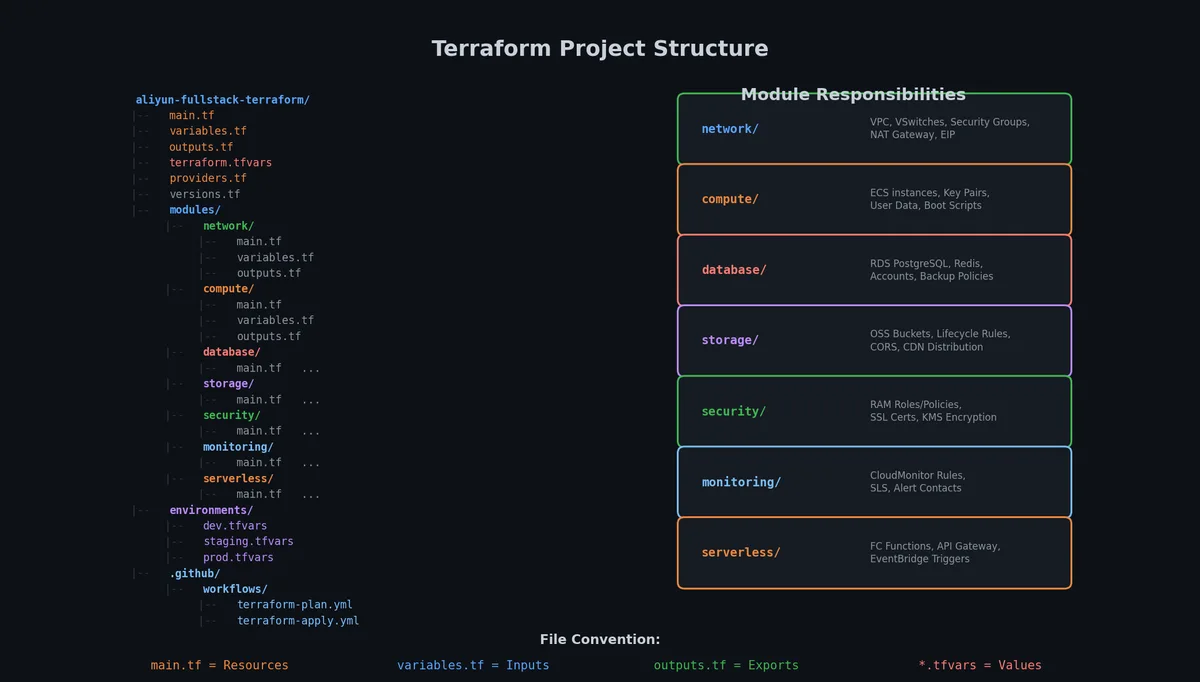
项目结构# 一个组织良好的 Terraform 项目,直接决定该代码库能否被团队长期维护,还是在数月内沦为‘不可触碰、仅能侥幸运行’的技术债务。结构如下:
 1
 2
 3
 4
 5
 6
 7
 8
 9
10
11
12
13
14
15
16
17
18
19
20
21
22
23
24
25
26
27
28
29
30
31
32
33
34
35
36
37
38
39
40
41
42
43
44
45
46
47
48
49
50
51
52
53
54
55
56
57
aliyun-fullstack-terraform/
├── main.tf                    # Root module: composes all child modules
├── variables.tf               # Input variables for the root module
├── outputs.tf                 # Output values (IPs, endpoints, etc.)
├── versions.tf                # Provider and Terraform version constraints
├── backend.tf                 # Remote state configuration (OSS)
├── terraform.tfvars           # Variable values (gitignored)
├── terraform.tfvars.example   # Example variable values (committed)
│
├── modules/
│   ├── network/
│   │   ├── main.tf            # VPC, VSwitches, Security Groups, NAT
│   │   ├── variables.tf
│   │   └── outputs.tf
│   │
│   ├── compute/
│   │   ├── main.tf            # ECS, cloud-init, key pair
│   │   ├── variables.tf
│   │   ├── outputs.tf
│   │   └── cloud-init.yaml    # Cloud-init template
│   │
│   ├── database/
│   │   ├── main.tf            # RDS MySQL HA
│   │   ├── variables.tf
│   │   └── outputs.tf
│   │
│   ├── storage/
│   │   ├── main.tf            # OSS, lifecycle, CORS
│   │   ├── variables.tf
│   │   └── outputs.tf
│   │
│   ├── security/
│   │   ├── main.tf            # RAM users, roles, policies, KMS
│   │   ├── variables.tf
│   │   └── outputs.tf
│   │
│   ├── monitoring/
│   │   ├── main.tf            # SLS project, logstore, alerts
│   │   ├── variables.tf
│   │   └── outputs.tf
│   │
│   └── serverless/
│       ├── main.tf            # Function Compute, triggers
│       ├── variables.tf
│       ├── outputs.tf
│       └── functions/         # Function source code
│           └── image-resize/
│               └── index.py
│
├── environments/
│   ├── dev.tfvars             # Dev environment overrides
│   ├── staging.tfvars         # Staging environment overrides
│   └── prod.tfvars            # Production environment overrides
│
└── .github/
    └── workflows/
        └── terraform.yml      # CI/CD pipeline
该结构设计的关键决策包括:
一个根模块,多个子模块: 每个子模块都是自包含且可复用的。你可以在不同项目中使用 modules/network,而不必拖着 database 模块一起。通过 .tfvars 文件隔离环境。 既不采用独立目录,也不使用 Terraform Workspace,后者因共享同一 state backend,存在并发冲突风险。只是不同的变量文件:terraform apply -var-file=environments/prod.tfvars。每个环境独立状态: 每个环境在单独的 OSS 路径下拥有自己的 state file。我们在 backend 中配置这一点。密钥不进版本控制: terraform.tfvars 被 gitignored。terraform.tfvars.example 展示结构但不含值。配置 Provider 和 State# 动手写模块代码前,有两件事得先安排好:阿里云 Provider 配置和远程 State 后端。
versions.tf# 1
2
3
4
5
6
7
8
9
10
11
12
13
14
15
16
17
18
19
20
terraform {
required_version = "> = 1 . 5 . 0 "
required_providers {
alicloud = {
source = "aliyun/alicloud"
version = "~> 1.230.0"
}
random = {
source = "hashicorp/random"
version = "~> 3.6.0"
}
}
}
provider "alicloud" {
region = var . region
access_key = var . access_key
secret_key = var . secret_key
}
Provider 版本必须锁死。alicloud 更新频繁, Breaking Changes 时有发生。~> 约束允许 patch 更新(1.230.x),但挡住了 minor 版本升级。
千万别把凭证硬编码在 provider 块里。实际生产中,你会用环境变量(ALICLOUD_ACCESS_KEY, ALICLOUD_SECRET_KEY)或者阿里云凭证文件。这里用变量是为了显式声明。
backend.tf# 1
2
3
4
5
6
7
8
9
terraform {
backend "oss" {
bucket = "my-terraform-state"
prefix = "fullstack/prod"
region = "cn-hangzhou"
tablestore_endpoint = "https://terraform-lock.cn-hangzhou.ots.aliyuncs.com"
tablestore_table = "terraform_lock"
}
}
State 文件存储于 OSS,分布式锁由 Table Store 提供。团队协作这是命门,没锁的话,两个人同时跑 terraform apply, State 文件直接损坏。 TableStore 提供分布式锁,防止并发修改 State。
创建 State Bucket 和锁表(这是一次性的 bootstrap 步骤):
1
2
3
4
5
6
7
8
9
10
11
# Create the state bucket
aliyun oss mb oss://my-terraform-state --region cn-hangzhou
# Enable versioning (so you can recover from state corruption)
aliyun oss bucket-versioning --method put oss://my-terraform-state --versioning-configuration '{"Status":"Enabled"}'
# Create the TableStore instance and lock table
aliyun ots create-instance --instance-name terraform-lock --region cn-hangzhou
aliyun ots create-table \
\
'{"TableName":"terraform_lock","PrimaryKey":[{"Name":"LockID","Type":"STRING"}]}'
variables.tf (根模块)# 1
2
3
4
5
6
7
8
9
10
11
12
13
14
15
16
17
18
19
20
21
22
23
24
25
26
27
28
29
30
31
32
33
34
35
36
37
38
39
40
41
42
43
44
45
46
47
48
49
50
51
52
53
54
55
56
57
58
59
60
61
62
63
64
65
66
67
68
69
# --- Provider ---
variable "region" {
description = "Alibaba Cloud region"
type = string
default = "cn-hangzhou"
}
variable "access_key" {
description = "Alibaba Cloud Access Key ID"
type = string
sensitive = true
}
variable "secret_key" {
description = "Alibaba Cloud Access Key Secret"
type = string
sensitive = true
}
# --- Common ---
variable "project_name" {
description = "Project name used for resource naming and tagging"
type = string
default = "fullstack"
}
variable "environment" {
description = "Environment name (dev, staging, prod)"
type = string
default = "prod"
validation {
condition = contains ([ "dev", "staging", "prod" ], var . environment )
error_message = "Environment must be dev, staging, or prod."
}
}
# --- Network ---
variable "vpc_cidr" {
description = "CIDR block for the VPC"
type = string
default = "10.0.0.0/16"
}
# --- Compute ---
variable "ecs_instance_type" {
description = "ECS instance type"
type = string
default = "ecs.g7.large"
}
variable "ecs_password" {
description = "ECS instance root password"
type = string
sensitive = true
}
# --- Database ---
variable "rds_instance_type" {
description = "RDS instance type"
type = string
default = "rds.mysql.s2.large"
}
variable "db_password" {
description = "RDS database password"
type = string
sensitive = true
}
注意凭证变量加了 sensitive = true。 Terraform 会在 plan 输出和 state 日志里把这些值掩码处理。
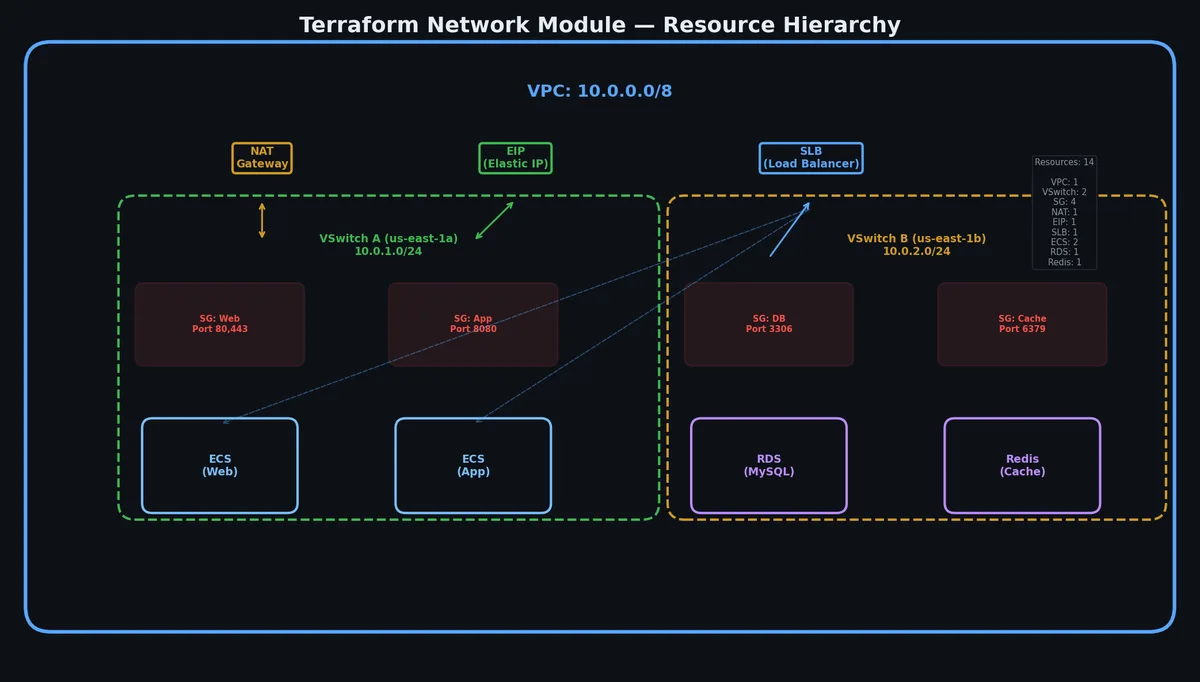
网络模块# 网络模块负责部署 Part 3
里设计的 VPC 架构,3 层结构、 2 可用区布局,包含安全组、出向流量的 NAT Gateway 以及公网访问的 EIP。
modules/network/variables.tf# 1
2
3
4
5
6
7
8
9
10
11
12
13
14
15
16
variable "project_name" {
type = string
}
variable "environment" {
type = string
}
variable "region" {
type = string
}
variable "vpc_cidr" {
type = string
default = "10.0.0.0/16"
}
modules/network/main.tf# 1
2
3
4
5
6
7
8
9
10
11
12
13
14
15
16
17
18
19
20
21
22
23
24
25
26
27
28
29
30
31
32
33
34
35
36
37
38
39
40
41
42
43
44
45
46
47
48
49
50
51
52
53
54
55
56
57
58
59
60
61
62
63
64
65
66
67
68
69
70
71
72
73
74
75
76
77
78
79
80
81
82
83
84
85
86
87
88
89
90
91
92
93
94
95
96
97
98
99
100
101
102
103
104
105
106
107
108
109
110
111
112
113
114
115
116
117
118
119
120
121
122
123
124
125
126
127
128
129
130
131
132
133
134
135
136
137
138
139
140
141
142
143
144
145
146
147
148
149
150
151
152
153
154
155
156
157
# --- Data sources ---
data "alicloud_zones" "available" {
available_resource_creation = "VSwitch"
}
locals {
az_a = data . alicloud_zones . available . zones [ 0 ]. id
az_b = data . alicloud_zones . available . zones [ 1 ]. id
name_prefix = "${var.project_name}-${var.environment}"
}
# --- VPC ---
resource "alicloud_vpc" "main" {
vpc_name = "${local.name_prefix}-vpc"
cidr_block = var . vpc_cidr
tags = {
Project = var . project_name
Environment = var . environment
}
}
# --- VSwitches (3 tiers x 2 AZs = 6 VSwitches) ---
resource "alicloud_vswitch" "public_a" {
vswitch_name = "${local.name_prefix}-public-a"
vpc_id = alicloud_vpc . main . id
cidr_block = "10.0.1.0/24"
zone_id = local . az_a
}
resource "alicloud_vswitch" "public_b" {
vswitch_name = "${local.name_prefix}-public-b"
vpc_id = alicloud_vpc . main . id
cidr_block = "10.0.2.0/24"
zone_id = local . az_b
}
resource "alicloud_vswitch" "app_a" {
vswitch_name = "${local.name_prefix}-app-a"
vpc_id = alicloud_vpc . main . id
cidr_block = "10.0.10.0/24"
zone_id = local . az_a
}
resource "alicloud_vswitch" "app_b" {
vswitch_name = "${local.name_prefix}-app-b"
vpc_id = alicloud_vpc . main . id
cidr_block = "10.0.11.0/24"
zone_id = local . az_b
}
resource "alicloud_vswitch" "data_a" {
vswitch_name = "${local.name_prefix}-data-a"
vpc_id = alicloud_vpc . main . id
cidr_block = "10.0.20.0/24"
zone_id = local . az_a
}
resource "alicloud_vswitch" "data_b" {
vswitch_name = "${local.name_prefix}-data-b"
vpc_id = alicloud_vpc . main . id
cidr_block = "10.0.21.0/24"
zone_id = local . az_b
}
# --- Security Groups ---
resource "alicloud_security_group" "web" {
name = "${local.name_prefix}-sg-web"
vpc_id = alicloud_vpc . main . id
description = "Security group for web tier"
}
resource "alicloud_security_group_rule" "web_http" {
type = "ingress"
ip_protocol = "tcp"
port_range = "80/80"
cidr_ip = "0.0.0.0/0"
security_group_id = alicloud_security_group . web . id
}
resource "alicloud_security_group_rule" "web_https" {
type = "ingress"
ip_protocol = "tcp"
port_range = "443/443"
cidr_ip = "0.0.0.0/0"
security_group_id = alicloud_security_group . web . id
}
resource "alicloud_security_group" "app" {
name = "${local.name_prefix}-sg-app"
vpc_id = alicloud_vpc . main . id
description = "Security group for app tier"
}
resource "alicloud_security_group_rule" "app_ssh" {
type = "ingress"
ip_protocol = "tcp"
port_range = "22/22"
cidr_ip = var . vpc_cidr
security_group_id = alicloud_security_group . app . id
}
resource "alicloud_security_group_rule" "app_from_web" {
type = "ingress"
ip_protocol = "tcp"
port_range = "8080/8080"
cidr_ip = "10.0.1.0/24"
security_group_id = alicloud_security_group . app . id
}
resource "alicloud_security_group" "data" {
name = "${local.name_prefix}-sg-data"
vpc_id = alicloud_vpc . main . id
description = "Security group for data tier"
}
resource "alicloud_security_group_rule" "data_mysql" {
type = "ingress"
ip_protocol = "tcp"
port_range = "3306/3306"
cidr_ip = "10.0.10.0/23"
security_group_id = alicloud_security_group . data . id
}
# --- NAT Gateway ---
resource "alicloud_nat_gateway" "main" {
vpc_id = alicloud_vpc . main . id
nat_gateway_name = "${local.name_prefix}-nat"
payment_type = "PayAsYouGo"
vswitch_id = alicloud_vswitch . public_a . id
nat_type = "Enhanced"
}
resource "alicloud_eip_address" "nat" {
address_name = "${local.name_prefix}-eip-nat"
bandwidth = "5"
internet_charge_type = "PayByTraffic"
payment_type = "PayAsYouGo"
}
resource "alicloud_eip_association" "nat" {
allocation_id = alicloud_eip_address . nat . id
instance_id = alicloud_nat_gateway . main . id
instance_type = "Nat"
}
resource "alicloud_snat_entry" "app_a" {
snat_table_id = alicloud_nat_gateway . main . snat_table_ids
source_vswitch_id = alicloud_vswitch . app_a . id
snat_ip = alicloud_eip_address . nat . ip_address
}
resource "alicloud_snat_entry" "app_b" {
snat_table_id = alicloud_nat_gateway . main . snat_table_ids
source_vswitch_id = alicloud_vswitch . app_b . id
snat_ip = alicloud_eip_address . nat . ip_address
}
modules/network/outputs.tf# 1
2
3
4
5
6
7
8
9
10
11
12
13
14
15
16
17
18
19
20
21
22
23
24
25
26
27
28
29
30
31
output "vpc_id" {
value = alicloud_vpc . main . id
}
output "public_vswitch_ids" {
value = [ alicloud_vswitch . public_a . id , alicloud_vswitch . public_b . id ]
}
output "app_vswitch_ids" {
value = [ alicloud_vswitch . app_a . id , alicloud_vswitch . app_b . id ]
}
output "data_vswitch_ids" {
value = [ alicloud_vswitch . data_a . id , alicloud_vswitch . data_b . id ]
}
output "web_security_group_id" {
value = alicloud_security_group . web . id
}
output "app_security_group_id" {
value = alicloud_security_group . app . id
}
output "data_security_group_id" {
value = alicloud_security_group . data . id
}
output "nat_eip" {
value = alicloud_eip_address . nat . ip_address
}
留意安全组规则。 SSH 只允许 VPC 内部访问(10.0.0.0/16),不对公网开放。 App 端口(8080)只有公共子网能通。 MySQL 仅限 App 子网访问。这就是 Part 3
设计的三层隔离,现在代码化了,随时可复用。
模块:计算 (Compute)# 计算模块负责创建我们在 第二部分
定好的 ECS 实例,连带着自动引导的 cloud-init 脚本一起配好。
modules/compute/variables.tf# 1
2
3
4
5
6
7
8
9
10
11
12
13
14
15
16
17
18
19
20
21
22
23
24
25
26
27
28
29
30
variable "project_name" {
type = string
}
variable "environment" {
type = string
}
variable "vpc_id" {
type = string
}
variable "vswitch_id" {
type = string
description = "VSwitch for the ECS instance (app tier)"
}
variable "security_group_id" {
type = string
}
variable "instance_type" {
type = string
default = "ecs.g7.large"
}
variable "password" {
type = string
sensitive = true
}
modules/compute/main.tf# 1
2
3
4
5
6
7
8
9
10
11
12
13
14
15
16
17
18
19
20
21
22
23
24
25
26
27
28
29
30
31
32
33
34
35
36
37
38
39
40
41
42
43
44
45
46
47
48
49
50
51
52
53
54
55
56
57
58
59
60
61
62
locals {
name_prefix = "${var.project_name}-${var.environment}"
}
data "alicloud_images" "ubuntu" {
name_regex = "^ubuntu_22"
most_recent = true
owners = "system"
}
# --- Key Pair ---
resource "tls_private_key" "ecs" {
algorithm = "RSA"
rsa_bits = 4096
}
resource "alicloud_ecs_key_pair" "main" {
key_pair_name = "${local.name_prefix}-keypair"
public_key = tls_private_key . ecs . public_key_openssh
}
# --- ECS Instance ---
resource "alicloud_instance" "app" {
instance_name = "${local.name_prefix}-app"
host_name = "${local.name_prefix}-app"
image_id = data . alicloud_images . ubuntu . images [ 0 ]. id
instance_type = var . instance_type
vswitch_id = var . vswitch_id
security_groups = [ var . security_group_id ]
key_name = alicloud_ecs_key_pair . main . key_pair_name
system_disk_category = "cloud_essd"
system_disk_size = 40
internet_max_bandwidth_out = 0 # No public IP; use EIP
user_data = base64encode ( templatefile ( "${path.module}/cloud-init.yaml" , {
hostname = "${local.name_prefix}-app"
environment = var . environment
}))
tags = {
Project = var . project_name
Environment = var . environment
Role = "app-server"
}
}
# --- EIP for the app server ---
resource "alicloud_eip_address" "app" {
address_name = "${local.name_prefix}-eip-app"
bandwidth = "10"
internet_charge_type = "PayByTraffic"
payment_type = "PayAsYouGo"
}
resource "alicloud_eip_association" "app" {
allocation_id = alicloud_eip_address . app . id
instance_id = alicloud_instance . app . id
instance_type = "EcsInstance"
}
modules/compute/cloud-init.yaml# 1
2
3
4
5
6
7
8
9
10
11
12
13
14
15
16
17
18
19
20
21
22
23
24
25
26
27
28
29
30
31
32
33
#cloud-config
hostname : ${hostname}
package_update : true
package_upgrade : true
packages :
- docker.io
- docker-compose
- nginx
- certbot
- python3-certbot-nginx
- fail2ban
- ufw
runcmd :
# Enable and start Docker
- systemctl enable docker
- systemctl start docker
# Configure firewall
- ufw default deny incoming
- ufw default allow outgoing
- ufw allow 22/tcp
- ufw allow 80/tcp
- ufw allow 443/tcp
- ufw --force enable
# Enable fail2ban
- systemctl enable fail2ban
- systemctl start fail2ban
# Log the completion
- echo "cloud-init complete for ${environment}" >> /var/log/cloud-init-custom.log
modules/compute/outputs.tf# 1
2
3
4
5
6
7
8
9
10
11
12
13
14
15
16
output "instance_id" {
value = alicloud_instance . app . id
}
output "private_ip" {
value = alicloud_instance . app . private_ip
}
output "public_ip" {
value = alicloud_eip_address . app . ip_address
}
output "private_key_pem" {
value = tls_private_key . ecs . private_key_pem
sensitive = true
}
模块:数据库 (Database)# 数据库模块负责拉起 第五部分
提到的 RDS MySQL 高可用实例,包含只读副本、自动备份策略,还有专用数据库账号。
modules/database/variables.tf# 1
2
3
4
5
6
7
8
9
10
11
12
13
14
15
16
17
18
19
20
21
22
23
24
25
26
27
28
29
30
31
32
33
34
35
36
37
38
39
40
variable "project_name" {
type = string
}
variable "environment" {
type = string
}
variable "vpc_id" {
type = string
}
variable "vswitch_id_primary" {
type = string
description = "VSwitch for the primary RDS instance (data tier, AZ-A)"
}
variable "vswitch_id_secondary" {
type = string
description = "VSwitch for the secondary RDS instance (data tier, AZ-B)"
}
variable "security_group_id" {
type = string
}
variable "instance_type" {
type = string
default = "rds.mysql.s2.large"
}
variable "db_name" {
type = string
default = "app_production"
}
variable "db_password" {
type = string
sensitive = true
}
modules/database/main.tf# 1
2
3
4
5
6
7
8
9
10
11
12
13
14
15
16
17
18
19
20
21
22
23
24
25
26
27
28
29
30
31
32
33
34
35
36
37
38
39
40
41
42
43
44
45
46
47
48
49
50
51
52
53
54
55
56
57
58
59
60
61
62
63
64
65
66
67
68
69
70
71
72
73
74
75
76
77
78
79
80
81
82
83
locals {
name_prefix = "${var.project_name}-${var.environment}"
}
# --- RDS MySQL Instance (Primary) ---
resource "alicloud_db_instance" "primary" {
engine = "MySQL"
engine_version = "8.0"
instance_type = var . instance_type
instance_storage = 50
instance_name = "${local.name_prefix}-rds-primary"
vswitch_id = var . vswitch_id_primary
security_group_ids = [ var . security_group_id ]
instance_charge_type = "Postpaid"
db_instance_storage_type = "cloud_essd"
# High Availability
zone_id = null # auto-select based on vswitch
zone_id_slave_a = null
# Security
security_ips = [ "10.0.10.0/24", "10.0.11.0/24" ]
ssl_action = "Open"
# Maintenance window
maintain_time = "02:00Z-06:00Z"
tags = {
Project = var . project_name
Environment = var . environment
Role = "database-primary"
}
}
# --- Database ---
resource "alicloud_db_database" "main" {
instance_id = alicloud_db_instance . primary . id
name = var . db_name
character_set = "utf8mb4"
}
# --- Database Account ---
resource "alicloud_rds_account" "app" {
db_instance_id = alicloud_db_instance . primary . id
account_name = "app_user"
account_password = var . db_password
account_type = "Normal"
}
resource "alicloud_db_account_privilege" "app" {
instance_id = alicloud_db_instance . primary . id
account_name = alicloud_rds_account . app . account_name
privilege = "ReadWrite"
db_names = [ alicloud_db_database . main . name ]
}
# --- Backup Policy ---
resource "alicloud_db_backup_policy" "main" {
instance_id = alicloud_db_instance . primary . id
preferred_backup_time = "02:00Z-03:00Z"
preferred_backup_period = [ "Monday", "Wednesday", "Friday" ]
backup_retention_period = 7
log_backup_retention_period = 7
enable_backup_log = true
}
# --- Read-Only Instance ---
resource "alicloud_db_readonly_instance" "replica" {
master_db_instance_id = alicloud_db_instance . primary . id
engine_version = "8.0"
instance_type = var . instance_type
instance_storage = 50
instance_name = "${local.name_prefix}-rds-readonly"
vswitch_id = var . vswitch_id_secondary
zone_id = null
tags = {
Project = var . project_name
Environment = var . environment
Role = "database-readonly"
}
}
modules/database/outputs.tf# 1
2
3
4
5
6
7
8
9
10
11
12
13
14
15
output "primary_connection_string" {
value = alicloud_db_instance . primary . connection_string
}
output "primary_port" {
value = alicloud_db_instance . primary . port
}
output "readonly_connection_string" {
value = alicloud_db_readonly_instance . replica . connection_string
}
output "database_name" {
value = alicloud_db_database . main . name
}
模块:存储 (Storage)# 存储模块对应 第四部分
里的 OSS Bucket,顺便把生命周期策略、 CORS 规则以及 CDN 加速都配置上。
modules/storage/main.tf# 1
2
3
4
5
6
7
8
9
10
11
12
13
14
15
16
17
18
19
20
21
22
23
24
25
26
27
28
29
30
31
32
33
34
35
36
37
38
39
40
41
42
43
44
45
46
47
48
49
50
51
52
53
54
55
56
57
58
59
60
61
62
63
64
65
66
67
68
69
70
71
72
73
74
75
76
77
78
79
80
81
82
83
84
85
86
locals {
name_prefix = "${var.project_name}-${var.environment}"
}
# Random suffix to ensure bucket name uniqueness
resource "random_string" "bucket_suffix" {
length = 6
special = false
upper = false
}
# --- OSS Bucket ---
resource "alicloud_oss_bucket" "media" {
bucket = "${local.name_prefix}-media-${random_string.bucket_suffix.result}"
acl = "private"
# Versioning
versioning {
status = "Enabled"
}
# Server-side encryption
server_side_encryption_rule {
sse_algorithm = "AES256"
}
# Lifecycle rules
lifecycle_rule {
id = "archive-old-files"
enabled = true
transition {
days = 90
storage_class = "IA"
}
transition {
days = 180
storage_class = "Archive"
}
}
lifecycle_rule {
id = "cleanup-temp"
prefix = "tmp/"
enabled = true
expiration {
days = 7
}
}
# CORS rules
cors_rule {
allowed_origins = [ "https://*.${var.domain}" ]
allowed_methods = [ "GET", "PUT", "POST" ]
allowed_headers = [ "*" ]
max_age_seconds = 3600
}
tags = {
Project = var . project_name
Environment = var . environment
}
}
# --- Bucket policy: only allow access from VPC ---
resource "alicloud_oss_bucket_policy" "vpc_only" {
bucket = alicloud_oss_bucket . media . id
policy = jsonencode ( {
Version = "1"
Statement = [
{
Effect = "Allow"
Action = [ "oss:GetObject" ]
Principal = [ "*" ]
Resource = [ "acs:oss:*:*:${alicloud_oss_bucket.media.id}/*" ]
Condition = {
StringEquals = {
"acs:SourceVpc" = [ var . vpc_id ]
}
}
}
]
})
}
modules/storage/variables.tf# 1
2
3
4
5
6
7
8
9
10
11
12
13
14
15
16
variable "project_name" {
type = string
}
variable "environment" {
type = string
}
variable "vpc_id" {
type = string
}
variable "domain" {
type = string
default = "example.com"
}
modules/storage/outputs.tf# 1
2
3
4
5
6
7
8
9
10
11
output "bucket_name" {
value = alicloud_oss_bucket . media . id
}
output "bucket_domain" {
value = alicloud_oss_bucket . media . extranet_endpoint
}
output "bucket_internal_domain" {
value = alicloud_oss_bucket . media . intranet_endpoint
}
模块:安全# 安全模块这块,咱们延续 Part 6
的思路,继续完善 RAM 配置,用户、用户组、角色和策略,全都遵循最小权限原则。另外还配了一把 KMS 密钥用来加密。
modules/security/main.tf# 1
2
3
4
5
6
7
8
9
10
11
12
13
14
15
16
17
18
19
20
21
22
23
24
25
26
27
28
29
30
31
32
33
34
35
36
37
38
39
40
41
42
43
44
45
46
47
48
49
50
51
52
53
54
55
56
57
58
59
60
61
62
63
64
65
66
67
68
69
70
71
72
73
74
75
76
77
78
79
80
81
82
83
84
85
86
87
88
89
90
91
92
93
94
95
96
97
98
99
100
101
102
103
104
105
106
locals {
name_prefix = "${var.project_name}-${var.environment}"
}
# --- RAM Group for Developers ---
resource "alicloud_ram_group" "developers" {
name = "${local.name_prefix}-developers"
force = true
}
# --- RAM Policy: ECS Read-Only ---
resource "alicloud_ram_policy" "ecs_readonly" {
policy_name = "${local.name_prefix}-ecs-readonly"
policy_document = jsonencode ( {
Version = "1"
Statement = [
{
Effect = "Allow"
Action = [ "ecs:Describe*", "ecs:List*" ]
Resource = [ "*" ]
}
]
})
}
resource "alicloud_ram_group_policy_attachment" "dev_ecs" {
policy_name = alicloud_ram_policy . ecs_readonly . policy_name
policy_type = "Custom"
group_name = alicloud_ram_group . developers . name
}
# --- RAM Role: ECS Instance Role (for EC2-like instance profiles) ---
resource "alicloud_ram_role" "ecs_role" {
name = "${local.name_prefix}-ecs-role"
document = jsonencode ( {
Version = "1"
Statement = [
{
Effect = "Allow"
Action = "sts:AssumeRole"
Principal = {
Service = [ "ecs.aliyuncs.com" ]
}
}
]
})
}
# --- RAM Policy: Allow ECS to access OSS ---
resource "alicloud_ram_policy" "ecs_oss_access" {
policy_name = "${local.name_prefix}-ecs-oss-access"
policy_document = jsonencode ( {
Version = "1"
Statement = [
{
Effect = "Allow"
Action = [ "oss:GetObject", "oss:PutObject", "oss:ListBucket" ]
Resource = [
"acs:oss:*:*:${var.oss_bucket_name}" ,
"acs:oss:*:*:${var.oss_bucket_name}/*"
]
}
]
})
}
resource "alicloud_ram_role_policy_attachment" "ecs_oss" {
policy_name = alicloud_ram_policy . ecs_oss_access . policy_name
policy_type = "Custom"
role_name = alicloud_ram_role . ecs_role . name
}
# --- RAM Policy: Allow ECS to write SLS logs ---
resource "alicloud_ram_policy" "ecs_sls_write" {
policy_name = "${local.name_prefix}-ecs-sls-write"
policy_document = jsonencode ( {
Version = "1"
Statement = [
{
Effect = "Allow"
Action = [ "log:PostLogStoreLogs" ]
Resource = [ "acs:log:*:*:project/${var.sls_project_name}/*" ]
}
]
})
}
resource "alicloud_ram_role_policy_attachment" "ecs_sls" {
policy_name = alicloud_ram_policy . ecs_sls_write . policy_name
policy_type = "Custom"
role_name = alicloud_ram_role . ecs_role . name
}
# --- KMS Key for encryption ---
resource "alicloud_kms_key" "main" {
description = "${local.name_prefix} master encryption key"
key_usage = "ENCRYPT/DECRYPT"
pending_window_in_days = 7
automatic_rotation = "Enabled"
rotation_interval = "365d"
}
resource "alicloud_kms_alias" "main" {
alias_name = "alias/${local.name_prefix}-master-key"
key_id = alicloud_kms_key . main . id
}
modules/security/variables.tf# 1
2
3
4
5
6
7
8
9
10
11
12
13
14
15
16
variable "project_name" {
type = string
}
variable "environment" {
type = string
}
variable "oss_bucket_name" {
type = string
}
variable "sls_project_name" {
type = string
default = ""
}
modules/security/outputs.tf# 1
2
3
4
5
6
7
8
9
10
11
12
13
14
15
output "ecs_role_name" {
value = alicloud_ram_role . ecs_role . name
}
output "ecs_role_arn" {
value = alicloud_ram_role . ecs_role . arn
}
output "kms_key_id" {
value = alicloud_kms_key . main . id
}
output "developer_group_name" {
value = alicloud_ram_group . developers . name
}
模块:监控# 监控模块主要搞定 SLS (Simple Log Service)的 Project 和 Logstore,实现日志集中管理,再加上 CloudMonitor 的告警规则。这一步算是把 Part 7
里聊的可观测性层给彻底代码化了。
modules/monitoring/main.tf# 1
2
3
4
5
6
7
8
9
10
11
12
13
14
15
16
17
18
19
20
21
22
23
24
25
26
27
28
29
30
31
32
33
34
35
36
37
38
39
40
41
42
43
44
45
46
47
48
49
50
51
52
53
54
55
56
57
58
59
60
61
62
63
64
65
66
67
68
69
70
71
72
73
74
75
76
77
78
79
80
81
82
83
84
85
86
87
88
89
90
91
92
93
94
95
96
97
98
99
100
101
102
103
104
105
106
107
108
109
110
111
112
113
114
115
116
117
118
119
120
121
122
123
124
125
126
127
128
129
130
131
locals {
name_prefix = "${var.project_name}-${var.environment}"
}
# --- SLS Project ---
resource "alicloud_log_project" "main" {
project_name = "${local.name_prefix}-logs"
description = "Log project for ${var.project_name} ${var.environment}"
}
# --- SLS Logstores ---
resource "alicloud_log_store" "app" {
project_name = alicloud_log_project . main . project_name
logstore_name = "app-logs"
retention_period = 30
shard_count = 2
auto_split = true
max_split_shard_count = 8
append_meta = true
enable_web_tracking = false
}
resource "alicloud_log_store" "access" {
project_name = alicloud_log_project . main . project_name
logstore_name = "access-logs"
retention_period = 90
shard_count = 2
auto_split = true
max_split_shard_count = 16
}
resource "alicloud_log_store" "error" {
project_name = alicloud_log_project . main . project_name
logstore_name = "error-logs"
retention_period = 180
shard_count = 1
auto_split = true
max_split_shard_count = 4
}
# --- Log Index (required for querying) ---
resource "alicloud_log_store_index" "app" {
project = alicloud_log_project . main . project_name
logstore = alicloud_log_store . app . logstore_name
full_text {
case_sensitive = false
token = ", '\"; = ()[] {}?@&<>/:\ n \ t \ r "
}
field_search {
name = "level"
type = "text"
case_sensitive = false
include_chinese = false
token = ", '\"; = ()[] {}?@&<>/:\ n \ t \ r "
enable_analytics = true
}
field_search {
name = "request_time"
type = "double"
enable_analytics = true
}
}
# --- CloudMonitor Alert: High CPU ---
resource "alicloud_cms_alarm" "high_cpu" {
name = "${local.name_prefix}-high-cpu"
project = "acs_ecs_dashboard"
metric = "CPUUtilization"
period = 300
dimensions = {
instanceId = var . ecs_instance_id
}
escalations_critical {
statistics = "Average"
comparison_operator = "> = "
threshold = "90"
times = 3
}
contact_groups = [ var . alert_contact_group ]
enabled = true
}
# --- CloudMonitor Alert: High Memory ---
resource "alicloud_cms_alarm" "high_memory" {
name = "${local.name_prefix}-high-memory"
project = "acs_ecs_dashboard"
metric = "memory_usedutilization"
period = 300
dimensions = {
instanceId = var . ecs_instance_id
}
escalations_critical {
statistics = "Average"
comparison_operator = "> = "
threshold = "90"
times = 3
}
contact_groups = [ var . alert_contact_group ]
enabled = true
}
# --- CloudMonitor Alert: RDS CPU ---
resource "alicloud_cms_alarm" "rds_cpu" {
name = "${local.name_prefix}-rds-high-cpu"
project = "acs_rds_dashboard"
metric = "CpuUsage"
period = 300
dimensions = {
instanceId = var . rds_instance_id
}
escalations_critical {
statistics = "Average"
comparison_operator = "> = "
threshold = "85"
times = 3
}
contact_groups = [ var . alert_contact_group ]
enabled = true
}
modules/monitoring/variables.tf# 1
2
3
4
5
6
7
8
9
10
11
12
13
14
15
16
17
18
19
20
21
variable "project_name" {
type = string
}
variable "environment" {
type = string
}
variable "ecs_instance_id" {
type = string
}
variable "rds_instance_id" {
type = string
default = ""
}
variable "alert_contact_group" {
type = string
default = "default-contact-group"
}
modules/monitoring/outputs.tf# 1
2
3
4
5
6
7
8
9
10
11
12
13
14
15
output "sls_project_name" {
value = alicloud_log_project . main . project_name
}
output "sls_endpoint" {
value = alicloud_log_project . main . project_name
}
output "app_logstore" {
value = alicloud_log_store . app . logstore_name
}
output "access_logstore" {
value = alicloud_log_store . access . logstore_name
}
模块: Serverless# Serverless 模块就是 Function Compute 服务配上 OSS 触发器,跟咱们在 Part 8
里搭建的一模一样。只要往媒体存储桶上传文件,函数就会自动生成缩略图。
modules/serverless/main.tf# 1
2
3
4
5
6
7
8
9
10
11
12
13
14
15
16
17
18
19
20
21
22
23
24
25
26
27
28
29
30
31
32
33
34
35
36
37
38
39
40
41
42
43
44
45
46
47
48
49
50
51
52
53
54
55
56
57
58
59
60
61
62
63
64
65
66
67
68
69
70
locals {
name_prefix = "${var.project_name}-${var.environment}"
}
# --- Function Compute Service ---
resource "alicloud_fc_service" "main" {
name = "${local.name_prefix}-fc-service"
description = "Function Compute service for ${var.project_name}"
role = var . fc_role_arn
log_config {
project = var . sls_project_name
logstore = var . sls_logstore_name
}
vpc_config {
vswitch_ids = var . vswitch_ids
security_group_id = var . security_group_id
}
internet_access = false
}
# --- Function: Image Resize ---
data "archive_file" "image_resize" {
type = "zip"
source_dir = "${path.module}/functions/image-resize"
output_path = "${path.module}/functions/image-resize.zip"
}
resource "alicloud_fc_function" "image_resize" {
service = alicloud_fc_service . main . name
name = "image-resize"
description = "Resize images uploaded to OSS"
runtime = "python3.10"
handler = "index.handler"
memory_size = 512
timeout = 60
filename = data . archive_file . image_resize . output_path
environment_variables = {
DEST_BUCKET = var . oss_bucket_name
DEST_PREFIX = "thumbnails/"
MAX_WIDTH = "800"
MAX_HEIGHT = "600"
}
}
# --- OSS Trigger ---
resource "alicloud_fc_trigger" "oss_upload" {
service = alicloud_fc_service . main . name
function = alicloud_fc_function . image_resize . name
name = "oss-upload-trigger"
type = "oss"
role = var . fc_trigger_role_arn
config = jsonencode ( {
events = [ "oss:ObjectCreated:PutObject", "oss:ObjectCreated:PostObject" ]
filter = {
key = {
prefix = "uploads/"
suffix = ""
}
}
})
source_arn = "acs:oss:*:*:${var.oss_bucket_name}"
}
modules/serverless/functions/image-resize/index.py# 1
2
3
4
5
6
7
8
9
10
11
12
13
14
15
16
17
18
19
20
21
22
23
24
25
26
27
28
29
30
31
32
33
34
35
36
37
import json
import oss2
import os
from io import BytesIO
def handler ( event , context ):
"""
Triggered by OSS upload. Resizes images and stores thumbnails.
"""
evt = json . loads ( event )
bucket_name = evt [ "events" ][ 0 ][ "oss" ][ "bucket" ][ "name" ]
object_key = evt [ "events" ][ 0 ][ "oss" ][ "object" ][ "key" ]
creds = context . credentials
auth = oss2 . StsAuth (
creds . access_key_id ,
creds . access_key_secret ,
creds . security_token
)
endpoint = f "https://oss- { context . region } -internal.aliyuncs.com"
bucket = oss2 . Bucket ( auth , endpoint , bucket_name )
# Download the original image
result = bucket . get_object ( object_key )
img_data = result . read ()
# Generate thumbnail key
dest_prefix = os . environ . get ( "DEST_PREFIX" , "thumbnails/" )
filename = object_key . split ( "/" )[ - 1 ]
dest_key = f " { dest_prefix }{ filename } "
# For production, use Pillow for actual resizing.
# This example passes through the original as a placeholder.
bucket . put_object ( dest_key , img_data )
return { "statusCode" : 200 , "body" : f "Processed { object_key } -> { dest_key } " }
modules/serverless/variables.tf# 1
2
3
4
5
6
7
8
9
10
11
12
13
14
15
16
17
18
19
20
21
22
23
24
25
26
27
28
29
30
31
32
33
34
35
variable "project_name" {
type = string
}
variable "environment" {
type = string
}
variable "fc_role_arn" {
type = string
}
variable "fc_trigger_role_arn" {
type = string
}
variable "sls_project_name" {
type = string
}
variable "sls_logstore_name" {
type = string
}
variable "vswitch_ids" {
type = list ( string )
}
variable "security_group_id" {
type = string
}
variable "oss_bucket_name" {
type = string
}
modules/serverless/outputs.tf# 1
2
3
4
5
6
7
8
9
10
11
output "service_name" {
value = alicloud_fc_service . main . name
}
output "function_name" {
value = alicloud_fc_function . image_resize . name
}
output "trigger_name" {
value = alicloud_fc_trigger . oss_upload . name
}
把所有模块组装起来# 根目录的 main.tf 负责把七个模块串起来,把上一个模块的输出变成下一个模块的输入。在这个文件里,你能看清整个架构是怎么连通的。
main.tf (根模块)#
 1
 2
 3
 4
 5
 6
 7
 8
 9
10
11
12
13
14
15
16
17
18
19
20
21
22
23
24
25
26
27
28
29
30
31
32
33
34
35
36
37
38
39
40
41
42
43
44
45
46
47
48
49
50
51
52
53
54
55
56
57
58
59
60
61
62
63
64
65
66
67
68
69
70
71
72
73
74
75
76
77
78
79
80
# --- Network ---
module "network" {
source = "./modules/network"
project_name = var . project_name
environment = var . environment
region = var . region
vpc_cidr = var . vpc_cidr
}
# --- Compute ---
module "compute" {
source = "./modules/compute"
project_name = var . project_name
environment = var . environment
vpc_id = module . network . vpc_id
vswitch_id = module . network . app_vswitch_ids [ 0 ]
security_group_id = module . network . app_security_group_id
instance_type = var . ecs_instance_type
password = var . ecs_password
}
# --- Database ---
module "database" {
source = "./modules/database"
project_name = var . project_name
environment = var . environment
vpc_id = module . network . vpc_id
vswitch_id_primary = module . network . data_vswitch_ids [ 0 ]
vswitch_id_secondary = module . network . data_vswitch_ids [ 1 ]
security_group_id = module . network . data_security_group_id
instance_type = var . rds_instance_type
db_password = var . db_password
}
# --- Storage ---
module "storage" {
source = "./modules/storage"
project_name = var . project_name
environment = var . environment
vpc_id = module . network . vpc_id
}
# --- Security ---
module "security" {
source = "./modules/security"
project_name = var . project_name
environment = var . environment
oss_bucket_name = module . storage . bucket_name
sls_project_name = module . monitoring . sls_project_name
}
# --- Monitoring ---
module "monitoring" {
source = "./modules/monitoring"
project_name = var . project_name
environment = var . environment
ecs_instance_id = module . compute . instance_id
rds_instance_id = module . database . primary_connection_string
}
# --- Serverless ---
module "serverless" {
source = "./modules/serverless"
project_name = var . project_name
environment = var . environment
fc_role_arn = module . security . ecs_role_arn
fc_trigger_role_arn = module . security . ecs_role_arn
sls_project_name = module . monitoring . sls_project_name
sls_logstore_name = module . monitoring . app_logstore
vswitch_ids = module . network . app_vswitch_ids
security_group_id = module . network . app_security_group_id
oss_bucket_name = module . storage . bucket_name
}
outputs.tf (根模块)# 1
2
3
4
5
6
7
8
9
10
11
12
13
14
15
16
17
18
19
20
21
22
23
24
25
26
27
28
29
30
31
32
33
34
35
36
37
38
39
40
41
42
43
44
45
46
47
48
49
50
51
52
53
54
55
56
57
# --- Endpoints ---
output "app_public_ip" {
description = "Public IP of the application server"
value = module . compute . public_ip
}
output "app_private_ip" {
description = "Private IP of the application server"
value = module . compute . private_ip
}
output "rds_endpoint" {
description = "RDS primary connection string"
value = module . database . primary_connection_string
}
output "rds_readonly_endpoint" {
description = "RDS read-only connection string"
value = module . database . readonly_connection_string
}
output "oss_bucket" {
description = "OSS bucket name"
value = module . storage . bucket_name
}
output "oss_internal_endpoint" {
description = "OSS internal endpoint (use from within VPC)"
value = module . storage . bucket_internal_domain
}
output "sls_project" {
description = "SLS project name"
value = module . monitoring . sls_project_name
}
output "fc_service" {
description = "Function Compute service name"
value = module . serverless . service_name
}
output "nat_eip" {
description = "NAT Gateway public IP"
value = module . network . nat_eip
}
# --- SSH ---
output "ssh_private_key" {
description = "SSH private key (save to file, chmod 600)"
value = module . compute . private_key_pem
sensitive = true
}
output "ssh_command" {
description = "SSH command to connect to the app server"
value = "ssh -i key.pem root@${module.compute.public_ip}"
}
1
2
3
4
5
6
7
8
9
10
11
12
13
14
15
# Copy this to terraform.tfvars and fill in your values
# DO NOT commit terraform.tfvars to version control
region = "cn-hangzhou"
access_key = "your-access-key-id"
secret_key = "your-access-key-secret"
project_name = "fullstack"
environment = "prod"
vpc_cidr = "10.0.0.0/16"
ecs_instance_type = "ecs.g7.large"
ecs_password = "YourSecurePassword123!"
rds_instance_type = "rds.mysql.s2.large"
db_password = "YourDBPassword456!"
运行部署#
 1
 2
 3
 4
 5
 6
 7
 8
 9
10
11
12
13
14
15
16
17
18
# Initialize Terraform (download providers, configure backend)
terraform init
# Preview what will be created
terraform plan -var-file= environments/prod.tfvars
# Apply (create everything)
terraform apply -var-file= environments/prod.tfvars
# See what was created
terraform output
# Get the SSH key
terraform output -raw ssh_private_key > key.pem
chmod 600 key.pem
# Connect to your server
$( terraform output -raw ssh_command)
terraform plan 的输出会在你真正提交之前展示所有即将创建的资源。这是 Terraform 最核心的功能,你永远知道接下来会发生什么。根据我的经验,大概每三次计划执行就有一次能 catch 住我没意图的操作,避免把资源创错可用区、开错端口或者选错实例规格。
我们这套全栈架构的典型 plan 输出长这样:
1
2
3
4
5
6
7
Plan: 42 to add, 0 to change, 0 to destroy.
Changes to Outputs:
+ app_public_ip = (known after apply)
+ oss_bucket = (known after apply)
+ rds_endpoint = (known after apply)
+ ssh_command = (known after apply)
一条命令搞定四十二个资源。这就是基础设施即代码的威力。
基于 GitHub Actions 的 CI/CD# 在自己电脑上手动跑 terraform apply 玩个人项目没问题。但如果是团队协作,你就得自动化了:每次提 PR 都跑 terraform plan 让 Reviewer 看到基础设施的变更差异, PR 合并到 main 分支后自动执行 terraform apply。
 1
 2
 3
 4
 5
 6
 7
 8
 9
10
11
12
13
14
15
16
17
18
19
20
21
22
23
24
25
26
27
28
29
30
31
32
33
34
35
36
37
38
39
40
41
42
43
44
45
46
47
48
49
50
51
52
53
54
55
56
57
58
59
60
61
62
63
64
65
66
67
68
69
70
71
72
73
74
75
76
77
78
79
80
81
82
83
84
85
86
87
88
89
90
91
92
93
94
95
96
97
98
99
100
101
102
103
104
105
106
107
108
109
110
name : "Terraform"
on :
push :
branches : [ main]
paths :
- "**.tf"
- "**.tfvars"
- ".github/workflows/terraform.yml"
pull_request :
branches : [ main]
paths :
- "**.tf"
- "**.tfvars"
permissions :
contents : read
pull-requests : write
env :
TF_VERSION : "1.7.0"
ALICLOUD_ACCESS_KEY : ${{ secrets.ALICLOUD_ACCESS_KEY }}
ALICLOUD_SECRET_KEY : ${{ secrets.ALICLOUD_SECRET_KEY }}
ALICLOUD_REGION : "cn-hangzhou"
jobs :
terraform-plan :
name : "Plan"
runs-on : ubuntu-latest
if : github.event_name == 'pull_request'
steps :
- name : Checkout
uses : actions/checkout@v4
- name : Setup Terraform
uses : hashicorp/setup-terraform@v3
with :
terraform_version : ${{ env.TF_VERSION }}
- name : Terraform Init
run : terraform init -input=false
- name : Terraform Format Check
run : terraform fmt -check -recursive
- name : Terraform Validate
run : terraform validate
- name : Terraform Plan
id : plan
run : |
terraform plan -no-color -input=false \
-var-file=environments/prod.tfvars \
-out=tfplan \
2>&1 | tee plan_output.txt
continue-on-error : true
- name : Comment PR with Plan
uses : actions/github-script@v7
with :
script : |
const fs = require('fs');
const plan = fs.readFileSync('plan_output.txt', 'utf8');
const truncated = plan.length > 60000
? plan.substring(0, 60000) + '\n... (truncated)'
: plan;
const output = `### Terraform Plan
\`\`\`
${truncated}
\`\`\`
*Pushed by: @${{ github.actor }}*`;
github.rest.issues.createComment({
issue_number: context.issue.number,
owner: context.repo.owner,
repo: context.repo.repo,
body: output
});
- name : Plan Status
if : steps.plan.outcome == 'failure'
run : exit 1
terraform-apply :
name : "Apply"
runs-on : ubuntu-latest
if : github.ref == 'refs/heads/main' && github.event_name == 'push'
steps :
- name : Checkout
uses : actions/checkout@v4
- name : Setup Terraform
uses : hashicorp/setup-terraform@v3
with :
terraform_version : ${{ env.TF_VERSION }}
- name : Terraform Init
run : terraform init -input=false
- name : Terraform Apply
run : |
terraform apply -auto-approve -input=false \
-var-file=environments/prod.tfvars
- name : Terraform Output
run : terraform output -no-color
密钥管理#
把这些密钥存到你的 GitHub 仓库设置里(Settings > Secrets and variables > Actions):
千万别在 CI/CD 里用根账号的凭证。创建一个专用的 RAM 用户,只给 Terraform 所需的权限(或者更好的做法是用 OIDC 联邦假设 RAM 角色,避免长期凭证,不过这是进阶话题,以后再说)。
这个工作流主要做五件事:
格式检查 – 确保所有 .tf 文件格式正确。风格问题尽早暴露。Validate – 检查语法和内部一致性,不调用任何 API。Plan – 展示变更内容。把计划结果发到 PR 评论里,方便 Reviewer 查看基础设施差异。Apply – 仅在合并到 main 分支时运行。自动应用变更。Output – 在工作流日志里展示最终的端点和 IP。这样你就拥有了和应用代码一样的基础设施代码审查流程。有人提变更,计划展示后果,团队审查,合并触发执行。
成本估算与优化# 基础设施即代码最大的好处之一,就是能在花钱之前先把账算清楚。开源工具 infracost 可以直接读取你的 Terraform 文件,估算出每月的花费。
安装并运行 infracost# 1
2
3
4
5
6
7
8
# 安装 infracost
brew install infracost
# 注册免费 API Key
infracost auth login
# 生成成本明细
infracost breakdown --path= . --terraform-var-file= environments/prod.tfvars
这是我们全栈方案的典型输出:
 1
 2
 3
 4
 5
 6
 7
 8
 9
10
11
12
13
14
15
16
17
18
19
20
21
22
23
24
25
26
27
28
29
30
31
32
33
34
35
36
37
38
Project: aliyun-fullstack-terraform
Name Monthly Qty Unit Monthly Cost
module.compute.alicloud_instance.app
├─ Instance (ecs.g7.large, linux) 730 hours $86.14
└─ System disk (cloud_essd, 40GB) 40 GB $4.00
module.database.alicloud_db_instance.primary
├─ Instance (rds.mysql.s2.large) 730 hours $142.35
└─ Storage (cloud_essd, 50GB) 50 GB $8.50
module.database.alicloud_db_readonly_instance.replica
├─ Instance (rds.mysql.s2.large) 730 hours $142.35
└─ Storage (cloud_essd, 50GB) 50 GB $8.50
module.network.alicloud_nat_gateway.main
└─ NAT Gateway (Enhanced) 730 hours $13.14
module.network.alicloud_eip_address.nat
└─ EIP (PayByTraffic) 1 month $3.36
module.compute.alicloud_eip_address.app
└─ EIP (PayByTraffic) 1 month $3.36
module.storage.alicloud_oss_bucket.media
└─ Standard storage 50 GB $1.20
(estimate, actual varies with usage)
module.monitoring.alicloud_log_project.main
└─ SLS (estimate) 1 month $0.00
(free tier covers most dev/small prod usage)
module.serverless.alicloud_fc_function.image_resize
└─ Function Compute 1 month $0.00
(free tier: 1M requests + 400K GB-s/month)
OVERALL TOTAL $412.90
优化策略# 云厂商的省钱套路都差不多,但 Terraform 让落地变得简单:你只需要改代码里的参数,不用在控制台里点点点。
1. 非核心负载使用抢占式(Spot)实例。
1
2
3
4
5
resource "alicloud_instance" "worker" {
# ... other config ...
spot_strategy = "SpotAsPriceGo"
spot_price_limit = 0 # 接受市场价(通常折扣在 1-3 折)
阿里云的抢占式实例价格能低到 90%,但随时可能被回收(提前 5 分钟通知)。适合用来跑批量任务、开发测试环境或者无状态 worker。
2. 可预测负载使用包年包月(Subscription)实例。
对于 7x24 小时运行的生产数据库,从按量付费改成 1 年订阅,大概能省 40%:
1
2
3
4
5
6
7
resource "alicloud_db_instance" "primary" {
# ... other config ...
instance_charge_type = "Prepaid"
period = 12 # 1 年
auto_renew = true
auto_renew_period = 12
}
3. 根据实际用量调整规格。
跑一个月后,查查云监控指标:
1
2
3
4
5
6
# 查看过去 7 天的平均 CPU 利用率
aliyun cms DescribeMetricLast \
\
\
'[{"instanceId":"i-xxxx"}]' \
86400
如果你的 ecs.g7.large(2 vCPU, 8 GiB)平均 CPU 只有 15%,内存 30%,那就降级到 ecs.g7.small(1 vCPU, 4 GiB),成本直接减半。用 Terraform 改这个只需要一行:
1
2
# 在 environments/prod.tfvars 中
ecs_instance_type = "ecs.g7.small"  # 原来是:ecs.g7.large
4. 优化前后成本对比表。
资源 之前(按量付费) 之后(优化后) 节省 ECS (app server) $86.14/mo $43.07/mo (right-sized) 50% RDS Primary $142.35/mo $85.41/mo (1yr subscription) 40% RDS Replica $142.35/mo $85.41/mo (1yr subscription) 40% NAT Gateway $13.14/mo $13.14/mo 0% EIPs (x2) $6.72/mo $6.72/mo 0% OSS $1.20/mo $1.20/mo 0% SLS + FC $0.00/mo $0.00/mo (free tier) 0% Total $412.90/mo $234.95/mo 43%
算下来一年能省将近 2200 美元,仅仅靠调整规格和改订阅模式。而且因为这些改动都在版本控制的 .tfvars 文件里,每次优化决策的时间和原因都有据可查。
销毁与清理# 环境用完即毁,比如测试完要把 staging 栈撤掉,Terraform 只需要一条命令:
1
2
3
4
5
# 预览将要销毁的内容
terraform plan -destroy -var-file= environments/staging.tfvars
# 销毁所有资源
terraform destroy -var-file= environments/staging.tfvars
这是 terraform apply 的逆操作。它会读取状态文件,确定所有托管资源,并按正确的依赖顺序删除。比如先删 RDS 只读副本,再删主实例;先删 SNAT 条目,再删 NAT 网关;先清空 VSwitch,再删 VPC。
关于 terraform destroy 有两个警告:
不可逆: RDS 数据、 OSS 对象、 SLS 日志,全都没了。 Terraform 会让你确认,但一旦输入 yes,就没有撤销按钮。有些资源抗拒删除: OSS Bucket 必须先清空才能删。设置了 deletion_protection = true 的 RDS 实例会阻止销毁。这些都是安全机制。如果你真要彻底清理,可能需要手动清空 Bucket,或者在资源上设置 force_destroy = true。1
2
3
4
5
# 只有当你确实希望 terraform destroy 能删除非空 Bucket 时才设这个
resource "alicloud_oss_bucket" "media" {
# ... other config ...
force_destroy = var.environment ! = "prod" # 绝不要强制销毁生产环境
常见陷阱#
用 Terraform 跑阿里云一年多,我遇到的高频问题主要有这几个:
1. Provider 版本漂移。 alicloud provider 每周都在发更新。务必固定版本,有计划地升级。有一次意外升级 provider,默认的安全组规则属性变了,导致我以为关闭的端口实际上开了。
2. 状态文件损坏: 永远使用带锁的远程状态。如果两个人同时 apply 且没有锁,状态文件会变得不一致。恢复起来得用 terraform state pull,手动编辑,再 terraform state push,这种脏活你绝对不想干。
3. 资源名称唯一性: 有些阿里云资源要求全局名称唯一(比如 OSS Bucket 名)。务必加上随机后缀或者你的账号/项目前缀。
4. 配额限制: 每个阿里云账号都有默认配额(比如每个区域 20 个 ECS 实例, 5 个 VPC)。如果 terraform apply 跑到一半因为配额不足失败,你会得到一个半成品的基础设施。 apply 之前先查配额。
1
2
# 检查 ECS 配额
aliyun ecs DescribeAccountAttributes --RegionId cn-hangzhou
5. 导入现有资源: 如果你已经有手动创建的资源,想纳入 Terraform 管理,用 terraform import:
1
2
3
4
5
# 导入现有 VPC
terraform import module.network.alicloud_vpc.main vpc-bp1xxxxxxxxxxxxx

# 导入现有 ECS 实例
terraform import module.compute.alicloud_instance.app i-bp1xxxxxxxxxxxxx
导入后,跑 terraform plan 看看配置是否匹配实际资源。通常得迭代几次,直到 plan 显示无变更。
写到这儿,整个系列的核心其实就几条原则:
1. 基础设施即代码: 我们在第 1 到第 11 篇里手动搭建的每个资源,现在都是一个声明式的 .tf 文件。代码既是文档,也是操作手册,还是灾难恢复计划。
2. 模块是复用单元: 每个模块(网络、计算、数据库、存储、安全、监控、 Serverless)都是独立且可测试的。下一个项目你可以直接用网络模块,不用动数据库模块。
3. 环境只是变量: 开发、测试、生产用同一套代码,只是 .tfvars 文件不同。再也不会有“生产环境有个半年前手动加的安全组规则,没人记得为啥”这种事了。
4. CI/CD 形成闭环。 基础设施变更走和应用代码一样的 PR 流程:提案、 review、合并、 apply。不会再有“谁动了安全组?”这种悬案。
5. 成本优化也是代码变更。 调整规格、包年包月、抢占式实例,这些都是 .tfvars 文件里的参数变化,像其他代码变更一样可 review、可审计。
十二篇文章,咱们覆盖了不少内容。从 第 1 篇的生态图谱
开始,经过 计算
、网络
、存储
、数据库
、安全
、可观测性、Serverless
、容器、LLM
、ML 平台
,到现在的基础设施即代码,你已经拥有了在阿里云构建生产系统的完整工具包。
这篇文章的代码只是起点,不是成品。 Fork 它,根据你的架构调整,添加你需要的资源,删掉你不用的。重点从来不是具体的配置,而是像对待应用代码一样认真对待基础设施这种实践。
一次 terraform apply,搞定所有需求。本该如此。
这是阿里云全栈 系列的第 12 篇(终篇)。如果想更深入研究 Terraform 本身,模块、工作区、测试、 CI/CD 模式和多云架构,请看 Terraform for Agents 系列
。