系列 · Claude Code 实战 · 第 7 篇

Claude Code 实战(七):十个实用 Hooks 配方

从参考仓库的 100 个脚本里挑出 10 个,每一个都给:它做什么、JS 全文、settings.json 的接线方式、它会咬人的地方。PreToolUse 守安全,PostToolUse 做卫生,那些朴素但救命的脚本。

第五章梳理了 Hook 的基本概念,本章则聚焦实战应用:从百余个脚本的参考库中,仅这十个被纳入所有严肃项目的标准配置,并逐一介绍附带代码级操作说明。

所有示例默认 Node 18+ 环境,脚本存到 ./hooks/,加上 chmod +x 权限,然后在 .claude/settings.json 里这样配置:

1
2
3
4
5
6
7
{
  "hooks": {
    "PreToolUse": [
      { "matcher": "Read|Grep", "hooks": [{ "type": "command", "command": "node ./hooks/block-env-read.js" }] }
    ]
  }
}

先厘清 Hook 生命周期,这样后续代码会更易读。

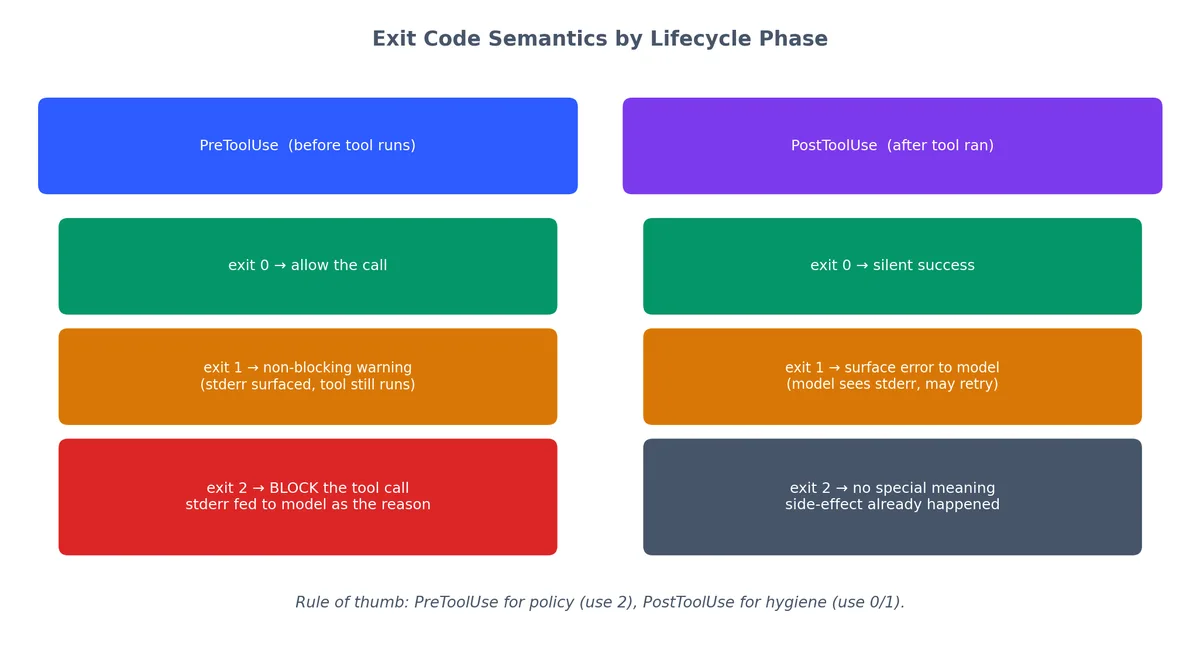
  • PreToolUse 在 Claude 执行工具之前触发。退出码 0 表示“放行”,退出码 2 表示“拦截这次调用”。任何写到 stderr 的内容都会作为解释回喂给模型。
  • PostToolUse 在工具返回之后触发。退出码 1 会把错误暴露给模型;退出码 2 在这里没有特殊含义——副作用已经发生。
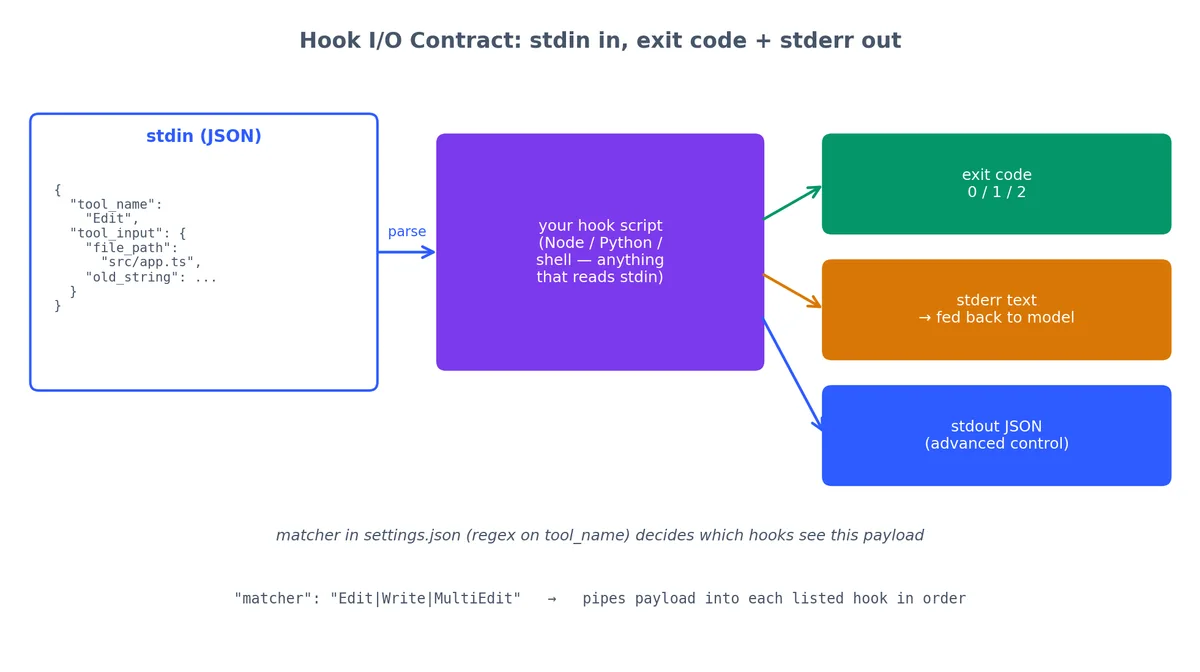
  • stdin 携带一个包含 tool_nametool_input 的 JSON 载荷。每个 Hook 都从 stdin 读入。

所有 Hook 共用的开头模板:

1
2
3
4
5
6
7
8
9
#!/usr/bin/env node
const chunks = [];
process.stdin.on('data', c => chunks.push(c));
process.stdin.on('end', () => {
  const t = JSON.parse(Buffer.concat(chunks).toString());
  // t.tool_name  → "Read"、"Bash"、"Edit" 等
  // t.tool_input → Claude 传给工具的参数
  main(t);
});

下面的代码清单为了简洁,会跳过这段开头,但每个真实的 Hook 都从这里起步。

Hook 的 I/O 契约:stdin 输入 JSON,退出码 + stderr 输出
每个 Hook 都是从 stdin 读取 JSON 载荷的脚本,通过退出码进行判决,stderr 提供说明;settings.json 中的 matcher 控制其可见范围——即哪些 Hook 能接收到本次工具调用。

Claude Code 实战(7):我实际使用的十个钩子及其代码 —— 视觉呈现


block-env-read — 保护 secrets#

这是性价比最高(ROI 最高)的一个 Hook。防止 ReadGrep 触碰 .envid_rsacredentials.json

完整代码#

 1
 2
 3
 4
 5
 6
 7
 8
 9
10
11
12
13
14
15
16
17
18
19
20
21
22
23
24
25
26
27
28
29
30
31
32
33
34
35
#!/usr/bin/env node
// hooks/block-env-read.js
// PreToolUse on Read|Grep|Edit|Write|MultiEdit

const chunks = [];
process.stdin.on('data', c => chunks.push(c));
process.stdin.on('end', () => {
  const t = JSON.parse(Buffer.concat(chunks).toString());
  const p = t.tool_input?.file_path
          || t.tool_input?.path
          || t.tool_input?.pattern
          || "";

  const sensitive = [
    '.env',
    '.env.local',
    '.env.production',
    'credentials.json',
    'secrets.yaml',
    'secrets.yml',
    'id_rsa',
    'id_ed25519',
    '.aws/credentials',
    '.gcloud/credentials.json',
    'service-account.json',
    '.npmrc',           // 可能包含 token
    '.pypirc',          // 可能包含 token
  ];

  if (sensitive.some(s => p.includes(s))) {
    console.error(`Blocked: "${p}" matches sensitive pattern. If you need values from this file, ask the user to provide them directly.`);
    process.exit(2);
  }
  process.exit(0);
});

settings.json 接线#

 1
 2
 3
 4
 5
 6
 7
 8
 9
10
11
12
{
  "hooks": {
    "PreToolUse": [
      {
        "matcher": "Read|Grep|Edit|Write|MultiEdit",
        "hooks": [
          { "type": "command", "command": "node ./hooks/block-env-read.js" }
        ]
      }
    ]
  }
}

自测#

接入前必须先测试,给 stdin 喂一个伪造的载荷。

 1
 2
 3
 4
 5
 6
 7
 8
 9
10
11
12
# 应当被拦截(exit 2):
echo '{"tool_name":"Read","tool_input":{"file_path":"./config/.env.local"}}' | node ./hooks/block-env-read.js
echo "Exit code: $?"
# 期望输出:
# Blocked: "./config/.env.local" matches sensitive pattern. ...
# Exit code: 2

# 应当放行(exit 0):
echo '{"tool_name":"Read","tool_input":{"file_path":"./src/app.ts"}}' | node ./hooks/block-env-read.js
echo "Exit code: $?"
# 期望输出:
# Exit code: 0

触发时 Claude 看到什么#

Hook 拦截调用时,stderr 文本会作为反馈交给 Claude。真实会话大致是这样的:

1
2
3
4
5
Claude: I'll read the environment configuration...
[Hook blocked Read on .env.local]
Claude: I can't read .env.local directly as it contains sensitive data.
        Could you share the specific variable names you'd like me to use?
        For example: DATABASE_URL, API_KEY, etc.

模型能优雅地恢复,因为 stderr 信息明确告诉了它替代方案


bash-blacklist — 阻止 rm -rf /#

Claude Code 实战 (7):我实际使用的十个钩子及其代码 —— 图解

最常见的自伤操作。挂在 Bash 的 PreToolUse 上。

完整代码#

 1
 2
 3
 4
 5
 6
 7
 8
 9
10
11
12
13
14
15
16
17
18
19
20
21
22
23
24
25
26
27
28
#!/usr/bin/env node
// hooks/bash-blacklist.js
// PreToolUse on Bash

const chunks = [];
process.stdin.on('data', c => chunks.push(c));
process.stdin.on('end', () => {
  const t = JSON.parse(Buffer.concat(chunks).toString());
  const cmd = t.tool_input?.command || "";

  const banned = [
    { re: /rm\s+-rf\s+\/(\s|$)/,           desc: "recursive delete from root" },
    { re: /rm\s+-rf\s+~(\s|$)/,            desc: "recursive delete home directory" },
    { re: /:\(\)\s*\{.*:\|:.*\}\s*;:/,     desc: "fork bomb" },
    { re: /mkfs\./,                        desc: "filesystem format" },
    { re: /dd\s+if=.*of=\/dev\//,          desc: "raw write to device" },
    { re: />\s*\/dev\/sd[a-z]/,            desc: "redirect to disk device" },
    { re: /chmod\s+-R\s+777\s+\//,         desc: "world-writable everything" },
  ];

  for (const b of banned) {
    if (b.re.test(cmd)) {
      console.error(`Blocked: ${b.desc}. If you really need this, run it yourself.`);
      process.exit(2);
    }
  }
  process.exit(0);
});

正则列表刻意保持精简。过长的黑名单一旦误报率上升,实际就会被忽略。每条规则都附上 desc,触发时 stderr 才能给模型一句明确的“为什么”。

settings.json 接线#

 1
 2
 3
 4
 5
 6
 7
 8
 9
10
11
12
{
  "hooks": {
    "PreToolUse": [
      {
        "matcher": "Bash",
        "hooks": [
          { "type": "command", "command": "node ./hooks/bash-blacklist.js" }
        ]
      }
    ]
  }
}

bash-whitelist — 适合生产环境周边的机器#

反过来,适合那些需要接触生产环境的 repo,只允许明确列出的二进制文件。

完整代码#

 1
 2
 3
 4
 5
 6
 7
 8
 9
10
11
12
13
14
15
16
17
18
19
20
21
22
23
24
25
26
27
28
#!/usr/bin/env node
// hooks/bash-whitelist.js
// PreToolUse on Bash

const chunks = [];
process.stdin.on('data', c => chunks.push(c));
process.stdin.on('end', () => {
  const t = JSON.parse(Buffer.concat(chunks).toString());
  const cmd = (t.tool_input?.command || "").trim();

  const allow = new Set([
    'ls', 'cat', 'grep', 'rg', 'find', 'head', 'tail', 'wc',
    'git', 'npm', 'node', 'python', 'python3', 'pip', 'pip3',
    'curl', 'jq', 'echo', 'pwd', 'date',
  ]);

  // 取命令链中的第一个二进制文件名
  const first = (cmd.split(/\s+/)[0] || "").split('/').pop();

  if (!allow.has(first)) {
    console.error(
      `Blocked: "${first}" is not on the allowlist. ` +
      `Allowed: ${[...allow].join(', ')}.`
    );
    process.exit(2);
  }
  process.exit(0);
});

黑名单 vs 白名单#

场景推荐原因
个人项目、本地实验黑名单灵活,不用持续维护清单
部署、生产周边白名单默认拒绝,无清单即拒绝
团队共享仓库白名单新成员不会意外引入未审计命令

白名单的核心优势在于对未知天然安全,新版本工具链里多出来的命令默认走拒绝分支,需要显式审批后才能加入。


block-git-push — 禁止意外 push#

我从来没想过让 Claude 不打招呼就直接 push。挂在 Bash 的 PreToolUse 上。

完整代码#

 1
 2
 3
 4
 5
 6
 7
 8
 9
10
11
12
13
14
15
16
17
18
19
20
21
22
23
24
25
26
27
#!/usr/bin/env node
// hooks/block-git-push.js
// PreToolUse on Bash

const chunks = [];
process.stdin.on('data', c => chunks.push(c));
process.stdin.on('end', () => {
  const t = JSON.parse(Buffer.concat(chunks).toString());
  const cmd = t.tool_input?.command || "";

  // 阻止裸 push、force push、push 到远端
  const pushPatterns = [
    /^\s*git\s+push\b/,
    /git\s+push\s+--force/,
    /git\s+push\s+-f\b/,
    /git\s+push\s+\S+\s+\S+/,    // git push <remote> <branch>
  ];

  if (pushPatterns.some(re => re.test(cmd))) {
    console.error(
      "Blocked: git push must be human-initiated. " +
      "Stage and commit if needed, but the push is for me to do."
    );
    process.exit(2);
  }
  process.exit(0);
});

写错一次 push 的代价,远比我自己手动敲一遍 git push 大得多。这条规则配合 git commit 不拦截:让模型放心做 commit,但保留人类按下 push 这一步。

退出码在 PreToolUse 与 PostToolUse 中的语义差异
同样的退出码在不同生命周期阶段含义完全不同。exit 2 只在 PreToolUse 阶段阻断调用;在 PostToolUse 阶段副作用已经发生,无法回滚。


format-on-write — 把 Prettier 做成 PostToolUse#

挂在 Write|Edit|MultiEdit 的 PostToolUse 上。

完整代码#

 1
 2
 3
 4
 5
 6
 7
 8
 9
10
11
12
13
14
15
16
17
18
19
20
21
22
23
24
25
26
27
28
29
30
#!/usr/bin/env node
// hooks/format-on-write.js
// PostToolUse on Write|Edit|MultiEdit

const { execSync } = require('child_process');
const path = require('path');

const chunks = [];
process.stdin.on('data', c => chunks.push(c));
process.stdin.on('end', () => {
  const t = JSON.parse(Buffer.concat(chunks).toString());
  const filePath = t.tool_input?.file_path || "";

  // 只处理可格式化的文件类型
  if (!/\.(ts|tsx|js|jsx|json|md|css|scss|html|yaml|yml)$/.test(filePath)) {
    process.exit(0);
  }

  try {
    execSync(`npx prettier --write "${filePath}"`, {
      stdio: 'pipe',
      timeout: 10000,
    });
    console.error(`Formatted: ${path.basename(filePath)}`);
  } catch (e) {
    // 不要因为 Prettier 出错就让整个操作失败
    console.error(`Warning: Prettier failed on ${filePath}: ${e.message}`);
  }
  process.exit(0);
});

为什么是 exit 0,不是 exit 1#

PostToolUse 在编辑后运行,此时副作用已发生,exit 2 无法回滚;若用 exit 1,错误将暴露给模型,可能引发反复编辑的死循环。格式化是纯辅助操作,记录警告后放行。

真实终端输出#

1
2
3
4
Claude: I'll update the component...
[Edit applied to src/components/Header.tsx]
[PostToolUse hook] Formatted: Header.tsx
Claude: Done. The component now accepts a `subtitle` prop.

格式化静默发生, Claude 自己甚至都不会提及。


test-on-edit — 快速失败#

挂在源文件的 Edit|MultiEdit 的 PostToolUse 上。这是单论效益最高的 Hook——长期使用,它实际上“训练”了 Claude 在我的仓库里写出更靠谱的代码。

完整代码#

 1
 2
 3
 4
 5
 6
 7
 8
 9
10
11
12
13
14
15
16
17
18
19
20
21
22
23
24
25
26
27
28
29
30
31
32
33
34
35
36
37
38
39
40
41
42
43
44
45
46
47
48
#!/usr/bin/env node
// hooks/test-on-edit.js
// PostToolUse on Edit|MultiEdit

const { execSync } = require('child_process');
const path = require('path');
const fs = require('fs');

const chunks = [];
process.stdin.on('data', c => chunks.push(c));
process.stdin.on('end', () => {
  const t = JSON.parse(Buffer.concat(chunks).toString());
  const filePath = t.tool_input?.file_path || "";

  // 只对源文件触发,跳过测试与配置
  if (!/\/(src|lib|app|packages)\/.*\.(ts|tsx|js|jsx)$/.test(filePath)) {
    process.exit(0);
  }

  // 没有 test 脚本就直接放行
  const pkgPath = path.resolve('package.json');
  if (!fs.existsSync(pkgPath)) process.exit(0);

  const pkg = JSON.parse(fs.readFileSync(pkgPath, 'utf8'));
  const hasRelated = pkg.scripts?.['test:related'];
  const hasTest = pkg.scripts?.test;

  try {
    if (hasRelated) {
      // 只跑与改动文件相关的测试
      execSync(`npm run -s test:related -- "${filePath}"`, {
        stdio: 'inherit',
        timeout: 60000,
      });
    } else if (hasTest) {
      // 退化为跑完整测试
      execSync('npm run -s test', {
        stdio: 'inherit',
        timeout: 120000,
      });
    }
  } catch (e) {
    console.error(`Tests failed after editing ${path.basename(filePath)}.`);
    console.error("Review the test output above and fix the issue.");
    process.exit(1);   // 1 = 把错误暴露给模型
  }
  process.exit(0);
});

为什么是 exit 1,不是 exit 2#

在 PostToolUse 中,exit 1 会把失败信息回喂给模型,模型读到测试输出后会尝试修复代码,形成反馈闭环。

 1
 2
 3
 4
 5
 6
 7
 8
 9
10
11
12
13
14
15
16
17
18
19
20
21
22
Claude: I'll update the validation logic...
[Edit applied to src/validators/email.ts]
[Running test:related for email.ts...]

  FAIL  tests/validators/email.test.ts
    ✕ rejects emails without @ symbol (3ms)
    Expected: false
    Received: true

Tests failed after editing email.ts.
Review the test output above and fix the issue.

Claude: The test shows my regex change broke the @ validation.
        Let me fix the pattern...
[Edit applied to src/validators/email.ts]
[Running test:related for email.ts...]

  PASS  tests/validators/email.test.ts
    ✓ rejects emails without @ symbol (2ms)
    ✓ accepts valid emails (1ms)

Claude: Fixed. The regex now correctly requires an @ symbol.

随着会话累积,这个 Hook 实际上“教”模型一次性写出符合你测试预期的代码。本清单中,单论价值,它排第一。


backup-before-edit — 安全网#

挂在 Edit|Write|MultiEdit 的 PreToolUse 上。便宜的保险。

完整代码#

 1
 2
 3
 4
 5
 6
 7
 8
 9
10
11
12
13
14
15
16
17
18
19
20
21
22
23
24
25
26
27
28
29
30
31
32
33
34
35
36
37
38
39
#!/usr/bin/env node
// hooks/backup-before-edit.js
// PreToolUse on Edit|Write|MultiEdit

const fs = require('fs');
const path = require('path');

const chunks = [];
process.stdin.on('data', c => chunks.push(c));
process.stdin.on('end', () => {
  const t = JSON.parse(Buffer.concat(chunks).toString());
  const filePath = t.tool_input?.file_path || t.tool_input?.path || "";

  if (!filePath) process.exit(0);

  if (fs.existsSync(filePath)) {
    const backupDir = '/tmp/cc-backups';
    if (!fs.existsSync(backupDir)) {
      fs.mkdirSync(backupDir, { recursive: true });
    }

    const timestamp = Date.now();
    const safeName = filePath.replace(/\//g, '_');
    const backupPath = `${backupDir}/${timestamp}-${safeName}`;

    try {
      fs.copyFileSync(filePath, backupPath);

      // 维护一个 manifest,恢复时方便检索
      const manifest = `${backupDir}/manifest.log`;
      const entry = `${new Date().toISOString()} | ${filePath} -> ${backupPath}\n`;
      fs.appendFileSync(manifest, entry);
    } catch (e) {
      // 备份失败也要放行——保险不应阻塞工作
      console.error(`Warning: could not back up ${filePath}: ${e.message}`);
    }
  }
  process.exit(0);   // 始终放行——这是安全网,不是闸门
});

恢复一个文件#

需要回滚时:

 1
 2
 3
 4
 5
 6
 7
 8
 9
10
# 看一下都备份了什么
cat /tmp/cc-backups/manifest.log
# 2026-04-24T10:23:45.123Z | ./src/config.ts -> /tmp/cc-backups/1714122225123-_src_config.ts
# 2026-04-24T10:24:01.456Z | ./src/config.ts -> /tmp/cc-backups/1714122241456-_src_config.ts

# 当前版本与备份对比
diff ./src/config.ts /tmp/cc-backups/1714122225123-_src_config.ts

# 还原
cp /tmp/cc-backups/1714122225123-_src_config.ts ./src/config.ts

我从 /tmp 救回过两次文件,这两次都值回一年的 cron 任务工资。


log-tool-calls — 可观测性#

挂在 *(所有工具)的 PostToolUse 上。

完整代码#

 1
 2
 3
 4
 5
 6
 7
 8
 9
10
11
12
13
14
15
16
17
18
19
20
21
22
23
24
25
26
27
28
29
30
31
32
33
34
35
36
37
38
39
40
41
#!/usr/bin/env node
// hooks/log-tool-calls.js
// PostToolUse on * (all tools)

const fs = require('fs');
const path = require('path');

const chunks = [];
process.stdin.on('data', c => chunks.push(c));
process.stdin.on('end', () => {
  const t = JSON.parse(Buffer.concat(chunks).toString());

  const logDir = '.claude';
  if (!fs.existsSync(logDir)) {
    fs.mkdirSync(logDir, { recursive: true });
  }

  const logFile = path.join(logDir, 'tool-calls.jsonl');

  // 构造一条紧凑的日志
  const entry = {
    ts: new Date().toISOString(),
    tool: t.tool_name,
    input: t.tool_input,
  };

  // 对 Bash,单独抽出 command 字段方便 grep
  if (t.tool_name === 'Bash') {
    entry.cmd = (t.tool_input?.command || "").substring(0, 500);
  }

  // 对文件操作,单独抽出 path 字段
  if (t.tool_input?.file_path) {
    entry.file = t.tool_input.file_path;
  }

  const line = JSON.stringify(entry) + "\n";
  fs.appendFileSync(logFile, line);

  process.exit(0);
});

查询日志#

JSONL 格式使分析变得简单。

 1
 2
 3
 4
 5
 6
 7
 8
 9
10
11
12
13
14
15
16
# 今天 Claude 改了哪些文件?
cat .claude/tool-calls.jsonl | jq -r 'select(.tool == "Edit") | .file' | sort -u

# 跑过哪些 bash 命令?
cat .claude/tool-calls.jsonl | jq -r 'select(.tool == "Bash") | .cmd'

# 各类工具调用次数统计
cat .claude/tool-calls.jsonl | jq -r '.tool' | sort | uniq -c | sort -rn
#   42 Read
#   28 Edit
#   15 Bash
#    8 Grep
#    3 Write

# 最近 10 分钟发生了什么?
cat .claude/tool-calls.jsonl | jq -r 'select(.ts > "2026-04-24T10:15") | "\(.ts) \(.tool) \(.file // .cmd // "")"'

该日志文件日常静默,但在关键排查时刻,它的存在是可观测性的底线保障。

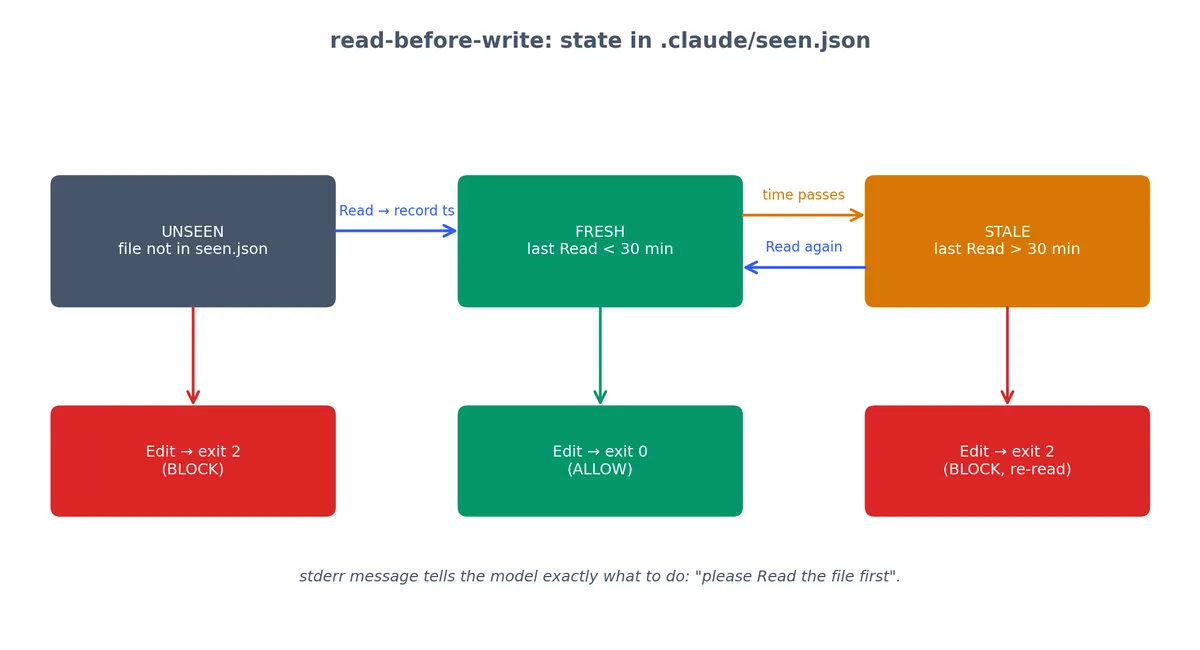
read-before-write 状态机:UNSEEN / FRESH / STALE
Hook 在 seen.json 中维护每个文件最近一次 Read 的时间戳。对 UNSEEN 或 STALE 文件的编辑会被 exit 2 阻断, stderr 直接告诉 Claude 该如何补救。


read-before-write — 禁止盲改#

挂在 Edit|MultiEdit 的 PreToolUse 上。强制模型在编辑文件前先读它。

完整代码#

 1
 2
 3
 4
 5
 6
 7
 8
 9
10
11
12
13
14
15
16
17
18
19
20
21
22
23
24
25
26
27
28
29
30
31
32
33
34
35
36
37
38
39
40
41
42
43
44
45
46
47
48
49
50
51
52
53
54
55
56
#!/usr/bin/env node
// hooks/read-before-write.js
// PreToolUse on Edit|MultiEdit
// 还需要在 Read 上挂一个伴随条目,用来记录"看过哪些文件"。

const fs = require('fs');
const path = require('path');

const chunks = [];
process.stdin.on('data', c => chunks.push(c));
process.stdin.on('end', () => {
  const t = JSON.parse(Buffer.concat(chunks).toString());
  const filePath = t.tool_input?.file_path || t.tool_input?.path || "";
  const seenFile = path.join('.claude', 'seen.json');

  // 加载 seen 映射
  let seen = {};
  try {
    if (fs.existsSync(seenFile)) {
      seen = JSON.parse(fs.readFileSync(seenFile, 'utf8'));
    }
  } catch {
    seen = {};
  }

  // Read 调用:记录并放行
  if (t.tool_name === 'Read') {
    seen[filePath] = Date.now();
    const dir = path.dirname(seenFile);
    if (!fs.existsSync(dir)) fs.mkdirSync(dir, { recursive: true });
    fs.writeFileSync(seenFile, JSON.stringify(seen, null, 2));
    process.exit(0);
  }

  // Edit/MultiEdit:检查文件是否近期被读过(30 分钟内)
  const lastSeen = seen[filePath];
  const thirtyMinutes = 30 * 60 * 1000;

  if (!lastSeen) {
    console.error(
      `Blocked: "${filePath}" has not been Read in this session. ` +
      `Please read the file first to understand its current state before editing.`
    );
    process.exit(2);
  }

  if (Date.now() - lastSeen > thirtyMinutes) {
    console.error(
      `Blocked: "${filePath}" was last Read ${Math.round((Date.now() - lastSeen) / 60000)} minutes ago. ` +
      `Please re-read the file to verify its current state.`
    );
    process.exit(2);
  }

  process.exit(0);
});

settings.json 接线(两处条目)#

这个 Hook 需要在 Read(用于记录)和 Edit/MultiEdit(用于强制)上同时挂载。

 1
 2
 3
 4
 5
 6
 7
 8
 9
10
11
12
13
14
{
  "hooks": {
    "PreToolUse": [
      {
        "matcher": "Read",
        "hooks": [{ "type": "command", "command": "node ./hooks/read-before-write.js" }]
      },
      {
        "matcher": "Edit|MultiEdit",
        "hooks": [{ "type": "command", "command": "node ./hooks/read-before-write.js" }]
      }
    ]
  }
}

它能抓住什么#

这个 Hook 专治一类隐蔽缺陷:模型基于训练数据的先验,而不是文件当前的实际状态进行编辑。没有这个 Hook,Claude 可能“修复”它在训练里见过的某个函数版本,而那个函数在你当前的仓库里并不相同。


work-hours-only — 人性化边界#

挂在 Bash 的 PreToolUse 上。

完整代码#

 1
 2
 3
 4
 5
 6
 7
 8
 9
10
11
12
13
14
15
16
17
18
19
20
21
22
23
24
25
26
27
28
#!/usr/bin/env node
// hooks/work-hours-only.js
// PreToolUse on Bash

const chunks = [];
process.stdin.on('data', c => chunks.push(c));
process.stdin.on('end', () => {
  const t = JSON.parse(Buffer.concat(chunks).toString());
  const h = new Date().getHours();
  const day = new Date().getDay(); // 0 = 周日,6 = 周六

  // 工作日:9:00 - 22:00
  // 周末:完全屏蔽
  const isWeekend = day === 0 || day === 6;
  const isOutsideHours = h < 9 || h >= 22;

  if (isWeekend) {
    console.error("Blocked: no automated work on weekends. Rest.");
    process.exit(2);
  }

  if (isOutsideHours) {
    console.error(`Blocked: outside work hours (current hour: ${h}). Allowed: 9:00-22:00 weekdays.`);
    process.exit(2);
  }

  process.exit(0);
});

这玩意儿真正解决的问题#

该 Hook 部署于非工作时间告警专用机器,凌晨 2 点触发的破坏性操作几乎必为误触发。其目标不是为 Claude 设定工作生活边界,而是拦截本不该在此时段运行的失控自动化。


把它们串起来#

上面这十个 Hook 不是孤立运行的,而是组合在一起。下面是它们在真实项目中的分层方式。

完整的 settings.json (含所有十个 Hook)#

 1
 2
 3
 4
 5
 6
 7
 8
 9
10
11
12
13
14
15
16
17
18
19
20
21
22
23
24
25
26
27
28
29
30
31
32
33
34
35
36
37
38
39
40
41
42
43
44
{
  "hooks": {
    "PreToolUse": [
      {
        "matcher": "Read|Grep",
        "hooks": [
          { "type": "command", "command": "node ./hooks/block-env-read.js" },
          { "type": "command", "command": "node ./hooks/read-before-write.js" }
        ]
      },
      {
        "matcher": "Edit|Write|MultiEdit",
        "hooks": [
          { "type": "command", "command": "node ./hooks/block-env-read.js" },
          { "type": "command", "command": "node ./hooks/backup-before-edit.js" },
          { "type": "command", "command": "node ./hooks/read-before-write.js" }
        ]
      },
      {
        "matcher": "Bash",
        "hooks": [
          { "type": "command", "command": "node ./hooks/bash-blacklist.js" },
          { "type": "command", "command": "node ./hooks/block-git-push.js" },
          { "type": "command", "command": "node ./hooks/work-hours-only.js" }
        ]
      }
    ],
    "PostToolUse": [
      {
        "matcher": "Edit|Write|MultiEdit",
        "hooks": [
          { "type": "command", "command": "node ./hooks/format-on-write.js" },
          { "type": "command", "command": "node ./hooks/test-on-edit.js" }
        ]
      },
      {
        "matcher": "*",
        "hooks": [
          { "type": "command", "command": "node ./hooks/log-tool-calls.js" }
        ]
      }
    ]
  }
}

执行顺序#

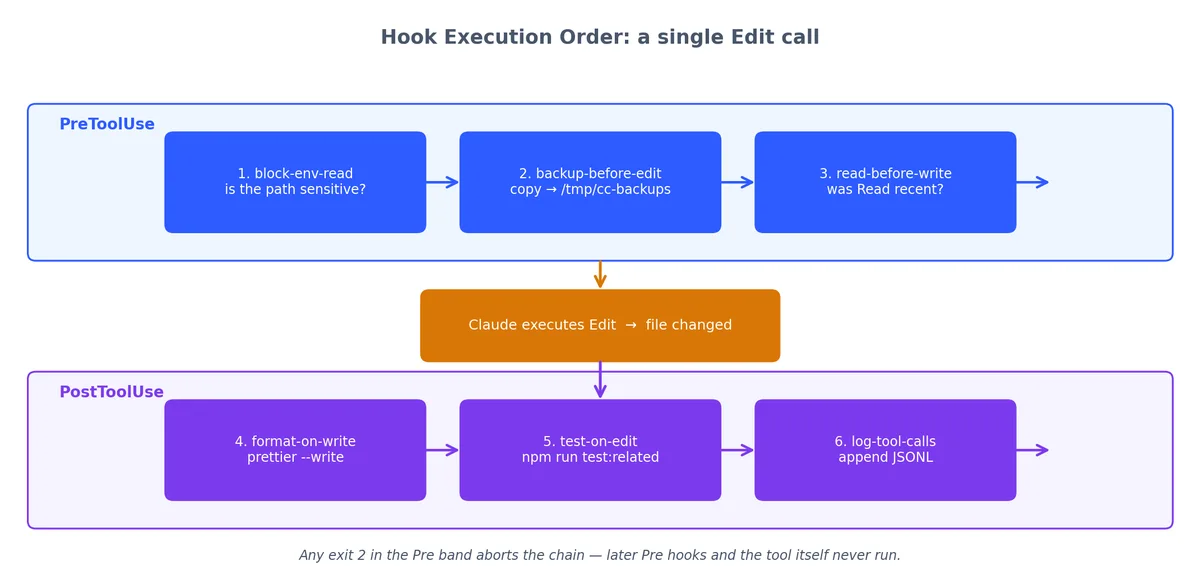
Edit 调用的 Hook 执行顺序:PreToolUse → 工具执行 → PostToolUse
一次 Edit 调用依次流经六个 Hook:3 个 PreToolUse(策略守门员)、工具本体、3 个 PostToolUse(卫生作业);任一 PreToolUse 返回 exit 2,整条链路立即终止。

当 Claude 对一个源文件调用 Edit,事件序列是:

  1. block-env-read — 这是敏感文件吗?是就拦截。
  2. backup-before-edit — 把当前版本拷到 /tmp/cc-backups/
  3. read-before-write — 这个文件最近被读过吗?没读过就拦截。
  4. (Claude 执行编辑)
  5. format-on-write — 用 Prettier 格式化结果。
  6. test-on-edit — 跑相关测试。失败就把错误暴露给模型。
  7. log-tool-calls — 追加一条 JSONL 日志。

第 1–3 步为 PreToolUse(任一 exit 2 均阻断编辑),第 5–7 步为 PostToolUse(编辑已完成)——顺序即原则:安全优先、卫生次之、可观测性兜底。

组合时常见的坑#

问题:Hook 串行执行,慢的 Hook 拖累整体。 如果 test-on-edit 跑 60 秒,每次编辑都会感觉很卡。解决:设置超时;对大型测试套件,改走异步触发(比如把测试请求扔到一个独立队列里)。

问题:单个 Hook 的退出码会终止整条链路。 在 PreToolUse 里,如果 block-env-read 退出 2,后面的 backup-before-editread-before-write 不会再跑。这是正确行为——一个被拦截的调用不应该被备份或追踪。

问题:Hook 之间会互相冲突。 一个会修改文件的格式化 Hook,可能触发 read-before-write 的“自上次 Read 后文件已变化”逻辑。解决方案:格式化 Hook 跑在 PostToolUse 阶段,而 PostToolUse 不会再触发 PreToolUse,所以生命周期天然规避了这个冲突。


起步套件#

如果你想在新项目里一次配齐这十个 Hook,目录结构如下:

 1
 2
 3
 4
 5
 6
 7
 8
 9
10
11
12
13
14
.claude/
  settings.json          # 上面给出的接线
your-project/
  hooks/
    block-env-read.js
    bash-blacklist.js
    bash-whitelist.js     # 生产仓库里把它和黑名单换掉
    block-git-push.js
    format-on-write.js
    test-on-edit.js
    backup-before-edit.js
    log-tool-calls.js
    read-before-write.js
    work-hours-only.js

设置可执行权限:

1
chmod +x hooks/*.js

一次性烟雾测试:

1
2
3
4
5
# 快速 smoke test —— 一次普通 Read 应该让所有 Hook exit 0
for hook in hooks/*.js; do
  echo '{"tool_name":"Read","tool_input":{"file_path":"./src/index.ts"}}' | node "$hook"
  echo "$hook: exit $?"
done

期望输出:

 1
 2
 3
 4
 5
 6
 7
 8
 9
10
hooks/backup-before-edit.js: exit 0
hooks/bash-blacklist.js: exit 0
hooks/bash-whitelist.js: exit 0
hooks/block-env-read.js: exit 0
hooks/block-git-push.js: exit 0
hooks/format-on-write.js: exit 0
hooks/log-tool-calls.js: exit 0
hooks/read-before-write.js: exit 0
hooks/test-on-edit.js: exit 0
hooks/work-hours-only.js: exit 0

调试 Hook#

Hook 故障时,按以下顺序排查:

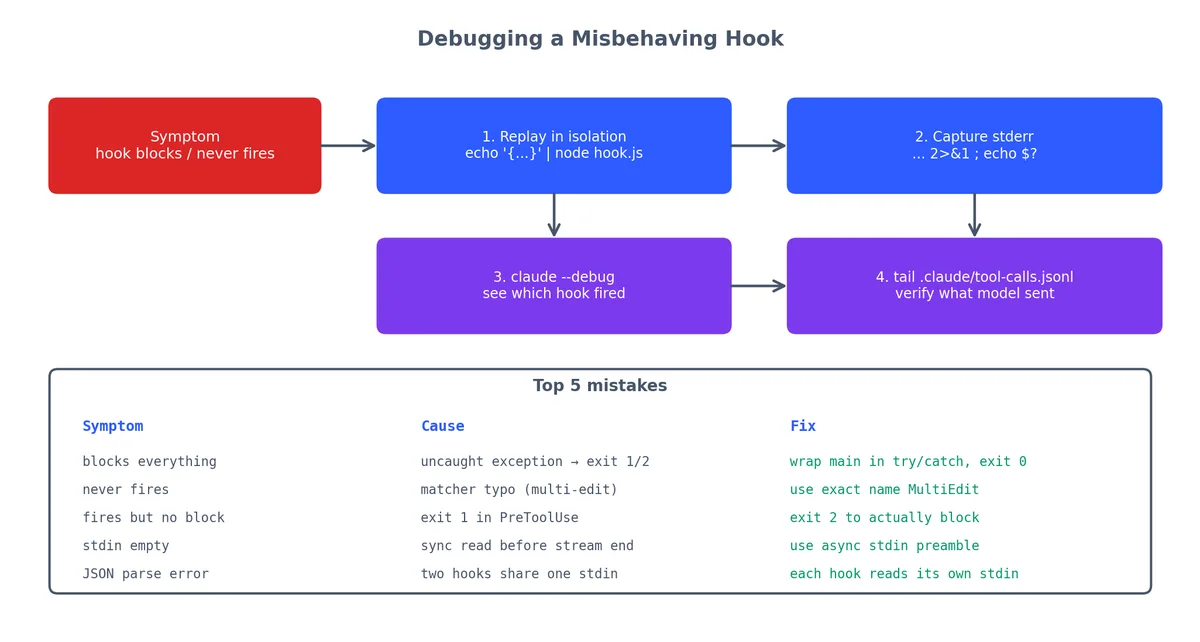
Hook 调试四步法以及最常见的五类错误
在隔离环境里把失败的调用回放给 Hook,捕获 stderr,再用 claude --debug 和 JSONL 日志逐层排查。下方表格覆盖了 90% 的 Hook 故障原因。

第 1 步:隔离测试#

1
2
echo '{"tool_name":"Edit","tool_input":{"file_path":"./src/app.ts"}}' | node ./hooks/your-hook.js
echo "Exit code: $?"

第 2 步:检查 stderr#

1
echo '{"tool_name":"Bash","tool_input":{"command":"rm -rf /"}}' | node ./hooks/bash-blacklist.js 2>&1

2>&1 把 stdout 和 stderr 都打到屏幕上。

第 3 步:开启 Claude 调试日志#

1
claude --debug

调试输出会显示哪些 Hook 触发、它们返回了什么、最终是哪个 Hook 给出了判决。

第 4 步:核对最常见的几类错误#

症状原因修法
Hook 把所有调用都阻断了脚本抛出未处理异常, Node 用 1 或 2 退出用 try-catch 包住主逻辑,意外错误时 exit 0
Hook 完全不触发matcher 没匹配上工具名检查拼写——是 MultiEdit,不是 multi-edit
Hook 触发但没拦下用了 exit 1,没用 exit 2PreToolUse 里只有 exit 2 才会阻断
stdin 是空的Hook 没用异步方式读 stdin用本文开头给的异步模板
JSON 解析报错多个 Hook 被错误地用管道串了起来每个 Hook 必须独立读自己的 stdin

把它们串起来的逻辑#

三条经验规则,都是踩过坑得来的:

  1. PreToolUse 管策略, PostToolUse 管卫生。 别想在 PostToolUse 里回滚——副作用已经发生了。
  2. Stderr 是反馈,退出码是判决。 退出码 2 阻断(仅限 PreToolUse)。 stderr 里的内容会原样喂给 Claude。两者配合用。
  3. Hook 出错即阻断: 一个行为不端的 Hook 会阻断你所有的工具调用。配置前先拿 echo '{"tool_name":"Read","tool_input":{"file_path":"/tmp/x"}}' | node hook.js 测一下脚本。

十个 Hook 数量看似有限,却足以将 YOLO(You Only Live Once)式的随意会话转化为可控、可靠的工程实践。

本系列

Claude Code 实战 10 篇

  1. 01 Claude Code 实战(一):安装、三层配置体系,以及 `#` `@` `/init` 三剑客
  2. 02 Claude Code 实战(二):快捷键、四态切换与思考模式
  3. 03 Claude Code 实战(三):自定义斜杠命令与对话控制
  4. 04 Claude Code 实战(四):MCP 服务器连接万物
  5. 05 Claude Code 实战(五):Hooks 与 Yolo 安全网
  6. 06 Claude Code 实战(六):SDK 与 GitHub CI
  7. 07 Claude Code 实战(七):十个实用 Hooks 配方 当前
  8. 08 Claude Code 实战(八):Sub-Agent 与计划模式
  9. 09 Claude Code 实战(九):权限模型与环境变量
  10. 10 Claude Code 实战(十):Skills 与四种扩展机制

读有所得?

GitHub 关注我 → 新文周更

GitHub