
Claude Code 实战(十):Skills 与四种扩展机制
Claude Code 现在有四种扩展机制:斜杠命令、MCP server、Hooks、Skills。Skill 是最新的——一个文件夹、一份 SKILL.md、一段按需加载的指令。它和其他三个怎么分工,给一棵决策树。
Claude Code 现在有四种扩展机制:slash commands、MCP servers、hooks 和 Skills。它们之间存在重叠。当你第一次冒出“Claude 应该知道如何做 X”这个想法时,问题就变成了:该用这四种中的哪一种?
这是本系列的最后一章。让我为你梳理一下决策树。

Skill 到底是什么#
Skill 是位于 ~/.claude/skills/<name>/(用户级)或 <repo>/.claude/skills/<name>/(项目级)下的一个文件夹,其中至少包含一个 SKILL.md 文件。
完整的 SKILL.md 结构#
每个 SKILL.md 都包含两部分:frontmatter 和 body。
| |
Frontmatter 字段#
| 字段 | 是否必填 | 说明 |
|---|---|---|
name | Yes | Skill 的标识符。用于日志和调试。请使用小写加连字符的格式(lowercase-with-dashes)。 |
description | Yes | 关键字段: Claude 正是通过这个字段决定是否加载该 Skill。如果 description 没有明确说明何时使用它,那么这个 Skill 就不会被触发。 |
description 是整个文件中最重要的那一行。Claude 在每次会话开始时都会读取所有可用 Skill 的 descriptions。当你的 prompt 与某个 description 匹配时,Claude 才会加载完整的 Skill body。如果 description 过于模糊,Skill 要么对所有内容都触发,要么完全不触发,这两种情况都不好。
Body#
Body 想写多长就可以写多长。它仅在被触发时才会成为 system prompt 的一部分,因此除非 Skill 被触发,否则冗长不会带来额外开销。我有些 Skill 的 body 超过 600 行,每一行都值得。
Body 是自由格式的 Markdown,但有一些行之有效的模式:
Voice/style section — 当此 Skill 激活时,Claude 应该如何写作:
| |
Schema/format section — Claude 必须遵循的确切格式:
| |
Workflow section — 分步操作流程:
| |
Rules/constraints — 不应该做的事情:
| |
Skill 目录结构#
用户级 Skills#
| |
用户级 Skills 在你机器上的所有项目中都可用。
项目级 Skills#
| |
项目级 Skills 仅在该项目中可用。它们可以提交到 git,以便整个团队共享。
该使用哪一级?#
| Situation | Level | Reason |
|---|---|---|
| 个人写作风格 | User | 在你写作的所有地方都适用 |
| 项目部署流程 | Project | 特定于该代码库 |
| 代码审查偏好 | User | 你的个人偏好,适用于所有项目 |
| API 集成工作流 | Project | 特定的 API,特定的模式 |
| 通用的“简化代码” | User | 具有普遍适用性 |
从零开始编写一个真实的 Skill#
让我带你为一个具体场景构建一个 Skill:一个将 Node.js 应用部署到 staging 环境的团队。
步骤 1:识别符合 Skill 特征的使用场景#
要问的问题是:“这是不是一类领域知识,只要话题出现就应该自动启用?还是说这是一个需要我显式调用的命令?”
部署到 staging 是团队在多种上下文中都会做的事情,合并 PR 后、测试新功能时、排查生产问题时。它不是一个单一命令,而是一整套关于 我们如何部署 的知识体系。这正是 Skill 的典型特征。
步骤 2:编写 description#
从 description 开始写,因为它决定了 Skill 何时触发:
| |
要具体。“Use for deployment” 太模糊了,它会在讨论部署理论时就被触发。“Use when deploying to the staging environment” 则明确指向具体操作。
步骤 3:编写 body#
| |
docker build -t acme-api:staging -f Dockerfile.staging .
docker tag acme-api:staging 123456789.dkr.ecr.us-east-1.amazonaws.com/acme-api:staging
docker push 123456789.dkr.ecr.us-east-1.amazonaws.com/acme-api:staging
aws ecs update-service
–cluster acme-staging-ecs
–service acme-api
–force-new-deployment
| |
curl -s https://staging.acme.dev/health | jq .
| |
aws ecs describe-services –cluster acme-staging-ecs –services acme-api
| jq ‘.services[0].deployments[] | select(.status == “PRIMARY”) | .taskDefinition’
aws ecs update-service
–cluster acme-staging-ecs
–service acme-api
–task-definition acme-api:
| |
步骤 4:测试 Skill#
创建文件并启动一个 Claude 会话:
| |
Claude 应该会加载该 Skill 并遵循其中的流程。如果没有,请检查 description,可能你的措辞与之不匹配。
步骤 5:迭代优化#
使用几次后,你会注意到一些缺失的部分。将它们补充到 body 中:
- “哦,我需要提一下 VPN 的要求。”
- “ECR 登录步骤应该更突出。”
- “加上 Slack 通知步骤。”
每次迭代都会让 Skill 更加完善。使用一周后,这个 Skill 就会成为部署流程的权威文档。
Skills vs commands vs hooks vs MCP — 完整对比#
这是我刚开始时希望拥有的表格:
| 维度 | 斜杠命令 | MCP 服务器 | 钩子 | 技能 |
|---|---|---|---|---|
| Lives in | .claude/commands/<name>.md | mcp.json config | settings.json | .claude/skills/<name>/SKILL.md |
| 加载时间 | 用户输入 /<name> 时 | 始终可用 | 围绕工具调用 | 描述匹配提示时 |
| 触发方式 | 显式(用户输入) | 显式(Claude 调用工具) | 自动(在工具调用时) | 隐式(主题匹配) |
| 最适合 | 可重复的工作流程 | 外部功能 | 策略执行 | 领域知识 |
| 可以编辑文件 | 是(通过 Claude) | 是(通过工具) | 是(副作用) | 是(通过 Claude) |
| 可以阻止操作 | 否 | 否 | 是(退出代码 2) | 否 |
| 上下文成本 | 调用时加载一次 | 工具描述始终加载 | 最小(脚本外部运行) | 触发时加载 |
| 可共享性 | 是(提交到仓库) | 是(提交配置) | 是(提交设置 + 脚本) | 是(提交到仓库) |
| 编写复杂度 | 低(仅 Markdown) | 高(服务器代码) | 中等(Node.js 脚本) | 低(仅 Markdown) |
| 用户级别可用性 | 否(仅项目) | 是 | 是 | 是 |
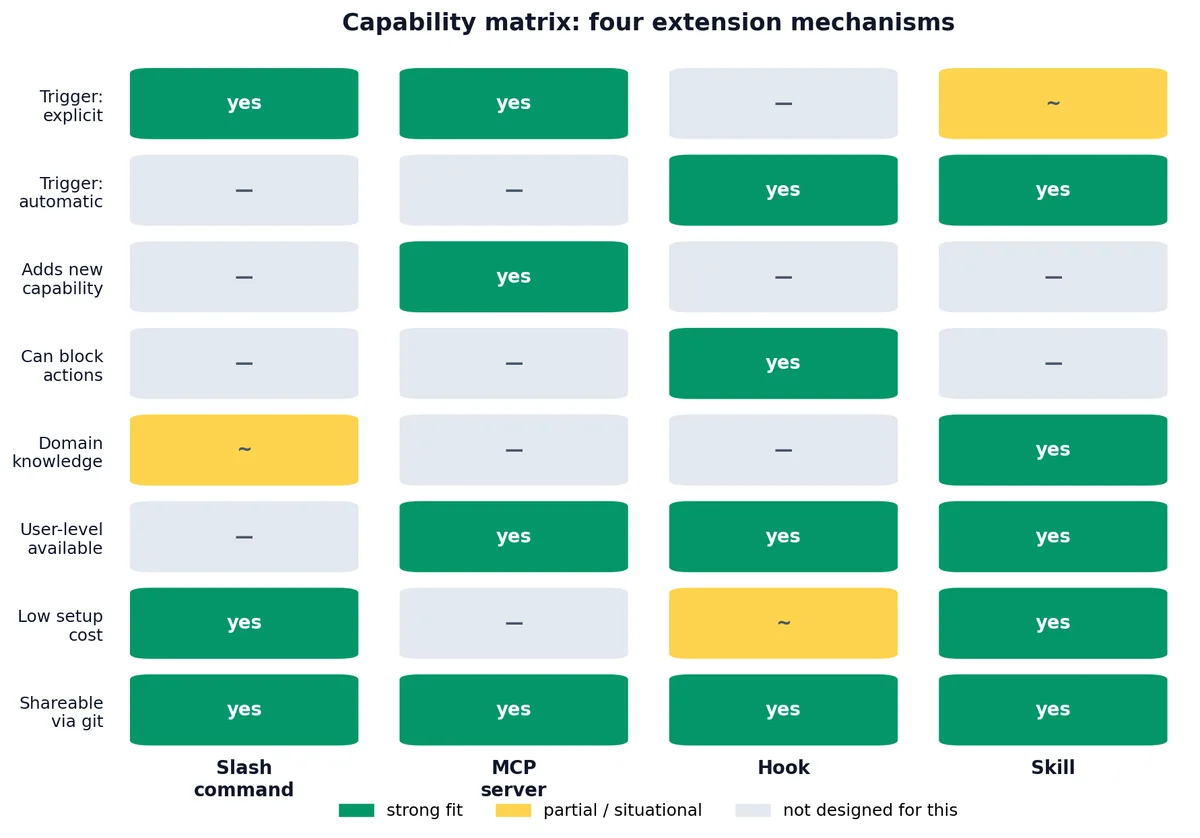
最清晰的区分界限#
Slash commands 是命令;Skills 是知识。 Slash command 是“执行这个确切的操作”。Skill 是“这是我思考这类问题的方式;只要适用就使用它。”
Hooks 是自动执行的;其他都是可选的。 Hook 无论 Claude 或用户是否想要,都会运行。这使得 Hooks 适合用于安全策略,而不适合用于可选的工作流。
MCP 提供能力;其他提供指令。 只有 MCP 能赋予 Claude 它原本没有的工具。如果你需要浏览器自动化、数据库访问或第三方 API,MCP 是唯一的选择。其他机制只是塑造 Claude 如何使用其已有工具。
Skill 的发现与加载#
Claude 如何发现 Skills#
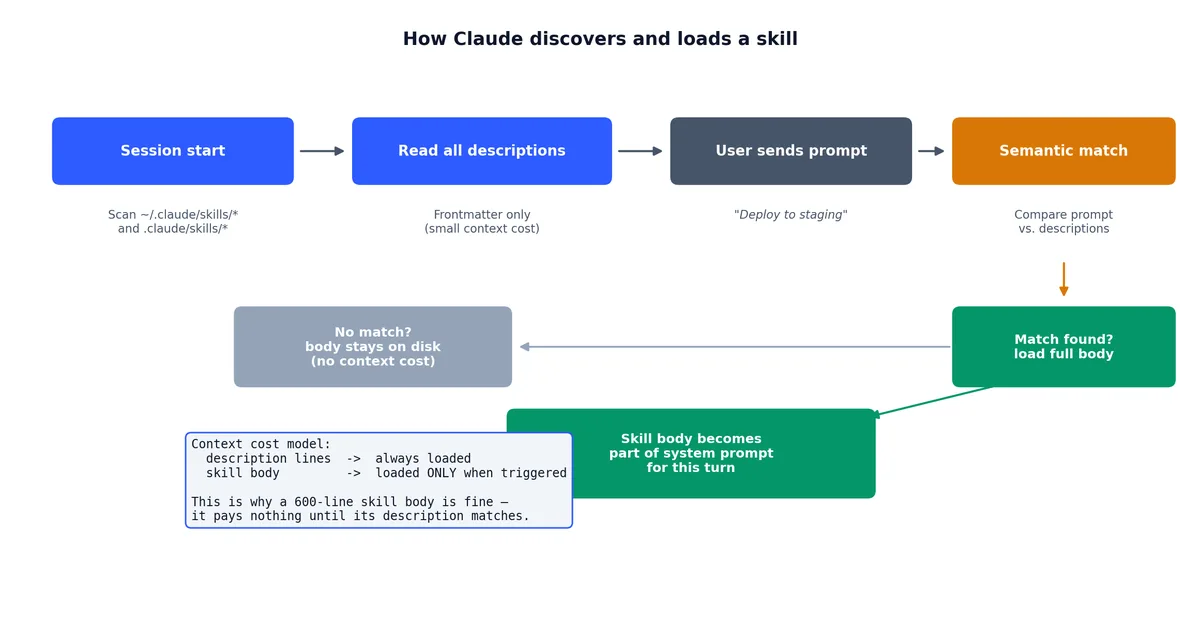
在会话开始时,Claude 会扫描以下位置的 Skill 文件:
~/.claude/skills/*/SKILL.md— 用户级 Skills.claude/skills/*/SKILL.md— 项目级 Skills
它会从每个 SKILL.md 的 frontmatter 中读取 description。这些 descriptions 始终处于上下文中,它们是 system prompt 的一部分。
加载机制#
当你发送一条消息时,Claude 会将你的 prompt 与所有 Skill descriptions 进行比对。如果有匹配项,Claude 会将匹配的 Skill(s) 的完整 body 加载到该轮对话的上下文中。
这意味着:
- Descriptions 始终被加载(开销很小,仅 description 行)。
- Bodies 按需加载(可能很大,但仅在相关时才加载)。
- 多个 Skills 可能同时触发,如果多个 descriptions 都匹配。这可能导致上下文膨胀,参见下文“When skills are the wrong answer”。
调试 Skill 加载#
如果 Skill 没有在预期时触发:
- 检查 description。 它是否提到了你正在使用的关键词?Claude 基于语义相似度匹配,而非精确关键词,但具体的 description 比模糊的更有效。
- 检查文件位置: SKILL.md 是否在正确目录?
~/.claude/skills/<name>/SKILL.md或.claude/skills/<name>/SKILL.md。 - 检查 frontmatter。 YAML 是否有效?是否有
---分隔符? - 尝试显式调用: 如果某些 Skill 同时注册为 slash command,也可以通过名称调用。但 Skill 的核心价值在于隐式加载,如果你必须通过名称调用它,那它可能更适合做成 slash command。
条件型 Skills#
有时 Skill 只应在特定上下文中触发。你可以在 description 和 body 中处理这一点。
上下文感知的 descriptions#
| |
“only relevant in Python projects” 这部分是对 Claude 的提示。即使你提到“training”,当你在 JavaScript 项目中工作时,Claude 也不会加载这个 Skill。
Body 层面的条件#
| |
这不是强制约束,Claude 仍可能偏离。但它为 Claude 提供了明确的指导,告诉它何时应更加严格。
决策树流程图#
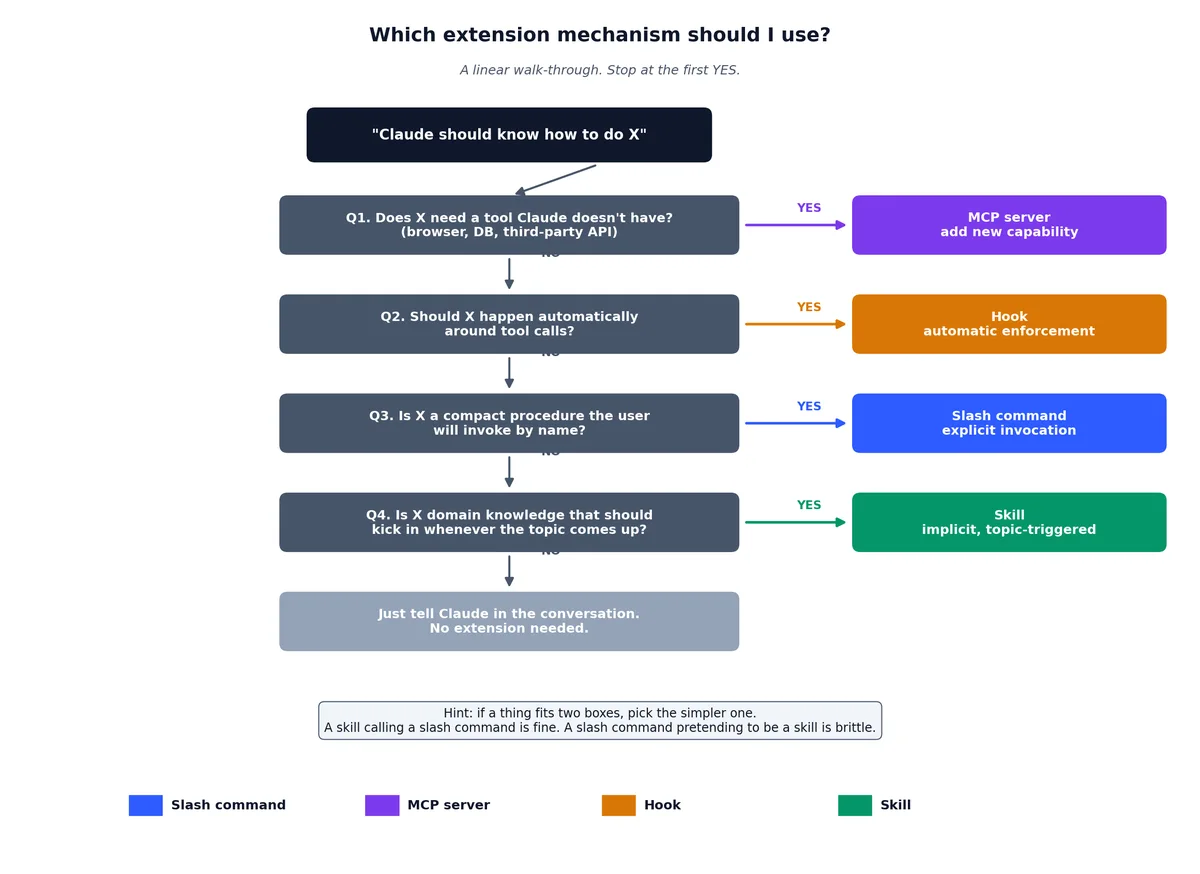
当你冒出“Claude 应该知道如何做 X”这个想法时,请按以下流程思考:
| |
如果某件事符合两个类别,优先选择更简单的那个。一个调用 slash command 的 Skill 是合理的。但一个假装成 Skill 的 slash command 则很脆弱。
我实际编写的三个 Skills#
chenk-blog-write#
用于在此网站上写作。涵盖 front matter schema、写作风格、中英文内容对齐要求、使用 Wanxiang 生成封面、部署流程以及常见陷阱。
当提到 chenk.top、“write a post” 或 “new article” 时触发。body 约 600 行,每一行都值得。
为什么是 Skill 而不是 command:我并不总是通过名称调用它。有时我说“write about hooks”,Claude 需要知道这意味着“在 chenk.top 上以这种风格、这种格式写一篇关于 hooks 的博客文章”。Skill 之所以触发,是因为 description 匹配。
update-config#
用于修改 ~/.claude/settings.json 和 .claude/settings.json。当提到“allow X command”、“set env Y”、“add a hook”、“move permission to project settings” 时触发。
它编码了第 9 章 中的权限优先级规则和典型模式,省去了我每次都要重新推导合并顺序的麻烦。
为什么是 Skill 而不是 hook:它提供的是 如何 编辑设置的知识,而不是对设置的强制执行。Hook 会阻止或允许;而这个 Skill 是 教学。
simplify#
用于审查我自己的代码变更。当提到“is there a simpler way to do this”、“review for quality”、“check for reuse” 时触发。
它编码了我的偏好:优先组合而非继承、立即删除死代码、根据事物本质而非构建方式命名、超过 30 行的函数很可能应该拆成两个。
为什么是 Skill 而不是 command:它不是一个流程。它是一组价值观和启发式规则,用于指导 Claude 如何阅读和审查代码。品味无法通过命令传达,但可以教授。
何时不该使用 Skills#
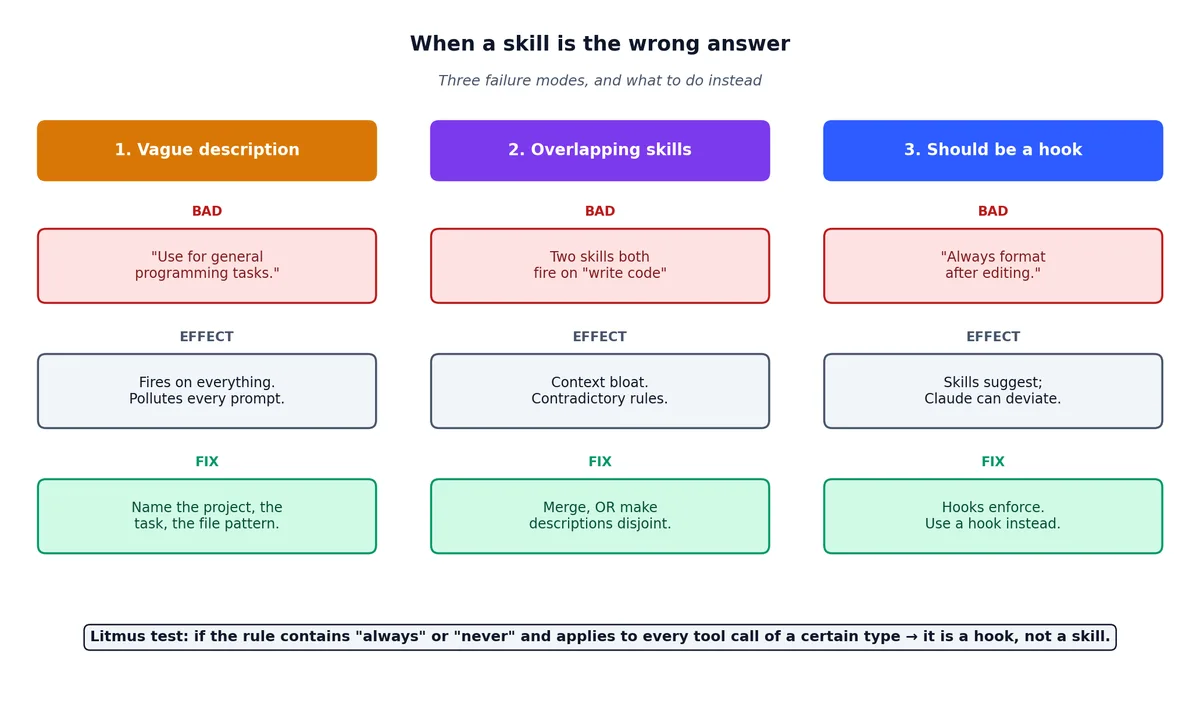
一个触发过于频繁的 Skill 比没有 Skill 更糟,它会污染那些不需要它的任务的上下文。以下是三个陷阱:
模糊的 descriptions#
| |
“Use for general programming” 会匹配一切。当你编辑 README 时会触发,当你写 commit message 时也会触发。“适用于一切” = “对任何有用的事情都不适用”。
重叠的 Skills#
两个 Skill 都在“write code”时触发,会导致上下文膨胀。模型会收到两套(可能矛盾的)指令,并不得不判断哪一套适用。
解决方法:将它们合并为一个 Skill,或者让 descriptions 更具体,使它们在不同子主题上触发。
本该是 hooks 的 Skills#
“Always format code after editing.” 这是 hook,不是 Skill。Skills 是建议;hooks 是强制执行。
判断标准:如果指令包含“always”或“never”,并且适用于某一类工具调用的每一次,那就是 hook。如果包含“when discussing X”或“for tasks involving Y”,那就是 Skill。
构建你自己的扩展库#
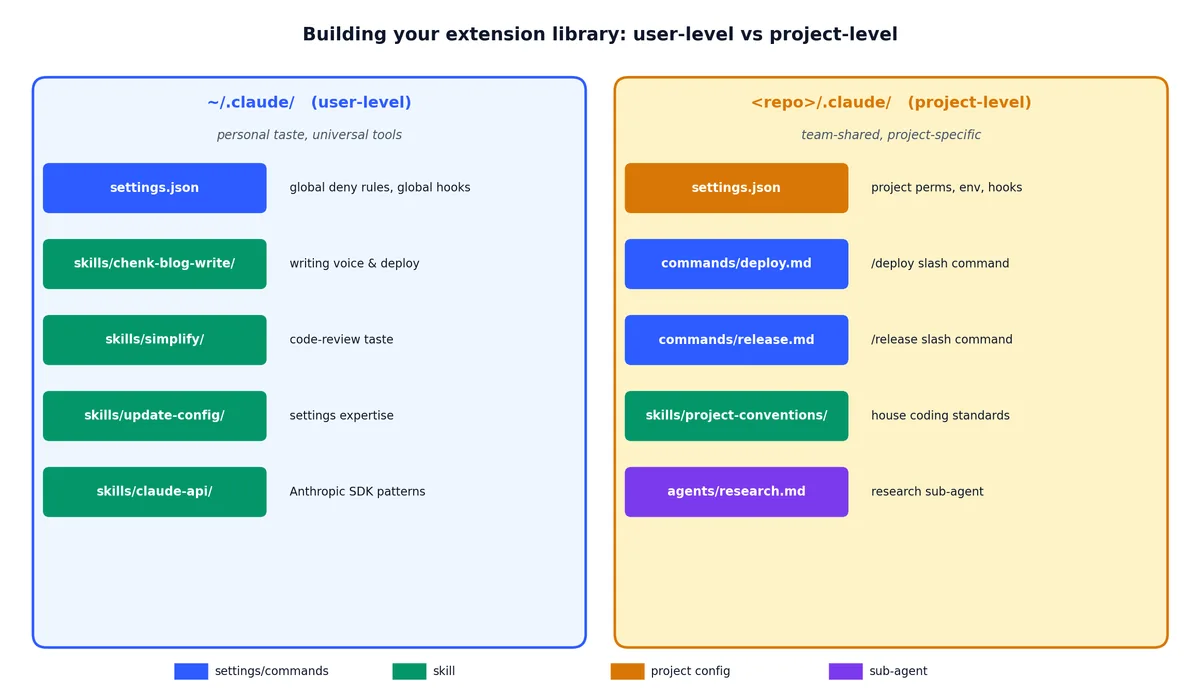
随着时间推移,你会在所有四种机制中积累大量扩展。以下是我组织它们的方式:
| |
模式:用户级用于个人偏好和通用工具,项目级用于团队共享知识和项目特定流程。
系列终章#

经过十章的学习,你现在拥有:
- 一个已配置好的 Claude Code,并在脑海中建立了三层设置模型(第 1、9 章)。
- 对快捷键、模式和对话控制的熟练掌握(第 2 章 )。
- 四种扩展机制,slash commands、MCP、hooks、skills,以及在它们之间选择的决策树(第 3、4、5、7、10 章)。
- 并发原语,sub-agents、worktrees、plan mode,用于将单个会话扩展到更大规模的工作(第 8 章 )。
- 一个可用的 SDK 和 GitHub 集成方案,用于将 Claude 放入 CI(第 6 章 )。
这就是全部表面功能。这些扩展点可以组合使用:Skill 可以引用 slash command,hook 可以强制执行 Skill 推荐的内容,MCP server 可以提供数据,而 Skill 则告诉 Claude 如何解读这些数据。你最初选择哪种机制并不那么重要,重要的是选择任意一种机制。因为“没有任何扩展的 Claude”和“哪怕只有一个精心编写的 Skill 的 Claude”之间的差距,远大于 Skill 和 command 之间的差距。
从此刻起,工作重心不再是如何使用 Claude Code 本身,而是你用它来构建什么。去构建吧。
Claude Code 实战 10 篇
- 01 Claude Code 实战(一):安装、三层配置体系,以及 `#` `@` `/init` 三剑客
- 02 Claude Code 实战(二):快捷键、四态切换与思考模式
- 03 Claude Code 实战(三):自定义斜杠命令与对话控制
- 04 Claude Code 实战(四):MCP 服务器连接万物
- 05 Claude Code 实战(五):Hooks 与 Yolo 安全网
- 06 Claude Code 实战(六):SDK 与 GitHub CI
- 07 Claude Code 实战(七):十个实用 Hooks 配方
- 08 Claude Code 实战(八):Sub-Agent 与计划模式
- 09 Claude Code 实战(九):权限模型与环境变量
- 10 Claude Code 实战(十):Skills 与四种扩展机制 当前