你只改了一行代码,却导致三个毫不相干的功能崩溃;重构一个函数后,不得不花上两小时手动点击整个应用,只为确认一切是否还正常;周五部署上线,结果半夜就被报警电话叫醒……所有这些,都是同一种病的症状:没有测试 。
测试不是繁文缛节,而是最快验证你的代码是否真如你所想那样工作 的方式。一套优秀的测试套件只需几秒钟就能跑完,却能捕获那些手动排查要耗费数小时才能发现的 bug。
为何要写测试# 写测试前期确实要多花时间,但不写测试,后期付出的代价更大。来看这笔账:
活动 无测试 有测试 初始开发 更快(不用写测试) 稍慢(测试增加 20–40% 时间) 重构 提心吊胆(我是不是搞坏了什么?) 自信从容(测试会揪出回归问题) 调试 得通读整个代码库 运行测试,立刻知道哪里出错了 新人上手 “去问 Sarah,只有她懂” 测试本身就是文档,清晰说明预期行为 生产部署 手动 QA,听天由命 自动化守门,放心上线 客户报 bug 手动复现 → 修复 → 再手动验证 写个复现 bug 的测试 → 修复 → 测试自动确认
真正的回报出现在对任何一段代码进行第二次修改时 。第一次你刚写完,自然知道它能跑;但之后每次改动,除非有测试兜底,否则你根本无法确定它是否还正常。
pytest 基础# pytest 是 Python 社区事实上的标准测试框架。它直接使用原生 assert 语句,并支持自动发现测试用例。
1
( .venv) $ pip install pytest
你的第一个测试# 1
2
3
4
5
6
7
8
9
10
11
12
13
14
15
# tests/test_math.py
def test_addition ():
assert 1 + 1 == 2
def test_string_upper ():
assert "hello" . upper () == "HELLO"
def test_list_append ():
items = [ 1 , 2 , 3 ]
items . append ( 4 )
assert items == [ 1 , 2 , 3 , 4 ]
assert len ( items ) == 4
运行它:
1
2
3
4
5
6
7
8
9
( .venv) $ pytest
========================= test session starts ==========================
platform linux -- Python 3.11.7, pytest-7.4.4
rootdir: /home/user/project
collected 3 items
tests/test_math.py ... [ 100%]
========================= 3 passed in 0.02s ============================
测试发现规则# pytest 会自动查找符合以下规则的内容:
文件名以 test_*.py 或 *_test.py 开头 这些文件中,函数名以 test_* 开头 类名以 Test* 开头,且其方法名也以 test_* 开头 实用命令行参数# 1
2
3
4
5
6
7
8
9
10
11
12
13
14
15
16
17
18
19
20
21
22
23
24
25
26
# 详细输出(显示每个测试名称)
( .venv) $ pytest -v
# 首次失败即停止
( .venv) $ pytest -x
# 运行匹配关键词表达式的测试
( .venv) $ pytest -k "download"
# 运行指定文件中的测试
( .venv) $ pytest tests/test_core.py
# 运行指定测试函数
( .venv) $ pytest tests/test_core.py::test_download_file
# 显示 print 输出(不捕获 stdout/stderr)
( .venv) $ pytest -s
# 在 traceback 中显示局部变量
( .venv) $ pytest -l
# 仅重跑上一次运行中失败的测试
( .venv) $ pytest --lf
# 先运行失败的测试,再运行其余测试
( .venv) $ pytest --ff
测试异常# 用 pytest.raises 验证代码是否会抛出预期的异常:
1
2
3
4
5
6
7
8
9
10
11
12
13
import pytest
from my_tool.utils import validate_url
def test_invalid_url_raises ():
with pytest . raises ( ValueError , match = "Invalid URL" ):
validate_url ( "not-a-url" )
def test_empty_url_raises ():
with pytest . raises ( ValueError ):
validate_url ( "" )
match 参数通过正则表达式检查异常消息内容。
测试近似值# 1
2
3
4
def test_float_division ():
# 浮点数比较需容忍误差
assert 0.1 + 0.2 == pytest . approx ( 0.3 )
assert 3.14 == pytest . approx ( 3.14159 , abs = 0.01 )
Fixture:可复用的测试准备逻辑#
Fixture 取代了 unittest 中的 setUp/tearDown 模式,通过函数参数向测试注入依赖。
基础 Fixture# 1
2
3
4
5
6
7
8
9
10
11
12
13
14
15
16
17
import pytest
from my_tool.core import FileDownloader
@pytest.fixture
def downloader ():
"""创建一个已配置的下载器实例。"""
return FileDownloader ( timeout = 5 , retries = 1 )
def test_download_sets_timeout ( downloader ):
assert downloader . timeout == 5
def test_download_sets_retries ( downloader ):
assert downloader . retries == 1
pytest 发现测试函数参数中有 downloader,就会去找同名的 fixture,调用它,并把返回值传给测试函数。每个测试都会拿到一个全新的实例。
含清理逻辑的 Fixture# 用 yield 在测试结束后执行清理代码(即使测试失败也会执行):
 1
 2
 3
 4
 5
 6
 7
 8
 9
10
11
12
13
14
15
16
17
18
19
20
import tempfile
from pathlib import Path
import pytest
@pytest.fixture
def temp_dir ():
"""创建临时目录,测试后自动清理。"""
path = Path ( tempfile . mkdtemp ())
yield path
# 清理逻辑在测试结束后执行,无论成功或失败
import shutil
shutil . rmtree ( path , ignore_errors = True )
def test_file_creation ( temp_dir ):
test_file = temp_dir / "test.txt"
test_file . write_text ( "hello" )
assert test_file . read_text () == "hello"
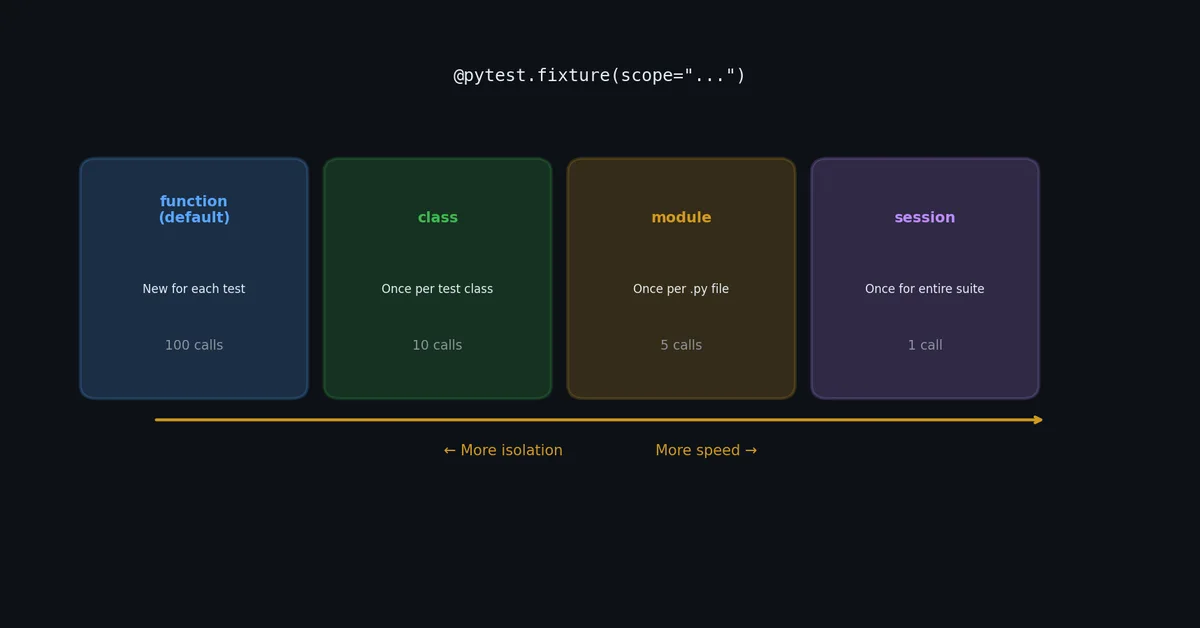
Fixture 作用域(Scope)# 默认情况下,fixture 每次测试都会重新创建。对于开销较大的初始化操作,可以调整作用域:
1
2
3
4
5
6
7
8
9
10
11
12
13
14
15
16
17
18
19
20
21
22
23
24
@pytest.fixture ( scope = "session" )
def database_connection ():
"""创建数据库连接,被全部测试共享。"""
conn = create_connection ( "test.db" )
yield conn
conn . close ()
@pytest.fixture ( scope = "module" )
def sample_data ():
"""加载样本数据,在单个测试文件内共享。"""
return load_test_data ( "fixtures/sample.json" )
@pytest.fixture ( scope = "class" )
def api_client ():
"""创建 API 客户端,在单个测试类内共享。"""
return APIClient ( base_url = "http://localhost:8000" )
@pytest.fixture # scope="function" 是默认值
def clean_state ():
"""为每个测试提供干净状态。"""
return {}
作用域 创建时机 销毁时机 适用场景 function每个测试前 每个测试后 默认,适用于大多数 fixture class类中首个测试前 类中最后一个测试后 测试类内共享状态 module文件中首个测试前 文件中最后一个测试后 开销大的文件级初始化 session全局首个测试前 全局最后一个测试后 数据库连接、服务启动等
conftest.py:共享 Fixture# 定义在 conftest.py 中的 fixture 会自动对同目录及其所有子目录下的测试可见,无需显式导入:
1
2
3
4
5
6
7
tests/
conftest.py # fixture 对所有测试可用
test_core.py
test_cli.py
integration/
conftest.py # 为集成测试额外定义的 fixture
test_api.py
1
2
3
4
5
6
7
8
9
10
11
12
13
# tests/conftest.py
import pytest
@pytest.fixture
def sample_url ():
return "https://httpbin.org/get"
@pytest.fixture
def sample_headers ():
return { "User-Agent" : "test-agent/1.0" }
tests/ 下的任何测试文件都能直接使用 sample_url 和 sample_headers,完全不用 import。
内置 Fixture# pytest 自带几个实用的内置 fixture:
1
2
3
4
5
6
7
8
9
10
11
12
13
14
15
16
17
18
19
def test_capture_output ( capsys ):
"""capsys 捕获 stdout 和 stderr。"""
print ( "hello world" )
captured = capsys . readouterr ()
assert captured . out == "hello world \n "
def test_temp_path ( tmp_path ):
"""tmp_path 提供唯一临时目录。"""
file = tmp_path / "data.txt"
file . write_text ( "content" )
assert file . read_text () == "content"
def test_monkeypatch_env ( monkeypatch ):
"""monkeypatch 为测试临时修改环境变量。"""
monkeypatch . setenv ( "API_KEY" , "test-key-123" )
import os
assert os . environ [ "API_KEY" ] == "test-key-123"
Parametrize:批量测试多组用例#
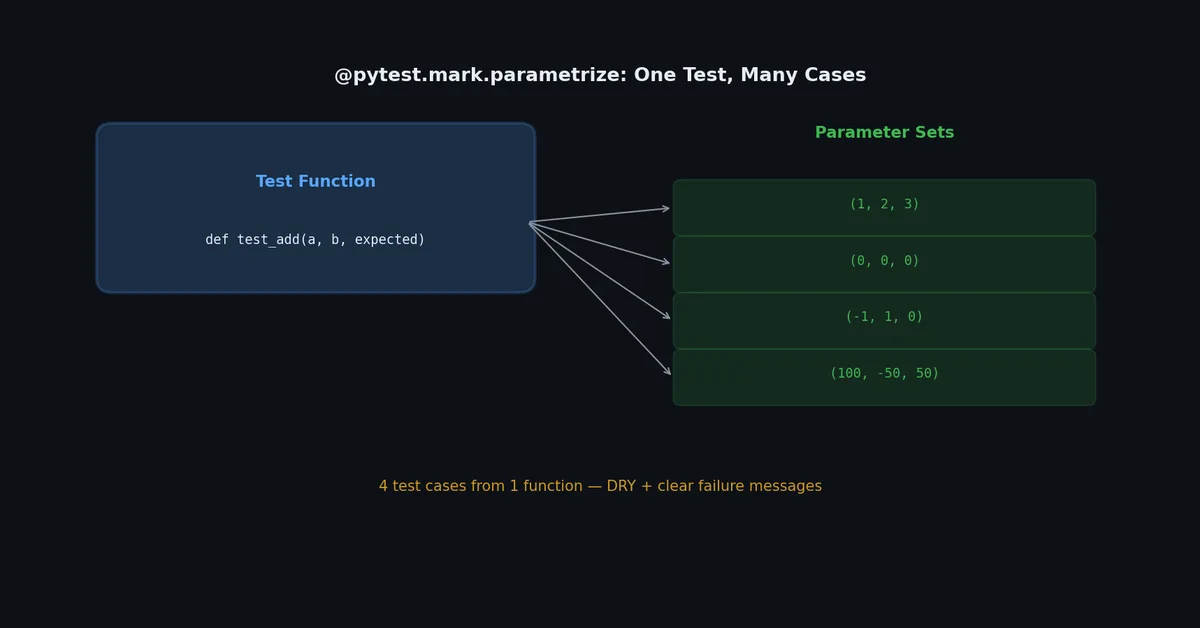
与其为每种输入单独写一个测试函数,不如用 @pytest.mark.parametrize:
1
2
3
4
5
6
7
8
9
10
11
12
13
14
15
16
import pytest
from my_tool.utils import format_size
@pytest.mark.parametrize ( "size_bytes,expected" , [
( 0 , "0.0 B" ),
( 1023 , "1023.0 B" ),
( 1024 , "1.0 KB" ),
( 1536 , "1.5 KB" ),
( 1048576 , "1.0 MB" ),
( 1073741824 , "1.0 GB" ),
( 5368709120 , "5.0 GB" ),
])
def test_format_size ( size_bytes , expected ):
assert format_size ( size_bytes ) == expected
输出:
1
2
3
4
5
6
7
8
( .venv) $ pytest -v tests/test_utils.py::test_format_size
tests/test_utils.py::test_format_size[ 0-0.0 B] PASSED
tests/test_utils.py::test_format_size[ 1023-1023.0 B] PASSED
tests/test_utils.py::test_format_size[ 1024-1.0 KB] PASSED
tests/test_utils.py::test_format_size[ 1536-1.5 KB] PASSED
tests/test_utils.py::test_format_size[ 1048576-1.0 MB] PASSED
tests/test_utils.py::test_format_size[ 1073741824-1.0 GB] PASSED
tests/test_utils.py::test_format_size[ 5368709120-5.0 GB] PASSED
7 组用例,1 个函数。每组用例在输出中都作为独立的测试项出现,各自有独立的通过/失败状态。
使用 ID 命名 Parametrize 用例# 为了让输出更清晰,可以显式指定用例 ID:
1
2
3
4
5
6
7
8
@pytest.mark.parametrize ( "url,expected_filename" , [
( "https://example.com/data.csv" , "data.csv" ),
( "https://example.com/path/to/file.txt" , "file.txt" ),
( "https://example.com/" , "download" ),
( "https://example.com" , "download" ),
], ids = [ "simple" , "nested-path" , "trailing-slash" , "no-path" ])
def test_filename_from_url ( url , expected_filename ):
assert filename_from_url ( url ) == expected_filename
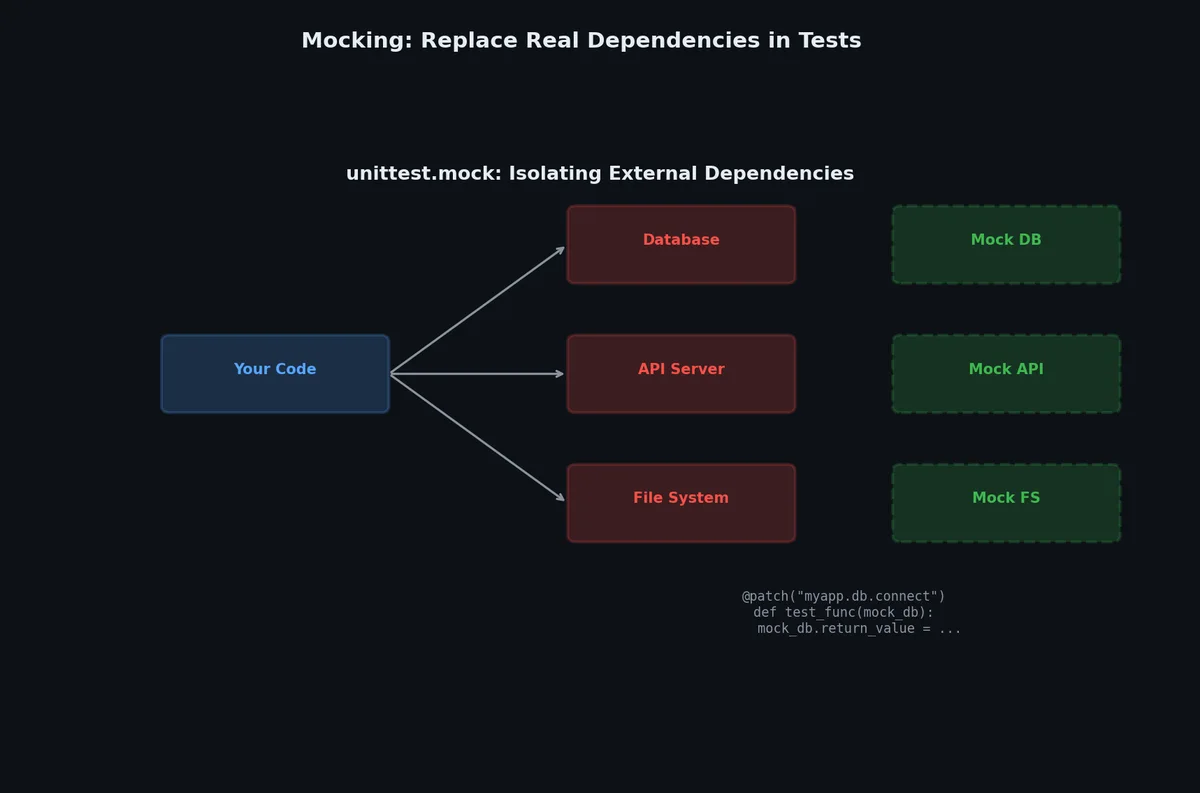
Mocking:隔离你的代码# 当你测试一个会调用外部服务的函数时,肯定不希望测试真的发起 HTTP 请求。Mocking 就是把代码中的某些部分替换成可控的“假货”。
unittest.mock.patch# 1
2
3
4
5
6
7
8
9
10
11
12
13
14
15
16
17
18
19
20
21
22
23
24
25
26
27
28
29
30
31
from unittest.mock import patch , MagicMock
from my_tool.core import download_file
@patch ( "my_tool.core.requests.get" )
def test_download_file_success ( mock_get , tmp_path ):
# 配置 mock 响应
mock_response = MagicMock ()
mock_response . status_code = 200
mock_response . headers = { "content-length" : "11" }
mock_response . iter_content . return_value = [ b "hello world" ]
mock_response . raise_for_status . return_value = None
mock_get . return_value = mock_response
output = tmp_path / "test.txt"
result = download_file ( "https://example.com/test.txt" , str ( output ), quiet = True )
assert result == output
assert output . read_bytes () == b "hello world"
mock_get . assert_called_once ()
@patch ( "my_tool.core.requests.get" )
def test_download_file_http_error ( mock_get ):
mock_response = MagicMock ()
mock_response . raise_for_status . side_effect = Exception ( "404 Not Found" )
mock_get . return_value = mock_response
with pytest . raises ( Exception , match = "404" ):
download_file ( "https://example.com/missing.txt" , quiet = True )
何时该 Mock?# 应 Mock 不应 Mock HTTP 请求 纯函数 数据库查询 业务数据转换 文件系统(有时) 字符串处理 时间相关逻辑 数学计算 外部服务 API 自己的内部逻辑
过度 Mock 是个常见陷阱:如果你把什么都 Mock 了,那测试验证的其实是 Mock 的行为,而不是你自己的代码。只在边界处 Mock(网络、磁盘、时钟),核心逻辑要用真实代码测试。
Monkeypatch:更简洁的替代方案# 对于简单场景,monkeypatch 比 patch 更清爽:
1
2
3
4
def test_download_with_env_config ( monkeypatch ):
monkeypatch . setenv ( "DOWNLOAD_TIMEOUT" , "60" )
monkeypatch . setattr ( "my_tool.config.DEFAULT_TIMEOUT" , 60 )
# 测试读取配置的代码
Coverage:衡量测试覆盖度# 安装 pytest-cov:
1
( .venv) $ pip install pytest-cov
运行并生成覆盖率报告:
1
2
3
4
5
6
7
8
9
10
11
12
13
14
15
16
( .venv) $ pytest --cov= my_tool --cov-report= term-missing
========================= test session starts ==========================
...
---------- coverage: platform linux, python 3.11.7 ----------
Name Stmts Miss Cover Missing
---------------------------------------------------------
src/my_tool/__init__.py 3 0 100%
src/my_tool/cli.py 28 5 82% 41-45
src/my_tool/config.py 4 0 100%
src/my_tool/core.py 31 3 90% 52-54
src/my_tool/utils.py 15 0 100%
---------------------------------------------------------
TOTAL 81 8 90%
========================= 12 passed in 0.45s ===========================
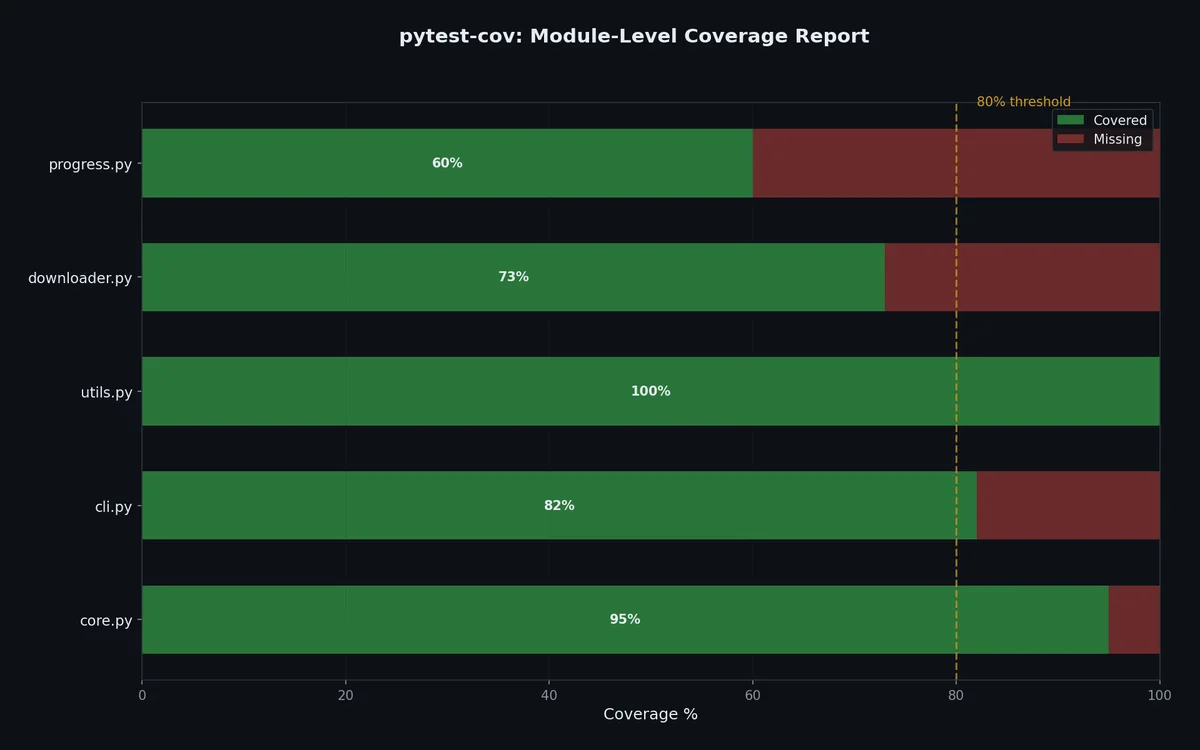
Missing 列会精确告诉你哪些行没被任何测试覆盖到。比如 41-45 表示第 41 到 45 行从未被执行。
Coverage 配置# 1
2
3
4
5
6
7
8
9
10
11
12
13
14
# pyproject.toml
[ tool . coverage . run ]
source = [ "my_tool" ]
branch = true
[ tool . coverage . report ]
show_missing = true
fail_under = 80
exclude_lines = [
"pragma: no cover" ,
"if __name__ == .__main__." ,
"if TYPE_CHECKING:" ,
]
branch = true 启用分支覆盖率,确保 if/else 的两个分支都被测到。
覆盖率目标建议# 覆盖率水平 含义 适用场景 < 50% 几乎没测 正在补测试的遗留代码 50–70% 基础覆盖 内部工具、脚本 70–85% 良好覆盖 大多数应用程序 85–95% 强覆盖 库、关键服务 95–100% 接近完整 支付处理、安全敏感代码
别盲目追求 100% 覆盖率 。有些代码(比如理论上不可能触发的错误处理、__repr__ 方法)根本不值得测。重点应该放在业务逻辑和边界情况上。
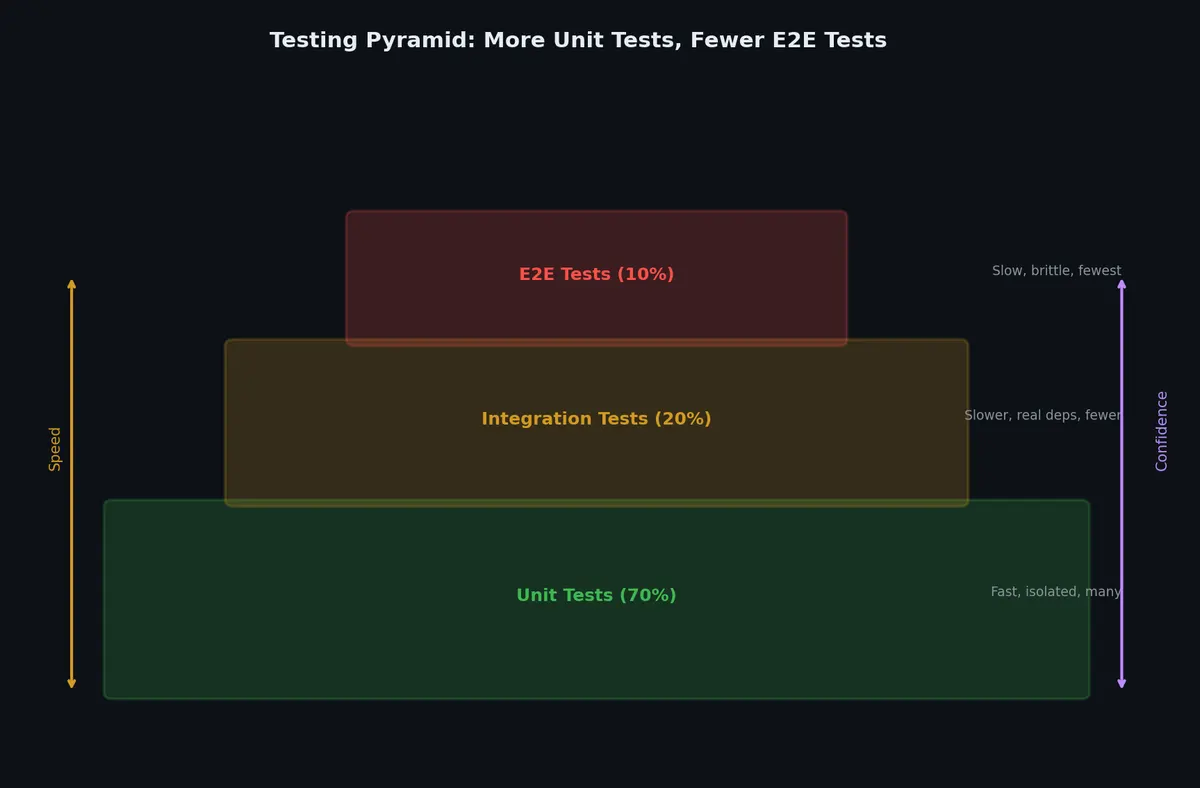
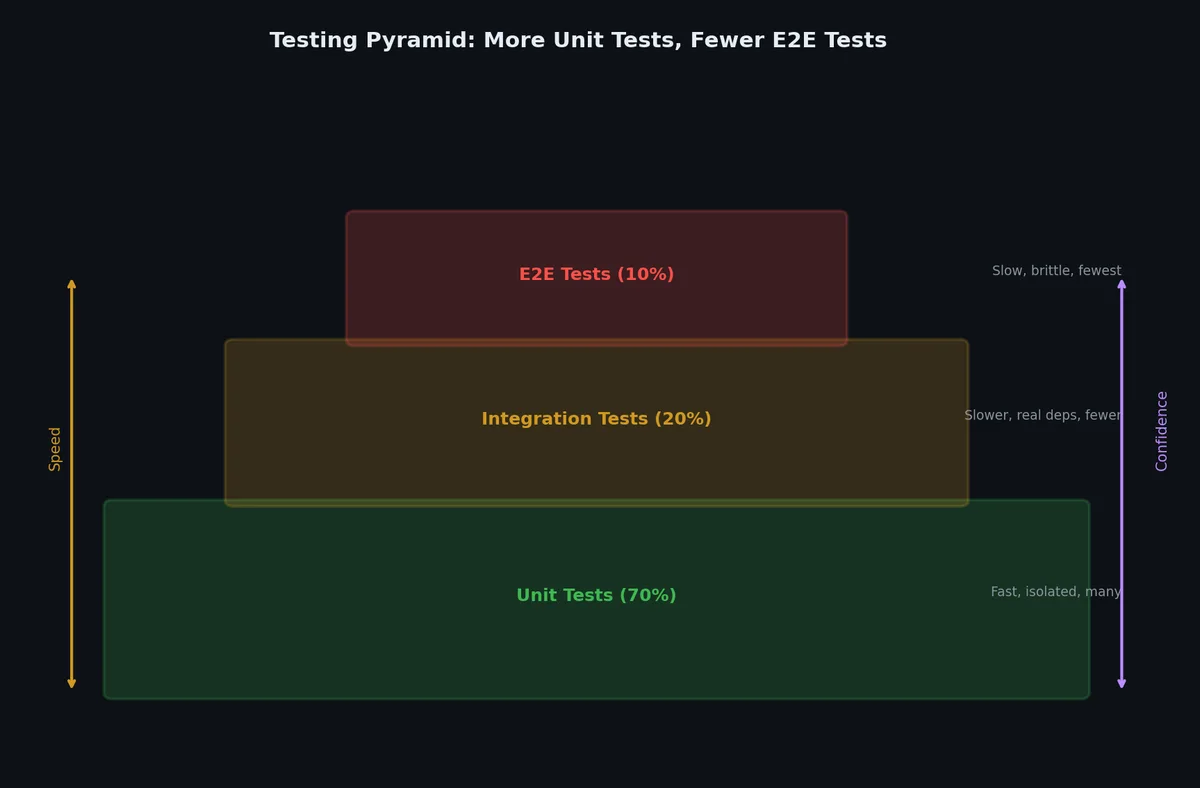
测试组织策略# 单元测试(Unit Tests)# 隔离测试单个函数,快速、专注、数量多。
1
2
3
4
5
6
7
# tests/test_utils.py
def test_format_size_zero ():
assert format_size ( 0 ) == "0.0 B"
def test_format_size_kilobytes ():
assert format_size ( 1024 ) == "1.0 KB"
集成测试(Integration Tests)# 测试多个组件如何协同工作,速度较慢,数量较少。
1
2
3
4
5
6
7
8
9
10
# tests/integration/test_download.py
def test_download_real_file ( tmp_path ):
"""集成测试:实际从 httpbin 下载文件。"""
result = download_file (
"https://httpbin.org/bytes/1024" ,
str ( tmp_path / "data.bin" ),
quiet = True ,
)
assert result . stat () . st_size == 1024
给集成测试打上标记,方便在快速运行时跳过它们:
1
2
3
4
5
6
import pytest
pytestmark = pytest . mark . integration
def test_download_real_file ( tmp_path ):
...
1
2
3
4
5
# 仅运行单元测试(跳过集成测试)
( .venv) $ pytest -m "not integration"
# 仅运行集成测试
( .venv) $ pytest -m integration
在 pyproject.toml 中注册自定义标记:
1
2
3
4
5
[ tool . pytest . ini_options ]
markers = [
"integration: marks tests as integration tests (deselect with '-m \"not integration\"')" ,
"slow: marks tests as slow (deselect with '-m \"not slow\"')" ,
]
端到端测试(End-to-End Tests)# 从用户视角测试整个应用:
1
2
3
4
5
6
7
8
9
10
11
12
13
14
15
16
17
18
19
# tests/e2e/test_cli.py
from click.testing import CliRunner
from my_tool.cli import main
def test_cli_download ( tmp_path , monkeypatch ):
monkeypatch . chdir ( tmp_path )
runner = CliRunner ()
result = runner . invoke ( main , [ "https://httpbin.org/bytes/100" , "-o" , "test.bin" , "-q" ])
assert result . exit_code == 0
assert ( tmp_path / "test.bin" ) . exists ()
def test_cli_help ():
runner = CliRunner ()
result = runner . invoke ( main , [ "--help" ])
assert result . exit_code == 0
assert "Download files from URLs" in result . output
调试:当测试失败时# breakpoint() 与 pdb# Python 3.7 引入了内置的 breakpoint() 函数:
1
2
3
4
5
def download_file ( url , output = None , quiet = False , timeout = 30 ):
response = requests . get ( url , stream = True , timeout = timeout )
breakpoint () # 执行在此暂停,进入调试器
response . raise_for_status ()
...
正常运行测试即可(虽然 pytest 默认会捕获 stdin,但 breakpoint() 会强制打开交互):
1
2
3
4
( .venv) $ pytest -s tests/test_core.py::test_download_file_success
> /home/user/src/my_tool/core.py( 15) download_file()
-> response.raise_for_status()
( Pdb)
核心 pdb 命令# 命令 缩写 功能说明 nextn执行当前行,跳过函数调用(step over) steps执行当前行,进入函数调用(step into) continuec继续执行直到下一个断点 print exprp expr打印表达式值 pp expr美观打印表达式值 listl显示当前行附近的源码 wherew显示调用栈 upu向上调用栈移动一帧 downd向下调用栈移动一帧 quitq退出调试器 helph显示帮助
ipdb:更强大的调试器# ipdb 提供语法高亮和 Tab 补全:
1
( .venv) $ pip install ipdb
1
import ipdb ; ipdb . set_trace () # 或设置 PYTHONBREAKPOINT=ipdb.set_trace
或者全局启用:
1
2
$ export PYTHONBREAKPOINT = ipdb.set_trace
$ pytest -s tests/test_core.py # 此时 breakpoint() 将使用 ipdb
失败后调试(Post-Mortem Debugging)# 对刚刚失败的测试,在失败点直接进入调试器:
1
2
( .venv) $ pytest --pdb tests/test_core.py
# 在失败点自动进入 pdb
这招极其强大:你完全不用手动加 breakpoint()。只要加上 --pdb 参数,pytest 就会在断言失败的精确行号 处启动调试器,并保留所有局部变量。
基于属性的测试:Hypothesis# 传统测试检查特定输入输出。基于属性的测试验证对任何有效输入 都成立的不变式。Hypothesis ↗
自动生成数百个随机输入,发现你永远想不到的边界情况。
1
( .venv) $ pip install hypothesis
基本属性# 1
2
3
4
5
6
7
8
9
10
11
12
13
14
15
16
17
18
19
from hypothesis import given , assume , settings
from hypothesis import strategies as st
@given ( st . lists ( st . integers ()))
def test_sort_is_idempotent ( xs ):
"""排序两次和排序一次结果相同。"""
assert sorted ( sorted ( xs )) == sorted ( xs )
@given ( st . lists ( st . integers ()))
def test_sort_preserves_length ( xs ):
"""排序不增不减元素。"""
assert len ( sorted ( xs )) == len ( xs )
@given ( st . lists ( st . integers (), min_size = 1 ))
def test_sort_result_is_ordered ( xs ):
"""结果中每个元素都 <= 下一个。"""
result = sorted ( xs )
for a , b in zip ( result , result [ 1 :]):
assert a <= b
不再测试 sorted([3, 1, 2]) == [1, 2, 3],而是测试任何正确排序都必须满足的属性。Hypothesis 会尝试空列表、单元素、重复值、负数、极大值等各种情况。
自定义策略# 1
2
3
4
5
6
7
8
9
10
11
12
13
14
15
16
17
18
19
20
21
22
from dataclasses import dataclass
@dataclass
class User :
name : str
age : int
email : str
# 构建 User 对象的生成策略
users = st . builds (
User ,
name = st . text ( min_size = 1 , max_size = 50 ),
age = st . integers ( min_value = 0 , max_value = 150 ),
email = st . emails (),
)
@given ( users )
def test_user_serialization_roundtrip ( user ):
"""序列化 → 反序列化应返回原始对象。"""
data = serialize ( user )
restored = deserialize ( data )
assert restored == user
有状态测试# 对于有状态的系统(数据库、API),Hypothesis 能生成操作序列:
 1
 2
 3
 4
 5
 6
 7
 8
 9
10
11
12
13
14
15
16
17
18
19
20
21
22
23
24
25
26
27
28
from hypothesis.stateful import RuleBasedStateMachine , rule
class SetMachine ( RuleBasedStateMachine ):
"""验证 CustomSet 行为与内置 set 一致。"""
def __init__ ( self ):
super () . __init__ ()
self . model = set () # 参考实现
self . actual = CustomSet () # 被测系统
@rule ( value = st . integers ())
def add ( self , value ):
self . model . add ( value )
self . actual . add ( value )
assert value in self . actual
@rule ( value = st . integers ())
def remove ( self , value ):
if value in self . model :
self . model . remove ( value )
self . actual . remove ( value )
assert value not in self . actual
@rule ()
def check_length ( self ):
assert len ( self . actual ) == len ( self . model )
TestSet = SetMachine . TestCase
当 Hypothesis 发现 Bug# Hypothesis 会将失败输入收缩至仍能触发 Bug 的最小示例:
1
2
3
Falsifying example: test_parse_date(
s='0000-00-00', # 从 '9812-23-71' 收缩而来
)
然后存储在 .hypothesis/ 中,后续运行自动重测。将 .hypothesis/examples/ 提交到仓库。
配置与 Profile# 1
2
3
4
5
6
7
8
9
10
11
12
13
14
15
16
17
18
from hypothesis import settings , Phase , Verbosity
# 慢但彻底(CI 环境)
@settings ( max_examples = 1000 , deadline = None )
@given ( st . text ())
def test_thorough ( s ):
...
# 快速迭代(开发环境)
@settings ( max_examples = 50 )
@given ( st . text ())
def test_quick ( s ):
...
# 在 conftest.py 中全局配置 profile
settings . register_profile ( "ci" , max_examples = 1000 )
settings . register_profile ( "dev" , max_examples = 50 )
settings . load_profile ( os . environ . get ( "HYPOTHESIS_PROFILE" , "dev" ))
快照测试# 快照测试捕获函数输出并与保存的"黄金"文件比对。适用于:
CLI 输出格式 序列化格式(JSON、YAML 响应) 模板渲染 代码生成输出 使用 syrupy# 1
( .venv) $ pip install syrupy
 1
 2
 3
 4
 5
 6
 7
 8
 9
10
11
12
13
def test_user_json_format ( snapshot ):
user = User ( name = "Alice" , age = 30 , email = "alice@example.com" )
result = user . to_json ( indent = 2 )
assert result == snapshot
def test_error_message ( snapshot ):
with pytest . raises ( ValidationError ) as exc_info :
validate_config ({ "port" : "not_a_number" })
assert str ( exc_info . value ) == snapshot
def test_cli_help_output ( snapshot ):
result = runner . invoke ( app , [ "--help" ])
assert result . output == snapshot
首次运行创建 __snapshots__/ 文件。后续运行对比:
1
2
# 输出有意变更时更新快照
( .venv) $ pytest --snapshot-update
何时用快照 vs 断言# 方式 适用场景 缺点 显式断言 逻辑、计算、状态转换 复杂输出时冗长 快照测试 格式化、渲染、序列化 容易过度批准变更
经验法则:当你关心输出的精确形态 ,且手写需要 5 条以上断言时,用快照。
检测慢测试# 测试套件增长时,慢测试逐渐累积,破坏反馈循环。尽早发现它们。
pytest 耗时报告# 1
2
3
4
5
6
7
8
# 显示最慢的 10 个测试
( .venv) $ pytest --durations= 10
============================= slowest 10 durations =============================
1.23s call tests/test_api.py::test_database_migration
0.89s call tests/test_export.py::test_large_csv_export
0.67s setup tests/test_integration.py::test_full_pipeline
...
强制时间限制# 1
2
3
4
5
6
7
import pytest
@pytest.mark.timeout ( 5 )
def test_api_response ():
"""必须在 5 秒内完成。"""
response = client . get ( "/api/heavy-endpoint" )
assert response . status_code == 200
或在 pyproject.toml 中全局配置:
1
2
[ tool . pytest . ini_options ]
timeout = 30 # 秒——超时的单个测试直接失败
并行运行测试# 1
2
3
4
5
6
7
( .venv) $ pip install pytest-xdist
# 使用所有 CPU 核心
( .venv) $ pytest -n auto
# 使用 4 个 worker
( .venv) $ pytest -n 4
测试必须独立(无共享状态、无固定端口)才能并行。使用 fixture 提供唯一临时目录和随机端口。
CI 优化模式# 1
2
3
4
5
6
7
8
# .github/workflows/test.yml
jobs :
test :
strategy :
matrix :
shard : [ 1 , 2 , 3 , 4 ]
steps :
- run : pytest --splits 4 --group ${{ matrix.shard }}
将测试分片到多个 CI runner,大型套件反馈更快。
真实案例:测试日志处理器# 下面是一个处理日志条目的函数:
1
2
3
4
5
6
7
8
9
10
11
12
13
14
15
16
17
18
19
20
21
22
23
24
25
26
27
28
29
30
31
32
33
34
35
# src/my_tool/processor.py
from datetime import datetime
def parse_log_entry ( line : str ) -> dict :
"""将日志行解析为结构化数据。
预期格式:YYYY-MM-DD HH:MM:SS LEVEL message
Args:
line: 原始日志行字符串。
Returns:
包含键值:timestamp、level、message 的字典。
Raises:
ValueError: 若日志格式无效。
"""
parts = line . strip () . split ( " " , 3 )
if len ( parts ) < 4 :
raise ValueError ( f "Invalid log format: { line !r} " )
date_str , time_str , level , message = parts
timestamp = datetime . fromisoformat ( f " { date_str } { time_str } " )
level = level . upper ()
if level not in ( "DEBUG" , "INFO" , "WARNING" , "ERROR" , "CRITICAL" ):
raise ValueError ( f "Unknown log level: { level !r} " )
return {
"timestamp" : timestamp ,
"level" : level ,
"message" : message ,
}
配套的全面测试:
 1
 2
 3
 4
 5
 6
 7
 8
 9
10
11
12
13
14
15
16
17
18
19
20
21
22
23
24
25
26
27
28
29
30
31
32
33
34
35
36
37
38
39
40
41
42
43
44
45
46
47
48
49
50
51
52
53
54
55
56
57
58
59
60
61
62
# tests/test_processor.py
from datetime import datetime
import pytest
from my_tool.processor import parse_log_entry
class TestParseLogEntry :
"""parse_log_entry 函数的测试集。"""
def test_valid_info_line ( self ):
result = parse_log_entry ( "2024-01-15 10:30:00 INFO Server started" )
assert result == {
"timestamp" : datetime ( 2024 , 1 , 15 , 10 , 30 , 0 ),
"level" : "INFO" ,
"message" : "Server started" ,
}
def test_valid_error_line ( self ):
result = parse_log_entry ( "2024-01-15 10:30:00 ERROR Connection refused" )
assert result [ "level" ] == "ERROR"
assert result [ "message" ] == "Connection refused"
def test_message_with_spaces ( self ):
result = parse_log_entry (
"2024-01-15 10:30:00 WARNING Disk usage at 90 % o n /dev/sda1"
)
assert result [ "message" ] == "Disk usage at 90 % o n /dev/sda1"
def test_level_case_insensitive ( self ):
result = parse_log_entry ( "2024-01-15 10:30:00 info lowercase level" )
assert result [ "level" ] == "INFO"
@pytest.mark.parametrize ( "level" , [
"DEBUG" , "INFO" , "WARNING" , "ERROR" , "CRITICAL" ,
])
def test_all_valid_levels ( self , level ):
line = f "2024-01-15 10:30:00 { level } test message"
result = parse_log_entry ( line )
assert result [ "level" ] == level
def test_empty_string_raises ( self ):
with pytest . raises ( ValueError , match = "Invalid log format" ):
parse_log_entry ( "" )
def test_incomplete_line_raises ( self ):
with pytest . raises ( ValueError , match = "Invalid log format" ):
parse_log_entry ( "2024-01-15 10:30:00" )
def test_invalid_level_raises ( self ):
with pytest . raises ( ValueError , match = "Unknown log level" ):
parse_log_entry ( "2024-01-15 10:30:00 TRACE message" )
def test_invalid_timestamp_raises ( self ):
with pytest . raises ( ValueError ):
parse_log_entry ( "not-a-date 10:30:00 INFO message" )
def test_strips_whitespace ( self ):
result = parse_log_entry ( " 2024-01-15 10:30:00 INFO padded \n " )
assert result [ "level" ] == "INFO"
带详细输出与覆盖率运行:
1
2
3
4
5
6
7
8
9
10
11
12
13
14
15
16
( .venv) $ pytest -v --cov= my_tool tests/test_processor.py
tests/test_processor.py::TestParseLogEntry::test_valid_info_line PASSED
tests/test_processor.py::TestParseLogEntry::test_valid_error_line PASSED
tests/test_processor.py::TestParseLogEntry::test_message_with_spaces PASSED
tests/test_processor.py::TestParseLogEntry::test_level_case_insensitive PASSED
tests/test_processor.py::TestParseLogEntry::test_all_valid_levels[ DEBUG] PASSED
tests/test_processor.py::TestParseLogEntry::test_all_valid_levels[ INFO] PASSED
tests/test_processor.py::TestParseLogEntry::test_all_valid_levels[ WARNING] PASSED
tests/test_processor.py::TestParseLogEntry::test_all_valid_levels[ ERROR] PASSED
tests/test_processor.py::TestParseLogEntry::test_all_valid_levels[ CRITICAL] PASSED
tests/test_processor.py::TestParseLogEntry::test_empty_string_raises PASSED
tests/test_processor.py::TestParseLogEntry::test_incomplete_line_raises PASSED
tests/test_processor.py::TestParseLogEntry::test_invalid_level_raises PASSED
tests/test_processor.py::TestParseLogEntry::test_invalid_timestamp_raises PASSED
tests/test_processor.py::TestParseLogEntry::test_strips_whitespace PASSED
14 passed
下一步# 测试告诉你代码是否能跑起来 ;类型提示和静态检查则能在你运行之前就告诉你代码是否写对了 。下一篇文章中,我们将为代码库添加类型注解,配置 mypy 进行静态类型检查,并设置 ruff 和 black,让代码风格问题自动化解决,不再靠争论。