Python 工程实践(四):类型提示、代码检查与质量保障 使用 mypy 添加类型安全性,用 ruff 和 black 强制执行代码风格,并通过 pre-commit 钩子自动化检查。让代码评审聚焦于逻辑设计,而非格式细节。
CK
Chen Kai
April 17, 2022 · 22 分钟 · 5208 字
代码评审应聚焦于逻辑与架构设计,而不是纠结于单引号还是双引号——这类争论纯粹是浪费工程师的时间。解决方案很简单:让机器处理代码风格,让人专注于逻辑正确性。
本文涵盖三层自动化代码质量保障机制:类型提示 能在运行前捕获逻辑错误,代码检查器(linter) 能发现风格违规和常见缺陷,而 pre-commit 钩子 则在每次提交时自动执行全部检查。
类型提示:基础注解# Python 是动态类型语言,但从 3.5 版本起支持可选的类型注解(type annotations)。这些注解不影响运行时行为,仅作为元数据供 mypy 等工具进行静态检查。
基础类型# 1
2
3
4
5
6
7
8
9
10
11
# 基础类型
name : str = "Alice"
age : int = 30
height : float = 1.75
active : bool = True
# 函数注解
def greet ( name : str , excited : bool = False ) -> str :
if excited :
return f "Hello, { name } !"
return f "Hello, { name } ."
集合类型# 自 Python 3.9 起,可直接使用内置类型表示泛型:
1
2
3
4
5
6
7
8
9
# Python 3.9+
names : list [ str ] = [ "Alice" , "Bob" ]
scores : dict [ str , int ] = { "Alice" : 95 , "Bob" : 87 }
coordinates : tuple [ float , float ] = ( 40.7128 , - 74.0060 )
unique_ids : set [ int ] = { 1 , 2 , 3 }
# 嵌套类型
matrix : list [ list [ int ]] = [[ 1 , 2 ], [ 3 , 4 ]]
config : dict [ str , list [ str ]] = { "hosts" : [ "a.com" , "b.com" ]}
对于 Python 3.7–3.8,则需从 typing 模块导入:
1
2
3
4
from typing import Dict , List , Set , Tuple
names : List [ str ] = [ "Alice" , "Bob" ]
scores : Dict [ str , int ] = { "Alice" : 95 }
或者在文件顶部加上 from __future__ import annotations,即可在旧版本中启用 3.9+ 的语法。
Optional 与 Union# 1
2
3
4
5
6
7
8
9
10
11
12
13
14
15
16
17
from typing import Optional , Union
# Optional 表示“该类型或 None”
def find_user ( user_id : int ) -> Optional [ dict ]:
"""返回用户字典,若未找到则返回 None。"""
...
# Union 表示“这些类型中的任意一种”
def process ( value : Union [ str , int ]) -> str :
return str ( value )
# Python 3.10+ 简写语法
def find_user ( user_id : int ) -> dict | None :
...
def process ( value : str | int ) -> str :
return str ( value )
Any、Callable 与 Iterator# 1
2
3
4
5
6
7
8
9
10
11
12
13
14
15
16
17
18
19
from typing import Any , Callable , Iterator
# Any 将禁用对该值的类型检查
def log ( message : Any ) -> None :
print ( message )
# Callable[[参数类型], 返回类型]
def retry ( func : Callable [[ str ], bool ], attempts : int = 3 ) -> bool :
for _ in range ( attempts ):
if func ( "test" ):
return True
return False
# Iterator 与 Generator
def count_up ( start : int , end : int ) -> Iterator [ int ]:
current = start
while current < end :
yield current
current += 1
类型别名(Type Aliases)#
 1
 2
 3
 4
 5
 6
 7
 8
 9
10
11
# 简单别名
UserId = int
UserRecord = dict [ str , Any ]
# 复杂类型推荐使用别名
Headers = dict [ str , str ]
Callback = Callable [[ str , int ], bool ]
Matrix = list [ list [ float ]]
def fetch ( url : str , headers : Headers , on_progress : Callback ) -> bytes :
...
泛型类型:TypeVar 与 Protocol# TypeVar# 当你需要一个能处理任意类型、同时保持类型关系的函数时:
1
2
3
4
5
6
7
8
9
10
11
from typing import TypeVar , Sequence
T = TypeVar ( "T" )
def first ( items : Sequence [ T ]) -> T :
"""返回首个元素;返回类型与 items 元素类型一致。"""
return items [ 0 ]
# mypy 可推断出这些类型:
x : int = first ([ 1 , 2 , 3 ]) # T = int
y : str = first ([ "a" , "b" , "c" ]) # T = str
有界 TypeVar(Bounded TypeVar)# 1
2
3
4
5
6
7
8
9
10
11
from typing import TypeVar
# T 必须是 int 或 float 的子类
Numeric = TypeVar ( "Numeric" , int , float )
def add ( a : Numeric , b : Numeric ) -> Numeric :
return a + b
add ( 1 , 2 ) # OK: int
add ( 1.0 , 2.0 ) # OK: float
add ( "a" , "b" ) # Error: str 不是 int 或 float
Protocol(结构化子类型)# Protocol 通过结构(而非继承)定义接口:只要对象具备所需方法,即视为匹配。
1
2
3
4
5
6
7
8
9
10
11
12
13
14
15
16
17
from typing import Protocol , runtime_checkable
@runtime_checkable
class Readable ( Protocol ):
def read ( self , size : int = - 1 ) -> bytes :
...
def process_stream ( source : Readable ) -> bytes :
"""接受任何具有 .read() 方法的对象。"""
return source . read ()
# 无需继承 Readable,只要拥有 .read() 即可工作
import io
data = process_stream ( io . BytesIO ( b "hello" )) # OK
TypedDict# 用于描述结构已知的字典:
 1
 2
 3
 4
 5
 6
 7
 8
 9
10
11
12
13
14
15
16
17
18
19
20
21
22
23
24
from typing import TypedDict
class UserRecord ( TypedDict ):
name : str
age : int
email : str
class UserRecordPartial ( TypedDict , total = False ):
name : str
age : int
email : str # 所有字段均为可选
def create_user ( data : UserRecord ) -> int :
# mypy 知道 data["name"] 是 str,data["age"] 是 int
...
# OK
create_user ({ "name" : "Alice" , "age" : 30 , "email" : "a@b.com" })
# Error: 缺少 "email"
create_user ({ "name" : "Alice" , "age" : 30 })
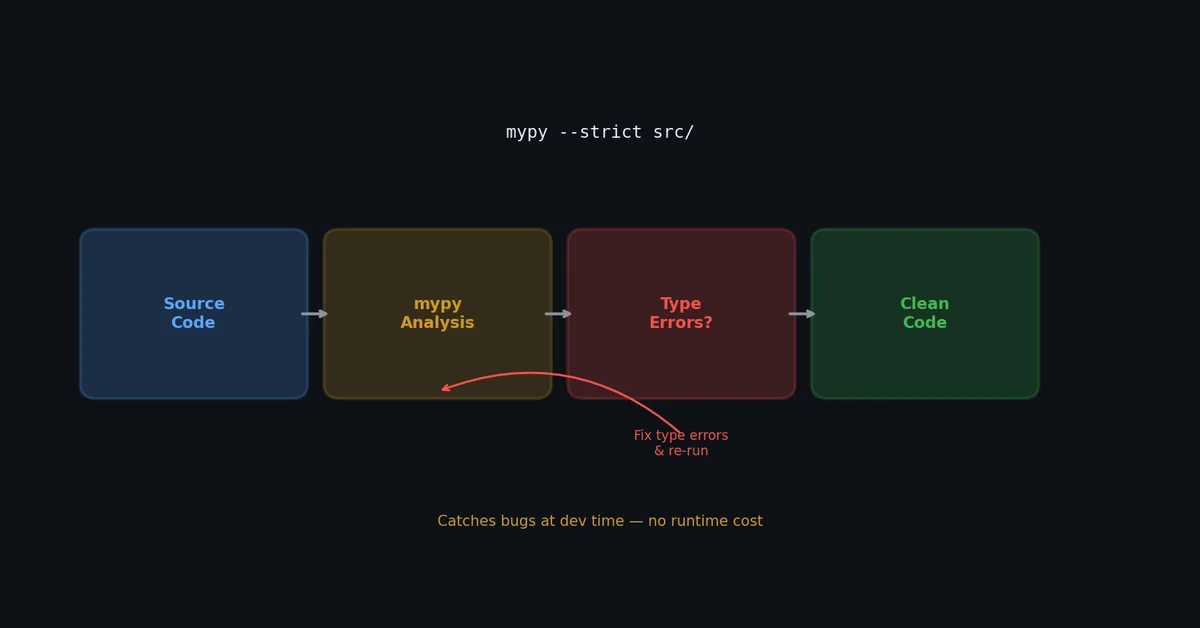
使用 mypy 进行类型检查# mypy 读取类型注解,在不实际运行代码的情况下报告错误。
安装与基础用法# 1
2
( .venv) $ pip install mypy
( .venv) $ mypy src/
严格度等级# 1
2
3
4
5
6
7
8
# 默认:仅检查已注解的代码
( .venv) $ mypy src/
# 严格模式:要求所有地方都注解,捕获更多错误
( .venv) $ mypy --strict src/
# 检查单个文件
( .venv) $ mypy src/my_tool/core.py
常见 mypy 错误及修复方式# 1
2
3
4
5
6
7
8
9
10
11
12
13
14
15
16
17
18
19
20
21
22
23
24
25
26
27
28
29
30
31
32
33
34
35
36
37
38
39
40
# 错误:Incompatible return value type (got "Optional[str]", expected "str")
def get_name ( user_id : int ) -> str :
result = lookup ( user_id ) # 返回 Optional[str]
return result # 错误!
# 修复:显式处理 None 情况
def get_name ( user_id : int ) -> str :
result = lookup ( user_id )
if result is None :
raise ValueError ( f "User { user_id } not found" )
return result # 此时 mypy 确认 result 是 str
# 错误:Item "None" of "Optional[dict]" has no attribute "get"
def get_email ( user : dict | None ) -> str :
return user . get ( "email" , "" ) # 错误:user 可能为 None
# 修复:缩小类型范围(type narrowing)
def get_email ( user : dict | None ) -> str :
if user is None :
return ""
return user . get ( "email" , "" )
# 错误:Need type annotation for "items"
items = [] # mypy 无法推断元素类型
# 修复:显式注解
items : list [ str ] = []
# 错误:Argument 1 to "open" has incompatible type "Optional[str]"
def read_file ( path : str | None ) -> str :
with open ( path ) as f : # 错误:path 可能为 None
return f . read ()
# 修复:先校验,或修改类型声明
def read_file ( path : str ) -> str :
with open ( path ) as f :
return f . read ()
mypy 配置# 1
2
3
4
5
6
7
8
9
10
11
12
13
14
15
16
17
18
19
20
21
22
# pyproject.toml
[ tool . mypy ]
python_version = "3.11"
strict = true
warn_return_any = true
warn_unused_configs = true
disallow_untyped_defs = true
disallow_incomplete_defs = true
check_untyped_defs = true
no_implicit_optional = true
warn_redundant_casts = true
warn_unused_ignores = true
# 模块级覆盖配置
[[ tool . mypy . overrides ]]
module = "tests.*"
disallow_untyped_defs = false
[[ tool . mypy . overrides ]]
module = "third_party_lib.*"
ignore_missing_imports = true
渐进式采用策略# 你无需一次性为全部代码添加类型注解。建议按以下顺序推进:
新代码 :始终添加类型提示;公共 API 函数 :标注参数与返回类型;核心模块 :逐步补全完整注解;测试代码 :为 fixture 和 helper 函数添加注解,测试函数本身可宽松处理。必要时,可用 # type: ignore[error-code] 临时抑制特定错误:
1
result = some_untyped_function () # type: ignore[no-untyped-call]
高级类型特性(Python 3.10+)# Python 类型系统演进迅速。这些特性解决了基础注解无法表达的真实问题。
ParamSpec:保留函数签名# 编写装饰器时,ParamSpec 保留被装饰函数的精确参数类型:
 1
 2
 3
 4
 5
 6
 7
 8
 9
10
11
12
13
14
15
16
17
18
19
20
21
22
23
24
from typing import ParamSpec , TypeVar , Callable
from functools import wraps
import time
P = ParamSpec ( "P" )
R = TypeVar ( "R" )
def timing ( func : Callable [ P , R ]) -> Callable [ P , R ]:
"""记录执行时间且不丢失类型信息的装饰器。"""
@wraps ( func )
def wrapper ( * args : P . args , ** kwargs : P . kwargs ) -> R :
start = time . perf_counter ()
result = func ( * args , ** kwargs )
elapsed = time . perf_counter () - start
print ( f " { func . __name__ } took { elapsed : .3f } s" )
return result
return wrapper
@timing
def fetch_user ( user_id : int , include_posts : bool = False ) -> dict :
...
# mypy 知道: fetch_user(user_id=42, include_posts=True) -> dict
# mypy 报错: fetch_user("wrong") # Error: str is not int
没有 ParamSpec,装饰后的函数会丢失类型签名,mypy 将其视为 (*args: Any, **kwargs: Any) -> Any。
TypeVarTuple:可变参数泛型# TypeVarTuple(Python 3.11+)为接受可变数量类型参数的函数提供类型:
1
2
3
4
5
6
7
8
9
10
from typing import TypeVarTuple , Unpack
Ts = TypeVarTuple ( "Ts" )
def first_of ( * args : Unpack [ Ts ]) -> tuple [ Unpack [ Ts ]]:
return args
# 类型检查器知道:
result = first_of ( 1 , "hello" , 3.14 )
# result: tuple[int, str, float]
TypeGuard 和 TypeIs# 在条件分支中缩窄类型:
1
2
3
4
5
6
7
8
9
10
from typing import TypeGuard
def is_string_list ( val : list [ object ]) -> TypeGuard [ list [ str ]]:
"""返回 True 后,mypy 知道 val 是 list[str]。"""
return all ( isinstance ( x , str ) for x in val )
def process ( data : list [ object ]):
if is_string_list ( data ):
# mypy 知道: data 是 list[str]
print ( ", " . join ( data )) # 无错误
TypeIs(Python 3.13+)比 TypeGuard 更严格——在 if 和 else 分支都会缩窄类型。
@override 装饰器(Python 3.12+)# 显式标记重写父类方法。若父类方法被重命名或删除,mypy 会报错:
 1
 2
 3
 4
 5
 6
 7
 8
 9
10
11
12
13
14
from typing import override
class Animal :
def speak ( self ) -> str :
return "..."
class Dog ( Animal ):
@override
def speak ( self ) -> str :
return "Woof"
@override
def eat ( self ) -> None : # 错误: Animal 没有 'eat' 方法
...
Pydantic:从类型注解到运行时验证# Pydantic ↗
桥接静态类型注解与运行时验证。定义一次数据模型,免费获得解析、验证和序列化。
基础模型# 1
2
3
4
5
6
7
8
9
10
11
12
13
14
15
16
17
18
19
20
21
22
23
24
25
26
from pydantic import BaseModel , Field , field_validator
from datetime import datetime
class UserCreate ( BaseModel ):
name : str = Field ( min_length = 1 , max_length = 100 )
email : str
age : int = Field ( ge = 0 , le = 150 )
created_at : datetime = Field ( default_factory = datetime . now )
@field_validator ( "email" )
@classmethod
def validate_email ( cls , v : str ) -> str :
if "@" not in v :
raise ValueError ( "invalid email format" )
return v . lower ()
# 自动解析和验证
user = UserCreate ( name = "Alice" , email = "ALICE@Example.COM" , age = 30 )
print ( user . email ) # "alice@example.com"(已转换)
# 验证错误带详细信息
try :
UserCreate ( name = "" , email = "bad" , age =- 1 )
except ValidationError as e :
print ( e . errors ())
# [{'type': 'string_too_short', 'loc': ('name',), ...}, ...]
嵌套模型与泛型# 1
2
3
4
5
6
7
8
9
10
11
12
13
14
15
16
17
18
19
20
21
22
23
24
25
from pydantic import BaseModel
from typing import Generic , TypeVar
T = TypeVar ( "T" )
class Pagination ( BaseModel , Generic [ T ]):
items : list [ T ]
total : int
page : int
per_page : int
@property
def has_next ( self ) -> bool :
return self . page * self . per_page < self . total
class Order ( BaseModel ):
id : int
product : str
quantity : int
# 类型安全的分页响应
response = Pagination [ Order ](
items = [ Order ( id = 1 , product = "Widget" , quantity = 5 )],
total = 42 , page = 1 , per_page = 10 ,
)
Pydantic + FastAPI# FastAPI 使用 Pydantic 模型进行请求/响应验证:
 1
 2
 3
 4
 5
 6
 7
 8
 9
10
11
12
13
14
15
from fastapi import FastAPI
from pydantic import BaseModel
app = FastAPI ()
class ItemCreate ( BaseModel ):
name : str
price : float = Field ( gt = 0 )
tags : list [ str ] = []
@app.post ( "/items" , response_model = ItemResponse )
async def create_item ( item : ItemCreate ) -> ItemResponse :
# item 已被 Pydantic 验证
saved = await db . save ( item . model_dump ())
return ItemResponse ( id = saved . id , ** item . model_dump ())
Pydantic vs dataclasses vs attrs# 特性 Pydantic dataclasses attrs 运行时验证 是(核心功能) 否 可选 类型强制转换 是("42" → 42) 否 否 JSON 序列化 内置 需手写 需手写 性能 快(v2 Rust 核心) 最快(无验证) 快 最佳场景 API 边界、配置 内部数据结构 内部 + 验证
原则: 系统边界(API 输入、配置文件、外部数据)用 Pydantic。内部值对象用 dataclasses。
Dataclass 模式# 冻结 Dataclass(不可变值)# 1
2
3
4
5
6
7
8
9
10
11
12
13
14
15
from dataclasses import dataclass , field
@dataclass ( frozen = True )
class Point :
x : float
y : float
def distance_to ( self , other : "Point" ) -> float :
return (( self . x - other . x ) ** 2 + ( self . y - other . y ) ** 2 ) ** 0.5
p = Point ( 1.0 , 2.0 )
# p.x = 3.0 # 错误: FrozenInstanceError
# 可哈希 → 可用作 dict 键和 set 元素
seen : set [ Point ] = { Point ( 0 , 0 ), Point ( 1 , 1 )}
__post_init__ 计算派生字段# 1
2
3
4
5
6
7
8
9
10
11
@dataclass
class Rectangle :
width : float
height : float
area : float = field ( init = False )
def __post_init__ ( self ):
self . area = self . width * self . height
r = Rectangle ( width = 3 , height = 4 )
print ( r . area ) # 12.0
Slots(Python 3.10+)# 1
2
3
4
5
6
7
8
@dataclass ( slots = True )
class Event :
name : str
timestamp : float
payload : dict
# 减少 20-30% 内存,属性访问略快
# 不能动态添加新属性
使用 ruff 进行代码检查#
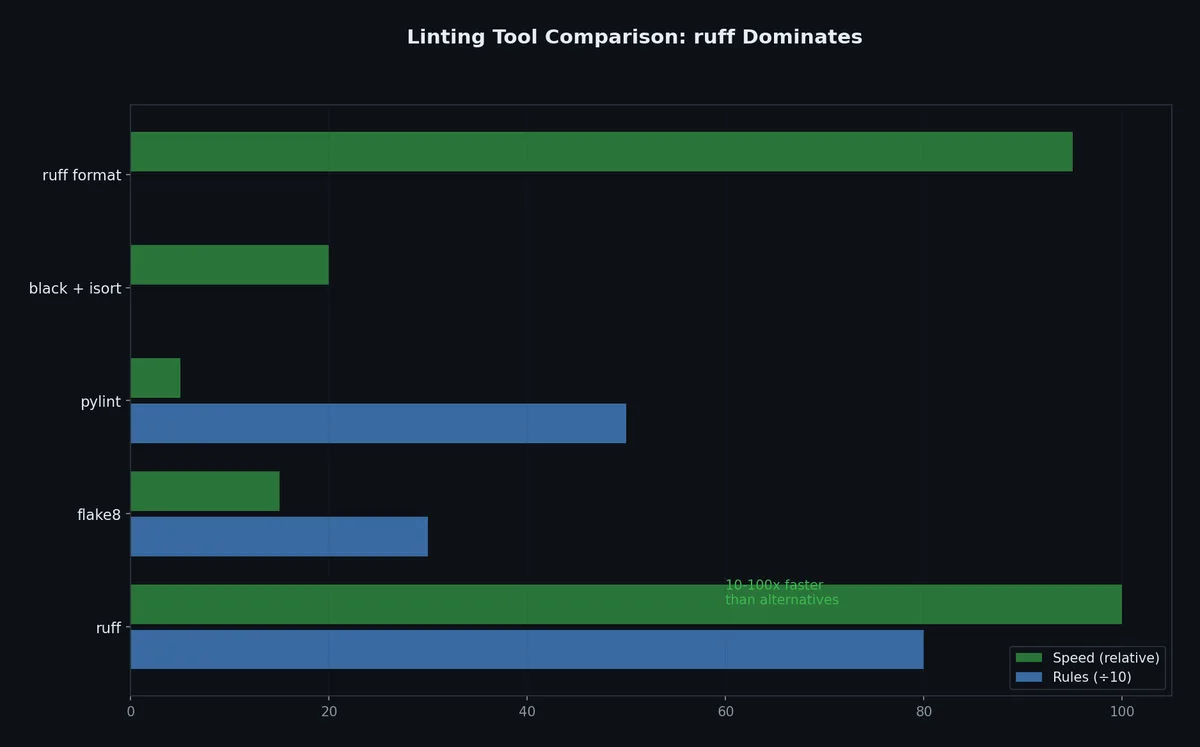
ruff 是一款用 Rust 编写的 Python linter,速度比 flake8 快 10–100 倍,并集成了 flake8、isort、pyflakes、pycodestyle、pydocstyle 以及众多 flake8 插件的功能。
安装与使用# 1
2
3
4
5
6
7
8
9
10
11
12
13
14
15
16
( .venv) $ pip install ruff
# 执行检查
( .venv) $ ruff check src/
src/my_tool/core.py:3:1: F401 [ *] ` os` imported but unused
src/my_tool/utils.py:15:80: E501 Line too long ( 92 > 88)
Found 2 errors.
[ *] 1 fixable with ` --fix` .
# 自动修复
( .venv) $ ruff check --fix src/
Found 2 errors ( 1 fixed, 1 remaining) .
# 格式化(替代 black)
( .venv) $ ruff format src/
2 files reformatted.
ruff 配置# 1
2
3
4
5
6
7
8
9
10
11
12
13
14
15
16
17
18
19
20
21
22
23
24
25
26
27
28
29
30
31
32
33
# pyproject.toml
[ tool . ruff ]
target-version = "py311"
line-length = 88
[ tool . ruff . lint ]
select = [
"E" , # pycodestyle errors
"W" , # pycodestyle warnings
"F" , # pyflakes
"I" , # isort
"N" , # pep8-naming
"UP" , # pyupgrade
"B" , # flake8-bugbear
"SIM" , # flake8-simplify
"C4" , # flake8-comprehensions
"DTZ" , # flake8-datetimez
"T20" , # flake8-print (生产代码中禁用 print)
"RET" , # flake8-return
"PTH" , # flake8-use-pathlib
"ERA" , # eradicate (移除注释掉的代码)
"RUF" , # ruff-specific rules
]
ignore = [
"E501" , # 行过长(由格式化器统一处理)
]
[ tool . ruff . lint . per-file-ignores ]
"tests/*" = [ "T20" , "S101" ] # 允许测试中使用 print 和 assert
[ tool . ruff . lint . isort ]
known-first-party = [ "my_tool" ]
ruff 能检测的问题示例# 1
2
3
4
5
6
7
8
9
10
11
12
13
14
15
16
17
18
19
20
21
22
23
24
25
26
# F401: 导入但未使用
import os # <-- ruff 将自动删除此行
# F841: 局部变量赋值后未使用
def process ():
result = compute () # <-- ruff 将标记此行
return None
# B006: 可变默认参数(危险!共享的可变默认值)
def append_to ( item , target = []): # <-- Bug!
target . append ( item )
return target
# SIM108: 推荐使用三元表达式替代 if-else
if condition :
x = 1
else :
x = 2
# ruff 建议:x = 1 if condition else 2
# UP035: 推荐使用 PEP 604 联合类型语法
from typing import Optional # <-- ruff 建议改用 str | None
def f ( x : Optional [ str ]): ...
# C4: 推荐使用字典/列表推导式
dict ([( k , v ) for k , v in items ]) # <-- ruff 建议:{k: v for k, v in items}
使用 black 进行代码格式化# black 是一款「固执己见」的代码格式化工具,替你做出所有风格决策,从而彻底终结格式之争。
 1
 2
 3
 4
 5
 6
 7
 8
 9
10
11
12
13
14
15
16
( .venv) $ pip install black
# 仅检查,不修改
( .venv) $ black --check src/
would reformat src/my_tool/core.py
Oh no!
1 file would be reformatted.
# 显示将要变更的内容
( .venv) $ black --diff src/my_tool/core.py
# 立即格式化
( .venv) $ black src/
reformatted src/my_tool/core.py
All done !
1 file reformatted.
注意:ruff format 现已作为 black 的完全替代品,因此你无需单独安装 black,直接使用 ruff format 即可。
black 配置# 1
2
3
4
5
# pyproject.toml
[ tool . black ]
line-length = 88
target-version = [ "py311" ]
black 的设计哲学是极简配置——它的目的就是终结争论,请直接使用默认值。
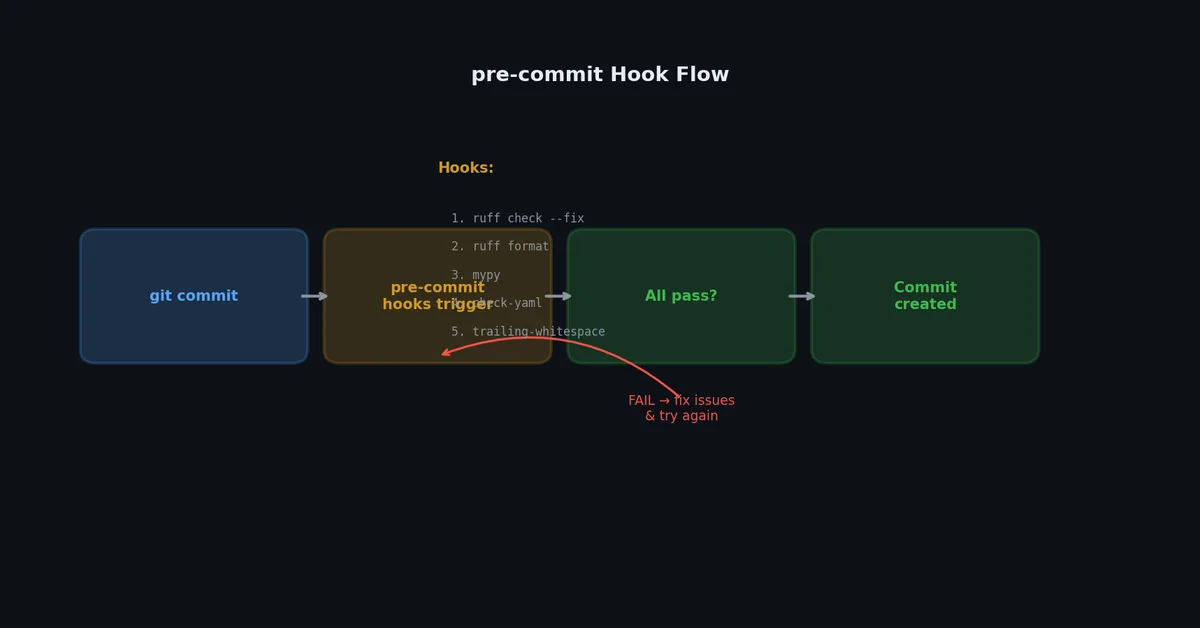
Pre-commit 钩子# pre-commit 在每次 git commit 前自动运行检查。若任一检查失败,提交将被阻止,直至问题修复。
1
( .venv) $ pip install pre-commit
在项目根目录创建 .pre-commit-config.yaml:
 1
 2
 3
 4
 5
 6
 7
 8
 9
10
11
12
13
14
15
16
17
18
19
20
21
22
23
24
25
26
repos :
- repo : https://github.com/astral-sh/ruff-pre-commit
rev : v0.3.4
hooks :
- id : ruff
args : [ --fix]
- id : ruff-format
- repo : https://github.com/pre-commit/mirrors-mypy
rev : v1.9.0
hooks :
- id : mypy
additional_dependencies :
- types-requests
- pydantic
- repo : https://github.com/pre-commit/pre-commit-hooks
rev : v4.5.0
hooks :
- id : trailing-whitespace
- id : end-of-file-fixer
- id : check-yaml
- id : check-toml
- id : check-added-large-files
args : [ --maxkb=500]
- id : debug-statements
安装钩子# 1
2
3
4
5
6
7
8
9
10
11
12
13
14
( .venv) $ pre-commit install
pre-commit installed at .git/hooks/pre-commit
# 首次对全部文件运行(全量扫描)
( .venv) $ pre-commit run --all-files
ruff.....................................................................Passed
ruff-format..............................................................Passed
mypy.....................................................................Passed
trailing whitespace......................................................Passed
fix end of files.........................................................Passed
check yaml...............................................................Passed
check toml...............................................................Passed
check for added large files..............................................Passed
debug statements.........................................................Passed
此后每次 git commit 都会自动运行这些检查。如果 ruff 或 black 修改了文件,提交会失败,你需要先 git add 修改后的文件,再重新提交。
跳过钩子(仅限紧急情况)# 1
2
3
4
5
# 跳过全部钩子
$ git commit --no-verify -m "hotfix: emergency patch"
# 跳过特定钩子
$ SKIP = mypy git commit -m "WIP: types incomplete"
请谨慎使用 --no-verify。如果频繁跳过钩子,CI 流水线仍会捕获这些问题,反而导致你在事后花费更多时间修复。
对比:ruff vs flake8 vs pylint# 特性 ruff flake8 pylint 实现语言 Rust Python Python 速度(10k 文件) ~0.1s ~30s ~120s 自动修复 ✅ ❌(需插件) ❌ 导入排序 ✅(内置 isort) ❌(需插件) ✅ 代码格式化 ✅(兼容 black) ❌ ❌ 类型检查 ❌(需搭配 mypy) ❌ ✅(基础) 插件生态 快速成长中 极其庞大 内置丰富 配置方式 pyproject.toml.flake8 或 setup.cfg.pylintrc规则数量 800+ ~200(核心) 400+ 开发活跃度 非常活跃 维护阶段 活跃
建议 :选用 ruff。它更快、支持自动修复,并整合了多个工具;类型检查则额外搭配 mypy。
完整的 pyproject.toml 配置示例#
以下是可用于生产环境的完整工具配置节:
 1
 2
 3
 4
 5
 6
 7
 8
 9
10
11
12
13
14
15
16
17
18
19
20
21
22
23
24
25
26
27
28
29
30
31
32
33
34
35
36
# pyproject.toml
[ tool . ruff ]
target-version = "py311"
line-length = 88
[ tool . ruff . lint ]
select = [ "E" , "W" , "F" , "I" , "N" , "UP" , "B" , "SIM" , "C4" , "DTZ" , "RET" , "PTH" , "RUF" ]
ignore = [ "E501" ]
[ tool . ruff . lint . per-file-ignores ]
"tests/*" = [ "T20" , "S101" ]
[ tool . ruff . lint . isort ]
known-first-party = [ "my_tool" ]
[ tool . mypy ]
python_version = "3.11"
strict = true
warn_return_any = true
[[ tool . mypy . overrides ]]
module = "tests.*"
disallow_untyped_defs = false
[ tool . pytest . ini_options ]
testpaths = [ "tests" ]
addopts = "-v --cov=my_tool --cov-report=term-missing"
[ tool . coverage . run ]
source = [ "my_tool" ]
branch = true
[ tool . coverage . report ]
show_missing = true
fail_under = 80
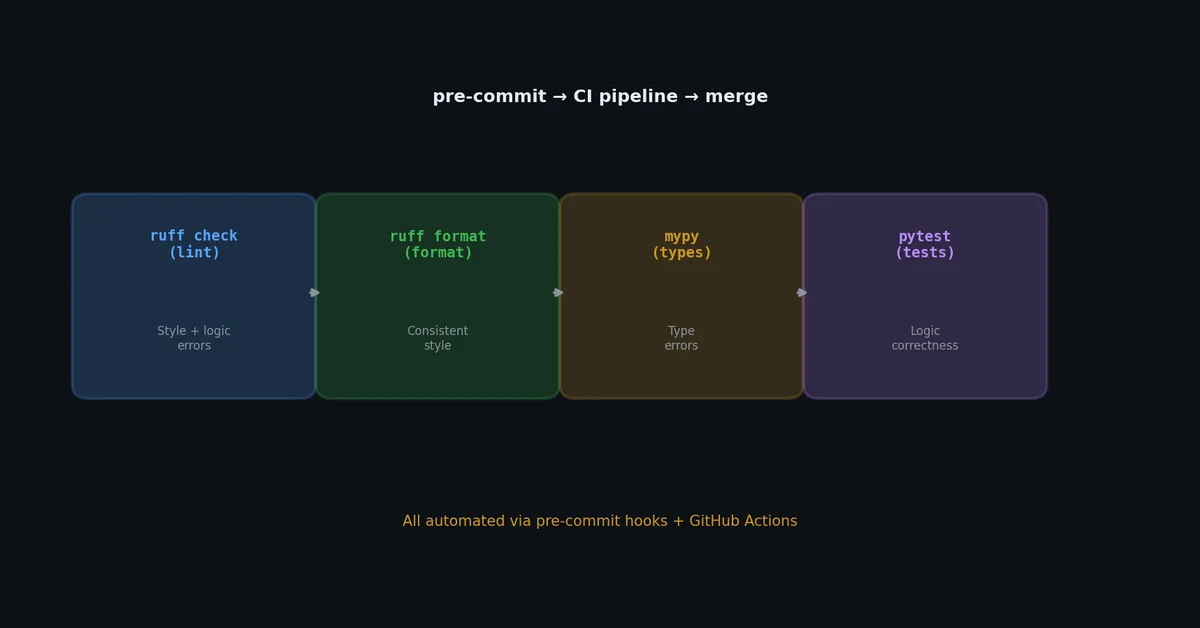
CI 集成:GitHub Actions# 在 CI 中运行全部检查,确保无遗漏:
1
2
3
4
5
6
7
8
9
10
11
12
13
14
15
16
17
18
19
20
21
22
23
24
25
26
27
28
29
30
31
32
33
34
35
36
37
38
39
40
41
42
43
44
45
46
# .github/workflows/ci.yml
name : CI
on :
push :
branches : [ main]
pull_request :
branches : [ main]
jobs :
lint-and-test :
runs-on : ubuntu-latest
strategy :
matrix :
python-version : [ "3.11" , "3.12" ]
steps :
- uses : actions/checkout@v4
- name : Set up Python ${{ matrix.python-version }}
uses : actions/setup-python@v5
with :
python-version : ${{ matrix.python-version }}
- name : Install dependencies
run : |
python -m pip install --upgrade pip
pip install -e ".[dev]"
- name : Lint with ruff
run : ruff check src/ tests/
- name : Check formatting
run : ruff format --check src/ tests/
- name : Type check with mypy
run : mypy src/
- name : Run tests
run : pytest --cov=my_tool --cov-report=xml
- name : Upload coverage
uses : codecov/codecov-action@v3
with :
file : coverage.xml
下一步# 你的代码现已具备类型安全性、格式一致性,并在每次提交时自动验证。但 Python 程序远不止计算——它们还要读写文件、解析配置、以数十种格式序列化数据。下一篇文章中,我们将深入 I/O 实践,攻克编码难题,并横向对比 JSON、Parquet 等所有主流序列化格式。