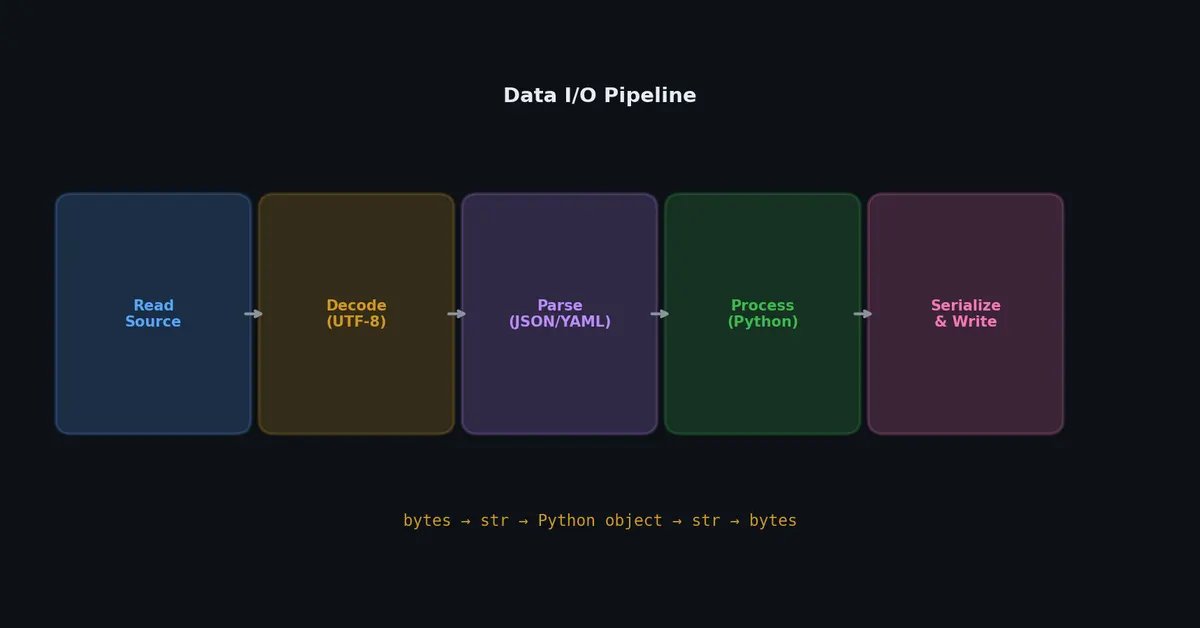
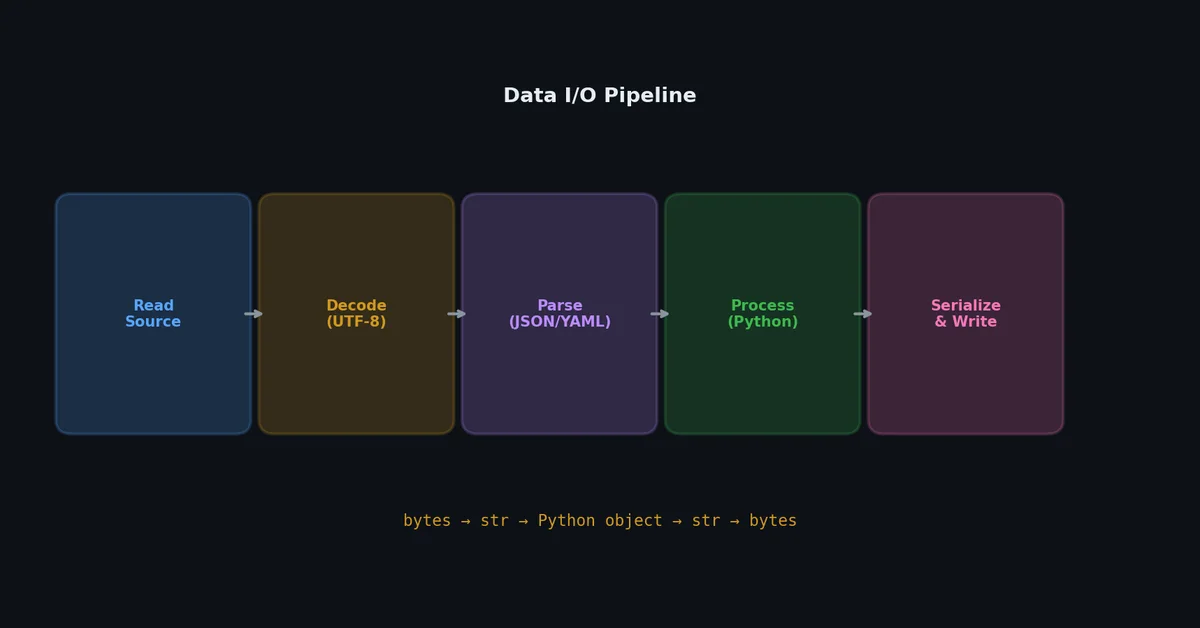
大多数程序本质上只是在不同数据格式之间搭管道:读一个 CSV,转换一下,写成 JSON;加载配置文件,校验后传给应用。每个 Python 开发者都写过这类代码,而其中大多数人至少踩过一次编码、路径处理或序列化细节的坑。
本文将覆盖 Python 中所有常见的 I/O 模式——从基础文件读写到列式数据格式,并重点剖析那些最容易浪费你时间的陷阱。
文件 I/O:基础操作#
打开文件# 1
2
3
4
5
6
7
8
# 正确方式:始终使用上下文管理器(context manager)
with open ( "data.txt" , "r" , encoding = "utf-8" ) as f :
content = f . read ()
# 不用 'with' 会发生什么:
f = open ( "data.txt" , "r" )
content = f . read ()
f . close () # 容易遗漏,尤其当上方代码抛出异常时
with 语句能确保即使发生异常,f.close() 也会被执行。永远不要不用 with 打开文件。
文件打开模式# 模式 名称 是否创建? 是否截断? 起始位置 "r"只读 否(文件不存在时报错) 否 文件开头 "w"写入 是 是 文件开头 "a"追加 是 否 文件末尾 "x"独占创建 是(若文件已存在则报错) N/A 文件开头 "r+"读写 否 否 文件开头 "w+"读写(覆盖) 是 是 文件开头 "rb"二进制只读 否 否 文件开头 "wb"二进制写入 是 是 文件开头
读取模式# 1
2
3
4
5
6
7
8
9
10
11
12
13
14
15
16
17
18
# 一次性读取整个文件为字符串
with open ( "data.txt" , encoding = "utf-8" ) as f :
content = f . read ()
# 读取为行列表
with open ( "data.txt" , encoding = "utf-8" ) as f :
lines = f . readlines ()
# 每行末尾包含换行符 '\n'
# 逐行迭代(对大文件内存友好)
with open ( "data.txt" , encoding = "utf-8" ) as f :
for line in f :
process ( line . rstrip ( " \n " ))
# 读取指定字节数
with open ( "data.bin" , "rb" ) as f :
header = f . read ( 4 ) # 前 4 字节
rest = f . read () # 剩余全部字节
写入模式# 1
2
3
4
5
6
7
8
9
10
11
12
13
14
15
16
17
18
19
20
# 写入字符串
with open ( "output.txt" , "w" , encoding = "utf-8" ) as f :
f . write ( "Hello, world \n " )
# 写入多行
lines = [ "first" , "second" , "third" ]
with open ( "output.txt" , "w" , encoding = "utf-8" ) as f :
for line in lines :
f . write ( line + " \n " )
# 或者:
with open ( "output.txt" , "w" , encoding = "utf-8" ) as f :
f . writelines ( line + " \n " for line in lines )
# 追加到已有文件
with open ( "log.txt" , "a" , encoding = "utf-8" ) as f :
f . write ( f "[ { timestamp } ] Event occurred \n " )
# 写入二进制
with open ( "output.bin" , "wb" ) as f :
f . write ( b " \x00\x01\x02\x03 " )
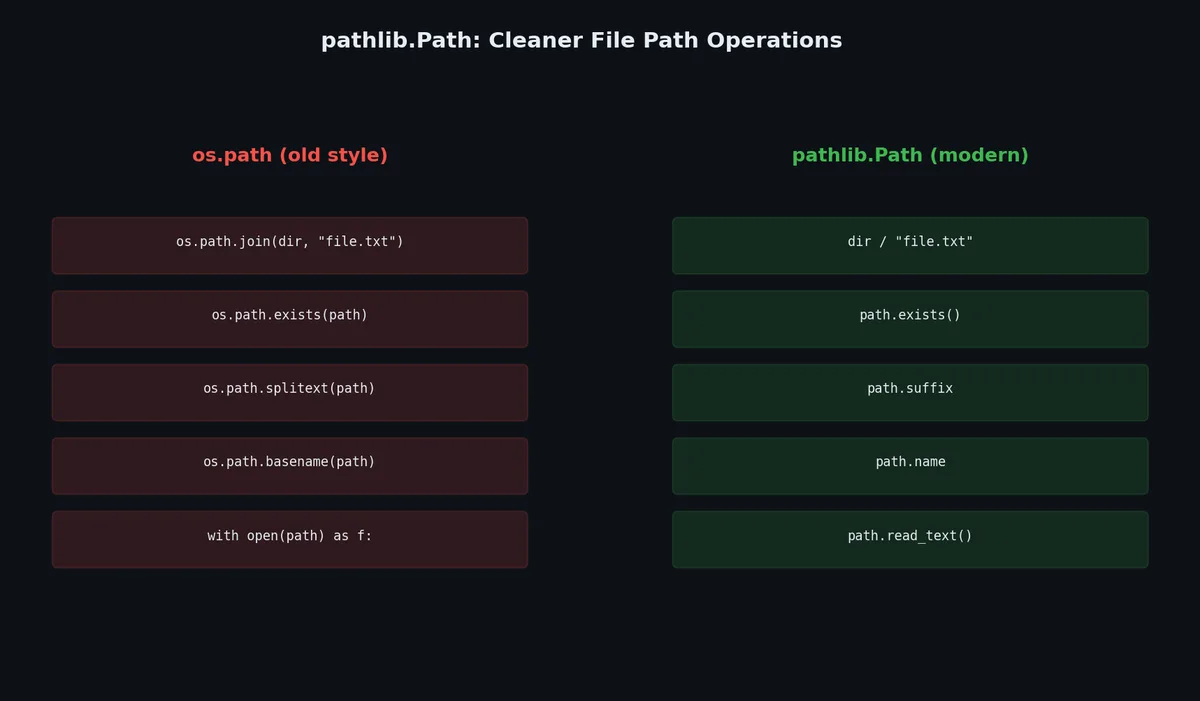
pathlib.Path:现代路径处理方式# pathlib 模块用面向对象的 API 替代了老旧的 os.path,你应该在所有地方使用它。
1
2
3
4
5
6
7
8
9
10
11
12
13
14
15
16
17
18
19
from pathlib import Path
# 创建路径
project = Path ( "/home/user/project" )
config = project / "config" / "settings.toml"
# 结果:PosixPath('/home/user/project/config/settings.toml')
# 当前目录与用户主目录
cwd = Path . cwd ()
home = Path . home ()
# 路径组成部分
p = Path ( "/home/user/project/data/file.csv" )
p . name # 'file.csv'
p . stem # 'file'
p . suffix # '.csv'
p . parent # PosixPath('/home/user/project/data')
p . parents [ 1 ] # PosixPath('/home/user/project')
p . parts # ('/', 'home', 'user', 'project', 'data', 'file.csv')
常见操作# 1
2
3
4
5
6
7
8
9
10
11
12
13
14
15
16
17
18
19
20
21
22
23
24
25
26
27
28
29
30
31
32
33
34
35
36
37
38
39
from pathlib import Path
p = Path ( "data" )
# 检查存在性
p . exists () # True/False
p . is_file () # 若为文件返回 True
p . is_dir () # 若为目录返回 True
# 创建目录(自动创建父目录,且不报错若已存在)
p . mkdir ( parents = True , exist_ok = True )
# 列出目录内容
for child in p . iterdir ():
print ( child )
# Glob 模式匹配
for csv_file in p . glob ( "*.csv" ):
print ( csv_file )
# 递归 Glob
for py_file in p . rglob ( "*.py" ):
print ( py_file )
# 便捷读写方法(无需显式 open)
text = p . joinpath ( "config.txt" ) . read_text ( encoding = "utf-8" )
p . joinpath ( "output.txt" ) . write_text ( "hello \n " , encoding = "utf-8" )
data = p . joinpath ( "image.png" ) . read_bytes ()
p . joinpath ( "copy.png" ) . write_bytes ( data )
# 文件元数据
stat = p . stat ()
stat . st_size # 文件大小(字节)
stat . st_mtime # 修改时间(Unix 时间戳)
# 重命名与删除
p . rename ( "new_name" )
p . unlink () # 删除文件
p . rmdir () # 删除空目录
os.path vs pathlib# 操作 os.pathpathlib拼接路径 os.path.join(a, b)Path(a) / b获取文件名 os.path.basename(p)p.name获取扩展名 os.path.splitext(p)[1]p.suffix获取父目录 os.path.dirname(p)p.parent检查是否存在 os.path.exists(p)p.exists()读取文件 open(p).read()p.read_text()Glob 匹配 glob.glob("*.txt")Path(".").glob("*.txt")绝对路径 os.path.abspath(p)p.resolve()
在所有场景下,pathlib 都更简洁清晰。光是能用 / 操作符拼接路径这一点,就足以让你全面切换。
编码:UTF-8 优先原则#
问题所在# 1
2
3
4
# 这段代码在你的 Mac 上能运行,但在 Windows 服务器上会失败:
with open ( "data.txt" ) as f :
content = f . read ()
# UnicodeDecodeError: 'cp1252' codec can't decode byte 0xe9
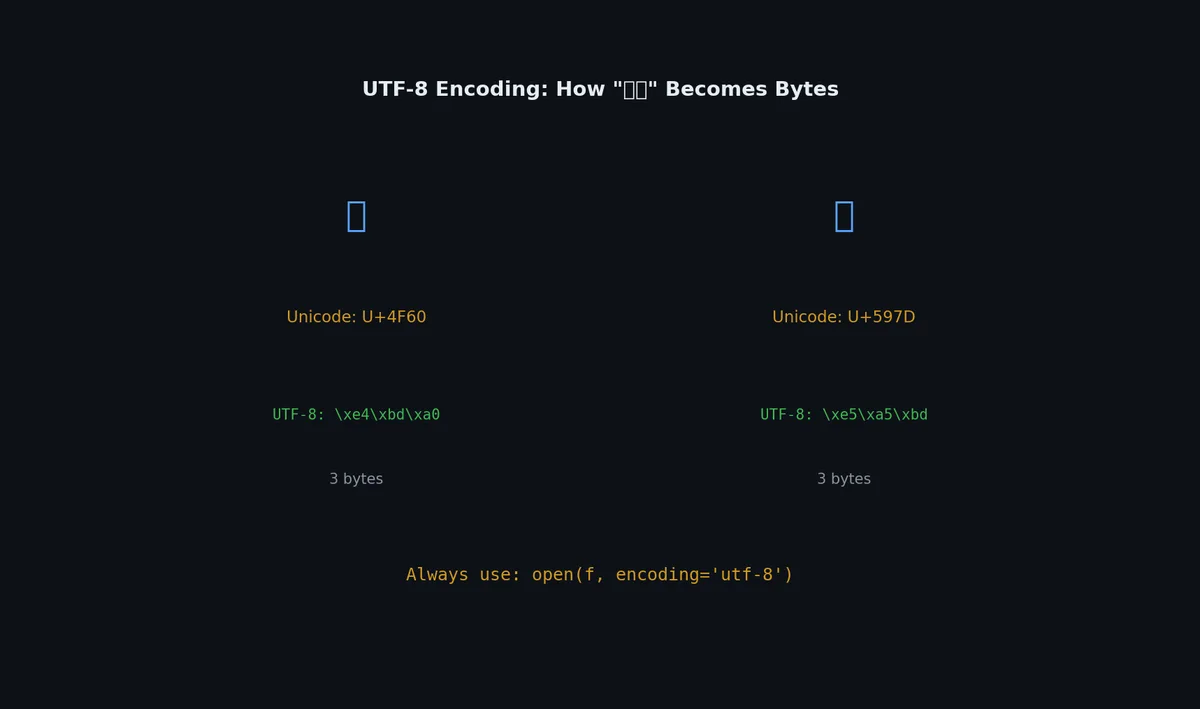
如果你不显式指定 encoding,Python 会使用系统默认编码:macOS 和 Linux 通常是 UTF-8,而 Windows 往往是 cp1252(Windows-1252)。这意味着本地跑得好好的代码,一到生产环境就可能崩溃。
解决方案# 始终显式指定编码:
1
2
3
# 务必这样做
with open ( "data.txt" , encoding = "utf-8" ) as f :
content = f . read ()
从 Python 3.15(PEP 686)开始,UTF-8 将成为默认编码。在此之前,请务必显式声明。
处理编码错误# 1
2
3
4
5
6
7
8
9
10
11
12
13
14
15
16
17
# 跳过非法字节
with open ( "messy.txt" , encoding = "utf-8" , errors = "ignore" ) as f :
content = f . read ()
# 将非法字节替换为 '?'
with open ( "messy.txt" , encoding = "utf-8" , errors = "replace" ) as f :
content = f . read ()
# 自动检测编码(当你完全不知道源编码时)
import chardet
with open ( "mystery.txt" , "rb" ) as f :
raw = f . read ()
detected = chardet . detect ( raw )
# {'encoding': 'utf-8', 'confidence': 0.99, 'language': ''}
content = raw . decode ( detected [ "encoding" ])
BOM(字节顺序标记)# 某些 Windows 工具会在 UTF-8 文件开头插入一个 BOM()。此时应使用 utf-8-sig 编码来自动处理:
1
2
3
4
5
6
7
# 读取:自动剥离 BOM(如存在)
with open ( "windows_file.csv" , encoding = "utf-8-sig" ) as f :
content = f . read ()
# 写入:添加 BOM(提升 Windows 兼容性)
with open ( "output.csv" , "w" , encoding = "utf-8-sig" ) as f :
f . write ( "data \n " )
JSON# JSON 是最主流的数据交换格式,Python 的 json 模块原生支持。
读写操作# 1
2
3
4
5
6
7
8
9
10
11
12
13
14
15
16
17
18
19
20
21
22
23
24
import json
# 解析 JSON 字符串
data = json . loads ( '{"name": "Alice", "age": 30}' )
# data = {'name': 'Alice', 'age': 30}
# 序列化为 JSON 字符串
text = json . dumps ( data )
# '{"name": "Alice", "age": 30}'
# 美化输出
text = json . dumps ( data , indent = 2 , sort_keys = True )
# {
# "age": 30,
# "name": "Alice"
# }
# 从文件读取
with open ( "config.json" , encoding = "utf-8" ) as f :
config = json . load ( f )
# 写入文件
with open ( "output.json" , "w" , encoding = "utf-8" ) as f :
json . dump ( data , f , indent = 2 , ensure_ascii = False )
ensure_ascii=False 对非 ASCII 文本至关重要。否则中文、emoji 等字符会被转义成 \uXXXX 形式。
自定义序列化器# JSON 原生不支持 datetime、Path、set、bytes 或自定义对象。你可以通过 default 参数处理它们:
 1
 2
 3
 4
 5
 6
 7
 8
 9
10
11
12
13
14
15
16
17
18
19
20
21
22
23
24
25
import json
from datetime import datetime
from pathlib import Path
def json_serializer ( obj ):
"""处理 json.dumps 无法直接序列化的类型"""
if isinstance ( obj , datetime ):
return obj . isoformat ()
if isinstance ( obj , Path ):
return str ( obj )
if isinstance ( obj , set ):
return sorted ( obj )
if isinstance ( obj , bytes ):
return obj . decode ( "utf-8" , errors = "replace" )
raise TypeError ( f "Type { type ( obj ) } is not JSON serializable" )
data = {
"timestamp" : datetime . now (),
"path" : Path ( "/home/user/data" ),
"tags" : { "python" , "coding" },
}
text = json . dumps ( data , default = json_serializer , indent = 2 )
命令行 JSON 工具# Python 自带一个 JSON 格式化工具:
1
2
3
4
5
# 美化打印 JSON 文件
$ python -m json.tool data.json
# 从管道输入
$ curl -s https://api.example.com/data | python -m json.tool
YAML# YAML 因其可读性强且支持注释,常被用于配置文件。
1
( .venv) $ pip install pyyaml
1
2
3
4
5
6
7
8
9
import yaml
# 读取 YAML
with open ( "config.yaml" , encoding = "utf-8" ) as f :
config = yaml . safe_load ( f )
# 写入 YAML
with open ( "output.yaml" , "w" , encoding = "utf-8" ) as f :
yaml . dump ( config , f , default_flow_style = False , allow_unicode = True )
safe_load vs load# 务必始终使用 safe_load。 load 函数可能执行 YAML 中嵌入的任意 Python 代码:
1
2
3
# 下面这段 YAML 在使用 yaml.load() 时会执行系统命令:
!!python/object/apply:os.system
args : [ "rm -rf /" ]
safe_load 会拒绝这些危险标签。除非你完全信任数据来源,否则没有任何理由使用 load。
YAML 的陷阱# 1
2
3
4
5
6
7
8
9
# YAML 存在令人意外的类型强制转换:
norway : NO # 解析为布尔值 False!
version : 3.10 # 解析为浮点数 3.1!
port : 8080 # 解析为整数(通常符合预期)
zip : 01onal # 解析为字符串
# 对任何可能被误判为布尔值或数字的值,务必加引号:
norway : "NO"
version : "3.10"
这是真实存在的 bug 来源。请坚持使用 safe_load,并对任何看起来像布尔值或数字但实际不是的值加上引号。
TOML# TOML 是 YAML 的现代替代方案,专为配置设计:没有类型强制转换的意外,语法清晰明确,也是 Python 打包的标准格式(pyproject.toml)。
读取 TOML# Python 3.11+ 内置了 tomllib:
1
2
3
4
5
6
7
8
9
10
11
12
13
14
15
16
17
# Python 3.11+
import tomllib
with open ( "config.toml" , "rb" ) as f :
config = tomllib . load ( f )
# 或从字符串解析
config = tomllib . loads ( """
[server]
host = "0.0.0.0"
port = 8080
debug = false
[database]
url = "postgresql://localhost/mydb"
pool_size = 5
""" )
注意:tomllib 必须以二进制模式("rb")打开文件 ,不能用文本模式。
对于 Python 3.10 及更早版本:
1
( .venv) $ pip install tomli
1
2
3
4
import tomli
with open ( "config.toml" , "rb" ) as f :
config = tomli . load ( f )
写入 TOML# 标准库不提供 TOML 写入器,推荐使用 tomli-w:
1
( .venv) $ pip install tomli-w
1
2
3
4
5
6
7
8
9
import tomli_w
config = {
"server" : { "host" : "0.0.0.0" , "port" : 8080 },
"database" : { "url" : "postgresql://localhost/mydb" },
}
with open ( "config.toml" , "wb" ) as f :
tomli_w . dump ( config , f )
CSV# CSV 在数据工作中无处不在。Python 的 csv 模块能正确处理引号、转义和各种分隔符。
读取 CSV# 1
2
3
4
5
6
7
8
9
10
11
12
13
14
import csv
# 作为列表读取
with open ( "data.csv" , encoding = "utf-8" ) as f :
reader = csv . reader ( f )
header = next ( reader )
for row in reader :
print ( row ) # ['Alice', '30', 'alice@example.com']
# 作为字典读取(通常更推荐)
with open ( "data.csv" , encoding = "utf-8" ) as f :
reader = csv . DictReader ( f )
for row in reader :
print ( row [ "name" ], row [ "age" ])
写入 CSV# 1
2
3
4
5
6
7
8
9
10
11
12
import csv
# 使用 DictWriter 写入
rows = [
{ "name" : "Alice" , "age" : 30 , "email" : "alice@example.com" },
{ "name" : "Bob" , "age" : 25 , "email" : "bob@example.com" },
]
with open ( "output.csv" , "w" , encoding = "utf-8" , newline = "" ) as f :
writer = csv . DictWriter ( f , fieldnames = [ "name" , "age" , "email" ])
writer . writeheader ()
writer . writerows ( rows )
newline="" 参数在 Windows 上至关重要。缺少它会导致出现双换行。
CSV 边界情况# 1
2
3
4
5
6
7
8
9
10
11
# 制表符分隔(TSV)
with open ( "data.tsv" , encoding = "utf-8" ) as f :
reader = csv . reader ( f , delimiter = " \t " )
# 分号分隔(欧洲地区常见)
with open ( "data.csv" , encoding = "utf-8" ) as f :
reader = csv . reader ( f , delimiter = ";" )
# 处理由 Excel 导出的带 BOM 的 CSV
with open ( "excel_export.csv" , encoding = "utf-8-sig" ) as f :
reader = csv . DictReader ( f )
二进制格式#
pickle:Python 对象序列化# pickle 能将任意 Python 对象序列化为字节流并还原,速度快且方便。
1
2
3
4
5
6
7
8
9
10
11
import pickle
data = { "key" : [ 1 , 2 , 3 ], "nested" : { "a" : "b" }}
# 序列化
with open ( "data.pkl" , "wb" ) as f :
pickle . dump ( data , f )
# 反序列化
with open ( "data.pkl" , "rb" ) as f :
loaded = pickle . load ( f )
但 pickle 极其危险。 加载不受信任的 pickle 文件会执行任意代码。切勿反序列化来自不可信来源的数据。 此外,pickle 文件不保证跨 Python 版本或跨平台兼容。它只适合在你自己控制的系统内做临时缓存。
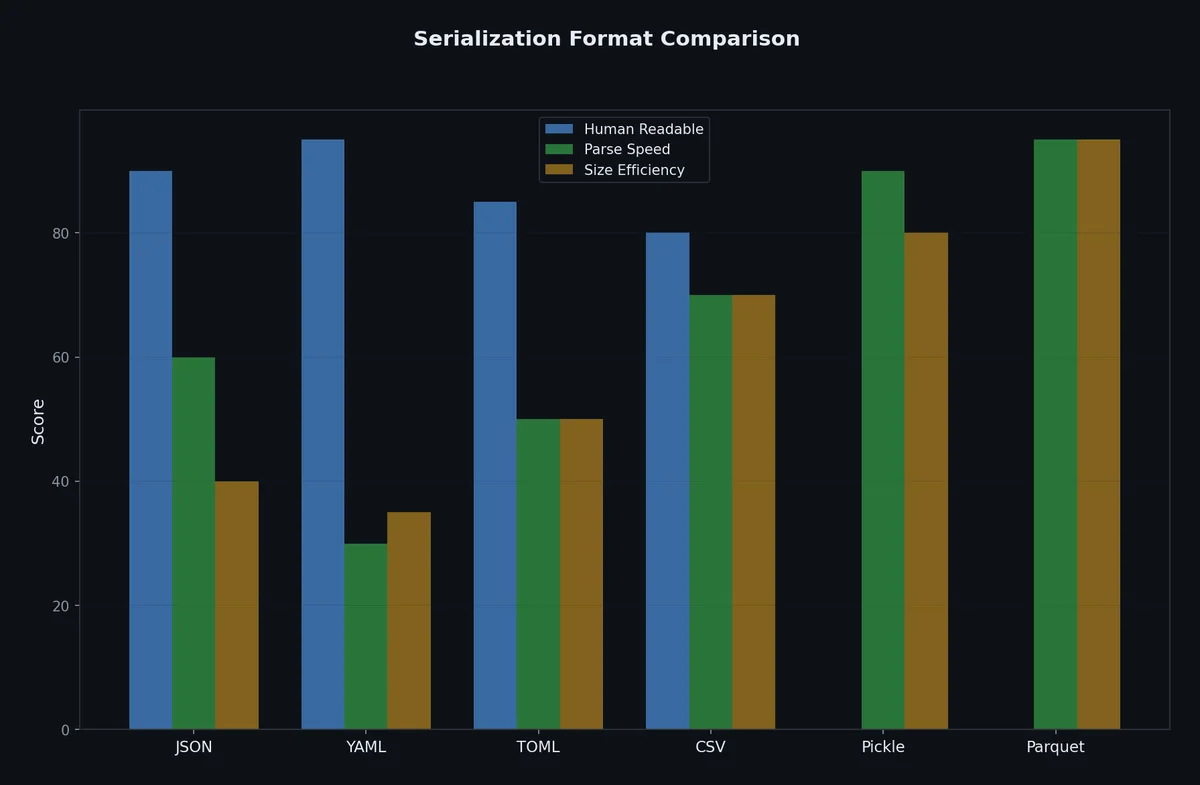
格式 人类可读 跨语言 可安全加载自不可信源 Python 专用 JSON 是 是 是 否 YAML 是 是 是(safe_load) 否 TOML 是 是 是 否 pickle否 否 否(危险) 是 msgpack否 是 是 否
struct:二进制数据打包# 适用于处理二进制协议或文件格式:
1
2
3
4
5
6
7
8
9
10
import struct
# 将数据打包为字节
packed = struct . pack ( ">IHB" , 1024 , 256 , 42 )
# > = 大端序,I = uint32,H = uint16,B = uint8
# 结果:b'\x00\x00\x04\x00\x01\x00\x2a'
# 将字节解包为数值
values = struct . unpack ( ">IHB" , packed )
# (1024, 256, 42)
msgpack:快速二进制序列化# msgpack 是 JSON 的二进制替代品,更快更紧凑:
1
( .venv) $ pip install msgpack
1
2
3
4
5
6
7
8
9
10
import msgpack
data = { "name" : "Alice" , "scores" : [ 95 , 87 , 91 ]}
# 序列化
packed = msgpack . packb ( data )
# b'\x82\xa4name\xa5Alice\xa6scores\x93_W['
# 反序列化
unpacked = msgpack . unpackb ( packed )
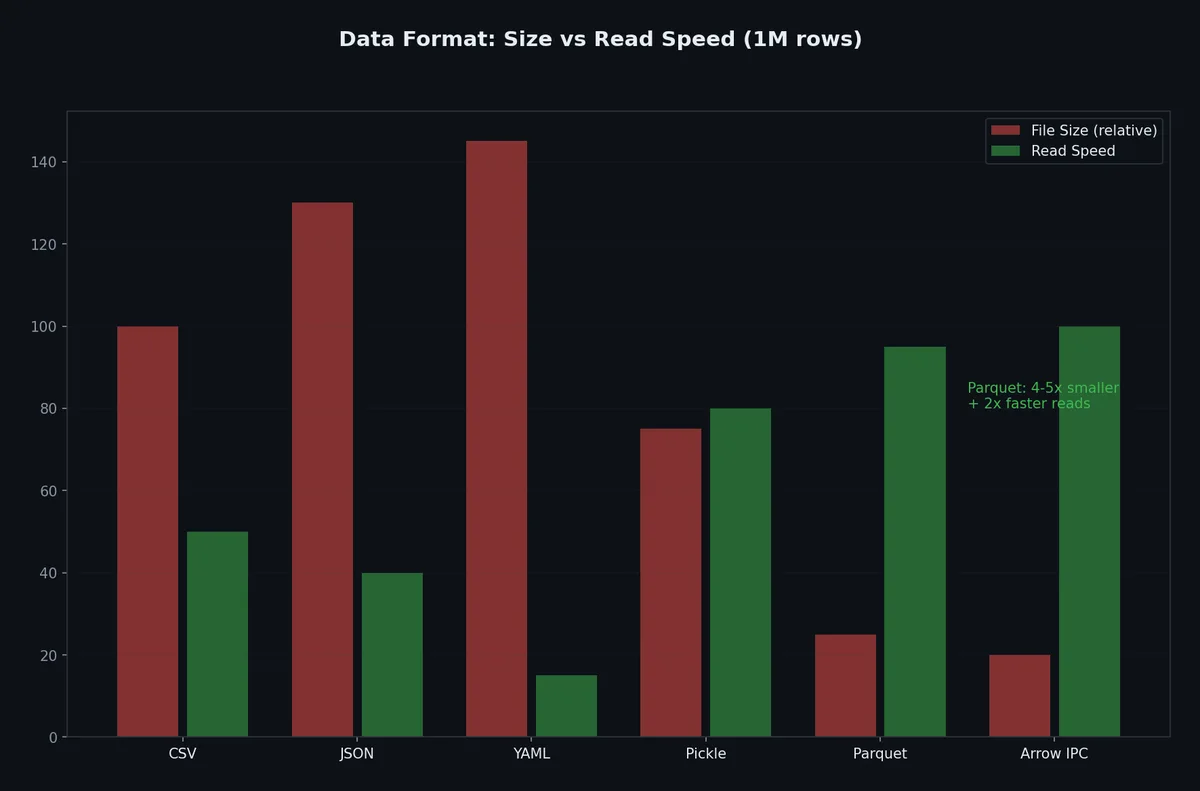
Parquet 与 Arrow:列式数据# 对于大型数据集,行式格式(如 CSV、JSON)效率低下且浪费资源。Parquet 采用列式存储,支持高效压缩和快速分析查询。
1
( .venv) $ pip install pyarrow pandas
1
2
3
4
5
6
7
8
9
10
11
import pandas as pd
# 读取 CSV 并写入 Parquet
df = pd . read_csv ( "large_data.csv" )
df . to_parquet ( "large_data.parquet" , engine = "pyarrow" )
# 读取 Parquet
df = pd . read_parquet ( "large_data.parquet" )
# 仅读取特定列(Parquet 可跳过未使用列)
df = pd . read_parquet ( "large_data.parquet" , columns = [ "name" , "age" ])
一个百万行数据集的性能对比:
格式 文件大小 写入耗时 读取耗时 仅读两列耗时 CSV 120 MB 8.2s 5.1s 5.1s (全量读取) JSON 200 MB 12.5s 9.8s 9.8s (全量读取) Parquet 15 MB 1.8s 0.4s 0.1s
在这个例子中,Parquet 比 CSV 小 8 倍,读取速度提升 12 倍。
流式处理大文件# 文件超出可用内存时,必须分块处理。Python 的迭代器协议让这很自然。
逐行处理# 1
2
3
4
5
6
7
8
9
10
from pathlib import Path
def process_large_log ( path : Path ) -> dict [ str , int ]:
"""统计日志级别——无需将整个文件加载到内存。"""
counts : dict [ str , int ] = {}
with open ( path , encoding = "utf-8" ) as f :
for line in f : # 每次产出一行
level = line . split ( "|" , 2 )[ 1 ] . strip () if "|" in line else "UNKNOWN"
counts [ level ] = counts . get ( level , 0 ) + 1
return counts
Python 文件对象本身就是迭代器——for line in f 逐行读取,永远不会加载整个文件。
分块二进制读取# 1
2
3
4
5
6
7
8
def sha256_file ( path : Path , chunk_size : int = 65536 ) -> str :
"""哈希大文件,不全量加载到内存。"""
import hashlib
h = hashlib . sha256 ()
with open ( path , "rb" ) as f :
while chunk := f . read ( chunk_size ):
h . update ( chunk )
return h . hexdigest ()
海象运算符(:=)使分块读取简洁。64KB-1MB 的块大小在系统调用开销和内存之间取得平衡。
生成器流水线# 链式生成器构建内存高效的数据管道:
 1
 2
 3
 4
 5
 6
 7
 8
 9
10
11
12
13
14
15
16
17
18
19
20
21
22
23
24
25
26
27
28
29
30
31
from typing import Iterator
import gzip
import json
def read_jsonl_gz ( path : Path ) -> Iterator [ dict ]:
"""从 gzip 压缩的 JSON Lines 文件流式读取记录。"""
with gzip . open ( path , "rt" , encoding = "utf-8" ) as f :
for line in f :
if line . strip ():
yield json . loads ( line )
def filter_recent ( records : Iterator [ dict ], days : int = 7 ) -> Iterator [ dict ]:
"""只保留最近 N 天的记录。"""
from datetime import datetime , timedelta
cutoff = datetime . now () - timedelta ( days = days )
for record in records :
if datetime . fromisoformat ( record [ "timestamp" ]) > cutoff :
yield record
def extract_errors ( records : Iterator [ dict ]) -> Iterator [ dict ]:
"""只保留 ERROR 级别记录。"""
for record in records :
if record . get ( "level" ) == "ERROR" :
yield record
# 组合:在迭代之前什么都不执行
pipeline = extract_errors ( filter_recent ( read_jsonl_gz ( Path ( "app.jsonl.gz" ))))
# 逐条处理——无论文件多大,内存恒定
for error in pipeline :
print ( f " { error [ 'timestamp' ] } : { error [ 'message' ] } " )
内存映射文件# 大文件随机访问时,mmap 将文件内容直接映射到虚拟内存:
1
2
3
4
5
6
7
8
9
10
11
12
13
14
15
16
import mmap
from pathlib import Path
def search_in_large_file ( path : Path , pattern : bytes ) -> list [ int ]:
"""用 mmap 在大文件中查找所有匹配位置。"""
offsets = []
with open ( path , "rb" ) as f :
with mmap . mmap ( f . fileno (), 0 , access = mmap . ACCESS_READ ) as mm :
pos = 0
while True :
pos = mm . find ( pattern , pos )
if pos == - 1 :
break
offsets . append ( pos )
pos += 1
return offsets
操作系统负责分页——只有被访问的区域才加载到物理 RAM。
Protocol Buffers:模式优先的序列化# Protocol Buffers ↗
(protobuf)在 .proto 模式文件中定义数据结构。代码生成确保跨语言类型安全。
何时用 Protobuf vs JSON# 因素 JSON Protobuf 人类可读 是 否(二进制) 模式强制 否(可选 JSON Schema) 是(必须) 体积 大(文本 + 键名重复) 小(二进制,字段编号) 速度 慢(解析文本) 快(解码二进制) 多语言支持 通用 代码生成覆盖 10+ 语言 模式演进 脆弱(重命名即破坏) 安全(字段编号稳定) 最佳场景 API、配置、调试 服务间通信、持久存储
定义模式# 1
2
3
4
5
6
7
8
9
10
11
12
13
14
15
16
// user.proto
syntax = "proto3" ;
message User {
int32 id = 1 ;
string name = 2 ;
string email = 3 ;
repeated string tags = 4 ;
enum Role {
UNKNOWN = 0 ;
ADMIN = 1 ;
USER = 2 ;
}
Role role = 5 ;
}
生成 Python 代码# 1
2
$ pip install grpcio-tools
$ python -m grpc_tools.protoc -I. --python_out= . --pyi_out= . user.proto
生成 user_pb2.py(运行时)和 user_pb2.pyi(类型存根)。
使用生成的代码# 1
2
3
4
5
6
7
8
9
10
11
12
13
14
from user_pb2 import User
# 创建
user = User ( id = 1 , name = "Alice" , email = "alice@example.com" , role = User . ADMIN )
user . tags . append ( "staff" )
# 序列化(字节)
data : bytes = user . SerializeToString ()
print ( len ( data )) # ~40 字节(相比 JSON 等效的 ~120 字节)
# 反序列化
restored = User ()
restored . ParseFromString ( data )
assert restored . name == "Alice"
模式演进规则# 遵循以下规则可安全演进 protobuf 模式:
永不复用字段编号 — 删除的字段应标记为 reserved新字段用新编号 — 旧代码忽略未知字段不改变字段类型 — int32 改 string 会破坏现有数据使用 optional — 可能不总是设置的字段DuckDB:对本地文件执行 SQL# DuckDB ↗
是进程内分析数据库。直接读取 Parquet、CSV、JSON 文件——无需服务器,无需导入步骤。
1
( .venv) $ pip install duckdb
直接查询文件# 1
2
3
4
5
6
7
8
9
10
11
12
13
14
15
16
17
import duckdb
# 用 SQL 查询 CSV 文件
result = duckdb . sql ( """
SELECT department, COUNT(*) as headcount, AVG(salary) as avg_salary
FROM 'employees.csv'
GROUP BY department
ORDER BY avg_salary DESC
""" ) . fetchdf () # 返回 pandas DataFrame
# 查询 Parquet 文件(支持通配符)
result = duckdb . sql ( """
SELECT date_trunc('month', created_at) as month, COUNT(*) as orders
FROM 'orders/*.parquet'
GROUP BY 1
ORDER BY 1
""" )
格式转换# 1
2
3
4
5
6
7
8
9
10
11
12
13
import duckdb
# CSV → Parquet(带压缩)
duckdb . sql ( """
COPY (SELECT * FROM 'large_dataset.csv')
TO 'output.parquet' (FORMAT PARQUET, COMPRESSION ZSTD)
""" )
# Parquet → CSV(筛选后)
duckdb . sql ( """
COPY (SELECT * FROM 'data.parquet' WHERE year = 2024)
TO 'filtered.csv' (FORMAT CSV, HEADER)
""" )
DuckDB vs pandas# 操作 pandas DuckDB 加载 1GB CSV ~30s, 3GB RAM ~5s, ~200MB RAM 分组聚合 中等 快(列式引擎) 两文件 JOIN 两者全量加载 流式 join,低内存 筛选+导出 全量加载→筛选→导出 下推筛选,最小 I/O SQL 接口 无 原生 SQL
文件太大无法放入 RAM、需要 SQL 语义、或想避免 pandas 依赖时,用 DuckDB。
配置模式# 使用 python-dotenv 处理 .env 文件# 1
( .venv) $ pip install python-dotenv
1
2
3
4
5
# .env
DATABASE_URL = postgresql://localhost/mydb
API_KEY = sk-abc123
DEBUG = true
SECRET_KEY = super-secret-key-do-not-commit
1
2
3
4
5
6
7
8
from dotenv import load_dotenv
import os
load_dotenv () # 将 .env 加载至 os.environ
database_url = os . environ [ "DATABASE_URL" ]
api_key = os . environ [ "API_KEY" ]
debug = os . environ . get ( "DEBUG" , "false" ) . lower () == "true"
务必把 .env 加入 .gitignore,并提交一个包含占位符的 .env.example:
1
2
3
4
5
# .env.example
DATABASE_URL = postgresql://localhost/mydb
API_KEY = your-api-key-here
DEBUG = false
SECRET_KEY = generate-a-random-key
配置文件格式对比表# 特性 JSON YAML TOML .env支持注释 否 是 是 是 嵌套结构 是 是 是 否(仅扁平键值对) 类型安全性 良好 差(类型强制转换) 良好 无(全为字符串) 人类可读性 良好 良好 良好 良好 Python 标准库支持 是 PyYAML 是(3.11+) python-dotenv多行字符串 需转义 是 是 有限 典型用途 API、数据交换 Kubernetes、Docker Compose pyproject.toml、Cargo密钥、环境变量 “陷阱”风险 低 中(类型强制转换) 低 低
推荐方案:
应用配置 :TOML(清晰、强类型、无歧义)密钥与环境变量 :.env 文件(绝不可提交至版本控制 )数据交换 :JSON(通用性强,所有语言均支持)避免使用 YAML ,除非你必须配合要求 YAML 的工具(如 Kubernetes、GitHub Actions)下一步# 文件与数据格式构成了程序的 I/O 层。但当你的程序需要同时执行大量 I/O 操作——比如下载 100 个文件或并发调用 50 个 API——串行执行会把大部分时间浪费在等待上。下一篇文章将深入探讨并发编程:线程(threads)、进程(processes)与异步 I/O(asyncio),并教你如何为不同场景选择最合适的工具。