Python 工程实践(六):并发编程 —— 线程、进程与 asyncio 深入理解 GIL,掌握 threading、multiprocessing 和 asyncio。学会为 I/O 密集型与 CPU 密集型任务选择最合适的并发模型。
CK
Chen Kai
April 21, 2022 · 28 分钟 · 6521 字
你的脚本一次只下载 100 个文件,每个约耗时 2 秒——绝大部分时间在等待服务器响应,总耗时 200 秒,而 CPU 99% 的时间处于空闲状态。你为网络延迟付费,却白白浪费了计算资源,并发编程正是为了解决这个问题而诞生的。
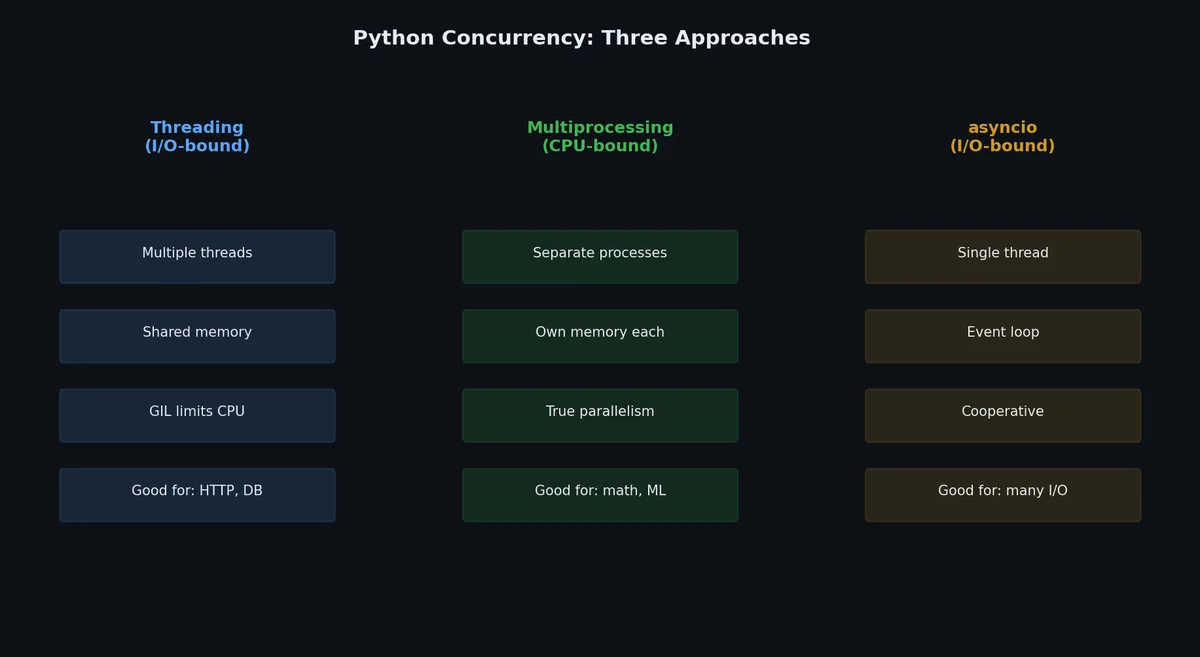
Python 提供三种并发模型,分别面向不同场景。选错模型不仅无法提速,还可能引发竞态条件。
GIL:它是什么?为何重要?# 全局解释器锁(Global Interpreter Lock,GIL)是保护 Python 对象访问的互斥锁(mutex),即使在多核机器上也仅允许一个线程执行 Python 字节码。
GIL 无法防止什么# 1
2
3
4
5
6
7
8
9
10
11
12
13
14
15
16
17
18
import threading
counter = 0
def increment ():
global counter
for _ in range ( 1_000_000 ):
counter += 1 # 这不是原子操作!
threads = [ threading . Thread ( target = increment ) for _ in range ( 4 )]
for t in threads :
t . start ()
for t in threads :
t . join ()
print ( counter )
# 无 GIL:竞态条件,counter < 4_000_000
# 有 GIL:仍有竞态条件!counter < 4_000_000
等等,GIL 并不能防止这个?没错。counter += 1 编译为多个字节码指令(LOAD、ADD、STORE),而 GIL 可能在这些字节码指令执行的间隙被释放。GIL 保护的是解释器内部结构,而非你的应用逻辑。
GIL 实际能做什么# 防止多线程同时破坏 Python 内部数据结构(如引用计数、对象分配) 加速单线程代码执行(避免加锁开销) 在 I/O 操作(文件读写、网络调用、sleep)期间自动释放 GIL 对你的实际影响# 工作负载类型 Threading Multiprocessing I/O 密集型(网络、磁盘、数据库) 表现良好(I/O 期间 GIL 释放) 可行但过度设计 CPU 密集型(数学计算、解析) 无加速效果(GIL 阻塞并行执行) 表现良好(独立进程,各自拥有 GIL) 混合型 取决于 I/O 与 CPU 比例 通常更稳妥的选择
未来:Free-Threaded Python(3.13+)# PEP 703 引入了实验性的无 GIL CPython 构建。从 Python 3.13 开始,你可以安装"free-threaded"构建(python3.13t),实现线程级真正并行执行:
1
2
3
4
5
6
# 安装 free-threaded 构建(实验性)
$ pyenv install 3.13.0t
# 检查 GIL 是否已禁用
$ python3.13t -c "import sys; print(sys._is_gil_enabled())"
False
GIL 禁用后,前面的线程示例在 CPU 密集型任务上确实能获得真正的并行加速。然而截至 2025 年,生态系统仍在适配——许多 C 扩展假设 GIL 存在,可能会崩溃或产生错误结果。目前仅适合实验,不建议用于生产环境。计划在 Python 3.15 或 3.16 中将 free-threading 设为默认。
当前实践建议不变:I/O 用线程,CPU 用进程,高并发 I/O 用 asyncio。
Threading:面向 I/O 密集型任务的并发# 线程共享同一内存空间,开销轻量。由于 GIL 在 I/O 操作期间会释放,因此线程非常适合网络请求、文件操作和数据库查询等场景。
基础线程用法# 1
2
3
4
5
6
7
8
9
10
11
12
13
14
15
16
17
18
19
20
21
22
23
24
25
26
27
28
29
30
31
32
33
import threading
import time
import requests
def download ( url : str ) -> int :
"""下载 URL,返回响应体大小。"""
response = requests . get ( url , timeout = 10 )
return len ( response . content )
urls = [
"https://httpbin.org/delay/1" ,
]
# 串行执行:约 4 秒
start = time . perf_counter ()
results = [ download ( url ) for url in urls ]
sequential_time = time . perf_counter () - start
print ( f "Sequential: { sequential_time : .2f } s" )
# 多线程:约 1 秒
start = time . perf_counter ()
threads = []
for url in urls :
t = threading . Thread ( target = download , args = ( url ,))
t . start ()
threads . append ( t )
for t in threads :
t . join ()
threaded_time = time . perf_counter () - start
print ( f "Threaded: { threaded_time : .2f } s" )
输出:
1
2
Sequential: 4.12s
Threaded: 1.08s
ThreadPoolExecutor# concurrent.futures 提供更高层的 API,并支持结果收集:
 1
 2
 3
 4
 5
 6
 7
 8
 9
10
11
12
13
14
15
16
17
18
19
20
21
22
23
24
25
26
27
28
from concurrent.futures import ThreadPoolExecutor , as_completed
import requests
def download ( url : str ) -> tuple [ str , int ]:
response = requests . get ( url , timeout = 10 )
return url , len ( response . content )
urls = [
"https://httpbin.org/delay/1" ,
"https://httpbin.org/delay/2" ,
"https://httpbin.org/delay/1" ,
"https://httpbin.org/delay/3" ,
]
with ThreadPoolExecutor ( max_workers = 4 ) as executor :
# 提交全部任务
futures = { executor . submit ( download , url ): url for url in urls }
# 按完成顺序处理结果
for future in as_completed ( futures ):
url = futures [ future ]
try :
result_url , size = future . result ()
print ( f "Downloaded { result_url } : { size } bytes" )
except Exception as e :
print ( f "Failed { url } : { e } " )
线程安全的数据结构# 当线程共享数据时,需使用锁或线程安全集合:
1
2
3
4
5
6
7
8
9
10
11
12
13
14
15
16
17
18
19
20
21
22
23
24
25
26
27
28
29
30
31
32
33
34
35
36
37
38
39
40
import threading
from collections import deque
# 用于保护共享状态的锁
lock = threading . Lock ()
results = []
def worker ( item ):
processed = expensive_computation ( item )
with lock : # 同一时刻仅一个线程可执行此代码块
results . append ( processed )
# 生产者-消费者模式中使用的队列
from queue import Queue
work_queue : Queue [ str ] = Queue ()
for url in urls :
work_queue . put ( url )
def consumer ():
while True :
url = work_queue . get ()
if url is None : # Poison pill(终止信号)
break
download ( url )
work_queue . task_done ()
# 启动消费者线程
threads = [ threading . Thread ( target = consumer ) for _ in range ( 4 )]
for t in threads :
t . start ()
# 等待所有任务完成
work_queue . join ()
# 发送终止信号
for _ in threads :
work_queue . put ( None )
for t in threads :
t . join ()
Multiprocessing:面向 CPU 密集型任务的并发# 每个进程拥有独立的 Python 解释器和 GIL,从而实现在多核 CPU 上真正的并行执行。
基础用法# 1
2
3
4
5
6
7
8
9
10
11
12
13
14
15
16
17
18
19
20
21
22
23
24
import multiprocessing
import time
def cpu_intensive ( n : int ) -> int :
"""模拟 CPU 密集型工作。"""
total = 0
for i in range ( n ):
total += i * i
return total
numbers = [ 10_000_000 ] * 4
# 串行执行
start = time . perf_counter ()
results = [ cpu_intensive ( n ) for n in numbers ]
print ( f "Sequential: { time . perf_counter () - start : .2f } s" )
# 并行执行
start = time . perf_counter ()
with multiprocessing . Pool ( processes = 4 ) as pool :
results = pool . map ( cpu_intensive , numbers )
print ( f "Parallel: { time . perf_counter () - start : .2f } s" )
在 4 核机器上的输出:
1
2
Sequential: 8.45s
Parallel: 2.31s
ProcessPoolExecutor# API 与 ThreadPoolExecutor 完全一致,便于在两者间切换:
1
2
3
4
5
6
7
8
9
10
11
12
13
14
15
16
17
18
19
from concurrent.futures import ProcessPoolExecutor
def factorize ( n : int ) -> list [ int ]:
"""找出 n 的所有因数。"""
factors = []
for i in range ( 1 , int ( n ** 0.5 ) + 1 ):
if n % i == 0 :
factors . append ( i )
if i != n // i :
factors . append ( n // i )
return sorted ( factors )
numbers = [ 112272535095293 , 112582705942171 , 115280095190773 , 115797848077099 ]
with ProcessPoolExecutor ( max_workers = 4 ) as executor :
results = list ( executor . map ( factorize , numbers ))
for n , factors in zip ( numbers , results ):
print ( f " { n } : { factors } " )
Multiprocessing 开销# 进程比线程更“重”:
方面 Threads Processes 内存 共享(轻量) 独立(每个进程复制数据) 启动成本 ~1ms ~50–100ms 通信方式 直接(共享内存,但需加锁) 序列化(通过管道 pickle) GIL 限制 是(CPU 密集型受限) 否(独立解释器) 调试难度 更难(共享状态引发的 bug) 更易(状态隔离)
不要对小任务使用 multiprocessing,因为序列化与进程启动开销可能导致其比串行执行更慢。
进程间共享数据# 1
2
3
4
5
6
7
8
9
10
11
12
13
14
15
16
17
18
19
import multiprocessing
def worker ( shared_array , index , value ):
shared_array [ index ] = value
if __name__ == "__main__" :
# 共享数组
arr = multiprocessing . Array ( "i" , 4 ) # 4 个整数
processes = []
for i in range ( 4 ):
p = multiprocessing . Process ( target = worker , args = ( arr , i , i * 10 ))
p . start ()
processes . append ( p )
for p in processes :
p . join ()
print ( list ( arr )) # [0, 10, 20, 30]
注意 if __name__ == "__main__": 守卫语句。在 macOS 和 Windows 上这是必需的,因为 multiprocessing 使用 spawn 方式创建新进程,会重新导入模块。
concurrent.futures:统一 API#
concurrent.futures 的精妙之处在于:在线程与进程间切换,只需改动一行代码:
1
2
3
4
5
6
7
8
9
10
11
12
13
14
15
from concurrent.futures import ThreadPoolExecutor , ProcessPoolExecutor
def process_item ( item ):
# ... 执行某些工作 ...
return result
items = range ( 100 )
# 用于 I/O 密集型任务:
with ThreadPoolExecutor ( max_workers = 10 ) as executor :
results = list ( executor . map ( process_item , items ))
# 用于 CPU 密集型任务(仅改这一行):
with ProcessPoolExecutor ( max_workers = 4 ) as executor :
results = list ( executor . map ( process_item , items ))
超时与异常处理# 1
2
3
4
5
6
7
8
9
10
11
12
13
14
15
16
17
from concurrent.futures import ThreadPoolExecutor , TimeoutError
def slow_download ( url ):
import time
time . sleep ( 10 )
return f "Done: { url } "
with ThreadPoolExecutor ( max_workers = 2 ) as executor :
future = executor . submit ( slow_download , "https://example.com" )
try :
result = future . result ( timeout = 5 ) # 最多等待 5 秒
except TimeoutError :
print ( "Task timed out!" )
future . cancel ()
except Exception as e :
print ( f "Task failed: { e } " )
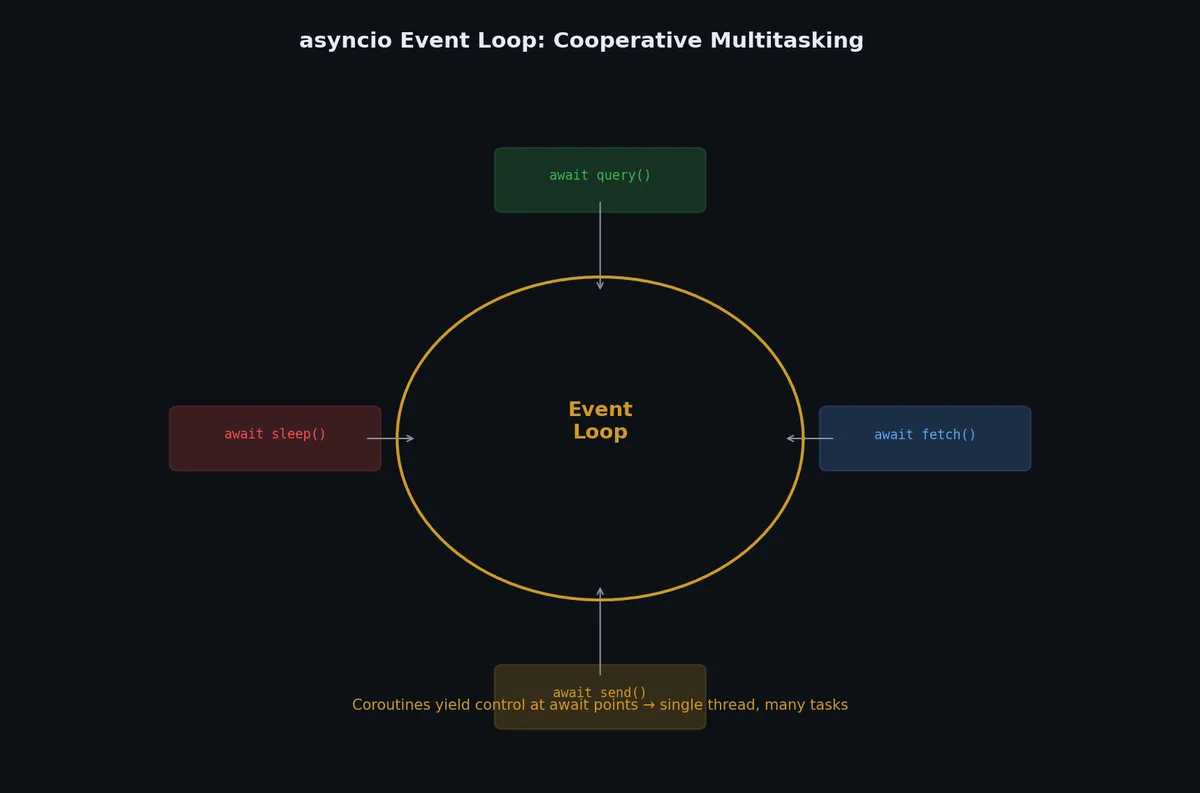
asyncio:协作式并发# asyncio 基于单线程与事件循环(event loop)运行。协程函数在 await 点主动让出控制权,使其他任务得以运行。无需线程、无需锁、无需担忧 GIL。
基础 async/await# 1
2
3
4
5
6
7
8
9
10
11
12
13
14
15
16
17
18
19
20
21
22
23
24
import asyncio
async def say_after ( delay : float , message : str ) -> str :
"""等待后返回消息。"""
await asyncio . sleep ( delay )
return message
async def main ():
# 串行执行:耗时 3 秒
result1 = await say_after ( 1 , "hello" )
result2 = await say_after ( 2 , "world" )
print ( result1 , result2 )
# 并发执行:耗时 2 秒(取最大延迟)
results = await asyncio . gather (
say_after ( 1 , "hello" ),
say_after ( 2 , "world" ),
)
print ( results ) # ['hello', 'world']
asyncio . run ( main ())
创建任务(Tasks)# 1
2
3
4
5
6
7
8
9
10
11
12
13
14
15
16
17
18
19
20
21
22
23
import asyncio
async def download ( url : str ) -> str :
print ( f "Start: { url } " )
await asyncio . sleep ( 1 ) # 模拟网络 I/O
print ( f "Done: { url } " )
return f "Content of { url } "
async def main ():
# 创建任务(立即开始执行)
tasks = [
asyncio . create_task ( download ( f "https://example.com/ { i } " ))
for i in range ( 5 )
]
# 等待全部完成
results = await asyncio . gather ( * tasks )
print ( f "Downloaded { len ( results ) } pages" )
asyncio . run ( main ())
输出:
1
2
3
4
5
6
7
8
9
10
11
Start: https://example.com/0
Start: https://example.com/1
Start: https://example.com/2
Start: https://example.com/3
Start: https://example.com/4
Done: https://example.com/0
Done: https://example.com/1
Done: https://example.com/2
Done: https://example.com/3
Done: https://example.com/4
Downloaded 5 pages
五个下载任务几乎同时发起,并在约 1 秒后全部完成。
aiohttp:异步 HTTP 客户端# requests 是同步库。要进行异步 HTTP 请求,请使用 aiohttp:
1
( .venv) $ pip install aiohttp
1
2
3
4
5
6
7
8
9
10
11
12
13
14
15
16
17
18
19
20
21
22
23
24
25
26
import asyncio
import time
import aiohttp
async def download ( session : aiohttp . ClientSession , url : str ) -> int :
async with session . get ( url ) as response :
content = await response . read ()
return len ( content )
async def main ():
urls = [ f "https://httpbin.org/delay/1" for _ in range ( 10 )]
async with aiohttp . ClientSession () as session :
tasks = [ download ( session , url ) for url in urls ]
start = time . perf_counter ()
results = await asyncio . gather ( * tasks )
elapsed = time . perf_counter () - start
print ( f "Downloaded { len ( results ) } URLs in { elapsed : .2f } s" )
print ( f "Total bytes: { sum ( results ) } " )
asyncio . run ( main ())
输出:
1
2
Downloaded 10 URLs in 1.15s
Total bytes: 4230
10 个各延迟 1 秒的 URL,在略超 1 秒内全部完成。
Semaphore:控制并发数量# 不加限制的并发可能压垮服务端或触发速率限制:
1
2
3
4
5
6
7
8
9
10
11
12
13
14
15
16
17
18
19
20
21
22
23
24
25
26
import asyncio
import aiohttp
async def download (
session : aiohttp . ClientSession ,
url : str ,
semaphore : asyncio . Semaphore ,
) -> int :
async with semaphore : # 最多 N 个并发下载
async with session . get ( url ) as response :
content = await response . read ()
return len ( content )
async def main ():
urls = [ f "https://httpbin.org/delay/1" for _ in range ( 100 )]
semaphore = asyncio . Semaphore ( 10 ) # 最多 10 个并发请求
async with aiohttp . ClientSession () as session :
tasks = [ download ( session , url , semaphore ) for url in urls ]
results = await asyncio . gather ( * tasks )
print ( f "Downloaded { len ( results ) } URLs" )
asyncio . run ( main ())
asyncio 中的超时处理# 1
2
3
4
5
6
7
8
9
10
11
12
13
14
15
16
import asyncio
async def slow_operation ():
await asyncio . sleep ( 10 )
return "done"
async def main ():
try :
result = await asyncio . wait_for ( slow_operation (), timeout = 3.0 )
except asyncio . TimeoutError :
print ( "Operation timed out after 3 seconds" )
asyncio . run ( main ())
现代 asyncio 模式(Python 3.11+)# Python 3.9–3.11 引入了三个从根本上改善异步代码的特性。如果你使用 3.11+,优先选择这些新模式。
asyncio.to_thread():无样板代码运行阻塞操作# Python 3.9 之前,在异步上下文中运行阻塞代码需要 loop.run_in_executor()。现在有了更简洁的方式:
1
2
3
4
5
6
7
8
9
10
11
12
13
14
15
16
17
18
19
20
21
22
23
24
25
26
27
28
29
import asyncio
import time
def blocking_io () -> str :
"""模拟阻塞 I/O 操作(遗留库、文件 I/O 等)。"""
time . sleep ( 2 )
return "阻塞调用的结果"
async def main ():
# 旧方式(冗长):
# loop = asyncio.get_event_loop()
# result = await loop.run_in_executor(None, blocking_io)
# 新方式(Python 3.9+):
result = await asyncio . to_thread ( blocking_io )
print ( result )
# 并发运行多个阻塞调用:
results = await asyncio . gather (
asyncio . to_thread ( blocking_io ),
asyncio . to_thread ( blocking_io ),
asyncio . to_thread ( blocking_io ),
)
# 总共约 2 秒,而非 6 秒
asyncio . run ( main ())
当你需要从异步代码中调用同步库(数据库驱动、文件解析器、遗留 SDK)而不阻塞事件循环时,使用 asyncio.to_thread()。
asyncio.TaskGroup:结构化并发# asyncio.gather() 有一个问题:如果某个任务抛出异常,其他任务会继续运行(或被不一致地取消)。TaskGroup(Python 3.11+)通过结构化并发 解决了这个问题——组内所有任务保证在代码块退出前完成:
1
2
3
4
5
6
7
8
9
10
11
12
13
14
15
16
17
18
19
20
21
22
23
24
25
import asyncio
async def fetch ( url : str ) -> str :
await asyncio . sleep ( 1 )
if "bad" in url :
raise ValueError ( f "无效 URL: { url } " )
return f "内容: { url } "
async def main ():
try :
async with asyncio . TaskGroup () as tg :
task1 = tg . create_task ( fetch ( "https://example.com/a" ))
task2 = tg . create_task ( fetch ( "https://example.com/b" ))
task3 = tg . create_task ( fetch ( "https://example.com/bad" ))
except * ValueError as eg :
# ExceptionGroup:统一处理所有 ValueError
for exc in eg . exceptions :
print ( f "捕获: { exc } " )
else :
print ( task1 . result (), task2 . result (), task3 . result ())
asyncio . run ( main ())
与 gather() 的关键区别:
特性 asyncio.gather()asyncio.TaskGroup失败时取消 仅在 return_exceptions=False 时 始终取消剩余任务 异常处理 第一个异常传播,其余丢失 ExceptionGroup 收集全部清理保证 无——任务可能泄漏 有——块退出时所有任务已完成 动态创建任务 否(固定列表) 是(块内 tg.create_task()) Python 版本 3.4+ 3.11+
Python 3.11+ 的新代码优先使用 TaskGroup 而非 gather()。 它能防止困扰 gather() 代码的"发射后不管"类 bug。
gather() 中的异常处理# 如果需要支持 Python < 3.11,显式处理 gather() 中的失败:
1
2
3
4
5
6
7
8
9
10
11
12
13
14
15
16
17
18
19
20
21
22
23
24
25
26
import asyncio
async def risky_download ( url : str ) -> str :
await asyncio . sleep ( 1 )
if "fail" in url :
raise ConnectionError ( f "无法连接 { url } " )
return f "OK: { url } "
async def main ():
urls = [ "https://a.com" , "https://fail.com" , "https://b.com" ]
# 方案 1:return_exceptions=True(收集全部,手动检查)
results = await asyncio . gather (
* [ risky_download ( url ) for url in urls ],
return_exceptions = True ,
)
for url , result in zip ( urls , results ):
if isinstance ( result , Exception ):
print ( f "失败 { url } : { result } " )
else :
print ( f "成功 { url } : { result } " )
asyncio . run ( main ())
输出:
1
2
3
成功 https://a.com: OK: https://a.com
失败 https://fail.com: 无法连接 https://fail.com
成功 https://b.com: OK: https://b.com
生产环境模式# 指数退避重试# 网络请求不可避免会失败。成熟的重试机制使用指数退避来避免压垮下游服务:
1
2
3
4
5
6
7
8
9
10
11
12
13
14
15
16
17
18
19
20
21
22
23
24
25
26
27
28
29
30
import asyncio
import random
from typing import TypeVar , Callable , Awaitable
T = TypeVar ( "T" )
async def retry_with_backoff (
func : Callable [[], Awaitable [ T ]],
max_retries : int = 3 ,
base_delay : float = 1.0 ,
max_delay : float = 60.0 ,
) -> T :
"""带指数退避和抖动的重试。"""
for attempt in range ( max_retries + 1 ):
try :
return await func ()
except Exception as e :
if attempt == max_retries :
raise
delay = min ( base_delay * ( 2 ** attempt ), max_delay )
jitter = random . uniform ( 0 , delay * 0.1 )
await asyncio . sleep ( delay + jitter )
# 使用示例
async def fetch_data ():
result = await retry_with_backoff (
lambda : api_client . get ( "/unstable-endpoint" ),
max_retries = 5 ,
base_delay = 0.5 ,
)
关键设计要点:
指数增长 :每次失败后等待时间翻倍,避免短时间内大量重试随机抖动 :防止"惊群效应"——多个客户端在同一时刻同时重试最大延迟上限 :防止退避时间无限增长令牌桶限速器# 当调用有 QPS 限制的外部 API 时,令牌桶算法是最灵活的限速方案:
 1
 2
 3
 4
 5
 6
 7
 8
 9
10
11
12
13
14
15
16
17
18
19
20
21
22
23
24
25
26
27
28
29
30
31
32
33
34
import asyncio
import time
class TokenBucket :
"""异步令牌桶限速器。"""
def __init__ ( self , rate : float , capacity : int ):
self . rate = rate # 每秒补充令牌数
self . capacity = capacity # 桶容量
self . tokens = capacity
self . last_refill = time . monotonic ()
self . _lock = asyncio . Lock ()
async def acquire ( self , tokens : int = 1 ):
async with self . _lock :
self . _refill ()
while self . tokens < tokens :
wait = ( tokens - self . tokens ) / self . rate
await asyncio . sleep ( wait )
self . _refill ()
self . tokens -= tokens
def _refill ( self ):
now = time . monotonic ()
elapsed = now - self . last_refill
self . tokens = min ( self . capacity , self . tokens + elapsed * self . rate )
self . last_refill = now
# 使用:限制为每秒 10 次请求
limiter = TokenBucket ( rate = 10 , capacity = 10 )
async def rate_limited_request ( url : str ):
await limiter . acquire ()
return await http_client . get ( url )
优雅关闭# 生产服务需要在接收到终止信号时干净地关闭——完成进行中的请求,释放资源:
1
2
3
4
5
6
7
8
9
10
11
12
13
14
15
16
17
18
19
20
21
22
23
24
25
26
27
28
29
30
import asyncio
import signal
class GracefulShutdown :
def __init__ ( self ):
self . _shutdown_event = asyncio . Event ()
def install_handlers ( self ):
loop = asyncio . get_running_loop ()
for sig in ( signal . SIGTERM , signal . SIGINT ):
loop . add_signal_handler ( sig , self . _shutdown_event . set )
async def wait ( self ):
await self . _shutdown_event . wait ()
async def main ():
shutdown = GracefulShutdown ()
shutdown . install_handlers ()
workers = [ asyncio . create_task ( worker ( i )) for i in range ( 4 )]
# 等待关闭信号
await shutdown . wait ()
print ( "收到关闭信号,等待任务完成..." )
# 给 worker 时间完成当前工作
for w in workers :
w . cancel ()
await asyncio . gather ( * workers , return_exceptions = True )
print ( "干净关闭完成" )
异步生产者-消费者# asyncio.Queue 天然适合解耦数据生产和消费,实现背压控制:
 1
 2
 3
 4
 5
 6
 7
 8
 9
10
11
12
13
14
15
16
17
18
19
20
21
22
23
24
25
26
27
28
29
30
31
32
33
34
35
import asyncio
from dataclasses import dataclass
@dataclass
class WorkItem :
url : str
priority : int = 0
async def producer ( queue : asyncio . Queue , urls : list [ str ]):
for url in urls :
await queue . put ( WorkItem ( url = url ))
# 发送毒丸通知消费者退出
await queue . put ( None )
async def consumer ( queue : asyncio . Queue , consumer_id : int ):
while True :
item = await queue . get ()
if item is None :
await queue . put ( None ) # 传递给下一个消费者
break
try :
result = await process ( item . url )
print ( f "消费者 { consumer_id } : 处理完成 { item . url } " )
except Exception as e :
print ( f "消费者 { consumer_id } : 处理失败 { item . url } : { e } " )
finally :
queue . task_done ()
async def pipeline ( urls : list [ str ], num_consumers : int = 5 ):
queue : asyncio . Queue = asyncio . Queue ( maxsize = 100 ) # 背压:最多缓冲100项
async with asyncio . TaskGroup () as tg :
tg . create_task ( producer ( queue , urls ))
for i in range ( num_consumers ):
tg . create_task ( consumer ( queue , i ))
maxsize=100 提供背压 :当队列满时,生产者会自动暂停,防止内存无限增长。
测试异步代码# 使用 pytest-asyncio# 1
2
3
4
5
6
7
8
9
10
11
12
13
14
15
16
import pytest
import asyncio
@pytest.mark.asyncio
async def test_fetch_user ():
user = await fetch_user ( user_id = 42 )
assert user . name == "Alice"
@pytest.mark.asyncio
async def test_concurrent_fetches ():
users = await asyncio . gather (
fetch_user ( 1 ),
fetch_user ( 2 ),
fetch_user ( 3 ),
)
assert len ( users ) == 3
Mock 异步函数# 1
2
3
4
5
6
7
8
9
10
11
12
13
14
15
16
17
18
from unittest.mock import AsyncMock , patch
@pytest.mark.asyncio
async def test_with_mock_api ():
mock_client = AsyncMock ()
mock_client . get . return_value = { "status" : "ok" , "data" : [ 1 , 2 , 3 ]}
result = await fetch_data ( client = mock_client )
assert result == [ 1 , 2 , 3 ]
mock_client . get . assert_called_once_with ( "/api/data" )
@pytest.mark.asyncio
async def test_timeout_handling ():
mock_client = AsyncMock ()
mock_client . get . side_effect = asyncio . TimeoutError ()
with pytest . raises ( ServiceUnavailableError ):
await fetch_data ( client = mock_client )
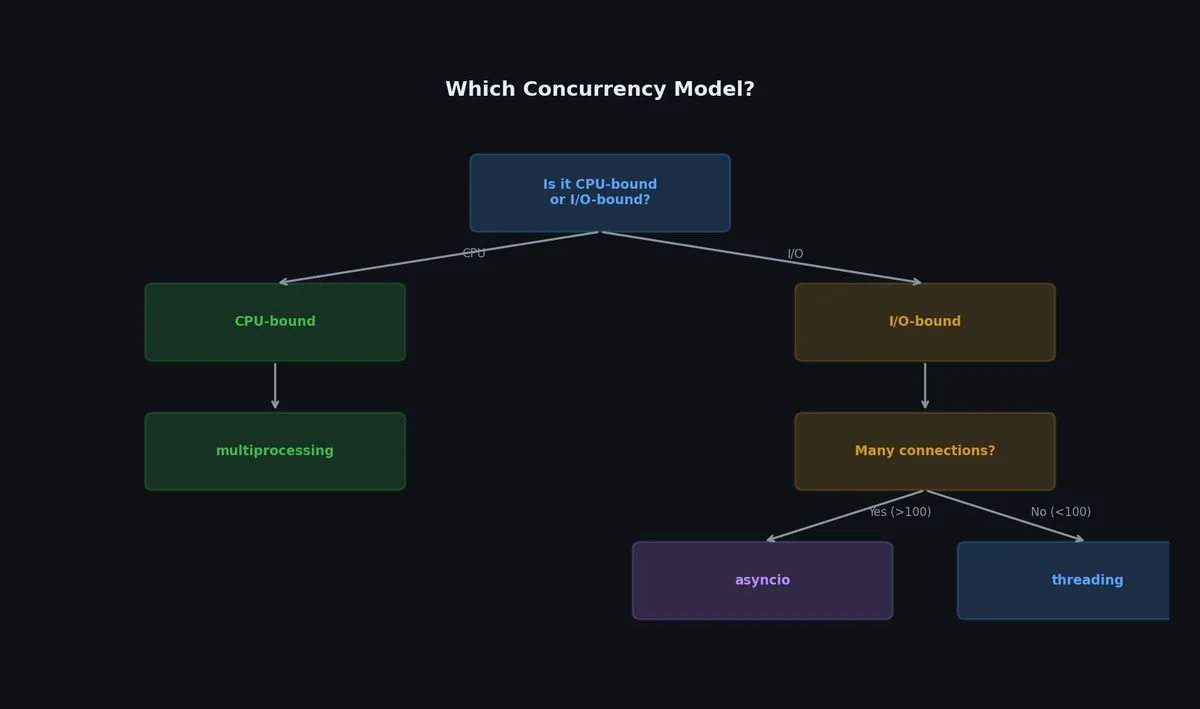
如何选择正确的并发模型?# 决策取决于工作负载类型:
I/O 密集型任务(网络、磁盘、数据库):
并发任务数较少(< 50):使用 ThreadPoolExecutor 并发任务数较多(50+):使用 asyncio 简单脚本或一次性任务:ThreadPoolExecutor Web 服务器、长期运行的服务:asyncio CPU 密集型任务(数学计算、图像处理、文本解析):
始终使用 ProcessPoolExecutor 或 multiprocessing.Pool 混合型工作负载:
用 asyncio 处理 I/O,将 CPU 密集型工作卸载至 ProcessPoolExecutor: 1
2
3
4
5
6
7
8
9
10
11
12
13
14
15
16
17
18
19
20
21
22
23
24
25
26
27
28
29
30
31
32
33
import asyncio
from concurrent.futures import ProcessPoolExecutor
import aiohttp
def cpu_work ( data : bytes ) -> dict :
"""CPU 密集型处理(在独立进程中运行)。"""
# 解析、转换、计算...
return { "result" : len ( data )}
async def fetch_and_process ( session , url , process_pool ):
"""异步获取数据(I/O),再交由进程池处理(CPU)。"""
async with session . get ( url ) as response :
data = await response . read ()
# 将 CPU 工作卸载至进程池
loop = asyncio . get_event_loop ()
result = await loop . run_in_executor ( process_pool , cpu_work , data )
return result
async def main ():
urls = [ f "https://example.com/ { i } " for i in range ( 20 )]
with ProcessPoolExecutor ( max_workers = 4 ) as process_pool :
async with aiohttp . ClientSession () as session :
tasks = [
fetch_and_process ( session , url , process_pool )
for url in urls
]
results = await asyncio . gather ( * tasks )
真实基准测试:串行 vs 线程 vs 异步# 1
2
3
4
5
6
7
8
9
10
11
12
13
14
15
16
17
18
19
20
21
22
23
24
25
26
27
28
29
30
31
32
33
34
35
36
37
38
39
40
41
42
43
44
45
46
47
"""基准测试:用不同并发模型下载 20 个 URL。"""
import asyncio
import time
from concurrent.futures import ThreadPoolExecutor
import aiohttp
import requests
URL = "https://httpbin.org/delay/1"
COUNT = 20
def sequential ():
for _ in range ( COUNT ):
requests . get ( URL , timeout = 10 )
def threaded ():
def download ( url ):
requests . get ( url , timeout = 10 )
with ThreadPoolExecutor ( max_workers = COUNT ) as executor :
list ( executor . map ( download , [ URL ] * COUNT ))
async def async_download ():
async with aiohttp . ClientSession () as session :
tasks = []
for _ in range ( COUNT ):
tasks . append ( session . get ( URL ))
responses = await asyncio . gather ( * tasks )
for r in responses :
await r . read ()
r . close ()
def benchmark ( name , func ):
start = time . perf_counter ()
func ()
elapsed = time . perf_counter () - start
print ( f " { name : 12s } : { elapsed : .2f } s" )
benchmark ( "Sequential" , sequential )
benchmark ( "Threaded" , threaded )
benchmark ( "Async" , lambda : asyncio . run ( async_download ()))
结果:
1
2
3
Sequential  : 21.34s
Threaded    : 1.18s
Async       : 1.09s
线程与异步均在约 1 秒内完成(等于服务器延迟)。异步方案系统资源占用更低——没有线程栈、没有上下文切换开销。
对比汇总表#
特性 threading multiprocessing asyncio 并行类型 并发(受 GIL 限制) 真正并行 协作式并发 最佳适用场景 I/O 密集型 CPU 密集型 I/O 密集型(大量任务) 内存开销 低(~8KB/线程) 高(~30MB/进程) 极低(~1KB/协程) 实际可支撑任务数 ~100–1000 等于 CPU 核心数 ~10,000+ 共享状态 是(需加锁) 否(需序列化) 是(无需锁,单线程) 调试难度 难(竞态条件) 中等(隔离性有助调试) 中等(堆栈跟踪不够清晰) 生态兼容性 所有库均可使用 所有库均可使用 需要异步兼容库 启动成本 ~1ms ~50–100ms ~0.01ms 是否受 GIL 影响 是 否 不适用(单线程)
常见陷阱# 陷阱 表现症状 解决方案 对 CPU 密集型任务使用线程 无性能提升,单核 100% 占用 切换至 ProcessPoolExecutor 创建过多线程 内存耗尽、上下文切换变慢 限制线程池大小(通常 10–50) 忘记 if __name__ == "__main__": macOS/Windows 报 RuntimeError 所有 multiprocessing 代码必须加此守卫 同步与异步混用 RuntimeError: This event loop is already running仅在顶层调用 asyncio.run() 忘记 await 协程 RuntimeWarning: coroutine was never awaited所有异步函数调用必须 await 在异步代码中执行阻塞操作 事件循环冻结,其他任务饿死 将阻塞操作卸载至线程/进程池 共享状态引发竞态条件 数据不一致、偶发 Bug 使用锁、队列或不可变数据 死锁 程序永久挂起 按固定顺序获取锁,使用超时机制
下一步# 你的代码现已具备并发能力且高效运行。但在发布前,还需正确打包。下一篇文章将介绍如何构建可分发的 Python 包、发布到 PyPI、创建 Docker 镜像,并搭建完整的分发流水线。