你写了一个实用的小工具,同事找你要。你把文件夹打包成 ZIP 发过去,对方解压后运行 python main.py,却报了 ModuleNotFoundError —— 因为缺少依赖。他手动装上依赖,结果版本不对;更糟的是,他用的是 Python 3.8,而你的代码里用了 f-string 中的海象运算符(walrus operator),这在 3.8 里根本跑不了。
规范的打包能彻底避免这些问题。只要执行 pip install your-tool,一切自动就绪:依赖版本精准匹配、Python 兼容性有保障,还能直接通过命令行调用。
包、模块与库# 这些术语常被混用,但在 Python 中其实各有明确定义:
术语 定义 示例 Module (模块) 单个 .py 文件 utils.pyPackage (包) 包含 __init__.py 的目录,内含多个模块 my_tool/ 目录Library (库) 为复用而发布的包(或包集合) requests, flaskDistribution (分发包) 可安装的归档文件(wheel 或 sdist),托管于 PyPI requests-2.31.0-py3-none-any.whlScript (脚本) 可直接运行的独立 .py 文件 download.py
当有人说“安装 requests 库”,实际意思是:从 PyPI 下载 requests 的分发包,其中包含 requests 包及其子包。
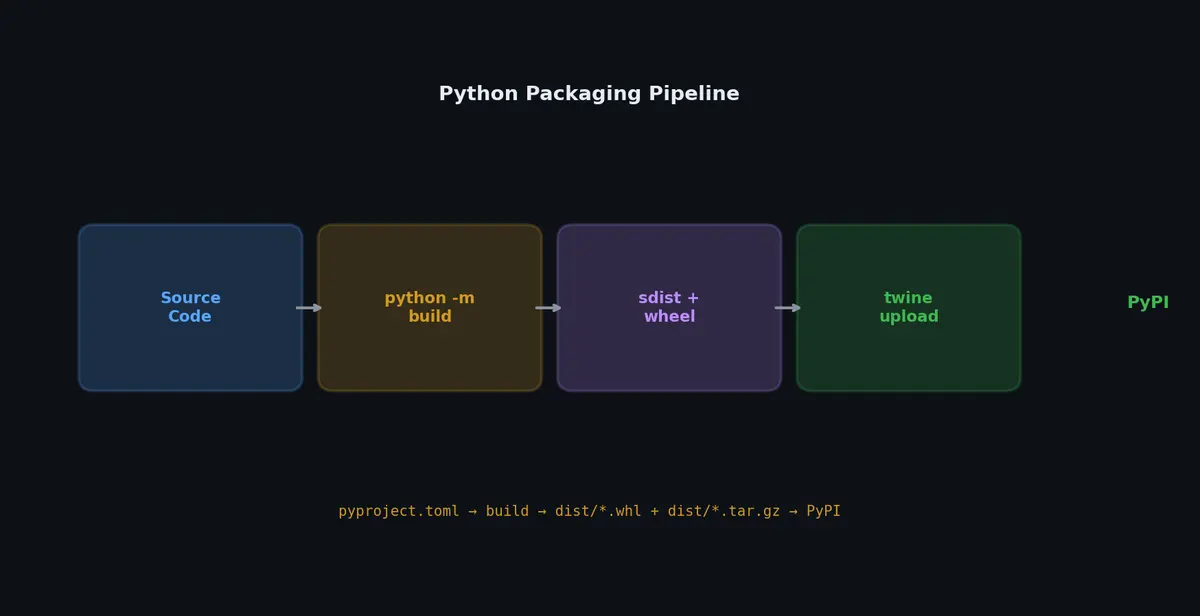
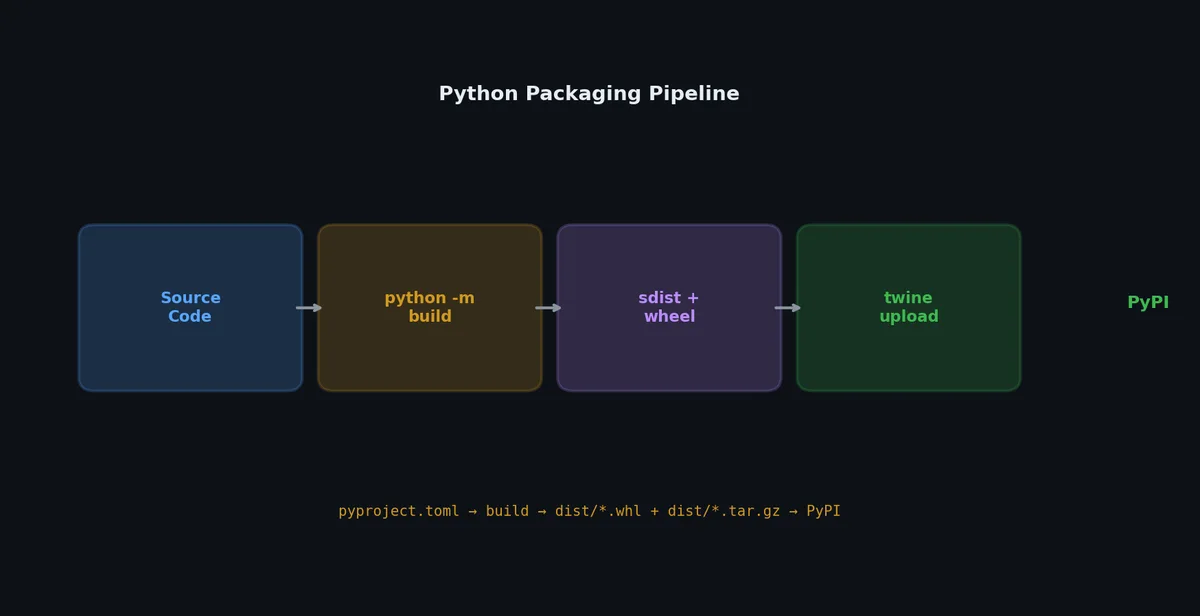
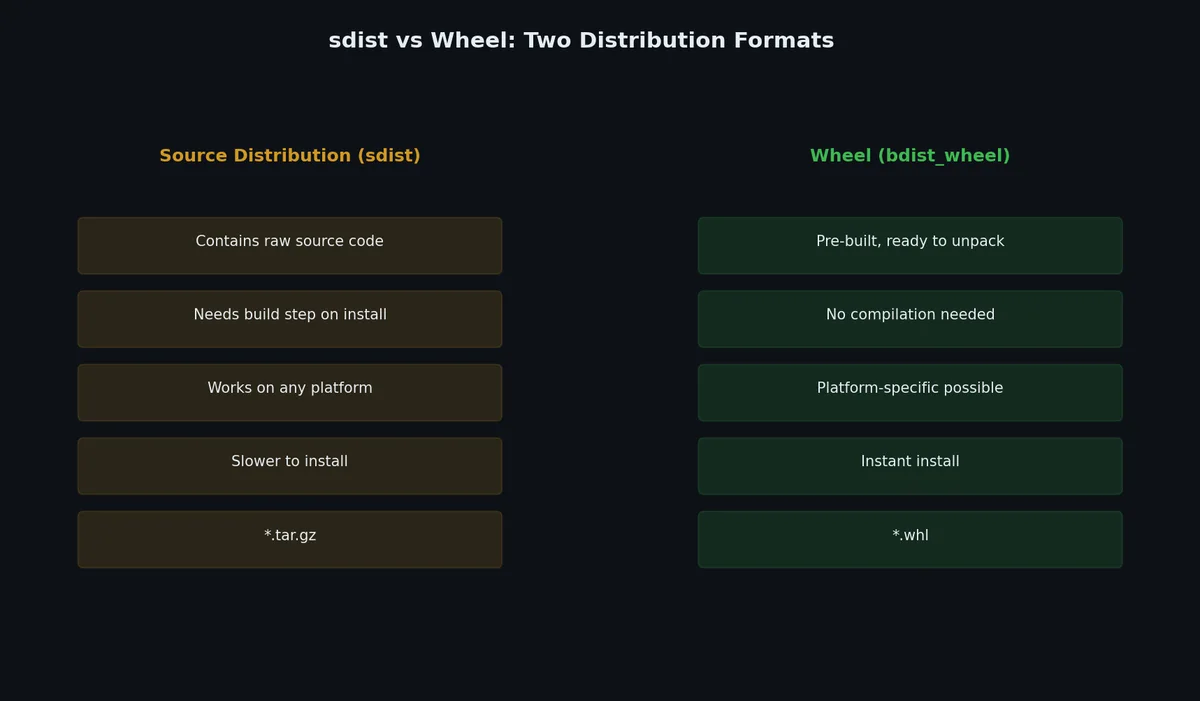
构建分发包# Python 包有两种标准分发格式:
sdist (源码分发包)# 一个 .tar.gz 格式的源码压缩包。接收方需要完整的构建工具链(比如编译 C 扩展所需的编译器)才能安装。
wheel (预编译分发包)# .whl 文件(本质是 zip 压缩包),已预先构建好,无需编译,安装更快。pip 默认优先使用 wheel。
 1
 2
 3
 4
 5
 6
 7
 8
 9
10
11
# 安装构建工具
( .venv) $ pip install build
# 同时构建 sdist 和 wheel
( .venv) $ python -m build
* Creating venv isolated environment...
* Installing packages in isolated environment... ( setuptools>= 68.0, wheel)
* Getting build dependencies for sdist...
* Building sdist...
* Building wheel from sdist
Successfully built my_tool-0.1.0.tar.gz and my_tool-0.1.0-py3-none-any.whl
生成的文件会放在 dist/ 目录下:
1
2
3
dist/
  my_tool-0.1.0.tar.gz                    # sdist
  my_tool-0.1.0-py3-none-any.whl          # wheel
wheel 文件名包含元数据:{name}-{version}-{python}-{abi}-{platform}.whl。例如 py3-none-any 表示“仅限 Python 3、无 ABI 依赖、适用于所有平台”——也就是纯 Python 包。
查看 wheel 内容# 1
2
3
4
5
6
7
8
9
10
11
12
13
14
# .whl 本质就是 zip 文件
$ unzip -l dist/my_tool-0.1.0-py3-none-any.whl
Archive: dist/my_tool-0.1.0-py3-none-any.whl
Length Date Time Name
--------- ---------- ----- ----
142 2024-01-15 10:00 my_tool/__init__.py
1845 2024-01-15 10:00 my_tool/core.py
923 2024-01-15 10:00 my_tool/cli.py
456 2024-01-15 10:00 my_tool/utils.py
178 2024-01-15 10:00 my_tool/config.py
631 2024-01-15 10:00 my_tool-0.1.0.dist-info/METADATA
92 2024-01-15 10:00 my_tool-0.1.0.dist-info/WHEEL
50 2024-01-15 10:00 my_tool-0.1.0.dist-info/entry_points.txt
654 2024-01-15 10:00 my_tool-0.1.0.dist-info/RECORD
使用 pyproject.toml 进行打包配置#
完整的打包配置如下:
 1
 2
 3
 4
 5
 6
 7
 8
 9
10
11
12
13
14
15
16
17
18
19
20
21
22
23
24
25
26
27
28
29
30
31
32
33
34
35
36
37
38
39
40
41
42
43
44
45
46
47
48
49
50
51
52
53
54
55
56
57
[ build-system ]
requires = [ "setuptools>=68.0" , "wheel" ]
build-backend = "setuptools.backends._legacy:_Backend"
[ project ]
name = "my-tool"
version = "0.1.0"
description = "A CLI tool for downloading and converting files"
readme = "README.md"
requires-python = ">=3.10"
license = { text = "MIT" }
authors = [
{ name = "Your Name" , email = "you@example.com" },
]
keywords = [ "download" , "convert" , "cli" ]
classifiers = [
"Development Status :: 3 - Alpha" ,
"Environment :: Console" ,
"Intended Audience :: Developers" ,
"License :: OSI Approved :: MIT License" ,
"Programming Language :: Python :: 3" ,
"Programming Language :: Python :: 3.10" ,
"Programming Language :: Python :: 3.11" ,
"Programming Language :: Python :: 3.12" ,
"Topic :: Utilities" ,
]
dependencies = [
"requests>=2.28,<3" ,
"click>=8.0" ,
"rich>=13.0" ,
]
[ project . optional-dependencies ]
dev = [
"pytest>=7.0" ,
"pytest-cov" ,
"ruff>=0.3" ,
"mypy" ,
"build" ,
"twine" ,
]
[ project . scripts ]
my-tool = "my_tool.cli:main"
[ project . urls ]
Homepage = "https://github.com/you/my-tool"
Documentation = "https://my-tool.readthedocs.io"
Repository = "https://github.com/you/my-tool"
Issues = "https://github.com/you/my-tool/issues"
Changelog = "https://github.com/you/my-tool/blob/main/CHANGELOG.md"
[ tool . setuptools . packages . find ]
where = [ "src" ]
[ tool . setuptools . package-data ]
my_tool = [ "py.typed" ]
关键配置项说明# [build-system]pip 用哪个构建后端。默认是 setuptools,但也可以换成 flit、hatchling 或 poetry-core。
[project]
[project.scripts]my-tool 会自动加入系统 PATH,可直接调用。
[project.optional-dependencies]pip install my-tool[dev] 就能装上开发所需的所有额外包。
[tool.setuptools.packages.find]setuptools 在 src/ 目录下自动查找包。
包含非 Python 数据文件# 如果你的包需要模板、配置或数据文件,必须显式声明:
1
2
3
4
5
6
[ tool . setuptools . package-data ]
my_tool = [
"templates/*.html" ,
"data/*.json" ,
"py.typed" , # PEP 561 类型检查标记
]
或者通过 MANIFEST.in 文件专门控制 sdist 包含的内容:
1
2
3
4
include LICENSE
include README.md
recursive-include src/my_tool/templates *.html
recursive-include src/my_tool/data *.json
发布到 PyPI# 先在 TestPyPI 上测试# 务必先上传到 TestPyPI 验证流程,确认无误后再发到正式 PyPI。
 1
 2
 3
 4
 5
 6
 7
 8
 9
10
11
12
13
14
# 安装 twine
( .venv) $ pip install twine
# 构建
( .venv) $ python -m build
# 上传至 TestPyPI
( .venv) $ twine upload --repository testpypi dist/*
Uploading distributions to https://test.pypi.org/legacy/
Uploading my_tool-0.1.0-py3-none-any.whl [========================================] 100%
Uploading my_tool-0.1.0.tar.gz [========================================] 100%
# 从 TestPyPI 测试安装
( .venv) $ pip install --index-url https://test.pypi.org/simple/ my-tool
创建 PyPI 账户与 API Token# 访问 https://pypi.org/account/register/ ↗
注册账号。 进入 Account Settings > API Tokens。 创建一个作用域限定到你项目的 token(首次发布可选“All projects”)。 然后配置 ~/.pypirc:
 1
 2
 3
 4
 5
 6
 7
 8
 9
10
11
12
13
[distutils]
index-servers =
    pypi
    testpypi

[pypi]
username = __token__
password = pypi-XXXXXXXXXXXXXXXXXXXXXXXXXXXXXXXXXX

[testpypi]
repository = https://test.pypi.org/legacy/
username = __token__
password = pypi-XXXXXXXXXXXXXXXXXXXXXXXXXXXXXXXXXX
正式上传至 PyPI# 1
2
3
4
5
6
7
( .venv) $ twine upload dist/*
Uploading distributions to https://upload.pypi.org/legacy/
Uploading my_tool-0.1.0-py3-none-any.whl [========================================] 100%
Uploading my_tool-0.1.0.tar.gz [========================================] 100%
View at:
https://pypi.org/project/my-tool/0.1.0/
现在任何人都能轻松安装:
发布前检查清单# 1
2
3
4
# 检查分发包常见错误
( .venv) $ twine check dist/*
Checking dist/my_tool-0.1.0-py3-none-any.whl: PASSED
Checking dist/my_tool-0.1.0.tar.gz: PASSED
twine check 能帮你提前发现常见问题,比如:
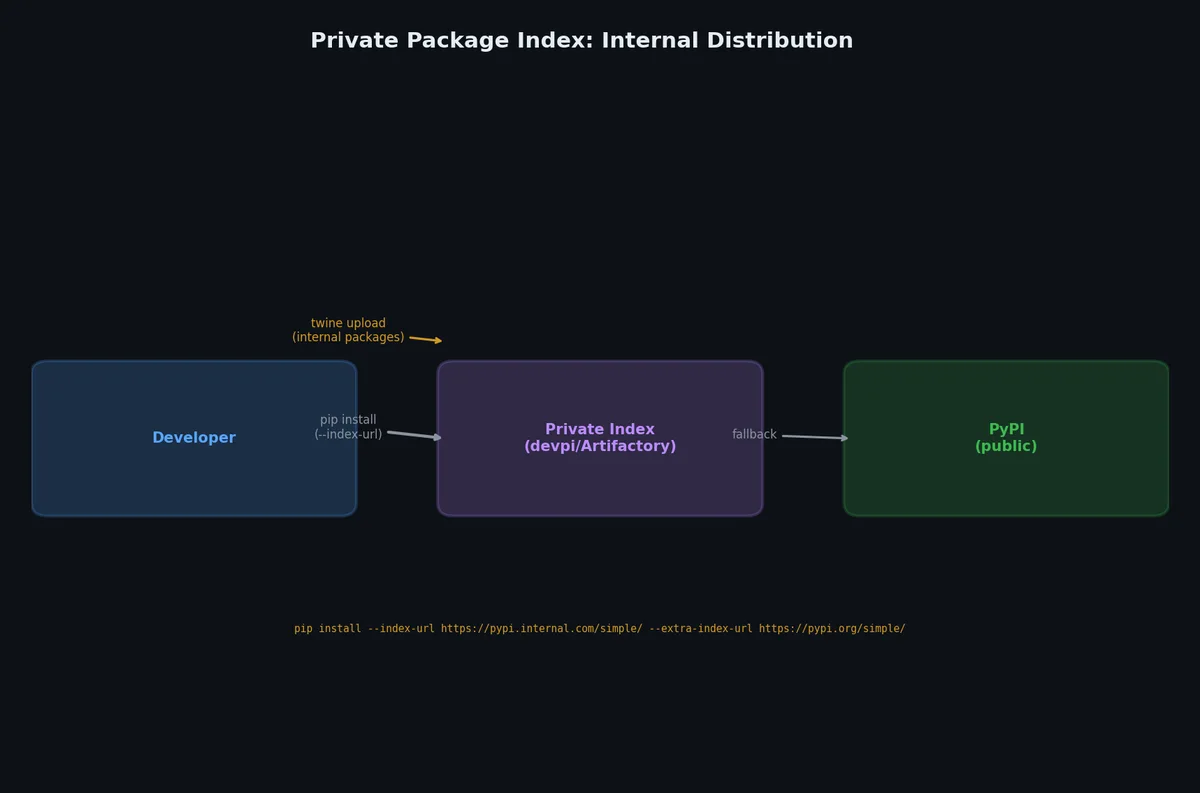
缺少 README long_description 格式不合法必填的元数据缺失 私有包索引(Private Package Indexes)# 不是所有代码都适合公开。内部工具应使用私有包索引。
devpi# 1
2
3
4
5
6
7
8
9
10
11
12
13
14
15
16
# 安装 devpi 服务端与客户端
$ pip install devpi-server devpi-client
# 启动服务端
$ devpi-server --start --port 3141
# 配置客户端
$ devpi use http://localhost:3141
$ devpi login root --password ""
$ devpi index -c dev
# 上传包
$ devpi upload dist/*
# 从私有索引安装
$ pip install my-tool --index-url http://localhost:3141/root/dev/+simple/
pip 配置私有索引# 1
2
3
4
5
# ~/.pip/pip.conf(Linux/macOS)或 %APPDATA%\pip\pip.ini(Windows)
[global]
extra-index-url = http://internal-pypi.company.com/simple/
trusted-host = internal-pypi.company.com
也可以在项目级的 pyproject.toml 中指定(虽然非标准,但 pip-tools 支持):
1
2
# This is not standard but supported by pip-tools
# For pip itself, use pip.conf or command-line flags
1
2
# 按命令指定
$ pip install my-internal-tool --extra-index-url http://internal-pypi.company.com/simple/
使用 Docker 构建 Python 镜像#
基础镜像选择# 基础镜像 大小 适用场景 python:3.11~900MB 开发环境,自带构建工具 python:3.11-slim~150MB 生产环境,精简版 python:3.11-alpine~50MB 极致轻量,但 musl libc 可能导致兼容性问题 python:3.11-bookworm~900MB Debian Bookworm,兼容性好 python:3.11-slim-bookworm~150MB Debian Bookworm 上的生产环境
推荐:生产环境优先用 python:3.11-slim。除非你明确需要 Alpine 的极小体积,并且愿意处理 numpy、pandas 等含 C 扩展的包可能无法安装的问题,否则尽量避开 Alpine。
基础 Dockerfile# 1
2
3
4
5
6
7
8
9
10
11
12
13
14
15
16
17
18
19
20
21
22
23
24
25
26
FROM python:3.11-slim
WORKDIR /app
# 安装系统依赖(如需)
RUN apt-get update && apt-get install -y --no-install-recommends \
\
&& rm -rf /var/lib/apt/lists/*
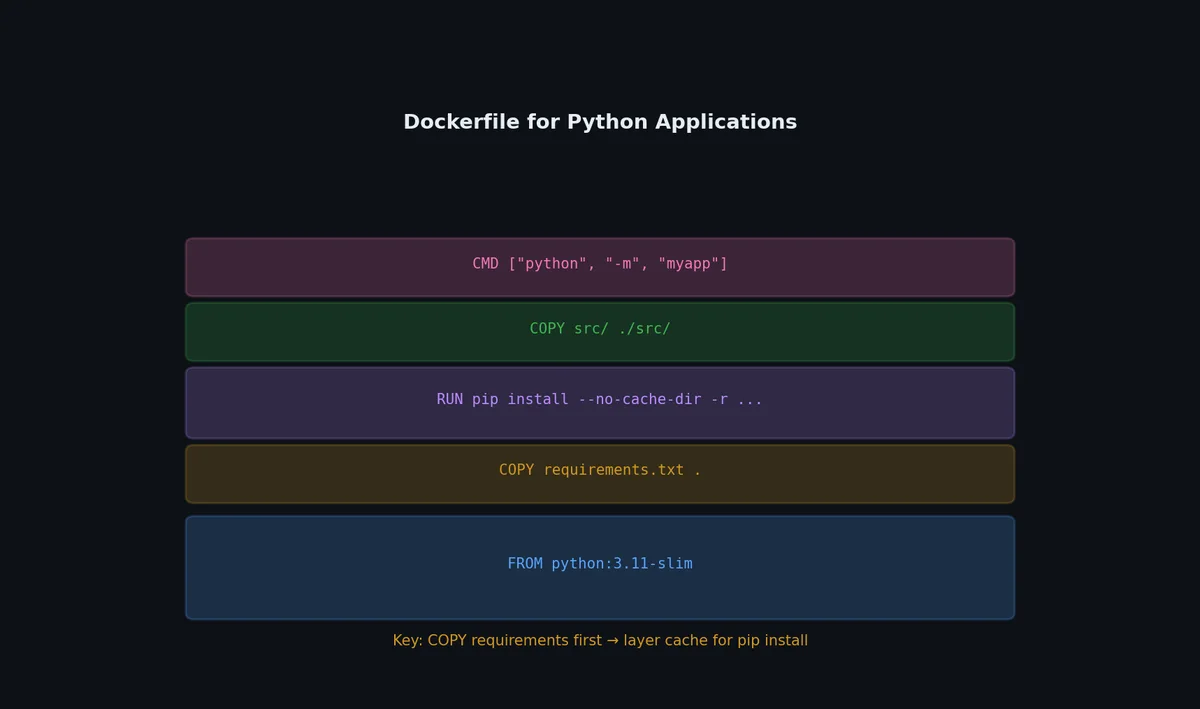
# 优先复制依赖文件(提升缓存命中率)
COPY requirements.txt .
RUN pip install --no-cache-dir -r requirements.txt
# 复制应用代码
COPY src/ src/
COPY pyproject.toml .
# 安装当前包
RUN pip install --no-cache-dir .
# 以非 root 用户运行
RUN useradd --create-home appuser
USER appuser
EXPOSE 8000
CMD [ "my-tool" , "serve" , "--host" , "0.0.0.0" , "--port" , "8000" ]
多阶段构建(Multi-Stage Build)# 通过分离构建和运行阶段,大幅减小最终镜像体积:
1
2
3
4
5
6
7
8
9
10
11
12
13
14
15
16
17
18
19
20
21
22
23
24
25
26
# 第一阶段:构建
FROM python:3.11 AS builder
WORKDIR /build
COPY requirements.txt .
RUN pip install --no-cache-dir --prefix= /install -r requirements.txt
COPY src/ src/
COPY pyproject.toml .
RUN pip install --no-cache-dir --prefix= /install .
# 第二阶段:运行时
FROM python:3.11-slim
WORKDIR /app
# 仅从 builder 复制已安装的包
COPY --from= builder /install /usr/local
# 创建非 root 用户
RUN useradd --create-home appuser
USER appuser
EXPOSE 8000
CMD [ "my-tool" , "serve" , "--host" , "0.0.0.0" , "--port" , "8000" ]
构建阶段包含 gcc 和其他编译工具;运行阶段只保留已安装的 Python 包。
.dockerignore# 1
2
3
4
5
6
7
8
9
10
11
12
13
.venv/
.git/
.mypy_cache/
__pycache__/
*.pyc
dist/
build/
*.egg-info/
.env
.env.*
tests/
docs/
*.md
构建与运行# 1
2
3
4
5
6
7
8
9
10
11
# 构建
$ docker build -t my-tool:0.1.0 .
# 运行
$ docker run -p 8000:8000 my-tool:0.1.0
# 运行并传入环境变量
$ docker run -p 8000:8000 \
DATABASE_URL = postgresql://db:5432/mydb \
API_KEY = sk-abc123 \
现代构建后端# Python 打包生态已不再局限于 setuptools。新一代构建后端更快、配置更简单、覆盖更多场景。
Hatch:一体化项目管理器# Hatch ↗
用一个工具管理环境、构建和发布:
1
2
3
4
5
6
7
8
9
10
11
12
13
14
# pyproject.toml
[ build-system ]
requires = [ "hatchling" ]
build-backend = "hatchling.build"
[ project ]
name = "my-library"
dynamic = [ "version" ]
[ tool . hatch . version ]
path = "src/my_library/__init__.py"
[ tool . hatch . build . targets . wheel ]
packages = [ "src/my_library" ]
1
2
3
4
5
6
7
8
9
10
# 构建
$ hatch build
dist/my_library-0.1.0-py3-none-any.whl
dist/my_library-0.1.0.tar.gz
# 发布
$ hatch publish
# 在隔离环境中运行
$ hatch run pytest
Hatch 的环境矩阵无需 tox 即可跨 Python 版本测试:
1
2
3
4
5
6
7
8
9
[ tool . hatch . envs . test ]
dependencies = [ "pytest" , "pytest-cov" ]
[[ tool . hatch . envs . test . matrix ]]
python = [ "3.10" , "3.11" , "3.12" , "3.13" ]
[ tool . hatch . envs . test . scripts ]
run = "pytest {args}"
cov = "pytest --cov {args}"
1
2
$ hatch run test:run # 在所有 4 个 Python 版本上运行
$ hatch run test.py3.12:run # 指定版本运行
uv 构建与发布# uv 无需额外工具即可处理完整生命周期:
1
2
3
4
5
6
7
8
# 构建 wheel 和 sdist
$ uv build
Successfully built dist/my_lib-0.1.0.tar.gz and dist/my_lib-0.1.0-py3-none-any.whl
# 发布到 PyPI
$ uv publish
# 或发布到私有索引:
$ uv publish --index-url https://private.pypi.org/simple/
Maturin:Python + Rust 扩展# Maturin ↗
构建包含 Rust 扩展的 Python 包(通过 PyO3):
1
2
3
4
5
6
7
[ build-system ]
requires = [ "maturin>=1.0,<2.0" ]
build-backend = "maturin"
[ project ]
name = "my-fast-lib"
requires-python = ">=3.9"
1
2
3
4
5
6
7
8
9
10
11
12
13
// src/lib.rs
use pyo3 ::prelude ::* ;
#[pyfunction]
fn fast_sum ( data : Vec < f64 > ) -> f64 {
data . iter (). sum ()
}
#[pymodule]
fn my_fast_lib ( m : & Bound < '_ , PyModule > ) -> PyResult < () > {
m . add_function ( wrap_pyfunction! ( fast_sum , m ) ? ) ? ;
Ok (())
}
1
2
3
4
5
# 开发模式构建安装
$ maturin develop
# 构建发布用 wheel
$ maturin build --release
这正是 pydantic-core、ruff、polars 等高性能库发布 Rust 支持 Python 包的方式。
构建后端对比# 后端 速度 用途 Rust/C 支持 setuptools 慢 遗留项目、复杂构建 是(仅 C) hatchling 快 纯 Python 库 否 flit 快 简单纯 Python 否 maturin 快 Rust 扩展 是(Rust) scikit-build-core 中等 C/C++/Fortran 扩展 是
可复现构建与 SBOM# 可复现构建确保相同源码产生二进制一致的输出。对安全审计和供应链完整性至关重要。
锁定构建依赖# 1
2
3
[ build-system ]
requires = [ "hatchling==1.21.1" ] # 锁定精确版本
build-backend = "hatchling.build"
哈希验证# 1
2
3
4
5
6
# pip-tools:为供应链安全生成哈希
$ pip-compile --generate-hashes requirements.in
# 输出包含每个包的哈希:
# requests==2.31.0 \
# --hash=sha256:942c5a758f98d790eaed1a29cb6eefc7f0edf3...
uv 的 uv.lock 始终包含哈希——无需额外标志。
软件物料清单(SBOM)# 生成 SBOM 用于合规和漏洞追踪:
1
2
3
# 使用 cyclonedx(标准 SBOM 格式)
$ pip install cyclonedx-bom
$ cyclonedx-py environment -o sbom.cdx.json
将 SBOM 附加到发版中,便于下游消费者审计依赖。
条件依赖与平台标记# 真实世界的包在不同平台或 Python 版本上需要不同依赖。
环境标记# 1
2
3
4
5
6
7
[ project ]
dependencies = [
"tomli>=1.0; python_version < '3.11'" , # 3.11+ 有 stdlib tomllib
"colorama>=0.4; sys_platform == 'win32'" ,
"uvloop>=0.17; sys_platform != 'win32'" ,
"typing-extensions>=4.0; python_version < '3.12'" ,
]
常用标记:
标记 示例值 python_version'3.10'、'3.11'sys_platform'linux'、'darwin'、'win32'platform_machine'x86_64'、'aarch64'implementation_name'cpython'、'pypy'
可选依赖组# 1
2
3
4
5
6
[ project . optional-dependencies ]
postgres = [ "psycopg[binary]>=3.0" ]
mysql = [ "mysqlclient>=2.0" ]
redis = [ "redis>=5.0" ]
all = [ "my-lib[postgres,mysql,redis]" ]
dev = [ "pytest" , "mypy" , "ruff" ]
1
2
3
# 安装指定额外依赖
$ pip install "my-lib[postgres,redis]"
$ uv add "my-lib[all]"
跨平台 Wheel 构建# 包含编译扩展的包需要为每个平台构建 wheel:
1
2
3
4
5
6
7
8
9
10
# .github/workflows/release.yml 使用 cibuildwheel
jobs :
build :
strategy :
matrix :
os : [ ubuntu-latest, macos-latest, windows-latest]
steps :
- uses : pypa/cibuildwheel@v2
env :
CIBW_PYTHON : "cp310 cp311 cp312 cp313"
cibuildwheel ↗
自动化跨平台、跨 Python 版本的 wheel 构建。
使用 Poetry 构建与发布#
如果项目用的是 Poetry 而不是 setuptools:
1
2
3
4
5
6
7
8
9
# 安装 Poetry
$ curl -sSL https://install.python-poetry.org | python3 -
# 初始化新项目
$ poetry new my-tool
$ cd my-tool
# 或转换现有项目
$ poetry init
Poetry 使用 pyproject.toml 中的 [tool.poetry] 区块来管理元数据:
 1
 2
 3
 4
 5
 6
 7
 8
 9
10
11
12
13
14
15
16
17
18
19
20
21
22
23
[ tool . poetry ]
name = "my-tool"
version = "0.1.0"
description = "A CLI tool"
authors = [ "Your Name <you@example.com>" ]
readme = "README.md"
packages = [{ include = "my_tool" , from = "src" }]
[ tool . poetry . dependencies ]
python = "^3.10"
requests = "^2.28"
click = "^8.0"
[ tool . poetry . group . dev . dependencies ]
pytest = "^7.0"
ruff = "^0.3"
[ tool . poetry . scripts ]
my-tool = "my_tool.cli:main"
[ build-system ]
requires = [ "poetry-core" ]
build-backend = "poetry.core.masonry.api"
1
2
3
4
5
6
7
8
9
10
11
12
13
14
# 构建
$ poetry build
Building my-tool ( 0.1.0)
- Building sdist
- Built my_tool-0.1.0.tar.gz
- Building wheel
- Built my_tool-0.1.0-py3-none-any.whl
# 发布至 TestPyPI
$ poetry config repositories.testpypi https://test.pypi.org/legacy/
$ poetry publish --repository testpypi
# 发布至正式 PyPI
$ poetry publish
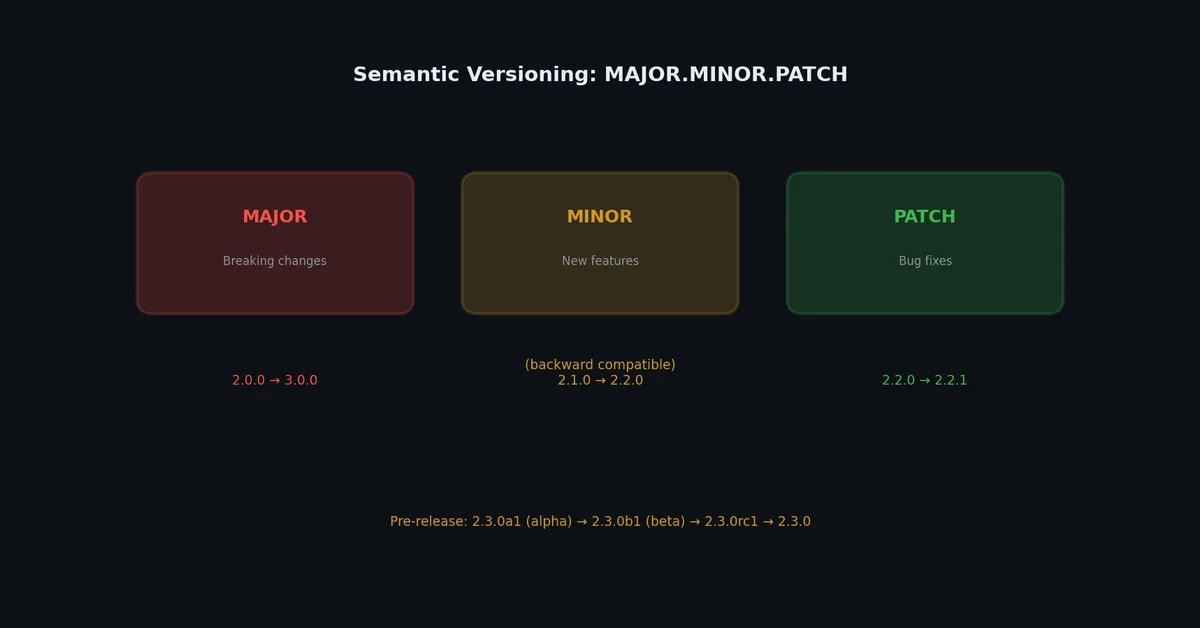
版本管理# 语义化版本(SemVer)# 标准格式为 MAJOR.MINOR.PATCH:
组件 何时递增 示例 MAJOR 引入破坏性变更(API 不兼容) 1.0.0 → 2.0.0MINOR 新增向后兼容的功能 1.0.0 → 1.1.0PATCH 向后兼容的 bug 修复 1.0.0 → 1.0.1
预发布版本写法如:1.0.0a1(alpha)、1.0.0b1(beta)、1.0.0rc1(release candidate)。
版本号设置方式# 方式一:单一信源 —— 直接在 pyproject.toml 中定义
1
2
[ project ]
version = "0.1.0"
运行时可通过以下方式读取:
1
2
3
from importlib.metadata import version
__version__ = version ( "my-tool" )
方式二:在 __init__.py 中定义 __version__
1
2
# src/my_tool/__init__.py
__version__ = "0.1.0"
并在 pyproject.toml 中引用它:
1
2
3
4
5
[ project ]
dynamic = [ "version" ]
[ tool . setuptools . dynamic ]
version = { attr = "my_tool.__version__" }
方式三:基于 Git Tag 的动态版本(推荐)
1
( .venv) $ pip install setuptools-scm
1
2
3
4
5
6
7
[ build-system ]
requires = [ "setuptools>=68.0" , "setuptools-scm>=8.0" ]
[ project ]
dynamic = [ "version" ]
[ tool . setuptools_scm ]
这样版本号会自动从 Git tag 推导出来:
1
2
3
$ git tag v0.1.0
$ python -m build
# 包版本即为 0.1.0
实战示例:完整打包与发布流程# 以下是以本系列前文中的下载器工具为例的完整发布流程:
 1
 2
 3
 4
 5
 6
 7
 8
 9
10
11
12
13
14
15
16
17
18
19
20
21
22
23
24
25
26
27
28
29
30
31
32
33
34
35
36
37
38
39
40
41
42
43
# 1. 确保测试全部通过
( .venv) $ pytest -v --cov= my_tool
========================= 14 passed in 0.45s ==========================
# 2. 确保代码风格合规
( .venv) $ ruff check src/ tests/
All checks passed!
# 3. 确保类型检查无误
( .venv) $ mypy src/
Success: no issues found
# 4. 构建分发包
( .venv) $ python -m build
# 5. 检查构建结果
( .venv) $ twine check dist/*
Checking dist/my_tool-0.1.0-py3-none-any.whl: PASSED
Checking dist/my_tool-0.1.0.tar.gz: PASSED
# 6. 在全新虚拟环境中测试安装
$ python -m venv /tmp/test-install
$ source /tmp/test-install/bin/activate
( test-install) $ pip install dist/my_tool-0.1.0-py3-none-any.whl
( test-install) $ my-tool --help
Usage: my-tool [ OPTIONS] URL
...
( test-install) $ deactivate
# 7. 先上传至 TestPyPI
( .venv) $ twine upload --repository testpypi dist/*
# 8. 从 TestPyPI 测试安装
$ pip install --index-url https://test.pypi.org/simple/ my-tool
$ my-tool --version
my-tool 0.1.0
# 9. 最终上传至正式 PyPI
( .venv) $ twine upload dist/*
# 10. 打上 Git Release Tag
$ git tag -a v0.1.0 -m "Release 0.1.0"
$ git push origin v0.1.0
使用 GitHub Actions 自动化发布# 1
2
3
4
5
6
7
8
9
10
11
12
13
14
15
16
17
18
19
20
21
22
23
24
25
26
27
28
29
30
31
32
33
# .github/workflows/publish.yml
name : Publish to PyPI
on :
release :
types : [ published]
jobs :
publish :
runs-on : ubuntu-latest
permissions :
id-token : write # Required for trusted publishing
steps :
- uses : actions/checkout@v4
- name : Set up Python
uses : actions/setup-python@v5
with :
python-version : "3.11"
- name : Install dependencies
run : |
python -m pip install --upgrade pip
pip install build
- name : Build
run : python -m build
- name : Publish to PyPI
uses : pypa/gh-action-pypi-publish@release/v1
# Uses trusted publishing (no API token needed)
启用 Trusted Publishing 后,PyPI 会直接信任你的 GitHub Actions 工作流,完全不需要手动管理 API Token。
下一步# 你的包已经成功发布,人人都能安装使用。但它够快吗?在下一篇文章中,我们将学习如何对 Python 代码进行性能剖析、定位瓶颈、应用缓存与向量化优化,并掌握一项关键技能:判断何时该优化、何时不该优化 。