Donald Knuth 那句广为流传的名言常被断章取义。完整原文是:“我们应当忽略微小的效率提升,比如 97% 的情况:过早优化是一切罪恶之源。然而,我们也不应放过那至关重要的 3% 中的良机。”后半句恰恰是重点所在,性能优化并非追求“一切皆快”,而是精准识别真正影响全局的那 3%,并集中资源将其优化。
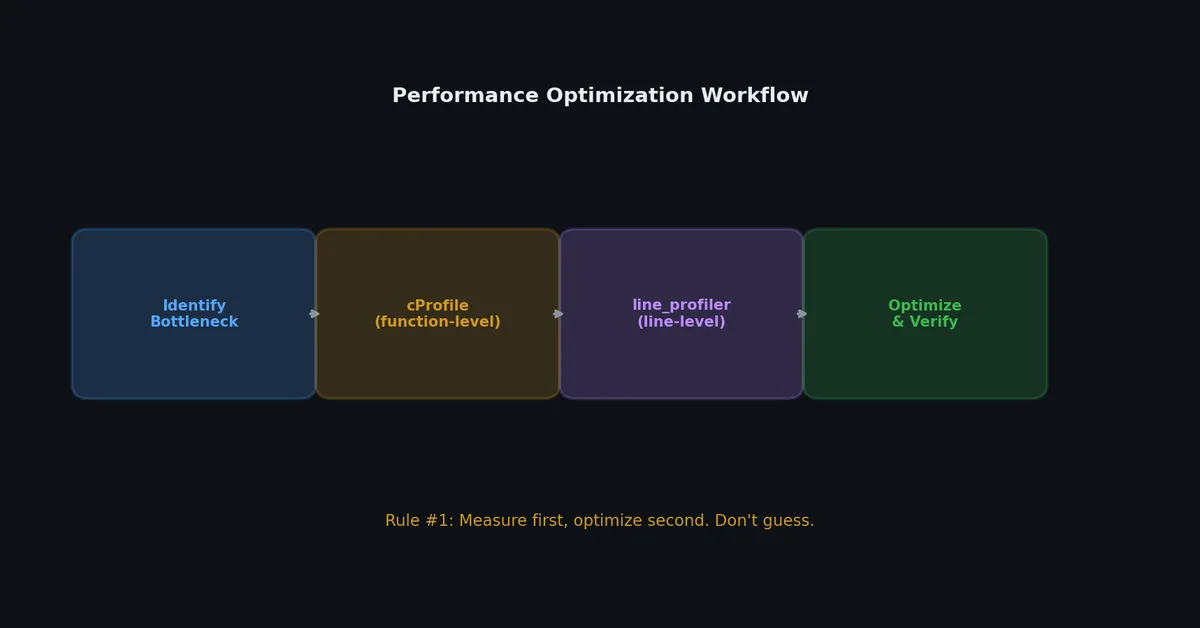
本文聚焦于如何找到这关键的 3%。你将学会:先分析,再优化;每次改动,必测量其实际影响。
手动基准测试(Manual Benchmarking)# time.perf_counter()# 最基础的性能分析工具,用于对特定代码段计时:
1
2
3
4
5
6
import time
start = time . perf_counter ()
result = expensive_function ()
elapsed = time . perf_counter () - start
print ( f "Took { elapsed : .4f } s" )
perf_counter() 使用当前系统所能提供的最高精度计时器,而 time.time() 在某些平台上精度较低。基准测试务必使用 perf_counter()。
可复用的计时器(A Reusable Timer)# 1
2
3
4
5
6
7
8
9
10
11
12
13
14
15
16
17
18
19
20
21
import time
from contextlib import contextmanager
@contextmanager
def timer ( label : str = "Block" ):
start = time . perf_counter ()
yield
elapsed = time . perf_counter () - start
print ( f " { label } : { elapsed : .4f } s" )
# Usage
with timer ( "Data loading" ):
data = load_large_file ( "data.csv" )
with timer ( "Processing" ):
result = process ( data )
with timer ( "Writing output" ):
write_results ( result )
输出:
1
2
3
Data loading: 2.3451s
Processing: 0.0123s
Writing output: 0.8901s
现在你清楚时间都花在哪了:数据加载才是瓶颈,而非处理过程。
timeit 模块# 适用于对小型代码片段进行微基准测试(micro-benchmark):
1
2
3
4
5
6
7
8
9
# 命令行方式
$ python -m timeit -n 1000000 '"hello" + " " + "world"'
1000000 loops, best of 5: 0.0523 usec per loop
$ python -m timeit -n 1000000 'f"hello world"'
1000000 loops, best of 5: 0.0168 usec per loop
$ python -m timeit -n 1000000 '" ".join(["hello", "world"])'
1000000 loops, best of 5: 0.0891 usec per loop
1
2
3
4
5
6
7
8
9
10
11
# 在代码中使用
import timeit
# 对一个函数计时
time_taken = timeit . timeit (
stmt = 'sorted(data)' ,
setup = 'import random; data = random.sample(range(10000), 1000)' ,
number = 1000 ,
)
print ( f "1000 iterations: { time_taken : .4f } s" )
print ( f "Per iteration: { time_taken / 1000 * 1000 : .4f } ms" )
替代方案对比(Comparing Alternatives)# 1
2
3
4
5
6
7
8
9
10
11
12
13
14
15
16
17
18
19
20
21
22
23
24
import timeit
def approach_a ():
"""List comprehension."""
return [ x ** 2 for x in range ( 10000 )]
def approach_b ():
"""Map function."""
return list ( map ( lambda x : x ** 2 , range ( 10000 )))
def approach_c ():
"""For loop with append."""
result = []
for x in range ( 10000 ):
result . append ( x ** 2 )
return result
for func in [ approach_a , approach_b , approach_c ]:
time_taken = timeit . timeit ( func , number = 1000 )
print ( f " { func . __doc__ . strip () : 25s } : { time_taken : .4f } s" )
输出:
1
2
3
List comprehension. : 1.2345s
Map function. : 1.5678s
For loop with append. : 1.8901s
列表推导式胜出,但差异往往微乎其微,此时可读性应优先于微观优化 。
cProfile:函数级性能分析# cProfile 会追踪每一次函数调用,记录调用次数及耗时。
基本用法# 1
2
3
4
5
6
7
8
9
10
11
12
13
$ python -m cProfile -s cumtime my_script.py
12456 function calls ( 11789 primitive calls) in 3.456 seconds
Ordered by: cumulative time
ncalls tottime percall cumtime percall filename:lineno( function )
1 0.001 0.001 3.456 3.456 my_script.py:1( <module>)
1 0.002 0.002 2.345 2.345 my_script.py:15( load_data)
1000 1.234 0.001 1.234 0.001 my_script.py:30( parse_row)
1 0.890 0.890 0.890 0.890 my_script.py:50( write_output)
1 0.012 0.012 0.210 0.210 my_script.py:45( transform)
1000 0.198 0.000 0.198 0.000 my_script.py:35( validate)
...
理解输出字段# 列名 含义 ncalls该函数被调用的次数 tottime函数自身执行总耗时(不包含子函数) percalltottime / ncallscumtime累积耗时(包含所有子函数) percallcumtime / ncalls
排序选项:
1
2
3
$ python -m cProfile -s tottime my_script.py # 按函数自身耗时排序
$ python -m cProfile -s cumtime my_script.py # 按累积耗时排序(默认,最常用)
$ python -m cProfile -s calls my_script.py # 按调用次数排序
对特定代码进行分析# 1
2
3
4
5
6
7
8
9
10
11
12
13
14
15
import cProfile
import pstats
def main ():
data = load_data ( "input.csv" )
result = process ( data )
write_output ( result )
# 运行分析并保存结果
cProfile . run ( "main()" , "profile_output.prof" )
# 分析已保存的结果
stats = pstats . Stats ( "profile_output.prof" )
stats . sort_stats ( "cumulative" )
stats . print_stats ( 20 ) # 显示前 20 个函数
使用 snakeviz 可视化分析结果# 1
2
3
4
5
6
7
( .venv) $ pip install snakeviz
# 生成分析数据
$ python -m cProfile -o profile.prof my_script.py
# 在浏览器中可视化
$ snakeviz profile.prof
snakeviz 会打开一个交互式网页,以日冕图(sunburst chart)形式展示各函数调用耗时,耗时最长的函数一目了然。
line_profiler:逐行计时#
cProfile 告诉你哪些函数慢,而 line_profiler 则精确指出这些函数内部哪一行最慢。
1
( .venv) $ pip install line_profiler
装饰你希望分析的函数:
 1
 2
 3
 4
 5
 6
 7
 8
 9
10
11
12
13
14
15
16
17
18
19
20
21
22
23
24
# my_script.py
@profile # 此装饰器由 kernprof 识别
def process_data ( records ):
results = []
for record in records :
# Validate
if not record . get ( "id" ):
continue
# Transform
name = record [ "name" ] . strip () . lower ()
score = float ( record [ "score" ])
# Normalize
normalized = score / 100.0
# Store
results . append ({
"id" : record [ "id" ],
"name" : name ,
"score" : normalized ,
})
return results
使用 kernprof 运行:
1
2
3
4
5
6
7
8
9
10
11
12
13
14
15
16
17
18
19
20
21
22
23
24
25
26
27
28
29
$ kernprof -l -v my_script.py
Wrote profile results to my_script.py.lprof
Timer unit: 1e-06 s
Total time: 2.34567 s
File: my_script.py
Function: process_data at line 3
Line # Hits Time Per Hit % Time Line Contents
==============================================================
3 @profile
4 def process_data( records) :
5 1 2.0 2.0 0.0 results = []
6 100001 45123.0 0.5 1.9 for record in records:
7 100000 89234.0 0.9 3.8 if not record.get( "id" ) :
8 100 45.0 0.5 0.0 continue
9
10 99900 456789.0 4.6 19.5 name = record[ "name" ] .strip() .lower()
11 99900 123456.0 1.2 5.3 score = float( record[ "score" ])
12
13 99900 98765.0 1.0 4.2 normalized = score / 100.0
14
15 99900 1532146.0 15.3 65.3 results.append({
16 "id" : record[ "id" ] ,
17 "name" : name,
18 "score" : normalized,
19 })
20 1 1.0 1.0 0.0 return results
第 15 行(带字典创建的 append)占用了 65% 的时间,这就是你的优化目标。
memory_profiler:内存使用追踪# 1
( .venv) $ pip install memory_profiler
1
2
3
4
5
6
7
8
9
10
11
12
from memory_profiler import profile
@profile
def load_large_data ():
# 每一步都显示内存变化
data = [ i for i in range ( 1_000_000 )] # +8 MB
strings = [ str ( i ) for i in range ( 1_000_000 )] # +60 MB
combined = list ( zip ( data , strings )) # +40 MB
del data # -8 MB
del strings # -60 MB
return combined
 1
 2
 3
 4
 5
 6
 7
 8
 9
10
11
12
13
$ python -m memory_profiler my_script.py
Filename: my_script.py
Line # Mem usage Increment Occurrences Line Contents
=============================================================
4 45.2 MiB 45.2 MiB 1 @profile
5 def load_large_data() :
6 53.4 MiB 8.2 MiB 1 data = [ i for i in range( 1_000_000)]
7 113.6 MiB 60.2 MiB 1 strings = [ str( i) for i in range( 1_000_000)]
8 153.8 MiB 40.2 MiB 1 combined = list( zip( data, strings))
9 145.6 MiB -8.2 MiB 1 del data
10 85.4 MiB -60.2 MiB 1 del strings
11 85.4 MiB 0.0 MiB 1 return combined
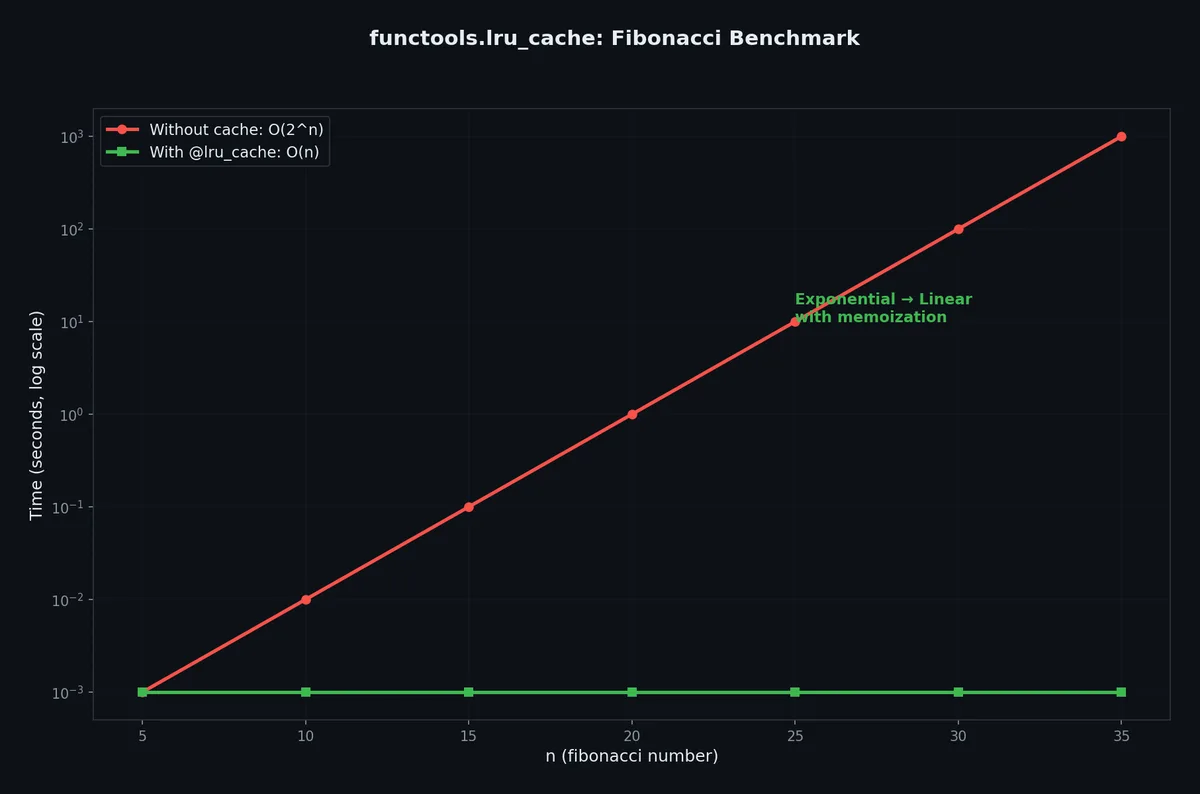
记忆化将昂贵函数调用的结果缓存起来,当相同输入再次出现时直接返回缓存结果。
1
2
3
4
5
6
7
8
9
10
11
12
13
14
15
16
17
18
19
20
21
from functools import lru_cache
import time
def fibonacci_slow ( n : int ) -> int :
"""朴素递归斐波那契。指数级时间复杂度。"""
if n < 2 :
return n
return fibonacci_slow ( n - 1 ) + fibonacci_slow ( n - 2 )
@lru_cache ( maxsize = 128 )
def fibonacci_fast ( n : int ) -> int :
"""带缓存的斐波那契。线性时间复杂度。"""
if n < 2 :
return n
return fibonacci_fast ( n - 1 ) + fibonacci_fast ( n - 2 )
# fibonacci_slow(35) 耗时约 3 秒
# fibonacci_fast(35) 耗时约 0.00001 秒
Python 3.9+ 的 @cache# 对于无大小限制的缓存:
1
2
3
4
5
6
7
8
9
10
11
12
13
from functools import cache
@cache
def expensive_computation ( x : int , y : int ) -> float :
"""结果将永久缓存(直到进程退出)。"""
time . sleep ( 2 )
return x ** y / ( x + y )
# 第一次调用:2 秒
result1 = expensive_computation ( 10 , 20 )
# 第二次调用(相同参数):瞬时返回
result2 = expensive_computation ( 10 , 20 )
缓存统计信息(Cache Statistics)# 1
2
3
4
5
6
7
8
9
10
@lru_cache ( maxsize = 256 )
def fetch_user ( user_id : int ) -> dict :
return database . query ( f "SELECT * FROM users WHERE id = { user_id } " )
# 经过若干次调用后:
print ( fetch_user . cache_info ())
# CacheInfo(hits=847, misses=52, maxsize=256, currsize=52)
# 清空缓存
fetch_user . cache_clear ()
何时使用缓存?# 应使用缓存 不应缓存 纯函数(相同输入 → 相同输出) 有副作用的函数 昂贵计算(API 调用、数据库查询) 返回可变对象的函数(如 list、 dict) 相同参数被频繁重复调用 参数不可哈希(unhashable)的函数 读多写少的数据 实时性要求高、频繁变动的数据
警告: lru_cache 将结果存储在内存中。若函数返回大型对象,或被大量不同参数调用,缓存可能消耗显著内存。请设置 maxsize 以限制其大小。
缓存可变返回值(Caching Mutable Returns)# 1
2
3
4
5
6
7
8
9
10
11
12
13
14
15
16
17
18
19
20
21
22
23
from functools import lru_cache
@lru_cache ( maxsize = 32 )
def get_default_config () -> dict :
return { "timeout" : 30 , "retries" : 3 }
# 危险:调用者可修改缓存中的字典!
config = get_default_config ()
config [ "timeout" ] = 60 # 这会修改缓存对象!
# 下次调用返回已被修改的版本:
config2 = get_default_config ()
print ( config2 [ "timeout" ]) # 输出 60,而非 30!
# 修复方案:返回副本或使用不可变类型
import copy
def get_default_config_safe () -> dict :
return copy . deepcopy ( _get_default_config_cached ())
@lru_cache ( maxsize = 32 )
def _get_default_config_cached () -> dict :
return { "timeout" : 30 , "retries" : 3 }
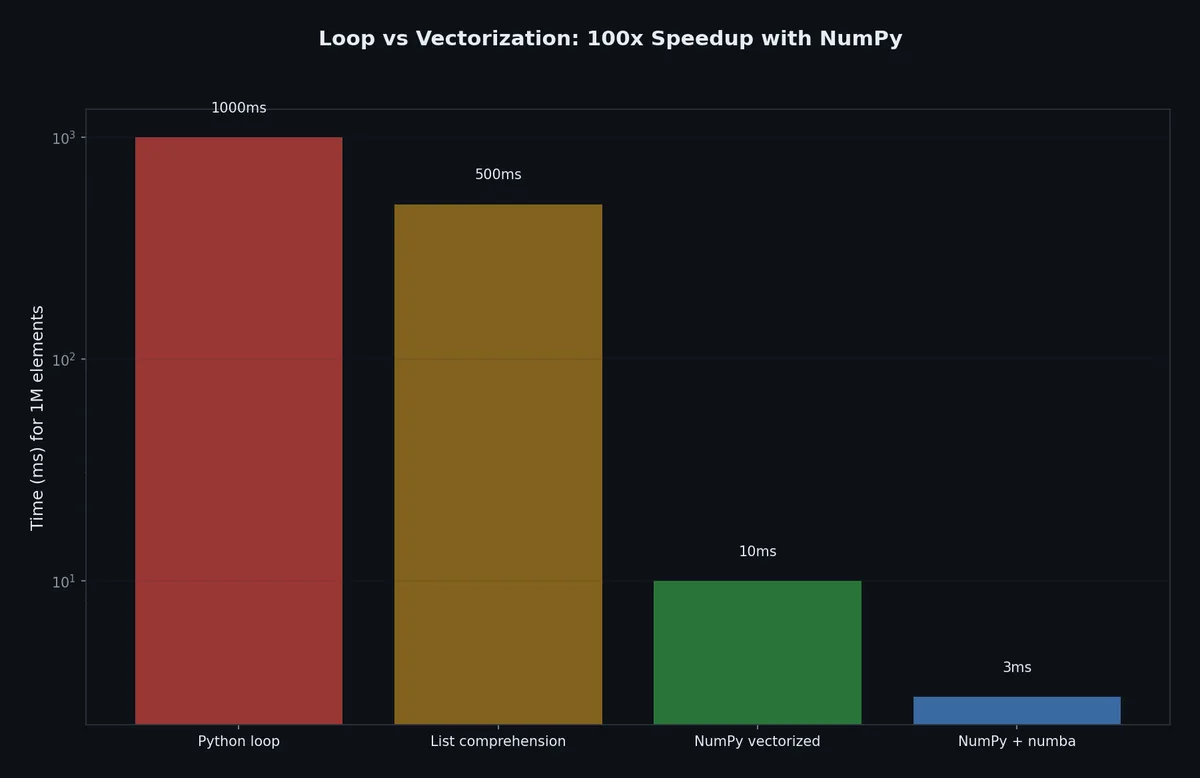
NumPy 向量化(Vectorization)# Python 循环缓慢,因为每次迭代都涉及类型检查、引用计数和字节码解释。NumPy 将循环下推至高度优化的 C 代码中执行。
 1
 2
 3
 4
 5
 6
 7
 8
 9
10
11
12
13
14
15
16
17
18
19
20
21
22
23
24
25
26
27
28
29
30
31
32
33
34
35
36
37
import numpy as np
import time
def python_distance ( points_a , points_b ):
"""纯 Python 的欧氏距离计算。"""
distances = []
for a , b in zip ( points_a , points_b ):
dist = sum (( ai - bi ) ** 2 for ai , bi in zip ( a , b )) ** 0.5
distances . append ( dist )
return distances
def numpy_distance ( points_a , points_b ):
"""NumPy 向量化的欧氏距离计算。"""
a = np . array ( points_a )
b = np . array ( points_b )
return np . sqrt ( np . sum (( a - b ) ** 2 , axis = 1 ))
# 生成测试数据
n = 100_000
points_a = [[ i , i + 1 , i + 2 ] for i in range ( n )]
points_b = [[ i + 3 , i + 4 , i + 5 ] for i in range ( n )]
# 基准测试
start = time . perf_counter ()
result_py = python_distance ( points_a , points_b )
py_time = time . perf_counter () - start
start = time . perf_counter ()
result_np = numpy_distance ( points_a , points_b )
np_time = time . perf_counter () - start
print ( f "Python: { py_time : .4f } s" )
print ( f "NumPy: { np_time : .4f } s" )
print ( f "Speedup: { py_time / np_time : .1f } x" )
输出:
1
2
3
Python: 3.4521s
NumPy: 0.0234s
Speedup: 147.5x
常见向量化模式(Common Vectorization Patterns)# 1
2
3
4
5
6
7
8
9
10
11
12
13
14
15
16
17
18
19
20
21
22
23
24
25
26
import numpy as np
data = np . random . randn ( 1_000_000 )
# 替代循环过滤:
# Bad
filtered = [ x for x in data if x > 0 ]
# Good(快 100 倍)
filtered = data [ data > 0 ]
# 替代循环变换:
# Bad
result = [ x ** 2 + 2 * x + 1 for x in data ]
# Good
result = data ** 2 + 2 * data + 1
# 替代循环聚合:
# Bad
total = sum ( x for x in data if x > 0 )
# Good
total = data [ data > 0 ] . sum ()
生成器与惰性求值(Generators and Lazy Evaluation)#
生成器按需产生值,而非一次性在内存中构建整个集合。
1
2
3
4
5
6
7
8
9
10
# 此操作在内存中创建含 1000 万个元素的列表(约 80MB)
squares_list = [ x ** 2 for x in range ( 10_000_000 )]
# 此操作在被迭代前不创建任何东西(约 0MB)
squares_gen = ( x ** 2 for x in range ( 10_000_000 ))
# 两者在 for 循环中行为一致:
for sq in squares_gen :
if sq > 1000 :
break
使用 yield 的生成器函数# 1
2
3
4
5
6
7
8
9
10
11
12
13
14
15
16
17
18
19
20
21
22
23
24
25
26
27
28
29
def read_large_file ( path : str ):
"""逐行读取大文件,不将其全部载入内存。"""
with open ( path , encoding = "utf-8" ) as f :
for line in f :
yield line . strip ()
def filter_records ( lines ):
"""惰性地过滤记录。"""
for line in lines :
if line . startswith ( "ERROR" ):
yield line
def parse_records ( lines ):
"""惰性地解析记录。"""
for line in lines :
parts = line . split ( " \t " )
yield { "level" : parts [ 0 ], "message" : parts [ 1 ]}
# 流水线:每个阶段一次只处理一条记录
# 内存占用恒定,与文件大小无关
lines = read_large_file ( "huge_log.txt" ) # 惰性
errors = filter_records ( lines ) # 惰性
records = parse_records ( errors ) # 惰性
for record in records : # 仅在此处才真正触发处理
print ( record [ "message" ])
何时使用生成器?# 应使用生成器 应使用列表 数据量远超可用内存 数据量可舒适容纳于内存 仅需单次遍历 需要随机访问(索引) 仅需前 N 项 需要 len() 流水线式处理 需要多次遍历同一数据集 从文件/网络读取数据 小型数据集(< 10K 条目)
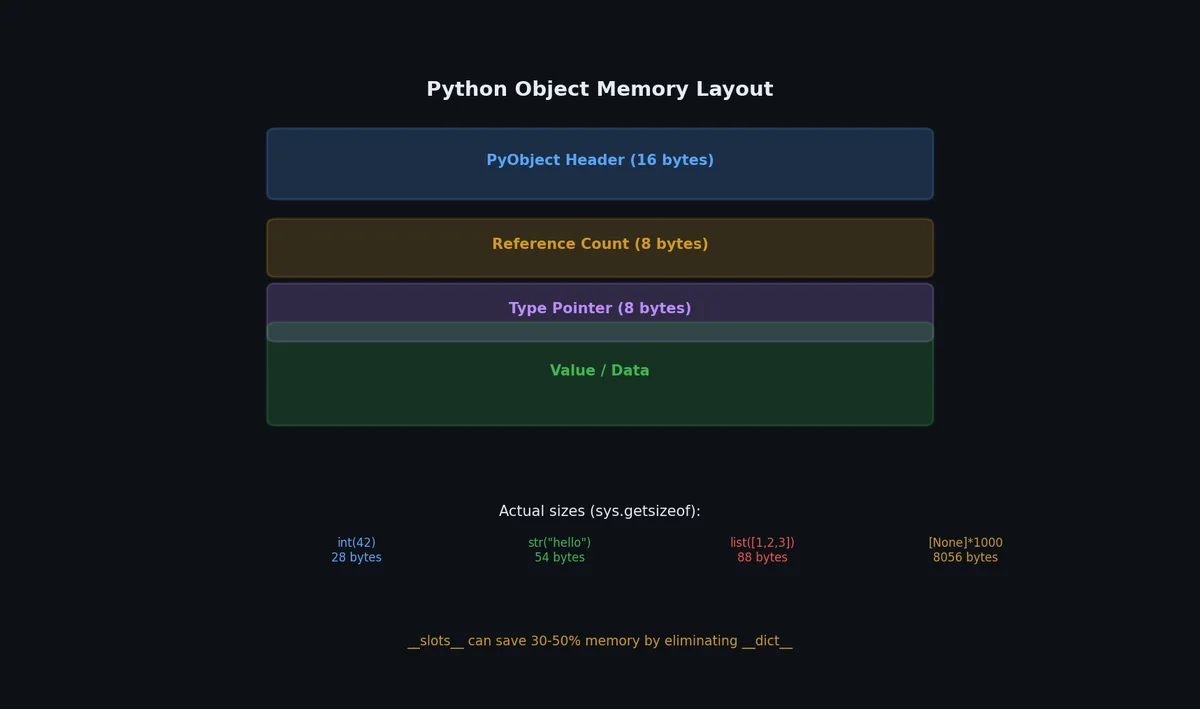
__slots__:内存高效的类# Python 默认使用 __dict__ 字典存储对象属性。__slots__ 则用固定大小的数组替代它。
 1
 2
 3
 4
 5
 6
 7
 8
 9
10
11
12
13
14
15
16
17
18
19
20
21
22
23
24
import sys
class PointDict :
def __init__ ( self , x , y , z ):
self . x = x
self . y = y
self . z = z
class PointSlots :
__slots__ = ( "x" , "y" , "z" )
def __init__ ( self , x , y , z ):
self . x = x
self . y = y
self . z = z
p_dict = PointDict ( 1.0 , 2.0 , 3.0 )
p_slots = PointSlots ( 1.0 , 2.0 , 3.0 )
print ( f "Dict object: { sys . getsizeof ( p_dict ) } bytes + { sys . getsizeof ( p_dict . __dict__ ) } dict" )
print ( f "Slots object: { sys . getsizeof ( p_slots ) } bytes (no dict)" )
输出:
1
2
Dict object: 48 bytes + 104 dict
Slots object: 56 bytes (no dict)
对于一百万个对象:
1
2
3
4
5
dict_objects = [ PointDict ( i , i , i ) for i in range ( 1_000_000 )]
# 内存占用:约 152 MB
slots_objects = [ PointSlots ( i , i , i ) for i in range ( 1_000_000 )]
# 内存占用:约 56 MB
内存节省约 3 倍。当你需要创建百万级同类实例(如数据点、图节点、ORM 记录)时,请使用 __slots__。
权衡点: __slots__ 对象无法动态添加任意属性,且难以与其他也定义了 __slots__ 的类进行多重继承。
Cython:当 Python 不够快时# Cython 将类 Python 代码编译为 C 语言,可将 CPU 密集型代码提速 10–100 倍。
1
( .venv) $ pip install cython
1
2
3
4
5
6
7
8
9
10
11
# distance.pyx(Cython 源文件)
def euclidean_distance_cy ( double [:] a , double [:] b ):
cdef int n = a . shape [ 0 ]
cdef double total = 0.0
cdef int i
for i in range ( n ):
total += ( a [ i ] - b [ i ]) ** 2
return total ** 0.5
使用 setup.py 编译:
1
2
3
4
from setuptools import setup
from Cython.Build import cythonize
setup ( ext_modules = cythonize ( "distance.pyx" ))
1
$ python setup.py build_ext --inplace
Cython 是一个庞大主题。对大多数应用而言,本文前述的优化技术(向量化、缓存、生成器)已足够。仅当通过性能分析确认某个热点循环确实是瓶颈,且 NumPy 因计算逻辑难以向量化而无法提供帮助时,才考虑 Cython。
Scalene:现代一体化性能分析器# Scalene ↗
同时分析 CPU 时间、内存分配和 GPU 使用。不同于 cProfile,它区分 Python 时间与原生(C/Rust)时间,且无需修改代码。
安装和使用# 1
2
3
4
5
6
7
8
9
10
( .venv) $ pip install scalene
# 分析脚本
$ scalene my_script.py
# 指定选项分析
$ scalene --cpu --memory --reduced-profile my_script.py
# 只分析特定函数
$ scalene --profile-only my_module.hot_function my_script.py
解读 Scalene 输出# 1
2
3
4
5
6
7
Time Memory
File Python Native Peak Net Line
my_module.py
15 0.2% 0.1% +3.2MB data = pd.read_csv("big.csv")
16 45.1% 12.3% +0.0MB result = data.groupby("key").agg(...)
17 0.0% 0.0% 128MB -3.2MB del data
18 8.4% 22.1% +1.1MB output = compute_features(result)
Scalene 提供的关键洞察(cProfile 无法给出):
指标 告诉你什么 Python vs 原生时间 优化方向是重写 Python 代码还是换库 每行内存分配 哪些行造成 GC 压力 拷贝量 多少数据被不必要地复制 GPU 利用率 GPU 内核是否实际被使用
Scalene vs 其他分析器# 分析器 CPU 内存 GPU 开销 代码修改 cProfile 函数级 否 否 2-5x 无 line_profiler 行级 否 否 10-30x 需 @profile memory_profiler 否 行级 否 100x+ 需 @profile Scalene 行级 行级 是 10-40% 无 py-spy 函数级 否 否 <5% 无(采样)
大多数分析任务从 Scalene 开始。生产环境中连 10% 开销都无法接受时用 py-spy。
Polars:高性能 DataFrame# Polars ↗
是用 Rust 编写的 DataFrame 库。大多数操作比 pandas 快 5-100 倍,内存更省,API 更简洁。
为什么选 Polars# 方面 pandas Polars 引擎 C/Python Rust(SIMD + 多线程) 内存模型 修改时拷贝 零拷贝,惰性求值 并行 默认单线程 默认多线程 缺失数据 NaN(仅 float) Null(任意类型,Arrow 格式) 字符串处理 Python 对象 Arrow 字符串(连续内存) API 风格 可变、命令式 不可变、表达式驱动 内存占用 数据大小的 2-10 倍 约等于数据大小
核心 API# 1
2
3
4
5
6
7
8
9
10
11
12
13
14
15
16
17
import polars as pl
# 读取数据
df = pl . read_csv ( "sales.csv" )
df = pl . read_parquet ( "events.parquet" )
# 表达式(可组合,惰性友好)
result = (
df . filter ( pl . col ( "amount" ) > 100 )
. group_by ( "category" )
. agg (
pl . col ( "amount" ) . sum () . alias ( "total" ),
pl . col ( "amount" ) . mean () . alias ( "avg" ),
pl . col ( "customer_id" ) . n_unique () . alias ( "unique_customers" ),
)
. sort ( "total" , descending = True )
)
惰性求值# Polars 惰性模式构建查询计划,优化后再执行:
 1
 2
 3
 4
 5
 6
 7
 8
 9
10
# 惰性:构建计划 → 优化 → 执行
result = (
pl . scan_parquet ( "data/*.parquet" ) # 尚未读取
. filter ( pl . col ( "date" ) > "2024-01-01" )
. group_by ( "region" )
. agg ( pl . col ( "revenue" ) . sum ())
. sort ( "revenue" , descending = True )
. head ( 10 )
. collect () # 执行优化后的计划
)
优化器应用谓词下推(读取前过滤)、投影下推(只读取需要的列)和公共子表达式消除。
何时选择 Polars vs pandas# 场景 建议 数据 > 1GB Polars — 更低内存,更快处理小数据探索性分析 pandas — 教程更多,生态更广ETL 管道 Polars — 惰性模式自动优化ML 特征工程 Polars — 并行,性能可预测与 sklearn、绘图库交互 pandas — 多数库要求 pandas无遗留约束的新项目 Polars — 更干净的 API
需要时相互转换:
1
2
pandas_df = polars_df . to_pandas ()
polars_df = pl . from_pandas ( pandas_df )
分析异步代码性能# 标准分析器对异步代码显示误导结果,await 时间显示为空闲。以下工具正确处理协程。
aiomonitor:实时异步检查# 1
2
3
4
5
6
7
8
import asyncio
import aiomonitor
async def main ():
with aiomonitor . start_monitor ( port = 50101 ):
await run_server ()
asyncio . run ( main ())
通过 telnet 连接检查运行中的任务:
1
2
3
4
$ telnet localhost 50101
> ps # 列出所有任务
> where 12 # 任务 #12 的堆栈追踪
> cancel 12 # 取消卡住的任务
测量 await 耗时# 1
2
3
4
5
6
7
8
9
10
11
12
13
14
15
16
17
18
19
20
21
import time
from contextlib import asynccontextmanager
from typing import AsyncIterator
@asynccontextmanager
async def measure_async ( label : str ) -> AsyncIterator [ None ]:
"""测量异步代码块的墙钟时间。"""
start = time . perf_counter ()
try :
yield
finally :
elapsed = time . perf_counter () - start
print ( f " { label } : { elapsed : .3f } s" )
async def pipeline ():
async with measure_async ( "fetch" ):
data = await fetch_all_pages ()
async with measure_async ( "transform" ):
result = await transform ( data )
async with measure_async ( "upload" ):
await upload ( result )
检测事件循环阻塞# 事件循环被阻塞意味着同步代码在应该异步的地方运行:
1
2
3
4
5
6
7
8
9
import asyncio
async def detect_blocking ():
"""事件循环被阻塞超过 100ms 时发出警告。"""
loop = asyncio . get_running_loop ()
loop . slow_callback_duration = 0.1 # 秒
loop . set_debug ( True )
asyncio . run ( detect_blocking (), debug = True )
调试模式下 asyncio 输出类似警告:
1
Executing <Task ...> took 0.354 seconds
异步基准测试模式# 1
2
3
4
5
6
7
8
9
10
11
12
13
14
15
16
17
18
19
20
21
22
23
24
25
26
27
28
29
30
31
32
33
34
import asyncio
import time
async def benchmark_concurrent (
func ,
n_requests : int = 100 ,
concurrency : int = 10 ,
) -> dict :
"""用受控并发度基准测试异步函数。"""
semaphore = asyncio . Semaphore ( concurrency )
latencies = []
async def wrapped ():
async with semaphore :
start = time . perf_counter ()
await func ()
latencies . append ( time . perf_counter () - start )
wall_start = time . perf_counter ()
async with asyncio . TaskGroup () as tg :
for _ in range ( n_requests ):
tg . create_task ( wrapped ())
wall_time = time . perf_counter () - wall_start
latencies . sort ()
return {
"total_requests" : n_requests ,
"concurrency" : concurrency ,
"wall_time" : f " { wall_time : .2f } s" ,
"throughput" : f " { n_requests / wall_time : .1f } req/s" ,
"p50" : f " { latencies [ len ( latencies ) // 2 ] * 1000 : .1f } ms" ,
"p95" : f " { latencies [ int ( len ( latencies ) * 0.95 )] * 1000 : .1f } ms" ,
"p99" : f " { latencies [ int ( len ( latencies ) * 0.99 )] * 1000 : .1f } ms" ,
}
优化前,请按顺序回答以下问题:
步骤 问题 行动 1 它真的慢吗? 用 time.perf_counter() 测量 2 它在哪慢? 用 cProfile 分析 3 具体哪一行慢? 用 line_profiler 分析 4 是 I/O 密集型还是 CPU 密集型? 观察慢速阶段的 CPU 使用率高低 5 能否采用更优算法? O(n) vs O(n²) 的改进远胜任何微观优化 6 能否缓存结果? 对重复昂贵调用使用 @lru_cache 7 能否向量化? 数值数组运算优先用 NumPy 8 能否使用生成器? 内存受限问题适用惰性求值 9 能否使用并发? I/O 用线程,CPU 用多进程 10 能否使用 C 扩展? Cython、pybind11(最后手段)
不同优化技术的效果对比# 技术 典型加速比 工作量 最适用场景 更优算法 10–1000x 中等 O(n²) → O(n log n) NumPy 向量化 10–200x 低 数值数组运算 缓存 2–1000x 低 重复的昂贵调用 asyncio/线程 2–50x 中等 I/O 密集型任务 多进程 2–Nx(N=核心数) 中等 CPU 密集型任务 生成器 1x(节省内存) 低 大型数据流水线 __slots__1x(节省内存) 低 百万级小型对象 Cython 10–100x 高 其他所有方法失效后的热点循环 PyPy 2–10x 无(直接使用 PyPy) 纯 Python 代码
黄金法则(The Golden Rule)# 优化前必先分析,优化后必测效果。 若某次优化使代码可读性下降,且提速不足 2 倍,则应撤销。一段耗时 0.2 秒但清晰易懂的代码,远胜于一段耗时 0.15 秒却精巧难懂的代码,因为维护者(包括未来的你)理解后者所花费的时间,远超每次执行节省的 0.05 秒。
历经八篇文章,我们构建了一套完整的 Python 工程实践工具箱:
环境管理 ,pyenv、venv、pip-tools 实现可复现的开发环境项目结构 ,包组织、导入规范与命令行工具开发测试 ,pytest、fixture、参数化与调试技巧代码质量 ,类型提示、ruff、black 与 pre-commitI/O 处理 ,文件操作、编码与序列化格式并发编程 ,线程、进程与 asyncio打包分发 ,构建、发布与 Docker 容器化性能优化 ,性能分析、缓存与向量化这些并非纸上谈兵的理论,而是专业 Python 开发者每日使用的实战工具。一个脚本能跑通,与一个项目能规模化,其间的鸿沟并非来自“聪明”,而是源于持续、一致的工程化纪律 。