学习系统设计的最佳方式是动手实践。阅读关于单个组件(如缓存、消息队列、负载均衡器)的资料能帮你建立术语库,但只有亲手设计一个完整系统,才能学会如何将这些组件有机组合,构建出真正可用的系统。
本文将端到端地剖析三个经典系统设计问题,每个案例均严格遵循本系列第一篇文章提出的系统设计框架:明确需求 → 规模估算 → 高层架构设计 → 关键组件深度剖析 → 瓶颈识别。
案例研究 1:网址缩短服务(URL Shortener)#
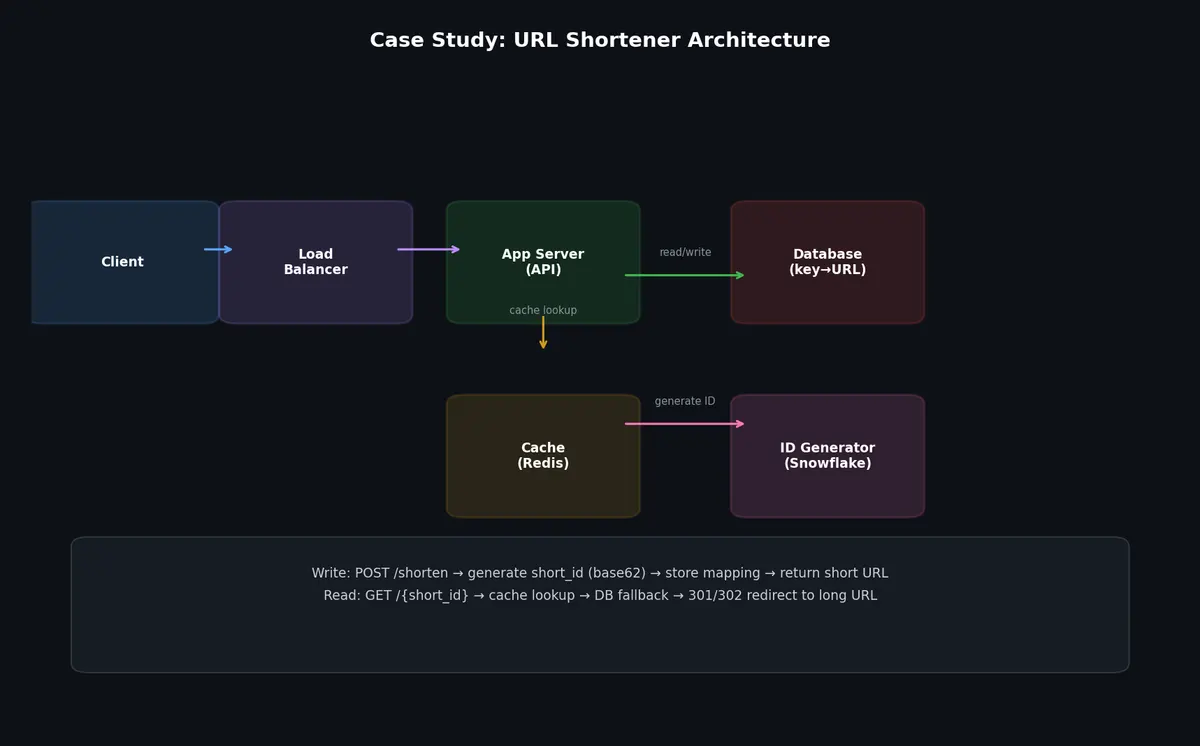
网址缩短服务接收一个长 URL,并生成一个短别名(例如 https://short.ly/abc123),该别名重定向至原始长 URL。它看似极其简单,但在海量规模下,会触及哈希、分布式存储、缓存及分析等核心问题。
功能性需求:
- 给定一个长 URL,生成对应的短 URL
- 给定一个短 URL,重定向至原始长 URL
- 用户可选择自定义短别名
- 短 URL 支持配置过期时间(默认:5 年)
- 追踪点击分析数据(点击次数、来源页 referrer、地理分布)
非功能性需求:
- 每日新增 URL 数量:1 亿条
- 读写比:100:1(即每日 100 亿次重定向)
- 重定向延迟 < 50ms(p99)
- 可用性:99.99%(对所有依赖该服务的用户而言,这是关键基础设施)
- 短 URL 应尽可能短
规模估算#
写入 QPS(URL 创建):
1
2
| 100M URLs/day ÷ 86,400 sec/day ≈ 1,160 writes/sec
峰值(3×):~3,500 writes/sec
|
读取 QPS(重定向):
1
2
| 10B redirects/day ÷ 86,400 sec/day ≈ 115,000 reads/sec
峰值(3×):~350,000 reads/sec
|
这是一个极度读密集型系统,缓存将是其可扩展性的基石。
存储估算:
 1
 2
 3
 4
 5
 6
 7
 8
 9
10
11
| 每条 URL 记录:
短码(short code):7 字节
长 URL:500 字节(平均值)
用户 ID:8 字节
创建时间戳:8 字节
过期时间戳:8 字节
总计:~530 字节
每日:100M × 530 字节 = 53 GB/day
每年:53 GB × 365 = 19.3 TB/year
5 年保留:~100 TB
|
缓存内存估算(采用 80/20 法则,20% 的 URL 承载 80% 的流量):
1
2
3
4
| 每日唯一访问 URL 数:~10 亿(估算)
热点集(hot set,20%):2 亿条 URL
每条缓存项:530 字节
所需缓存内存:200M × 530 字节 ≈ 106 GB
|
106 GB 的缓存容量在 Redis 集群中完全可控(例如:6 个节点,每节点 32 GB)。
短 URL 生成方案#
核心设计挑战:如何为每个 URL 生成唯一且极短的编码。
方案 1:自增 ID 的 Base62 编码
使用分布式 ID 生成器(如 Twitter Snowflake)生成唯一的 64 位整数,再将其以 base62 编码(a–z, A–Z, 0–9)。
 1
 2
 3
 4
 5
 6
 7
 8
 9
10
11
12
13
14
15
16
17
18
19
20
21
22
23
| import string
ALPHABET = string.ascii_lowercase + string.ascii_uppercase + string.digits # 62 chars
def encode_base62(num: int) -> str:
if num == 0:
return ALPHABET[0]
result = []
while num > 0:
result.append(ALPHABET[num % 62])
num //= 62
return "".join(reversed(result))
def decode_base62(s: str) -> int:
num = 0
for char in s:
num = num * 62 + ALPHABET.index(char)
return num
# 示例:
# encode_base62(1000000) → "4C92" (4 字符)
# encode_base62(1000000000) → "15FTGg" (6 字符)
# encode_base62(3500000000000) → "zzzzzz" (6 字符,6 字符最大值)
|
使用 7 位 base62 编码,可表示 $62^7 = 3.5$
万亿个唯一 URL,足以支撑数十年业务增长。
方案 2:哈希后截断
对长 URL 使用 MD5 或 SHA-256 哈希,再取其 base62 编码后的前 7 位字符。
1
2
3
4
5
6
7
| import hashlib
def generate_short_code(long_url: str) -> str:
hash_bytes = hashlib.md5(long_url.encode()).digest()
hash_int = int.from_bytes(hash_bytes[:8], byteorder="big")
code = encode_base62(hash_int)[:7]
return code
|
问题:哈希碰撞。两个不同 URL 可能生成相同的 7 字符短码。必须检测碰撞并在发生时追加计数器或更换哈希种子。
方案 3:预生成密钥池(Pre-generated key pool)
由独立服务预先批量生成大量唯一短码并存入池中,新 URL 创建时直接从池中取出下一个可用短码。
 1
 2
 3
 4
 5
 6
 7
 8
 9
10
11
12
13
14
15
16
17
18
19
20
21
22
23
24
25
26
27
| class KeyGenerationService:
"""为 URL 缩短服务预生成唯一短码。"""
def __init__(self, redis_client):
self.redis = redis_client
self.pool_key = "available_codes"
def generate_batch(self, batch_size: int = 100000):
"""生成一批唯一短码并加入池中。"""
codes = set()
while len(codes) < batch_size:
code = encode_base62(random.randint(0, 62**7 - 1))
code = code.ljust(7, "0") # 补齐至 7 字符
codes.add(code)
# 加入 Redis 集合(自动去重)
pipeline = self.redis.pipeline()
for code in codes:
pipeline.sadd(self.pool_key, code)
pipeline.execute()
def get_code(self) -> str:
"""从池中弹出一个短码。线程安全且原子操作。"""
code = self.redis.spop(self.pool_key)
if code is None:
raise RuntimeError("短码池已耗尽 —— 请生成更多短码")
return code.decode()
|
本设计选用方案 1(分布式 ID 的 base62 编码),因其简洁、无碰撞风险且能稳定生成最短编码。
高层架构#
组件:
- API 服务器(无状态),处理创建与重定向请求
- 分布式 ID 生成器,为新 URL 生成唯一 ID
- 数据库,存储 URL 映射(短码 → 长 URL)
- Redis 缓存,缓存热门 URL 映射,加速重定向
- 分析流水线,记录点击事件用于数据分析
URL 创建的数据流:
1
2
3
4
5
| 客户端 → 负载均衡器 → API 服务器
→ 生成唯一 ID(Snowflake)
→ Base62 编码为短码
→ 将映射写入数据库
→ 返回短 URL 给客户端
|
重定向的数据流:
1
2
3
4
5
| 客户端 → 负载均衡器 → API 服务器
→ 在 Redis 缓存中查找短码
→ 缓存命中:立即重定向
→ 缓存未命中:查数据库,填充缓存,再重定向
→ 异步:将点击事件发送至 Kafka 供分析
|
深度剖析:重定向逻辑#
 1
 2
 3
 4
 5
 6
 7
 8
 9
10
11
12
13
14
15
16
17
18
19
20
21
22
23
24
25
26
27
28
29
30
31
32
33
34
35
36
37
38
39
40
41
42
43
44
| from fastapi import FastAPI, Response, HTTPException
from fastapi.responses import RedirectResponse
import redis
import json
app = FastAPI()
cache = redis.Redis(host="cache.internal", port=6379, decode_responses=True)
@app.get("/{short_code}")
async def redirect(short_code: str):
# 步骤 1:检查缓存
long_url = cache.get(f"url:{short_code}")
if long_url is None:
# 步骤 2:缓存未命中 —— 查询数据库
record = await db.fetch_one(
"SELECT long_url, expires_at FROM urls WHERE short_code = $1",
short_code,
)
if record is None:
raise HTTPException(status_code=404, detail="短 URL 未找到")
if record["expires_at"] and record["expires_at"] < datetime.utcnow():
raise HTTPException(status_code=410, detail="短 URL 已过期")
long_url = record["long_url"]
# 填充缓存(TTL:24 小时)
cache.setex(f"url:{short_code}", 86400, long_url)
# 步骤 3:记录分析事件(异步、非阻塞)
await kafka_producer.send("click-events", {
"short_code": short_code,
"timestamp": datetime.utcnow().isoformat(),
"referrer": request.headers.get("referer"),
"user_agent": request.headers.get("user-agent"),
"ip": request.client.host,
})
# 步骤 4:执行重定向
# 301(永久)更利于缓存,但会丢失分析数据
# 302(临时)强制浏览器每次均访问服务器(利于分析)
return RedirectResponse(url=long_url, status_code=302)
|
vs 302 重定向#
这是一个重要的权衡:
| 重定向类型 | 行为 | 分析准确性 | CDN 缓存 |
|---|
| 301(永久) | 浏览器缓存,后续不再访问服务器 | 低估(遗漏缓存重定向) | CDN 强力缓存 |
| 302(临时) | 浏览器每次均访问服务器 | 准确(每次点击均被记录) | CDN 可能不缓存 |
绝大多数 URL 缩短服务采用 302,因为分析是其核心功能;部分服务提供双模式,默认 302,对性能敏感场景支持可选 301。
可扩展性策略#
数据库分片:按短码哈希确定分片。这能均匀分散写入,并支持免扫描查询。
1
2
3
4
5
| 分片 0:短码首字符 ∈ [0-9]
分片 1:短码首字符 ∈ [a-m]
分片 2:短码首字符 ∈ [n-z]
分片 3:短码首字符 ∈ [A-M]
分片 4:短码首字符 ∈ [N-Z]
|
缓存热点 URL:Top 1% 的 URL 承载了 90%+ 的流量。一个缓存这些热点 URL 的 Redis 集群,即可处理绝大部分重定向请求,无需触达数据库。
分析流水线:点击事件先发往 Kafka,而非直写数据库。Flink 作业按分钟/小时/天聚合点击数,并写入时序数据库。此举将实时重定向路径与分析路径解耦。
案例研究 2:实时聊天系统#
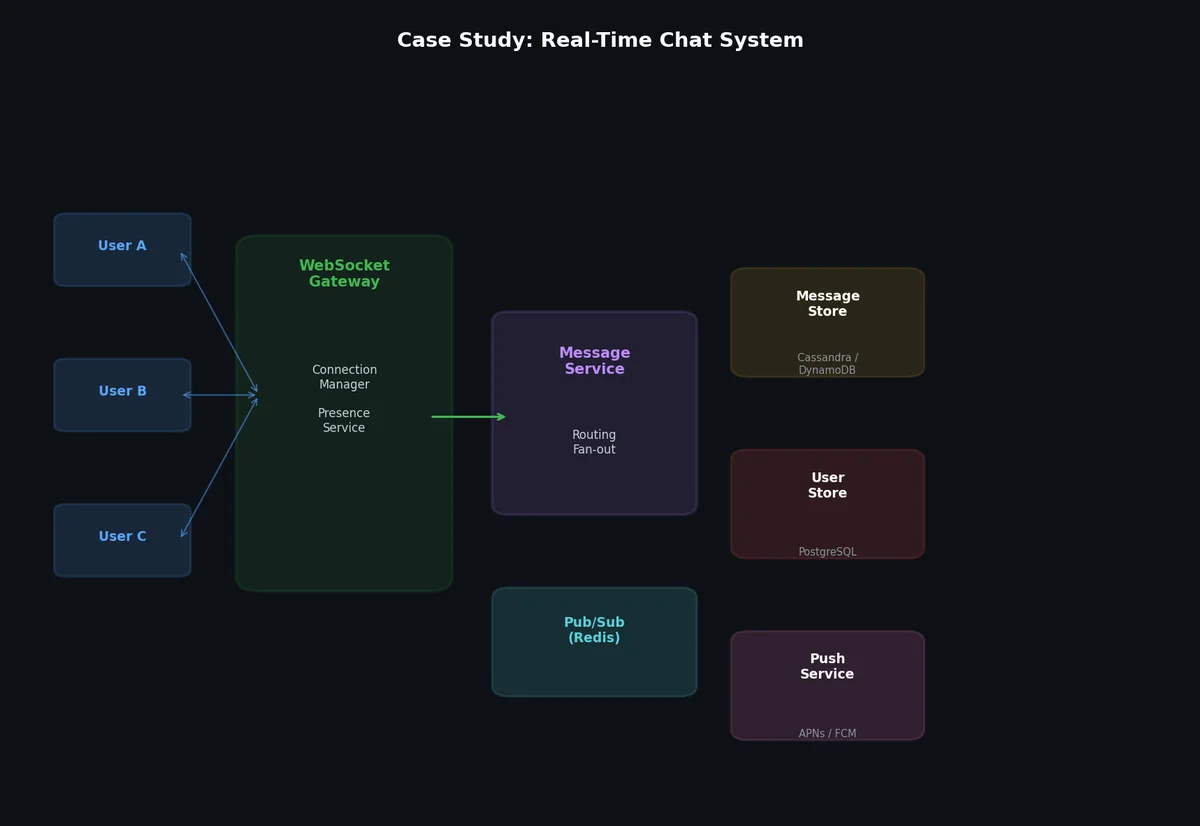
聊天应用需支持实时双向通信、持久化消息存储、在线状态感知(presence)以及高效的群组消息广播(fan-out)。
功能性需求:
- 用户间点对点(1:1)消息
- 群聊(最多 500 成员)
- 在线/离线状态(presence)
- 消息历史(持久化、可搜索)
- 已发送/已送达/已读回执
- 向离线用户推送通知
- 支持文本、图片及文件附件
非功能性需求:
- 日活跃用户(DAU):5000 万
- 每用户日均发送消息数:40 条
- 平均群组成员数:10 人
- 30% 的消息为群组消息
- 消息投递延迟 < 200ms(p95)
- 可用性:99.9%
- 同一聊天会话内消息顺序必须保证
规模估算#
消息总量:
1
2
3
| 50M DAU × 40 messages/user/day = 2B messages/day
2B ÷ 86,400 = ~23,000 messages/sec
峰值(3×):~70,000 messages/sec
|
连接数:
1
2
3
| 50M DAU,假设 30% 同时在线 = 1500 万并发 WebSocket 连接
每连接内存开销:~10 KB
连接状态总内存:15M × 10 KB = 150 GB
|
150 GB 连接状态需多台服务器承载。若单台服务器支持 50 万连接,则需约 30 台连接服务器。
存储:
1
2
3
4
| 单条消息平均大小:200 字节(文本) + 100 字节(元数据) = 300 字节
每日:2B × 300 字节 = 600 GB/day
每年:600 GB × 365 = 219 TB/year
三副本:~660 TB/year
|
媒体附件应使用对象存储(S3)+ CDN,纯文本消息存入数据库。
高层架构#
组件:
- WebSocket 网关,与客户端维持持久连接
- 聊天服务(Chat Service),处理消息路由与业务逻辑
- 消息存储(Message Store),持久化消息历史
- 在线状态服务(Presence Service),跟踪用户在线/离线状态
- 推送通知服务(Push Notification Service),向离线用户发送推送
- 媒体服务(Media Service),处理文件上传与分发(后端为对象存储 + CDN)
- Kafka,解耦消息摄入、存储与投递
WebSocket 连接管理#
WebSocket 网关维护用户 ID 到连接的映射。
 1
 2
 3
 4
 5
 6
 7
 8
 9
10
11
12
13
14
15
16
17
18
19
20
21
22
23
24
25
26
27
28
29
30
31
32
33
34
35
36
37
| # 连接管理器(运行于每台 WebSocket 服务器)
import asyncio
import websockets
from collections import defaultdict
class ConnectionManager:
def __init__(self, server_id: str, redis_client):
self.server_id = server_id
self.connections = {} # user_id → websocket
self.redis = redis_client
async def connect(self, user_id: str, websocket):
self.connections[user_id] = websocket
# 在 Redis 中注册:user_id → server_id
self.redis.hset("user_connections", user_id, self.server_id)
# 发布在线状态事件
self.redis.publish("presence", json.dumps({
"user_id": user_id, "status": "online"
}))
async def disconnect(self, user_id: str):
self.connections.pop(user_id, None)
self.redis.hdel("user_connections", user_id)
self.redis.publish("presence", json.dumps({
"user_id": user_id, "status": "offline"
}))
async def send_to_user(self, user_id: str, message: dict):
ws = self.connections.get(user_id)
if ws:
await ws.send(json.dumps(message))
return True
return False
def find_server(self, user_id: str) -> str:
"""查找用户当前连接在哪台服务器上。"""
return self.redis.hget("user_connections", user_id)
|
消息路由#
当用户 A 向用户 B 发送消息时:
- 用户 A 的 WebSocket 服务器接收消息。
- 消息发布至 Kafka(保障持久性与顺序)。
- 聊天服务从 Kafka 消费并通过 Redis 查询用户 B 所连服务器。
- 若用户 B 在同一服务器,直接通过 WebSocket 投递。
- 若用户 B 在另一服务器,通过服务器间通信(Redis Pub/Sub 或内部 gRPC)路由。
- 若用户 B 离线,存储消息并发送推送通知。
 1
 2
 3
 4
 5
 6
 7
 8
 9
10
11
12
13
14
15
16
17
18
19
20
21
22
23
24
25
26
27
28
29
30
31
32
33
34
35
36
37
38
39
40
41
| class ChatService:
async def handle_message(self, message: dict):
sender_id = message["sender_id"]
recipient_id = message["recipient_id"]
conversation_id = message["conversation_id"]
# 生成消息 ID 和时间戳(服务端生成,确保一致性)
message["message_id"] = str(uuid.uuid4())
message["server_timestamp"] = datetime.utcnow().isoformat()
# 持久化至 Kafka(保障顺序与可靠性)
await kafka_producer.send(
topic=f"chat-messages",
key=conversation_id, # 同一会话 → 同一分区 → 有序
value=message,
)
# 向发送方返回确认
await self.connection_manager.send_to_user(sender_id, {
"type": "ack",
"message_id": message["message_id"],
"status": "sent",
})
# 投递至接收方
recipient_server = self.connection_manager.find_server(recipient_id)
if recipient_server:
if recipient_server == self.server_id:
# 同一服务器 —— 直接投递
await self.connection_manager.send_to_user(
recipient_id, message
)
else:
# 不同服务器 —— 通过 Redis Pub/Sub 路由
self.redis.publish(
f"deliver:{recipient_server}",
json.dumps(message),
)
else:
# 用户离线 —— 发送推送通知
await push_service.notify(recipient_id, message)
|
群组消息广播(Fan-Out)#
群组消息需投递给所有成员。对 N 人小组,即为 N 倍广播。
 1
 2
 3
 4
 5
 6
 7
 8
 9
10
11
12
13
14
15
16
17
18
19
20
21
22
23
24
25
26
27
28
29
| async def handle_group_message(self, message: dict):
group_id = message["group_id"]
sender_id = message["sender_id"]
# 获取群组成员
members = await db.fetch_all(
"SELECT user_id FROM group_members WHERE group_id = $1",
group_id,
)
# 持久化消息
message["message_id"] = str(uuid.uuid4())
message["server_timestamp"] = datetime.utcnow().isoformat()
await kafka_producer.send(
topic="chat-messages",
key=group_id,
value=message,
)
# 广播给所有成员(除发送者外)
delivery_tasks = []
for member in members:
if member["user_id"] != sender_id:
delivery_tasks.append(
self.deliver_to_user(member["user_id"], message)
)
# 并行投递
await asyncio.gather(*delivery_tasks, return_exceptions=True)
|
对于大型群组(100+ 成员),广播应异步进行。聊天服务仅将消息发至 Kafka,由独立的投递工作器(delivery worker)负责实际广播。
消息存储#
消息需持久化以支持历史查看与搜索。典型访问模式为:“获取会话 X 中最近 N 条消息,按时间倒序排列。”
 1
 2
 3
 4
 5
 6
 7
 8
 9
10
11
12
13
14
15
16
17
| -- Cassandra 风格 Schema(宽列存储,针对时序访问优化)
CREATE TABLE messages (
conversation_id TEXT,
message_id TIMEUUID,
sender_id TEXT,
content TEXT,
message_type TEXT, -- 'text', 'image', 'file'
media_url TEXT,
created_at TIMESTAMP,
PRIMARY KEY (conversation_id, message_id)
) WITH CLUSTERING ORDER BY (message_id DESC);
-- 查询:获取会话中最近 50 条消息
SELECT * FROM messages
WHERE conversation_id = 'conv_123'
ORDER BY message_id DESC
LIMIT 50;
|
Cassandra 是聊天消息存储的常见选择,原因如下:
- 写入优化(仅追加)
- 按
conversation_id 分片,数据分布均匀 - 时间排序聚类键(clustering key)支持高效范围查询
- 线性可扩展(增加节点即可扩容)
在线状态服务(Presence Service)#
在线状态(online/offline)通过心跳机制实现:
 1
 2
 3
 4
 5
 6
 7
 8
 9
10
11
12
13
14
15
16
17
18
19
20
21
22
23
24
25
| class PresenceService:
HEARTBEAT_INTERVAL = 30 # 秒
OFFLINE_THRESHOLD = 90 # 秒(无心跳即视为离线)
def __init__(self, redis_client):
self.redis = redis_client
async def heartbeat(self, user_id: str):
"""客户端每 30 秒调用一次。"""
self.redis.setex(
f"presence:{user_id}",
self.OFFLINE_THRESHOLD,
"online",
)
def is_online(self, user_id: str) -> bool:
return self.redis.exists(f"presence:{user_id}")
def get_online_friends(self, user_id: str) -> list:
friend_ids = self.get_friends(user_id)
pipeline = self.redis.pipeline()
for fid in friend_ids:
pipeline.exists(f"presence:{fid}")
results = pipeline.execute()
return [fid for fid, online in zip(friend_ids, results) if online]
|
可扩展性考量#
按用户 ID 哈希分片 WebSocket 连接:一致性哈希将每个用户映射至特定网关服务器。若某服务器宕机,仅其用户需重连。
消息顺序保证:Kafka 按 conversation_id 分区,确保同一会话内消息顺序;不同会话可在不同分区并行处理。
热门群组隔离:含 500 名活跃成员的群组,每条消息触发 500 倍广播。应将热门群组的广播任务隔离至专用投递工作器,避免影响 1:1 聊天延迟。
案例研究 3:新闻信息流系统(News Feed System)#

新闻信息流系统向用户展示个性化、排序后的动态内容流,内容来自其关注的用户与页面,这是 Facebook、Twitter、Instagram 等平台的核心产品功能。
功能性需求:
- 用户可发布帖子(文本、图片、链接)
- 用户可关注/取消关注其他用户
- 用户可见其关注对象发布的帖子流
- 信息流需排序(非纯时间顺序)
- 支持分页(无限滚动)
- 支持点赞与评论
非功能性需求:
- 日活跃用户(DAU):2 亿
- 平均每人关注 200 个账号
- 平均每人日发帖 1 条,日浏览信息流 10 次
- 信息流生成延迟 < 500ms
- 可用性:99.9%
- 接受最终一致性(帖子可在粉丝信息流中延迟数秒出现)
规模估算#
发帖 QPS:
1
2
| 200M DAU × 1 post/day ÷ 86,400 = ~2,300 posts/sec
峰值(3×):~7,000 posts/sec
|
信息流读取 QPS:
1
2
| 200M DAU × 10 reads/day ÷ 86,400 = ~23,000 reads/sec
峰值(3×):~70,000 reads/sec
|
广播量(Fan-Out Volume):
1
2
3
| 每条帖子需广播至作者的所有粉丝。
人均粉丝数:200
2,300 posts/sec × 200 followers = 460,000 fan-out writes/sec
|
每秒 46 万次广播写入对分布式系统而言虽具挑战,但完全可应对。
广播难题(The Fan-Out Problem)#
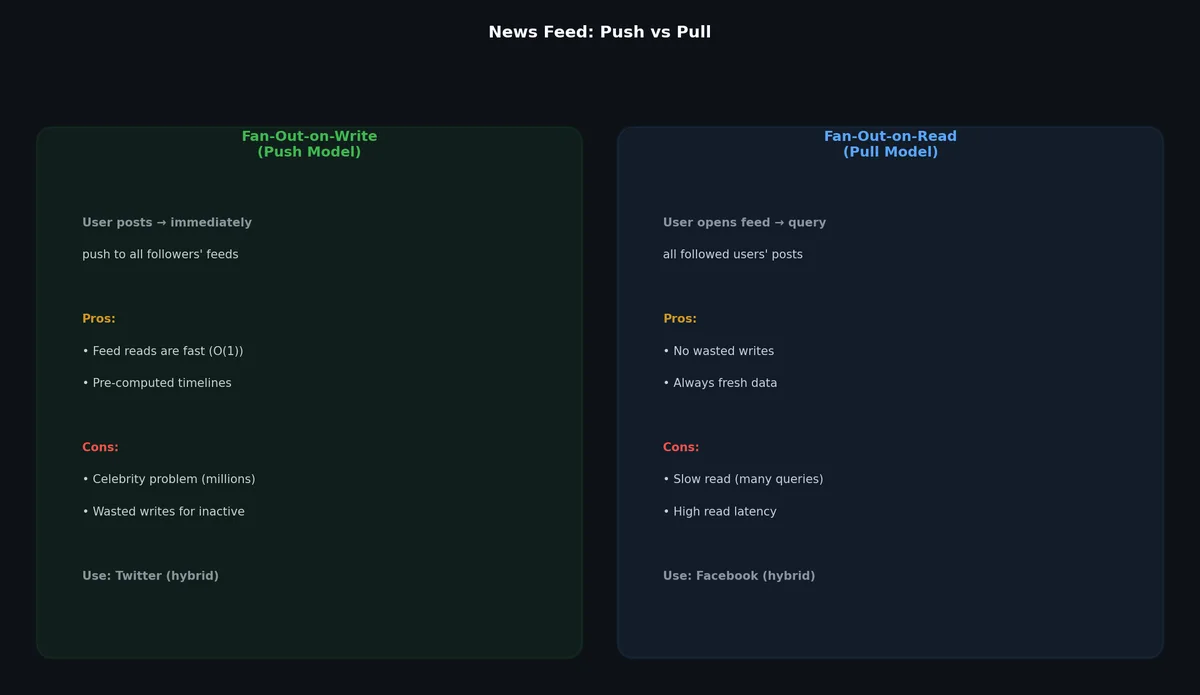
核心设计挑战:如何为每位用户构建其关注对象的帖子流?
写时广播(Push Model):用户发帖时,立即将该帖写入其每位粉丝的信息流缓存。
1
2
3
4
5
6
| 用户 A 发布帖子:
→ 对其 200 位粉丝中的每一位:
→ 将帖子加入该粉丝的预计算信息流缓存
用户打开信息流时:
→ 直接从其预计算缓存中读取(极快!)
|
优势:
劣势:
- 写入放大严重(1 条帖子 → 200+ 次写入)
- “名人问题”(celebrity problem):拥有 1000 万粉丝的用户发一条帖,触发 1000 万次写入
- 为不活跃用户做无谓计算(其可能永不打开信息流)
读时广播(Pull Model):用户打开信息流时,实时查询其所有关注对象的最新帖子。
1
2
3
4
5
| 用户打开信息流:
→ 获取其关注的用户列表(200 人)
→ 实时查询每位关注用户的最新帖子
→ 合并并排序所有帖子
→ 返回 Top N 帖子
|
优势:
- 无写入放大
- 无浪费计算(仅在用户真正读取时才计算)
- 自然解决名人问题(无需特殊处理)
劣势:
- 信息流读取慢(需查询 200+ 用户的帖子并合并)
- 读取时数据库负载高
- 流量高峰时延迟飙升
混合模型(Hybrid Model,实用之选):对普通用户采用写时广播,对名人用户采用读时广播。
1
2
| 粉丝数 < 10,000:写时广播(推送到粉丝信息流)
粉丝数 ≥ 10,000:读时广播(粉丝在读取时拉取)
|
Twitter 及多数大型社交平台均采用此策略。
高层架构#
组件:
- 帖子服务(Post Service),处理帖子创建与存储
- 信息流生成服务(Feed Generation Service),构建并缓存信息流
- 广播服务(Fan-Out Service),将帖子分发至粉丝信息流
- 排序服务(Ranking Service),按相关性对信息流条目排序
- 社交图谱服务(Social Graph Service),管理关注关系
- 信息流缓存(Feed Cache),Redis 中预计算的信息流
- 帖子缓存(Post Cache),Redis 中高频访问的帖子
- Kafka,解耦帖子创建与广播
发帖流程#
 1
 2
 3
 4
 5
 6
 7
 8
 9
10
11
12
13
14
15
16
17
18
19
20
21
22
23
24
25
26
27
28
29
30
31
32
| class PostService:
async def create_post(self, user_id: str, content: dict) -> dict:
# 在数据库中创建帖子
post_id = str(uuid.uuid4())
post = {
"post_id": post_id,
"user_id": user_id,
"content": content["text"],
"media_urls": content.get("media_urls", []),
"created_at": datetime.utcnow().isoformat(),
}
await db.execute(
"INSERT INTO posts (id, user_id, content, media_urls, created_at) "
"VALUES ($1, $2, $3, $4, $5)",
post_id, user_id, post["content"],
json.dumps(post["media_urls"]), post["created_at"],
)
# 缓存帖子
await redis.setex(
f"post:{post_id}", 86400, json.dumps(post)
)
# 发布事件供广播服务消费
await kafka_producer.send(
topic="new-posts",
key=user_id,
value=post,
)
return post
|
广播服务#
 1
 2
 3
 4
 5
 6
 7
 8
 9
10
11
12
13
14
15
16
17
18
19
20
21
22
23
24
25
26
27
28
29
30
| class FanOutService:
CELEBRITY_THRESHOLD = 10000
async def process_new_post(self, post: dict):
user_id = post["user_id"]
# 获取粉丝数
follower_count = await social_graph.get_follower_count(user_id)
if follower_count >= self.CELEBRITY_THRESHOLD:
# 名人:跳过广播,粉丝将在读取时拉取
await redis.sadd("celebrity_users", user_id)
return
# 普通用户:写时广播
followers = await social_graph.get_followers(user_id)
# 批量广播提升效率
pipeline = redis.pipeline()
for follower_id in followers:
feed_key = f"feed:{follower_id}"
# 将帖子 ID 加入粉丝信息流(有序集合,按时间戳排序)
pipeline.zadd(
feed_key,
{post["post_id"]: float(post["created_at_epoch"])},
)
# 截断信息流,仅保留最近 1000 条(防无限增长)
pipeline.zremrangebyrank(feed_key, 0, -1001)
await pipeline.execute()
|
信息流读取流程#
 1
 2
 3
 4
 5
 6
 7
 8
 9
10
11
12
13
14
15
16
17
18
19
20
21
22
23
24
25
26
27
28
29
30
31
32
33
34
35
36
37
38
39
40
41
42
43
44
45
46
47
48
49
50
51
52
53
54
55
56
57
58
59
60
61
62
63
64
65
66
67
68
69
70
| class FeedService:
FEED_SIZE = 50 # 每页帖子数
async def get_feed(self, user_id: str, cursor: str = None) -> dict:
feed_key = f"feed:{user_id}"
# 步骤 1:获取预计算信息流(写时广播的帖子)
if cursor:
max_score = float(cursor)
else:
max_score = float("inf")
post_ids = await redis.zrevrangebyscore(
feed_key,
max_score, "-inf",
start=0, num=self.FEED_SIZE,
withscores=True,
)
# 步骤 2:合并名人帖子(读时广播)
celebrity_ids = await self.get_followed_celebrities(user_id)
if celebrity_ids:
celebrity_posts = await self.fetch_celebrity_posts(
celebrity_ids, max_score, self.FEED_SIZE
)
# 合并名人帖子与预计算信息流
all_posts = self.merge_sorted(post_ids, celebrity_posts)
else:
all_posts = post_ids
# 步骤 3:批量获取完整帖子数据(从缓存/DB)
enriched_posts = await self.enrich_posts(
[pid for pid, _ in all_posts[:self.FEED_SIZE]]
)
# 步骤 4:排序帖子
ranked_posts = await self.ranking_service.rank(
user_id, enriched_posts
)
# 步骤 5:构建响应(含分页游标)
next_cursor = None
if len(ranked_posts) == self.FEED_SIZE:
next_cursor = str(all_posts[self.FEED_SIZE - 1][1])
return {
"posts": ranked_posts,
"next_cursor": next_cursor,
}
async def fetch_celebrity_posts(
self, celebrity_ids: list, max_timestamp: float, limit: int
) -> list:
"""拉取名人用户的近期帖子(读时广播)。"""
tasks = [
db.fetch_all(
"SELECT post_id, created_at_epoch FROM posts "
"WHERE user_id = $1 AND created_at_epoch < $2 "
"ORDER BY created_at_epoch DESC LIMIT $3",
celeb_id, max_timestamp, limit,
)
for celeb_id in celebrity_ids
]
results = await asyncio.gather(*tasks)
# 合并所有名人帖子,按时间戳倒序排序
merged = []
for result in results:
merged.extend([(r["post_id"], r["created_at_epoch"]) for r in result])
merged.sort(key=lambda x: x[1], reverse=True)
return merged[:limit]
|
排序(Ranking)#
纯时间顺序信息流简单直接,但无法最大化用户参与度。排序信息流利用多种信号,提升最相关帖子的曝光率:
 1
 2
 3
 4
 5
 6
 7
 8
 9
10
11
12
13
14
15
16
17
18
19
20
21
22
23
24
25
26
27
28
29
30
31
32
33
34
| class RankingService:
async def rank(self, user_id: str, posts: list) -> list:
"""基于相关性信号对帖子打分并排序。"""
scored_posts = []
for post in posts:
score = self.compute_score(user_id, post)
scored_posts.append((score, post))
scored_posts.sort(key=lambda x: x[0], reverse=True)
return [post for _, post in scored_posts]
def compute_score(self, user_id: str, post: dict) -> float:
"""简易评分函数,融合多种信号。"""
score = 0.0
# 新鲜度:时间衰减(指数衰减)
age_hours = (time.time() - post["created_at_epoch"]) / 3600
recency_score = math.exp(-0.1 * age_hours)
score += recency_score * 10
# 互动度:获赞/评论越多,排名越高
engagement = post.get("like_count", 0) + post.get("comment_count", 0) * 2
score += math.log1p(engagement) * 3
# 亲密度:用户与作者互动越频繁,权重越高
interaction_count = self.get_interaction_count(user_id, post["user_id"])
affinity_score = math.log1p(interaction_count)
score += affinity_score * 5
# 内容类型加成:图片/视频优先级高于纯文本
if post.get("media_urls"):
score += 2
return score
|
在生产环境中,此简易评分函数会被一个基于用户行为(点击率 CTR、停留时长、点赞、分享)训练的机器学习模型取代,但简易版已清晰阐明核心思想。
“名人问题”深度剖析#
当一位拥有 5000 万粉丝的用户发帖时,“写时广播”需执行 5000 万次缓存写入。若每次写入耗时 1 微秒,则总耗时达 50 秒。此时另一位名人的新帖又启动其广播,系统迅速积压、落后。
混合模型解决了此问题:名人交由“读时广播”,但“普通用户”与“名人”之间存在连续谱。一些实用阈值如下:
1
2
3
| 粉丝数 < 10,000: 写时广播(预计算信息流)
粉丝数 10K–1M: 写时广播(低优先级,异步,允许延迟)
粉丝数 > 1M: 仅读时广播(查询时拉取)
|
该阈值并非固定不变,而取决于基础设施容量、可接受延迟以及粉丝中实际活跃用户的占比。
可扩展性策略#
信息流缓存分片:按用户 ID 哈希,将 Redis 集群节点分片。每位用户的信息流固定落在某个确定分片上。
帖子存储分片:按用户 ID 分片,实现写入优化(同一用户所有帖子位于同一分片)。跨用户查询需借助二级索引或搜索服务。
广播工作器:广播服务是一组 Kafka 消费者池。可通过水平扩展工作器数量来应对发帖洪峰。每工作器处理一部分帖子的广播任务。
读取路径优化:为每位用户预计算并缓存其信息流 Top 200 帖子。因多数用户仅浏览前 20–50 条,缓存命中率极高。
跨案例共性主题#

纵观全部三个案例,以下模式反复出现:
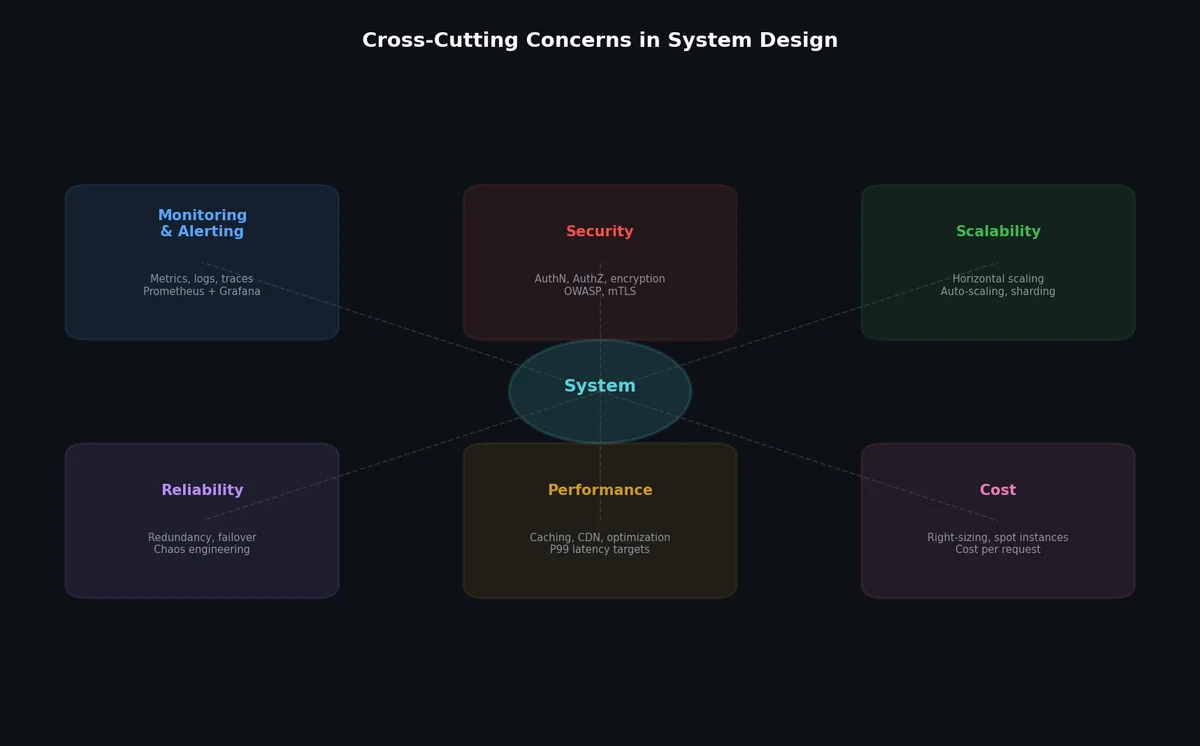
读密集型系统受益于缓存:网址缩短服务、聊天历史、新闻信息流的读写比均为 10:1 至 100:1。缓存能将原本不可扩展的系统转变为可扩展系统。
通过消息队列实现异步处理:三个系统均使用 Kafka 解耦写入路径与下游处理。网址缩短服务解耦分析;聊天系统解耦消息存储与投递;新闻信息流解耦发帖与广播。
为特定访问模式选择合适的数据存储:网址缩短服务使用键值存储(哈希查找);聊天系统使用宽列存储(按会话时间序存储消息);新闻信息流使用有序集合缓存(按用户排序帖子)。没有一种数据库能通吃三者。
规模估算驱动架构决策:估算阶段得出的数字决定了所需组件。35 万次读取/秒要求引入缓存;46 万次广播写入/秒要求引入消息队列;1500 万并发连接要求分布式 WebSocket 网关。缺乏量化估算,所有架构决策都只是猜测。
下一步#
本文标志着《系统设计》系列的完结。八篇文章共同覆盖了从规模估算基础到完整系统设计的全谱系。下一步是实践:挑选你每天使用的某个系统,定义其需求,估算其规模,并设计其架构。你设计的系统越多,识别出的模式就越丰富,收敛到优质解决方案的速度也就越快。